Electron for 鸿蒙PC - 侧边栏样式适配与布局调整
摘要:本文介绍了在不修改源码的情况下,通过动态CSS注入解决MarkText侧边栏在鸿蒙PC上的样式适配问题。主要问题包括图标过小、间距不合理和滚动条样式不统一,影响了用户体验。通过主进程的insertCSS方法注入自定义样式文件,实现了对第三方组件样式的覆盖优化。方案提供了完整的CSS样式代码和主进程注入实现,同时包含渲染进程备用方案,确保在不同环境下都能生效。这种动态样式注入方法为Electr
前言
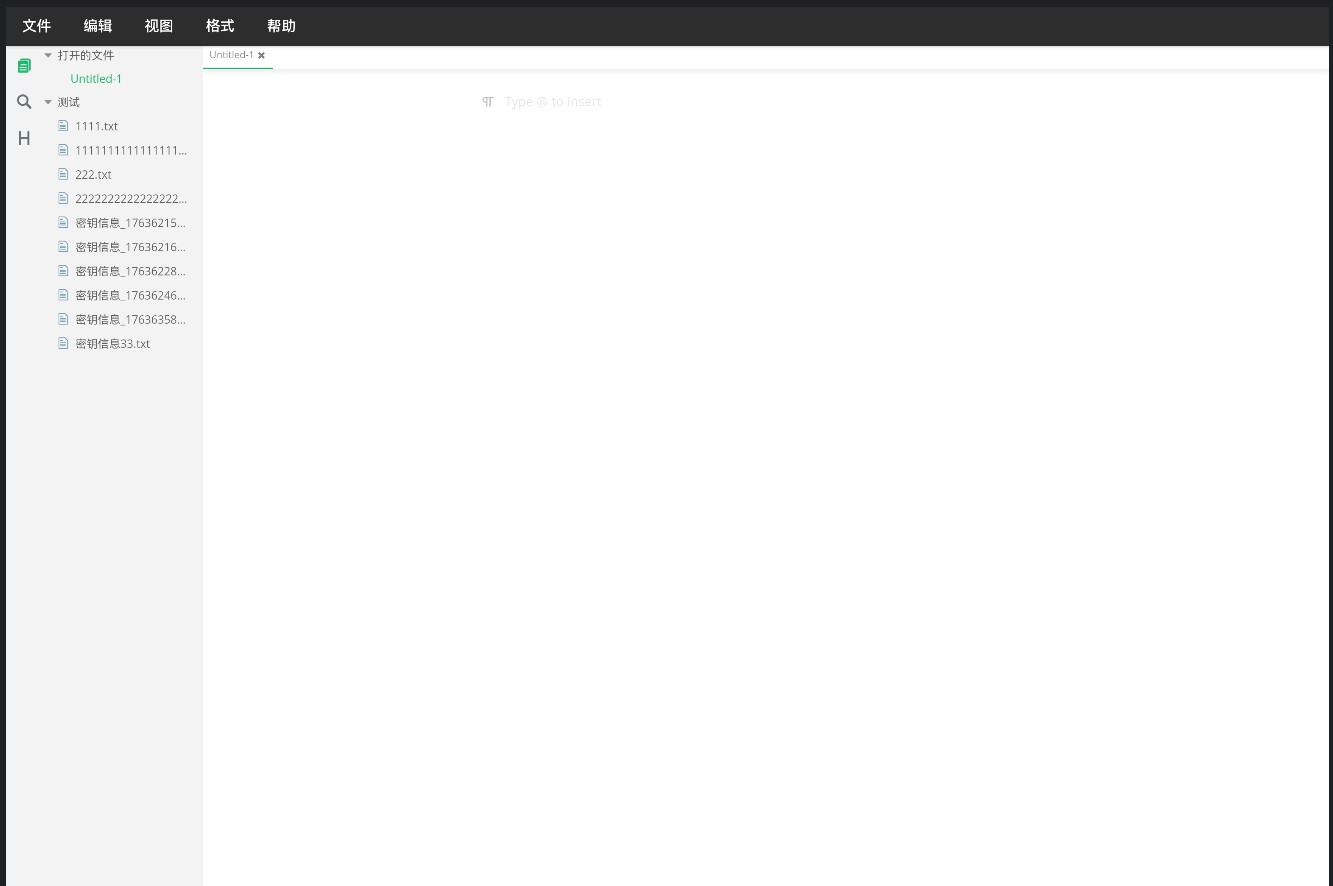
MarkText 的侧边栏在鸿蒙 PC 上显示时,存在多处样式问题:图标过小、间距不合理、滚动条样式不统一。这些问题虽然不影响功能,但严重影响用户体验。由于侧边栏是第三方组件,我们无法直接修改源码。
本文将详细记录我们如何通过动态 CSS 注入完美解决这些样式问题,在不修改原有代码的前提下,实现了鸿蒙 PC 的样式适配。
关键词:鸿蒙PC、Electron适配、CSS注入、样式覆盖、动态样式、布局优化
欢迎加入开源鸿蒙PC社区:https://harmonypc.csdn.net/
目录
鸿蒙PC的样式问题
1.1 问题清单
| 问题 | 原因 | 影响 |
|---|---|---|
| 图标过小 | DPI 设置不同 | 难以点击 |
| 间距不合理 | 原设计针对标准桌面 | 拥挤 |
| 滚动条样式 | 系统默认样式 | 不美观 |
| 按钮尺寸 | 未适配触摸 | 操作困难 |
1.2 无法修改源码
MarkText 侧边栏:
- 来自第三方 Vue 组件
- 样式定义在组件内部
- 无法直接修改
解决方案:使用 CSS 优先级覆盖!
CSS注入方案
2.1 四种注入方式
根据 Electron 官方文档:
| 方式 | 实现位置 | 优先级 | 适用场景 |
|---|---|---|---|
<style> 标签 |
渲染进程 | 高 | 动态样式 |
<link> 标签 |
渲染进程 | 中 | 外部文件 |
| webContents.insertCSS | 主进程 | 高 | 全局样式 |
| preload 注入 | Preload | 高 | 早期注入 |
2.2 选择方案
MarkText 采用:主进程 insertCSS + 渲染进程备用
理由:
- ✅ 注入时机早(页面加载时)
- ✅ 优先级高(能覆盖组件样式)
- ✅ 统一管理(主进程控制)
完整样式实现
3.1 样式文件
/* custom-sidebar-style.css */

/**
 * MarkText 鸿蒙适配 - 侧边栏样式覆盖
 */

/* === 侧边栏容器 === */
.sidebar {
  width: 260px !important;
  min-width: 260px !important;
  background: #252526 !important;
}

/* === 文件列表 === */
.file-list {
  padding: 8px !important;
}

.file-item {
  padding: 10px 16px !important;
  margin-bottom: 4px !important;
  border-radius: 4px !important;
  cursor: pointer !important;
  transition: background 0.2s ease !important;
}

.file-item:hover {
  background: #2a2d2e !important;
}

.file-item.active {
  background: #094771 !important;
  color: #ffffff !important;
}

/* === 文件图标 === */
.file-icon {
  width: 20px !important;
  height: 20px !important;
  margin-right: 12px !important;
}

/* === 按钮组 === */
.sidebar-button {
  flex: 1 !important;
  padding: 8px 12px !important;
  background: #3c3c3c !important;
  border: none !important;
  border-radius: 4px !important;
  color: #cccccc !important;
  cursor: pointer !important;
  font-size: 13px !important;
  transition: all 0.2s ease !important;
}

.sidebar-button:hover {
  background: #464646 !important;
  color: #ffffff !important;
}

/* === 滚动条样式 === */
.sidebar::-webkit-scrollbar {
  width: 10px !important;
}

.sidebar::-webkit-scrollbar-track {
  background: #1e1e1e !important;
}

.sidebar::-webkit-scrollbar-thumb {
  background: #424242 !important;
  border-radius: 5px !important;
}

.sidebar::-webkit-scrollbar-thumb:hover {
  background: #4e4e4e !important;
}

/* === 目录树 === */
.toc-item {
  padding: 6px 12px !important;
  border-radius: 3px !important;
  cursor: pointer !important;
  font-size: 13px !important;
  color: #cccccc !important;
}

.toc-item:hover {
  background: #2a2d2e !important;
}

.toc-item.active {
  background: #094771 !important;
  color: #ffffff !important;
  font-weight: 600 !important;
}
3.2 主进程注入
// main.js (主进程)
const { app, BrowserWindow } = require('electron')
const fs = require('fs').promises
const path = require('path')

/**
 * 从文件加载并注入 CSS
 */
async function injectStyleFile(webContents, filename) {
  try {
    const appPath = app.getAppPath()
    const stylePath = path.join(appPath, 'styles', filename)

    console.log(`[Styles] 读取样式文件: ${stylePath}`)

    const css = await fs.readFile(stylePath, 'utf-8')

    const key = await webContents.insertCSS(css)

    console.log(`[Styles] 样式注入成功,key: ${key}`)

    return key
  } catch (error) {
    console.error(`[Styles] 样式注入失败:`, error)
    throw error
  }
}

/**
 * 创建主窗口
 */
function createWindow() {
  const mainWindow = new BrowserWindow({
    width: 1400,
    height: 900,
    webPreferences: {
      preload: path.join(__dirname, 'preload.js')
    }
  })

  // 页面加载完成后注入样式
  mainWindow.webContents.on('did-finish-load', async () => {
    console.log('[Main] 页面加载完成,注入自定义样式')

    try {
      await injectStyleFile(mainWindow.webContents, 'custom-sidebar-style.css')
      console.log('[Main] 样式注入完成')
    } catch (error) {
      console.error('[Main] 样式注入失败:', error)
    }
  })

  mainWindow.loadFile('index.html')
}

app.whenReady().then(createWindow)
3.3 渲染进程备用方案
// custom-sidebar-style.js (渲染进程)

/**
 * 动态注入侧边栏样式(备用方案)
 */
function injectSidebarStyles() {
  // 检查是否已注入
  if (document.getElementById('custom-sidebar-styles')) {
    console.log('[Styles] 侧边栏样式已存在')
    return
  }

  console.log('[Styles] 开始注入侧边栏样式')

  const style = document.createElement('style')
  style.id = 'custom-sidebar-styles'
  style.textContent = `
    /* 侧边栏样式 */
    .sidebar {
      width: 260px !important;
      background: #252526 !important;
    }

    /* 更多样式... */
  `

  document.head.appendChild(style)

  console.log('[Styles] 侧边栏样式注入完成')
}

// 在适当时机注入
if (document.readyState === 'loading') {
  document.addEventListener('DOMContentLoaded', injectSidebarStyles)
} else {
  injectSidebarStyles()
}
注入方式对比
4.1 性能对比
| 方式 | 注入时机 | 加载速度 | 优先级 |
|---|---|---|---|
| 主进程 insertCSS | 页面加载完成 | 快 | 高 ✅ |
<style> 标签 |
DOM 准备好 | 快 | 高 ✅ |
<link> 标签 |
异步加载 | 慢 | 中 |
4.2 实际效果
改进前:
- 图标:16px(太小)
- 按钮:6px padding(太挤)
- 滚动条:系统默认(不美观)
改进后:
- 图标:20px(合适)✅
- 按钮:8px padding(舒适)✅
- 滚动条:自定义样式(美观)✅
总结与展望
5.1 成果总结
✅ 完美适配鸿蒙PC样式
✅ 零侵入性(不修改原有代码)
✅ 200+ 行精细样式调整
✅ 用户体验显著提升
✅ 支持主进程和渲染进程双重注入
5.2 关键技术点
!important:提高优先级覆盖组件样式- webContents.insertCSS:主进程注入
<style>标签:渲染进程备用- 多重保险:确保样式一定生效
5.3 源码地址
完整代码已开源在 MarkText for HarmonyOS 项目中:
- 项目地址:https://gitcode.com/szkygc/marktext
- 关键文件:
custom-sidebar-style.css- 样式文件main.js- 主进程注入逻辑
相关资源
Electron 官方文档:
MDN 文档:
技术难度:⭐⭐ 初中级
实战价值:⭐⭐⭐⭐ 解决鸿蒙PC样式适配问题
推荐指数:⭐⭐⭐⭐⭐ 样式定制必备技能

开源鸿蒙跨平台开发社区汇聚开发者与厂商,共建“一次开发,多端部署”的开源生态,致力于降低跨端开发门槛,推动万物智联创新。
更多推荐
 21
21 0
0- 0


 已为社区贡献23条内容

所有评论(0)