鸿蒙PC命令行critic.sh测试框架与代码覆盖率分析深度解析
·
critic.sh 是一个简单易用的 Bash 测试框架,支持代码覆盖率报告。本文档全面介绍 critic.sh 的测试方法论、API 设计、覆盖率分析技巧和工程实践,帮助开发者构建高质量、可维护的 Bash 脚本测试体系。
欢迎加入【开源鸿蒙PC社区】,一起共建鸿蒙化C/C++三方库生态。
仓库地址:https://atomgit.com/szkygc/critic4og
📋 目录
一、快速开始
1.1 安装 critic.sh
方式一:使用 tar.gz 包安装
# 在鸿蒙PC上执行
tar -xzf ohos_critic.sh_0.1.1.tar.gz
cp -r critic.sh_0.1.1/* /data/service/hnp/critic.sh.org/critic.sh_0.1.1/
方式二:手动安装
# 复制文件到安装目录
mkdir -p /data/service/hnp/critic.sh.org/critic.sh_0.1.1/bin
cp bin/critic.sh /data/service/hnp/critic.sh.org/critic.sh_0.1.1/bin/
cp bin/critic /data/service/hnp/critic.sh.org/critic.sh_0.1.1/bin/
chmod +x /data/service/hnp/critic.sh.org/critic.sh_0.1.1/bin/*

# 添加到 PATH
export PATH=$PATH:/data/service/hnp/critic.sh.org/critic.sh_0.1.1/bin
1.2 验证安装
# 使用 critic 命令(推荐)
critic --help

# 或直接使用 bash 执行
bash /data/service/hnp/critic.sh.org/critic.sh_0.1.1/bin/critic.sh --help
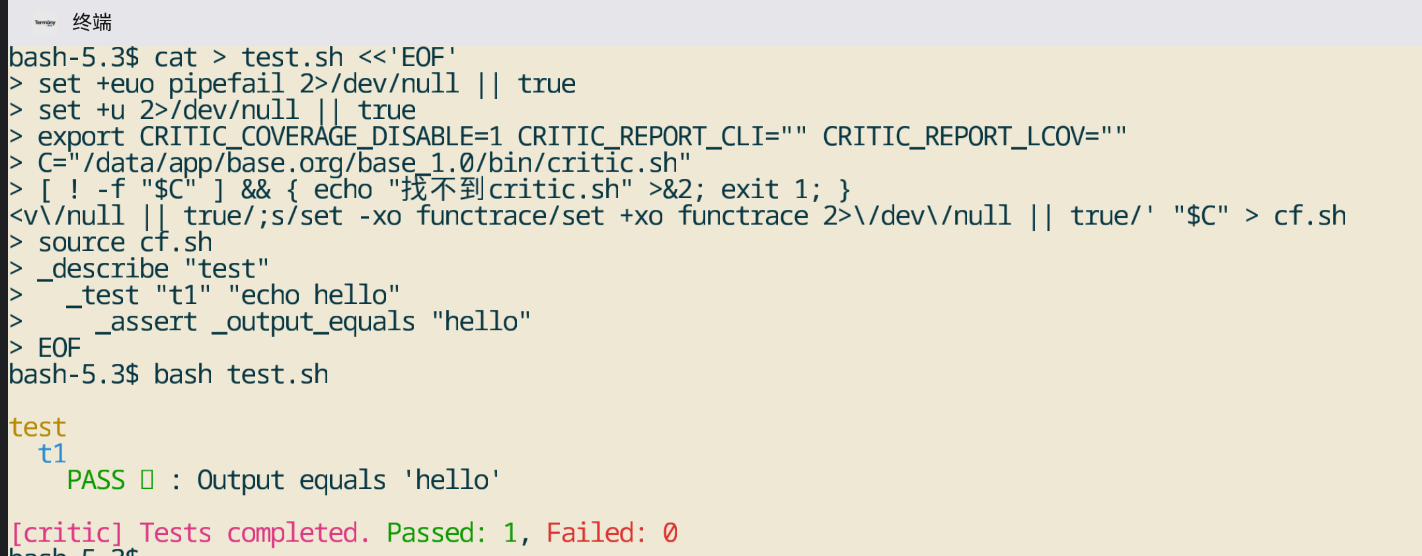
1.3 第一个测试
创建测试脚本 test_example.sh:
#!/usr/bin/env bash

# 包含被测试的源文件
source examples/lib.sh

# 包含测试框架
source critic.sh

# 编写测试套件
_describe foo
  _test "output should equal foo"
    _assert _output_equals "foo"

  _test "return code should be 0"
    _assert _return_true "Exit code should be 0"
运行测试:
critic test_example.sh
二、基本语法
2.1 测试套件
定义测试套件
_describe "suite name"
  # 测试用例
跳过测试套件
_describe_skip "skipped suite"
  # 这些测试会被跳过
2.2 测试用例
定义测试用例
_test "test description"
  # 测试代码
  _assert _return_true
跳过测试用例
_test_skip "skipped test"
  # 这个测试会被跳过
2.3 断言函数
critic.sh 提供以下断言函数:
| 断言函数 | 说明 |
|---|---|
_return_true |
验证返回码为 0 |
_return_false |
验证返回码不为 0 |
_return_equals N |
验证返回码等于 N |
_output_equals TEXT |
验证输出等于 TEXT |
_output_contains TEXT |
验证输出包含 TEXT |
_nth_arg_equals N TEXT |
验证第 N 个参数等于 TEXT |
_not |
取反操作符 |
2.4 自定义断言
# 使用自定义表达式作为断言
_test "custom assertion" "[ 1 -eq 1 ]"
  _assert "[ 1 -eq 1 ]"
  _assert "[ 2 -eq 2 ]" "Two should be equal to two"
三、使用示例
3.1 基本测试
创建测试脚本 test_basic.sh:
#!/usr/bin/env bash

source critic.sh

# 测试函数 foo
foo() {
    echo "foo"
}

_describe foo
  _test "output should equal foo"
    foo
    _assert _output_equals "foo"

  _test "return code should be 0"
    foo
    _assert _return_true "Exit code should be 0"
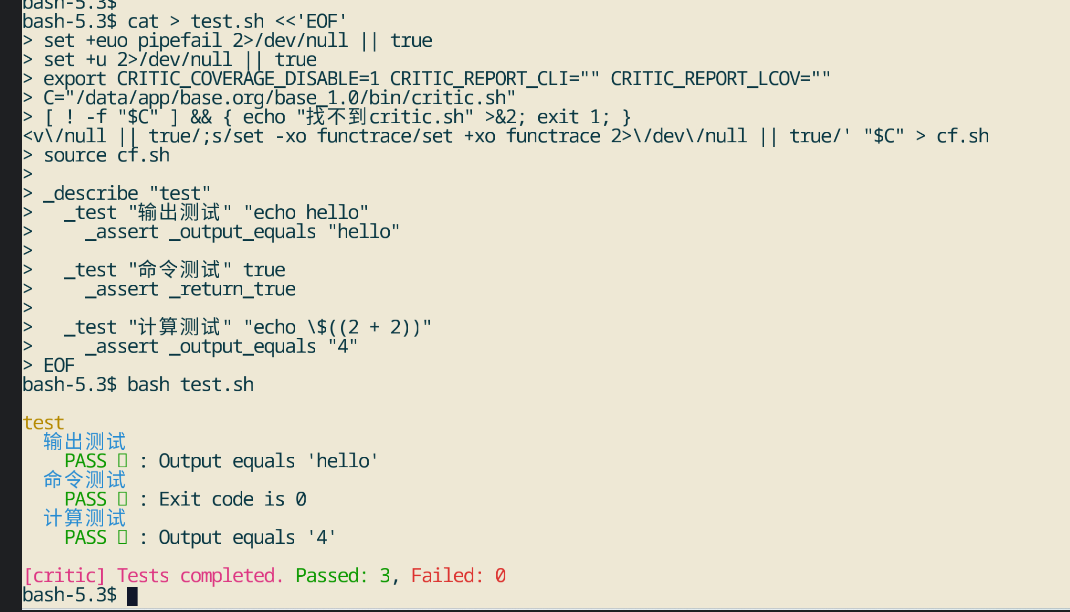
运行测试:
critic test_basic.sh
输出:
[critic] Running tests in test_basic.sh

foo
  output should equal foo
    PASS ✔ : Output equals 'foo'
  return code should be 0
    PASS ✔ : Exit code is 0

[critic] Tests completed. Passed: 2, Failed: 0
3.2 测试库函数
创建库文件 lib.sh:
#!/usr/bin/env bash

add() {
    echo $(($1 + $2))
}

multiply() {
    echo $(($1 * $2))
}
创建测试文件 test_lib.sh:
#!/usr/bin/env bash

source lib.sh
source critic.sh

_describe "math functions"
  _test "add should return sum"
    result=$(add 2 3)
    _assert _output_equals "5"

  _test "multiply should return product"
    result=$(multiply 2 3)
    _assert _output_equals "6"
运行测试:
critic test_lib.sh
3.3 测试命令行工具
创建测试脚本 test_command.sh:
#!/usr/bin/env bash

source critic.sh

_describe "echo command"
  _test "should output text"
    echo "hello"
    _assert _output_equals "hello"

_describe "grep command"
  _test "should find pattern"
    echo "hello world" | grep "world"
    _assert _return_true
运行测试:
critic test_command.sh
3.4 测试文件操作
创建测试脚本 test_file.sh:
#!/usr/bin/env bash

source critic.sh

_describe "file operations"
  _test "should create file"
    echo "test" > /tmp/test_file.txt
    _assert _return_true
    _assert "[ -f /tmp/test_file.txt ]"

  _test "should read file"
    content=$(cat /tmp/test_file.txt)
    _assert _output_equals "test"

  _test "should delete file"
    rm /tmp/test_file.txt
    _assert _return_true
    _assert "[ ! -f /tmp/test_file.txt ]"
运行测试:
critic test_file.sh
四、高级功能
4.1 代码覆盖率报告
生成 LCOV 格式报告
# 运行测试并生成覆盖率报告
critic test_example.sh

# 覆盖率报告会保存在 coverage/ 目录
ls coverage/
# lcov.info
生成 HTML 覆盖率报告
# 设置环境变量启用 HTML 报告
export CRITIC_COVERAGE_REPORT_HTML=true
critic test_example.sh

# HTML 报告会保存在 coverage/report/ 目录
覆盖率报告示例:
[critic] Coverage Report

/path/to/examples/lib.sh
  Total LOC: 19
  Covered LOC: 3
  Coverage %: 50
  Ignored LOC: 5
  Uncovered Lines: 21 22 30
4.2 测试跳过
跳过整个测试套件
_describe_skip "skipped suite"
  _test "this test will be skipped"
    _assert _return_true
跳过单个测试
_describe "normal suite"
  _test_skip "this test will be skipped"
    _assert _return_true
4.3 清理函数
使用 _teardown 在测试后清理:
_describe "test with cleanup"
  _test "should create temp file"
    echo "test" > /tmp/test_temp.txt
    _assert _return_true

  _teardown
    rm -f /tmp/test_temp.txt
4.4 自定义断言消息
_test "custom assertion message"
  result=$(add 2 3)
  _assert "[ $result -eq 5 ]" "Result should be 5, got $result"
五、实际应用场景
5.1 系统脚本测试
测试系统管理脚本:
#!/usr/bin/env bash

source backup.sh
source critic.sh

_describe "backup script"
  _test "should create backup archive"
    backup_script /tmp/data
    _assert _return_true
    _assert "[ -f /tmp/data/backup.tar.gz ]"

  _test "should restore from backup"
    restore_script /tmp/data/backup.tar.gz /tmp/restored
    _assert _return_true
    _assert "[ -d /tmp/restored ]"
5.2 工具链测试
测试编译工具、构建工具等:
#!/usr/bin/env bash

source critic.sh

_describe "compiler test"
  _test "should compile C program"
    echo 'int main(){return 0;}' > test.c
    clang test.c -o test
    _assert _return_true
    ./test
    _assert _return_true

  _test "should handle compilation errors"
    echo 'int main(){return' > test_error.c
    clang test_error.c -o test_error 2>&1
    _assert _return_false
5.3 配置文件验证
验证配置文件格式、内容等:
#!/usr/bin/env bash

source critic.sh

_describe "config validation"
  _test "should validate config syntax"
    echo "key=value" > config.conf
    grep -q "key=value" config.conf
    _assert _return_true

  _test "should detect invalid config"
    echo "invalid" > config.conf
    validate_config config.conf 2>&1
    _assert _return_false
5.4 API 测试
测试 REST API 或命令行 API:
#!/usr/bin/env bash

source critic.sh

_describe "API test"
  _test "should return 200 status"
    response=$(curl -s -o /dev/null -w "%{http_code}" http://localhost:8080/api)
    _assert _output_equals "200"

  _test "should return JSON data"
    response=$(curl -s http://localhost:8080/api/data)
    echo "$response" | grep -q "success"
    _assert _return_true
六、常见问题
6.1 Bash 版本问题
问题:critic.sh 需要 Bash 4.1+。
解决:确保系统已安装 Bash 4.1 或更高版本:
bash --version
# 应该显示 4.1 或更高版本
6.2 覆盖率报告不生成
问题:覆盖率报告没有生成。
解决:
- 确保使用 Bash 4.1+
- 检查环境变量设置
- 确保测试脚本正确 source 了被测试的文件
# 启用覆盖率追踪
export CRITIC_COVERAGE_ENABLE=1
critic test.sh
6.3 测试失败但无错误信息
问题:测试失败但没有详细的错误信息。
解决:使用自定义断言消息:
_test "should return expected value"
  result=$(my_function)
  _assert "[ $result -eq 42 ]" "Expected 42, got $result"
6.4 路径问题
问题:测试脚本找不到被测试的文件。
解决:使用绝对路径或设置工作目录:
# 使用绝对路径
source /path/to/lib.sh

# 或设置工作目录
cd /path/to/project
source lib.sh
6.5 环境变量问题
问题:测试需要特定的环境变量。
解决:在测试中设置环境变量:
_test "should use environment variable"
  export MY_VAR=test_value
  result=$(my_function)
  _assert _output_equals "test_value"
七、最佳实践
7.1 测试组织
- 每个测试文件测试一个模块或功能
- 使用描述性的测试套件名称
- 保持测试独立,不依赖其他测试
7.2 断言使用
- 使用最具体的断言函数
- 为自定义断言提供清晰的错误消息
- 避免过度使用
_not操作符
7.3 覆盖率目标
- 为目标代码设置合理的覆盖率目标
- 关注关键路径的覆盖率
- 定期查看覆盖率报告,发现未测试的代码
7.4 CI/CD 集成
#!/bin/bash
# CI/CD 测试脚本

# 运行所有测试
for test_file in tests/*.sh; do
    critic "$test_file" || exit 1
done

# 检查覆盖率
if [ -f coverage/lcov.info ]; then
    coverage=$(grep -oP '^LF:\K\d+' coverage/lcov.info | head -1)
    echo "Coverage: $coverage%"
fi
八、总结
critic.sh 是一个功能强大且易用的 Bash 测试框架,通过简洁的 API 就能实现完整的测试功能。主要优势:
- 简单易用:API 设计直观,学习成本低
- 功能完整:支持测试、断言、覆盖率等完整功能
- 代码覆盖率:提供 LCOV 格式的覆盖率报告
- 灵活扩展:支持自定义断言和表达式
通过本教程,您应该能够:
- ✅ 安装和配置 critic.sh
- ✅ 编写各种类型的测试
- ✅ 使用代码覆盖率功能
- ✅ 在实际项目中应用 critic.sh

开源鸿蒙跨平台开发社区汇聚开发者与厂商,共建“一次开发,多端部署”的开源生态,致力于降低跨端开发门槛,推动万物智联创新。
更多推荐


 16
16 0
0- 0


 已为社区贡献50条内容

所有评论(0)