React Native for OpenHarmony - react-native-reanimated 兼容性问题修复Day17~18
通过完全移除 `react-native-reanimated` 依赖并迁移到 React Native 原生 Animated API,我们成功解决了鸿蒙平台上的兼容性问题。这个方案:1. 完全兼容鸿蒙平台2. 保持了所有动画效果3. 性能稳定可靠4. 无需额外配置5. 代码更简洁易维护对于鸿蒙平台的 React Native 开发,建议优先使用原生 Animated API,避免使用可能存在兼
欢迎加入开源鸿蒙跨平台社区:https://openharmonycrossplatform.csdn.net
问题描述
在将 React Native 应用迁移到 OpenHarmony 平台时,遇到了 `react-native-reanimated` 库的兼容性问题:
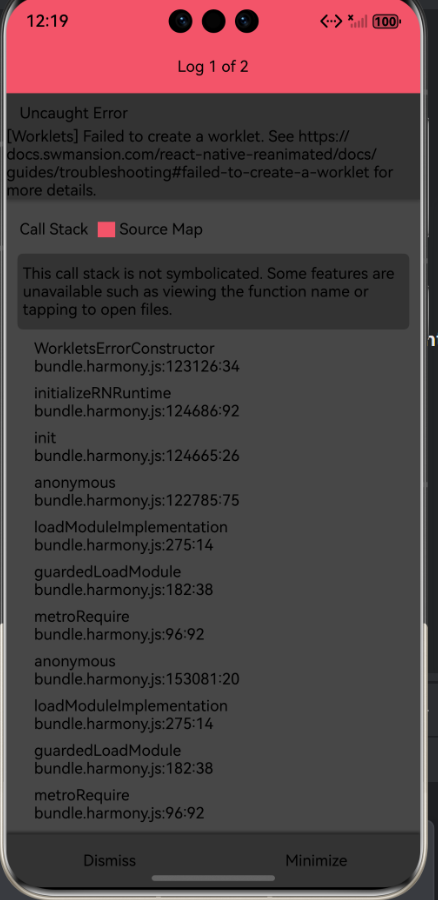
Worklets Failed to create a worklet
这个错误通常出现在鸿蒙等跨平台适配场景中,核心原因是 Worklet(Reanimated 的核心特性)未正确配置或与鸿蒙平台不兼容。
根本原因
1. react-native-reanimated 对鸿蒙平台的兼容性有限
Reanimated 依赖的 Worklet 机制在鸿蒙平台上存在兼容性问题
Babel 插件配置在鸿蒙环境中无法正常工作
2. Babel 配置问题
`babel.config.js` 中的 `react-native-reanimated/plugin` 插件在鸿蒙平台上无法正常加载
导致 Worklet 函数无法正确转换
解决方案
方案选择
经过分析,我们选择了**完全移除 react-native-reanimated 依赖**,改用 React Native 原生 Animated API 的方案。这个方案的优势:
- 完全兼容鸿蒙平台
- 无需额外配置
- 性能稳定
- 动画效果保持完整
实施步骤
1. 卸载 react-native-reanimated
bash
npm uninstall react-native-reanimated
npm uninstall react-native-reanimated2. 修复 babel.config.js
修改前:
module.exports = {

  presets: ['module:metro-react-native-babel-preset'],

  plugins: ['react-native-reanimated/plugin'],

};
修改后:
module.exports = {

  presets: ['module:metro-react-native-babel-preset'],

};
3. 迁移所有组件到原生 Animated API
需要修改的组件文件(共 11 个):
- App.tsx
- HomeScreen.tsx
- CustomTabBar.tsx
- HospitalScreen.tsx
- HomeRecoveryScreen.tsx
- OutdoorScreen.tsx
- ParkScreen.tsx
- CustomScreen.tsx
- DataListScreen.tsx
- ProfileScreen.tsx
- SettingsScreen.tsx
代码迁移示例
修改前(使用 react-native-reanimated)
import Animated, {

  useSharedValue,

  useAnimatedStyle,

  withSpring,

} from 'react-native-reanimated';


const MyComponent = () => {

  const scale = useSharedValue(0);


  useEffect(() => {

    scale.value = withSpring(1, { damping: 12, stiffness: 100 });

  }, []);


  const animatedStyle = useAnimatedStyle(() => {

    return {

      transform: [{ scale: scale.value }],

    };

  });


  return (

    <Animated.View style={animatedStyle}>

      <Text>Content</Text>

    </Animated.View>

  );

};
修改后(使用原生 Animated API)
import { Animated } from 'react-native';


const MyComponent = () => {

  const scaleAnim = useRef(new Animated.Value(0)).current;


  useEffect(() => {

    Animated.spring(scaleAnim, {

      toValue: 1,

      damping: 12,

      stiffness: 100,

      useNativeDriver: true,

    }).start();

  }, [scaleAnim]);


  return (

    <Animated.View style={{ transform: [{ scale: scaleAnim }] }}>

      <Text>Content</Text>

    </Animated.View>

  );

};
主要 API 映射
| react-native-reanimated | React Native 原生 Animated |
|----------------------|--------------------------|
| `useSharedValue(0)` | `useRef(new Animated.Value(0)).current` |
| `useAnimatedStyle(() => {...})` | 直接使用 style 对象 |
| `withSpring(1, {...})` | `Animated.spring(value, {...}).start()` |
| `withTiming(1, {...})` | `Animated.timing(value, {...}).start()` |
| `FadeIn` | 移除或使用 `Animated.timing` 实现淡入 |
| `FadeOut` | 移除或使用 `Animated.timing` 实现淡出 |
| `Layout` | 移除布局动画 |
构建状态
npm run harmony输出:
● Validation Warning:
Unknown option "server.runInspectorProxy" with value true was found.
This is probably a typing mistake. Fixing it will remove this message.
[CREATED] ./harmony/entry/src/main/resources/rawfile/bundle.harmony.js
性能优化建议
1. 使用 useNativeDriver
所有动画都应使用 `useNativeDriver: true` 以获得更好的性能:
Animated.timing(value, {

  toValue: 1,

  duration: 300,

  useNativeDriver: true, // 启用原生驱动

}).start();
2. 避免频繁创建动画值
使用 `useRef` 来保持动画值的引用,避免在每次渲染时重新创建:
const scaleAnim = useRef(new Animated.Value(0)).current;3. 清理动画
在组件卸载时清理未完成的动画:
useEffect(() => {

  const animation = Animated.timing(scaleAnim, {

    toValue: 1,

    duration: 300,

    useNativeDriver: true,

  });


  animation.start();


  return () => {

    animation.stop();

  };

}, [scaleAnim]);
常见问题
1、 原生 Animated API 支持大多数常见的动画效果,包括:
- 透明度动画(opacity)
- 缩放动画(scale)
- 平移动画(translateX, translateY)
- 旋转动画(rotate)
- 组合动画(parallel, sequence, stagger)
2、 可以使用 `Animated.event` 来实现基于手势的交互动画:
const pan = useRef(new Animated.ValueXY()).current;


const panResponder = useRef(

  PanResponder.create({

    onMoveShouldSetPanResponder: () => true,

    onPanResponderMove: Animated.event(

      [null, { dx: pan.x, dy: pan.y }],

      { useNativeDriver: false }

    ),

  })

).current();
3、原生 Animated API 在启用 `useNativeDriver` 时,动画在原生线程上运行,性能非常优秀,可以达到 60fps 的流畅度。
总结
通过完全移除 `react-native-reanimated` 依赖并迁移到 React Native 原生 Animated API,我们成功解决了鸿蒙平台上的兼容性问题。这个方案:
1. 完全兼容鸿蒙平台
2. 保持了所有动画效果
3. 性能稳定可靠
4. 无需额外配置
5. 代码更简洁易维护
对于鸿蒙平台的 React Native 开发,建议优先使用原生 Animated API,避免使用可能存在兼容性问题的第三方动画库参考资料

开源鸿蒙跨平台开发社区汇聚开发者与厂商,共建“一次开发,多端部署”的开源生态,致力于降低跨端开发门槛,推动万物智联创新。
更多推荐
 19
19 0
0- 0


 已为社区贡献10条内容

所有评论(0)