Flutter for OpenHarmony 实战之基础组件:第三十篇 IntrinsicHeight 与 IntrinsicWidth — 解决布局中的“身高不齐”问题
摘要:本文介绍了Flutter中的IntrinsicHeight和IntrinsicWidth组件,用于解决Row或Column中子组件高度或宽度不一致的问题。通过示例代码演示了如何实现子组件的高度或宽度自动对齐,并强调了性能优化的注意事项。在OpenHarmony平台上,这些组件能有效应对字体大小变化和分屏场景下的布局适配。建议局部使用以避免性能损耗,同时提供了替代方案和最佳实践建议。

Flutter for OpenHarmony 实战之基础组件:第三十篇 IntrinsicHeight 与 IntrinsicWidth — 解决布局中的“身高不齐”问题
前言
在进行复杂的 UI 布局时,你是否遇到过这样的尴尬场景:在一个水平排列的 Row 中,你希望所有的子元素(例如一张图片和一段文字说明)高度完全一致,但由于内容多少不一,背景色或边框总是一长一短,显得非常不协调。
虽然通过硬编码 height 可以解决,但在屏幕尺寸多样的 OpenHarmony 设备上,硬编码往往意味着适配灾难。Flutter 提供的 IntrinsicHeight 和 IntrinsicWidth 就是专门用来解决这种“根据子组件固有尺寸进行同步约束”的良药。本文将解析其工作原理、实战策略及性能注意事项。
一、核心痛点:为什么 Row 里的子项高度不一致?
默认情况下,Row 或 Column 的子组件只会占据其内容所需的最小空间。
1.1 场景再现
假设你有一个包含“用户头像”和“用户签名”的横向布局,你希望头像所在的左侧区域背景和右侧文字区域背景高度对齐。
Row(
  crossAxisAlignment: CrossAxisAlignment.stretch, // 尝试拉伸,但往往因为父容器没有固定高度而失效
  children: [
    Container(color: Colors.blue, child: Text("左侧内容")),
    Container(color: Colors.green, child: Text("右侧内容\n带换行\n更长一些")),
  ],
)
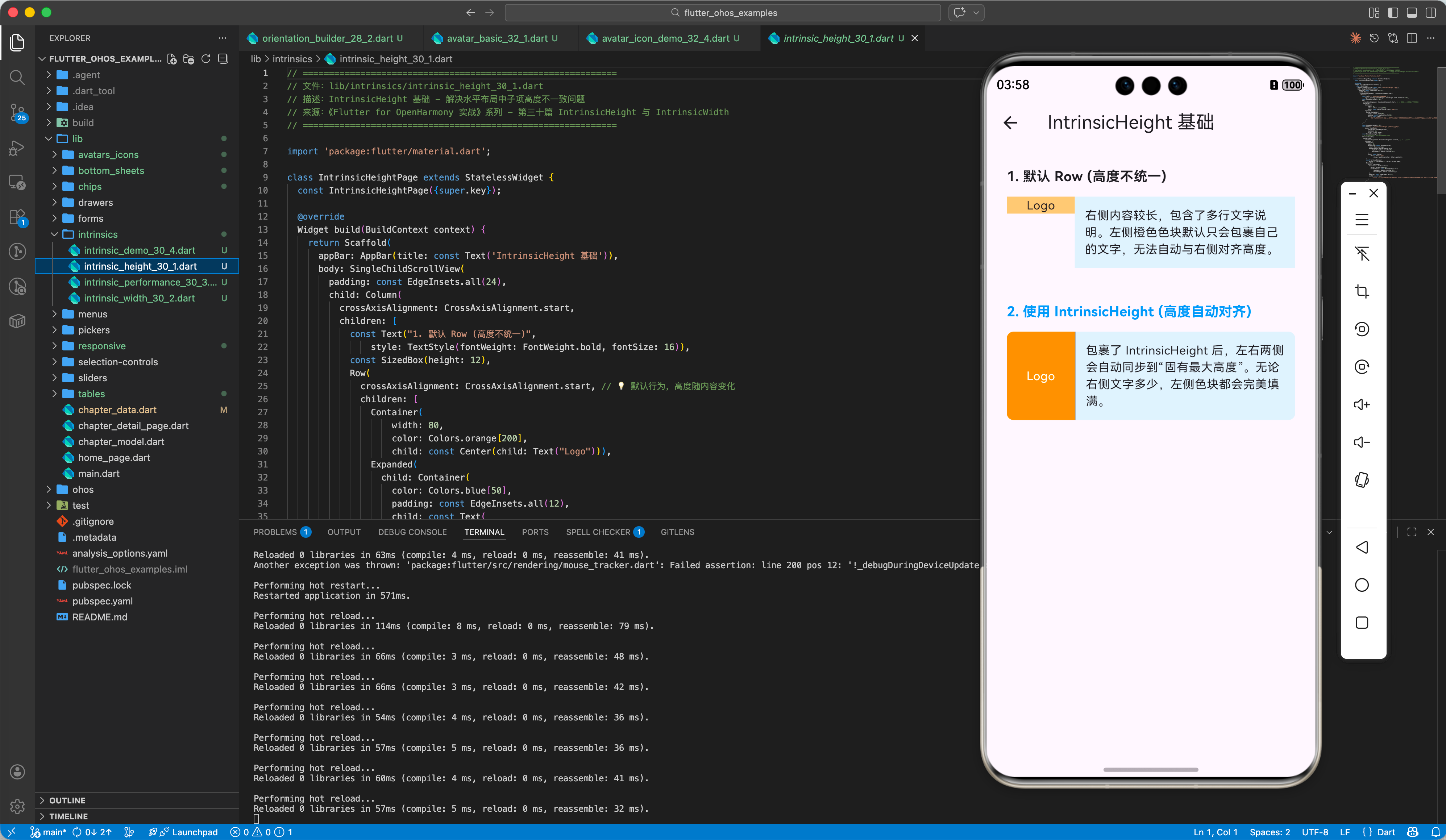
在这种情况下,你会发现左侧的蓝色背景只包住了单行文字,而右侧的绿色背景却很高。
二、神奇的 IntrinsicHeight 组件
IntrinsicHeight 能够计算其所有子组件的“固有高度”,并将这个数值作为统一的最小高度约束应用给所有子项。
2.1 解决方案代码
IntrinsicHeight(
  child: Row(
    crossAxisAlignment: CrossAxisAlignment.stretch, // 核心:开启拉伸,此时它会根据计算出的固有高度拉伸
    children: [
      Container(width: 100, color: Colors.blue, child: Center(child: Text("Logo"))),
      const VerticalDivider(width: 1, thickness: 1, color: Colors.grey), // 垂直分割线需要高度
      Expanded(
        child: Container(
          padding: EdgeInsets.all(10),
          color: Colors.green[100],
          child: Text("这是一份很长很长的说明文字,它将决定整个行的高度。文字越多,高度越深。"),
        ),
      ),
    ],
  ),
)
三、IntrinsicWidth:同步宽度约束
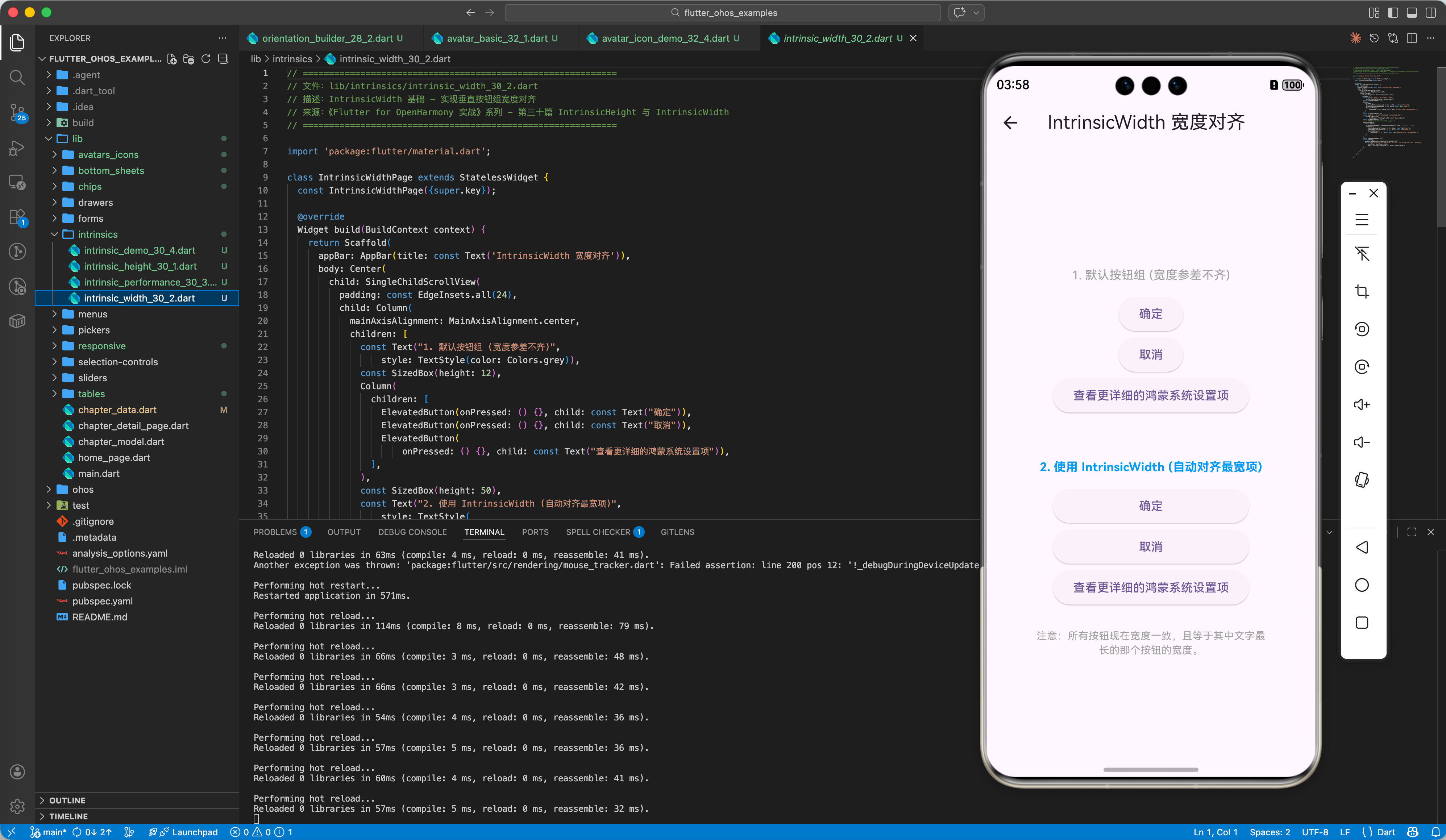
同理,IntrinsicWidth 用于让列(Column)中的所有子项宽度等于其中最宽的那个子项。
3.1 应用场景:垂直按钮组
当你想让一组文案长度不一的按钮宽度完全相等,且又不想通过固定 width 来限制时。
IntrinsicWidth(
  child: Column(
    crossAxisAlignment: CrossAxisAlignment.stretch,
    children: [
      ElevatedButton(onPressed: () {}, child: const Text("确定")),
      ElevatedButton(onPressed: () {}, child: const Text("取消")),
      ElevatedButton(onPressed: () {}, child: const Text("查看更详细的系统设置项")),
    ],
  ),
)
四、性能警示:不要滥用!
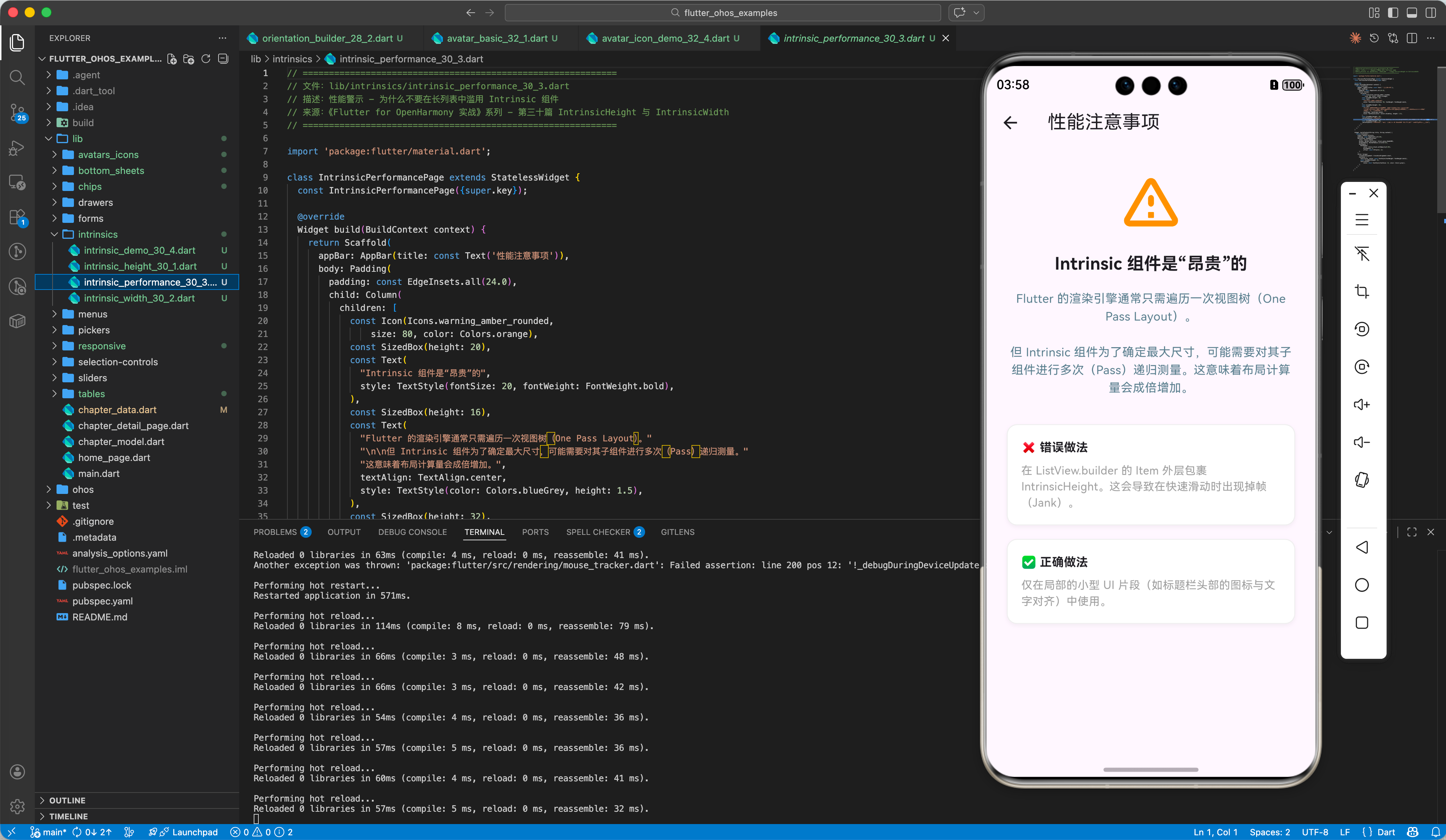
虽然这两个组件极大地简化了对齐逻辑,但它们在 Flutter 渲染树中属于“昂贵”的组件。
⚠️ 性能开销分析:
- 传统的布局方式:父组件传递约束给子组件,子组件计算并返回尺寸,仅需一次遍历。
- Intrinsic 模式:为了确定“最大固有尺寸”,系统可能需要对子组件树进行多次递归测量(Pass),从而导致计算量成倍增加。
✅ 最佳实践建议:
- 局部使用:仅在必须要对齐的一小块区域内使用,千万不要将其包裹在整个页面或长列表(ListView)的外层。
- 避免深层嵌套:在一个
IntrinsicHeight里再嵌套一个IntrinsicHeight会导致性能阶梯式下降。 - 替代方案:如果高度是已知的比例,优先考虑
Flex和AspectRatio。
五、OpenHarmony 平台适配实战
4.1 响应式文字对齐
在鸿蒙设备切换不同字体大小(Accessibility)时,文字行数会发生变化。
✅ 推荐方案:
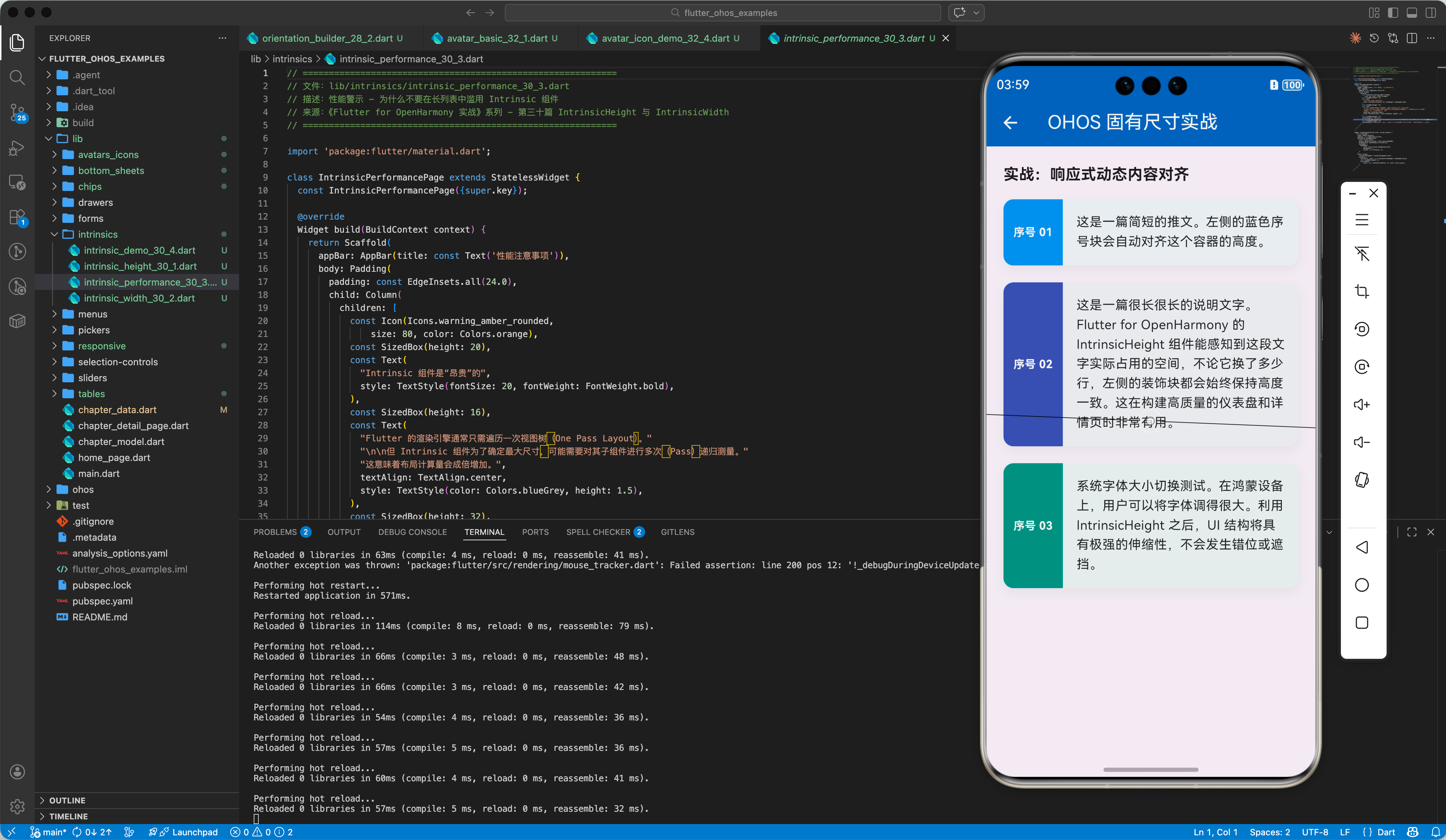
在鸿蒙应用中使用 IntrinsicHeight 构建动态卡片,能确保无论用户将系统字体调到多大,左右两侧的装饰性元素(如侧边色条、垂直分割线)始终能完美撑满容器高度。
4.2 处理分屏下的宽度抖动
当鸿蒙任务处于拖拽分屏状态时,宽度会实时变化。
💡 调优思路:
如果子组件包含复杂的自定义 Painter,在被 IntrinsicWidth 包裹时,务必在 Painter 的 shouldRepaint 中加入精细判断,减少重绘次数。
六、完整示例代码
以下演示如何利用 IntrinsicHeight 构建一个左右高度完美对齐的个人信息展示条。
import 'package:flutter/material.dart';
void main() => runApp(const MaterialApp(home: IntrinsicDemo()));
class IntrinsicDemo extends StatelessWidget {
const IntrinsicDemo({super.key});
Widget build(BuildContext context) {
return Scaffold(
appBar: AppBar(title: const Text('OHOS 固有尺寸约束实战')),
body: SingleChildScrollView(
padding: const EdgeInsets.all(20),
child: Column(
children: [
const Text("未对齐的 Row (默认行为)", style: TextStyle(fontWeight: FontWeight.bold)),
_buildStandardRow(),
const SizedBox(height: 50),
const Text("已对齐的 Row (使用 IntrinsicHeight)", style: TextStyle(fontWeight: FontWeight.bold, color: Colors.blue)),
_buildIntrinsicRow(),
],
),
),
);
}
// 默认 Row
Widget _buildStandardRow() {
return Row(
children: [
Container(width: 80, color: Colors.orange, child: const Center(child: Text("ID"))),
Expanded(
child: Container(
color: Colors.grey[200],
padding: const EdgeInsets.all(8),
child: const Text("这里是内容区\n由于文字较多\n高度增加"),
),
),
],
);
}
// 使用 IntrinsicHeight 对齐的 Row
Widget _buildIntrinsicRow() {
return IntrinsicHeight(
child: Row(
crossAxisAlignment: CrossAxisAlignment.stretch, // 必须设置 stretch 才能让子组件填充固有高度
children: [
Container(
width: 80,
decoration: const BoxDecoration(
color: Colors.blue,
borderRadius: BorderRadius.only(topLeft: Radius.circular(8), bottomLeft: Radius.circular(8)),
),
child: const Center(child: Text("序号", style: TextStyle(color: Colors.white))),
),
Expanded(
child: Container(
decoration: BoxDecoration(
color: Colors.blue[50],
borderRadius: const BorderRadius.only(topRight: Radius.circular(8), bottomRight: Radius.circular(8)),
),
padding: const EdgeInsets.all(12),
child: const Text(
"利用 IntrinsicHeight 之后,左侧的蓝色序号块会自动跟随右侧文字的实际高度进行伸缩,不再需要手动计算 height。",
style: TextStyle(fontSize: 16),
),
),
),
],
),
);
}
}
七、总结
IntrinsicHeight 和 IntrinsicWidth 是 Flutter 布局工具箱中的“秘密武器”,当现有的弹性布局(Flex)难以解决精准对齐问题时,它们能提供极简的实现方案。
- 核心逻辑:通过预测量子项固有尺寸,实现兄弟组件间的尺寸同步。
- 关键设置:包裹
Row时,别忘了设置crossAxisAlignment: CrossAxisAlignment.stretch。 - 开发禁忌:警惕多次测量带来的性能损耗,在长列表和高性能转换场景中慎用。
在 Flutter for OpenHarmony 的高质量开发中,合理运用此类高级组件,能让你的 UI 细节更加经得起不同设备尺寸的考量。
📦 完整代码已上传至 AtomGit:flutter_ohos_examples
🌐 欢迎加入开源鸿蒙跨平台社区:开源鸿蒙跨平台开发者社区

开源鸿蒙跨平台开发社区汇聚开发者与厂商,共建“一次开发,多端部署”的开源生态,致力于降低跨端开发门槛,推动万物智联创新。
更多推荐



 23
23 0
0- 0


 已为社区贡献34条内容

所有评论(0)