Flutter 持久化存储:sqflite 在 OpenHarmony 上的深度实战
Flutter 持久化存储:sqflite 在 OpenHarmony 上的实践 本文探讨了 Flutter 生态中成熟的 SQLite 插件 sqflite 在 OpenHarmony 平台上的应用。sqflite 通过 MethodChannel/Pigeon 调用原生数据库引擎,在鸿蒙旗舰机上性能表现优异,支持万级数据存储。文章详细介绍了其在 OpenHarmony 中的实现方式,包括数据库

Flutter 持久化存储:sqflite 在 OpenHarmony 上的深度实战
前言
在现代 App 开发中,并不是所有数据都适合通过网络请求获取。为了应对弱网环境、减少不必要的流量消耗并提升应用响应速度,本地数据库存储是不可或缺的基石。
sqflite 是 Flutter 生态中最成熟、性能最强的 SQLite 插件。在本篇文章中,我们将剖析如何将 sqflite 完整搬到 HarmonyOS NEXT 系统上,并解决鸿蒙端侧的权限隔离、并发事务及其与业务层的抽象封装问题。
一、 sqflite 的底层原理及其在鸿蒙端的表现
sqflite 并不是用 Dart 重写了 SQLite,而是通过 MethodChannel/Pigeon 调用了设备的原生数据库引擎。
1.1 性能表现
在鸿蒙旗舰机(搭载 UFS 4.0 存储)上,sqflite 的单条插入耗时几乎可以忽略不计。通过合理使用“批处理 (Batch)”和“事务 (Transaction)”,我们可以支撑万级以上的数据存储。
1.2 平台兼容性
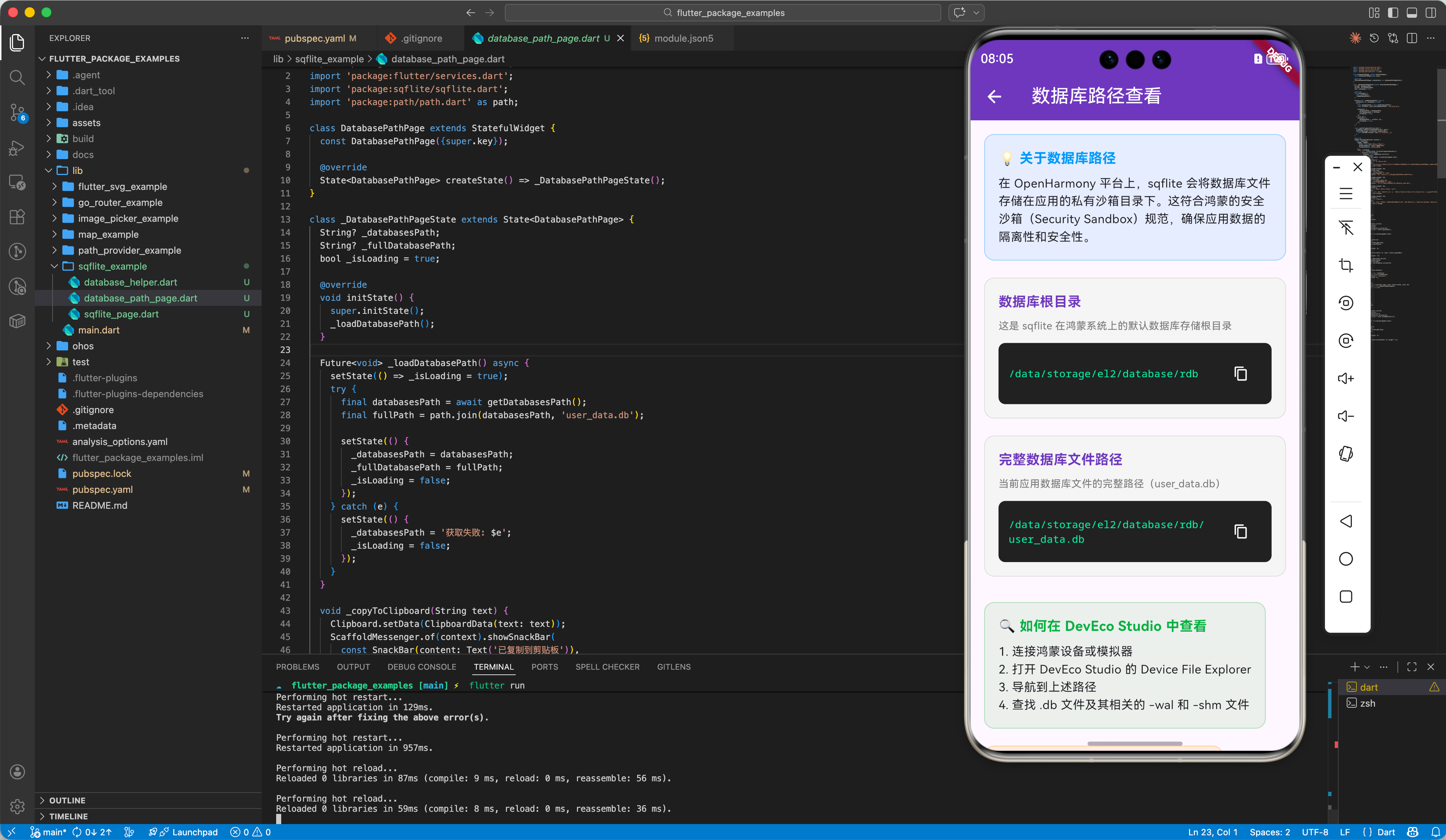
在 OpenHarmony 平台上,sqflite 会将数据库文件存储在应用的私有数据目录下,这符合鸿蒙最新的安全沙箱(Security Sandbox)规范。
import 'package:flutter/material.dart';
import 'package:flutter/services.dart';
import 'package:sqflite/sqflite.dart';
import 'package:path/path.dart' as path;
class DatabasePathPage extends StatefulWidget {
const DatabasePathPage({super.key});
State<DatabasePathPage> createState() => _DatabasePathPageState();
}
class _DatabasePathPageState extends State<DatabasePathPage> {
String? _databasesPath;
String? _fullDatabasePath;
bool _isLoading = true;
void initState() {
super.initState();
_loadDatabasePath();
}
Future<void> _loadDatabasePath() async {
setState(() => _isLoading = true);
try {
final databasesPath = await getDatabasesPath();
final fullPath = path.join(databasesPath, 'user_data.db');
setState(() {
_databasesPath = databasesPath;
_fullDatabasePath = fullPath;
_isLoading = false;
});
} catch (e) {
setState(() {
_databasesPath = '获取失败: $e';
_isLoading = false;
});
}
}
void _copyToClipboard(String text) {
Clipboard.setData(ClipboardData(text: text));
ScaffoldMessenger.of(context).showSnackBar(
const SnackBar(content: Text('已复制到剪贴板')),
);
}
Widget build(BuildContext context) {
return Scaffold(
appBar: AppBar(
title: const Text('数据库路径查看'),
backgroundColor: Colors.deepPurple,
foregroundColor: Colors.white,
),
body: _isLoading
? const Center(child: CircularProgressIndicator())
: SingleChildScrollView(
padding: const EdgeInsets.all(16.0),
child: Column(
crossAxisAlignment: CrossAxisAlignment.start,
children: [
_buildInfoCard(
title: '💡 关于数据库路径',
content:
'在 OpenHarmony 平台上,sqflite 会将数据库文件存储在应用的私有沙箱目录下。这符合鸿蒙的安全沙箱(Security Sandbox)规范,确保应用数据的隔离性和安全性。',
color: Colors.blue,
),
const SizedBox(height: 20),
_buildPathSection(
title: '数据库根目录',
path: _databasesPath ?? '未知',
description: '这是 sqflite 在鸿蒙系统上的默认数据库存储根目录',
),
const SizedBox(height: 20),
_buildPathSection(
title: '完整数据库文件路径',
path: _fullDatabasePath ?? '未知',
description: '当前应用数据库文件的完整路径(user_data.db)',
),
const SizedBox(height: 30),
_buildInfoCard(
title: '🔍 如何在 DevEco Studio 中查看',
content:
'1. 连接鸿蒙设备或模拟器\n2. 打开 DevEco Studio 的 Device File Explorer\n3. 导航到上述路径\n4. 查找 .db 文件及其相关的 -wal 和 -shm 文件',
color: Colors.green,
),
const SizedBox(height: 20),
_buildInfoCard(
title: '📝 路径说明',
content:
'• el2: 表示加密级别 2 的数据存储区域\n• 100: 用户 ID(通常是主用户)\n• database: 数据库专用目录\n• 应用包名: 您的应用唯一标识\n• databases: sqflite 的数据库子目录',
color: Colors.orange,
),
],
),
),
);
}
Widget _buildPathSection({
required String title,
required String path,
required String description,
}) {
return Container(
padding: const EdgeInsets.all(16),
decoration: BoxDecoration(
color: Colors.grey[100],
borderRadius: BorderRadius.circular(12),
border: Border.all(color: Colors.grey[300]!),
),
child: Column(
crossAxisAlignment: CrossAxisAlignment.start,
children: [
Text(
title,
style: const TextStyle(
fontSize: 16,
fontWeight: FontWeight.bold,
color: Colors.deepPurple,
),
),
const SizedBox(height: 8),
Text(
description,
style: TextStyle(fontSize: 12, color: Colors.grey[600]),
),
const SizedBox(height: 12),
Container(
padding: const EdgeInsets.all(12),
decoration: BoxDecoration(
color: Colors.black87,
borderRadius: BorderRadius.circular(8),
),
child: Row(
children: [
Expanded(
child: SelectableText(
path,
style: const TextStyle(
color: Colors.greenAccent,
fontFamily: 'monospace',
fontSize: 12,
),
),
),
IconButton(
icon: const Icon(Icons.copy, color: Colors.white, size: 18),
onPressed: () => _copyToClipboard(path),
tooltip: '复制路径',
),
],
),
),
],
),
);
}
Widget _buildInfoCard({
required String title,
required String content,
required Color color,
}) {
return Container(
padding: const EdgeInsets.all(16),
decoration: BoxDecoration(
color: color.withOpacity(0.1),
borderRadius: BorderRadius.circular(12),
border: Border.all(color: color.withOpacity(0.3)),
),
child: Column(
crossAxisAlignment: CrossAxisAlignment.start,
children: [
Text(
title,
style: TextStyle(
fontSize: 16,
fontWeight: FontWeight.bold,
color: color,
),
),
const SizedBox(height: 8),
Text(
content,
style: const TextStyle(fontSize: 14, height: 1.5),
),
],
),
);
}
}
二、 工程集成
2.1 添加依赖
由于 sqflite 在鸿蒙上的适配由 OpenHarmony-SIG 维护,我们需要直接引用其 Git 仓库。
dependencies:
  flutter:
    sdk: flutter
  sqflite:
    git:
      url: "https://gitcode.com/openharmony-sig/flutter_sqflite.git"
      path: "./sqflite"
  path: ^1.8.3     # 用于跨平台路径处理
2.2 无需特殊权限
在鸿蒙系统中,应用读写自身的沙箱内数据库(私有路径)默认是允许的,因此无需在 module.json5 中申请额外的读写外置卡权限。
三、 数据库管理中心(DBHelper 封装)
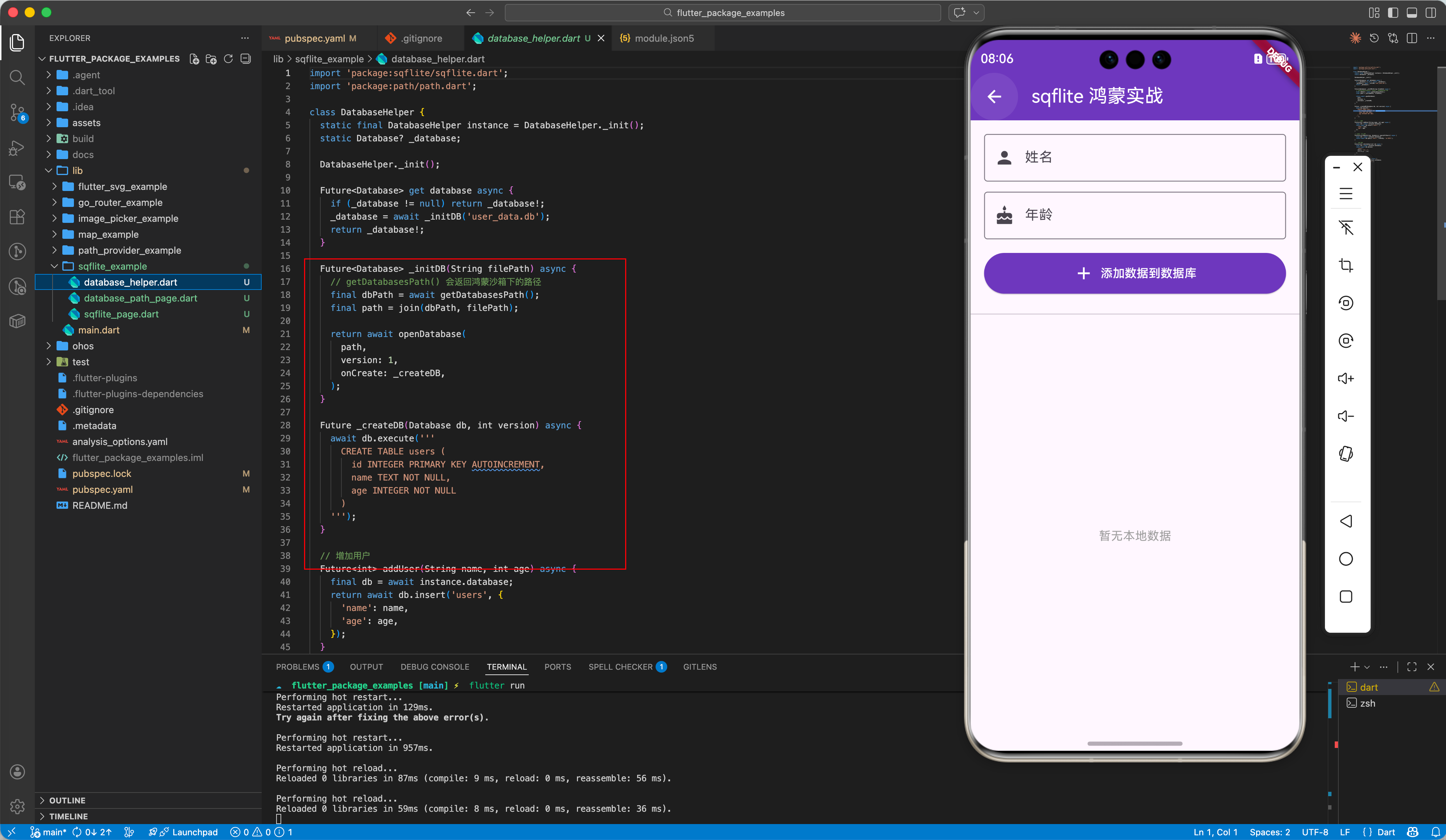
推荐采用“单例模式”来管理数据库连接,防止在鸿蒙多线程环境下出现连接死锁。
class DatabaseHelper {
  static final DatabaseHelper instance = DatabaseHelper._init();
  static Database? _database;

  DatabaseHelper._init();

  Future<Database> get database async {
    if (_database != null) return _database!;
    _database = await _initDB('user_data.db');
    return _database!;
  }

  Future<Database> _initDB(String filePath) async {
    // 💡 适配鸿蒙的沙箱路径
    final dbPath = await getDatabasesPath();
    final path = join(dbPath, filePath);

    return await openDatabase(
      path,
      version: 1,
      onCreate: _createDB,
    );
  }

  Future _createDB(Database db, int version) async {
    // 创建用户表的 SQL 构建
    await db.execute('''
      CREATE TABLE users (
        id INTEGER PRIMARY KEY AUTOINCREMENT,
        name TEXT NOT NULL,
        age INTEGER NOT NULL
      )
    ''');
  }
}
四、 增删改查实战
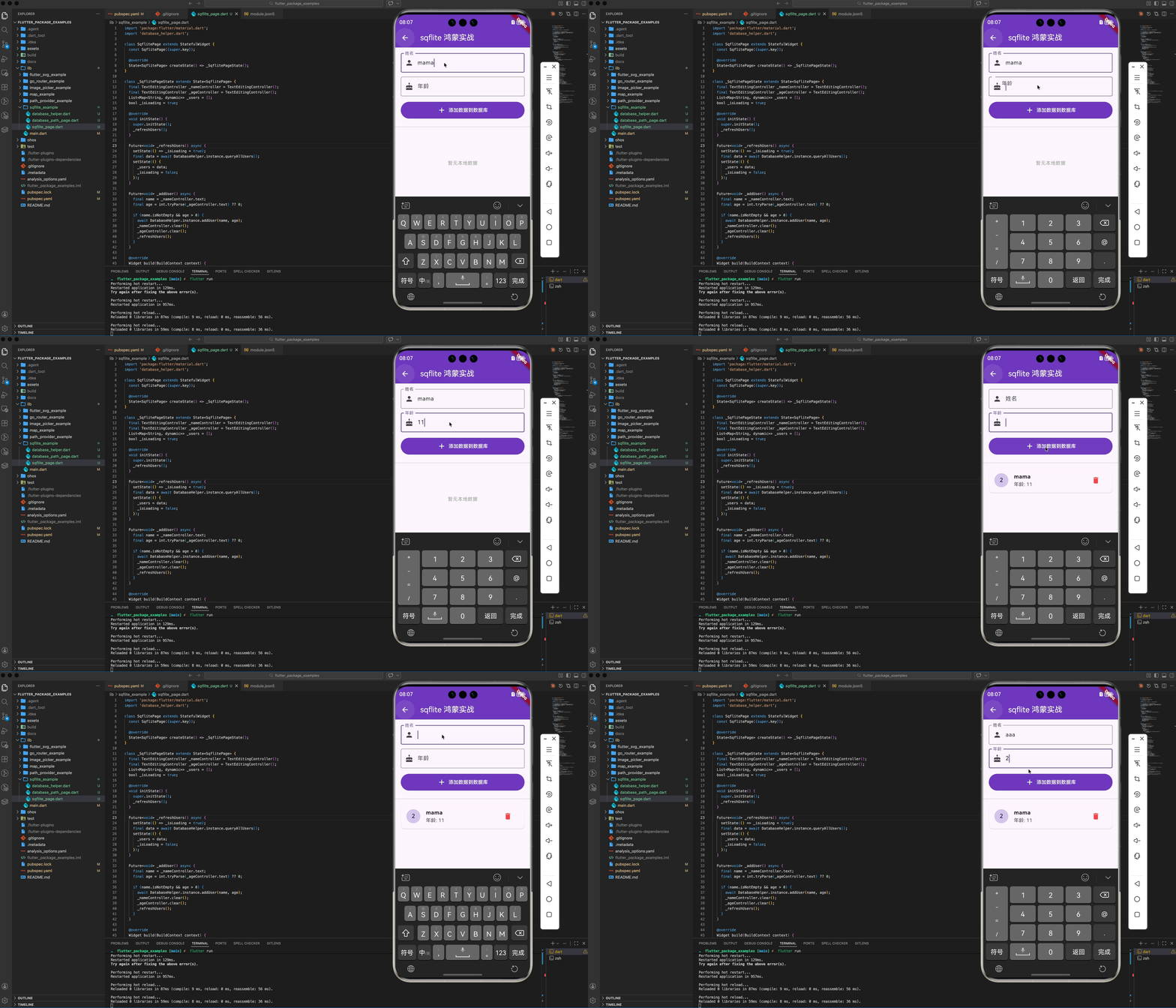
4.1 数据的“优雅插入”
使用事务包装,确保数据原子性。
Future<void> addUser(String name, int age) async {
  final db = await instance.database;
  await db.transaction((txn) async {
    await txn.insert('users', {'name': name, 'age': age});
  });
}
4.2 极速查询
Future<List<Map<String, dynamic>>> queryAllUsers() async {
  final db = await instance.database;
  return await db.query('users', orderBy: 'id DESC');
}
五、 鸿蒙端的生产级优化建议
5.1 数据库升迁 (Migration)
当你的应用发布由 Version 1 升级到 Version 2 时,必须处理好 onUpgrade。
onUpgrade: (db, oldVersion, newVersion) {
  if (oldVersion < 2) {
    db.execute('ALTER TABLE users ADD COLUMN email TEXT');
  }
}
5.2 异步阻塞规避
虽然鸿蒙的 I/O 性能出色,但对于大型数据库查询(如一次性查询 5000 条记录),请务必在 Dart 层配合 compute 函数或我们在第 138 篇提到的 TaskPool,防止 UI 掉帧。
六、 总结
sqflite 为鸿蒙 Flutter 开发者提供了极其稳定的持久化方案:
- 极高的可靠性:基于成熟的 SQLite 原生引擎。
- 安全合规:完美契合鸿蒙的沙箱存储机制。
- 零学习成本:与 Android/iOS 版的 sqflite 代码几乎完全复用。
对于需要处理复杂本地逻辑的应用(如记账、医疗记录、本地音乐库),sqflite 无疑是最佳选择。
📦 完整代码已上传至 AtomGit:flutter_package_examples
🌐 欢迎加入开源鸿蒙跨平台社区:开源鸿蒙跨平台开发者社区

开源鸿蒙跨平台开发社区汇聚开发者与厂商,共建“一次开发,多端部署”的开源生态,致力于降低跨端开发门槛,推动万物智联创新。
更多推荐

 9
9 0
0- 0


 已为社区贡献16条内容

所有评论(0)