跨端打车 App 的核心模块实现:基于 Flutter × OpenHarmony 的「最近行程」页面深度解析
本文解析了基于Flutter×OpenHarmony的跨端打车App中"最近行程"页面的实现方案。该模块采用Flutter构建UI层,OpenHarmony提供系统能力,通过分层架构实现多终端适配。文章详细拆解了卡片式UI的设计要点,包括Container外壳、BoxDecoration样式、Column纵向布局、Row标题栏等核心代码,并展示了可复用的行程卡片组件实现。这种模
文章目录
欢迎加入开源鸿蒙跨平台社区:https://openharmonycrossplatform.csdn.net
跨端打车 App 的核心模块实现:基于 Flutter × OpenHarmony 的「最近行程」页面深度解析
在移动互联网逐渐走向“多终端协同”的今天,应用的形态已经不再局限于手机屏幕之内。车机、平板、可穿戴设备、鸿蒙分布式终端、智慧大屏正在成为用户触点的重要组成部分。尤其是打车、出行、物流、即时服务这类强实时、高频使用的应用场景,对“跨终端一致体验”和“系统级能力融合”的要求,已经远远超过了传统 App 的开发范式。
如果仍然采用多端多套技术栈并行开发的方式,不仅维护成本急剧上升,功能迭代节奏也会被严重拖慢,最终导致产品体验割裂、技术债持续累积。
正是在这样的背景下,Flutter × OpenHarmony 这一组合逐渐显现出其工程价值:
一方面,Flutter 以高性能渲染引擎和声明式 UI 框架为核心,解决了跨平台界面一致性和高效开发的问题;另一方面,OpenHarmony 则在系统级能力、分布式协同、设备互联方面提供了强大的底层支撑。两者的结合,本质上是一种“前端统一、能力下沉、终端协同”的新型跨端架构范式。
本文并不是从宏观架构或概念层面空谈跨端优势,而是选择一个**真实业务中转化率极高、数据价值极大的核心模块——“最近行程”**作为切入点。
它表面上只是一个列表卡片,但在实际打车业务中却承担着:
用户路径记忆与快速复用的入口
首页转化链路的重要节点
用户画像与推荐模型的数据来源
多终端行为一致性的关键支撑
通过对这一模块在 Flutter 侧的 UI 构建方式、组件拆分策略、布局逻辑以及与 OpenHarmony 系统能力的协同关系进行深度拆解,你会看到:
一个看似简单的页面,其实背后隐藏着完整的跨端工程思想与系统级设计逻辑。
希望这篇文章不仅能帮你“写出一个页面”,更能帮助你理解:
在多设备时代,如何用一套代码,支撑一整套生态。

前言
在智能终端多样化的今天,单一平台开发已经难以满足业务快速落地的需求。尤其是像打车平台这样需要同时覆盖手机、车机、鸿蒙终端、平板等多终端场景的应用,更需要一种高效、统一、可扩展的跨端解决方案。
Flutter × OpenHarmony 的组合,正好提供了一条新的技术路径:
- Flutter 负责 高性能 UI 渲染 + 统一交互体验
- OpenHarmony 提供 分布式能力 + 原生系统级服务
本文以一个看似简单却极其重要的功能——“最近行程”模块为例,完整拆解其 UI 结构、布局策略、组件封装方式,并从跨端架构角度说明它在打车平台中的实际意义。
背景
在真实的打车业务中,“最近行程”并不是一个简单的展示列表,而是:
- 用户 快速复用上一次出行路径 的入口
- 司机/乘客 行为分析和推荐算法 的数据来源
- 首页 转化率最高的功能模块之一
在 OpenHarmony 设备(如车机、平板)上,我们需要它具备:
- 自适应屏幕尺寸
- 良好的触控交互
- 与系统服务解耦
- 可被 Flutter 统一管理
因此,选择 Flutter 来构建 UI 层,而由 OpenHarmony 提供底层能力,是一个非常典型的“UI 跨端 + 系统原生能力”组合方案。
Flutter × OpenHarmony 跨端开发介绍
| 技术 | 角色 |
|---|---|
| Flutter | 负责 UI 渲染、页面状态管理、动画与组件封装 |
| OpenHarmony | 提供系统能力、分布式数据、设备协同、原生接口 |
| Platform Channel | Flutter 与鸿蒙原生通信桥梁 |
| ArkTS / C++ | 底层能力实现(定位、设备信息、日志等) |
整体架构示意:
Flutter UI
    │
    │ Platform Channel
    ▼
OpenHarmony Service
    │
系统能力(定位、账户、分布式数据)
而“最近行程”模块,就是 Flutter 侧 UI 的一个典型业务组件。
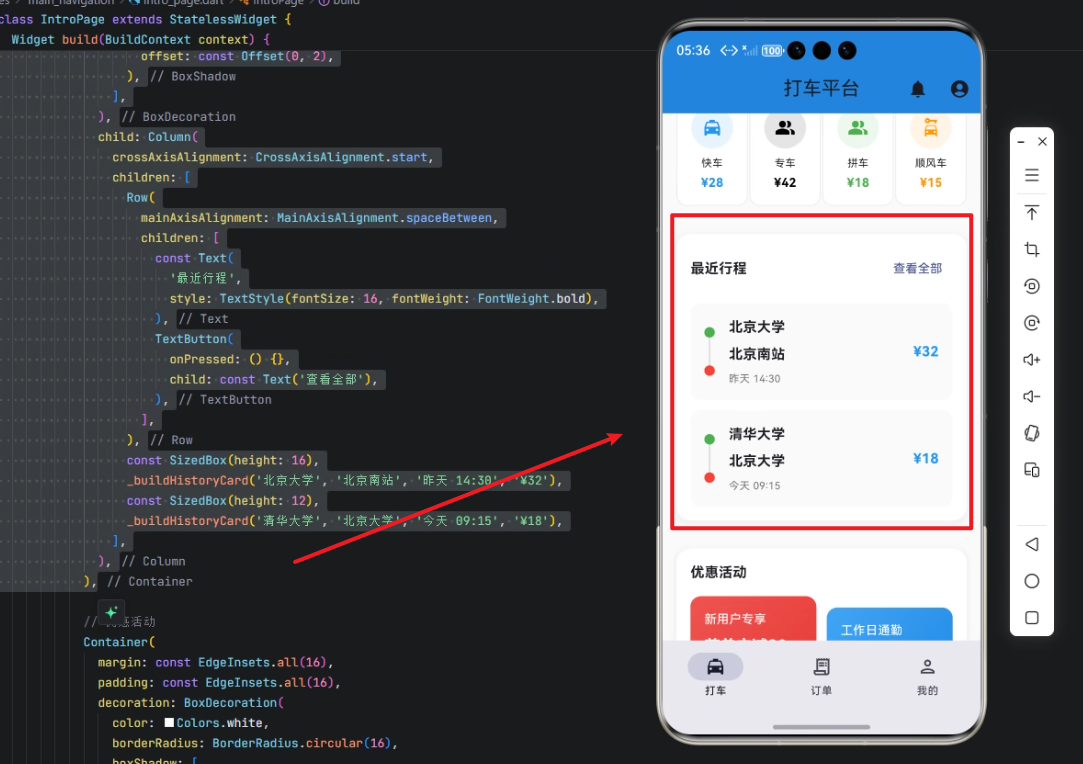
开发核心代码(逐行深度解析)
原始代码如下:
// 最近行程
Container(
  margin: const EdgeInsets.all(16),
  padding: const EdgeInsets.all(16),
  decoration: BoxDecoration(
    color: Colors.white,
    borderRadius: BorderRadius.circular(16),
    boxShadow: [
      BoxShadow(
        color: Colors.grey.withOpacity(0.1),
        spreadRadius: 2,
        blurRadius: 4,
        offset: const Offset(0, 2),
      ),
    ],
  ),
  child: Column(
    crossAxisAlignment: CrossAxisAlignment.start,
    children: [
      Row(
        mainAxisAlignment: MainAxisAlignment.spaceBetween,
        children: [
          const Text(
            '最近行程',
            style: TextStyle(fontSize: 16, fontWeight: FontWeight.bold),
          ),
          TextButton(
            onPressed: () {},
            child: const Text('查看全部'),
          ),
        ],
      ),
      const SizedBox(height: 16),
      _buildHistoryCard('北京大学', '北京南站', '昨天 14:30', '¥32'),
      const SizedBox(height: 12),
      _buildHistoryCard('清华大学', '北京大学', '今天 09:15', '¥18'),
    ],
  ),
)
1. Container:卡片外壳
Container(
  margin: const EdgeInsets.all(16),
  padding: const EdgeInsets.all(16),
margin:与外部模块保持距离padding:控制内部内容的呼吸感- 让模块在首页看起来像一个“信息卡片”
2. 装饰样式 BoxDecoration
decoration: BoxDecoration(
  color: Colors.white,
  borderRadius: BorderRadius.circular(16),
  boxShadow: [
    BoxShadow(
      color: Colors.grey.withOpacity(0.1),
      spreadRadius: 2,
      blurRadius: 4,
      offset: const Offset(0, 2),
    ),
  ],
),
| 属性 | 作用 |
|---|---|
| color | 背景色 |
| borderRadius | 圆角卡片 |
| boxShadow | 模拟悬浮阴影 |
这种设计非常符合打车类 App 的卡片化信息风格。
3. Column:整体纵向布局
child: Column(
  crossAxisAlignment: CrossAxisAlignment.start,
crossAxisAlignment.start:所有子组件左对齐- 让文字视觉层级更清晰
4. Row:标题栏
Row(
  mainAxisAlignment: MainAxisAlignment.spaceBetween,
  children: [
    const Text(
      '最近行程',
      style: TextStyle(fontSize: 16, fontWeight: FontWeight.bold),
    ),
    TextButton(
      onPressed: () {},
      child: const Text('查看全部'),
    ),
  ],
),
| 元素 | 作用 |
|---|---|
| Text | 标题 |
| TextButton | 跳转历史页入口 |
| mainAxisAlignment.spaceBetween | 两端对齐 |
5. 间距控制
const SizedBox(height: 16),
在 Flutter 中,用 SizedBox 做“空白控制”比 margin 更精确。
6. 业务核心:最近行程卡片
_buildHistoryCard('北京大学', '北京南站', '昨天 14:30', '¥32'),
这里的 _buildHistoryCard 是一个可复用的 UI 组件工厂函数,你可以封装如下:
Widget _buildHistoryCard(String start, String end, String time, String price) {
  return Row(
    children: [
      const Icon(Icons.location_on, color: Colors.blue),
      const SizedBox(width: 8),
      Expanded(
        child: Column(
          crossAxisAlignment: CrossAxisAlignment.start,
          children: [
            Text('$start → $end', style: const TextStyle(fontWeight: FontWeight.w600)),
            Text(time, style: const TextStyle(color: Colors.grey, fontSize: 12)),
          ],
        ),
      ),
      Text(price, style: const TextStyle(color: Colors.green, fontWeight: FontWeight.bold)),
    ],
  );
}
它实现了:
- 路径信息
- 时间信息
- 金额信息
- 统一样式复用
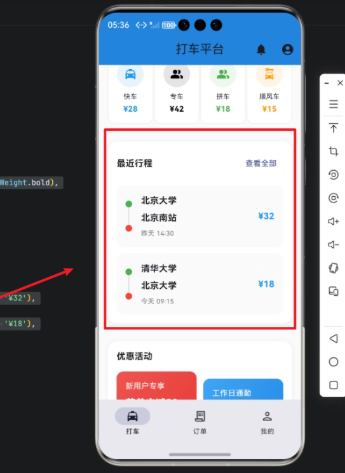
心得
在 Flutter × OpenHarmony 的架构中,我深刻体会到:UI 的模块化与业务解耦同样重要。
像“最近行程”这样的组件,如果设计得足够独立,就可以:
- 被首页、搜索页、车机端复用
- 通过平台通道动态注入数据
- 随业务变化快速扩展
它是打车平台中连接用户行为、数据推荐和交互效率的核心节点。通过 Flutter 的高效 UI 构建能力,结合 OpenHarmony 的系统级生态,我们可以用一套代码,支撑多终端一致体验。这种跨端方案,不仅提升了研发效率,也为未来多设备协同打下了坚实基础。
总结
“最近行程”看似只是一个小模块,但它是打车平台中连接用户行为、数据推荐和交互效率的核心节点。通过 Flutter 的高效 UI 构建能力,结合 OpenHarmony 的系统级生态,我们可以用一套代码,支撑多终端一致体验。这种跨端方案,不仅提升了研发效率,也为未来多设备协同打下了坚实基础。

开源鸿蒙跨平台开发社区汇聚开发者与厂商,共建“一次开发,多端部署”的开源生态,致力于降低跨端开发门槛,推动万物智联创新。
更多推荐
 21
21 0
0- 0


 已为社区贡献15条内容

所有评论(0)