Flutter for OpenHarmony 实战:跳一跳游戏完整开发指南
摘要 本文详细介绍了使用Flutter for OpenHarmony开发跳一跳游戏的完整过程。游戏核心功能包括蓄力机制、物理模拟、平台随机生成和碰撞检测。通过CustomPainter实现游戏绘图,Timer实现蓄力计时和物理更新。文章涵盖数据模型设计(玩家、平台类)、蓄力系统实现(开始蓄力、释放跳跃)、物理模拟(重力、跳跃轨迹计算)、平台生成(随机位置大小)等关键技术点。游戏还包含分数统计、最
·
欢迎加入开源鸿蒙跨平台社区:开源鸿蒙跨平台开发者社区
Flutter for OpenHarmony 实战:跳一跳游戏完整开发指南
文章目录
摘要
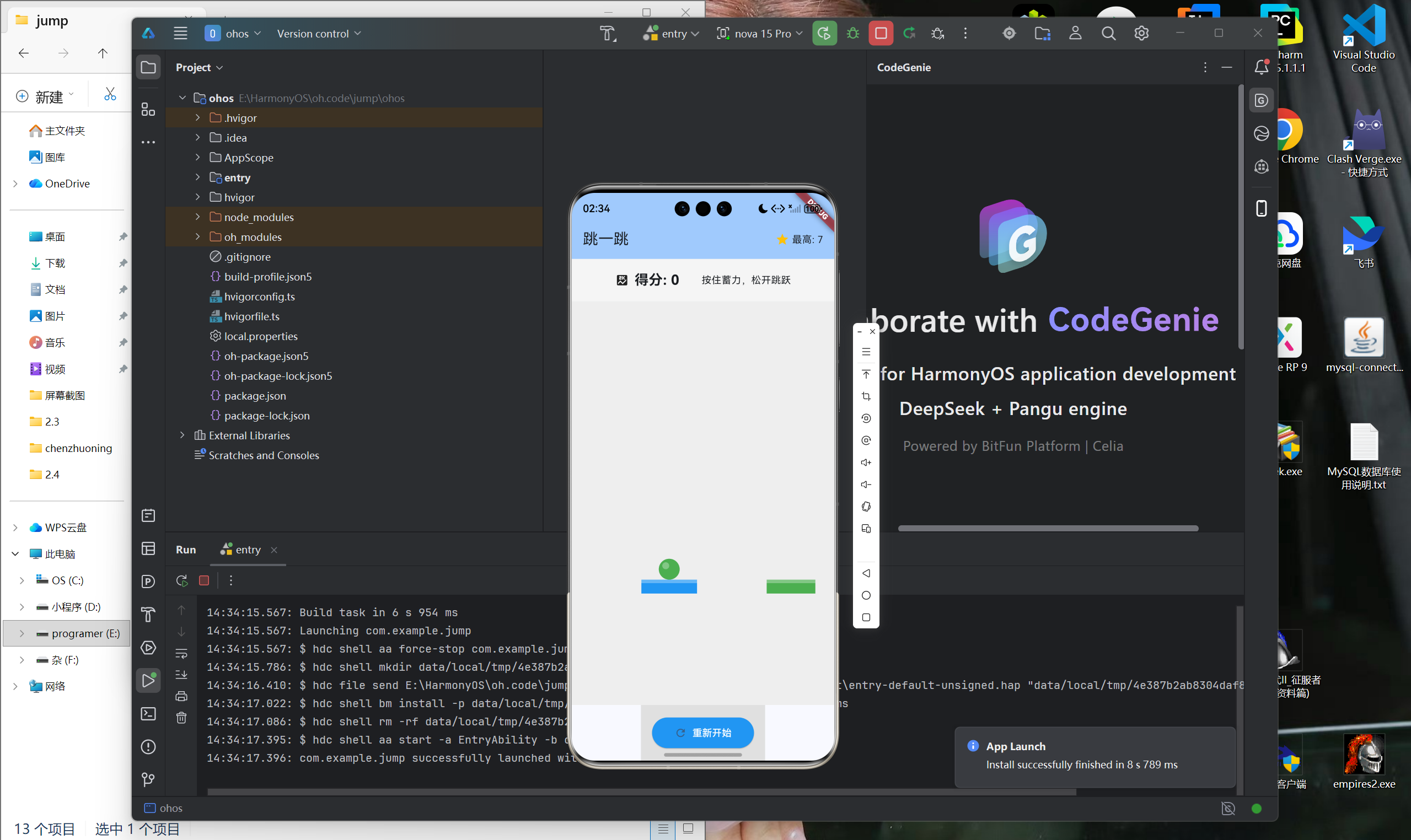
跳一跳是一款简单但极具成瘾性的休闲游戏,玩家通过按住屏幕蓄力,松开后棋子跳跃到下一个平台。本文将详细介绍如何使用Flutter for OpenHarmony框架开发一款功能完整的跳一跳游戏。文章涵盖了物理模拟、蓄力机制、平台生成、CustomPainter绘图等核心技术点。通过本文学习,读者将掌握Flutter在物理类游戏开发中的完整流程,了解Canvas绘图和动画实现。
一、项目背景与功能概述
1.1 跳一跳游戏介绍
跳一跳是一款休闲益智游戏:
- 目标:跳到更多平台获得更高分数
- 规则:
- 按住屏幕蓄力
- 松开后棋子跳跃
- 蓄力时间决定跳跃距离
- 成功着陆得1分
- 掉落则游戏结束
1.2 应用功能规划
| 功能模块 | 具体功能 |
|---|---|
| 蓄力系统 | 按住蓄力,松开跳跃 |
| 物理模拟 | 重力、跳跃轨迹 |
| 平台生成 | 随机位置、大小、颜色 |
| 碰撞检测 | 着陆判定 |
| 视角滚动 | 随玩家移动 |
| 分数统计 | 成功跳跃次数 |
| 最高分记录 | 保存历史最高分 |
1.3 游戏配置
| 参数 | 值 | 说明 |
|---|---|---|
| 重力 | 0.5 | 下落加速度 |
| 最大蓄力 | 20 | 最大蓄力值 |
| 蓄力速度 | 0.5/50ms | 蓄力增长速度 |
| 平台高度 | 20 | 平台绘制高度 |
二、数据模型设计
2.1 平台类
class Platform {
  double x;
  double y;
  final double width;
  final Color color;

  Platform({
    required this.x,
    required this.y,
    required this.width,
    required this.color,
  });

  // 获取平台中心
  double get centerX => x + width / 2;
}
2.2 玩家类
class Player {
  double x;
  double y;
  double charge = 0;
  bool isCharging = false;
  bool isJumping = false;
  double velocityY = 0;
  double targetX = 0;

  Player({required this.x, required this.y});
}
2.3 游戏状态
class _GamePageState extends State<GamePage> with TickerProviderStateMixin {
  static const double gravity = 0.5;
  static const double maxCharge = 20;
  static const double platformHeight = 20;

  late Player _player;
  List<Platform> _platforms = [];
  int _score = 0;
  int _bestScore = 0;
  bool _gameOver = false;

  final Random _random = Random();
  Timer? _gameTimer;
}
三、蓄力机制实现
3.1 开始蓄力
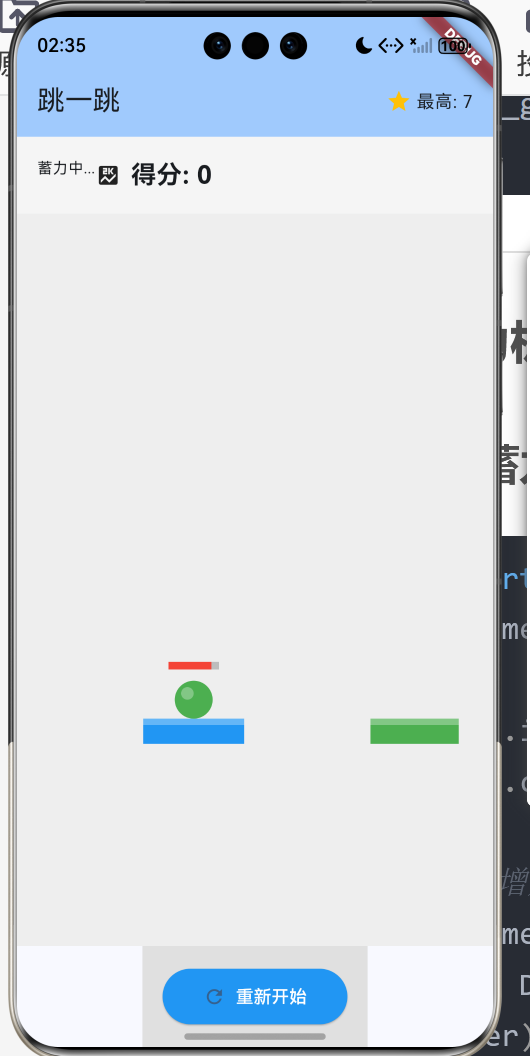
void _startCharging() {
  if (_gameOver || _player.isJumping) return;

  _player.isCharging = true;
  _player.charge = 0;

  // 定时增加蓄力值
  _gameTimer = Timer.periodic(
    const Duration(milliseconds: 50),
    (timer) {
      setState(() {
        if (_player.charge < maxCharge) {
          _player.charge += 0.5;
        }
      });
    }
  );
}
关键点:
- 使用Timer.periodic定期增加蓄力值
- 限制最大蓄力值
- 跳跃中或游戏结束时禁止蓄力
3.2 释放跳跃
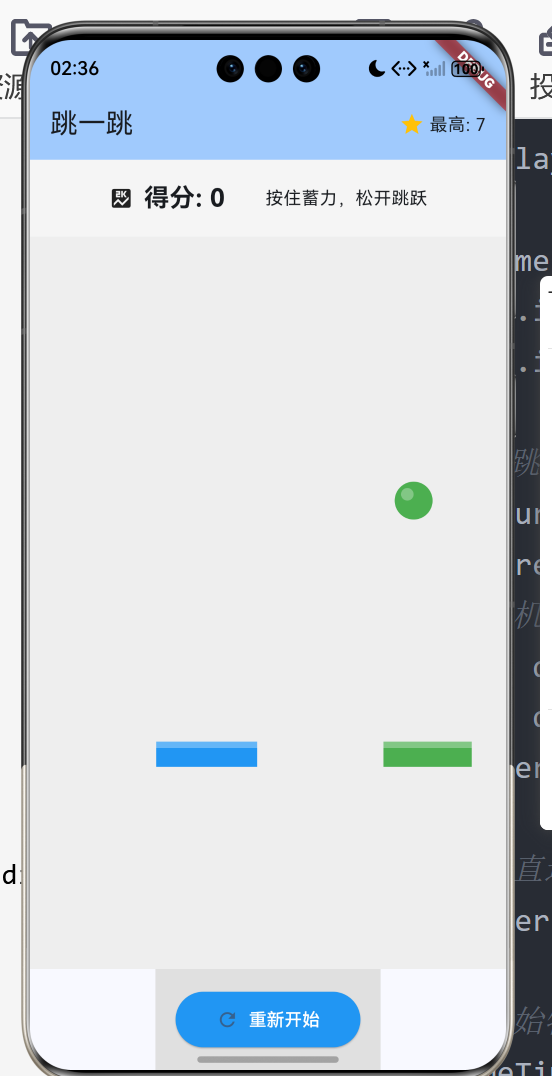
void _release() {
  if (!_player.isCharging) return;

  _gameTimer?.cancel();
  _player.isCharging = false;
  _player.isJumping = true;

  // 计算跳跃目标
  final currentPlatform = _getCurrentPlatform();
  if (currentPlatform != null) {
    // 随机方向
    final direction = _random.nextBool() ? 1 : -1;
    final distance = 50 + _player.charge * 10;
    _player.targetX = currentPlatform.centerX + direction * distance;

    // 垂直速度
    _player.velocityY = -_player.charge * 0.8;

    // 开始物理模拟
    _gameTimer = Timer.periodic(
      const Duration(milliseconds: 16),
      (timer) => _updateJump(),
    );
  }
}
四、物理模拟
4.1 跳跃更新
void _updateJump() {
  setState(() {
    // 水平移动(线性插值)
    final dx = _player.targetX - _player.x;
    _player.x += dx * 0.05;

    // 垂直移动(重力)
    _player.velocityY += gravity;
    _player.y += _player.velocityY;

    // 检测着陆
    for (final platform in _platforms) {
      if (_isLanding(platform)) {
        _landOnPlatform(platform);
        break;
      }
    }

    // 检测掉落
    if (_player.y > 600) {
      _gameOver = true;
      _gameTimer?.cancel();
      _showGameOverDialog();
    }
  });
}
4.2 着陆检测
bool _isLanding(Platform platform) {
  return _player.y + 20 >= platform.y &&
         _player.y + 20 <= platform.y + platformHeight + 10 &&
         _player.x >= platform.x &&
         _player.x <= platform.x + platform.width;
}

void _landOnPlatform(Platform platform) {
  _player.y = platform.y;
  _player.isJumping = false;
  _player.velocityY = 0;
  _gameTimer?.cancel();

  // 成功着陆
  _score++;
  if (_score > _bestScore) {
    _bestScore = _score;
  }

  // 生成新平台
  _generateNewPlatform();

  // 移动视角
  _scrollPlatforms();
}
五、平台生成
5.1 新平台生成
void _generateNewPlatform() {
  final lastPlatform = _platforms.last;

  // 随机方向和距离
  final direction = _random.nextBool() ? 1 : -1;
  final distance = 80 + _random.nextDouble() * 120;
  final width = 50 + _random.nextDouble() * 50;

  _platforms.add(Platform(
    x: lastPlatform.centerX + direction * distance - width / 2,
    y: lastPlatform.y + (200 + _random.nextDouble() * 100) * -1,
    width: width,
    color: Color.fromARGB(
      255,
      100 + _random.nextInt(155),
      100 + _random.nextInt(155),
      100 + _random.nextInt(155),
    ),
  ));

  // 移除旧平台
  if (_platforms.length > 5) {
    _platforms.removeAt(0);
  }
}
5.2 视角滚动
void _scrollPlatforms() {
  // 移动所有平台和玩家
  final offset = 400 - _player.y;
  if (offset > 0) {
    for (final platform in _platforms) {
      platform.y += offset;
    }
    _player.y += offset;
  }
}
六、UI界面实现
6.1 游戏画布
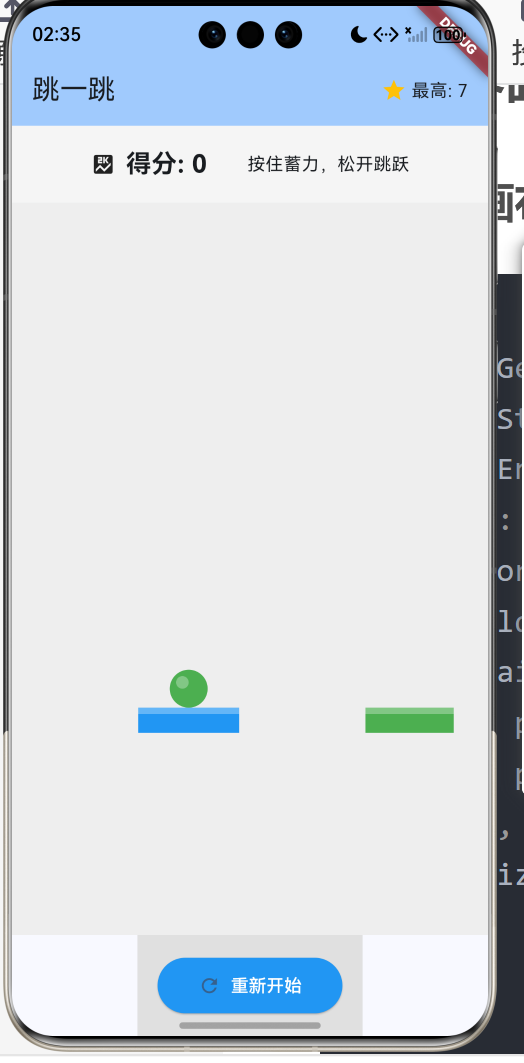
Expanded(
  child: GestureDetector(
    onPanStart: (_) => _startCharging(),
    onPanEnd: (_) => _release(),
    child: Container(
      color: Colors.grey.shade200,
      child: CustomPaint(
        painter: GamePainter(
          player: _player,
          platforms: _platforms,
        ),
        size: Size.infinite,
      ),
    ),
  ),
)
6.2 自定义画笔
class GamePainter extends CustomPainter {
final Player player;
final List<Platform> platforms;
GamePainter({
required this.player,
required this.platforms,
});
void paint(Canvas canvas, Size size) {
// 绘制背景
canvas.drawRect(
Rect.fromLTWH(0, 0, size.width, size.height),
Paint()..color = Colors.grey.shade200,
);
// 绘制平台
for (final platform in platforms) {
// 平台主体
canvas.drawRect(
Rect.fromLTWH(platform.x, platform.y, platform.width, 20),
Paint()..color = platform.color,
);
// 平台高光
canvas.drawRect(
Rect.fromLTWH(platform.x, platform.y, platform.width, 5),
Paint()..color = Colors.white.withValues(alpha: 0.3),
);
}
// 绘制玩家
canvas.drawCircle(
Offset(player.x, player.y),
15,
Paint()
..color = Colors.deepPurple
..style = PaintingStyle.fill,
);
// 玩家高光
canvas.drawCircle(
Offset(player.x - 5, player.y - 5),
5,
Paint()..color = Colors.white.withValues(alpha: 0.3),
);
// 蓄力条
if (player.isCharging) {
canvas.drawRect(
Rect.fromLTWH(player.x - 20, player.y - 30, 40, 6),
Paint()..color = Colors.grey.shade400,
);
final chargeRatio = player.charge / 20;
canvas.drawRect(
Rect.fromLTWH(player.x - 20, player.y - 30, 40 * chargeRatio, 6),
Paint()
..color = chargeRatio > 0.8 ? Colors.red : Colors.blue
..style = PaintingStyle.fill,
);
}
}
bool shouldRepaint(GamePainter oldDelegate) => true;
}
七、总结
本文详细介绍了使用Flutter for OpenHarmony开发跳一跳游戏的完整过程,涵盖了以下核心技术点:
- 数据模型:平台类、玩家类、游戏状态
- 蓄力机制:定时器蓄力、蓄力值管理
- 物理模拟:重力、跳跃轨迹、碰撞检测
- 平台生成:随机位置、视角滚动
- UI实现:CustomPainter绘图、手势识别
- 游戏循环:定时器更新、状态同步
这个项目展示了Flutter在物理类游戏开发中的完整流程,特别是Canvas绘图和物理模拟的应用。
欢迎加入开源鸿蒙跨平台社区: 开源鸿蒙跨平台开发者社区

开源鸿蒙跨平台开发社区汇聚开发者与厂商,共建“一次开发,多端部署”的开源生态,致力于降低跨端开发门槛,推动万物智联创新。
更多推荐
 22
22 0
0- 0


 已为社区贡献8条内容

所有评论(0)