Flutter for OpenHarmony 实战:倒班日历 - 适用于轮班工作者的排班日历
在移动开发领域,我们总是面临着选择与适配。今天,你的Flutter应用在Android和iOS上跑得正欢,明天可能就需要考虑一个新的平台:HarmonyOS(鸿蒙)。这不是一道选答题,而是很多团队正在面对的现实。Flutter的优势很明确——写一套代码,就能在两个主要平台上运行,开发体验流畅。而鸿蒙代表的是下一个时代的互联生态,它不仅仅是手机系统,更着眼于未来全场景的体验。
欢迎加入开源鸿蒙跨平台社区: https://openharmonycrossplatform.csdn.net
前言:跨生态开发的新机遇
在移动开发领域,我们总是面临着选择与适配。今天,你的Flutter应用在Android和iOS上跑得正欢,明天可能就需要考虑一个新的平台:HarmonyOS(鸿蒙)。这不是一道选答题,而是很多团队正在面对的现实。
Flutter的优势很明确——写一套代码,就能在两个主要平台上运行,开发体验流畅。而鸿蒙代表的是下一个时代的互联生态,它不仅仅是手机系统,更着眼于未来全场景的体验。将现有的Flutter应用适配到鸿蒙,听起来像是一个“跨界”任务,但它本质上是一次有价值的技术拓展:让产品触达更多用户,也让技术栈覆盖更广。
不过,这条路走起来并不像听起来那么简单。Flutter和鸿蒙,从底层的架构到上层的工具链,都有着各自的设计逻辑。会遇到一些具体的问题:代码如何组织?原有的功能在鸿蒙上如何实现?那些平台特有的能力该怎么调用?更实际的是,从编译打包到上架部署,整个流程都需要重新摸索。
这篇文章想做的,就是把这些我们趟过的路、踩过的坑,清晰地摊开给你看。我们不会只停留在“怎么做”,还会聊到“为什么得这么做”,以及“如果出了问题该往哪想”。这更像是一份实战笔记,源自真实的项目经验,聚焦于那些真正卡住过我们的环节。
无论你是在为一个成熟产品寻找新的落地平台,还是从一开始就希望构建能面向多端的应用,这里的思路和解决方案都能提供直接的参考。理解了两套体系之间的异同,掌握了关键的衔接技术,不仅能完成这次迁移,更能积累起应对未来技术变化的能力。
混合工程结构深度解析
项目目录架构
当Flutter项目集成鸿蒙支持后,典型的项目结构会发生显著变化。以下是经过ohos_flutter插件初始化后的项目结构:
my_flutter_harmony_app/
├── lib/                          # Flutter业务代码(基本不变)
│   ├── main.dart                 # 应用入口
│   ├── home_page.dart           # 首页
│   └── utils/
│       └── platform_utils.dart  # 平台工具类
├── pubspec.yaml                  # Flutter依赖配置
├── ohos/                         # 鸿蒙原生层(核心适配区)
│   ├── entry/                    # 主模块
│   │   └── src/main/
│   │       ├── ets/              # ArkTS代码
│   │       │   ├── MainAbility/
│   │       │   │   ├── MainAbility.ts       # 主Ability
│   │       │   │   └── MainAbilityContext.ts
│   │       │   └── pages/
│   │       │       ├── Index.ets           # 主页面
│   │       │       └── Splash.ets          # 启动页
│   │       ├── resources/        # 鸿蒙资源文件
│   │       │   ├── base/
│   │       │   │   ├── element/  # 字符串等
│   │       │   │   ├── media/    # 图片资源
│   │       │   │   └── profile/  # 配置文件
│   │       │   └── en_US/        # 英文资源
│   │       └── config.json       # 应用核心配置
│   ├── ohos_test/               # 测试模块
│   ├── build-profile.json5      # 构建配置
│   └── oh-package.json5         # 鸿蒙依赖管理
└── README.md
展示效果图片
flutter 实时预览 效果展示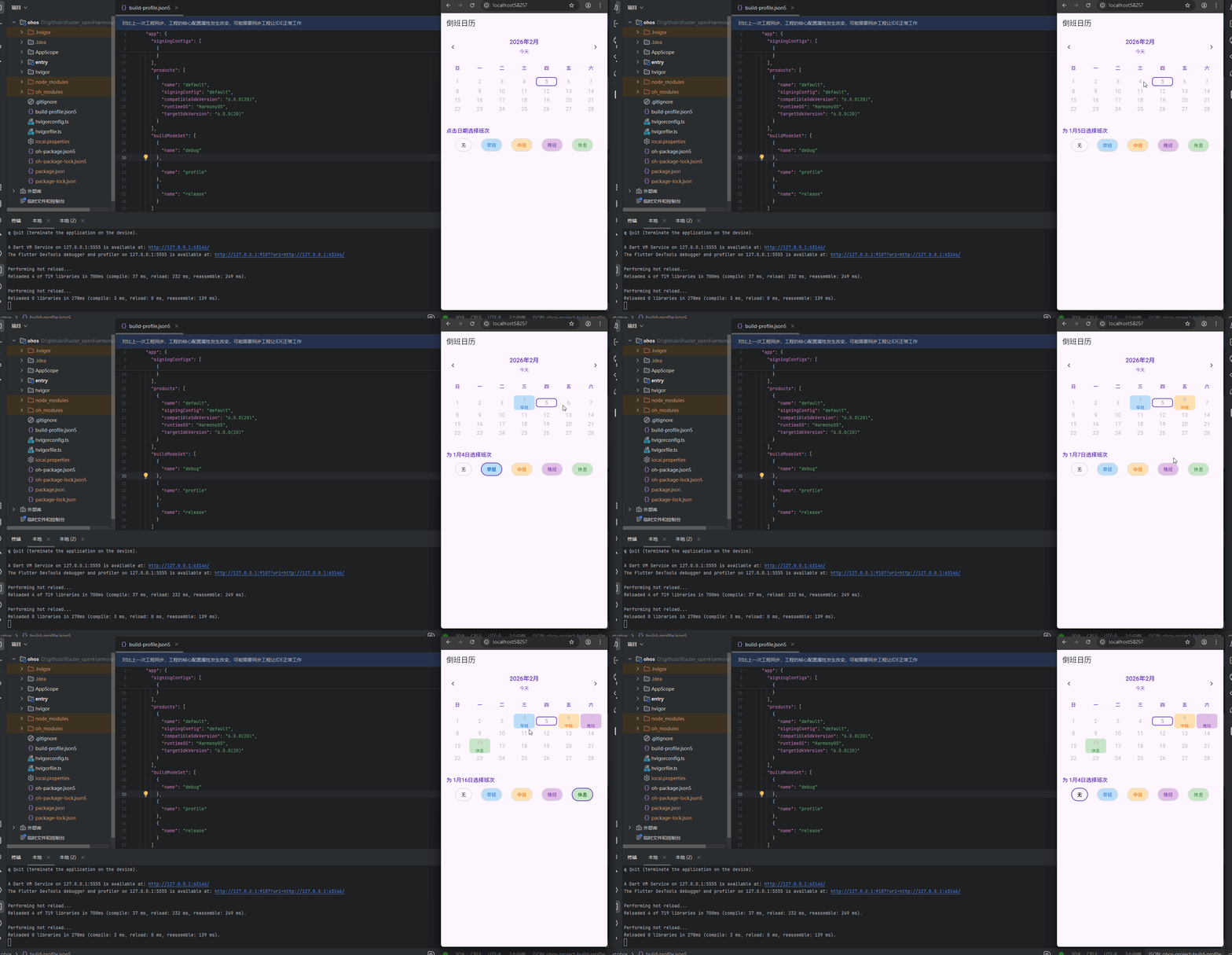
运行到鸿蒙虚拟设备中效果展示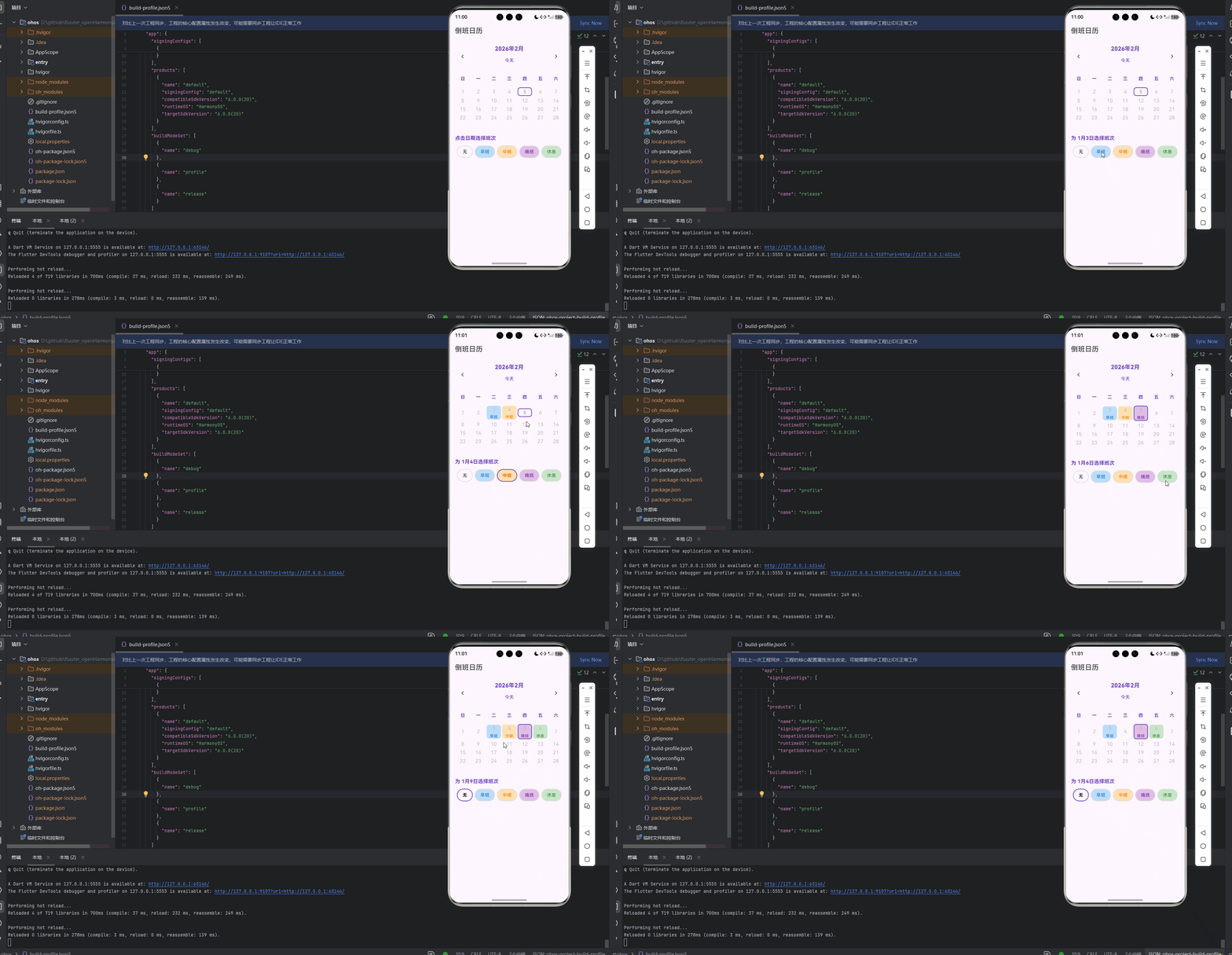
目录
功能代码实现
ShiftTypes 班次类型定义
核心代码结构
import 'package:flutter/material.dart';

enum ShiftType {
  none,       // 无班次
  morning,    // 早班
  afternoon,  // 中班
  night,      // 晚班
  off         // 休息
}

class ShiftUtils {
  static String getShiftName(ShiftType type) {
    switch (type) {
      case ShiftType.none:
        return '';
      case ShiftType.morning:
        return '早班';
      case ShiftType.afternoon:
        return '中班';
      case ShiftType.night:
        return '晚班';
      case ShiftType.off:
        return '休息';
    }
  }

  static Color getShiftColor(ShiftType type) {
    switch (type) {
      case ShiftType.none:
        return Colors.transparent;
      case ShiftType.morning:
        return Colors.blue.shade100;
      case ShiftType.afternoon:
        return Colors.orange.shade100;
      case ShiftType.night:
        return Colors.purple.shade100;
      case ShiftType.off:
        return Colors.green.shade100;
    }
  }

  static Color getShiftTextColor(ShiftType type) {
    switch (type) {
      case ShiftType.none:
        return Colors.black;
      case ShiftType.morning:
        return Colors.blue.shade800;
      case ShiftType.afternoon:
        return Colors.orange.shade800;
      case ShiftType.night:
        return Colors.purple.shade800;
      case ShiftType.off:
        return Colors.green.shade800;
    }
  }
}
实现细节
- ShiftType 枚举:定义了五种班次类型,包括无班次、早班、中班、晚班和休息。
- ShiftUtils 工具类:提供了三个静态方法,用于获取班次的名称、背景颜色和文本颜色。
getShiftName:根据班次类型返回对应的中文名称。getShiftColor:根据班次类型返回对应的背景颜色,使用不同深浅的颜色区分不同班次。getShiftTextColor:根据班次类型返回对应的文本颜色,确保文本在背景上的可读性。
使用方法
在其他组件中导入 shift_types.dart 文件,然后使用 ShiftType 枚举和 ShiftUtils 工具类来处理班次相关的逻辑和UI显示。
import 'shift_types.dart';

// 使用班次类型
final shiftType = ShiftType.morning;

// 获取班次名称
final shiftName = ShiftUtils.getShiftName(shiftType);

// 获取班次颜色
final shiftColor = ShiftUtils.getShiftColor(shiftType);

// 获取班次文本颜色
final shiftTextColor = ShiftUtils.getShiftTextColor(shiftType);
ShiftCalendarCell 日历单元格组件
核心代码结构
import 'package:flutter/material.dart';
import 'shift_types.dart';
class ShiftCalendarCell extends StatelessWidget {
final int day;
final bool isCurrentMonth;
final bool isToday;
final ShiftType shiftType;
final VoidCallback onTap;
const ShiftCalendarCell({
Key? key,
required this.day,
required this.isCurrentMonth,
required this.isToday,
required this.shiftType,
required this.onTap,
}) : super(key: key);
Widget build(BuildContext context) {
final isEmpty = day == 0;
final shiftColor = ShiftUtils.getShiftColor(shiftType);
final shiftTextColor = ShiftUtils.getShiftTextColor(shiftType);
final shiftName = ShiftUtils.getShiftName(shiftType);
return GestureDetector(
onTap: isEmpty ? null : onTap,
child: Container(
margin: const EdgeInsets.all(2),
decoration: BoxDecoration(
color: isEmpty ? Colors.transparent : shiftColor,
borderRadius: BorderRadius.circular(8),
border: isToday
? Border.all(color: Colors.deepPurple, width: 2)
: null,
),
child: Column(
mainAxisAlignment: MainAxisAlignment.center,
children: [
if (!isEmpty)
Text(
'$day',
style: TextStyle(
fontSize: 16,
fontWeight: isToday ? FontWeight.bold : FontWeight.normal,
color: isCurrentMonth
? (isToday ? Colors.deepPurple : shiftTextColor)
: Colors.grey.shade400,
),
),
if (!isEmpty && shiftType != ShiftType.none)
Padding(
padding: const EdgeInsets.only(top: 4),
child: Text(
shiftName,
style: TextStyle(
fontSize: 12,
color: shiftTextColor,
),
),
),
],
),
),
);
}
}
实现细节
- 属性定义:接收日期、是否为当前月、是否为今天、班次类型和点击回调等属性。
- 布局结构:使用
GestureDetector包裹Container,实现点击交互。 - 视觉效果:
- 根据
isEmpty判断是否显示日期(空单元格用于填充日历网格)。 - 根据
shiftType获取班次颜色和文本颜色。 - 为今天的日期添加紫色边框,突出显示。
- 对于非当前月的日期,使用灰色文本,区分显示。
- 当班次类型不为
none时,显示班次名称。
- 根据
使用方法
在日历网格中使用 ShiftCalendarCell 组件,为每个日期创建一个单元格。
ShiftCalendarCell(
  day: 15,
  isCurrentMonth: true,
  isToday: false,
  shiftType: ShiftType.morning,
  onTap: () => _selectDate(DateTime(year, month, 15)),
);
ShiftCalendar 倒班日历组件
核心代码结构
import 'package:flutter/material.dart';
import 'shift_calendar_cell.dart';
import 'shift_types.dart';
class ShiftCalendar extends StatefulWidget {
const ShiftCalendar({Key? key}) : super(key: key);
State<ShiftCalendar> createState() => _ShiftCalendarState();
}
class _ShiftCalendarState extends State<ShiftCalendar> {
DateTime _currentDate = DateTime.now();
Map<DateTime, ShiftType> _shiftSchedule = {};
DateTime? _selectedDate;
void initState() {
super.initState();
// 初始化一些示例数据
_initializeSampleData();
}
void _initializeSampleData() {
final today = DateTime.now();
for (int i = -5; i <= 10; i++) {
final date = today.add(Duration(days: i));
final shiftIndex = i % 4;
ShiftType shiftType;
switch (shiftIndex) {
case 0:
shiftType = ShiftType.morning;
break;
case 1:
shiftType = ShiftType.afternoon;
break;
case 2:
shiftType = ShiftType.night;
break;
case 3:
shiftType = ShiftType.off;
break;
default:
shiftType = ShiftType.none;
}
_shiftSchedule[DateTime(date.year, date.month, date.day)] = shiftType;
}
}
void _previousMonth() {
setState(() {
_currentDate = DateTime(_currentDate.year, _currentDate.month - 1, 1);
});
}
void _nextMonth() {
setState(() {
_currentDate = DateTime(_currentDate.year, _currentDate.month + 1, 1);
});
}
void _goToToday() {
setState(() {
_currentDate = DateTime.now();
});
}
void _selectDate(DateTime date) {
setState(() {
_selectedDate = date;
});
}
void _updateShift(ShiftType shiftType) {
if (_selectedDate != null) {
setState(() {
_shiftSchedule[_selectedDate!] = shiftType;
});
}
}
List<Widget> _buildWeekdayHeaders() {
const weekdays = ['日', '一', '二', '三', '四', '五', '六'];
return weekdays.map((weekday) {
return Expanded(
child: Container(
padding: const EdgeInsets.symmetric(vertical: 8),
alignment: Alignment.center,
child: Text(
weekday,
style: TextStyle(
fontWeight: FontWeight.bold,
color: Colors.deepPurple,
),
),
),
);
}).toList();
}
List<List<int>> _generateCalendarDays() {
final year = _currentDate.year;
final month = _currentDate.month;
// 获取当月第一天是星期几(0-6,0表示星期日)
final firstDayOfMonth = DateTime(year, month, 1);
final startingWeekday = firstDayOfMonth.weekday % 7;
// 获取当月的天数
final daysInMonth = DateTime(year, month + 1, 0).day;
// 获取上个月的天数
final daysInPreviousMonth = DateTime(year, month, 0).day;
final calendarDays = <List<int>>[];
var currentWeek = <int>[];
// 添加上个月的日期
for (int i = startingWeekday - 1; i >= 0; i--) {
currentWeek.add(daysInPreviousMonth - i);
}
// 添加当月的日期
for (int day = 1; day <= daysInMonth; day++) {
if (currentWeek.length == 7) {
calendarDays.add(currentWeek);
currentWeek = [];
}
currentWeek.add(day);
}
// 添加下个月的日期
var nextMonthDay = 1;
while (currentWeek.length < 7) {
currentWeek.add(nextMonthDay++);
}
calendarDays.add(currentWeek);
return calendarDays;
}
List<List<Widget>> _buildCalendarGrid() {
final calendarDays = _generateCalendarDays();
final year = _currentDate.year;
final month = _currentDate.month;
final today = DateTime.now();
final isCurrentMonth = year == today.year && month == today.month;
return calendarDays.map((week) {
return week.map((day) {
// 确定日期是否属于当前月
bool isDayInCurrentMonth;
DateTime date;
if (day <= DateTime(year, month, 0).day) {
// 上个月的日期
isDayInCurrentMonth = false;
date = DateTime(year, month - 1, day);
} else if (day > DateTime(year, month + 1, 0).day) {
// 下个月的日期
isDayInCurrentMonth = false;
date = DateTime(year, month + 1, day - DateTime(year, month + 1, 0).day);
} else {
// 当前月的日期
isDayInCurrentMonth = true;
date = DateTime(year, month, day);
}
// 检查是否是今天
final isToday = isCurrentMonth && day == today.day;
// 获取该日期的班次
final shiftType = _shiftSchedule[DateTime(date.year, date.month, date.day)] ?? ShiftType.none;
return Expanded(
child: ShiftCalendarCell(
day: day,
isCurrentMonth: isDayInCurrentMonth,
isToday: isToday,
shiftType: shiftType,
onTap: () => _selectDate(DateTime(date.year, date.month, date.day)),
),
);
}).toList();
}).toList();
}
Widget _buildShiftSelector() {
final shiftTypes = [
ShiftType.none,
ShiftType.morning,
ShiftType.afternoon,
ShiftType.night,
ShiftType.off,
];
return Container(
padding: const EdgeInsets.symmetric(vertical: 16),
child: Column(
crossAxisAlignment: CrossAxisAlignment.start,
children: [
Text(
_selectedDate != null
? '为 ${_selectedDate!.month}月${_selectedDate!.day}日选择班次'
: '点击日期选择班次',
style: TextStyle(
fontSize: 16,
fontWeight: FontWeight.bold,
color: Colors.deepPurple,
),
),
const SizedBox(height: 12),
Row(
mainAxisAlignment: MainAxisAlignment.spaceEvenly,
children: shiftTypes.map((type) {
return GestureDetector(
onTap: _selectedDate != null ? () => _updateShift(type) : null,
child: Container(
padding: const EdgeInsets.symmetric(horizontal: 16, vertical: 8),
decoration: BoxDecoration(
color: ShiftUtils.getShiftColor(type),
border: Border.all(
color: _selectedDate != null
? (_shiftSchedule[_selectedDate!] == type
? Colors.deepPurple
: Colors.grey.shade300)
: Colors.grey.shade300,
width: 2,
),
borderRadius: BorderRadius.circular(20),
),
child: Text(
ShiftUtils.getShiftName(type) == '' ? '无' : ShiftUtils.getShiftName(type),
style: TextStyle(
color: ShiftUtils.getShiftTextColor(type),
fontWeight: _selectedDate != null && _shiftSchedule[_selectedDate!] == type
? FontWeight.bold
: FontWeight.normal,
),
),
),
);
}).toList(),
),
],
),
);
}
Widget build(BuildContext context) {
return Container(
padding: const EdgeInsets.all(16),
child: Column(
crossAxisAlignment: CrossAxisAlignment.stretch,
children: [
// 月份导航
Row(
mainAxisAlignment: MainAxisAlignment.spaceBetween,
children: [
IconButton(
icon: const Icon(Icons.chevron_left),
onPressed: _previousMonth,
),
Column(
children: [
Text(
'${_currentDate.year}年${_currentDate.month}月',
style: TextStyle(
fontSize: 18,
fontWeight: FontWeight.bold,
color: Colors.deepPurple,
),
),
TextButton(
onPressed: _goToToday,
child: Text(
'今天',
style: TextStyle(color: Colors.deepPurple),
),
),
],
),
IconButton(
icon: const Icon(Icons.chevron_right),
onPressed: _nextMonth,
),
],
),
const SizedBox(height: 16),
// 星期标题
Row(
children: _buildWeekdayHeaders(),
),
const SizedBox(height: 8),
// 日历网格
..._buildCalendarGrid().map((week) {
return Row(
children: week,
mainAxisSize: MainAxisSize.max,
);
}),
const SizedBox(height: 24),
// 班次选择器
_buildShiftSelector(),
],
),
);
}
}
实现细节
- 状态管理:使用
setState管理当前月份、班次安排和选中日期等状态。 - 初始化数据:在
initState中调用_initializeSampleData方法,生成一些示例班次数据。 - 月份导航:实现了
_previousMonth、_nextMonth和_goToToday方法,支持在不同月份之间切换。 - 日历生成:
_generateCalendarDays方法生成日历网格所需的日期数据,包括当前月、上个月和下个月的日期。_buildCalendarGrid方法将日期数据转换为ShiftCalendarCell组件网格。
- 班次管理:
_selectDate方法处理日期选择。_updateShift方法更新选中日期的班次。
- 班次选择器:
_buildShiftSelector方法构建班次选择器,允许用户为选中日期选择不同班次。
使用方法
将 ShiftCalendar 组件添加到需要的页面中即可。
import 'package:flutter/material.dart';
import 'components/shift_calendar.dart';
class HomePage extends StatelessWidget {
const HomePage({Key? key}) : super(key: key);
Widget build(BuildContext context) {
return Scaffold(
appBar: AppBar(
title: const Text('倒班日历'),
),
body: SafeArea(
child: ShiftCalendar(),
),
);
}
}
首页集成
核心代码结构
import 'package:flutter/material.dart';
import 'components/shift_calendar.dart';
void main() {
runApp(const MyApp());
}
class MyApp extends StatelessWidget {
const MyApp({super.key});
Widget build(BuildContext context) {
return MaterialApp(
title: 'Flutter for openHarmony',
theme: ThemeData(
colorScheme: ColorScheme.fromSeed(seedColor: Colors.deepPurple),
useMaterial3: true,
),
debugShowCheckedModeBanner: false,
home: const MyHomePage(title: '倒班日历'),
);
}
}
class MyHomePage extends StatefulWidget {
const MyHomePage({super.key, required this.title});
final String title;
State<MyHomePage> createState() => _MyHomePageState();
}
class _MyHomePageState extends State<MyHomePage> {
Widget build(BuildContext context) {
return Scaffold(
appBar: AppBar(
title: Text(widget.title),
),
body: SafeArea(
child: ShiftCalendar(),
),
);
}
}
实现细节
- 应用入口:
main函数调用runApp启动应用。 - 主题配置:在
MyApp中配置应用主题,使用紫色作为种子颜色。 - 首页布局:在
MyHomePage中使用Scaffold构建页面结构,包含AppBar和ShiftCalendar组件。 - 安全区域:使用
SafeArea确保内容不会被设备刘海或底部导航栏遮挡。
本次开发中容易遇到的问题
1. 日历日期计算问题
问题:计算日历网格时,上个月和下个月的日期显示不正确,或者星期几的计算有误。
解决方案:
- 仔细理解
DateTime类的使用方法,特别是月份和星期的计算。 - 使用
DateTime(year, month + 1, 0).day来获取当月的天数。 - 使用
firstDayOfMonth.weekday % 7来计算当月第一天是星期几(0-6,0表示星期日)。 - 确保在生成日历网格时,正确处理上个月和下个月的日期。
2. 状态管理问题
问题:班次更新后 UI 未正确更新,或者选中日期的状态管理混乱。
解决方案:
- 确保所有状态更新都通过
setState方法进行。 - 合理组织状态变量,避免状态管理混乱。
- 在更新班次时,确保正确处理
_selectedDate为空的情况。
3. 性能优化问题
问题:日历网格生成过程中,性能较差,特别是在月份切换时。
解决方案:
- 优化日历日期生成算法,减少不必要的计算。
- 使用
const构造函数和const变量,减少不必要的重建。 - 考虑使用
ListView.builder或其他懒加载方式,优化长列表的性能。
4. 布局适配问题
问题:在不同屏幕尺寸下,日历网格显示异常,或者班次选择器布局错乱。
解决方案:
- 使用
Expanded、Flexible等组件确保布局自适应。 - 使用相对单位(如
EdgeInsets.all(16))而非绝对单位。 - 测试不同屏幕尺寸下的显示效果,确保布局在各种设备上都有良好的表现。
5. 数据持久化问题
问题:班次安排数据在应用重启后丢失。
解决方案:
- 考虑使用
shared_preferences或其他本地存储方案,持久化存储班次安排数据。 - 在应用启动时加载存储的数据,在数据变更时保存数据。
6. 交互体验问题
问题:点击日期后,班次选择器的反馈不及时,或者班次更新后没有视觉反馈。
解决方案:
- 确保点击事件的处理逻辑简洁高效。
- 为班次选择器添加适当的视觉反馈,如选中状态的边框和字体变化。
- 考虑添加动画效果,提升用户体验。
7. 月份导航问题
问题:月份导航时,日期计算错误,或者导航按钮的交互体验不佳。
解决方案:
- 确保月份导航时,正确计算新的月份和年份。
- 为导航按钮添加适当的点击反馈,如颜色变化或动画效果。
- 添加“今天”按钮,方便用户快速回到当前月份。
8. 班次样式问题
问题:不同班次的颜色区分不明显,或者文本在背景上的可读性差。
解决方案:
- 选择对比明显的颜色方案,确保不同班次易于区分。
- 为每个班次类型选择合适的文本颜色,确保文本在背景上的可读性。
- 考虑使用图标或其他视觉元素,增强班次的辨识度。
总结本次开发中用到的技术点
1. Flutter 状态管理
使用 setState 方法进行状态管理,确保 UI 与状态同步。
2. 枚举类型定义和使用
定义 ShiftType 枚举,清晰地表示不同的班次类型。
3. 工具类的设计和使用
创建 ShiftUtils 工具类,提供获取班次名称、颜色和文本颜色的方法,提高代码的可维护性。
4. 日历算法
实现了日历日期生成算法,包括计算当月天数、上个月天数、当月第一天是星期几等。
5. 响应式布局
使用 Expanded、Row、Column 等组件实现响应式布局,确保在不同屏幕尺寸下都有良好的显示效果。
6. 手势检测
使用 GestureDetector 实现点击交互,处理日期选择和班次更新等操作。
7. 条件渲染
根据不同的条件(如是否为今天、是否为当前月、班次类型等),渲染不同的 UI 内容。
8. 容器装饰和样式
使用 BoxDecoration 为容器添加背景色、边框、圆角等样式,提升 UI 的视觉效果。
9. 月份导航
实现了月份导航功能,支持在不同月份之间切换,快速回到今天。
10. 数据管理和存储
使用 Map<DateTime, ShiftType> 存储班次安排数据,实现班次的添加、更新和查询。
11. 组件化开发
将功能拆分为多个组件,如 ShiftCalendarCell 和 ShiftCalendar,提高代码的可维护性和复用性。
12. 安全区域适配
使用 SafeArea 确保内容不会被设备刘海或底部导航栏遮挡,提升应用在不同设备上的适配性。
13. 初始化数据
在组件初始化时,生成一些示例数据,方便用户快速了解应用功能。
14. 视觉反馈
为交互元素添加适当的视觉反馈,如点击效果、选中状态等,提升用户体验。
15. 代码组织和命名
采用清晰的代码组织结构和命名规范,提高代码的可读性和可维护性。
欢迎加入开源鸿蒙跨平台社区: https://openharmonycrossplatform.csdn.net

开源鸿蒙跨平台开发社区汇聚开发者与厂商,共建“一次开发,多端部署”的开源生态,致力于降低跨端开发门槛,推动万物智联创新。
更多推荐

 15
15 0
0- 0


 已为社区贡献17条内容

所有评论(0)