从入门小白到精通,玩转 React Native 鸿蒙跨平台开发:通用日期格式验证器
本次封装的日期验证器是「解耦式封装」,工具函数和页面逻辑完全分离,因此具备极高的复用性,在 RN 鸿蒙项目中可以灵活复用,满足不同业务场景的需求,这里提供 2 种最常用的复用方式,,包含「日期输入框」+「验证按钮」+「实时校验反馈」,页面布局简洁、鸿蒙端样式适配、交互友好,所有代码均为完整可运行版本,无任何第三方依赖,可直接复制到 RN 鸿蒙项目中使用,闰年的判断是日期验证的重中之重,因为闰年的
目录
一、RN 鸿蒙日期验证
日期验证的两大核心校验维度
一个合法的日期,必须同时满足「格式合法」+「逻辑合法」,这也是本次验证器的核心设计思路,缺一个都算非法日期:
- 格式合法性:输入的日期字符串,必须符合
YYYY-MM-DD或YYYY/MM/DD的标准格式,比如2026-01-11✔️、2026/01/11✔️,而2026.01.11❌、2026-1-11❌、2026/01/35❌ 均为格式错误; - 逻辑合法性:日期的年、月、日必须符合自然时间规则,核心校验点:
- 月份必须是 1~12 之间的整数;
- 日期必须是对应月份的合法天数(1 月 31 天、4 月 30 天);
- 闰年的 2 月可以是 29 天,平年的 2 月最多 28 天;
- 年份为合理数值(本次默认校验 1900~2100 年,可按需调整)。
二、通用日期格式验证器
2.1 判断闰年
闰年的判断是日期验证的重中之重,因为闰年的 2 月有 29 天,平年只有 28 天,这是新手最容易忽略的校验点,也是业务中最常见的日期错误来源。
const isLeapYear = (year) => {
  // 闰年规则:能被4整除且不能被100整除 或 能被400整除
  return (year % 4 === 0 && year % 100 !== 0) || year % 400 === 0;
};
2.2 获取指定月份的最大天数
根据「年份 + 月份」,返回该月份的合法最大天数,自动兼容闰年 2 月的特殊情况,是校验日期是否合法的核心函数。
const getMonthMaxDay = (year, month) => {
  // 定义每个月份的默认天数
  const monthDays = [31, 28, 31, 30, 31, 30, 31, 31, 30, 31, 30, 31];
  // 闰年的2月返回29天,否则返回默认天数
  if (month === 2) {
    return isLeapYear(year) ? 29 : 28;
  }
  return monthDays[month - 1];
};
2.3 通用日期格式 + 合法性总校验
这是对外提供的唯一调用入口,整合「格式校验」+「逻辑校验」的所有逻辑,传入任意日期字符串,返回 { isValid: 布尔值, msg: 提示文本 },校验结果清晰易懂,调用极其简单。兼容 YYYY-MM-DD 和 YYYY/MM/DD 两种格式,也是开发中最常用的两种日期格式,完全满足业务需求。
const validateDate = (dateStr) => {
  if (!dateStr) {
    return { isValid: false, msg: '日期不能为空,请输入日期' };
  }

  const reg = /^(\d{4})([-/])(0[1-9]|1[0-2])\2(0[1-9]|[12]\d|3[01])$/;
  const matchResult = dateStr.match(reg);
  if (!matchResult) {
    return { isValid: false, msg: '日期格式错误,请输入【YYYY-MM-DD】或【YYYY/MM/DD】格式' };
  }

  const year = parseInt(matchResult[1]);
  const month = parseInt(matchResult[3]);
  const day = parseInt(matchResult[4]);

  if (year < 1900 || year > 2100) {
    return { isValid: false, msg: `年份${year}不合法,请输入1900-2100之间的年份` };
  }

  if (month < 1 || month > 12) {
    return { isValid: false, msg: `月份${month}不合法,月份必须是1-12之间的整数` };
  }

  const maxDay = getMonthMaxDay(year, month);
  if (day < 1 || day > maxDay) {
    return { isValid: false, msg: `${year}年${month}月没有${day}日,该月最大天数为${maxDay}天` };
  }

  return { isValid: true, msg: `${dateStr} 日期格式正确,合法有效!` };
};
三、完整日期验证页面
基于上面封装的通用日期验证器,我们开发一个 完整的鸿蒙端 RN 日期验证实战页面,包含「日期输入框」+「验证按钮」+「实时校验反馈」,页面布局简洁、鸿蒙端样式适配、交互友好,所有代码均为完整可运行版本,无任何第三方依赖,可直接复制到 RN 鸿蒙项目中使用,零修改、零配置、直接运行。
import React, { useState } from 'react';
import { View, Text, TextInput, Button, Alert, StyleSheet } from 'react-native';

const isLeapYear = (year) => {
  return (year % 4 === 0 && year % 100 !== 0) || year % 400 === 0;
};

const getMonthMaxDay = (year, month) => {
  const monthDays = [31, 28, 31, 30, 31, 30, 31, 31, 30, 31, 30, 31];
  return month === 2 ? (isLeapYear(year) ? 29 : 28) : monthDays[month - 1];
};

const validateDate = (dateStr) => {
  if (!dateStr) return { isValid: false, msg: '日期不能为空,请输入日期' };
  const reg = /^(\d{4})([-/])(0[1-9]|1[0-2])\2(0[1-9]|[12]\d|3[01])$/;
  const matchResult = dateStr.match(reg);
  if (!matchResult) return { isValid: false, msg: '日期格式错误,请输入【YYYY-MM-DD】或【YYYY/MM/DD】格式' };

  const year = parseInt(matchResult[1]);
  const month = parseInt(matchResult[3]);
  const day = parseInt(matchResult[4]);

  if (year < 1900 || year > 2100) return { isValid: false, msg: `年份${year}不合法,范围1900-2100` };
  if (month < 1 || month > 12) return { isValid: false, msg: `月份${month}不合法,范围1-12` };

  const maxDay = getMonthMaxDay(year, month);
  if (day < 1 || day > maxDay) return { isValid: false, msg: `${year}年${month}月最大天数为${maxDay}天` };

  return { isValid: true, msg: `${dateStr} 日期合法有效!` };
};

const DateValidatorDemo = () => {
  const [dateValue, setDateValue] = useState('');

  const handleValidate = () => {
    const { isValid, msg } = validateDate(dateValue);
    isValid ? Alert.alert('校验成功', msg) : Alert.alert('校验失败', msg);
  };

  return (
    <View style={styles.container}>
      <Text style={styles.title}>RN鸿蒙 · 通用日期格式验证器</Text>
      <Text style={styles.tipsText}>支持格式:YYYY-MM-DD / YYYY/MM/DD(含年月日合法性校验)</Text>

      <TextInput
        style={styles.input}
        placeholder="请输入日期,例如:2026-01-11 或 2026/01/11"
        placeholderTextColor="#999"
        value={dateValue}
        onChangeText={(text) => setDateValue(text)}
        keyboardType="numeric"
        clearButtonMode="while-editing"
      />

      <Button
        title="立即验证日期合法性"
        onPress={handleValidate}
        color="#007DFF"
      />
    </View>
  );
};

const styles = StyleSheet.create({
  container: {
    flex: 1,
    justifyContent: 'center',
    alignItems: 'center',
    backgroundColor: '#f7f8fa',
    paddingHorizontal: 20,
    gap: 20
  },
  title: {
    fontSize: 20,
    color: '#1a1a1a',
    fontWeight: '600',
    textAlign: 'center'
  },
  tipsText: {
    fontSize: 13,
    color: '#666',
    textAlign: 'center',
    lineHeight: 20
  },
  input: {
    width: '100%',
    height: 50,
    backgroundColor: '#fff',
    borderRadius: 8,
    paddingHorizontal: 15,
    fontSize: 16,
    borderWidth: 1,
    borderColor: '#e5e5e5'
  }
});

export default DateValidatorDemo;
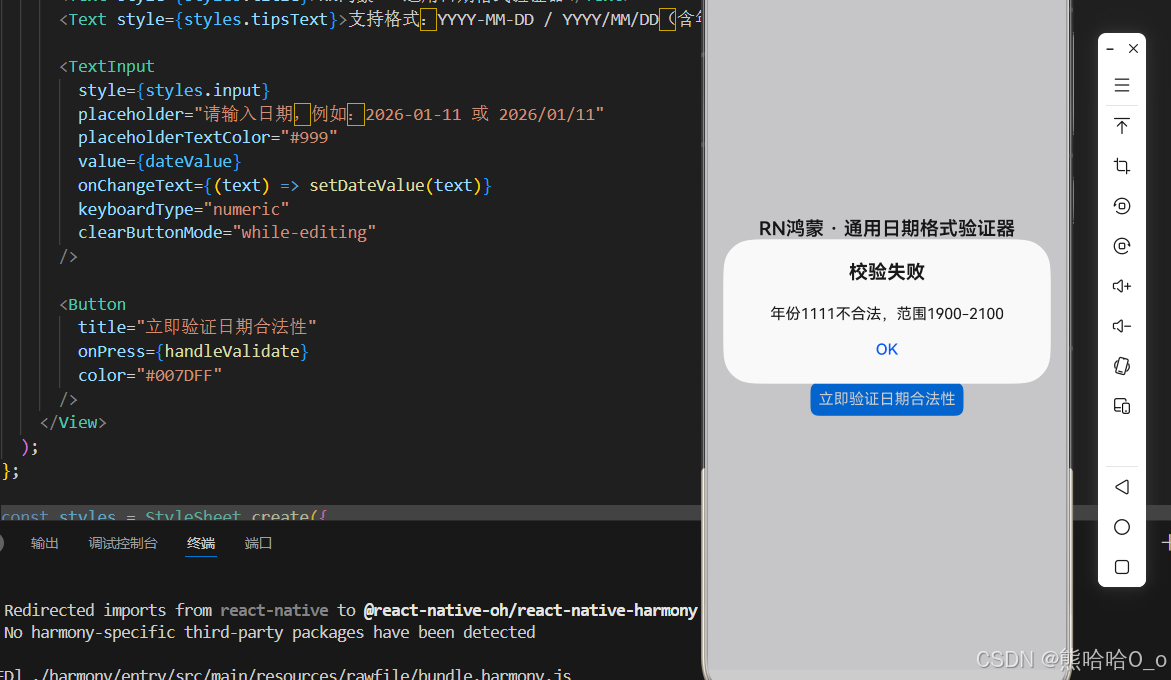
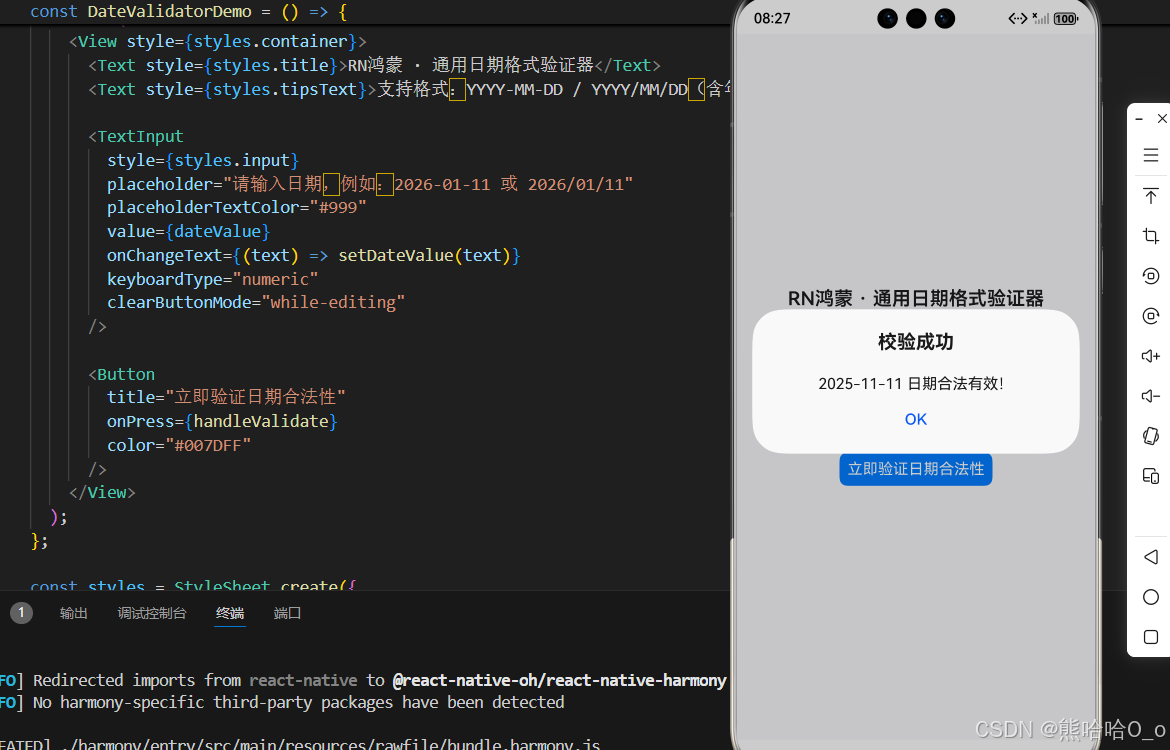
四、鸿蒙端专属适配要点
本次开发的日期验证器,在鸿蒙端运行时无任何兼容性问题,但整理了几个「鸿蒙端专属优化技巧」,让你的代码体验更好、更贴合鸿蒙原生应用的交互规范,零成本优化,必做项:
鸿蒙端优化技巧
- 输入框键盘优化:给
TextInput添加keyboardType="numeric",鸿蒙端会直接调出数字键盘,用户输入日期时无需切换键盘,体验更佳; - 清除按钮优化:添加
clearButtonMode="while-editing",输入时右侧显示清除按钮,一键清空输入内容,鸿蒙原生应用标配交互; - 样式适配:输入框使用
borderRadius:8,符合鸿蒙端的圆角设计规范,避免直角生硬的视觉效果; - 弹窗反馈:使用 RN 内置的
Alert组件,鸿蒙端会显示原生样式的弹窗,而非 RN 自定义弹窗,贴合用户使用习惯。
五、扩展用法:日期验证器的灵活复用
本次封装的日期验证器是「解耦式封装」,工具函数和页面逻辑完全分离,因此具备极高的复用性,在 RN 鸿蒙项目中可以灵活复用,满足不同业务场景的需求,这里提供 2 种最常用的复用方式,零成本扩展:
方式 1:封装为全局工具类
将三个核心验证函数,复制到项目的utils/dateValidator.js文件中,导出后在项目任意页面导入调用,示例:
// utils/dateValidator.js
export const isLeapYear = (year) => { ... };
export const getMonthMaxDay = (year, month) => { ... };
export const validateDate = (dateStr) => { ... };

// 其他页面调用
import { validateDate } from '../utils/dateValidator';
方式 2:表单联动校验
在注册、预约等表单页面,将日期验证器与表单提交逻辑联动,只有日期校验通过,才能提交表单,示例:
const handleFormSubmit = () => {
  const { isValid } = validateDate(birthday);
  if (!isValid) {
    Alert.alert('提示', '请输入合法的出生日期');
    return;
  }
  // 日期合法,执行表单提交逻辑
  console.log('表单提交成功');
};
欢迎加入开源鸿蒙跨平台社区:https://openharmonycrossplatform.csdn.net

开源鸿蒙跨平台开发社区汇聚开发者与厂商,共建“一次开发,多端部署”的开源生态,致力于降低跨端开发门槛,推动万物智联创新。
更多推荐
 28
28 0
0- 0


 已为社区贡献71条内容

所有评论(0)