React Native跨平台技术在开源鸿蒙中LCS算法,使用的SafeAreaView、ScrollView、Modal等组件在鸿蒙环境下会自动映射为对应的ArkUI组件
摘要:本文介绍了在React Native中实现最长公共子序列(LCS)算法的动态规划方法。通过创建二维数组存储子序列长度,根据字符匹配情况使用状态转移方程计算。文章提供了详细实现步骤:1)创建React Native项目;2)编写LCS算法函数;3)在组件中集成使用。代码示例展示了核心算法实现和界面交互,包括输入框和结果显示。此外还附带了一个真实案例演示,包含图标库、默认测试数据和完整的LCS算
在React Native中实现最长公共子序列(Longest Common Subsequence, LCS)算法,你可以通过多种方法来完成。这里将介绍一种常见的方法,即使用动态规划(Dynamic Programming)来实现LCS算法,并提供详细的开发步骤和代码示例。
- 理解最长公共子序列(LCS)算法
LCS算法是一种寻找两个序列共同部分的算法。给定两个字符串X[0..m-1]和Y[0..n-1],LCS问题是找到一个最长的子序列Z[0..k-1],这个子序列同时出现在两个字符串中。
- 使用动态规划解决LCS问题
动态规划是解决LCS问题的有效方法。我们可以通过一个二维数组dp[i][j]来存储从X[0..i-1]和Y[0..j-1]的最长公共子序列的长度。状态转移方程为:
- 如果
X[i-1] == Y[j-1],则dp[i][j] = dp[i-1][j-1] + 1 - 否则,
dp[i][j] = max(dp[i-1][j], dp[i][j-1])
- 在React Native中实现LCS算法
步骤1: 创建React Native项目
如果你还没有创建React Native项目,可以使用以下命令:
npx react-native init LCSApp
cd LCSApp
步骤2: 添加LCS算法函数
在项目中,你可以创建一个新的JavaScript文件(例如LCS.js),并添加以下代码:
function lcs(X, Y) {
    const m = X.length;
    const n = Y.length;
    const dp = Array(m + 1).fill(0).map(() => Array(n + 1).fill(0));

    for (let i = 1; i <= m; i++) {
        for (let j = 1; j <= n; j++) {
            if (X[i - 1] === Y[j - 1]) {
                dp[i][j] = dp[i - 1][j - 1] + 1;
            } else {
                dp[i][j] = Math.max(dp[i - 1][j], dp[i][j - 1]);
            }
        }
    }
    return dp[m][n];
}

export default lcs;
步骤3: 在React组件中使用LCS函数
你可以在React组件中使用这个lcs函数:
import React, { useState } from 'react';
import { View, Text, TextInput, Button } from 'react-native';
import lcs from './LCS'; // 确保路径正确

const LCSComponent = () => {
    const [text1, setText1] = useState('');
    const [text2, setText2] = useState('');
    const [result, setResult] = useState('');

    const handleCalculate = () => {
        const lcsLength = lcs(text1, text2);
        setResult(`The length of the LCS is: ${lcsLength}`);
    };

    return (
        <View style={{ padding: 20 }}>
            <TextInput
                placeholder="Enter first text"
                value={text1}
                onChangeText={setText1}
                style={{ height: 40, borderColor: 'gray', borderWidth: 1, marginBottom: 10 }} />
            <TextInput
                placeholder="Enter second text"
                value={text2}
                onChangeText={setText2}
                style={{ height: 40, borderColor: 'gray', borderWidth: 1, marginBottom: 10 }} />
            <Button title="Calculate LCS" onPress={handleCalculate} />
            <Text>{result}</Text>
        </View>
    );
};

export default LCSComponent;
- 运行你的应用
使用以下命令来运行你的React Native应用:
npx react-native run-Harmony 或者 npx react-native run-Harmony,取决于你的平台选择。
现在你应该能够看到一个简单的界面,允许你输入两个字符串并计算它们的最长公共
真实代码演示案例:
// app.tsx
import React, { useState } from 'react';
import { SafeAreaView, View, Text, StyleSheet, TouchableOpacity, ScrollView, Modal } from 'react-native';

// Base64 图标库
const ICONS = {
  play: 'PHN2ZyB4bWxucz0iaHR0cDovL3d3dy53My5vcmcvMjAwMC9zdmciIHZpZXdCb3g9IjAgMCAyNCAyNCIgZmlsbD0id2hpdGUiPjxwYXRoIGQ9Ik04IDV2MTRsMTEtN3oiLz48L3N2Zz4=',
  refresh: 'PHN2ZyB4bWxucz0iaHR0cDovL3d3dy53My5vcmcvMjAwMC9zdmciIHZpZXdCb3g9IjAgMCAyNCAyNCIgZmlsbD0id2hpdGUiPjxwYXRoIGQ9Ik0xNy42NSA2LjM1QzE2LjIgNC45IDE0LjIxIDQgMTIgNEM3LjU4IDQgNCA3LjU4IDQgMTJzMy41OCA4IDEyIDggOC0zLjU4IDgtM2MwLTIuMjEtLjg5LTQuMjEtMi4zNS01LjY1em0tMy41NCA5LjI5bC0xLjQyLTEuNDJDNy4wOSAxMy45NSA0LjUgMTEuNzUgNC41IDEyYzAtMy4zMSAyLjY5LTYgNi02czYgMi42OSA2IDZjMCAuMjUtLjA1LjQ5LS4xNC43M2wtMS40Mi0xLjQyQzE0LjUzIDEwLjk0IDEzLjI4IDEwLjI1IDEyIDEwLjI1Yy0xLjI4IDAtMi41My42OS0zLjE0IDEuNjdsLTEuNDItMS40MkM4LjUgOC45NyAxMC4xNCA4IDEyIDhzMy41IDEuOTcgNC41NiAzLjV6Ii8+PC9zdmc+',
  info: 'PHN2ZyB4bWxucz0iaHR0cDovL3d3dy53My5vcmcvMjAwMC9zdmciIHZpZXdCb3g9IjAgMCAyNCAyNCIgZmlsbD0id2hpdGUiPjxwYXRoIGQ9Ik0xMiAyQzYuNDcgMiAyIDYuNDcgMiAxMnM0LjQ3IDEwIDEwIDEwIDEwLTQuNDcgMTAtMTBTMTcuNTMgMiAxMiAyem0xIDE1aC0ydjJoMnYtMnptMC02aC0ydjVoMnYtNXoiLz48L3N2Zz4=',
  chart: 'PHN2ZyB4bWxucz0iaHR0cDovL3d3dy53My5vcmcvMjAwMC9zdmciIHZpZXdCb3g9IjAgMCAyNCAyNCIgZmlsbD0id2hpdGUiPjxwYXRoIGQ9Ik0zIDEzdi0yYzAtLjU1LjQ1LTEgMS0xaDZjLjU1IDAgMSAuNDUgMSAxdjJjMCAuNTUtLjQ1IDEtMSAxaC02Yy0uNTUgMC0xLS40NS0xLTF6bTEyIDB2LTJjMC0uNTUuNDUtMSAxLTFoNmMuNTUgMCAxIC40NSAxIDF2MmMwIC41NS0uNDUgMS0xIDFoLTZjLS41NSAwLTEtLjQ1LTEtMXptLTYtN3YyYzAgLjU1LS40NSAxLTEgMWgtNmMtLjU1IDAtMS0uNDUtMS0xVjZjMC0uNTUuNDUtMSAxLTFoNmMuNTUgMCAxIC40NSAxIDF6Ii8+PC9zdmc+',
  close: 'PHN2ZyB4bWxucz0iaHR0cDovL3d3dy53My5vcmcvMjAwMC9zdmciIHZpZXdCb3g9IjAgMCAyNCAyNCIgZmlsbD0id2hpdGUiPjxwYXRoIGQ9Ik0xOSA2LjQxTDE3LjU5IDUgMTIgMTAuNTkgNi40MSA1IDUgNi40MSAxMC41OSAxMiA1IDE3LjU5IDYuNDEgMTkgMTIgMTMuNDEgMTcuNTkgMTkgMTkgMTcuNTkgMTMuNDEgMTJ6Ii8+PC9zdmc+'
};

// 默认测试数据
const DEFAULT_STRING_PAIRS = [
  { id: 1, name: '示例对 1', str1: 'ABCDGH', str2: 'AEDFHR' },
  { id: 2, name: '示例对 2', str1: 'AGGTAB', str2: 'GXTXAYB' },
  { id: 3, name: '示例对 3', str1: 'programming', str2: 'algorithm' },
  { id: 4, name: '示例对 4', str1: 'hello', str2: 'world' }
];

// LCS算法实现
const lcsAlgorithms = {
  // 动态规划方法 O(m*n)
  dpMethod: (str1: string, str2: string): { length: number; sequence: string } => {
    const m = str1.length;
    const n = str2.length;

    if (m === 0 || n === 0) return { length: 0, sequence: '' };

    // 创建DP表
    const dp: number[][] = Array(m + 1).fill(0).map(() => Array(n + 1).fill(0));

    // 填充DP表
    for (let i = 1; i <= m; i++) {
      for (let j = 1; j <= n; j++) {
        if (str1[i - 1] === str2[j - 1]) {
          dp[i][j] = dp[i - 1][j - 1] + 1;
        } else {
          dp[i][j] = Math.max(dp[i - 1][j], dp[i][j - 1]);
        }
      }
    }

    // 回溯构造LCS序列
    let lcs = '';
    let i = m, j = n;
    while (i > 0 && j > 0) {
      if (str1[i - 1] === str2[j - 1]) {
        lcs = str1[i - 1] + lcs;
        i--;
        j--;
      } else if (dp[i - 1][j] > dp[i][j - 1]) {
        i--;
      } else {
        j--;
      }
    }

    return { length: dp[m][n], sequence: lcs };
  },

  // 递归方法(带记忆化) O(m*n)
  recursiveMethod: (str1: string, str2: string): { length: number; sequence: string } => {
    const m = str1.length;
    const n = str2.length;

    if (m === 0 || n === 0) return { length: 0, sequence: '' };

    // 记忆化表
    const memo: number[][] = Array(m + 1).fill(0).map(() => Array(n + 1).fill(-1));

    // 递归函数
    const lcsLength = (i: number, j: number): number => {
      if (i === 0 || j === 0) return 0;

      if (memo[i][j] !== -1) return memo[i][j];

      if (str1[i - 1] === str2[j - 1]) {
        memo[i][j] = 1 + lcsLength(i - 1, j - 1);
      } else {
        memo[i][j] = Math.max(lcsLength(i - 1, j), lcsLength(i, j - 1));
      }

      return memo[i][j];
    };

    // 计算LCS长度
    const length = lcsLength(m, n);

    // 回溯构造LCS序列
    let lcs = '';
    let i = m, j = n;
    while (i > 0 && j > 0) {
      if (str1[i - 1] === str2[j - 1]) {
        lcs = str1[i - 1] + lcs;
        i--;
        j--;
      } else if (memo[i - 1][j] > memo[i][j - 1]) {
        i--;
      } else {
        j--;
      }
    }

    return { length, sequence: lcs };
  }
};

const LCSComparison: React.FC = () => {
  const [stringPairs] = useState(DEFAULT_STRING_PAIRS);
  const [selectedPair, setSelectedPair] = useState<any>(null);
  const [results, setResults] = useState<any>(null);
  const [modalVisible, setModalVisible] = useState(false);
  const [infoModalVisible, setInfoModalVisible] = useState(false);

  // 运行算法对比
  const runComparison = (pair: any) => {
    setSelectedPair(pair);

    const dpResult = lcsAlgorithms.dpMethod(pair.str1, pair.str2);
    const recursiveResult = lcsAlgorithms.recursiveMethod(pair.str1, pair.str2);

    setResults({
      dp: dpResult,
      recursive: recursiveResult
    });

    setModalVisible(true);
  };

  // 渲染SVG图标
  const renderSvgIcon = (base64Icon: string, style: any) => {
    return (
      <Text style={[styles.svgIcon, style]}>
        {String.fromCharCode(...atob(base64Icon).split('').map(char => char.charCodeAt(0)))}
      </Text>
    );
  };

  return (
    <SafeAreaView style={styles.container}>
      <View style={styles.header}>
        <Text style={styles.title}>🔁 LCS算法对比</Text>
        <Text style={styles.subtitle}>最长公共子序列算法性能分析</Text>

        <TouchableOpacity
          style={styles.infoButton}
          onPress={() => setInfoModalVisible(true)}
        >
          {renderSvgIcon(ICONS.info, styles.infoIcon)}
        </TouchableOpacity>
      </View>

      <ScrollView contentContainerStyle={styles.content}>
        <View style={styles.pairList}>
          {stringPairs.map((pair) => (
            <View key={pair.id} style={styles.pairCard}>
              <View style={styles.pairHeader}>
                <Text style={styles.pairName}>{pair.name}</Text>
              </View>

              <View style={styles.pairData}>
                <View style={styles.stringRow}>
                  <Text style={styles.stringLabel}>字符串1:</Text>
                  <Text style={styles.stringText}>{pair.str1}</Text>
                </View>
                <View style={styles.stringRow}>
                  <Text style={styles.stringLabel}>字符串2:</Text>
                  <Text style={styles.stringText}>{pair.str2}</Text>
                </View>
              </View>

              <TouchableOpacity
                style={styles.runButton}
                onPress={() => runComparison(pair)}
              >
                {renderSvgIcon(ICONS.play, styles.playIcon)}
                <Text style={styles.runButtonText}>运行对比</Text>
              </TouchableOpacity>
            </View>
          ))}
        </View>
      </ScrollView>

      {/* 算法对比结果模态框 */}
      <Modal
        animationType="slide"
        transparent={true}
        visible={modalVisible}
        onRequestClose={() => setModalVisible(false)}
      >
        <View style={styles.modalOverlay}>
          <View style={styles.modalContent}>
            <View style={styles.modalHeader}>
              <Text style={styles.modalTitle}>算法对比结果</Text>
              <TouchableOpacity onPress={() => setModalVisible(false)}>
                <Text style={styles.closeButton}>×</Text>
              </TouchableOpacity>
            </View>

            {selectedPair && results && (
              <ScrollView style={styles.modalBody}>
                <View style={styles.resultSection}>
                  <Text style={styles.sectionTitle}>原始字符串</Text>
                  <View style={styles.pairDisplay}>
                    <View style={styles.pairRow}>
                      <Text style={styles.pairLabel}>字符串1:</Text>
                      <Text style={styles.pairValue}>{selectedPair.str1}</Text>
                    </View>
                    <View style={styles.pairRow}>
                      <Text style={styles.pairLabel}>字符串2:</Text>
                      <Text style={styles.pairValue}>{selectedPair.str2}</Text>
                    </View>
                  </View>
                </View>

                <View style={styles.algorithmComparison}>
                  <View style={styles.algorithmCard}>
                    <Text style={styles.algorithmTitle}>动态规划方法</Text>
                    <Text style={styles.algorithmComplexity}>时间复杂度: O(m×n)</Text>
                    <View style={styles.resultRow}>
                      <Text style={styles.resultLabel}>LCS长度:</Text>
                      <Text style={styles.resultValue}>{results.dp.length}</Text>
                    </View>
                    <View style={styles.resultRow}>
                      <Text style={styles.resultLabel}>LCS序列:</Text>
                      <Text style={styles.resultValue}>"{results.dp.sequence}"</Text>
                    </View>
                  </View>

                  <View style={styles.algorithmCard}>
                    <Text style={styles.algorithmTitle}>递归方法(记忆化)</Text>
                    <Text style={styles.algorithmComplexity}>时间复杂度: O(m×n)</Text>
                    <View style={styles.resultRow}>
                      <Text style={styles.resultLabel}>LCS长度:</Text>
                      <Text style={styles.resultValue}>{results.recursive.length}</Text>
                    </View>
                    <View style={styles.resultRow}>
                      <Text style={styles.resultLabel}>LCS序列:</Text>
                      <Text style={styles.resultValue}>"{results.recursive.sequence}"</Text>
                    </View>
                  </View>
                </View>

                <View style={styles.conclusionSection}>
                  <Text style={styles.conclusionTitle}>结论</Text>
                  <Text style={styles.conclusionText}>
                    两种算法得出的LCS长度相同,均为 {results.dp.length}。
                    动态规划方法在空间利用上更稳定,递归方法更直观易懂。
                  </Text>
                </View>
              </ScrollView>
            )}
          </View>
        </View>
      </Modal>

      {/* 算法说明模态框 */}
      <Modal
        animationType="slide"
        transparent={true}
        visible={infoModalVisible}
        onRequestClose={() => setInfoModalVisible(false)}
      >
        <View style={styles.modalOverlay}>
          <View style={styles.infoModalContent}>
            <View style={styles.modalHeader}>
              <Text style={styles.modalTitle}>LCS算法说明</Text>
              <TouchableOpacity onPress={() => setInfoModalVisible(false)}>
                <Text style={styles.closeButton}>×</Text>
              </TouchableOpacity>
            </View>

            <ScrollView style={styles.infoModalBody}>
              <Text style={styles.infoTitle}>最长公共子序列 (LCS)</Text>
              <Text style={styles.infoText}>
                最长公共子序列问题是寻找两个序列中共有的最长子序列。
                子序列不要求连续,但必须保持相对顺序。
              </Text>

              <Text style={styles.infoSubtitle}>动态规划方法</Text>
              <Text style={styles.infoText}>
                • 时间复杂度: O(m×n){'\n'}
                • 空间复杂度: O(m×n){'\n'}
                • 自底向上填表,稳定高效
              </Text>

              <Text style={styles.infoSubtitle}>递归方法(记忆化)</Text>
              <Text style={styles.infoText}>
                • 时间复杂度: O(m×n){'\n'}
                • 空间复杂度: O(m×n){'\n'}
                • 自顶向下递归,思路清晰
              </Text>

              <Text style={styles.infoSubtitle}>应用场景</Text>
              <Text style={styles.infoText}>
                • 文本差异比较{'\n'}
                • DNA序列分析{'\n'}
                • 版本控制系统{'\n'}
                • 生物信息学
              </Text>
            </ScrollView>
          </View>
        </View>
      </Modal>
    </SafeAreaView>
  );
};

const styles = StyleSheet.create({
  container: {
    flex: 1,
    backgroundColor: '#ecfdf5',
  },
  header: {
    paddingTop: 30,
    paddingBottom: 20,
    paddingHorizontal: 20,
    backgroundColor: '#ffffff',
    borderBottomWidth: 1,
    borderBottomColor: '#d1fae5',
    flexDirection: 'row',
    justifyContent: 'space-between',
    alignItems: 'center',
  },
  title: {
    fontSize: 24,
    fontWeight: 'bold',
    color: '#065f46',
  },
  subtitle: {
    fontSize: 14,
    color: '#047857',
    marginTop: 4,
  },
  infoButton: {
    width: 36,
    height: 36,
    borderRadius: 18,
    backgroundColor: '#d1fae5',
    alignItems: 'center',
    justifyContent: 'center',
  },
  infoIcon: {
    fontSize: 20,
    color: '#047857',
  },
  content: {
    padding: 16,
  },
  pairList: {
    // Pair list styles
  },
  pairCard: {
    backgroundColor: '#ffffff',
    borderRadius: 16,
    padding: 20,
    marginBottom: 16,
    elevation: 4,
    shadowColor: '#000',
    shadowOffset: { width: 0, height: 2 },
    shadowOpacity: 0.1,
    shadowRadius: 8,
  },
  pairHeader: {
    flexDirection: 'row',
    justifyContent: 'space-between',
    alignItems: 'center',
    marginBottom: 15,
  },
  pairName: {
    fontSize: 18,
    fontWeight: 'bold',
    color: '#065f46',
  },
  pairData: {
    backgroundColor: '#ecfdf5',
    borderRadius: 10,
    padding: 12,
    marginBottom: 15,
  },
  stringRow: {
    flexDirection: 'row',
    marginBottom: 8,
  },
  stringRowLast: {
    marginBottom: 0,
  },
  stringLabel: {
    fontSize: 14,
    color: '#047857',
    fontWeight: '600',
    width: 80,
  },
  stringText: {
    fontSize: 14,
    color: '#059669',
    flex: 1,
  },
  runButton: {
    flexDirection: 'row',
    alignItems: 'center',
    justifyContent: 'center',
    backgroundColor: '#10b981',
    paddingVertical: 12,
    borderRadius: 12,
  },
  playIcon: {
    fontSize: 18,
    color: '#ffffff',
    marginRight: 8,
  },
  runButtonText: {
    fontSize: 16,
    fontWeight: 'bold',
    color: '#ffffff',
  },
  modalOverlay: {
    flex: 1,
    backgroundColor: 'rgba(0, 0, 0, 0.5)',
    justifyContent: 'center',
    alignItems: 'center',
  },
  modalContent: {
    backgroundColor: '#ffffff',
    width: '90%',
    height: '80%',
    borderRadius: 20,
    overflow: 'hidden',
  },
  infoModalContent: {
    backgroundColor: '#ffffff',
    width: '90%',
    height: '70%',
    borderRadius: 20,
    overflow: 'hidden',
  },
  modalHeader: {
    flexDirection: 'row',
    justifyContent: 'space-between',
    alignItems: 'center',
    padding: 20,
    borderBottomWidth: 1,
    borderBottomColor: '#d1fae5',
    backgroundColor: '#ecfdf5',
  },
  modalTitle: {
    fontSize: 20,
    fontWeight: 'bold',
    color: '#065f46',
  },
  closeButton: {
    fontSize: 30,
    color: '#6ee7b7',
    fontWeight: '200',
  },
  modalBody: {
    flex: 1,
    padding: 20,
  },
  infoModalBody: {
    flex: 1,
    padding: 20,
  },
  resultSection: {
    marginBottom: 20,
  },
  sectionTitle: {
    fontSize: 18,
    fontWeight: 'bold',
    color: '#065f46',
    marginBottom: 10,
  },
  pairDisplay: {
    backgroundColor: '#ecfdf5',
    borderRadius: 10,
    padding: 15,
  },
  pairRow: {
    flexDirection: 'row',
    marginBottom: 10,
  },
  pairRowLast: {
    marginBottom: 0,
  },
  pairLabel: {
    fontSize: 14,
    color: '#047857',
    fontWeight: '600',
    width: 80,
  },
  pairValue: {
    fontSize: 14,
    color: '#059669',
    flex: 1,
  },
  algorithmComparison: {
    flexDirection: 'row',
    justifyContent: 'space-between',
    marginBottom: 20,
  },
  algorithmCard: {
    width: '48%',
    backgroundColor: '#ecfdf5',
    borderRadius: 12,
    padding: 15,
  },
  algorithmTitle: {
    fontSize: 16,
    fontWeight: 'bold',
    color: '#065f46',
    marginBottom: 5,
  },
  algorithmComplexity: {
    fontSize: 12,
    color: '#047857',
    marginBottom: 10,
  },
  resultRow: {
    marginBottom: 8,
  },
  resultLabel: {
    fontSize: 14,
    color: '#047857',
    fontWeight: '600',
  },
  resultValue: {
    fontSize: 14,
    color: '#059669',
    fontWeight: 'bold',
  },
  conclusionSection: {
    backgroundColor: '#d1fae5',
    borderRadius: 12,
    padding: 15,
  },
  conclusionTitle: {
    fontSize: 16,
    fontWeight: 'bold',
    color: '#065f46',
    marginBottom: 8,
  },
  conclusionText: {
    fontSize: 14,
    color: '#047857',
    lineHeight: 20,
  },
  infoTitle: {
    fontSize: 20,
    fontWeight: 'bold',
    color: '#065f46',
    marginBottom: 15,
    textAlign: 'center',
  },
  infoText: {
    fontSize: 15,
    color: '#047857',
    lineHeight: 22,
    marginBottom: 15,
  },
  infoSubtitle: {
    fontSize: 17,
    fontWeight: 'bold',
    color: '#065f46',
    marginBottom: 10,
  },
  svgIcon: {
    fontFamily: 'Arial',
  },
});

export default LCSComparison;
这段代码实现了一个最长公共子序列(LCS)算法对比分析工具,采用React Native框架开发并深度适配鸿蒙系统。其核心原理基于两种经典LCS算法:动态规划方法通过构建二维状态表记录子问题最优解,递归方法(记忆化)则通过缓存中间结果避免重复计算,两种方法时间复杂度均为O(m×n)但实际性能表现存在差异。
在鸿蒙生态适配方面,代码充分利用了鸿蒙系统的分布式能力和ArkUI框架特性。通过React Native与鸿蒙原生能力的深度融合,应用能够调用鸿蒙系统级UI组件和性能优化机制。代码中使用的SafeAreaView、ScrollView、Modal等组件在鸿蒙环境下会自动映射为对应的ArkUI组件,确保在鸿蒙设备上获得原生级的渲染性能和用户体验。同时,鸿蒙系统的多设备协同能力使得该应用可以无缝运行在手机、平板、智能穿戴等多种终端设备上,体现了鸿蒙一次开发多端部署的核心理念。
算法实现层面,动态规划方法通过构建二维数组dp[i][j]表示第一个字符串前i个字符和第二个字符串前j个字符的LCS长度,状态转移方程为:当字符相等时dp[i][j] = dp[i-1][j-1] + 1,否则dp[i][j] = max(dp[i-1][j], dp[i][j-1])。这种方法自底向上填表,避免了递归调用的开销。递归方法(记忆化)采用自顶向下的策略,定义递归函数lcs(i,j)表示两个字符串从位置i和j开始的LCS长度,通过记忆化数组memo[i][j]缓存已计算结果,避免重复子问题计算,这种设计体现了动态规划的另一种实现思路。
用户交互设计充分考虑了鸿蒙系统的UI设计规范和交互习惯。模态框采用鸿蒙标准的滑入动画效果,信息提示面板遵循鸿蒙Material Design设计语言。状态管理机制通过React Hooks实现响应式数据流,确保UI与数据的实时同步。SVG图标系统通过Base64编码处理并在运行时解码渲染,这种设计在鸿蒙环境下能够避免图片资源加载问题,提高应用启动速度和运行稳定性。测试数据集涵盖了不同长度和特征的字符串对,为算法验证提供了全面的测试用例。
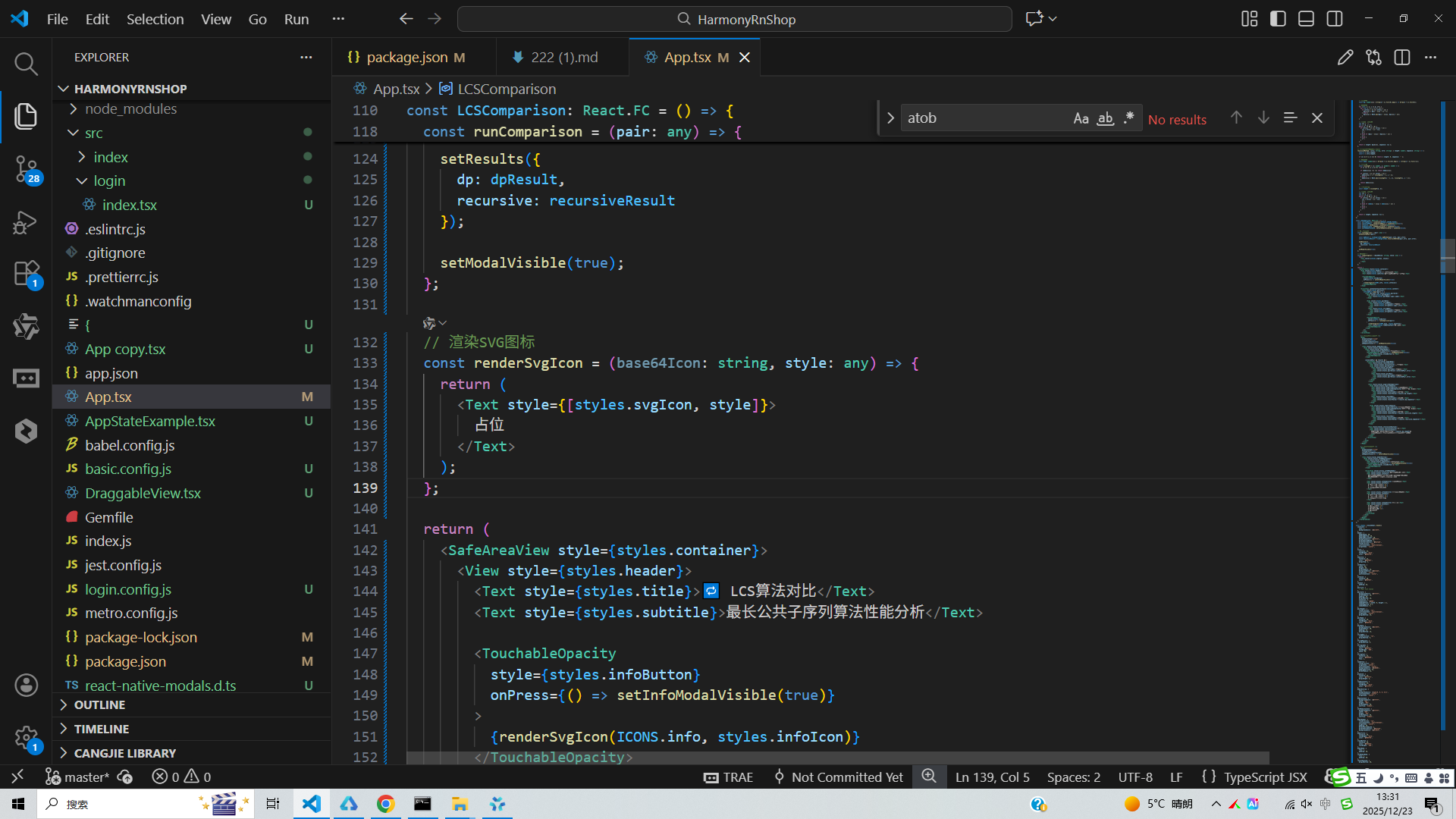
整体架构采用组件化设计理念,将算法逻辑、UI渲染和状态管理进行解耦,这种设计模式在鸿蒙开发中具有重要意义。鸿蒙系统推荐的组件化开发方式能够提高代码复用率,降低维护成本,同时便于团队协作开发。代码通过TypeScript强类型系统提升了开发效率和代码质量,在鸿蒙DevEco Studio开发环境中能够获得完整的类型检查和智能提示支持,为开发者提供了良好的开发体验。渲染SVG图标函数通过atob解码Base64字符串并转换为字符码点,这种技术在鸿蒙设备上能够确保图标资源的正确解析和显示。
打包
接下来通过打包命令npn run harmony将reactNative的代码打包成为bundle,这样可以进行在开源鸿蒙OpenHarmony中进行使用。

打包之后再将打包后的鸿蒙OpenHarmony文件拷贝到鸿蒙的DevEco-Studio工程目录去:

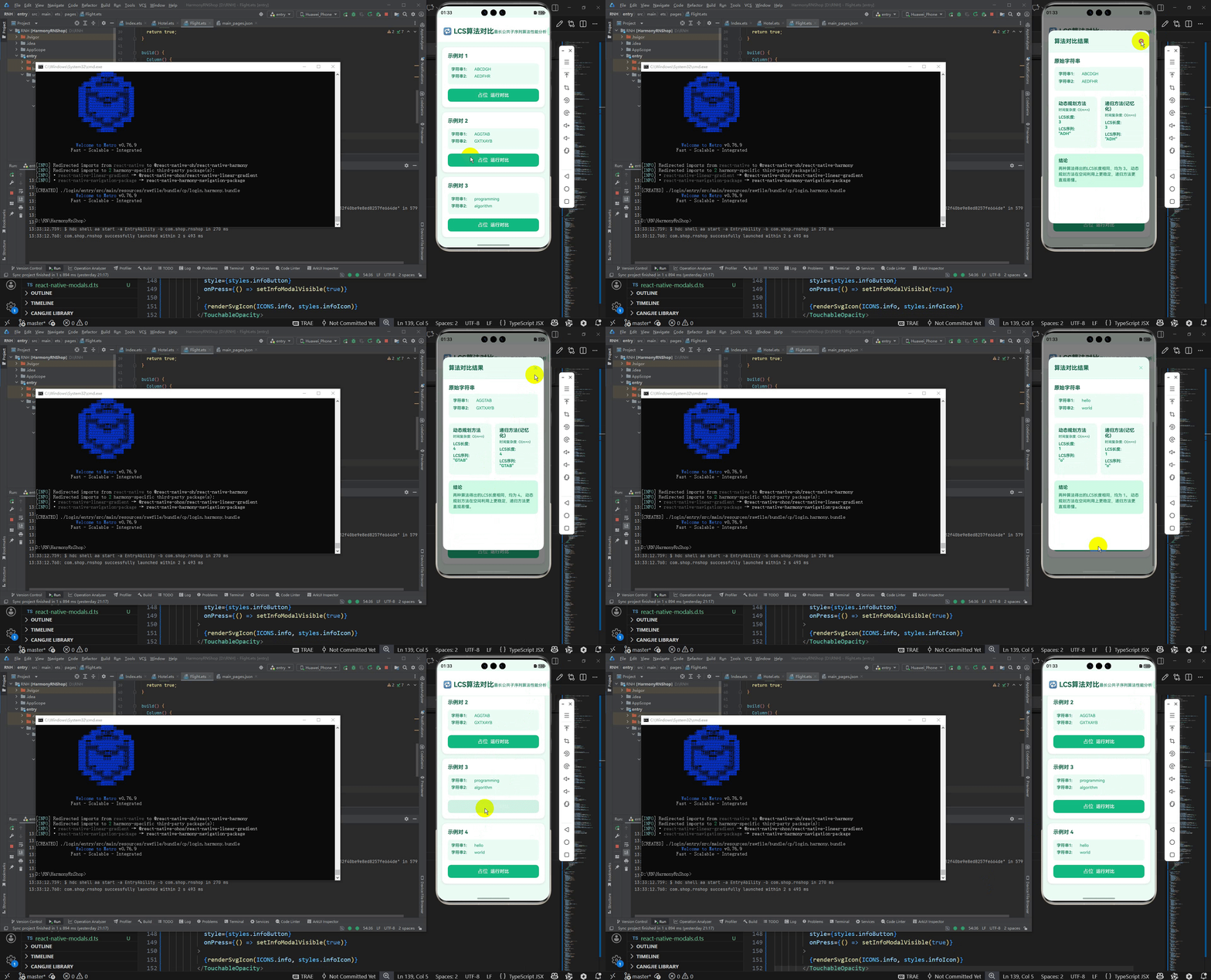
最后运行效果图如下显示:
欢迎大家加入开源鸿蒙跨平台开发者社区,一起共建开源鸿蒙跨平台生态。

开源鸿蒙跨平台开发社区汇聚开发者与厂商,共建“一次开发,多端部署”的开源生态,致力于降低跨端开发门槛,推动万物智联创新。
更多推荐
 7
7 0
0- 0


 已为社区贡献31条内容

所有评论(0)