Flutter for OpenHarmony Web开发助手App实战:MD5生成
MD5是常用的哈希算法,用于生成数据的唯一标识。今天我们来实现一个MD5生成工具,支持文本和文件的MD5计算。
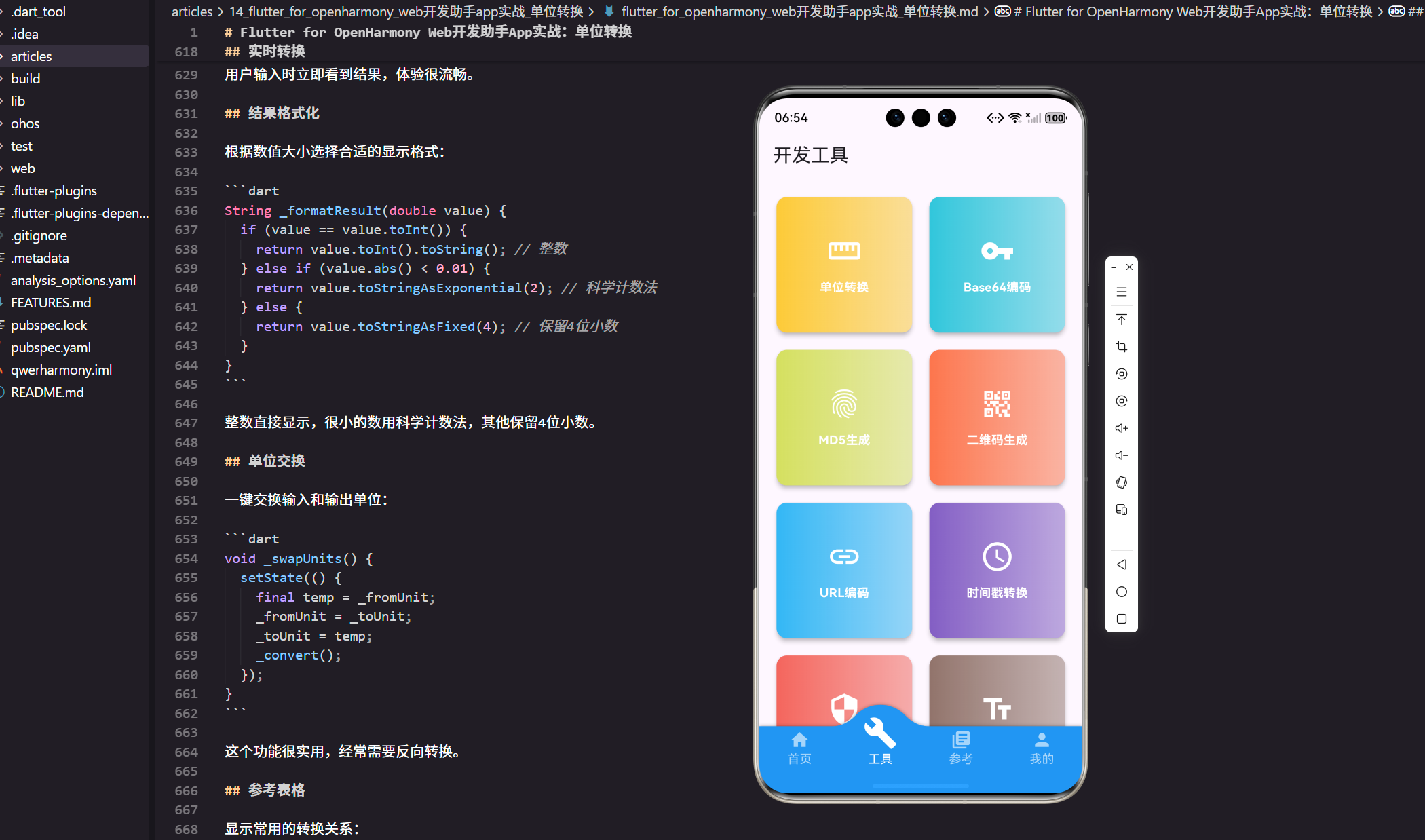
MD5是常用的哈希算法,用于生成数据的唯一标识。今天我们来实现一个MD5生成工具,支持文本和文件的MD5计算。
功能设计
MD5工具需要提供:
文本MD5:计算文本字符串的MD5值。
大小写选择:MD5结果支持大写和小写。
实时计算:输入时自动计算MD5。
多种哈希算法:除了MD5,还支持SHA-1、SHA-256等。
完整代码实现
import 'dart:convert';
import 'package:crypto/crypto.dart';
import 'package:flutter/material.dart';
import 'package:flutter/services.dart';
import 'package:flutter_screenutil/flutter_screenutil.dart';
import 'package:get/get.dart';
class Md5GeneratorPage extends StatefulWidget {
const Md5GeneratorPage({Key? key}) : super(key: key);
State<Md5GeneratorPage> createState() => _Md5GeneratorPageState();
}
class _Md5GeneratorPageState extends State<Md5GeneratorPage> {
final TextEditingController _inputController = TextEditingController();
String _md5Result = '';
String _sha1Result = '';
String _sha256Result = '';
bool _uppercase = false;
void initState() {
super.initState();
_inputController.text = 'Hello, World!';
_calculate();
}
void dispose() {
_inputController.dispose();
super.dispose();
}
Widget build(BuildContext context) {
return Scaffold(
appBar: AppBar(
title: const Text('MD5生成器'),
actions: [
IconButton(
icon: const Icon(Icons.info_outline),
onPressed: _showInfo,
tooltip: '关于哈希算法',
),
],
),
body: SingleChildScrollView(
padding: EdgeInsets.all(16.w),
child: Column(
crossAxisAlignment: CrossAxisAlignment.start,
children: [
// 输入区域
_buildInputSection(),
SizedBox(height: 24.h),
// 选项
_buildOptions(),
SizedBox(height: 24.h),
// 结果显示
_buildResultSection('MD5', _md5Result, Colors.blue),
SizedBox(height: 16.h),
_buildResultSection('SHA-1', _sha1Result, Colors.green),
SizedBox(height: 16.h),
_buildResultSection('SHA-256', _sha256Result, Colors.orange),
SizedBox(height: 24.h),
// 常见用途说明
_buildUsageSection(),
],
),
),
);
}
Widget _buildInputSection() {
return Card(
elevation: 2,
child: Padding(
padding: EdgeInsets.all(16.w),
child: Column(
crossAxisAlignment: CrossAxisAlignment.start,
children: [
Row(
children: [
Icon(Icons.edit, size: 20.sp, color: Colors.blue),
SizedBox(width: 8.w),
Text(
'输入文本',
style: TextStyle(
fontSize: 16.sp,
fontWeight: FontWeight.bold,
),
),
const Spacer(),
TextButton.icon(
onPressed: () => _inputController.clear(),
icon: const Icon(Icons.clear),
label: const Text('清空'),
),
],
),
SizedBox(height: 12.h),
TextField(
controller: _inputController,
maxLines: 5,
style: TextStyle(fontSize: 14.sp),
decoration: InputDecoration(
hintText: '输入要计算哈希值的文本...',
border: OutlineInputBorder(
borderRadius: BorderRadius.circular(8.r),
),
contentPadding: EdgeInsets.all(12.w),
),
onChanged: (_) => _calculate(),
),
SizedBox(height: 12.h),
Row(
children: [
Icon(Icons.info, size: 16.sp, color: Colors.grey[600]),
SizedBox(width: 4.w),
Text(
'字符数: ${_inputController.text.length}',
style: TextStyle(fontSize: 12.sp, color: Colors.grey[600]),
),
],
),
],
),
),
);
}
Widget _buildOptions() {
return Card(
child: Padding(
padding: EdgeInsets.all(16.w),
child: Row(
children: [
Icon(Icons.settings, size: 20.sp, color: Colors.grey[700]),
SizedBox(width: 8.w),
Text(
'选项',
style: TextStyle(
fontSize: 14.sp,
fontWeight: FontWeight.bold,
),
),
SizedBox(width: 16.w),
Checkbox(
value: _uppercase,
onChanged: (value) {
setState(() {
_uppercase = value ?? false;
_calculate();
});
},
),
Text('大写输出', style: TextStyle(fontSize: 14.sp)),
],
),
),
);
}
Widget _buildResultSection(String title, String result, Color color) {
return Card(
elevation: 2,
child: Padding(
padding: EdgeInsets.all(16.w),
child: Column(
crossAxisAlignment: CrossAxisAlignment.start,
children: [
Row(
children: [
Container(
padding: EdgeInsets.symmetric(horizontal: 8.w, vertical: 4.h),
decoration: BoxDecoration(
color: color,
borderRadius: BorderRadius.circular(4.r),
),
child: Text(
title,
style: TextStyle(
color: Colors.white,
fontSize: 12.sp,
fontWeight: FontWeight.bold,
),
),
),
const Spacer(),
IconButton(
icon: const Icon(Icons.copy),
onPressed: () => _copyResult(result),
tooltip: '复制',
),
],
),
SizedBox(height: 12.h),
Container(
width: double.infinity,
padding: EdgeInsets.all(12.w),
decoration: BoxDecoration(
color: Colors.grey[100],
borderRadius: BorderRadius.circular(8.r),
border: Border.all(color: color.withOpacity(0.3)),
),
child: SelectableText(
result.isEmpty ? '等待计算...' : result,
style: TextStyle(
fontFamily: 'monospace',
fontSize: 13.sp,
color: result.isEmpty ? Colors.grey : Colors.black87,
),
),
),
SizedBox(height: 8.h),
Row(
children: [
Icon(Icons.info, size: 14.sp, color: Colors.grey[600]),
SizedBox(width: 4.w),
Text(
'长度: ${result.length} 字符',
style: TextStyle(fontSize: 12.sp, color: Colors.grey[600]),
),
],
),
],
),
),
);
}
Widget _buildUsageSection() {
return Card(
child: Padding(
padding: EdgeInsets.all(16.w),
child: Column(
crossAxisAlignment: CrossAxisAlignment.start,
children: [
Row(
children: [
Icon(Icons.lightbulb, size: 20.sp, color: Colors.amber),
SizedBox(width: 8.w),
Text(
'常见用途',
style: TextStyle(
fontSize: 16.sp,
fontWeight: FontWeight.bold,
),
),
],
),
SizedBox(height: 12.h),
_buildUsageItem(
Icons.security,
'密码存储',
'将密码转换为哈希值存储,提高安全性',
),
_buildUsageItem(
Icons.fingerprint,
'文件校验',
'验证文件完整性,检测是否被篡改',
),
_buildUsageItem(
Icons.vpn_key,
'数字签名',
'生成数据的唯一标识,用于验证数据来源',
),
_buildUsageItem(
Icons.cached,
'缓存键',
'根据内容生成缓存键,实现内容寻址',
),
],
),
),
);
}
Widget _buildUsageItem(IconData icon, String title, String desc) {
return Padding(
padding: EdgeInsets.symmetric(vertical: 8.h),
child: Row(
crossAxisAlignment: CrossAxisAlignment.start,
children: [
Icon(icon, size: 20.sp, color: Colors.blue),
SizedBox(width: 12.w),
Expanded(
child: Column(
crossAxisAlignment: CrossAxisAlignment.start,
children: [
Text(
title,
style: TextStyle(
fontSize: 14.sp,
fontWeight: FontWeight.bold,
),
),
SizedBox(height: 4.h),
Text(
desc,
style: TextStyle(
fontSize: 12.sp,
color: Colors.grey[600],
),
),
],
),
),
],
),
);
}
void _calculate() {
if (_inputController.text.isEmpty) {
setState(() {
_md5Result = '';
_sha1Result = '';
_sha256Result = '';
});
return;
}
final bytes = utf8.encode(_inputController.text);
setState(() {
// MD5
final md5Hash = md5.convert(bytes);
_md5Result = _uppercase ? md5Hash.toString().toUpperCase() : md5Hash.toString();
// SHA-1
final sha1Hash = sha1.convert(bytes);
_sha1Result = _uppercase ? sha1Hash.toString().toUpperCase() : sha1Hash.toString();
// SHA-256
final sha256Hash = sha256.convert(bytes);
_sha256Result = _uppercase ? sha256Hash.toString().toUpperCase() : sha256Hash.toString();
});
}
void _copyResult(String result) {
if (result.isEmpty) {
Get.snackbar('提示', '没有可复制的内容',
snackPosition: SnackPosition.BOTTOM);
return;
}
Clipboard.setData(ClipboardData(text: result));
Get.snackbar('成功', '已复制到剪贴板',
snackPosition: SnackPosition.BOTTOM,
duration: const Duration(seconds: 2));
}
void _showInfo() {
showDialog(
context: context,
builder: (context) => AlertDialog(
title: const Text('关于哈希算法'),
content: SingleChildScrollView(
child: Column(
crossAxisAlignment: CrossAxisAlignment.start,
mainAxisSize: MainAxisSize.min,
children: [
Text(
'MD5',
style: TextStyle(fontSize: 16.sp, fontWeight: FontWeight.bold),
),
SizedBox(height: 8.h),
Text(
'MD5(Message-Digest Algorithm 5)是一种广泛使用的哈希算法,可以产生128位(16字节)的哈希值。',
style: TextStyle(fontSize: 14.sp),
),
SizedBox(height: 16.h),
Text(
'SHA-1',
style: TextStyle(fontSize: 16.sp, fontWeight: FontWeight.bold),
),
SizedBox(height: 8.h),
Text(
'SHA-1(Secure Hash Algorithm 1)产生160位(20字节)的哈希值,比MD5更安全。',
style: TextStyle(fontSize: 14.sp),
),
SizedBox(height: 16.h),
Text(
'SHA-256',
style: TextStyle(fontSize: 16.sp, fontWeight: FontWeight.bold),
),
SizedBox(height: 8.h),
Text(
'SHA-256是SHA-2家族的一员,产生256位(32字节)的哈希值,目前被认为是最安全的哈希算法之一。',
style: TextStyle(fontSize: 14.sp),
),
SizedBox(height: 16.h),
Text(
'安全性说明',
style: TextStyle(fontSize: 16.sp, fontWeight: FontWeight.bold),
),
SizedBox(height: 8.h),
Text(
'MD5和SHA-1已被发现存在碰撞漏洞,不建议用于安全敏感的场景。对于密码存储等安全场景,建议使用SHA-256或更强的算法。',
style: TextStyle(fontSize: 14.sp, color: Colors.red[700]),
),
],
),
),
actions: [
TextButton(
onPressed: () => Navigator.pop(context),
child: const Text('关闭'),
),
],
),
);
}
}
哈希算法使用
Dart的crypto包提供了常用的哈希算法:
import 'package:crypto/crypto.dart';

final bytes = utf8.encode(_inputController.text);

// MD5
final md5Hash = md5.convert(bytes);

// SHA-1
final sha1Hash = sha1.convert(bytes);

// SHA-256
final sha256Hash = sha256.convert(bytes);
先把文本转换为UTF-8字节,再用对应的算法计算哈希值。
实时计算
输入框的onChange事件触发计算:
TextField(
  controller: _inputController,
  onChanged: (_) => _calculate(),
)
用户输入时立即看到结果,体验很流畅。
大小写选择
哈希值默认是小写,可以选择大写:
_md5Result = _uppercase
    ? md5Hash.toString().toUpperCase()
    : md5Hash.toString();
有些系统要求大写的哈希值,提供这个选项很有必要。
结果展示
每种算法的结果单独显示,用不同颜色区分:
_buildResultSection('MD5', _md5Result, Colors.blue),
_buildResultSection('SHA-1', _sha1Result, Colors.green),
_buildResultSection('SHA-256', _sha256Result, Colors.orange),
颜色编码让界面更清晰,用户一眼就能找到需要的结果。
复制功能
每个结果都有复制按钮:
IconButton(
  icon: const Icon(Icons.copy),
  onPressed: () => _copyResult(result),
)
点击即可复制到剪贴板,方便在其他地方使用。
使用场景说明
展示哈希算法的常见用途:
_buildUsageItem(Icons.security, '密码存储', '将密码转换为哈希值存储'),
_buildUsageItem(Icons.fingerprint, '文件校验', '验证文件完整性'),
_buildUsageItem(Icons.vpn_key, '数字签名', '生成数据的唯一标识'),
_buildUsageItem(Icons.cached, '缓存键', '根据内容生成缓存键'),
让用户了解哈希算法的实际应用,不只是一个抽象的概念。
安全性提示
在帮助信息中说明各算法的安全性:
Text(
  'MD5和SHA-1已被发现存在碰撞漏洞,不建议用于安全敏感的场景。',
  style: TextStyle(color: Colors.red[700]),
)
这个提示很重要,避免用户在不合适的场景使用弱算法。
字符统计
显示输入文本的字符数:
Text('字符数: ${_inputController.text.length}')
以及哈希结果的长度:
Text('长度: ${result.length} 字符')
让用户了解数据的基本信息。
功能扩展建议
文件哈希:选择文件计算哈希值。
HMAC支持:带密钥的哈希算法。
批量计算:一次计算多个文本的哈希。
哈希对比:对比两个哈希值是否相同。
彩虹表查询:查询MD5是否在彩虹表中(教育用途)。
实战经验
做哈希工具时,最重要的是让用户理解哈希算法的用途和局限性。
一开始我只提供了MD5,但后来发现很多用户需要SHA-256。所以加入了多种算法,让工具更实用。
还有一个细节:安全性说明。很多人不知道MD5已经不安全了,还在用它存储密码。加入安全提示后,能帮助用户做出正确的选择。
小结
MD5生成器通过支持多种哈希算法,满足不同场景的需求。清晰的界面和实时计算,让哈希值的生成变得简单。
记住:工具不仅要提供功能,还要帮助用户正确使用功能。
欢迎加入开源鸿蒙跨平台社区:https://openharmonycrossplatform.csdn.net

开源鸿蒙跨平台开发社区汇聚开发者与厂商,共建“一次开发,多端部署”的开源生态,致力于降低跨端开发门槛,推动万物智联创新。
更多推荐


 15
15 0
0- 0


 已为社区贡献26条内容

所有评论(0)