flutter_for_openharmony家庭相册app实战+家人详情实现
家人详情页面实现家庭成员信息的完整展示,采用垂直滚动布局,包含头像、基本信息、详细资料和相关照片回忆等模块。顶部圆形头像采用Hero动画实现平滑过渡,关系标签使用彩色圆角边框突出显示。页面支持编辑和分享功能,编辑按钮可跳转至编辑页面修改成员信息。整体设计采用卡片式布局,通过阴影和渐变背景增强视觉效果,确保信息层次清晰、交互友好。
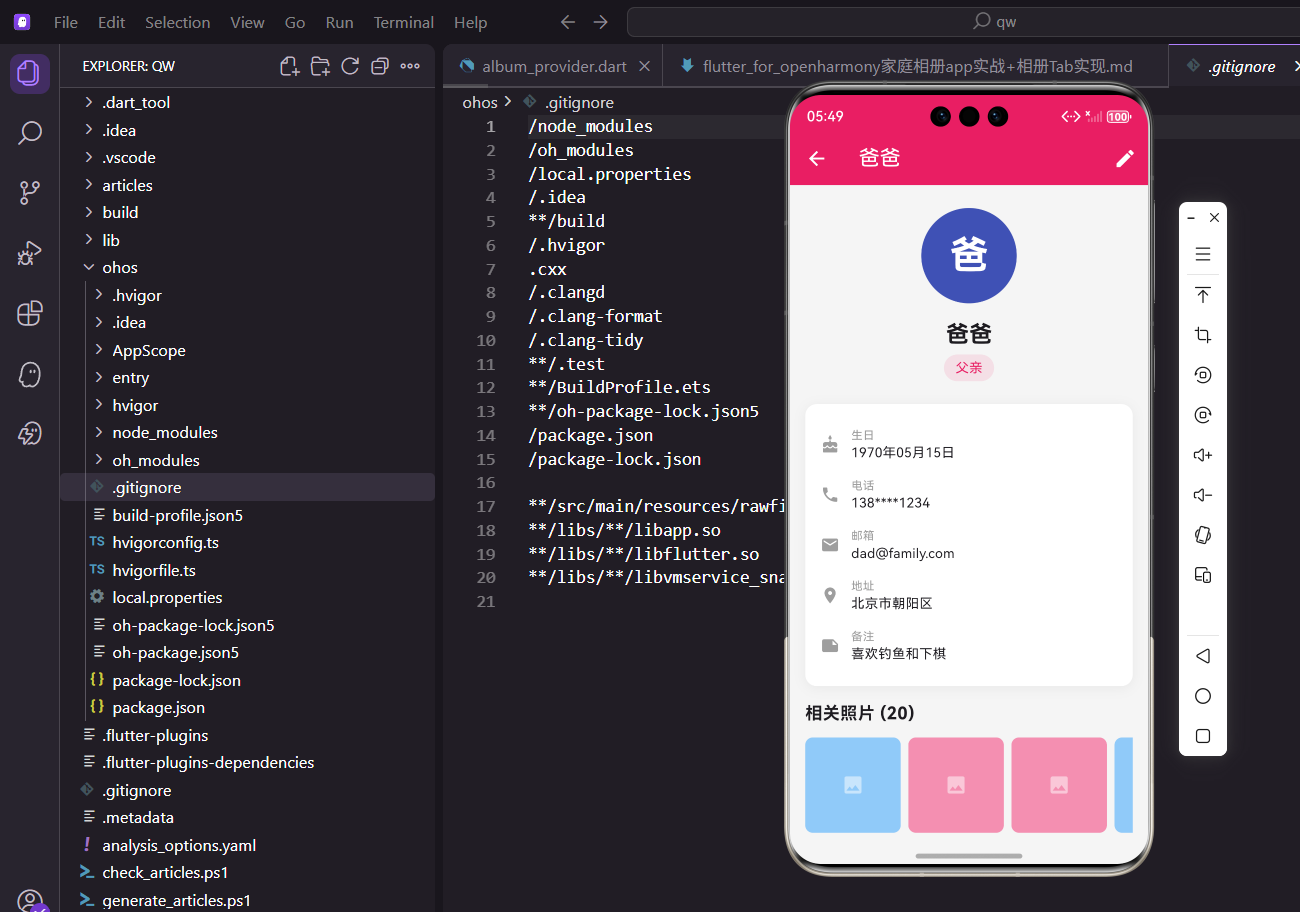
家人详情页面展示单个家庭成员的完整信息,包括基本资料、相关照片和回忆等。这个页面是用户了解家人信息的重要入口,也可以从这里进入编辑页面修改信息。今天我们来实现这个功能。
设计思路
家人详情页面采用垂直滚动布局,顶部显示头像和基本信息,中间显示详细资料卡片,底部展示相关的照片和回忆。用户可以通过顶部的编辑按钮进入编辑页面,也可以分享家人信息。
创建页面结构
先搭建基本框架:
import 'package:flutter/material.dart';
import 'package:flutter_screenutil/flutter_screenutil.dart';
import 'package:provider/provider.dart';
import 'package:intl/intl.dart';
import '../providers/family_provider.dart';
import '../providers/album_provider.dart';
import '../models/family_member.dart';
import 'edit_member_screen.dart';
import 'photo_detail_screen.dart';
import 'memory_detail_screen.dart';
class MemberDetailScreen extends StatelessWidget {
final FamilyMember member;
const MemberDetailScreen({
super.key,
required this.member,
});
Widget build(BuildContext context) {
return Scaffold(
appBar: AppBar(
title: Text(member.name),
elevation: 0,
actions: [
IconButton(
icon: const Icon(Icons.share),
onPressed: () => _shareMember(context),
),
IconButton(
icon: const Icon(Icons.edit),
onPressed: () {
Navigator.push(
context,
MaterialPageRoute(
builder: (_) => EditMemberScreen(member: member),
),
);
},
),
],
),
body: SingleChildScrollView(
child: Column(
children: [
_buildHeader(),
_buildInfoSection(),
_buildStatsSection(context),
_buildPhotosSection(context),
_buildMemoriesSection(context),
_buildEventsSection(context),
SizedBox(height: 24.h),
],
),
),
);
}
}
Scaffold提供基本页面结构,AppBar包含标题、分享和编辑按钮。SingleChildScrollView使整个页面可以滚动,适应不同内容长度。
头部信息展示
顶部展示家人的头像、姓名和关系:
Widget _buildHeader() {
  return Container(
    width: double.infinity,
    padding: EdgeInsets.all(24.w),
    decoration: BoxDecoration(
      gradient: LinearGradient(
        begin: Alignment.topLeft,
        end: Alignment.bottomRight,
        colors: [
          _getColorForMember(member.avatar).withOpacity(0.1),
          _getColorForMember(member.avatar).withOpacity(0.05),
        ],
      ),
    ),
    child: Column(
      children: [
        Hero(
          tag: 'member_${member.id}',
          child: Container(
            width: 120.w,
            height: 120.w,
            decoration: BoxDecoration(
              color: _getColorForMember(member.avatar),
              shape: BoxShape.circle,
              boxShadow: [
                BoxShadow(
                  color: _getColorForMember(member.avatar).withOpacity(0.3),
                  blurRadius: 20,
                  offset: const Offset(0, 10),
                ),
              ],
            ),
            child: Center(
              child: Text(
                member.name.substring(0, 1),
                style: TextStyle(
                  fontSize: 48.sp,
                  fontWeight: FontWeight.bold,
                  color: Colors.white,
                ),
              ),
            ),
          ),
        ),
        SizedBox(height: 16.h),
        Text(
          member.name,
          style: TextStyle(
            fontSize: 26.sp,
            fontWeight: FontWeight.bold,
            color: Colors.black87,
          ),
        ),
        SizedBox(height: 8.h),
        Container(
          padding: EdgeInsets.symmetric(
            horizontal: 16.w,
            vertical: 6.h,
          ),
          decoration: BoxDecoration(
            color: const Color(0xFFE91E63).withOpacity(0.15),
            borderRadius: BorderRadius.circular(20.r),
            border: Border.all(
              color: const Color(0xFFE91E63),
              width: 1,
            ),
          ),
          child: Text(
            member.relationship,
            style: TextStyle(
              color: const Color(0xFFE91E63),
              fontSize: 14.sp,
              fontWeight: FontWeight.w600,
            ),
          ),
        ),
      ],
    ),
  );
}

Color _getColorForMember(String avatar) {
  final colors = [
    const Color(0xFFE91E63),
    const Color(0xFF9C27B0),
    const Color(0xFF3F51B5),
    const Color(0xFF2196F3),
    const Color(0xFF009688),
    const Color(0xFF4CAF50),
  ];
  return colors[avatar.hashCode.abs() % colors.length];
}
圆形头像用Hero动画包装,从列表页跳转过来会有平滑的过渡效果。头像有阴影效果,看起来更立体。关系标签用圆角矩形背景和边框突出显示。
详细信息卡片
展示家人的详细资料:
Widget _buildInfoSection() {
  return Container(
    margin: EdgeInsets.all(16.w),
    padding: EdgeInsets.all(16.w),
    decoration: BoxDecoration(
      color: Colors.white,
      borderRadius: BorderRadius.circular(16.r),
      boxShadow: [
        BoxShadow(
          color: Colors.black.withOpacity(0.05),
          blurRadius: 10,
          offset: const Offset(0, 2),
        ),
      ],
    ),
    child: Column(
      crossAxisAlignment: CrossAxisAlignment.start,
      children: [
        Row(
          children: [
            Container(
              padding: EdgeInsets.all(8.w),
              decoration: BoxDecoration(
                color: const Color(0xFFE91E63).withOpacity(0.1),
                borderRadius: BorderRadius.circular(8.r),
              ),
              child: const Icon(
                Icons.info_outline,
                color: Color(0xFFE91E63),
                size: 20,
              ),
            ),
            SizedBox(width: 8.w),
            Text(
              '基本信息',
              style: TextStyle(
                fontSize: 18.sp,
                fontWeight: FontWeight.bold,
                color: Colors.black87,
              ),
            ),
          ],
        ),
        SizedBox(height: 16.h),
        if (member.birthday != null)
          _buildInfoRow(
            Icons.cake,
            '生日',
            DateFormat('yyyy年MM月dd日').format(member.birthday!),
            _calculateAge(member.birthday!),
          ),
        if (member.phone != null)
          _buildInfoRow(
            Icons.phone,
            '电话',
            member.phone!,
            null,
          ),
        if (member.email != null)
          _buildInfoRow(
            Icons.email,
            '邮箱',
            member.email!,
            null,
          ),
        if (member.address != null)
          _buildInfoRow(
            Icons.location_on,
            '地址',
            member.address!,
            null,
          ),
        if (member.notes != null && member.notes!.isNotEmpty)
          _buildInfoRow(
            Icons.note,
            '备注',
            member.notes!,
            null,
          ),
      ],
    ),
  );
}

Widget _buildInfoRow(
  IconData icon,
  String label,
  String value,
  String? extra,
) {
  return Padding(
    padding: EdgeInsets.only(bottom: 12.h),
    child: Row(
      crossAxisAlignment: CrossAxisAlignment.start,
      children: [
        Container(
          padding: EdgeInsets.all(6.w),
          decoration: BoxDecoration(
            color: Colors.grey[100],
            borderRadius: BorderRadius.circular(6.r),
          ),
          child: Icon(
            icon,
            color: Colors.grey[600],
            size: 18.sp,
          ),
        ),
        SizedBox(width: 12.w),
        Expanded(
          child: Column(
            crossAxisAlignment: CrossAxisAlignment.start,
            children: [
              Text(
                label,
                style: TextStyle(
                  color: Colors.grey[600],
                  fontSize: 12.sp,
                ),
              ),
              SizedBox(height: 2.h),
              Text(
                value,
                style: TextStyle(
                  fontSize: 15.sp,
                  fontWeight: FontWeight.w500,
                  color: Colors.black87,
                ),
              ),
              if (extra != null) ...[
                SizedBox(height: 2.h),
                Text(
                  extra,
                  style: TextStyle(
                    fontSize: 12.sp,
                    color: const Color(0xFFE91E63),
                  ),
                ),
              ],
            ],
          ),
        ),
      ],
    ),
  );
}

String _calculateAge(DateTime birthday) {
  final now = DateTime.now();
  int age = now.year - birthday.year;
  if (now.month < birthday.month ||
      (now.month == birthday.month && now.day < birthday.day)) {
    age--;
  }
  return '$age 岁';
}
信息卡片用白色背景和阴影效果,看起来像浮在页面上。每行信息包含图标、标签和值,图标用灰色圆角容器包装。生日信息会自动计算年龄并显示。
统计信息
显示与该家人相关的统计数据:
Widget _buildStatsSection(BuildContext context) {
  return Consumer2<AlbumProvider, FamilyProvider>(
    builder: (context, albumProvider, familyProvider, _) {
      final photoCount = albumProvider.getPhotosByMember(member.id).length;
      final memoryCount = familyProvider.getMemoriesByMember(member.id).length;
      final eventCount = familyProvider.getEventsByMember(member.id).length;

      return Container(
        margin: EdgeInsets.symmetric(horizontal: 16.w),
        padding: EdgeInsets.all(16.w),
        decoration: BoxDecoration(
          color: Colors.white,
          borderRadius: BorderRadius.circular(16.r),
          boxShadow: [
            BoxShadow(
              color: Colors.black.withOpacity(0.05),
              blurRadius: 10,
              offset: const Offset(0, 2),
            ),
          ],
        ),
        child: Row(
          children: [
            Expanded(
              child: _buildStatItem(
                icon: Icons.photo_library,
                label: '照片',
                value: photoCount.toString(),
                color: const Color(0xFF2196F3),
              ),
            ),
            Container(
              width: 1,
              height: 40.h,
              color: Colors.grey[200],
            ),
            Expanded(
              child: _buildStatItem(
                icon: Icons.auto_awesome,
                label: '回忆',
                value: memoryCount.toString(),
                color: const Color(0xFF9C27B0),
              ),
            ),
            Container(
              width: 1,
              height: 40.h,
              color: Colors.grey[200],
            ),
            Expanded(
              child: _buildStatItem(
                icon: Icons.event,
                label: '活动',
                value: eventCount.toString(),
                color: const Color(0xFF4CAF50),
              ),
            ),
          ],
        ),
      );
    },
  );
}

Widget _buildStatItem({
  required IconData icon,
  required String label,
  required String value,
  required Color color,
}) {
  return Column(
    children: [
      Container(
        padding: EdgeInsets.all(8.w),
        decoration: BoxDecoration(
          color: color.withOpacity(0.1),
          borderRadius: BorderRadius.circular(8.r),
        ),
        child: Icon(
          icon,
          color: color,
          size: 24.sp,
        ),
      ),
      SizedBox(height: 8.h),
      Text(
        value,
        style: TextStyle(
          fontSize: 20.sp,
          fontWeight: FontWeight.bold,
          color: Colors.black87,
        ),
      ),
      SizedBox(height: 2.h),
      Text(
        label,
        style: TextStyle(
          fontSize: 12.sp,
          color: Colors.grey[600],
        ),
      ),
    ],
  );
}
统计信息用三列布局展示照片、回忆和活动的数量。每列有图标、数字和标签,用不同颜色区分。列之间用竖线分隔。
相关照片展示
展示与该家人相关的照片:
Widget _buildPhotosSection(BuildContext context) {
  return Consumer<AlbumProvider>(
    builder: (context, provider, _) {
      final photos = provider.getPhotosByMember(member.id);

      if (photos.isEmpty) {
        return const SizedBox.shrink();
      }

      return Container(
        margin: EdgeInsets.fromLTRB(16.w, 16.h, 16.w, 0),
        child: Column(
          crossAxisAlignment: CrossAxisAlignment.start,
          children: [
            Row(
              children: [
                Container(
                  padding: EdgeInsets.all(8.w),
                  decoration: BoxDecoration(
                    color: const Color(0xFF2196F3).withOpacity(0.1),
                    borderRadius: BorderRadius.circular(8.r),
                  ),
                  child: const Icon(
                    Icons.photo_library,
                    color: Color(0xFF2196F3),
                    size: 20,
                  ),
                ),
                SizedBox(width: 8.w),
                Text(
                  '相关照片',
                  style: TextStyle(
                    fontSize: 18.sp,
                    fontWeight: FontWeight.bold,
                    color: Colors.black87,
                  ),
                ),
                const Spacer(),
                Text(
                  '${photos.length} 张',
                  style: TextStyle(
                    fontSize: 14.sp,
                    color: Colors.grey[600],
                  ),
                ),
                Icon(
                  Icons.chevron_right,
                  color: Colors.grey[400],
                  size: 20.sp,
                ),
              ],
            ),
            SizedBox(height: 12.h),
            SizedBox(
              height: 100.w,
              child: ListView.builder(
                scrollDirection: Axis.horizontal,
                itemCount: photos.length > 10 ? 10 : photos.length,
                itemBuilder: (context, index) {
                  final photo = photos[index];
                  return InkWell(
                    onTap: () {
                      Navigator.push(
                        context,
                        MaterialPageRoute(
                          builder: (_) => PhotoDetailScreen(photo: photo),
                        ),
                      );
                    },
                    borderRadius: BorderRadius.circular(12.r),
                    child: Container(
                      width: 100.w,
                      margin: EdgeInsets.only(right: 8.w),
                      decoration: BoxDecoration(
                        color: _getColorForPhoto(photo.url),
                        borderRadius: BorderRadius.circular(12.r),
                        boxShadow: [
                          BoxShadow(
                            color: Colors.black.withOpacity(0.1),
                            blurRadius: 4,
                            offset: const Offset(0, 2),
                          ),
                        ],
                      ),
                      child: Stack(
                        children: [
                          Center(
                            child: Icon(
                              Icons.photo,
                              color: Colors.white.withOpacity(0.5),
                              size: 32.sp,
                            ),
                          ),
                          if (photo.isFavorite)
                            Positioned(
                              top: 4.w,
                              right: 4.w,
                              child: Container(
                                padding: EdgeInsets.all(4.w),
                                decoration: const BoxDecoration(
                                  color: Colors.white,
                                  shape: BoxShape.circle,
                                ),
                                child: Icon(
                                  Icons.favorite,
                                  color: const Color(0xFFE91E63),
                                  size: 12.sp,
                                ),
                              ),
                            ),
                        ],
                      ),
                    ),
                  );
                },
              ),
            ),
          ],
        ),
      );
    },
  );
}

Color _getColorForPhoto(String url) {
  final colors = [
    const Color(0xFFE91E63),
    const Color(0xFF9C27B0),
    const Color(0xFF3F51B5),
    const Color(0xFF2196F3),
    const Color(0xFF009688),
    const Color(0xFF4CAF50),
    const Color(0xFFFF9800),
    const Color(0xFFFF5722),
  ];
  return colors[url.hashCode.abs() % colors.length].withOpacity(0.3);
}
照片用横向滚动列表展示,最多显示10张。每个照片有圆角和阴影,如果被收藏了右上角会显示爱心图标。点击照片可以查看详情。
相关回忆展示
展示与该家人相关的回忆:
Widget _buildMemoriesSection(BuildContext context) {
  return Consumer<FamilyProvider>(
    builder: (context, provider, _) {
      final memories = provider.getMemoriesByMember(member.id);

      if (memories.isEmpty) {
        return const SizedBox.shrink();
      }

      return Container(
        margin: EdgeInsets.fromLTRB(16.w, 16.h, 16.w, 0),
        child: Column(
          crossAxisAlignment: CrossAxisAlignment.start,
          children: [
            Row(
              children: [
                Container(
                  padding: EdgeInsets.all(8.w),
                  decoration: BoxDecoration(
                    color: const Color(0xFF9C27B0).withOpacity(0.1),
                    borderRadius: BorderRadius.circular(8.r),
                  ),
                  child: const Icon(
                    Icons.auto_awesome,
                    color: Color(0xFF9C27B0),
                    size: 20,
                  ),
                ),
                SizedBox(width: 8.w),
                Text(
                  '相关回忆',
                  style: TextStyle(
                    fontSize: 18.sp,
                    fontWeight: FontWeight.bold,
                    color: Colors.black87,
                  ),
                ),
                const Spacer(),
                Text(
                  '${memories.length} 个',
                  style: TextStyle(
                    fontSize: 14.sp,
                    color: Colors.grey[600],
                  ),
                ),
              ],
            ),
            SizedBox(height: 12.h),
            ...memories.take(5).map((memory) {
              return Card(
                margin: EdgeInsets.only(bottom: 8.h),
                elevation: 1,
                shape: RoundedRectangleBorder(
                  borderRadius: BorderRadius.circular(12.r),
                ),
                child: InkWell(
                  onTap: () {
                    Navigator.push(
                      context,
                      MaterialPageRoute(
                        builder: (_) => MemoryDetailScreen(memory: memory),
                      ),
                    );
                  },
                  borderRadius: BorderRadius.circular(12.r),
                  child: Padding(
                    padding: EdgeInsets.all(12.w),
                    child: Row(
                      children: [
                        Container(
                          padding: EdgeInsets.all(8.w),
                          decoration: BoxDecoration(
                            color: const Color(0xFF9C27B0).withOpacity(0.1),
                            borderRadius: BorderRadius.circular(8.r),
                          ),
                          child: Icon(
                            Icons.auto_awesome,
                            color: const Color(0xFF9C27B0),
                            size: 20.sp,
                          ),
                        ),
                        SizedBox(width: 12.w),
                        Expanded(
                          child: Column(
                            crossAxisAlignment: CrossAxisAlignment.start,
                            children: [
                              Text(
                                memory.title,
                                style: TextStyle(
                                  fontSize: 15.sp,
                                  fontWeight: FontWeight.w600,
                                  color: Colors.black87,
                                ),
                                maxLines: 1,
                                overflow: TextOverflow.ellipsis,
                              ),
                              SizedBox(height: 4.h),
                              Text(
                                DateFormat('yyyy年MM月dd日').format(memory.date),
                                style: TextStyle(
                                  fontSize: 12.sp,
                                  color: Colors.grey[600],
                                ),
                              ),
                            ],
                          ),
                        ),
                        Icon(
                          Icons.chevron_right,
                          color: Colors.grey[400],
                          size: 20.sp,
                        ),
                      ],
                    ),
                  ),
                ),
              );
            }).toList(),
            if (memories.length > 5)
              TextButton(
                onPressed: () {
                  // 跳转到完整回忆列表
                },
                child: Text(
                  '查看全部 ${memories.length} 个回忆',
                  style: TextStyle(
                    color: const Color(0xFFE91E63),
                    fontSize: 14.sp,
                  ),
                ),
              ),
          ],
        ),
      );
    },
  );
}
回忆列表最多显示5个,每个回忆用卡片展示,包含图标、标题和日期。如果回忆超过5个,底部显示"查看全部"按钮。
相关活动展示
展示与该家人相关的活动:
Widget _buildEventsSection(BuildContext context) {
  return Consumer<FamilyProvider>(
    builder: (context, provider, _) {
      final events = provider.getEventsByMember(member.id);

      if (events.isEmpty) {
        return const SizedBox.shrink();
      }

      return Container(
        margin: EdgeInsets.fromLTRB(16.w, 16.h, 16.w, 0),
        child: Column(
          crossAxisAlignment: CrossAxisAlignment.start,
          children: [
            Row(
              children: [
                Container(
                  padding: EdgeInsets.all(8.w),
                  decoration: BoxDecoration(
                    color: const Color(0xFF4CAF50).withOpacity(0.1),
                    borderRadius: BorderRadius.circular(8.r),
                  ),
                  child: const Icon(
                    Icons.event,
                    color: Color(0xFF4CAF50),
                    size: 20,
                  ),
                ),
                SizedBox(width: 8.w),
                Text(
                  '相关活动',
                  style: TextStyle(
                    fontSize: 18.sp,
                    fontWeight: FontWeight.bold,
                    color: Colors.black87,
                  ),
                ),
                const Spacer(),
                Text(
                  '${events.length} 个',
                  style: TextStyle(
                    fontSize: 14.sp,
                    color: Colors.grey[600],
                  ),
                ),
              ],
            ),
            SizedBox(height: 12.h),
            ...events.take(3).map((event) {
              return Card(
                margin: EdgeInsets.only(bottom: 8.h),
                elevation: 1,
                shape: RoundedRectangleBorder(
                  borderRadius: BorderRadius.circular(12.r),
                ),
                child: ListTile(
                  leading: Container(
                    padding: EdgeInsets.all(8.w),
                    decoration: BoxDecoration(
                      color: const Color(0xFF4CAF50).withOpacity(0.1),
                      borderRadius: BorderRadius.circular(8.r),
                    ),
                    child: Icon(
                      Icons.event,
                      color: const Color(0xFF4CAF50),
                      size: 20.sp,
                    ),
                  ),
                  title: Text(
                    event.title,
                    style: TextStyle(
                      fontSize: 15.sp,
                      fontWeight: FontWeight.w600,
                    ),
                    maxLines: 1,
                    overflow: TextOverflow.ellipsis,
                  ),
                  subtitle: Text(
                    DateFormat('MM-dd HH:mm').format(event.date),
                    style: TextStyle(fontSize: 12.sp),
                  ),
                  trailing: const Icon(Icons.chevron_right),
                  onTap: () {
                    // 跳转到活动详情
                  },
                ),
              );
            }).toList(),
          ],
        ),
      );
    },
  );
}
活动列表最多显示3个,用ListTile展示活动标题和时间。点击可以查看活动详情。
分享功能
分享家人信息:
void _shareMember(BuildContext context) {
  showModalBottomSheet(
    context: context,
    shape: RoundedRectangleBorder(
      borderRadius: BorderRadius.vertical(
        top: Radius.circular(20.r),
      ),
    ),
    builder: (sheetContext) => SafeArea(
      child: Column(
        mainAxisSize: MainAxisSize.min,
        children: [
          SizedBox(height: 8.h),
          Container(
            width: 40.w,
            height: 4.h,
            decoration: BoxDecoration(
              color: Colors.grey[300],
              borderRadius: BorderRadius.circular(2.r),
            ),
          ),
          SizedBox(height: 16.h),
          Padding(
            padding: EdgeInsets.symmetric(horizontal: 16.w),
            child: Row(
              children: [
                Text(
                  '分享家人信息',
                  style: TextStyle(
                    fontSize: 18.sp,
                    fontWeight: FontWeight.bold,
                  ),
                ),
                const Spacer(),
                IconButton(
                  icon: const Icon(Icons.close),
                  onPressed: () => Navigator.pop(sheetContext),
                ),
              ],
            ),
          ),
          const Divider(),
          ListTile(
            leading: const Icon(Icons.message, color: Color(0xFF07C160)),
            title: const Text('微信'),
            onTap: () {
              Navigator.pop(sheetContext);
              _performShare(context, 'wechat');
            },
          ),
          ListTile(
            leading: const Icon(Icons.link, color: Color(0xFF2196F3)),
            title: const Text('复制链接'),
            onTap: () {
              Navigator.pop(sheetContext);
              _performShare(context, 'link');
            },
          ),
          SizedBox(height: 16.h),
        ],
      ),
    ),
  );
}

void _performShare(BuildContext context, String platform) {
  String message = platform == 'wechat' ? '已分享到微信' : '链接已复制';

  ScaffoldMessenger.of(context).showSnackBar(
    SnackBar(
      content: Text(message),
      behavior: SnackBarBehavior.floating,
      shape: RoundedRectangleBorder(
        borderRadius: BorderRadius.circular(8.r),
      ),
      margin: EdgeInsets.all(16.w),
    ),
  );
}
分享功能用底部抽屉展示分享选项,包括微信和复制链接。点击后显示SnackBar提示操作成功。
总结
家人详情页面通过清晰的布局展示家人的完整信息。头像用Hero动画增强过渡效果,基本信息和详细资料用卡片展示。统计信息用三列布局展示照片、回忆和活动数量。相关照片用横向滚动列表展示,回忆和活动用卡片列表展示。分享功能让用户可以分享家人信息。整个页面信息丰富但不杂乱,用户体验良好。
欢迎加入开源鸿蒙跨平台社区:https://openharmonycrossplatform.csdn.net

开源鸿蒙跨平台开发社区汇聚开发者与厂商,共建“一次开发,多端部署”的开源生态,致力于降低跨端开发门槛,推动万物智联创新。
更多推荐



 22
22 0
0- 0


 已为社区贡献25条内容

所有评论(0)