Flutter for OpenHarmony垃圾分类指南App实战(三):首页实现
垃圾分类指南App首页实现摘要 本文介绍了垃圾分类指南App首页的实现过程。首页采用垂直滚动布局,包含搜索栏、今日小贴士、快捷功能、分类入口和环保资讯5个模块。搜索栏使用圆角和阴影效果,点击跳转搜索页;今日小贴士采用渐变背景卡片,展示每日垃圾分类知识;快捷功能区提供4个常用入口(答题挑战、视频教程等),采用图标加文字形式;分类入口使用网格布局展示4类垃圾;环保资讯部分展示最新环保新闻。实现中使用了
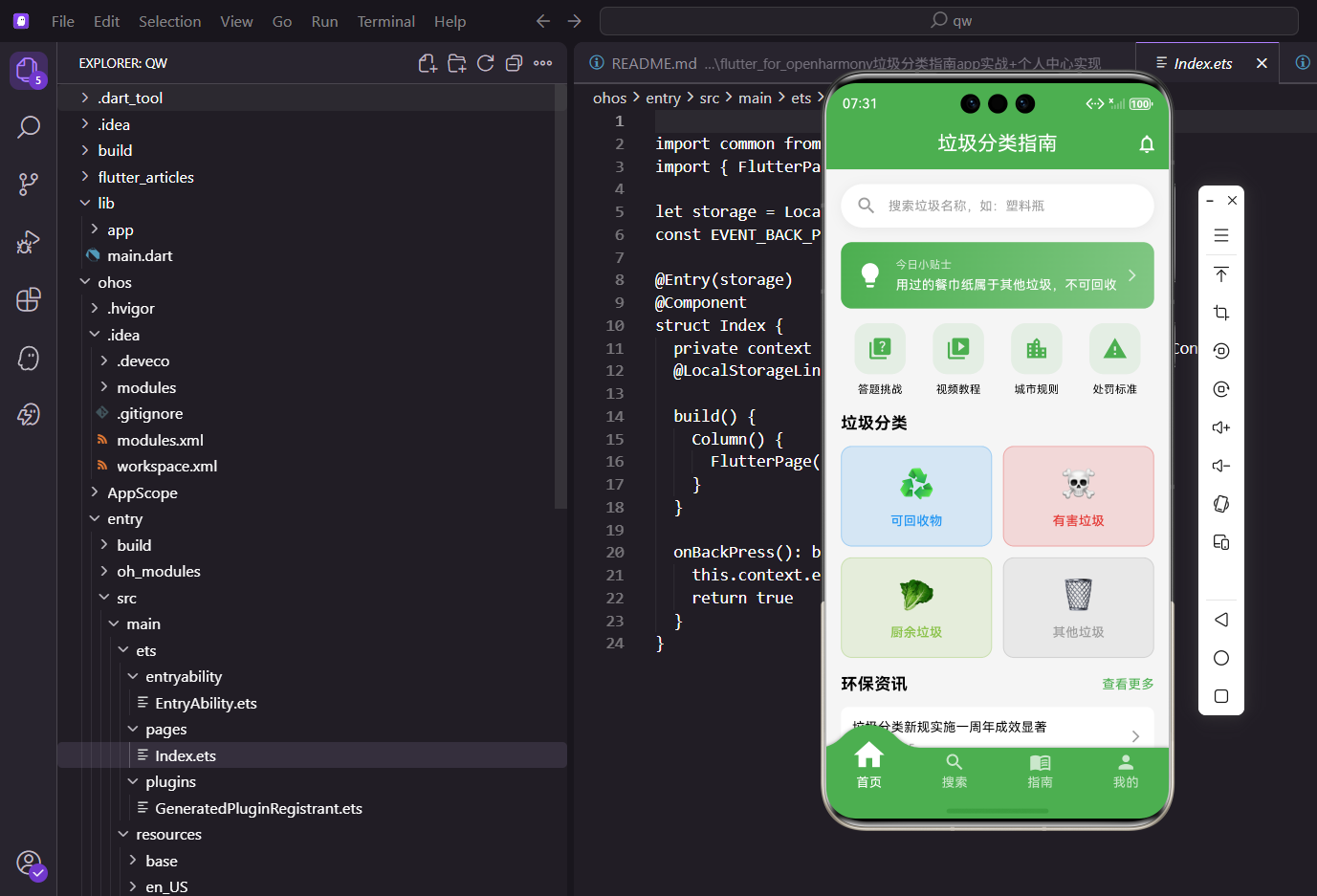
首页是用户打开应用后看到的第一个界面,承载着整个应用的核心功能入口。在垃圾分类指南这个项目中,首页需要展示搜索入口、今日小贴士、快捷功能、分类入口以及环保资讯等内容。这篇文章会详细讲解首页的实现过程。
首页的设计要遵循几个原则:信息层次清晰、核心功能突出、视觉吸引力强、加载速度快。用户打开应用的前几秒是决定他们是否继续使用的关键时刻,如果首页加载慢、布局混乱、找不到想要的功能,用户很可能会直接关闭应用。
从信息架构角度看,首页要把最重要、最常用的功能放在最显眼的位置。对于垃圾分类应用来说,搜索功能是核心,所以要放在顶部。今日小贴士可以增加用户粘性,快捷功能提供便捷入口,分类入口是主要功能,环保资讯丰富内容。这种从上到下的信息排布符合用户的浏览习惯。
页面整体结构
首页采用 SingleChildScrollView 包裹 Column 的方式实现垂直滚动布局。整个页面由五个主要模块组成,从上到下依次排列。
class HomePage extends StatelessWidget {
const HomePage({super.key});
Widget build(BuildContext context) {
final controller = Get.find<HomeController>();
return Scaffold(
appBar: AppBar(
title: const Text('垃圾分类指南'),
centerTitle: true,
elevation: 0,
actions: [
IconButton(
icon: const Icon(Icons.notifications_outlined),
onPressed: () => Get.toNamed(Routes.notification),
tooltip: '消息通知',
),
],
),
body: RefreshIndicator(
onRefresh: () => controller.refreshData(),
child: SingleChildScrollView(
physics: AlwaysScrollableScrollPhysics(),
child: Column(
crossAxisAlignment: CrossAxisAlignment.start,
children: [
_buildSearchBar(),
SizedBox(height: 16.h),
_buildTodayTip(controller),
SizedBox(height: 16.h),
_buildQuickActions(),
SizedBox(height: 16.h),
_buildCategoryGrid(controller),
SizedBox(height: 16.h),
_buildNewsSection(),
SizedBox(height: 32.h),
],
),
),
),
);
}
}
这里使用了 GetX 的依赖注入来获取 HomeController,通过 Get.find<HomeController>() 可以拿到之前注册的控制器实例。这种依赖注入的方式让代码解耦,控制器可以在任何地方被访问,不需要通过构造函数层层传递。
AppBar 右侧放置了一个通知图标,点击后跳转到消息通知页面。centerTitle设置为true让标题居中显示,elevation设置为0去掉阴影,让AppBar和body融为一体。tooltip为图标按钮添加长按提示,提升可访问性。
RefreshIndicator包裹整个内容区域,实现下拉刷新功能。用户下拉时会触发onRefresh回调,调用控制器的refreshData方法重新加载数据。AlwaysScrollableScrollPhysics确保即使内容不足一屏也能下拉刷新。
SizedBox用于在各个模块之间添加间距,让页面布局更加舒展。16.h是一个合适的间距值,既不会太紧凑也不会太松散。最后添加32.h的底部间距,避免内容紧贴屏幕底部。
搜索栏实现
搜索栏是一个假的输入框,点击后会跳转到专门的搜索页面。这种设计在很多应用中都很常见,可以让首页保持简洁。
Widget _buildSearchBar() {
  return GestureDetector(
    onTap: () => Get.toNamed(Routes.quickSearch),
    child: Container(
      margin: EdgeInsets.all(16.w),
      padding: EdgeInsets.symmetric(horizontal: 16.w, vertical: 12.h),
      decoration: BoxDecoration(
        color: Colors.white,
        borderRadius: BorderRadius.circular(24.r),
        boxShadow: [
          BoxShadow(
            color: Colors.black.withOpacity(0.05),
            blurRadius: 10,
            offset: const Offset(0, 2),
          ),
        ],
      ),
      child: Row(
        children: [
          Icon(Icons.search, color: Colors.grey, size: 24.sp),
          SizedBox(width: 12.w),
          Text(
            '搜索垃圾名称,如:塑料瓶',
            style: TextStyle(color: Colors.grey, fontSize: 14.sp),
          ),
        ],
      ),
    ),
  );
}
使用 GestureDetector 包裹整个容器,点击时通过 Get.toNamed 进行路由跳转。容器使用了圆角和阴影效果,让搜索栏看起来更有层次感。flutter_screenutil 提供的 .w、.h、.r、.sp 扩展方法可以实现屏幕适配。
今日小贴士卡片
今日小贴士是一个渐变背景的卡片,展示每天不同的垃圾分类知识。
Widget _buildTodayTip(HomeController controller) {
  return GestureDetector(
    onTap: () => Get.toNamed(Routes.dailyTip),
    child: Container(
      margin: EdgeInsets.symmetric(horizontal: 16.w),
      padding: EdgeInsets.all(16.w),
      decoration: BoxDecoration(
        gradient: const LinearGradient(
          colors: [AppTheme.primaryColor, AppTheme.secondaryColor],
          begin: Alignment.topLeft,
          end: Alignment.bottomRight,
        ),
        borderRadius: BorderRadius.circular(12.r),
      ),
      child: Row(
        children: [
          Icon(Icons.lightbulb, color: Colors.white, size: 32.sp),
          SizedBox(width: 12.w),
          Expanded(
            child: Column(
              crossAxisAlignment: CrossAxisAlignment.start,
              children: [
                Text(
                  '今日小贴士',
                  style: TextStyle(color: Colors.white70, fontSize: 12.sp),
                ),
                SizedBox(height: 4.h),
                Obx(() => Text(
                  controller.todayTip.value,
                  style: TextStyle(color: Colors.white, fontSize: 14.sp),
                  maxLines: 2,
                  overflow: TextOverflow.ellipsis,
                )),
              ],
            ),
          ),
          Icon(Icons.arrow_forward_ios, color: Colors.white70, size: 16.sp),
        ],
      ),
    ),
  );
}
LinearGradient 创建了从左上到右下的渐变效果,使用主题色和次要色作为渐变的起止颜色。Obx 是 GetX 提供的响应式组件,当 controller.todayTip.value 发生变化时会自动重建。
快捷功能入口
快捷功能区域展示了四个常用功能的入口,采用横向排列的方式。
Widget _buildQuickActions() {
  final actions = [
    {'icon': Icons.quiz, 'label': '答题挑战', 'route': Routes.quiz},
    {'icon': Icons.video_library, 'label': '视频教程', 'route': Routes.videoGuide},
    {'icon': Icons.location_city, 'label': '城市规则', 'route': Routes.cityRules},
    {'icon': Icons.warning, 'label': '处罚标准', 'route': Routes.penalty},
  ];

  return Container(
    margin: EdgeInsets.all(16.w),
    child: Row(
      mainAxisAlignment: MainAxisAlignment.spaceAround,
      children: actions.map((action) {
        return GestureDetector(
          onTap: () => Get.toNamed(action['route'] as String),
          child: Column(
            children: [
              Container(
                width: 56.w,
                height: 56.w,
                decoration: BoxDecoration(
                  color: AppTheme.primaryColor.withOpacity(0.1),
                  borderRadius: BorderRadius.circular(16.r),
                ),
                child: Icon(
                  action['icon'] as IconData,
                  color: AppTheme.primaryColor,
                  size: 28.sp,
                ),
              ),
              SizedBox(height: 8.h),
              Text(action['label'] as String, style: TextStyle(fontSize: 12.sp)),
            ],
          ),
        );
      }).toList(),
    ),
  );
}
通过 List<Map> 定义功能数据,然后使用 map 方法遍历生成组件。每个功能项由一个带背景色的图标容器和下方的文字标签组成。mainAxisAlignment: MainAxisAlignment.spaceAround 让四个功能项均匀分布。
垃圾分类入口
分类入口使用 GridView 展示四种垃圾类型,每种类型用不同的颜色区分。
Widget _buildCategoryGrid(HomeController controller) {
  final categories = [
    {'type': GarbageType.recyclable, 'color': AppTheme.recyclableColor, 'icon': '♻️', 'name': '可回收物'},
    {'type': GarbageType.hazardous, 'color': AppTheme.hazardousColor, 'icon': '☠️', 'name': '有害垃圾'},
    {'type': GarbageType.kitchen, 'color': AppTheme.kitchenColor, 'icon': '🥬', 'name': '厨余垃圾'},
    {'type': GarbageType.other, 'color': AppTheme.otherColor, 'icon': '🗑️', 'name': '其他垃圾'},
  ];

  return Container(
    margin: EdgeInsets.symmetric(horizontal: 16.w),
    child: Column(
      crossAxisAlignment: CrossAxisAlignment.start,
      children: [
        Text(
          '垃圾分类',
          style: TextStyle(fontSize: 18.sp, fontWeight: FontWeight.bold),
        ),
        SizedBox(height: 12.h),
        GridView.builder(
          shrinkWrap: true,
          physics: const NeverScrollableScrollPhysics(),
          gridDelegate: SliverGridDelegateWithFixedCrossAxisCount(
            crossAxisCount: 2,
            crossAxisSpacing: 12.w,
            mainAxisSpacing: 12.h,
            childAspectRatio: 1.5,
          ),
          itemCount: categories.length,
          itemBuilder: (context, index) {
            final cat = categories[index];
            return GestureDetector(
              onTap: () => Get.toNamed(Routes.categoryDetail, arguments: cat['type']),
              child: Container(
                decoration: BoxDecoration(
                  color: (cat['color'] as Color).withOpacity(0.15),
                  borderRadius: BorderRadius.circular(12.r),
                  border: Border.all(color: (cat['color'] as Color).withOpacity(0.3)),
                ),
                child: Column(
                  mainAxisAlignment: MainAxisAlignment.center,
                  children: [
                    Text(cat['icon'] as String, style: TextStyle(fontSize: 32.sp)),
                    SizedBox(height: 8.h),
                    Text(
                      cat['name'] as String,
                      style: TextStyle(
                        fontSize: 14.sp,
                        fontWeight: FontWeight.w500,
                        color: cat['color'] as Color,
                      ),
                    ),
                  ],
                ),
              ),
            );
          },
        ),
      ],
    ),
  );
}
GridView.builder 配合 shrinkWrap: true 和 NeverScrollableScrollPhysics() 可以让网格视图在 Column 中正常显示,不会产生滚动冲突。childAspectRatio: 1.5 设置了子项的宽高比。点击分类卡片时,通过 arguments 参数传递分类类型到详情页。
环保资讯模块
资讯模块展示最新的环保新闻,包含标题和查看更多入口。
Widget _buildNewsSection() {
  return Container(
    margin: EdgeInsets.all(16.w),
    child: Column(
      crossAxisAlignment: CrossAxisAlignment.start,
      children: [
        Row(
          mainAxisAlignment: MainAxisAlignment.spaceBetween,
          children: [
            Text(
              '环保资讯',
              style: TextStyle(fontSize: 18.sp, fontWeight: FontWeight.bold),
            ),
            GestureDetector(
              onTap: () => Get.toNamed(Routes.news),
              child: Text(
                '查看更多',
                style: TextStyle(fontSize: 14.sp, color: AppTheme.primaryColor),
              ),
            ),
          ],
        ),
        SizedBox(height: 12.h),
        _buildNewsItem('垃圾分类新规实施一周年成效显著', '2024-01-15'),
        _buildNewsItem('智能垃圾桶助力社区分类', '2024-01-14'),
      ],
    ),
  );
}

Widget _buildNewsItem(String title, String date) {
  return GestureDetector(
    onTap: () => Get.toNamed(Routes.newsDetail, arguments: title),
    child: Container(
      margin: EdgeInsets.only(bottom: 12.h),
      padding: EdgeInsets.all(12.w),
      decoration: BoxDecoration(
        color: Colors.white,
        borderRadius: BorderRadius.circular(8.r),
      ),
      child: Row(
        children: [
          Expanded(
            child: Column(
              crossAxisAlignment: CrossAxisAlignment.start,
              children: [
                Text(title, style: TextStyle(fontSize: 14.sp), maxLines: 2, overflow: TextOverflow.ellipsis),
                SizedBox(height: 4.h),
                Text(date, style: TextStyle(fontSize: 12.sp, color: Colors.grey)),
              ],
            ),
          ),
          Icon(Icons.arrow_forward_ios, size: 16.sp, color: Colors.grey),
        ],
      ),
    ),
  );
}
资讯列表项使用白色背景卡片,包含标题、日期和右侧的箭头图标。点击后跳转到资讯详情页,并将标题作为参数传递。
首页控制器
首页的数据逻辑由 HomeController 管理,主要负责今日小贴士的加载和最近搜索记录的维护。
class HomeController extends GetxController {
final categories = GarbageData.categories.obs;
final recentSearches = <GarbageItem>[].obs;
final todayTip = ''.obs;
final tips = [
'塑料瓶投放前请清空瓶内液体,压扁后投放更环保',
'废电池请单独收集,不要混入其他垃圾',
'厨余垃圾请沥干水分后投放',
'用过的餐巾纸属于其他垃圾,不可回收',
];
void onInit() {
super.onInit();
_loadTodayTip();
}
void _loadTodayTip() {
final index = DateTime.now().day % tips.length;
todayTip.value = tips[index];
}
void addRecentSearch(GarbageItem item) {
recentSearches.removeWhere((i) => i.id == item.id);
recentSearches.insert(0, item);
if (recentSearches.length > 10) {
recentSearches.removeLast();
}
}
}
onInit 方法在控制器初始化时调用,用于加载今日小贴士。小贴士的选择基于当前日期,确保每天显示不同的内容。addRecentSearch 方法用于添加最近搜索记录,会自动去重并限制最多保存10条。
首页的实现就完成了,它作为应用的门面,需要在有限的空间内展示尽可能多的功能入口,同时保持界面的简洁和美观。
欢迎加入开源鸿蒙跨平台社区:https://openharmonycrossplatform.csdn.net
首页轮播图实现
添加轮播图展示重要信息:
class BannerWidget extends StatelessWidget {
final List<BannerModel> banners = [
BannerModel(
imageUrl: 'assets/images/banner1.jpg',
title: '垃圾分类新规',
link: '/news/1',
),
BannerModel(
imageUrl: 'assets/images/banner2.jpg',
title: '环保知识竞赛',
link: '/activity/1',
),
];
Widget build(BuildContext context) {
return Container(
height: 180.h,
margin: EdgeInsets.all(16.w),
child: CarouselSlider(
options: CarouselOptions(
autoPlay: true,
enlargeCenterPage: true,
aspectRatio: 2.0,
viewportFraction: 0.9,
),
items: banners.map((banner) {
return GestureDetector(
onTap: () => Get.toNamed(banner.link),
child: Container(
decoration: BoxDecoration(
borderRadius: BorderRadius.circular(12.r),
image: DecorationImage(
image: AssetImage(banner.imageUrl),
fit: BoxFit.cover,
),
),
child: Container(
decoration: BoxDecoration(
borderRadius: BorderRadius.circular(12.r),
gradient: LinearGradient(
begin: Alignment.topCenter,
end: Alignment.bottomCenter,
colors: [
Colors.transparent,
Colors.black.withOpacity(0.7),
],
),
),
alignment: Alignment.bottomLeft,
padding: EdgeInsets.all(16.w),
child: Text(
banner.title,
style: TextStyle(
color: Colors.white,
fontSize: 16.sp,
fontWeight: FontWeight.bold,
),
),
),
),
);
}).toList(),
),
);
}
}
轮播图使用CarouselSlider实现自动播放和手势滑动。渐变遮罩确保标题文字清晰可见。点击轮播图可以跳转到详情页面。
快捷功能入口
优化快捷功能的布局和交互:
Widget _buildQuickActions() {
  final actions = [
    {'icon': Icons.search, 'label': '智能识别', 'route': Routes.aiRecognition, 'color': Colors.blue},
    {'icon': Icons.camera_alt, 'label': '拍照识别', 'route': Routes.camera, 'color': Colors.green},
    {'icon': Icons.location_city, 'label': '城市规则', 'route': Routes.cityRules, 'color': Colors.orange},
    {'icon': Icons.article, 'label': '环保资讯', 'route': Routes.news, 'color': Colors.purple},
    {'icon': Icons.quiz, 'label': '知识问答', 'route': Routes.quiz, 'color': Colors.red},
    {'icon': Icons.emoji_events, 'label': '积分商城', 'route': Routes.shop, 'color': Colors.amber},
  ];

  return Container(
    padding: EdgeInsets.all(16.w),
    child: GridView.builder(
      shrinkWrap: true,
      physics: const NeverScrollableScrollPhysics(),
      gridDelegate: SliverGridDelegateWithFixedCrossAxisCount(
        crossAxisCount: 3,
        mainAxisSpacing: 16.h,
        crossAxisSpacing: 16.w,
        childAspectRatio: 1.0,
      ),
      itemCount: actions.length,
      itemBuilder: (context, index) {
        final action = actions[index];
        return GestureDetector(
          onTap: () => Get.toNamed(action['route'] as String),
          child: Container(
            decoration: BoxDecoration(
              color: Colors.white,
              borderRadius: BorderRadius.circular(12.r),
              boxShadow: [
                BoxShadow(
                  color: Colors.grey.shade200,
                  blurRadius: 4,
                  offset: const Offset(0, 2),
                ),
              ],
            ),
            child: Column(
              mainAxisAlignment: MainAxisAlignment.center,
              children: [
                Container(
                  padding: EdgeInsets.all(12.w),
                  decoration: BoxDecoration(
                    color: (action['color'] as Color).withOpacity(0.1),
                    shape: BoxShape.circle,
                  ),
                  child: Icon(
                    action['icon'] as IconData,
                    color: action['color'] as Color,
                    size: 28.sp,
                  ),
                ),
                SizedBox(height: 8.h),
                Text(
                  action['label'] as String,
                  style: TextStyle(
                    fontSize: 13.sp,
                    fontWeight: FontWeight.w500,
                  ),
                ),
              ],
            ),
          ),
        );
      },
    ),
  );
}
快捷功能使用网格布局,每个功能都有专属图标和颜色。卡片式设计配合阴影效果,视觉层次分明。
热门搜索推荐
展示热门搜索词,引导用户搜索:
Widget _buildHotSearches() {
  final hotSearches = ['塑料瓶', '废电池', '过期药品', '剩菜剩饭', '旧衣服'];

  return Container(
    padding: EdgeInsets.all(16.w),
    child: Column(
      crossAxisAlignment: CrossAxisAlignment.start,
      children: [
        Row(
          children: [
            Icon(Icons.local_fire_department, color: Colors.red, size: 20.sp),
            SizedBox(width: 8.w),
            Text(
              '热门搜索',
              style: TextStyle(
                fontSize: 16.sp,
                fontWeight: FontWeight.bold,
              ),
            ),
          ],
        ),
        SizedBox(height: 12.h),
        Wrap(
          spacing: 8.w,
          runSpacing: 8.h,
          children: hotSearches.map((keyword) {
            return GestureDetector(
              onTap: () => Get.toNamed(Routes.search, arguments: keyword),
              child: Container(
                padding: EdgeInsets.symmetric(horizontal: 12.w, vertical: 6.h),
                decoration: BoxDecoration(
                  color: Colors.grey.shade100,
                  borderRadius: BorderRadius.circular(16.r),
                ),
                child: Text(
                  keyword,
                  style: TextStyle(fontSize: 13.sp),
                ),
              ),
            );
          }).toList(),
        ),
      ],
    ),
  );
}
热门搜索使用标签云形式展示,点击标签直接搜索。火焰图标增强"热门"的视觉表达。
每日一题功能
添加每日垃圾分类知识问答:
Widget _buildDailyQuestion() {
  return Container(
    margin: EdgeInsets.all(16.w),
    padding: EdgeInsets.all(16.w),
    decoration: BoxDecoration(
      gradient: LinearGradient(
        colors: [Colors.purple.shade400, Colors.purple.shade600],
      ),
      borderRadius: BorderRadius.circular(12.r),
    ),
    child: Column(
      crossAxisAlignment: CrossAxisAlignment.start,
      children: [
        Row(
          children: [
            Icon(Icons.quiz, color: Colors.white, size: 24.sp),
            SizedBox(width: 8.w),
            Text(
              '每日一题',
              style: TextStyle(
                color: Colors.white,
                fontSize: 18.sp,
                fontWeight: FontWeight.bold,
              ),
            ),
            const Spacer(),
            Container(
              padding: EdgeInsets.symmetric(horizontal: 8.w, vertical: 4.h),
              decoration: BoxDecoration(
                color: Colors.white.withOpacity(0.3),
                borderRadius: BorderRadius.circular(12.r),
              ),
              child: Text(
                '+10积分',
                style: TextStyle(color: Colors.white, fontSize: 12.sp),
              ),
            ),
          ],
        ),
        SizedBox(height: 12.h),
        Text(
          '问题: 用过的餐巾纸属于什么垃圾?',
          style: TextStyle(color: Colors.white, fontSize: 15.sp),
        ),
        SizedBox(height: 12.h),
        ElevatedButton(
          onPressed: () => Get.toNamed(Routes.dailyQuestion),
          style: ElevatedButton.styleFrom(
            backgroundColor: Colors.white,
            foregroundColor: Colors.purple,
          ),
          child: const Text('去答题'),
        ),
      ],
    ),
  );
}
每日一题以卡片形式展示,渐变背景吸引注意。答题可获得积分,激励用户参与。
用户成就展示
在首页展示用户的成就和积分:
Widget _buildUserAchievements() {
  return Container(
    margin: EdgeInsets.all(16.w),
    padding: EdgeInsets.all(16.w),
    decoration: BoxDecoration(
      color: Colors.white,
      borderRadius: BorderRadius.circular(12.r),
    ),
    child: Row(
      mainAxisAlignment: MainAxisAlignment.spaceAround,
      children: [
        _buildAchievementItem(Icons.stars, '积分', '1250', Colors.amber),
        _buildAchievementItem(Icons.emoji_events, '排名', '第89名', Colors.orange),
        _buildAchievementItem(Icons.check_circle, '连续打卡', '7天', Colors.green),
      ],
    ),
  );
}

Widget _buildAchievementItem(IconData icon, String label, String value, Color color) {
  return Column(
    children: [
      Icon(icon, color: color, size: 32.sp),
      SizedBox(height: 4.h),
      Text(
        value,
        style: TextStyle(
          fontSize: 18.sp,
          fontWeight: FontWeight.bold,
          color: color,
        ),
      ),
      Text(
        label,
        style: TextStyle(fontSize: 12.sp, color: Colors.grey),
      ),
    ],
  );
}
成就展示激励用户持续使用应用。积分、排名、打卡等数据可视化,增强游戏化体验。
附近投放点地图
显示附近的垃圾投放点:
Widget _buildNearbyPoints() {
  return Container(
    margin: EdgeInsets.all(16.w),
    child: Column(
      crossAxisAlignment: CrossAxisAlignment.start,
      children: [
        Row(
          mainAxisAlignment: MainAxisAlignment.spaceBetween,
          children: [
            Text(
              '附近投放点',
              style: TextStyle(fontSize: 16.sp, fontWeight: FontWeight.bold),
            ),
            TextButton(
              onPressed: () => Get.toNamed(Routes.map),
              child: const Text('查看地图'),
            ),
          ],
        ),
        SizedBox(height: 12.h),
        Container(
          height: 150.h,
          decoration: BoxDecoration(
            color: Colors.grey.shade200,
            borderRadius: BorderRadius.circular(12.r),
          ),
          child: const Center(
            child: Text('地图加载中...'),
          ),
        ),
      ],
    ),
  );
}
地图功能帮助用户找到最近的垃圾投放点,提供实用价值。
总结与技术要点
首页是应用的门面,通过合理的信息架构和丰富的功能入口,我们创建了一个既美观又实用的首页。轮播图、快捷功能、热门搜索、每日一题、成就展示等模块各司其职,为用户提供便捷的导航和丰富的内容。
核心技术点包括:CustomScrollView实现复杂的滚动布局,CarouselSlider实现轮播图自动播放,GridView展示快捷功能网格,Wrap组件实现标签云布局,渐变和阴影提升视觉效果。
首页设计要平衡信息密度和视觉美观,既要展示足够的内容,又不能让用户感到拥挤。通过模块化设计和合理的间距,我们创建了一个清晰、友好的首页体验。
欢迎加入开源鸿蒙跨平台社区:https://openharmonycrossplatform.csdn.net

开源鸿蒙跨平台开发社区汇聚开发者与厂商,共建“一次开发,多端部署”的开源生态,致力于降低跨端开发门槛,推动万物智联创新。
更多推荐

 17
17 0
0- 0


 已为社区贡献30条内容

所有评论(0)