Flutter for OpenHarmony垃圾分类指南App实战:关于我们实现
摘要:本文介绍了App"关于我们"页面的设计与实现,采用Flutter框架构建简洁实用的界面。页面包含应用图标、名称、版本号、功能介绍和联系信息等核心内容,通过卡片式布局和列表形式清晰展示。文章还提供了可扩展的功能建议,如用户协议、开源许可等,并强调设计应遵循简洁、完整和品牌感原则。代码示例展示了主要功能列表的实现方式,为开发者提供了实用的UI构建参考。
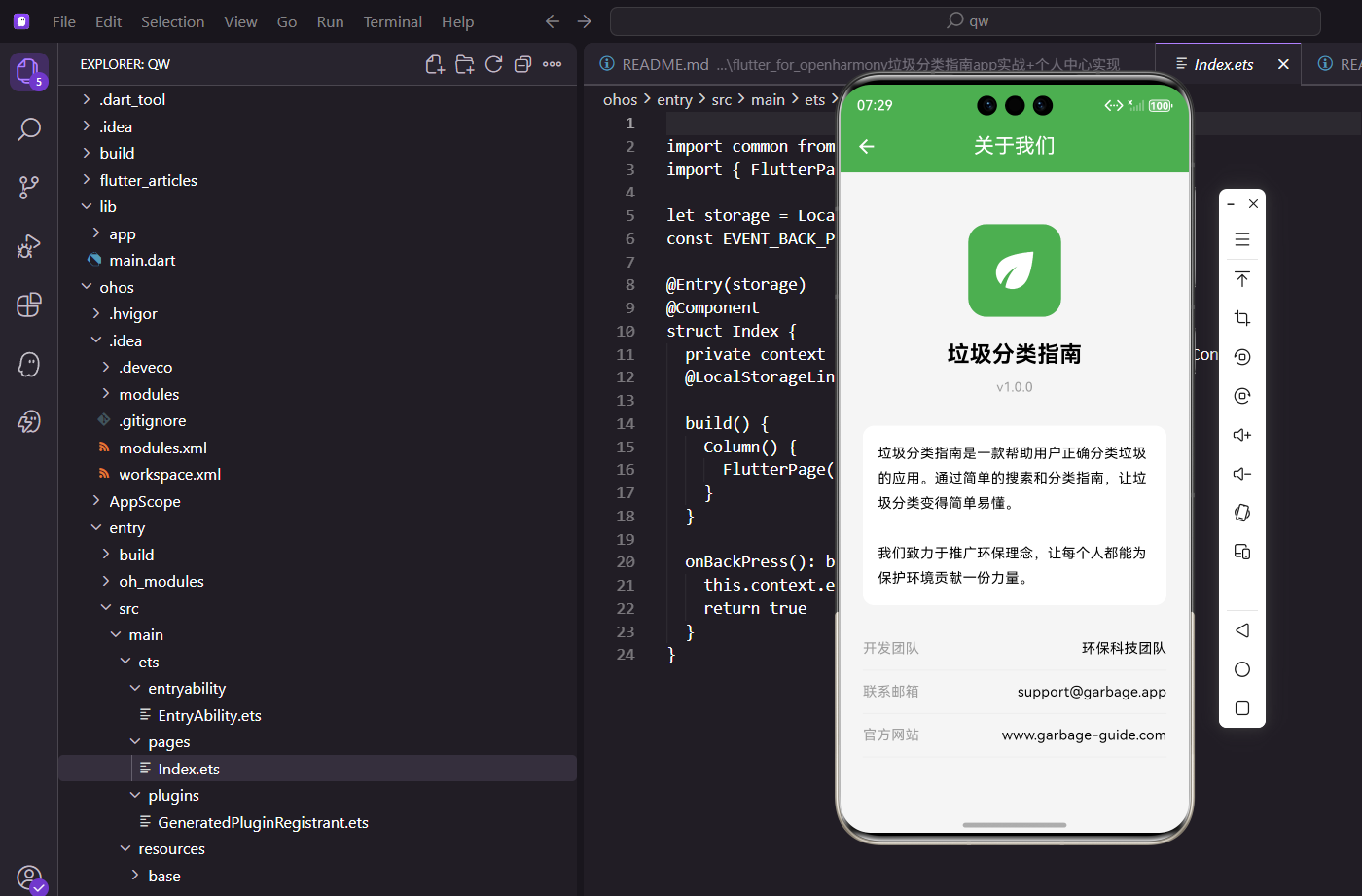
关于我们页面是App的"名片",展示应用的基本信息、开发团队、联系方式等。虽然用户不常看,但该有的还是得有,这是一个完整App的标配。
页面布局
页面采用居中布局,从上到下依次是:应用图标、应用名称、版本号、应用介绍、联系信息。
class AboutPage extends StatelessWidget {
const AboutPage({super.key});
Widget build(BuildContext context) {
return Scaffold(
appBar: AppBar(title: const Text('关于我们')),
body: SingleChildScrollView(
padding: EdgeInsets.all(24.w),
child: Column(
children: [
SizedBox(height: 32.h),
用SingleChildScrollView包裹,保证内容多的时候可以滚动。顶部留了32的空白,让内容不会太贴近AppBar。
应用图标
图标用一个圆角矩形容器,里面放个环保图标:
            Container(
              width: 100.w,
              height: 100.w,
              decoration: BoxDecoration(
                color: AppTheme.primaryColor,
                borderRadius: BorderRadius.circular(20.r),
              ),
              child: Icon(Icons.eco, color: Colors.white, size: 60.sp),
            ),
设计说明:用
Icons.eco这个叶子图标,和垃圾分类的环保主题很搭。背景用主题绿色,整体感觉清新自然。
应用名称和版本
            SizedBox(height: 24.h),
            Text(
              '垃圾分类指南',
              style: TextStyle(fontSize: 24.sp, fontWeight: FontWeight.bold),
            ),
            SizedBox(height: 8.h),
            Text(
              'v1.0.0',
              style: TextStyle(fontSize: 14.sp, color: Colors.grey),
            ),
应用名称用大字号加粗,是页面的视觉焦点。版本号用灰色小字,作为辅助信息。
应用介绍
介绍文字放在一个白色卡片里:
            SizedBox(height: 32.h),
            Container(
              padding: EdgeInsets.all(16.w),
              decoration: BoxDecoration(
                color: Colors.white,
                borderRadius: BorderRadius.circular(12.r),
              ),
              child: Text(
                '垃圾分类指南是一款帮助用户正确分类垃圾的应用。通过简单的搜索和分类指南,让垃圾分类变得简单易懂。\n\n我们致力于推广环保理念,让每个人都能为保护环境贡献一份力量。',
                style: TextStyle(fontSize: 15.sp, height: 1.8),
              ),
            ),
介绍文字分两段,第一段说应用是干什么的,第二段说我们的愿景。height: 1.8设置了比较大的行高,让文字读起来更舒服。
联系信息
联系信息用列表的形式展示:
            SizedBox(height: 24.h),
            _buildInfoItem('开发团队', '环保科技团队'),
            _buildInfoItem('联系邮箱', 'support@garbage.app'),
            _buildInfoItem('官方网站', 'www.garbage-guide.com'),
          ],
        ),
      ),
    );
  }
三条信息:开发团队、联系邮箱、官方网站。这些是用户可能需要的联系方式。
信息项组件
每条信息用一个带下划线的行来展示:
  Widget _buildInfoItem(String label, String value) {
    return Container(
      padding: EdgeInsets.symmetric(vertical: 12.h),
      decoration: BoxDecoration(
        border: Border(bottom: BorderSide(color: Colors.grey.shade200)),
      ),
      child: Row(
        mainAxisAlignment: MainAxisAlignment.spaceBetween,
        children: [
          Text(label, style: TextStyle(fontSize: 15.sp, color: Colors.grey)),
          Text(value, style: TextStyle(fontSize: 15.sp)),
        ],
      ),
    );
  }
}
左边是标签,右边是值,用spaceBetween让它们分布在两端。底部有条浅灰色的分隔线,让各项之间有区分。
可以扩展的内容
关于我们页面还可以加入:
1. 用户协议和隐私政策
这是上架应用商店必须的,点击后跳转到对应的页面或网页。
2. 开源许可
如果用了开源库,应该列出来并致谢。
3. 分享应用
让用户可以把App分享给朋友。
4. 给个好评
引导用户去应用商店评分。
5. 更新日志
展示每个版本的更新内容。
设计原则
关于我们页面的设计原则是:
1. 简洁
不需要太多花哨的设计,信息清晰就好。
2. 完整
该有的信息都要有,让用户能找到需要的联系方式。
3. 品牌感
通过图标、颜色、文案传达应用的品牌形象。
这个页面虽然简单,但它代表了应用的"脸面"。做得好能给用户留下专业、可信赖的印象。
欢迎加入开源鸿蒙跨平台社区:https://openharmonycrossplatform.csdn.net
功能列表展示
展示App的主要功能:
Widget _buildFeatureSection() {
  final features = [
    {'icon': Icons.search, 'title': '智能搜索', 'desc': '快速查找垃圾分类'},
    {'icon': Icons.menu_book, 'title': '分类指南', 'desc': '详细的分类说明'},
    {'icon': Icons.quiz, 'title': '答题挑战', 'desc': '趣味学习分类知识'},
    {'icon': Icons.location_city, 'title': '城市规则', 'desc': '各地分类标准'},
  ];

  return Container(
    padding: EdgeInsets.all(16.w),
    child: Column(
      crossAxisAlignment: CrossAxisAlignment.start,
      children: [
        Text('主要功能', style: TextStyle(fontSize: 16.sp, fontWeight: FontWeight.bold)),
        SizedBox(height: 12.h),
        ...features.map((f) => Padding(
          padding: EdgeInsets.only(bottom: 12.h),
          child: Row(
            children: [
              Container(
                width: 40.w,
                height: 40.w,
                decoration: BoxDecoration(
                  color: AppTheme.primaryColor.withOpacity(0.1),
                  borderRadius: BorderRadius.circular(8.r),
                ),
                child: Icon(f['icon'] as IconData, color: AppTheme.primaryColor),
              ),
              SizedBox(width: 12.w),
              Column(
                crossAxisAlignment: CrossAxisAlignment.start,
                children: [
                  Text(f['title'] as String, style: TextStyle(fontWeight: FontWeight.w500)),
                  Text(f['desc'] as String, style: TextStyle(fontSize: 12.sp, color: Colors.grey)),
                ],
              ),
            ],
          ),
        )),
      ],
    ),
  );
}
操作按钮区域
分享和评分按钮:
Widget _buildActionButtons() {
  return Row(
    children: [
      Expanded(
        child: ElevatedButton.icon(
          onPressed: () {
            Share.share('推荐一款垃圾分类App:垃圾分类指南!');
          },
          icon: const Icon(Icons.share),
          label: const Text('分享应用'),
          style: ElevatedButton.styleFrom(
            backgroundColor: AppTheme.primaryColor,
            foregroundColor: Colors.white,
          ),
        ),
      ),
      SizedBox(width: 12.w),
      Expanded(
        child: OutlinedButton.icon(
          onPressed: () {
            Get.snackbar('提示', '感谢您的支持!');
          },
          icon: const Icon(Icons.star),
          label: const Text('给个好评'),
        ),
      ),
    ],
  );
}
法律文档区域
用户协议和隐私政策链接:
Widget _buildLegalSection() {
  return Row(
    mainAxisAlignment: MainAxisAlignment.center,
    children: [
      TextButton(
        onPressed: () => _showLegalDocument('用户协议'),
        child: Text('用户协议', style: TextStyle(color: Colors.grey)),
      ),
      Text('|', style: TextStyle(color: Colors.grey)),
      TextButton(
        onPressed: () => _showLegalDocument('隐私政策'),
        child: Text('隐私政策', style: TextStyle(color: Colors.grey)),
      ),
    ],
  );
}

void _showLegalDocument(String title) {
  Get.bottomSheet(
    Container(
      height: Get.height * 0.8,
      padding: EdgeInsets.all(20.w),
      decoration: BoxDecoration(
        color: Colors.white,
        borderRadius: BorderRadius.vertical(top: Radius.circular(20.r)),
      ),
      child: Column(
        crossAxisAlignment: CrossAxisAlignment.start,
        children: [
          Text(title, style: TextStyle(fontSize: 18.sp, fontWeight: FontWeight.bold)),
          Expanded(
            child: SingleChildScrollView(
              child: Text('这里是\...', style: TextStyle(height: 1.8)),
            ),
          ),
        ],
      ),
    ),
  );
}
检查更新功能
检查是否有新版本:
Future<void> _checkUpdate() async {
  Get.dialog(
    const Center(child: CircularProgressIndicator()),
    barrierDismissible: false,
  );

  await Future.delayed(const Duration(seconds: 1));
  Get.back();

  Get.snackbar('提示', '当前已是最新版本');
}
意见反馈入口
在关于页面添加意见反馈入口:
Widget _buildFeedbackTile() {
  return ListTile(
    leading: Icon(Icons.feedback, color: AppTheme.primaryColor),
    title: const Text('意见反馈'),
    trailing: const Icon(Icons.arrow_forward_ios, size: 16),
    onTap: () => Get.toNamed(Routes.feedback),
  );
}
关于我们页面虽然简单,但它是展示应用专业形象的重要窗口。
欢迎加入开源鸿蒙跨平台社区:https://openharmonycrossplatform.csdn.net

开源鸿蒙跨平台开发社区汇聚开发者与厂商,共建“一次开发,多端部署”的开源生态,致力于降低跨端开发门槛,推动万物智联创新。
更多推荐
 8
8 0
0- 0


 已为社区贡献30条内容

所有评论(0)