flutter_for_openharmony家庭药箱管理app实战+健康管理实现
健康管理功能为药箱应用提供家人健康指标监测,包含血压、血糖、体重、体温四大核心指标。采用2x2网格卡片布局,每项指标配专属图标(红色心形、蓝色水滴等)和颜色,便于快速识别。界面设计包含家人健康概览模块,展示前3位成员最新数据,并提供健康报告入口。所有卡片采用白色背景+轻微阴影的悬浮效果,通过半透明色块突出图标,增强视觉层次感和操作直观性。代码实现使用Flutter框架,通过Provider管理数据
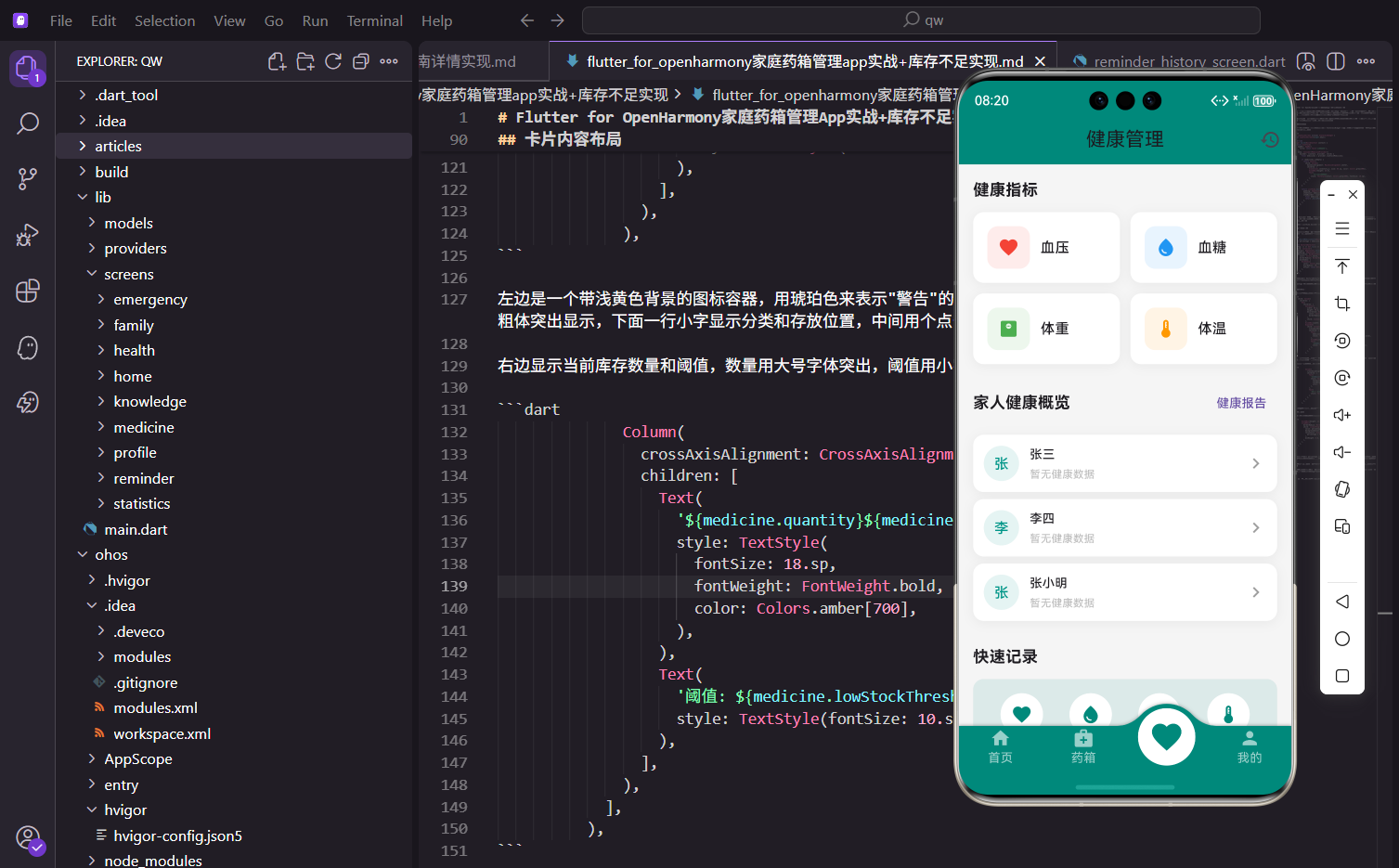
健康管理是药箱应用的重要扩展功能。通过记录血压、血糖、体重、体温等健康指标,用户可以全面了解家人的健康状况,及时发现异常并采取措施。
功能设计思路
健康管理页面作为健康功能的入口,展示四个主要健康指标的快捷入口、家人健康概览和快速记录功能。使用卡片式布局,每个指标使用独特的图标和颜色。
健康指标入口
四个主要健康指标采用网格布局:
Widget _buildHealthCategories(BuildContext context) {
  return Column(
    crossAxisAlignment: CrossAxisAlignment.start,
    children: [
      Text(
        '健康指标',
        style: TextStyle(fontSize: 18.sp, fontWeight: FontWeight.bold),
      ),
      SizedBox(height: 12.h),
      Row(
        children: [
          Expanded(
            child: _buildCategoryCard(
              icon: Icons.favorite,
              title: '血压',
              color: Colors.red,
              onTap: () => Get.to(() => const BloodPressureScreen()),
            ),
          ),
          SizedBox(width: 12.w),
          Expanded(
            child: _buildCategoryCard(
              icon: Icons.water_drop,
              title: '血糖',
              color: Colors.blue,
              onTap: () => Get.to(() => const BloodSugarScreen()),
            ),
          ),
        ],
      ),
      SizedBox(height: 12.h),
      Row(
        children: [
          Expanded(
            child: _buildCategoryCard(
              icon: Icons.monitor_weight,
              title: '体重',
              color: Colors.green,
              onTap: () => Get.to(() => const WeightScreen()),
            ),
          ),
          SizedBox(width: 12.w),
          Expanded(
            child: _buildCategoryCard(
              icon: Icons.thermostat,
              title: '体温',
              color: Colors.orange,
              onTap: () => Get.to(() => const TemperatureScreen()),
            ),
          ),
        ],
      ),
    ],
  );
}
使用2x2网格布局,每行两个指标。血压使用红色心形图标,血糖使用蓝色水滴图标,体重使用绿色体重秤图标,体温使用橙色温度计图标。这种颜色和图标的组合让用户能够快速识别不同指标,形成视觉记忆。每个卡片都可以点击进入详细页面。
指标卡片设计
每个指标卡片包含图标和标题:
Widget _buildCategoryCard({
  required IconData icon,
  required String title,
  required Color color,
  required VoidCallback onTap,
}) {
  return GestureDetector(
    onTap: onTap,
    child: Container(
      padding: EdgeInsets.all(16.w),
      decoration: BoxDecoration(
        color: Colors.white,
        borderRadius: BorderRadius.circular(12.r),
        boxShadow: [
          BoxShadow(
            color: Colors.black.withOpacity(0.05),
            blurRadius: 10,
            offset: const Offset(0, 2),
          ),
        ],
      ),
      child: Row(
        children: [
          Container(
            width: 48.w,
            height: 48.w,
            decoration: BoxDecoration(
              color: color.withOpacity(0.1),
              borderRadius: BorderRadius.circular(12.r),
            ),
            child: Icon(icon, color: color, size: 24.sp),
          ),
          SizedBox(width: 12.w),
          Text(
            title,
            style: TextStyle(fontSize: 16.sp, fontWeight: FontWeight.w500),
          ),
        ],
      ),
    ),
  );
}
图标使用对应颜色的半透明背景,图标本身使用完全不透明的颜色。标题使用中等粗细字体,整个卡片可点击跳转到对应的详情页面。白色背景配合轻微阴影,营造出卡片悬浮的视觉效果,提升了界面的层次感。
家人健康概览
展示家庭成员的最新健康数据:
Widget _buildFamilyHealthOverview(BuildContext context) {
  return Consumer2<FamilyProvider, HealthProvider>(
    builder: (context, familyProvider, healthProvider, child) {
      return Column(
        crossAxisAlignment: CrossAxisAlignment.start,
        children: [
          Row(
            mainAxisAlignment: MainAxisAlignment.spaceBetween,
            children: [
              Text(
                '家人健康概览',
                style: TextStyle(fontSize: 18.sp, fontWeight: FontWeight.bold),
              ),
              TextButton(
                onPressed: () => Get.to(() => const HealthReportScreen()),
                child: const Text('健康报告'),
              ),
            ],
          ),
          SizedBox(height: 12.h),
          ...familyProvider.members.take(3).map((member) {
            final latestBP = healthProvider.getLatestRecord(member.id, 'blood_pressure');
            final latestBS = healthProvider.getLatestRecord(member.id, 'blood_sugar');

            return _buildMemberHealthCard(member, latestBP, latestBS);
          }).toList(),
        ],
      );
    },
  );
}
使用Consumer2同时监听FamilyProvider和HealthProvider。只显示前3个成员的健康数据,避免列表过长。标题右侧提供"健康报告"入口,用户可以查看更详细的健康分析。这种设计在概览和详情之间取得了平衡。
成员健康卡片
每个成员显示最新的血压和血糖数据:
Widget _buildMemberHealthCard(member, latestBP, latestBS) {
  return Container(
    margin: EdgeInsets.only(bottom: 8.h),
    padding: EdgeInsets.all(12.w),
    decoration: BoxDecoration(
      color: Colors.white,
      borderRadius: BorderRadius.circular(12.r),
      boxShadow: [
        BoxShadow(
          color: Colors.black.withOpacity(0.05),
          blurRadius: 10,
          offset: const Offset(0, 2),
        ),
      ],
    ),
    child: Row(
      children: [
        CircleAvatar(
          radius: 20.r,
          backgroundColor: Colors.teal.withOpacity(0.1),
          child: Text(
            member.name.substring(0, 1),
            style: TextStyle(color: Colors.teal, fontSize: 16.sp),
          ),
        ),
        SizedBox(width: 12.w),
        Expanded(
          child: Column(
            crossAxisAlignment: CrossAxisAlignment.start,
            children: [
              Text(
                member.name,
                style: TextStyle(fontSize: 14.sp, fontWeight: FontWeight.w500),
              ),
              SizedBox(height: 4.h),
              Row(
                children: [
                  if (latestBP != null) ...[
                    Icon(Icons.favorite, size: 12.sp, color: Colors.red),
                    SizedBox(width: 4.w),
                    Text(
                      '${latestBP.data['systolic']}/${latestBP.data['diastolic']}',
                      style: TextStyle(fontSize: 12.sp, color: Colors.grey[600]),
                    ),
                    SizedBox(width: 12.w),
                  ],
                  if (latestBS != null) ...[
                    Icon(Icons.water_drop, size: 12.sp, color: Colors.blue),
                    SizedBox(width: 4.w),
                    Text(
                      '${latestBS.data['value']}',
                      style: TextStyle(fontSize: 12.sp, color: Colors.grey[600]),
                    ),
                  ],
                  if (latestBP == null && latestBS == null)
                    Text(
                      '暂无健康数据',
                      style: TextStyle(fontSize: 12.sp, color: Colors.grey[400]),
                    ),
                ],
              ),
            ],
          ),
        ),
        const Icon(Icons.chevron_right, color: Colors.grey),
      ],
    ),
  );
}
左侧显示成员头像,中间显示姓名和健康数据,右侧显示箭头图标。健康数据使用小图标和数值的组合,血压显示收缩压/舒张压,血糖显示数值。如果没有数据,显示"暂无健康数据"。这种紧凑的设计让用户能够快速浏览所有成员的健康状况。
快速记录功能
提供快捷的记录入口:
Widget _buildQuickRecord(BuildContext context) {
  return Column(
    crossAxisAlignment: CrossAxisAlignment.start,
    children: [
      Text(
        '快速记录',
        style: TextStyle(fontSize: 18.sp, fontWeight: FontWeight.bold),
      ),
      SizedBox(height: 12.h),
      Container(
        padding: EdgeInsets.all(16.w),
        decoration: BoxDecoration(
          color: const Color(0xFF00897B).withOpacity(0.1),
          borderRadius: BorderRadius.circular(12.r),
        ),
        child: Row(
          mainAxisAlignment: MainAxisAlignment.spaceAround,
          children: [
            _buildQuickAction(Icons.favorite, '血压', () => Get.to(() => const BloodPressureScreen())),
            _buildQuickAction(Icons.water_drop, '血糖', () => Get.to(() => const BloodSugarScreen())),
            _buildQuickAction(Icons.monitor_weight, '体重', () => Get.to(() => const WeightScreen())),
            _buildQuickAction(Icons.thermostat, '体温', () => Get.to(() => const TemperatureScreen())),
          ],
        ),
      ),
    ],
  );
}

Widget _buildQuickAction(IconData icon, String label, VoidCallback onTap) {
  return GestureDetector(
    onTap: onTap,
    child: Column(
      children: [
        Container(
          width: 48.w,
          height: 48.w,
          decoration: BoxDecoration(
            color: Colors.white,
            shape: BoxShape.circle,
          ),
          child: Icon(icon, color: const Color(0xFF00897B)),
        ),
        SizedBox(height: 4.h),
        Text(label, style: TextStyle(fontSize: 12.sp)),
      ],
    ),
  );
}
快速记录区域使用主题色的半透明背景,四个圆形按钮横向排列。每个按钮包含图标和标签,点击后跳转到对应的记录页面。这种设计让用户可以快速添加健康记录,无需多次导航。
Provider数据获取
HealthProvider提供数据查询方法:
HealthRecord? getLatestRecord(String memberId, String type) {
  final memberRecords = getRecordsByMemberAndType(memberId, type);
  if (memberRecords.isEmpty) return null;
  return memberRecords.first;
}

List<HealthRecord> getRecordsByMemberAndType(String memberId, String type) {
  return _records
      .where((r) => r.memberId == memberId && r.type == type)
      .toList()
    ..sort((a, b) => b.recordDate.compareTo(a.recordDate));
}
getLatestRecord方法获取指定成员和类型的最新记录。先筛选出符合条件的记录,按日期倒序排序,返回第一条。如果没有记录,返回null。这种设计让我们能够灵活地查询不同成员和类型的健康数据。
页面导航
AppBar右侧提供历史记录入口:
appBar: AppBar(
  title: const Text('健康管理'),
  actions: [
    IconButton(
      icon: const Icon(Icons.history),
      onPressed: () => Get.to(() => const HealthHistoryScreen()),
    ),
  ],
)
用户可以快速查看所有健康记录的历史,方便回顾和对比。
总结
健康管理页面通过指标入口、家人概览和快速记录三个模块,为用户提供了完整的健康管理功能。使用多个Provider获取关联数据,颜色编码和图标让不同指标易于识别。
健康提醒功能
为健康指标添加定期记录提醒:
Widget _buildHealthReminder() {
  return Container(
    padding: EdgeInsets.all(16.w),
    decoration: BoxDecoration(
      color: Colors.amber.withOpacity(0.1),
      borderRadius: BorderRadius.circular(12.r),
    ),
    child: Row(
      children: [
        Icon(Icons.notifications_active, color: Colors.amber, size: 24.sp),
        SizedBox(width: 12.w),
        Expanded(
          child: Column(
            crossAxisAlignment: CrossAxisAlignment.start,
            children: [
              Text('健康记录提醒', style: TextStyle(fontSize: 14.sp, fontWeight: FontWeight.bold)),
              Text('定期记录健康数据,了解身体变化', style: TextStyle(fontSize: 12.sp, color: Colors.grey[600])),
            ],
          ),
        ),
        Switch(
          value: _healthReminderEnabled,
          onChanged: (v) => setState(() => _healthReminderEnabled = v),
          activeColor: Colors.amber,
        ),
      ],
    ),
  );
}
健康提醒功能可以定期提醒用户记录健康数据,帮助养成良好的健康管理习惯。
健康目标设置
支持设置健康目标:
Widget _buildHealthGoals() {
  return Container(
    padding: EdgeInsets.all(16.w),
    decoration: BoxDecoration(
      color: Colors.white,
      borderRadius: BorderRadius.circular(12.r),
      boxShadow: [
        BoxShadow(color: Colors.black.withOpacity(0.05), blurRadius: 10, offset: const Offset(0, 2)),
      ],
    ),
    child: Column(
      crossAxisAlignment: CrossAxisAlignment.start,
      children: [
        Text('健康目标', style: TextStyle(fontSize: 16.sp, fontWeight: FontWeight.bold)),
        SizedBox(height: 12.h),
        _buildGoalItem('目标体重', '65 kg', 0.7, Colors.green),
        SizedBox(height: 8.h),
        _buildGoalItem('血压控制', '120/80', 0.85, Colors.red),
        SizedBox(height: 8.h),
        _buildGoalItem('血糖控制', '6.0 mmol/L', 0.6, Colors.blue),
      ],
    ),
  );
}

Widget _buildGoalItem(String label, String target, double progress, Color color) {
  return Column(
    crossAxisAlignment: CrossAxisAlignment.start,
    children: [
      Row(
        mainAxisAlignment: MainAxisAlignment.spaceBetween,
        children: [
          Text(label, style: TextStyle(fontSize: 14.sp)),
          Text(target, style: TextStyle(fontSize: 14.sp, color: color)),
        ],
      ),
      SizedBox(height: 4.h),
      LinearProgressIndicator(
        value: progress,
        backgroundColor: Colors.grey[200],
        valueColor: AlwaysStoppedAnimation<Color>(color),
      ),
    ],
  );
}
健康目标功能让用户可以设置体重、血压、血糖等指标的目标值,并显示当前的达成进度。这种可视化的目标管理有助于激励用户坚持健康管理。
健康趋势分析
显示健康指标的趋势分析:
Widget _buildTrendAnalysis(BuildContext context) {
  return Consumer<HealthProvider>(
    builder: (context, provider, child) {
      return Container(
        padding: EdgeInsets.all(16.w),
        decoration: BoxDecoration(
          color: Colors.white,
          borderRadius: BorderRadius.circular(12.r),
          boxShadow: [
            BoxShadow(color: Colors.black.withOpacity(0.05), blurRadius: 10, offset: const Offset(0, 2)),
          ],
        ),
        child: Column(
          crossAxisAlignment: CrossAxisAlignment.start,
          children: [
            Text('趋势分析', style: TextStyle(fontSize: 16.sp, fontWeight: FontWeight.bold)),
            SizedBox(height: 12.h),
            _buildTrendItem('血压', '近7天平均收缩压125mmHg,较上周下降3%', Icons.trending_down, Colors.green),
            SizedBox(height: 8.h),
            _buildTrendItem('血糖', '近7天平均血糖6.2mmol/L,保持稳定', Icons.trending_flat, Colors.blue),
            SizedBox(height: 8.h),
            _buildTrendItem('体重', '近30天体重下降1.5kg,继续保持', Icons.trending_down, Colors.green),
          ],
        ),
      );
    },
  );
}

Widget _buildTrendItem(String label, String description, IconData icon, Color color) {
  return Row(
    children: [
      Icon(icon, color: color, size: 20.sp),
      SizedBox(width: 8.w),
      Expanded(
        child: Column(
          crossAxisAlignment: CrossAxisAlignment.start,
          children: [
            Text(label, style: TextStyle(fontSize: 14.sp, fontWeight: FontWeight.w500)),
            Text(description, style: TextStyle(fontSize: 12.sp, color: Colors.grey[600])),
          ],
        ),
      ),
    ],
  );
}
趋势分析功能根据历史数据计算各项指标的变化趋势,帮助用户了解健康状况的变化。
健康建议
根据健康数据提供个性化建议:
Widget _buildHealthAdvice() {
  return Container(
    padding: EdgeInsets.all(16.w),
    decoration: BoxDecoration(
      color: const Color(0xFF00897B).withOpacity(0.1),
      borderRadius: BorderRadius.circular(12.r),
    ),
    child: Column(
      crossAxisAlignment: CrossAxisAlignment.start,
      children: [
        Row(
          children: [
            Icon(Icons.lightbulb_outline, color: const Color(0xFF00897B), size: 20.sp),
            SizedBox(width: 8.w),
            Text('健康建议', style: TextStyle(fontSize: 14.sp, fontWeight: FontWeight.bold)),
          ],
        ),
        SizedBox(height: 8.h),
        Text(
          '根据您近期的健康数据,建议:\n• 保持规律作息,每天睡眠7-8小时\n• 适量运动,每周至少150分钟中等强度运动\n• 控制盐分摄入,有助于血压管理',
          style: TextStyle(fontSize: 12.sp, color: Colors.grey[700], height: 1.5),
        ),
      ],
    ),
  );
}
健康建议功能根据用户的健康数据提供个性化的建议,帮助用户改善生活方式。
欢迎加入开源鸿蒙跨平台社区:https://openharmonycrossplatform.csdn.net

开源鸿蒙跨平台开发社区汇聚开发者与厂商,共建“一次开发,多端部署”的开源生态,致力于降低跨端开发门槛,推动万物智联创新。
更多推荐
 5
5 0
0- 0


 已为社区贡献30条内容

所有评论(0)