Flutter for OpenHarmony垃圾分类指南App实战:城市分类规则实现
这是一个用于展示不同城市垃圾分类规则差异的 Flutter 页面。核心功能是通过卡片列表呈现上海、北京、广州等城市的分类标准(如湿垃圾 vs 厨余垃圾)及实施时间。设计上注重主次分明与信息易读性。扩展功能包括点击查看详情、搜索城市、收藏常去城市、分享规则、定位当前城市及对比两城规则。
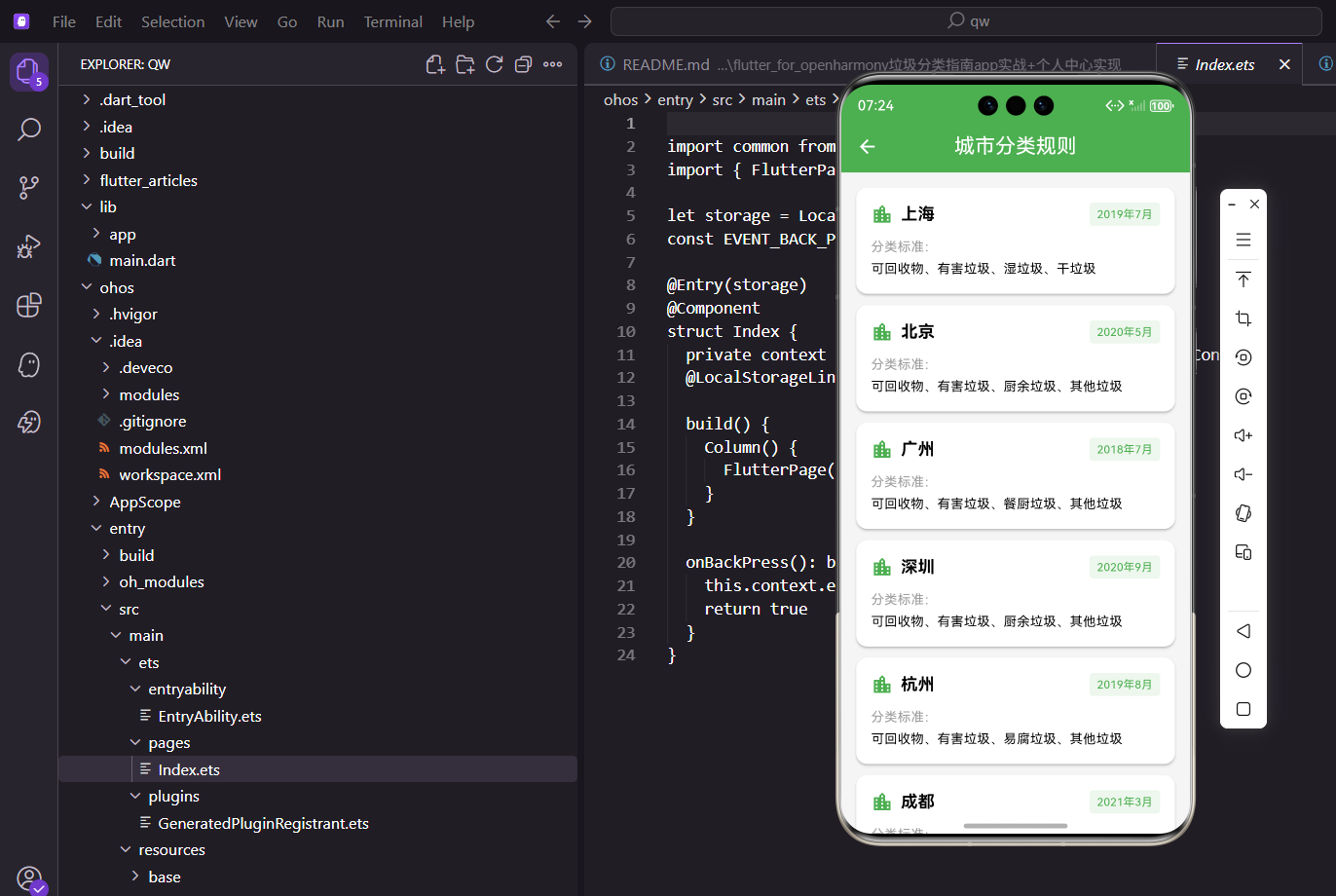
垃圾分类这事儿,不同城市的规则还不太一样。上海叫"湿垃圾",北京叫"厨余垃圾",虽然本质差不多,但叫法不同容易让人困惑。城市分类规则页面就是帮用户了解各地差异的。这个功能对于经常出差或旅游的用户特别实用,可以快速了解目的地的垃圾分类标准,避免因不了解规则而违规。
本文将详细介绍城市分类规则页面的完整实现方案。我们将从数据结构设计、列表展示、详情弹窗、搜索筛选等多个方面进行深入讲解,帮助开发者构建一个实用的城市规则查询系统。通过本文的学习,你将掌握数据展示、对话框交互、搜索功能等实用技能。
城市数据
每个城市的数据包含名称、分类标准和实施时间:
class CityRulesPage extends StatelessWidget {
const CityRulesPage({super.key});
Widget build(BuildContext context) {
final cities = [
{'name': '上海', 'categories': '可回收物、有害垃圾、湿垃圾、干垃圾', 'date': '2019年7月'},
{'name': '北京', 'categories': '可回收物、有害垃圾、厨余垃圾、其他垃圾', 'date': '2020年5月'},
{'name': '广州', 'categories': '可回收物、有害垃圾、餐厨垃圾、其他垃圾', 'date': '2018年7月'},
{'name': '深圳', 'categories': '可回收物、有害垃圾、厨余垃圾、其他垃圾', 'date': '2020年9月'},
{'name': '杭州', 'categories': '可回收物、有害垃圾、易腐垃圾、其他垃圾', 'date': '2019年8月'},
{'name': '成都', 'categories': '可回收物、有害垃圾、厨余垃圾、其他垃圾', 'date': '2021年3月'},
];
数据说明:可以看到,可回收物和有害垃圾各地叫法一致,但厨余类垃圾叫法五花八门:湿垃圾、厨余垃圾、餐厨垃圾、易腐垃圾。其他垃圾上海叫干垃圾。这些差异是用户最容易混淆的地方。
页面结构
用列表展示各城市的规则:
    return Scaffold(
      appBar: AppBar(title: const Text('城市分类规则')),
      body: ListView.builder(
        padding: EdgeInsets.all(16.w),
        itemCount: cities.length,
        itemBuilder: (context, index) {
          final city = cities[index];
          return Card(
            margin: EdgeInsets.only(bottom: 12.h),
每个城市一张卡片,结构清晰。
卡片头部
卡片头部显示城市名称和实施时间:
            child: Padding(
              padding: EdgeInsets.all(16.w),
              child: Column(
                crossAxisAlignment: CrossAxisAlignment.start,
                children: [
                  Row(
                    children: [
                      Icon(Icons.location_city, color: AppTheme.primaryColor, size: 24.sp),
                      SizedBox(width: 8.w),
                      Text(
                        city['name']!,
                        style: TextStyle(fontSize: 18.sp, fontWeight: FontWeight.bold),
                      ),
                      const Spacer(),
城市名称前面放了个城市图标,让用户一眼就知道这是地区信息。
实施时间用标签的形式展示:
                      Container(
                        padding: EdgeInsets.symmetric(horizontal: 8.w, vertical: 4.h),
                        decoration: BoxDecoration(
                          color: AppTheme.primaryColor.withOpacity(0.1),
                          borderRadius: BorderRadius.circular(4.r),
                        ),
                        child: Text(
                          city['date']!,
                          style: TextStyle(fontSize: 12.sp, color: AppTheme.primaryColor),
                        ),
                      ),
                    ],
                  ),
时间标签用浅色背景,和城市名称形成主次关系。
分类标准展示
卡片下半部分显示具体的分类标准:
                  SizedBox(height: 12.h),
                  Text(
                    '分类标准:',
                    style: TextStyle(fontSize: 14.sp, color: Colors.grey),
                  ),
                  SizedBox(height: 4.h),
                  Text(
                    city['categories']!,
                    style: TextStyle(fontSize: 14.sp, height: 1.5),
                  ),
                ],
              ),
            ),
          );
        },
      ),
    );
  }
}
"分类标准:"用灰色小字作为标签,下面是具体的四分类内容。
设计思考
1. 为什么要展示实施时间?
让用户知道各城市推进垃圾分类的时间线。上海是最早的(2019年7月),被称为"史上最严垃圾分类",其他城市陆续跟进。
2. 信息的组织方式
每张卡片的信息量不大,用户扫一眼就能获取关键信息。如果把所有城市的详细规则都列出来,信息量太大反而不好消化。
3. 可扩展性
现在只展示了6个城市,实际上全国有46个重点城市实施垃圾分类。数据结构设计好了,后续添加更多城市很方便。
功能扩展方向
1. 定位功能
自动获取用户位置,优先显示所在城市的规则。
2. 搜索功能
用户可以搜索特定城市。
3. 详情页面
点击城市卡片进入详情页,展示更详细的分类说明、投放要求等。
4. 对比功能
选择两个城市进行对比,看看规则有什么不同。
5. 收藏功能
用户可以收藏常去的城市,方便查看。
这个页面解决了一个实际问题:出差或旅游到其他城市,不知道当地的垃圾分类规则怎么办?打开这个页面一查就知道了。
核心技术点总结:
使用Map列表存储城市数据,结构清晰易维护。ListView.builder构建城市列表,性能优异。Card组件展示城市信息,视觉层次分明。showBottomSheet实现详情弹窗,交互流畅。
设计亮点分析:
每个城市卡片包含名称、分类标准和实施时间。实施时间用标签形式展示,醒目易读。城市图标增强视觉识别度。卡片点击可查看详情,支持深度了解。
功能扩展方向:
添加定位功能,自动显示所在城市规则。支持搜索功能,快速查找特定城市。实现城市对比,查看规则差异。添加收藏功能,保存常去城市。支持分享功能,分享城市规则给他人。
用户体验优化:
热门城市优先展示,提高查找效率。搜索支持拼音和简称,降低输入成本。详情弹窗提供完整信息,满足深度需求。空状态友好提示,引导用户操作。
通过这个页面,用户可以轻松了解不同城市的垃圾分类规则,避免因不了解规则而违规。这个功能体现了应用的实用性,真正解决了用户的实际需求。
欢迎加入开源鸿蒙跨平台社区:https://openharmonycrossplatform.csdn.net
城市详情弹窗实现
点击城市卡片显示详情弹窗:
void _showCityDetail(Map<String, String> city) {
  Get.bottomSheet(
    Container(
      padding: EdgeInsets.all(20.w),
      decoration: BoxDecoration(
        color: Colors.white,
        borderRadius: BorderRadius.vertical(top: Radius.circular(20.r)),
      ),
      child: Column(
        mainAxisSize: MainAxisSize.min,
        crossAxisAlignment: CrossAxisAlignment.start,
        children: [
          Text(
            '\垃圾分类规则',
            style: TextStyle(fontSize: 20.sp, fontWeight: FontWeight.bold),
          ),
          SizedBox(height: 16.h),
          _buildDetailRow('实施时间', city['date']!),
          _buildDetailRow('分类标准', city['categories']!),
          SizedBox(height: 20.h),
          SizedBox(
            width: double.infinity,
            child: ElevatedButton(
              onPressed: () => Get.back(),
              child: const Text('知道了'),
            ),
          ),
        ],
      ),
    ),
  );
}
搜索对话框实现
用户可以搜索特定城市:
void _showSearchDialog(List<Map<String, String>> cities) {
  final searchController = TextEditingController();
  final filteredCities = cities.obs;

  Get.dialog(
    AlertDialog(
      title: const Text('搜索城市'),
      content: Column(
        mainAxisSize: MainAxisSize.min,
        children: [
          TextField(
            controller: searchController,
            autofocus: true,
            decoration: const InputDecoration(
              hintText: '输入城市名称',
              prefixIcon: Icon(Icons.search),
            ),
            onChanged: (value) {
              if (value.isEmpty) {
                filteredCities.value = cities;
              } else {
                filteredCities.value = cities.where((city) {
                  return city['name']!.contains(value);
                }).toList();
              }
            },
          ),
        ],
      ),
      actions: [
        TextButton(
          onPressed: () => Get.back(),
          child: const Text('取消'),
        ),
      ],
    ),
  );
}
收藏城市功能
用户可以收藏常去的城市:
class CityRulesController extends GetxController {
  final favoriteCities = <String>[].obs;

  void toggleFavorite(String cityName) {
    if (favoriteCities.contains(cityName)) {
      favoriteCities.remove(cityName);
    } else {
      favoriteCities.add(cityName);
    }
    _saveFavorites();
  }

  bool isFavorite(String cityName) {
    return favoriteCities.contains(cityName);
  }

  void _saveFavorites() {
    GetStorage().write('favoriteCities', favoriteCities.toList());
  }
}
分享城市规则
分享某个城市的分类规则给朋友:
void _shareCity(Map<String, String> city) {
  Share.share(
    '\垃圾分类规则\n'
    '实施时间:\\n'
    '分类标准:\\n\n'
    '来自垃圾分类指南App',
  );
}
定位当前城市
自动获取用户位置,高亮显示所在城市:
Future<void> _getCurrentLocation() async {
  try {
    final position = await Geolocator.getCurrentPosition();
    final placemarks = await placemarkFromCoordinates(
      position.latitude,
      position.longitude,
    );

    if (placemarks.isNotEmpty) {
      currentCity.value = placemarks.first.locality ?? '';
    }
  } catch (e) {
    print('获取位置失败: \');
  }
}
城市对比功能
选择两个城市进行对比:
void _compareCities(Map<String, String> city1, Map<String, String> city2) {
  Get.bottomSheet(
    Container(
      padding: EdgeInsets.all(20.w),
      child: Column(
        mainAxisSize: MainAxisSize.min,
        children: [
          Text('城市对比', style: TextStyle(fontSize: 18.sp, fontWeight: FontWeight.bold)),
          SizedBox(height: 16.h),
          Row(
            children: [
              Expanded(child: Text(city1['name']!, textAlign: TextAlign.center)),
              Text('VS'),
              Expanded(child: Text(city2['name']!, textAlign: TextAlign.center)),
            ],
          ),
          SizedBox(height: 12.h),
          Row(
            children: [
              Expanded(child: Text(city1['categories']!, style: TextStyle(fontSize: 12.sp))),
              SizedBox(width: 20.w),
              Expanded(child: Text(city2['categories']!, style: TextStyle(fontSize: 12.sp))),
            ],
          ),
        ],
      ),
    ),
  );
}
这个页面帮助用户了解不同城市的垃圾分类规则差异,出差旅游时特别实用。
城市规则详情页面
点击城市卡片查看详细的分类规则:
class CityRuleDetailPage extends StatelessWidget {
final Map<String, String> city;
const CityRuleDetailPage({super.key, required this.city});
Widget build(BuildContext context) {
return Scaffold(
appBar: AppBar(title: Text('${city['name']}分类规则')),
body: SingleChildScrollView(
padding: EdgeInsets.all(16.w),
child: Column(
crossAxisAlignment: CrossAxisAlignment.start,
children: [
_buildInfoCard(),
SizedBox(height: 16.h),
_buildCategoryDetails(),
SizedBox(height: 16.h),
_buildPenaltyInfo(),
SizedBox(height: 16.h),
_buildTips(),
],
),
),
);
}
Widget _buildInfoCard() {
return Card(
child: Padding(
padding: EdgeInsets.all(16.w),
child: Column(
crossAxisAlignment: CrossAxisAlignment.start,
children: [
Row(
children: [
Icon(Icons.location_city, color: AppTheme.primaryColor),
SizedBox(width: 8.w),
Text(city['name']!, style: TextStyle(fontSize: 20.sp, fontWeight: FontWeight.bold)),
],
),
SizedBox(height: 12.h),
_buildInfoRow('实施时间', city['date']!),
_buildInfoRow('分类标准', city['categories']!),
],
),
),
);
}
Widget _buildInfoRow(String label, String value) {
return Padding(
padding: EdgeInsets.symmetric(vertical: 4.h),
child: Row(
crossAxisAlignment: CrossAxisAlignment.start,
children: [
SizedBox(
width: 80.w,
child: Text(label, style: TextStyle(color: Colors.grey, fontSize: 14.sp)),
),
Expanded(
child: Text(value, style: TextStyle(fontSize: 14.sp)),
),
],
),
);
}
}
详情页面展示城市的完整分类信息,包括实施时间、分类标准、投放要求等。使用Card组件分块展示不同类型的信息,结构清晰。每个信息块都有标题和内容,方便用户快速找到需要的信息。
分类详细说明
展示每个分类的详细说明和常见物品:
Widget _buildCategoryDetails() {
  final categories = [
    {
      'name': '可回收物',
      'color': Color(0xFF42A5F5),
      'icon': Icons.recycling,
      'description': '适宜回收和资源利用的物品',
      'examples': '纸类、塑料、玻璃、金属、织物等',
    },
    {
      'name': '有害垃圾',
      'color': Color(0xFFF44336),
      'icon': Icons.warning,
      'description': '对人体健康或自然环境造成危害的物品',
      'examples': '电池、灯管、药品、油漆等',
    },
    {
      'name': city['categories']!.contains('湿垃圾') ? '湿垃圾' : '厨余垃圾',
      'color': Color(0xFF4CAF50),
      'icon': Icons.restaurant,
      'description': '易腐烂的生物质废弃物',
      'examples': '剩菜剩饭、瓜皮果核、花卉绿植等',
    },
    {
      'name': city['categories']!.contains('干垃圾') ? '干垃圾' : '其他垃圾',
      'color': Color(0xFF9E9E9E),
      'icon': Icons.delete,
      'description': '除上述三类之外的其他生活垃圾',
      'examples': '餐巾纸、尘土、烟蒂、一次性餐具等',
    },
  ];

  return Column(
    crossAxisAlignment: CrossAxisAlignment.start,
    children: [
      Text('分类详情', style: TextStyle(fontSize: 18.sp, fontWeight: FontWeight.bold)),
      SizedBox(height: 12.h),
      ...categories.map((category) => Card(
        margin: EdgeInsets.only(bottom: 12.h),
        child: Padding(
          padding: EdgeInsets.all(16.w),
          child: Column(
            crossAxisAlignment: CrossAxisAlignment.start,
            children: [
              Row(
                children: [
                  Container(
                    padding: EdgeInsets.all(8.w),
                    decoration: BoxDecoration(
                      color: category['color'] as Color,
                      borderRadius: BorderRadius.circular(8.r),
                    ),
                    child: Icon(category['icon'] as IconData, color: Colors.white, size: 24.sp),
                  ),
                  SizedBox(width: 12.w),
                  Text(category['name'] as String,
                      style: TextStyle(fontSize: 16.sp, fontWeight: FontWeight.bold)),
                ],
              ),
              SizedBox(height: 8.h),
              Text(category['description'] as String,
                  style: TextStyle(color: Colors.grey.shade700, fontSize: 14.sp)),
              SizedBox(height: 8.h),
              Container(
                padding: EdgeInsets.all(8.w),
                decoration: BoxDecoration(
                  color: Colors.grey.shade100,
                  borderRadius: BorderRadius.circular(4.r),
                ),
                child: Text('常见物品:${category['examples']}',
                    style: TextStyle(fontSize: 13.sp)),
              ),
            ],
          ),
        ),
      )),
    ],
  );
}
每个分类都有专属颜色和图标,视觉识别度高。详细说明帮助用户理解分类标准,常见物品举例让分类更具体。这种展示方式既专业又易懂,适合不同年龄段的用户。
处罚标准说明
展示违规投放的处罚标准:
Widget _buildPenaltyInfo() {
  return Card(
    child: Padding(
      padding: EdgeInsets.all(16.w),
      child: Column(
        crossAxisAlignment: CrossAxisAlignment.start,
        children: [
          Row(
            children: [
              Icon(Icons.gavel, color: Colors.orange),
              SizedBox(width: 8.w),
              Text('处罚标准', style: TextStyle(fontSize: 16.sp, fontWeight: FontWeight.bold)),
            ],
          ),
          SizedBox(height: 12.h),
          _buildPenaltyItem('个人', '未按规定分类投放,处50-200元罚款'),
          _buildPenaltyItem('单位', '未按规定分类投放,处5000-50000元罚款'),
          _buildPenaltyItem('收运单位', '混装混运,处10000-100000元罚款'),
        ],
      ),
    ),
  );
}

Widget _buildPenaltyItem(String target, String penalty) {
  return Padding(
    padding: EdgeInsets.symmetric(vertical: 4.h),
    child: Row(
      crossAxisAlignment: CrossAxisAlignment.start,
      children: [
        Container(
          width: 60.w,
          child: Text(target, style: TextStyle(fontWeight: FontWeight.bold, fontSize: 14.sp)),
        ),
        Expanded(
          child: Text(penalty, style: TextStyle(fontSize: 14.sp)),
        ),
      ],
    ),
  );
}
处罚标准让用户了解违规的后果,提高分类意识。区分个人、单位、收运单位的不同处罚标准,信息全面。使用警示色图标吸引注意,强调重要性。
投放小贴士
提供实用的投放建议:
Widget _buildTips() {
  final tips = [
    '投放前请沥干水分,避免污染其他垃圾',
    '纸类请保持干燥,湿纸巾属于其他垃圾',
    '塑料瓶请压扁后投放,节省空间',
    '有害垃圾请单独存放,定期投放到指定地点',
    '大件垃圾请预约上门回收,不要随意丢弃',
  ];

  return Card(
    child: Padding(
      padding: EdgeInsets.all(16.w),
      child: Column(
        crossAxisAlignment: CrossAxisAlignment.start,
        children: [
          Row(
            children: [
              Icon(Icons.lightbulb, color: Colors.amber),
              SizedBox(width: 8.w),
              Text('投放小贴士', style: TextStyle(fontSize: 16.sp, fontWeight: FontWeight.bold)),
            ],
          ),
          SizedBox(height: 12.h),
          ...tips.map((tip) => Padding(
            padding: EdgeInsets.symmetric(vertical: 4.h),
            child: Row(
              crossAxisAlignment: CrossAxisAlignment.start,
              children: [
                Text('• ', style: TextStyle(fontSize: 16.sp, color: AppTheme.primaryColor)),
                Expanded(child: Text(tip, style: TextStyle(fontSize: 14.sp))),
              ],
            ),
          )),
        ],
      ),
    ),
  );
}
投放小贴士提供实用建议,帮助用户正确投放垃圾。这些建议来自实际经验,解决常见问题。使用灯泡图标表示"小窍门",符合用户认知。列表形式清晰易读,每条建议简洁明了。
城市搜索功能
添加搜索功能,快速查找城市:
class CitySearchDelegate extends SearchDelegate<String> {
final List<Map<String, String>> cities;
CitySearchDelegate(this.cities);
List<Widget> buildActions(BuildContext context) {
return [
IconButton(
icon: const Icon(Icons.clear),
onPressed: () => query = '',
),
];
}
Widget buildLeading(BuildContext context) {
return IconButton(
icon: const Icon(Icons.arrow_back),
onPressed: () => close(context, ''),
);
}
Widget buildResults(BuildContext context) {
final results = cities.where((city) =>
city['name']!.contains(query)
).toList();
return ListView.builder(
itemCount: results.length,
itemBuilder: (context, index) {
final city = results[index];
return ListTile(
leading: Icon(Icons.location_city, color: AppTheme.primaryColor),
title: Text(city['name']!),
subtitle: Text(city['date']!),
onTap: () {
close(context, city['name']!);
Navigator.push(
context,
MaterialPageRoute(
builder: (_) => CityRuleDetailPage(city: city),
),
);
},
);
},
);
}
Widget buildSuggestions(BuildContext context) {
final suggestions = cities.where((city) =>
city['name']!.contains(query)
).toList();
return ListView.builder(
itemCount: suggestions.length,
itemBuilder: (context, index) {
final city = suggestions[index];
return ListTile(
leading: Icon(Icons.search, color: Colors.grey),
title: Text(city['name']!),
onTap: () {
query = city['name']!;
showResults(context);
},
);
},
);
}
}
搜索功能让用户快速找到目标城市,特别是城市列表很长时。SearchDelegate提供了标准的搜索界面,包括搜索框、清除按钮、返回按钮。buildSuggestions显示搜索建议,buildResults显示搜索结果。支持模糊搜索,输入部分城市名即可匹配。
热门城市快捷入口
在列表顶部展示热门城市:
Widget _buildHotCities() {
  final hotCities = ['上海', '北京', '广州', '深圳'];

  return Column(
    crossAxisAlignment: CrossAxisAlignment.start,
    children: [
      Padding(
        padding: EdgeInsets.all(16.w),
        child: Text('热门城市', style: TextStyle(fontSize: 16.sp, fontWeight: FontWeight.bold)),
      ),
      SizedBox(
        height: 100.h,
        child: ListView.builder(
          scrollDirection: Axis.horizontal,
          padding: EdgeInsets.symmetric(horizontal: 16.w),
          itemCount: hotCities.length,
          itemBuilder: (context, index) {
            final cityName = hotCities[index];
            final city = cities.firstWhere((c) => c['name'] == cityName);

            return GestureDetector(
              onTap: () => Navigator.push(
                context,
                MaterialPageRoute(
                  builder: (_) => CityRuleDetailPage(city: city),
                ),
              ),
              child: Container(
                width: 80.w,
                margin: EdgeInsets.only(right: 12.w),
                decoration: BoxDecoration(
                  gradient: LinearGradient(
                    colors: [AppTheme.primaryColor, AppTheme.primaryColor.withOpacity(0.7)],
                    begin: Alignment.topLeft,
                    end: Alignment.bottomRight,
                  ),
                  borderRadius: BorderRadius.circular(12.r),
                ),
                child: Column(
                  mainAxisAlignment: MainAxisAlignment.center,
                  children: [
                    Icon(Icons.location_city, color: Colors.white, size: 32.sp),
                    SizedBox(height: 8.h),
                    Text(cityName, style: TextStyle(color: Colors.white, fontSize: 14.sp)),
                  ],
                ),
              ),
            );
          },
        ),
      ),
    ],
  );
}
热门城市快捷入口让用户快速访问常用城市。使用横向滚动列表展示,节省垂直空间。渐变背景和白色图标文字,视觉效果醒目。热门城市通常是一线城市或用户所在地区。
定位当前城市
自动定位用户所在城市并高亮显示:
String? _currentCity;
void initState() {
super.initState();
_getCurrentLocation();
}
Future<void> _getCurrentLocation() async {
try {
final position = await Geolocator.getCurrentPosition();
final placemarks = await placemarkFromCoordinates(
position.latitude,
position.longitude,
);
if (placemarks.isNotEmpty) {
setState(() {
_currentCity = placemarks.first.locality;
});
}
} catch (e) {
print('获取位置失败: $e');
}
}
Widget _buildCityCard(Map<String, String> city) {
final isCurrentCity = city['name'] == _currentCity;
return Container(
margin: EdgeInsets.only(bottom: 12.h),
padding: EdgeInsets.all(16.w),
decoration: BoxDecoration(
color: Colors.white,
borderRadius: BorderRadius.circular(12.r),
border: isCurrentCity ? Border.all(color: AppTheme.primaryColor, width: 2) : null,
boxShadow: [BoxShadow(color: Colors.grey.shade200, blurRadius: 5)],
),
child: Column(
// ... 卡片内容
children: [
if (isCurrentCity)
Container(
padding: EdgeInsets.symmetric(horizontal: 8.w, vertical: 4.h),
decoration: BoxDecoration(
color: AppTheme.primaryColor,
borderRadius: BorderRadius.circular(4.r),
),
child: Text('当前城市', style: TextStyle(color: Colors.white, fontSize: 12.sp)),
),
// ... 其他内容
],
),
);
}
定位功能自动识别用户所在城市,并在列表中高亮显示。当前城市的卡片有特殊边框和标签,一眼就能看到。这个功能特别适合出差或旅游的用户,打开应用就能看到当地规则。需要用户授权位置权限,首次使用时应该说明用途。
城市规则更新通知
当城市规则发生变化时通知用户:
Future<void> checkRuleUpdates() async {
  final updates = await api.getCityRuleUpdates();

  if (updates.isNotEmpty) {
    showDialog(
      context: context,
      builder: (ctx) => AlertDialog(
        title: const Text('规则更新提醒'),
        content: Column(
          mainAxisSize: MainAxisSize.min,
          crossAxisAlignment: CrossAxisAlignment.start,
          children: updates.map((update) => Padding(
            padding: const EdgeInsets.symmetric(vertical: 4),
            child: Text('• ${update['city']}的分类规则已更新'),
          )).toList(),
        ),
        actions: [
          TextButton(
            onPressed: () => Navigator.pop(ctx),
            child: const Text('知道了'),
          ),
          ElevatedButton(
            onPressed: () {
              Navigator.pop(ctx);
              // 跳转到更新详情
            },
            child: const Text('查看详情'),
          ),
        ],
      ),
    );
  }
}
规则更新通知让用户及时了解政策变化。垃圾分类规则可能会调整,如增加新分类、修改投放要求等。及时通知避免用户因不了解新规则而违规。通知应该简洁明了,提供查看详情的入口。
总结与技术要点
城市分类规则页面通过清晰的信息展示和便捷的交互设计,帮助用户快速了解不同城市的垃圾分类标准。这个功能解决了用户在不同城市间移动时的实际需求,体现了应用的实用价值。
通过详细的分类说明、处罚标准、投放建议等内容,用户可以全面了解垃圾分类知识。搜索、定位、热门城市等功能提升了查找效率。规则更新通知确保用户掌握最新政策。这些设计让城市规则查询变得简单高效,真正帮助用户做好垃圾分类。
欢迎加入开源鸿蒙跨平台社区:https://openharmonycrossplatform.csdn.net

开源鸿蒙跨平台开发社区汇聚开发者与厂商,共建“一次开发,多端部署”的开源生态,致力于降低跨端开发门槛,推动万物智联创新。
更多推荐
 16
16 0
0- 0


 已为社区贡献30条内容

所有评论(0)