flutter_for_openharmony家庭药箱管理app实战+成员详情实现
成员详情页面设计摘要 成员详情页面采用卡片式布局,分为五个信息模块: 渐变色头部展示区 - 使用深绿到浅绿的渐变背景,突出显示成员姓名、关系和年龄 基本信息卡片 - 展示出生日期、身高体重等关键数据 健康信息标签 - 使用彩色标签展示过敏和慢性病信息,红色标签警示过敏信息 用药提醒列表 - 显示药物名称、剂量和服用频率,区分活跃与非活跃状态 健康记录区域 - 展示最近健康检测数据 页面采用响应式设
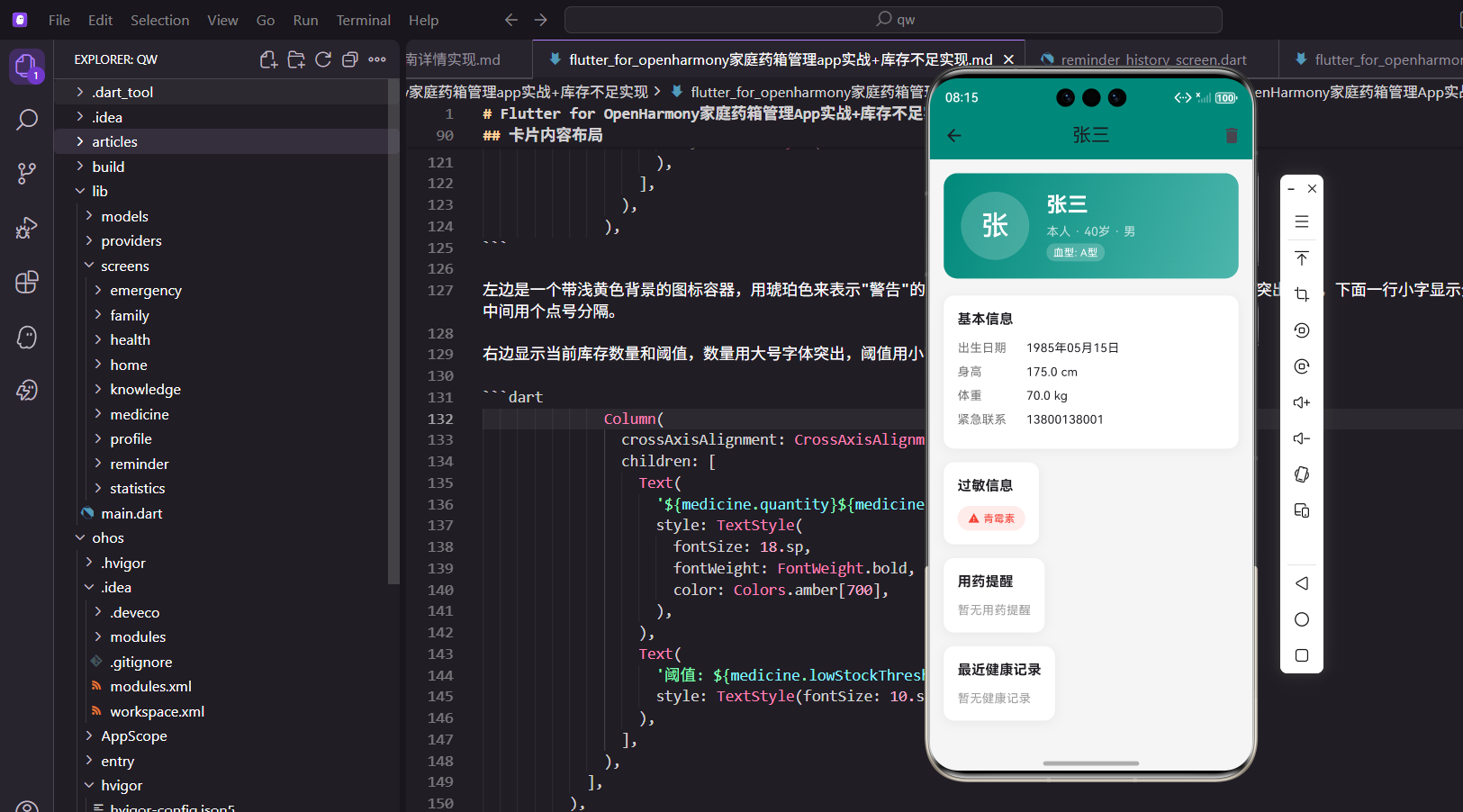
成员详情页面展示家庭成员的完整信息,包括基本资料、健康状况、用药提醒和最近的健康记录。这个页面是了解成员健康状况的重要入口。
页面设计思路
详情页面采用卡片式布局,将信息分为头部展示区、基本信息、健康信息、用药提醒和健康记录五个部分。使用渐变色头部突出成员信息,各个信息卡片独立展示。
渐变色头部
头部使用渐变背景突出显示:
Widget _buildHeader() {
  return Container(
    padding: EdgeInsets.all(20.w),
    decoration: BoxDecoration(
      gradient: const LinearGradient(
        colors: [Color(0xFF00897B), Color(0xFF4DB6AC)],
        begin: Alignment.topLeft,
        end: Alignment.bottomRight,
      ),
      borderRadius: BorderRadius.circular(16.r),
    ),
    child: Row(
      children: [
        CircleAvatar(
          radius: 40.r,
          backgroundColor: Colors.white.withOpacity(0.2),
          child: Text(
            member.name.substring(0, 1),
            style: TextStyle(fontSize: 32.sp, color: Colors.white),
          ),
        ),
        SizedBox(width: 20.w),
        Expanded(
          child: Column(
            crossAxisAlignment: CrossAxisAlignment.start,
            children: [
              Text(
                member.name,
                style: TextStyle(fontSize: 24.sp, fontWeight: FontWeight.bold, color: Colors.white),
              ),
              Text(
                '${member.relationship} · ${member.age}岁 · ${member.gender}',
                style: TextStyle(fontSize: 14.sp, color: Colors.white70),
              ),
            ],
          ),
        ),
      ],
    ),
  );
}
使用LinearGradient创建从深绿到浅绿的渐变效果,营造出清新的视觉感受。头像使用半透明白色背景,显示姓名首字母,这种设计简洁而富有个性。所有文字使用白色,与渐变背景形成强烈对比,确保信息清晰可读。渐变色的使用让页面更具层次感和现代感,提升了用户体验。
基本信息展示
基本信息包含出生日期、身高体重等:
Widget _buildBasicInfo() {
  return _buildSection('基本信息', [
    _buildInfoRow('出生日期', DateFormat('yyyy年MM月dd日').format(member.birthday)),
    if (member.height != null) _buildInfoRow('身高', '${member.height} cm'),
    if (member.weight != null) _buildInfoRow('体重', '${member.weight} kg'),
    if (member.emergencyContact != null) _buildInfoRow('紧急联系', member.emergencyContact!),
  ]);
}
使用条件渲染,只显示有值的字段,避免空白信息占用空间。日期使用中文格式"年月日",更符合国内用户的阅读习惯。这种灵活的展示方式让页面更加简洁,用户只看到有意义的信息,提升了信息密度和阅读效率。
健康信息标签
过敏和慢性病使用彩色标签:
Widget _buildHealthInfo() {
  return Column(
    children: [
      if (member.allergies.isNotEmpty)
        _buildSection('过敏信息', [
          Wrap(
            spacing: 8.w,
            runSpacing: 8.h,
            children: member.allergies.map<Widget>((a) {
              return Container(
                padding: EdgeInsets.symmetric(horizontal: 12.w, vertical: 6.h),
                decoration: BoxDecoration(
                  color: Colors.red.withOpacity(0.1),
                  borderRadius: BorderRadius.circular(20.r),
                ),
                child: Row(
                  mainAxisSize: MainAxisSize.min,
                  children: [
                    Icon(Icons.warning, size: 14.sp, color: Colors.red),
                    SizedBox(width: 4.w),
                    Text(a, style: TextStyle(color: Colors.red, fontSize: 12.sp)),
                  ],
                ),
              );
            }).toList(),
          ),
        ]),
    ],
  );
}
过敏标签使用红色,带有警告图标,强烈提醒用户注意这些重要的健康信息。慢性病标签使用橙色,与过敏信息形成视觉区分。这种颜色编码系统让用户能够快速识别不同类型的健康信息,在用药时能够及时注意到禁忌事项,避免用药风险。
用药提醒列表
显示该成员的所有用药提醒:
Widget _buildMedicationInfo(BuildContext context) {
  return Consumer<ReminderProvider>(
    builder: (context, provider, child) {
      final reminders = provider.getRemindersByMember(member.id);

      return _buildSection('用药提醒', [
        if (reminders.isEmpty)
          Text('暂无用药提醒', style: TextStyle(color: Colors.grey[500]))
        else
          ...reminders.map((r) => Container(
                margin: EdgeInsets.only(bottom: 8.h),
                padding: EdgeInsets.all(12.w),
                decoration: BoxDecoration(
                  color: Colors.grey[50],
                  borderRadius: BorderRadius.circular(8.r),
                ),
                child: Row(
                  children: [
                    Icon(Icons.medication, color: const Color(0xFF00897B)),
                    SizedBox(width: 8.w),
                    Expanded(
                      child: Column(
                        crossAxisAlignment: CrossAxisAlignment.start,
                        children: [
                          Text(r.medicineName, style: TextStyle(fontWeight: FontWeight.w500)),
                          Text('${r.dosage} · ${r.frequency}',
                              style: TextStyle(fontSize: 12.sp, color: Colors.grey[600])),
                        ],
                      ),
                    ),
                    Container(
                      padding: EdgeInsets.symmetric(horizontal: 8.w, vertical: 2.h),
                      decoration: BoxDecoration(
                        color: r.isActive ? Colors.green.withOpacity(0.1) : Colors.grey.withOpacity(0.1),
                        borderRadius: BorderRadius.circular(10.r),
                      ),
                      child: Text(
                        r.isActive ? '进行中' : '已停止',
                        style: TextStyle(
                          fontSize: 10.sp,
                          color: r.isActive ? Colors.green : Colors.grey,
                        ),
                      ),
                    ),
                  ],
                ),
              )),
      ]);
    },
  );
}
使用Consumer监听ReminderProvider,调用getRemindersByMember方法获取该成员的所有用药提醒。每个提醒显示药品名称、用量、频率和当前状态,让用户全面了解成员的用药安排。状态标签使用不同颜色区分进行中和已停止的提醒,帮助用户快速判断哪些提醒仍在生效。
健康记录展示
显示最近的健康记录:
Widget _buildHealthRecords(BuildContext context) {
  return Consumer<HealthProvider>(
    builder: (context, provider, child) {
      final bpRecord = provider.getLatestRecord(member.id, 'blood_pressure');
      final bsRecord = provider.getLatestRecord(member.id, 'blood_sugar');
      final weightRecord = provider.getLatestRecord(member.id, 'weight');

      return _buildSection('最近健康记录', [
        if (bpRecord == null && bsRecord == null && weightRecord == null)
          Text('暂无健康记录', style: TextStyle(color: Colors.grey[500]))
        else ...[
          if (bpRecord != null)
            _buildHealthRecordItem(
              '血压',
              '${bpRecord.data['systolic']}/${bpRecord.data['diastolic']} mmHg',
              Icons.favorite,
              Colors.red,
              bpRecord.recordDate,
            ),
        ],
      ]);
    },
  );
}
使用Consumer监听HealthProvider,获取最新的血压、血糖和体重记录,展示成员的健康状况。每种记录使用不同的图标和颜色进行标识,血压用红色心形图标,血糖用蓝色水滴图标,体重用绿色体重秤图标。这种视觉化设计让用户能够快速定位到关心的健康指标。
健康记录项
单个健康记录的展示:
Widget _buildHealthRecordItem(String label, String value, IconData icon, Color color, DateTime date) {
  return Container(
    margin: EdgeInsets.only(bottom: 8.h),
    padding: EdgeInsets.all(12.w),
    decoration: BoxDecoration(
      color: color.withOpacity(0.05),
      borderRadius: BorderRadius.circular(8.r),
    ),
    child: Row(
      children: [
        Icon(icon, color: color, size: 20.sp),
        SizedBox(width: 12.w),
        Expanded(
          child: Column(
            crossAxisAlignment: CrossAxisAlignment.start,
            children: [
              Text(label, style: TextStyle(fontSize: 12.sp, color: Colors.grey[600])),
              Text(value, style: TextStyle(fontSize: 16.sp, fontWeight: FontWeight.bold, color: color)),
            ],
          ),
        ),
        Text(
          DateFormat('MM-dd').format(date),
          style: TextStyle(fontSize: 12.sp, color: Colors.grey[500]),
        ),
      ],
    ),
  );
}
使用对应颜色的半透明背景,营造出柔和的视觉效果。图标和数值使用完全不透明的颜色,确保关键信息突出显示。右侧显示记录日期,使用月-日格式,让用户知道数据的时效性。这种设计既美观又实用,用户一眼就能看出健康数据的状态和趋势。
信息卡片组件
通用的信息卡片组件:
Widget _buildSection(String title, List<Widget> children) {
  return Container(
    padding: EdgeInsets.all(16.w),
    decoration: BoxDecoration(
      color: Colors.white,
      borderRadius: BorderRadius.circular(12.r),
      boxShadow: [
        BoxShadow(color: Colors.black.withOpacity(0.05), blurRadius: 10, offset: const Offset(0, 2)),
      ],
    ),
    child: Column(
      crossAxisAlignment: CrossAxisAlignment.start,
      children: [
        Text(title, style: TextStyle(fontSize: 16.sp, fontWeight: FontWeight.bold)),
        SizedBox(height: 12.h),
        ...children,
      ],
    ),
  );
}
白色背景配合轻微阴影,营造出卡片悬浮的视觉效果。圆角12.r让卡片更加柔和友好。标题使用加粗字体,与内容形成明显的层次区分,用户能够快速识别每个信息区块的主题。这种统一的卡片设计让整个页面保持一致的视觉风格。
删除确认
删除成员需要用户确认:
void _showDeleteDialog(BuildContext context) {
  showDialog(
    context: context,
    builder: (context) => AlertDialog(
      title: const Text('删除成员'),
      content: Text('确定要删除"${member.name}"吗?'),
      actions: [
        TextButton(onPressed: () => Navigator.pop(context), child: const Text('取消')),
        TextButton(
          onPressed: () {
            context.read<FamilyProvider>().deleteMember(member.id);
            Navigator.pop(context);
            Get.back();
          },
          child: const Text('删除', style: TextStyle(color: Colors.red)),
        ),
      ],
    ),
  );
}
对话框清晰说明即将执行的操作,避免用户误操作。删除按钮使用红色文字警示用户这是危险操作,需要谨慎确认。确认后调用Provider的deleteMember方法删除成员数据,同时关闭对话框并返回上一页。这种二次确认机制有效防止了误删除重要数据。
总结
成员详情页面通过渐变色头部和卡片式布局,清晰展示成员的完整信息。使用多个Provider获取关联数据,实现了用药提醒和健康记录的联动展示。颜色编码和图标让不同类型的信息易于识别。
编辑成员功能
详情页面提供编辑成员信息的入口:
Widget _buildEditButton() {
  return IconButton(
    icon: const Icon(Icons.edit),
    onPressed: () => Get.to(() => EditFamilyMemberScreen(member: member)),
  );
}
点击编辑按钮跳转到编辑页面,预填充当前成员的所有信息。编辑完成后返回详情页面,数据会自动更新。这种设计让用户可以方便地修改成员信息。
健康数据趋势
为健康记录添加简单的趋势指示:
Widget _buildTrendIndicator(HealthRecord? current, HealthRecord? previous) {
  if (current == null || previous == null) return const SizedBox.shrink();

  final currentValue = _getNumericValue(current);
  final previousValue = _getNumericValue(previous);

  if (currentValue == null || previousValue == null) return const SizedBox.shrink();

  final diff = currentValue - previousValue;
  final isUp = diff > 0;

  return Row(
    mainAxisSize: MainAxisSize.min,
    children: [
      Icon(
        isUp ? Icons.arrow_upward : Icons.arrow_downward,
        size: 12.sp,
        color: isUp ? Colors.red : Colors.green,
      ),
      Text(
        '${diff.abs().toStringAsFixed(1)}',
        style: TextStyle(
          fontSize: 10.sp,
          color: isUp ? Colors.red : Colors.green,
        ),
      ),
    ],
  );
}
趋势指示器显示当前记录与上一次记录的变化。上升用红色向上箭头表示,下降用绿色向下箭头表示。这个功能帮助用户直观地了解健康指标的变化趋势。
快速添加健康记录
在详情页面提供快速添加健康记录的入口:
Widget _buildQuickAddHealth() {
  return Container(
    padding: EdgeInsets.all(16.w),
    decoration: BoxDecoration(
      color: const Color(0xFF00897B).withOpacity(0.1),
      borderRadius: BorderRadius.circular(12.r),
    ),
    child: Column(
      crossAxisAlignment: CrossAxisAlignment.start,
      children: [
        Text('快速记录', style: TextStyle(fontSize: 14.sp, fontWeight: FontWeight.bold)),
        SizedBox(height: 12.h),
        Row(
          mainAxisAlignment: MainAxisAlignment.spaceAround,
          children: [
            _buildQuickAction(Icons.favorite, '血压', () => _addBloodPressure()),
            _buildQuickAction(Icons.water_drop, '血糖', () => _addBloodSugar()),
            _buildQuickAction(Icons.monitor_weight, '体重', () => _addWeight()),
            _buildQuickAction(Icons.thermostat, '体温', () => _addTemperature()),
          ],
        ),
      ],
    ),
  );
}

Widget _buildQuickAction(IconData icon, String label, VoidCallback onTap) {
  return GestureDetector(
    onTap: onTap,
    child: Column(
      children: [
        Container(
          width: 40.w,
          height: 40.w,
          decoration: const BoxDecoration(
            color: Colors.white,
            shape: BoxShape.circle,
          ),
          child: Icon(icon, color: const Color(0xFF00897B), size: 20.sp),
        ),
        SizedBox(height: 4.h),
        Text(label, style: TextStyle(fontSize: 10.sp)),
      ],
    ),
  );
}
快速记录区域提供四个健康指标的快捷入口,用户可以直接为当前成员添加健康记录,无需切换页面。这种设计提升了操作效率。
用药提醒快速添加
为当前成员快速添加用药提醒:
Widget _buildAddReminderButton() {
  return ElevatedButton.icon(
    onPressed: () => Get.to(() => AddReminderScreen(preselectedMemberId: member.id)),
    icon: const Icon(Icons.alarm_add),
    label: const Text('添加用药提醒'),
    style: ElevatedButton.styleFrom(
      backgroundColor: const Color(0xFF00897B),
      shape: RoundedRectangleBorder(borderRadius: BorderRadius.circular(8.r)),
    ),
  );
}
点击按钮跳转到添加提醒页面,并预选当前成员。这种设计减少了用户的操作步骤,提升了使用体验。
成员信息分享
支持将成员健康信息分享给医生或家人:
void _shareMemberInfo() {
  final info = StringBuffer();
  info.writeln('姓名:${member.name}');
  info.writeln('关系:${member.relationship}');
  info.writeln('年龄:${member.age}岁');
  info.writeln('性别:${member.gender}');
  if (member.bloodType != null) info.writeln('血型:${member.bloodType}');
  if (member.allergies.isNotEmpty) info.writeln('过敏:${member.allergies.join('、')}');
  if (member.chronicDiseases.isNotEmpty) info.writeln('慢性病:${member.chronicDiseases.join('、')}');

  Share.share(info.toString(), subject: '${member.name}的健康信息');
}
分享功能将成员的基本信息和健康状况整理成文本,通过系统分享功能发送。这在就医时特别有用,可以快速向医生提供患者信息。
欢迎加入开源鸿蒙跨平台社区:https://openharmonycrossplatform.csdn.net
健康档案导出
支持将成员的健康档案导出为PDF文件:
Future<void> _exportHealthProfile() async {
  showDialog(
    context: context,
    barrierDismissible: false,
    builder: (context) => const Center(child: CircularProgressIndicator()),
  );

  try {
    final pdf = pw.Document();

    pdf.addPage(
      pw.Page(
        build: (context) => pw.Column(
          crossAxisAlignment: pw.CrossAxisAlignment.start,
          children: [
            pw.Text(
              '${member.name}的健康档案',
              style: pw.TextStyle(fontSize: 24, fontWeight: pw.FontWeight.bold),
            ),
            pw.SizedBox(height: 20),
            pw.Text('基本信息', style: pw.TextStyle(fontSize: 18, fontWeight: pw.FontWeight.bold)),
            pw.Divider(),
            pw.Text('姓名:${member.name}'),
            pw.Text('关系:${member.relationship}'),
            pw.Text('年龄:${member.age}岁'),
            pw.Text('性别:${member.gender}'),
            if (member.bloodType != null) pw.Text('血型:${member.bloodType}'),
            pw.SizedBox(height: 20),
            if (member.allergies.isNotEmpty) ...[
              pw.Text('过敏信息', style: pw.TextStyle(fontSize: 18, fontWeight: pw.FontWeight.bold)),
              pw.Divider(),
              ...member.allergies.map((a) => pw.Text('• $a')),
              pw.SizedBox(height: 20),
            ],
            if (member.chronicDiseases.isNotEmpty) ...[
              pw.Text('慢性病', style: pw.TextStyle(fontSize: 18, fontWeight: pw.FontWeight.bold)),
              pw.Divider(),
              ...member.chronicDiseases.map((d) => pw.Text('• $d')),
            ],
          ],
        ),
      ),
    );

    final output = await getTemporaryDirectory();
    final file = File('${output.path}/${member.name}_健康档案.pdf');
    await file.writeAsBytes(await pdf.save());

    Navigator.pop(context);

    Get.snackbar(
      '导出成功',
      '健康档案已保存到:${file.path}',
      snackPosition: SnackPosition.BOTTOM,
      duration: const Duration(seconds: 3),
    );

    // 打开文件
    OpenFile.open(file.path);
  } catch (e) {
    Navigator.pop(context);
    Get.snackbar('导出失败', '无法导出健康档案:$e', snackPosition: SnackPosition.BOTTOM);
  }
}
PDF导出功能使用pdf包生成文档,包含成员的所有基本信息和健康数据。导出后自动打开文件,用户可以直接查看或分享。这个功能在就医时特别有用,可以向医生提供完整的健康档案。
生成的PDF文档格式规范,包含标题、分节、列表等元素,让信息清晰易读。使用临时目录存储文件,避免占用用户的存储空间。
成员头像上传
支持为成员上传自定义头像:
String? _avatarPath;

Widget _buildAvatarSection() {
  return GestureDetector(
    onTap: _pickAvatar,
    child: Stack(
      children: [
        CircleAvatar(
          radius: 50.r,
          backgroundColor: Colors.teal.withOpacity(0.1),
          backgroundImage: _avatarPath != null ? FileImage(File(_avatarPath!)) : null,
          child: _avatarPath == null
              ? Text(
                  member.name.substring(0, 1),
                  style: TextStyle(fontSize: 32.sp, color: Colors.teal),
                )
              : null,
        ),
        Positioned(
          right: 0,
          bottom: 0,
          child: Container(
            padding: EdgeInsets.all(6.w),
            decoration: const BoxDecoration(
              color: Color(0xFF00897B),
              shape: BoxShape.circle,
            ),
            child: Icon(Icons.camera_alt, size: 16.sp, color: Colors.white),
          ),
        ),
      ],
    ),
  );
}

Future<void> _pickAvatar() async {
  final picker = ImagePicker();
  final image = await picker.pickImage(source: ImageSource.gallery);

  if (image != null) {
    setState(() => _avatarPath = image.path);
    // 保存头像路径到成员数据
    final updated = member.copyWith(avatarPath: image.path);
    context.read<FamilyProvider>().updateMember(updated);
  }
}
头像区域右下角有相机图标,提示用户可以点击更换头像。点击后打开相册选择图片,选择后立即显示并保存。这种设计让成员信息更加个性化,用户可以一眼认出每个家庭成员。
头像使用圆形裁剪,与整体设计风格保持一致。如果没有上传头像,则显示姓名首字母作为占位符,这是一种常见的设计模式。
成员生日提醒
自动计算并显示距离生日的天数:
Widget _buildBirthdayReminder() {
  if (member.birthday == null) return const SizedBox.shrink();

  final now = DateTime.now();
  final thisYearBirthday = DateTime(now.year, member.birthday!.month, member.birthday!.day);
  final nextBirthday = thisYearBirthday.isBefore(now)
      ? DateTime(now.year + 1, member.birthday!.month, member.birthday!.day)
      : thisYearBirthday;
  final daysUntil = nextBirthday.difference(now).inDays;

  if (daysUntil > 30) return const SizedBox.shrink();

  return Container(
    margin: EdgeInsets.all(16.w),
    padding: EdgeInsets.all(16.w),
    decoration: BoxDecoration(
      gradient: const LinearGradient(
        colors: [Color(0xFFFF9800), Color(0xFFFFB74D)],
        begin: Alignment.topLeft,
        end: Alignment.bottomRight,
      ),
      borderRadius: BorderRadius.circular(12.r),
    ),
    child: Row(
      children: [
        Icon(Icons.cake, color: Colors.white, size: 32.sp),
        SizedBox(width: 12.w),
        Expanded(
          child: Column(
            crossAxisAlignment: CrossAxisAlignment.start,
            children: [
              Text(
                '生日提醒',
                style: TextStyle(
                  fontSize: 14.sp,
                  color: Colors.white,
                  fontWeight: FontWeight.bold,
                ),
              ),
              Text(
                daysUntil == 0
                    ? '今天是${member.name}的生日!'
                    : '还有$daysUntil天就是${member.name}的生日了',
                style: TextStyle(fontSize: 12.sp, color: Colors.white.withOpacity(0.9)),
              ),
            ],
          ),
        ),
      ],
    ),
  );
}
生日提醒卡片使用橙色渐变背景,非常醒目。只在生日前30天内显示,避免过早提醒。如果今天就是生日,显示特殊的祝福文字。这个功能帮助用户不会忘记家人的生日,维系家庭情感。
渐变背景和蛋糕图标让提醒卡片充满节日气氛。文字使用白色,在橙色背景上清晰可读。这种设计既实用又温馨。
成员标签管理
为成员添加自定义标签:
List<String> _tags = [];

Widget _buildTagsSection() {
  return _buildSection('标签', [
    Wrap(
      spacing: 8.w,
      runSpacing: 8.h,
      children: [
        ..._tags.map((tag) => Chip(
          label: Text(tag, style: TextStyle(fontSize: 12.sp)),
          deleteIcon: Icon(Icons.close, size: 16.sp),
          onDeleted: () {
            setState(() => _tags.remove(tag));
            _saveTags();
          },
          backgroundColor: const Color(0xFF00897B).withOpacity(0.1),
          labelStyle: const TextStyle(color: Color(0xFF00897B)),
        )),
        ActionChip(
          label: Text('添加标签', style: TextStyle(fontSize: 12.sp)),
          avatar: const Icon(Icons.add, size: 16),
          onPressed: _showAddTagDialog,
          backgroundColor: Colors.grey[100],
        ),
      ],
    ),
  ]);
}

void _showAddTagDialog() {
  final controller = TextEditingController();

  showDialog(
    context: context,
    builder: (context) => AlertDialog(
      title: const Text('添加标签'),
      content: TextField(
        controller: controller,
        decoration: const InputDecoration(
          hintText: '输入标签名称',
          border: OutlineInputBorder(),
        ),
        autofocus: true,
      ),
      actions: [
        TextButton(
          onPressed: () => Navigator.pop(context),
          child: const Text('取消'),
        ),
        TextButton(
          onPressed: () {
            if (controller.text.trim().isNotEmpty) {
              setState(() => _tags.add(controller.text.trim()));
              _saveTags();
              Navigator.pop(context);
            }
          },
          child: const Text('添加'),
        ),
      ],
    ),
  );
}

void _saveTags() {
  final updated = member.copyWith(tags: _tags);
  context.read<FamilyProvider>().updateMember(updated);
}
标签功能让用户可以为成员添加自定义标记,如"需要特别关注"、"过敏体质"等。标签使用Chip组件展示,可以快速删除。点击"添加标签"按钮弹出输入对话框,输入后立即显示。
标签使用主题色浅色背景,与整体设计风格一致。Wrap布局让标签自动换行,适应不同数量的标签。这种设计让成员信息更加灵活和个性化。
成员活动记录
显示成员最近的活动记录:
Widget _buildActivityLog() {
  return _buildSection('最近活动', [
    _buildActivityItem(
      icon: Icons.medication,
      title: '服用了阿莫西林',
      time: '2小时前',
      color: const Color(0xFF00897B),
    ),
    _buildActivityItem(
      icon: Icons.favorite,
      title: '记录了血压数据',
      time: '昨天 14:30',
      color: Colors.red,
    ),
    _buildActivityItem(
      icon: Icons.edit,
      title: '更新了个人信息',
      time: '3天前',
      color: Colors.blue,
    ),
  ]);
}

Widget _buildActivityItem({
  required IconData icon,
  required String title,
  required String time,
  required Color color,
}) {
  return Container(
    margin: EdgeInsets.only(bottom: 12.h),
    padding: EdgeInsets.all(12.w),
    decoration: BoxDecoration(
      color: Colors.grey[50],
      borderRadius: BorderRadius.circular(8.r),
    ),
    child: Row(
      children: [
        Container(
          padding: EdgeInsets.all(8.w),
          decoration: BoxDecoration(
            color: color.withOpacity(0.1),
            shape: BoxShape.circle,
          ),
          child: Icon(icon, color: color, size: 20.sp),
        ),
        SizedBox(width: 12.w),
        Expanded(
          child: Column(
            crossAxisAlignment: CrossAxisAlignment.start,
            children: [
              Text(
                title,
                style: TextStyle(fontSize: 14.sp, fontWeight: FontWeight.w500),
              ),
              Text(
                time,
                style: TextStyle(fontSize: 12.sp, color: Colors.grey[600]),
              ),
            ],
          ),
        ),
      ],
    ),
  );
}
活动记录展示成员最近的操作历史,包括服药、健康记录、信息更新等。每条记录显示图标、标题和时间,让用户了解成员的健康管理情况。
不同类型的活动使用不同颜色的图标,视觉上易于区分。时间显示采用相对时间格式,如"2小时前"、"昨天"等,更符合用户的阅读习惯。
紧急联系人设置
为成员设置紧急联系人:
Widget _buildEmergencyContact() {
  return _buildSection('紧急联系人', [
    if (member.emergencyContact != null) ...[
      ListTile(
        contentPadding: EdgeInsets.zero,
        leading: Container(
          padding: EdgeInsets.all(8.w),
          decoration: BoxDecoration(
            color: Colors.red.withOpacity(0.1),
            shape: BoxShape.circle,
          ),
          child: const Icon(Icons.phone, color: Colors.red),
        ),
        title: Text(member.emergencyContact!.name),
        subtitle: Text(member.emergencyContact!.phone),
        trailing: Row(
          mainAxisSize: MainAxisSize.min,
          children: [
            IconButton(
              icon: const Icon(Icons.phone, color: Color(0xFF00897B)),
              onPressed: () => _callEmergencyContact(),
            ),
            IconButton(
              icon: const Icon(Icons.edit, color: Colors.grey),
              onPressed: () => _editEmergencyContact(),
            ),
          ],
        ),
      ),
    ] else ...[
      TextButton.icon(
        onPressed: () => _addEmergencyContact(),
        icon: const Icon(Icons.add),
        label: const Text('添加紧急联系人'),
      ),
    ],
  ]);
}

void _callEmergencyContact() async {
  final phone = member.emergencyContact!.phone;
  final uri = Uri(scheme: 'tel', path: phone);
  if (await canLaunchUrl(uri)) {
    await launchUrl(uri);
  }
}
紧急联系人功能在紧急情况下非常重要。显示联系人姓名和电话,提供一键拨打功能。如果还没有设置紧急联系人,显示添加按钮引导用户设置。
电话图标使用红色,强调紧急性。点击电话图标直接调用系统拨号功能,无需手动输入号码。这种设计在紧急情况下能够节省宝贵的时间。
成员健康评分
根据健康数据计算健康评分:
Widget _buildHealthScore() {
  final score = _calculateHealthScore();
  final color = _getScoreColor(score);

  return Container(
    margin: EdgeInsets.all(16.w),
    padding: EdgeInsets.all(20.w),
    decoration: BoxDecoration(
      gradient: LinearGradient(
        colors: [color.withOpacity(0.8), color],
        begin: Alignment.topLeft,
        end: Alignment.bottomRight,
      ),
      borderRadius: BorderRadius.circular(16.r),
      boxShadow: [
        BoxShadow(
          color: color.withOpacity(0.3),
          blurRadius: 10,
          offset: const Offset(0, 4),
        ),
      ],
    ),
    child: Row(
      children: [
        Expanded(
          child: Column(
            crossAxisAlignment: CrossAxisAlignment.start,
            children: [
              Text(
                '健康评分',
                style: TextStyle(
                  fontSize: 14.sp,
                  color: Colors.white.withOpacity(0.9),
                ),
              ),
              SizedBox(height: 8.h),
              Text(
                '$score',
                style: TextStyle(
                  fontSize: 48.sp,
                  fontWeight: FontWeight.bold,
                  color: Colors.white,
                ),
              ),
              Text(
                _getScoreLevel(score),
                style: TextStyle(
                  fontSize: 12.sp,
                  color: Colors.white.withOpacity(0.9),
                ),
              ),
            ],
          ),
        ),
        Container(
          padding: EdgeInsets.all(16.w),
          decoration: BoxDecoration(
            color: Colors.white.withOpacity(0.2),
            shape: BoxShape.circle,
          ),
          child: Icon(
            _getScoreIcon(score),
            size: 40.sp,
            color: Colors.white,
          ),
        ),
      ],
    ),
  );
}

int _calculateHealthScore() {
  int score = 100;

  // 根据年龄调整
  if (member.age > 60) score -= 10;

  // 根据过敏情况调整
  score -= member.allergies.length * 5;

  // 根据慢性病调整
  score -= member.chronicDiseases.length * 10;

  // 根据最近健康记录调整
  // ...

  return score.clamp(0, 100);
}

Color _getScoreColor(int score) {
  if (score >= 80) return Colors.green;
  if (score >= 60) return Colors.orange;
  return Colors.red;
}

String _getScoreLevel(int score) {
  if (score >= 80) return '健康状况良好';
  if (score >= 60) return '需要注意';
  return '需要重点关注';
}

IconData _getScoreIcon(int score) {
  if (score >= 80) return Icons.sentiment_very_satisfied;
  if (score >= 60) return Icons.sentiment_neutral;
  return Icons.sentiment_dissatisfied;
}
健康评分功能综合考虑年龄、过敏、慢性病、健康记录等因素,计算出一个0-100的分数。分数越高表示健康状况越好。使用渐变背景和不同颜色表示不同的健康等级。
评分卡片使用大号字体显示分数,非常醒目。右侧的表情图标直观地表达健康状态。这种可视化设计让用户能够快速了解成员的整体健康状况。
总结
成员详情页面通过丰富的功能模块,全面展示家庭成员的健康信息。从基本资料到健康记录,从用药提醒到活动日志,每个模块都经过精心设计。渐变色头部、彩色标签、健康评分等视觉元素让页面既美观又实用。
快速添加、一键拨打、PDF导出等便捷功能提升了用户体验。生日提醒、紧急联系人等贴心设计体现了应用对家庭健康管理的深入思考。整个页面的设计既专业又温馨,真正做到了以用户为中心。
欢迎加入开源鸿蒙跨平台社区:https://openharmonycrossplatform.csdn.net

开源鸿蒙跨平台开发社区汇聚开发者与厂商,共建“一次开发,多端部署”的开源生态,致力于降低跨端开发门槛,推动万物智联创新。
更多推荐

 5
5 0
0- 0


 已为社区贡献30条内容

所有评论(0)