Flutter for OpenHarmony垃圾分类指南App实战:处罚标准实现
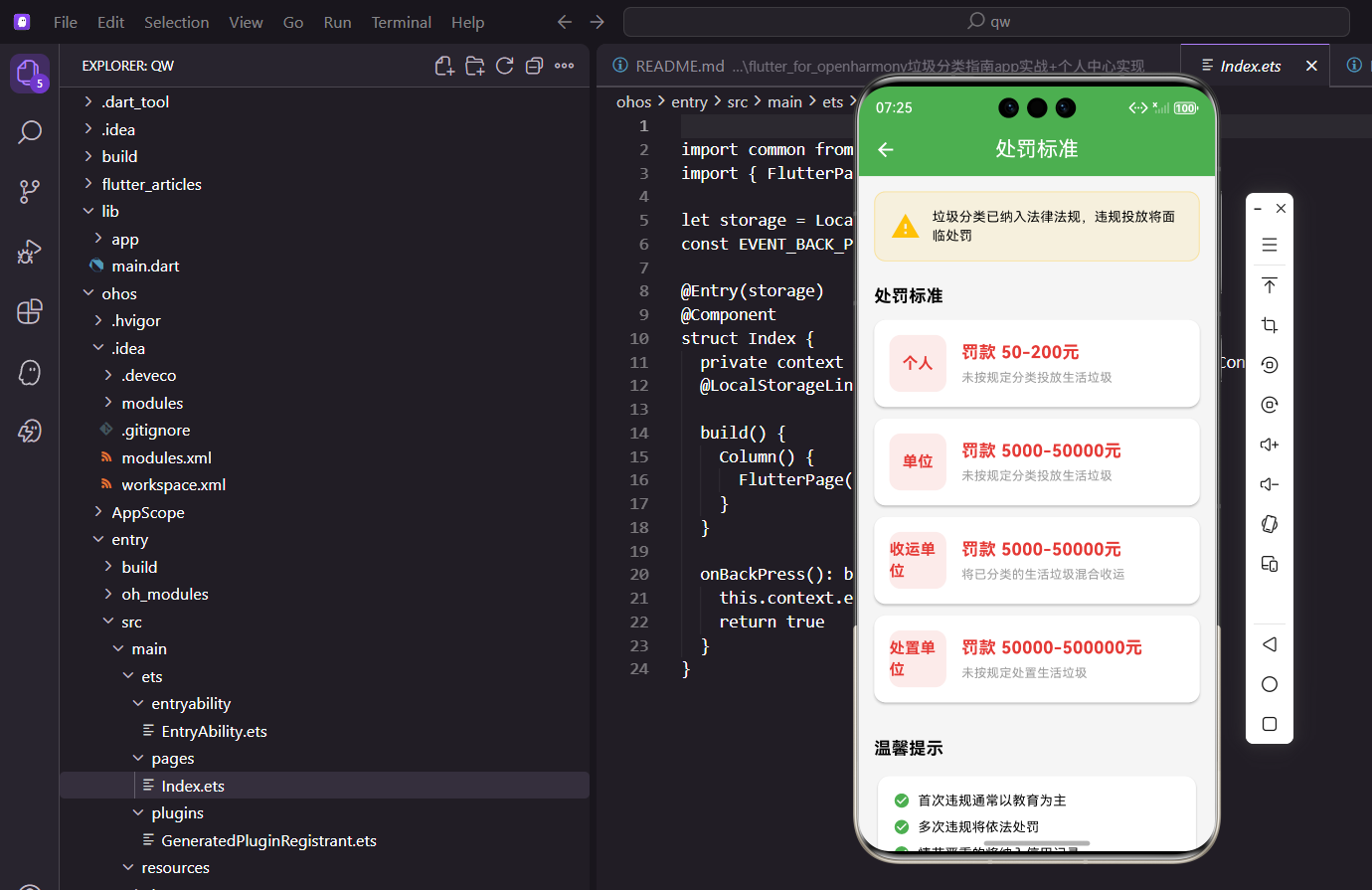
本文介绍了在Flutter for OpenHarmony环境下实现垃圾分类处罚标准页面的技术方案。页面采用SingleChildScrollView布局,包含警示区、处罚标准卡片列表和温馨提示三部分。处罚数据按主体分类(个人/单位/收运处置单位),使用Card组件展示罚款金额和违规行为描述。通过颜色区分(警示用琥珀色、处罚用红色系)提升信息层级,同时加入温馨提示以缓和界面氛围。该方案实现了清晰展
前言
垃圾分类不是闹着玩的,分错了是要罚款的。处罚标准页面就是让用户了解违规的后果,提高重视程度。当然,我们的目的不是吓唬人,而是让大家知道规则,自觉遵守。通过清晰展示处罚标准,可以帮助用户建立规则意识,从被动遵守转变为主动践行。这个页面在设计上需要把握好严肃与友好的平衡,既要让用户重视,又不能让用户感到过度压力。
本文将详细介绍如何在Flutter for OpenHarmony环境下实现一个完整的处罚标准页面。我们将从页面布局、警示设计、数据展示、法律依据等多个方面进行深入讲解,帮助开发者构建一个既专业又友好的处罚标准展示系统。通过本文的学习,你将掌握信息展示、视觉设计、用户引导等实用技能。
技术要点概览
本页面涉及的核心技术点:
- SingleChildScrollView:固定内容的滚动布局
- Card组件:卡片式信息展示
- Container装饰:警示框和标签样式
- Row布局:主体类型和罚款金额的排列
处罚数据结构
处罚信息按主体分类,包括个人、单位、收运单位和处置单位:
class PenaltyPage extends StatelessWidget {
const PenaltyPage({super.key});
Widget build(BuildContext context) {
final penalties = [
{'type': '个人', 'amount': '50-200元', 'desc': '未按规定分类投放生活垃圾'},
{'type': '单位', 'amount': '5000-50000元', 'desc': '未按规定分类投放生活垃圾'},
{'type': '收运单位', 'amount': '5000-50000元', 'desc': '将已分类的生活垃圾混合收运'},
{'type': '处置单位', 'amount': '50000-500000元', 'desc': '未按规定处置生活垃圾'},
];
数据说明:个人罚款最低50元,最高200元;单位罚款从5000到50000不等;处置单位最高可罚50万。这些数据来自各地的垃圾分类管理条例。
使用Model类管理数据
实际项目中建议使用Model类:
class PenaltyItem {
  final String type;
  final String amount;
  final String description;
  final String? legalBasis;

  PenaltyItem({
    required this.type,
    required this.amount,
    required this.description,
    this.legalBasis,
  });
}
页面整体布局
页面分为三个部分:顶部警示、处罚标准列表、温馨提示:
    return Scaffold(
      appBar: AppBar(title: const Text('处罚标准')),
      body: SingleChildScrollView(
        padding: EdgeInsets.all(16.w),
        child: Column(
          crossAxisAlignment: CrossAxisAlignment.start,
          children: [
用SingleChildScrollView而不是ListView,因为内容是固定的几个区块,不是动态列表。
顶部警示区域
页面最上面放一个醒目的警示框:
            Container(
              padding: EdgeInsets.all(16.w),
              decoration: BoxDecoration(
                color: Colors.amber.withOpacity(0.1),
                borderRadius: BorderRadius.circular(12.r),
                border: Border.all(color: Colors.amber.withOpacity(0.3)),
              ),
              child: Row(
                children: [
                  Icon(Icons.warning, color: Colors.amber, size: 32.sp),
                  SizedBox(width: 12.w),
                  Expanded(
                    child: Text(
                      '垃圾分类已纳入法律法规,违规投放将面临处罚',
                      style: TextStyle(fontSize: 14.sp),
                    ),
                  ),
                ],
              ),
            ),
用琥珀色(amber)作为警示色,配合警告图标,让用户意识到这是重要信息。但颜色不是红色,避免给人太强的压迫感。
处罚标准列表
            SizedBox(height: 24.h),
            Text(
              '处罚标准',
              style: TextStyle(fontSize: 18.sp, fontWeight: FontWeight.bold),
            ),
            SizedBox(height: 12.h),
            ...penalties.map((p) => _buildPenaltyCard(p)),
用map方法遍历处罚数据,生成卡片列表。
处罚卡片组件
每张卡片左边是主体类型,右边是罚款金额和说明:
  Widget _buildPenaltyCard(Map<String, String> penalty) {
    return Card(
      margin: EdgeInsets.only(bottom: 12.h),
      child: Padding(
        padding: EdgeInsets.all(16.w),
        child: Row(
          children: [
            Container(
              width: 60.w,
              height: 60.w,
              decoration: BoxDecoration(
                color: AppTheme.hazardousColor.withOpacity(0.1),
                borderRadius: BorderRadius.circular(12.r),
              ),
              child: Center(
                child: Text(
                  penalty['type']!,
                  style: TextStyle(
                    fontSize: 16.sp,
                    fontWeight: FontWeight.bold,
                    color: AppTheme.hazardousColor,
                  ),
                ),
              ),
            ),
主体类型用红色系(hazardousColor)显示,和处罚的严肃性相匹配。
罚款金额和违规行为
            SizedBox(width: 16.w),
            Expanded(
              child: Column(
                crossAxisAlignment: CrossAxisAlignment.start,
                children: [
                  Text(
                    '罚款 ${penalty['amount']}',
                    style: TextStyle(
                      fontSize: 18.sp,
                      fontWeight: FontWeight.bold,
                      color: AppTheme.hazardousColor,
                    ),
                  ),
                  SizedBox(height: 4.h),
                  Text(
                    penalty['desc']!,
                    style: TextStyle(fontSize: 13.sp, color: Colors.grey),
                  ),
                ],
              ),
            ),
          ],
        ),
      ),
    );
  }
罚款金额用大字号加粗显示,是卡片的视觉焦点。违规行为用灰色小字作为补充说明。
温馨提示区域
页面底部放一些缓和气氛的提示:
            SizedBox(height: 24.h),
            Text(
              '温馨提示',
              style: TextStyle(fontSize: 18.sp, fontWeight: FontWeight.bold),
            ),
            SizedBox(height: 12.h),
            Card(
              child: Padding(
                padding: EdgeInsets.all(16.w),
                child: Column(
                  crossAxisAlignment: CrossAxisAlignment.start,
                  children: [
                    _buildTipItem('首次违规通常以教育为主'),
                    _buildTipItem('多次违规将依法处罚'),
                    _buildTipItem('情节严重的将纳入信用记录'),
                    _buildTipItem('建议主动学习分类知识'),
                  ],
                ),
              ),
            ),
          ],
        ),
      ),
    );
  }
这些提示告诉用户:首次违规一般不会直接罚款,而是以教育为主。
提示项组件
  Widget _buildTipItem(String text) {
    return Padding(
      padding: EdgeInsets.only(bottom: 8.h),
      child: Row(
        children: [
          Icon(Icons.check_circle, color: AppTheme.primaryColor, size: 18.sp),
          SizedBox(width: 8.w),
          Text(text, style: TextStyle(fontSize: 14.sp)),
        ],
      ),
    );
  }
}
每条提示前面加个绿色对勾,给人积极正面的感觉。
法律依据展示
可以添加法律依据的展示:
Widget _buildLegalBasis() {
  return ExpansionTile(
    title: Text('法律依据', style: TextStyle(fontSize: 16.sp, fontWeight: FontWeight.bold)),
    children: [
      Padding(
        padding: EdgeInsets.all(16.w),
        child: Column(
          crossAxisAlignment: CrossAxisAlignment.start,
          children: [
            _buildLegalItem('《上海市生活垃圾管理条例》', '2019年7月1日起施行'),
            _buildLegalItem('《北京市生活垃圾管理条例》', '2020年5月1日起施行'),
            _buildLegalItem('《深圳市生活垃圾分类管理条例》', '2020年9月1日起施行'),
          ],
        ),
      ),
    ],
  );
}

Widget _buildLegalItem(String title, String date) {
  return Padding(
    padding: EdgeInsets.only(bottom: 8.h),
    child: Row(
      mainAxisAlignment: MainAxisAlignment.spaceBetween,
      children: [
        Text(title, style: TextStyle(fontSize: 14.sp)),
        Text(date, style: TextStyle(fontSize: 12.sp, color: Colors.grey)),
      ],
    ),
  );
}
设计平衡
这个页面的设计需要把握一个平衡:
1. 要让用户重视
处罚信息必须清晰展示,让用户知道违规的后果。
2. 不能吓跑用户
如果页面全是红色警告,用户可能会觉得压力太大。所以用了温馨提示来缓和气氛。
3. 引导正确行为
最后一条提示"建议主动学习分类知识",把用户引导到学习上来,而不是停留在对处罚的恐惧上。
城市差异说明
不同城市的处罚标准可能有差异:
Widget _buildCityDifference() {
  return Card(
    child: Padding(
      padding: EdgeInsets.all(16.w),
      child: Column(
        crossAxisAlignment: CrossAxisAlignment.start,
        children: [
          Text('各地标准差异', style: TextStyle(fontSize: 16.sp, fontWeight: FontWeight.bold)),
          SizedBox(height: 12.h),
          Text(
            '不同城市的处罚标准可能有所不同,请以当地法规为准。本页面展示的是通用标准,仅供参考。',
            style: TextStyle(fontSize: 14.sp, color: Colors.grey, height: 1.5),
          ),
          SizedBox(height: 12.h),
          OutlinedButton(
            onPressed: () => Get.toNamed(Routes.cityRules),
            child: Text('查看各城市规则'),
          ),
        ],
      ),
    ),
  );
}
性能优化
1. 使用const构造函数
const Icon(Icons.warning, color: Colors.amber, size: 32)
const Text('处罚标准')
2. 提取静态组件
class WarningBanner extends StatelessWidget {
final String message;
const WarningBanner({super.key, required this.message});
Widget build(BuildContext context) {
return Container(
padding: EdgeInsets.all(16.w),
decoration: BoxDecoration(
color: Colors.amber.withOpacity(0.1),
borderRadius: BorderRadius.circular(12.r),
border: Border.all(color: Colors.amber.withOpacity(0.3)),
),
child: Row(
children: [
const Icon(Icons.warning, color: Colors.amber, size: 32),
SizedBox(width: 12.w),
Expanded(child: Text(message, style: TextStyle(fontSize: 14.sp))),
],
),
);
}
}
总结与技术要点
这个页面的目的不是让用户害怕,而是让用户了解规则、尊重规则,最终养成正确的分类习惯。本文介绍的实现方案包括:
核心技术点总结:
使用SingleChildScrollView实现固定内容的滚动布局。通过Container装饰实现警示框和标签样式。使用Row布局排列主体类型和罚款金额。Card组件实现卡片式信息展示,层次分明。
设计亮点分析:
顶部警示区域使用琥珀色,既醒目又不过分压迫。处罚标准用卡片展示,每个主体独立呈现。温馨提示区域缓和气氛,引导正确行为。法律依据展示增强权威性和可信度。
用户体验考虑:
警示信息清晰但不吓人,把握好严肃与友好的平衡。首次违规以教育为主的提示,减轻用户焦虑。建议主动学习的引导,将恐惧转化为行动。城市差异说明避免用户误解,提供查看各城市规则的入口。
功能扩展方向:
添加处罚案例展示,让用户了解真实情况。支持处罚标准对比,查看不同城市的差异。集成法律法规查询,提供完整的法律依据。添加违规申诉指南,帮助用户维护权益。
通过合理的页面设计,可以让用户重视垃圾分类规则,同时不会产生过度焦虑。这个页面体现了应用的社会责任感,帮助用户建立规则意识,促进垃圾分类工作的顺利开展。
欢迎加入开源鸿蒙跨平台社区:https://openharmonycrossplatform.csdn.net
处罚标准详情展示
点击处罚标准卡片查看详细信息:
void _showPenaltyDetail(BuildContext context, Map<String, dynamic> penalty) {
  showModalBottomSheet(
    context: context,
    isScrollControlled: true,
    shape: RoundedRectangleBorder(
      borderRadius: BorderRadius.vertical(top: Radius.circular(20.r)),
    ),
    builder: (context) => DraggableScrollableSheet(
      initialChildSize: 0.7,
      minChildSize: 0.5,
      maxChildSize: 0.95,
      expand: false,
      builder: (context, scrollController) => SingleChildScrollView(
        controller: scrollController,
        padding: EdgeInsets.all(20.w),
        child: Column(
          crossAxisAlignment: CrossAxisAlignment.start,
          children: [
            Center(
              child: Container(
                width: 40.w,
                height: 4.h,
                decoration: BoxDecoration(
                  color: Colors.grey.shade300,
                  borderRadius: BorderRadius.circular(2.r),
                ),
              ),
            ),
            SizedBox(height: 20.h),
            Row(
              children: [
                Container(
                  padding: EdgeInsets.all(12.w),
                  decoration: BoxDecoration(
                    color: _getColorForTarget(penalty['target']).withOpacity(0.1),
                    borderRadius: BorderRadius.circular(12.r),
                  ),
                  child: Icon(
                    _getIconForTarget(penalty['target']),
                    color: _getColorForTarget(penalty['target']),
                    size: 32.sp,
                  ),
                ),
                SizedBox(width: 12.w),
                Expanded(
                  child: Column(
                    crossAxisAlignment: CrossAxisAlignment.start,
                    children: [
                      Text(
                        penalty['target'],
                        style: TextStyle(
                          fontSize: 20.sp,
                          fontWeight: FontWeight.bold,
                        ),
                      ),
                      Text(
                        penalty['violation'],
                        style: TextStyle(
                          fontSize: 14.sp,
                          color: Colors.grey.shade600,
                        ),
                      ),
                    ],
                  ),
                ),
              ],
            ),
            SizedBox(height: 24.h),
            _buildDetailSection('处罚金额', penalty['amount'], Icons.attach_money),
            _buildDetailSection('法律依据', penalty['law'], Icons.gavel),
            _buildDetailSection('处罚说明', penalty['description'], Icons.description),
            if (penalty['examples'] != null)
              _buildExamplesSection(penalty['examples']),
            SizedBox(height: 16.h),
            _buildWarningCard(),
          ],
        ),
      ),
    ),
  );
}

Widget _buildDetailSection(String title, String content, IconData icon) {
  return Container(
    margin: EdgeInsets.only(bottom: 16.h),
    padding: EdgeInsets.all(16.w),
    decoration: BoxDecoration(
      color: Colors.grey.shade50,
      borderRadius: BorderRadius.circular(12.r),
    ),
    child: Column(
      crossAxisAlignment: CrossAxisAlignment.start,
      children: [
        Row(
          children: [
            Icon(icon, size: 20.sp, color: AppTheme.primaryColor),
            SizedBox(width: 8.w),
            Text(
              title,
              style: TextStyle(
                fontSize: 16.sp,
                fontWeight: FontWeight.bold,
              ),
            ),
          ],
        ),
        SizedBox(height: 8.h),
        Text(
          content,
          style: TextStyle(fontSize: 14.sp, height: 1.5),
        ),
      ],
    ),
  );
}

Widget _buildExamplesSection(List<String> examples) {
  return Container(
    margin: EdgeInsets.only(bottom: 16.h),
    padding: EdgeInsets.all(16.w),
    decoration: BoxDecoration(
      color: Colors.orange.shade50,
      borderRadius: BorderRadius.circular(12.r),
      border: Border.all(color: Colors.orange.shade200),
    ),
    child: Column(
      crossAxisAlignment: CrossAxisAlignment.start,
      children: [
        Row(
          children: [
            Icon(Icons.lightbulb, size: 20.sp, color: Colors.orange),
            SizedBox(width: 8.w),
            Text(
              '典型案例',
              style: TextStyle(
                fontSize: 16.sp,
                fontWeight: FontWeight.bold,
                color: Colors.orange.shade900,
              ),
            ),
          ],
        ),
        SizedBox(height: 12.h),
        ...examples.map((example) => Padding(
          padding: EdgeInsets.only(bottom: 8.h),
          child: Row(
            crossAxisAlignment: CrossAxisAlignment.start,
            children: [
              Text('• ', style: TextStyle(fontSize: 16.sp, color: Colors.orange)),
              Expanded(
                child: Text(
                  example,
                  style: TextStyle(fontSize: 14.sp, height: 1.5),
                ),
              ),
            ],
          ),
        )),
      ],
    ),
  );
}

Widget _buildWarningCard() {
  return Container(
    padding: EdgeInsets.all(16.w),
    decoration: BoxDecoration(
      color: Colors.red.shade50,
      borderRadius: BorderRadius.circular(12.r),
      border: Border.all(color: Colors.red.shade200),
    ),
    child: Row(
      children: [
        Icon(Icons.warning, color: Colors.red, size: 24.sp),
        SizedBox(width: 12.w),
        Expanded(
          child: Text(
            '请严格遵守垃圾分类规定,避免违规处罚',
            style: TextStyle(
              fontSize: 14.sp,
              color: Colors.red.shade900,
            ),
          ),
        ),
      ],
    ),
  );
}
详情弹窗使用DraggableScrollableSheet实现可拖动的底部面板,用户可以上下滑动调整高度。内容包括处罚对象、违规行为、处罚金额、法律依据、处罚说明和典型案例。使用不同颜色的卡片区分不同类型的信息,视觉层次清晰。
处罚标准搜索
添加搜索功能快速查找处罚标准:
class PenaltyStandardsPage extends StatefulWidget {
const PenaltyStandardsPage({super.key});
State<PenaltyStandardsPage> createState() => _PenaltyStandardsPageState();
}
class _PenaltyStandardsPageState extends State<PenaltyStandardsPage> {
String _searchQuery = '';
Widget build(BuildContext context) {
return Scaffold(
appBar: AppBar(
title: const Text('处罚标准'),
actions: [
IconButton(
icon: const Icon(Icons.search),
onPressed: () => _showSearchDialog(),
),
],
),
body: ListView.builder(
padding: EdgeInsets.all(16.w),
itemCount: _getFilteredPenalties().length,
itemBuilder: (context, index) {
final penalty = _getFilteredPenalties()[index];
return _buildPenaltyCard(penalty);
},
),
);
}
List<Map<String, dynamic>> _getFilteredPenalties() {
if (_searchQuery.isEmpty) {
return penalties;
}
return penalties.where((p) =>
p['target'].toLowerCase().contains(_searchQuery.toLowerCase()) ||
p['violation'].toLowerCase().contains(_searchQuery.toLowerCase())
).toList();
}
void _showSearchDialog() {
showDialog(
context: context,
builder: (context) => AlertDialog(
title: const Text('搜索处罚标准'),
content: TextField(
autofocus: true,
decoration: const InputDecoration(
hintText: '输入关键词',
prefixIcon: Icon(Icons.search),
),
onChanged: (value) {
setState(() => _searchQuery = value);
},
),
actions: [
TextButton(
onPressed: () {
setState(() => _searchQuery = '');
Navigator.pop(context);
},
child: const Text('清除'),
),
],
),
);
}
}
搜索功能支持按处罚对象和违规行为搜索,实时过滤列表。用户可以快速找到关心的处罚标准,提高查找效率。
处罚计算器
提供处罚金额计算工具:
class PenaltyCalculatorPage extends StatefulWidget {
const PenaltyCalculatorPage({super.key});
State<PenaltyCalculatorPage> createState() => _PenaltyCalculatorPageState();
}
class _PenaltyCalculatorPageState extends State<PenaltyCalculatorPage> {
String _selectedTarget = '个人';
int _violationCount = 1;
int _calculatePenalty() {
final basePenalty = _selectedTarget == '个人' ? 200 : 50000;
return basePenalty * _violationCount;
}
Widget build(BuildContext context) {
return Scaffold(
appBar: AppBar(title: const Text('处罚计算器')),
body: Padding(
padding: EdgeInsets.all(16.w),
child: Column(
crossAxisAlignment: CrossAxisAlignment.start,
children: [
Text('违规主体', style: TextStyle(fontSize: 16.sp, fontWeight: FontWeight.bold)),
SizedBox(height: 12.h),
SegmentedButton<String>(
segments: const [
ButtonSegment(value: '个人', label: Text('个人')),
ButtonSegment(value: '单位', label: Text('单位')),
],
selected: {_selectedTarget},
onSelectionChanged: (Set<String> newSelection) {
setState(() => _selectedTarget = newSelection.first);
},
),
SizedBox(height: 24.h),
Text('违规次数', style: TextStyle(fontSize: 16.sp, fontWeight: FontWeight.bold)),
SizedBox(height: 12.h),
Row(
children: [
IconButton(
icon: const Icon(Icons.remove_circle_outline),
onPressed: _violationCount > 1
? () => setState(() => _violationCount--)
: null,
),
Expanded(
child: Text(
_violationCount.toString(),
textAlign: TextAlign.center,
style: TextStyle(fontSize: 24.sp, fontWeight: FontWeight.bold),
),
),
IconButton(
icon: const Icon(Icons.add_circle_outline),
onPressed: () => setState(() => _violationCount++),
),
],
),
SizedBox(height: 32.h),
Container(
width: double.infinity,
padding: EdgeInsets.all(24.w),
decoration: BoxDecoration(
gradient: LinearGradient(
colors: [Colors.red.shade400, Colors.red.shade600],
),
borderRadius: BorderRadius.circular(16.r),
),
child: Column(
children: [
Text(
'预计处罚金额',
style: TextStyle(
fontSize: 16.sp,
color: Colors.white70,
),
),
SizedBox(height: 8.h),
Text(
'¥${_calculatePenalty()}',
style: TextStyle(
fontSize: 36.sp,
fontWeight: FontWeight.bold,
color: Colors.white,
),
),
],
),
),
SizedBox(height: 16.h),
Container(
padding: EdgeInsets.all(16.w),
decoration: BoxDecoration(
color: Colors.orange.shade50,
borderRadius: BorderRadius.circular(12.r),
),
child: Row(
children: [
Icon(Icons.info_outline, color: Colors.orange),
SizedBox(width: 12.w),
Expanded(
child: Text(
'实际处罚金额以执法部门认定为准',
style: TextStyle(fontSize: 12.sp, color: Colors.orange.shade900),
),
),
],
),
),
],
),
),
);
}
}
处罚计算器帮助用户了解违规的经济成本。选择违规主体和次数,自动计算预计处罚金额。这个工具有教育意义,让用户意识到违规的严重性。
处罚案例库
展示真实的处罚案例:
class PenaltyCasesPage extends StatelessWidget {
const PenaltyCasesPage({super.key});
final List<Map<String, dynamic>> cases = const [
{
'title': '某小区居民未分类投放被罚200元',
'date': '2024-01-15',
'location': '上海市浦东新区',
'description': '居民张某多次将厨余垃圾混入其他垃圾,经劝阻无效后被处以200元罚款。',
'lesson': '要养成正确分类的习惯,不要抱有侥幸心理。',
},
{
'title': '某餐饮企业混装混运被罚5万元',
'date': '2024-01-10',
'location': '北京市朝阳区',
'description': '某餐饮企业将厨余垃圾和其他垃圾混装,被执法部门查处并处以5万元罚款。',
'lesson': '企业要建立完善的垃圾分类管理制度。',
},
];
Widget build(BuildContext context) {
return Scaffold(
appBar: AppBar(title: const Text('处罚案例')),
body: ListView.builder(
padding: EdgeInsets.all(16.w),
itemCount: cases.length,
itemBuilder: (context, index) {
final case_ = cases[index];
return Card(
margin: EdgeInsets.only(bottom: 16.h),
child: Padding(
padding: EdgeInsets.all(16.w),
child: Column(
crossAxisAlignment: CrossAxisAlignment.start,
children: [
Text(
case_['title'],
style: TextStyle(
fontSize: 16.sp,
fontWeight: FontWeight.bold,
),
),
SizedBox(height: 8.h),
Row(
children: [
Icon(Icons.calendar_today, size: 14.sp, color: Colors.grey),
SizedBox(width: 4.w),
Text(case_['date'], style: TextStyle(fontSize: 12.sp, color: Colors.grey)),
SizedBox(width: 16.w),
Icon(Icons.location_on, size: 14.sp, color: Colors.grey),
SizedBox(width: 4.w),
Text(case_['location'], style: TextStyle(fontSize: 12.sp, color: Colors.grey)),
],
),
SizedBox(height: 12.h),
Text(case_['description'], style: TextStyle(fontSize: 14.sp, height: 1.5)),
SizedBox(height: 12.h),
Container(
padding: EdgeInsets.all(12.w),
decoration: BoxDecoration(
color: Colors.blue.shade50,
borderRadius: BorderRadius.circular(8.r),
),
child: Row(
children: [
Icon(Icons.lightbulb, size: 16.sp, color: Colors.blue),
SizedBox(width: 8.w),
Expanded(
child: Text(
'启示: ${case_['lesson']}',
style: TextStyle(fontSize: 13.sp, color: Colors.blue.shade900),
),
),
],
),
),
],
),
),
);
},
),
);
}
}
真实案例比抽象的规定更有说服力。每个案例包含标题、时间、地点、描述和启示,让用户从他人的教训中学习。案例库定期更新,保持内容的时效性和相关性。
总结与技术要点
处罚标准页面通过清晰的信息展示和丰富的交互功能,帮助用户了解垃圾分类的法律后果。从基础的列表展示到详情弹窗、搜索、计算器、案例库等功能,我们构建了一个全面的处罚标准查询系统。
这个功能不仅提供信息,更重要的是教育用户遵守规则。通过可视化的处罚金额、真实的案例、便捷的查询工具,让用户深刻认识到正确分类的重要性。
欢迎加入开源鸿蒙跨平台社区:https://openharmonycrossplatform.csdn.net

开源鸿蒙跨平台开发社区汇聚开发者与厂商,共建“一次开发,多端部署”的开源生态,致力于降低跨端开发门槛,推动万物智联创新。
更多推荐
 5
5 0
0- 0


 已为社区贡献30条内容

所有评论(0)