应用设置页面 Cordova&OpenHarmony 混合开发实战
摘要:家庭菜谱应用设置模块通过Web层管理基础配置(如每页显示数量、通知开关等),数据存储在IndexedDB的settings表中。用户修改配置后,Web层保存表单数据至数据库,并通过Cordova插件同步需要原生层生效的设置(如通知开关)。ArkTS侧的SettingPlugin实现原生功能调用,确保Web与原生行为一致。该方案采用"Web配置中心+原生行为控制"的混合架构
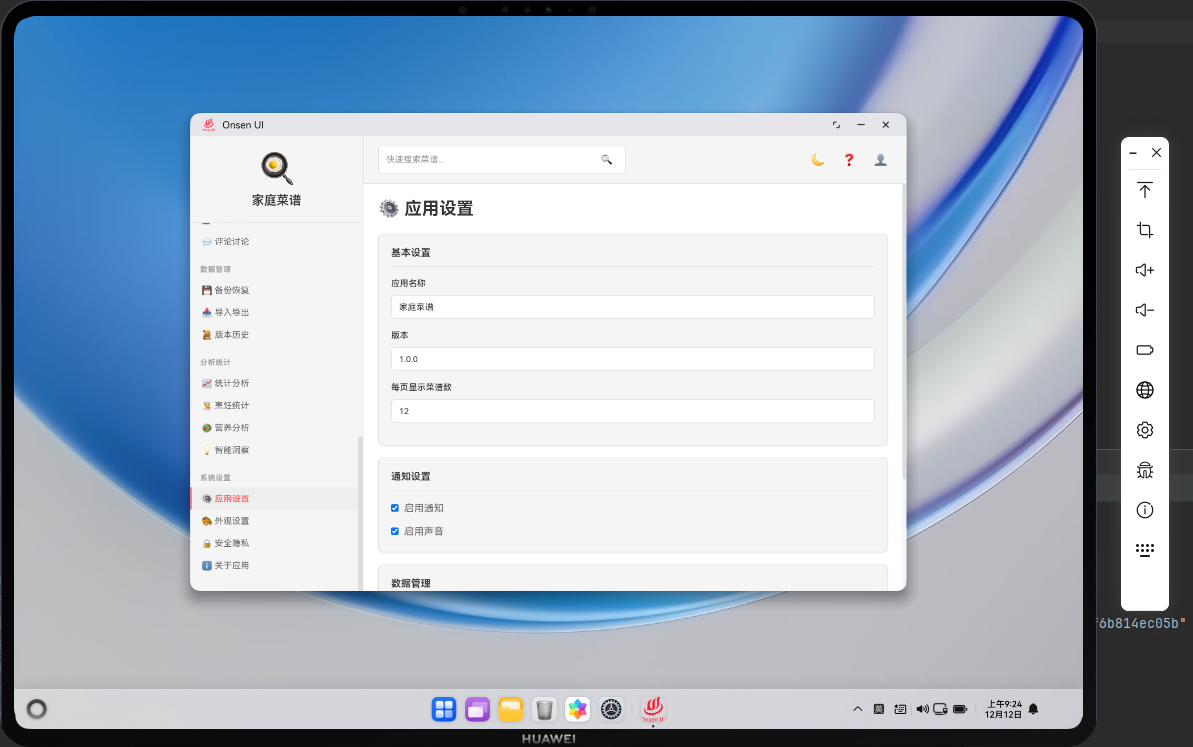
📌 模块概述
应用设置页面用于管理家庭菜谱应用的基础配置,例如每页显示的菜谱数量、是否启用通知、应用名称与版本信息展示等。这些设置大多存储在 IndexedDB 的 settings 表中,由 Web 层读写;部分设置(如通知开关)同时需要在 ArkTS 原生层生效,因此需要借助 Cordova 插件进行同步。
🔗 设置加载与保存流程
renderSettings()从db.getSetting读取现有设置值(如主题、语言、每页数量);- 页面加载时将这些值填入对应表单控件;
- 用户修改配置后点击「保存设置」按钮;
saveSettings()从表单控件中读取当前值,写回settings表;- 若某些设置需要影响原生行为(如通知总开关),则通过 ArkTS 插件同步生效。
🔧 设置表单结构(HTML 片段)
<div class="card">
  <div class="card-content">
    <div class="form-group">
      <label class="form-label">每页显示菜谱数</label>
      <input id="items-per-page" type="number" class="form-control" min="6" max="50">
    </div>
  </div>
</div>
<div class="card">
  <div class="card-content">
    <label>
      <input id="enable-notifications" type="checkbox"> 启用通知
    </label>
  </div>
</div>
这段 HTML 展示了两个典型设置项:每页条目数与通知开关。通过简单的表单控件即可完成设置采集与展示。
🔧 Web 层保存设置逻辑(JavaScript 片段)
async function saveSettings() {
  const itemsPerPage = parseInt(document.getElementById('items-per-page').value) || 12;
  const enableNotifications = document.getElementById('enable-notifications').checked;

  await db.saveSetting('itemsPerPage', itemsPerPage);
  await db.saveSetting('enableNotifications', enableNotifications);

  showToast('设置已保存', 'success');
}
上面的代码展示了如何在 Web 层将表单值写回 settings 表。具体使用何种 key 完全由应用自行约定,IndexedDB 本身对键名没有限制。
🔌 同步通知开关到鸿蒙原生(ArkTS 片段)
// entry/src/main/ets/plugins/SettingPlugin.ets
import plugin from '@ohos.plugin';

@plugin
export default class SettingPlugin {
  async setNotificationEnabled(enabled: boolean): Promise<void> {
    // 示例:开启或关闭原生通知通道
    console.info('notification enabled: ' + enabled);
  }
}
ArkTS 侧的 SettingPlugin 暴露 setNotificationEnabled 方法,用于在原生层同步通知开关状态。真实项目中可以在这里注册或注销通知通道。
async function syncNotificationSettingNative() {
  if (!window.cordova) return;
  const enabled = document.getElementById('enable-notifications').checked;
  cordova.exec(null, null, 'SettingPlugin', 'setNotificationEnabled', [enabled]);
}
在 Web 层,我们可以在保存设置后调用 syncNotificationSettingNative,把当前开关状态发送给 ArkTS 插件,保证 Web 层和原生层的行为一致。
📝 小结
应用设置页面集中管理家庭菜谱应用的基础配置,为用户提供了一致的配置入口。通过 Cordova&OpenHarmony 混合架构,我们在 Web 层负责所有设置的存取与界面展示,在 ArkTS 原生层负责与系统级能力相关的设置同步,实现了「Web 配置中心 + 原生行为控制」的整体方案。
欢迎加入开源鸿蒙跨平台社区:https://openharmonycrossplatform.csdn.net

开源鸿蒙跨平台开发社区汇聚开发者与厂商,共建“一次开发,多端部署”的开源生态,致力于降低跨端开发门槛,推动万物智联创新。
更多推荐



 4
4 0
0- 0


 已为社区贡献31条内容

所有评论(0)