Flutter & OpenHarmony 社交App消息已读回执组件构建方案
前言
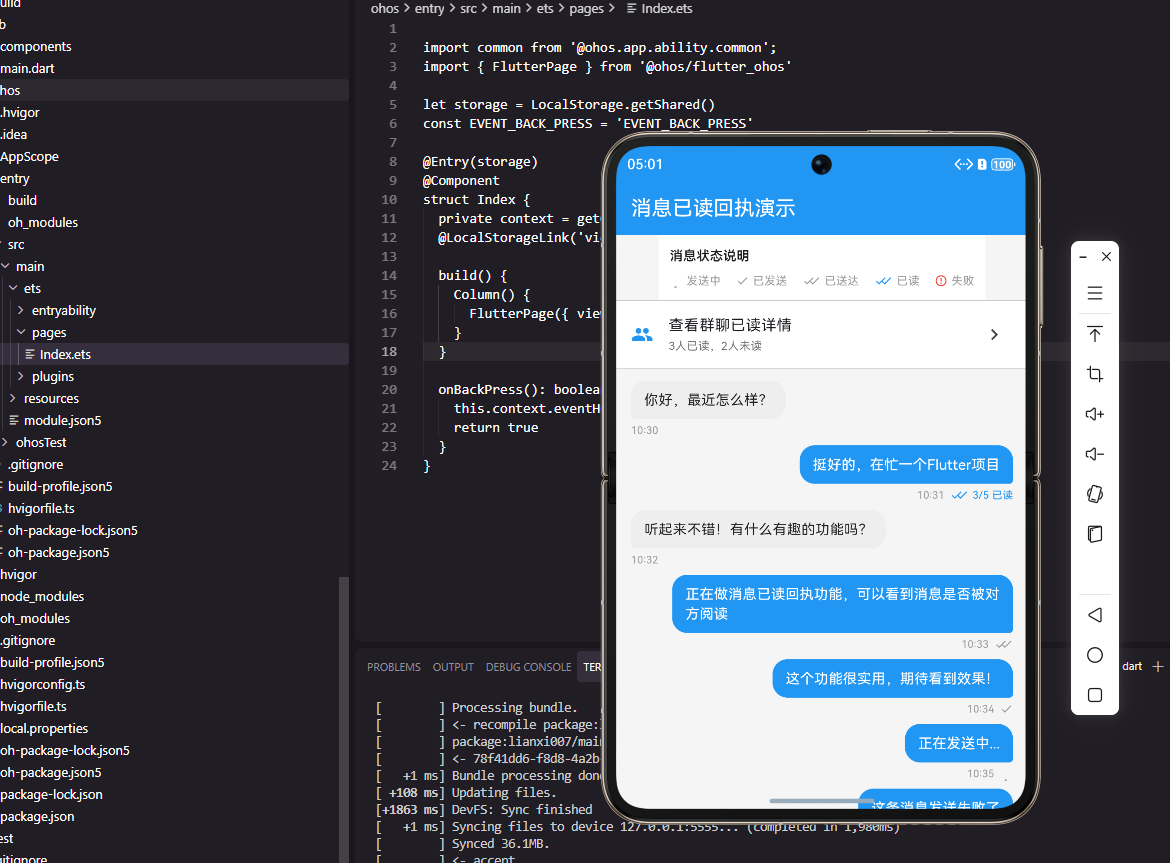
消息已读回执是即时通讯应用中提升沟通效率的重要功能,让发送者知道消息是否被对方阅读。一个完善的已读回执组件需要支持多种状态显示、群聊已读统计以及优雅的视觉设计。本文将详细讲解如何在Flutter和OpenHarmony平台上构建专业级的消息已读回执组件。
Flutter已读回执实现
首先定义消息状态枚举。
enum MessageStatus {
  sending,
  sent,
  delivered,
  read,
  failed,
}

class MessageStatusIndicator extends StatelessWidget {
  final MessageStatus status;
  final int? readCount;
  final int? totalCount;

  const MessageStatusIndicator({
    Key? key,
    required this.status,
    this.readCount,
    this.totalCount,
  }) : super(key: key);
MessageStatus枚举定义消息的五种状态:发送中、已发送、已送达、已读和发送失败。readCount和totalCount用于群聊场景显示已读人数。
Widget build(BuildContext context) {
return Row(
mainAxisSize: MainAxisSize.min,
children: [
_buildStatusIcon(),
if (status == MessageStatus.read && readCount != null)
Padding(
padding: EdgeInsets.only(left: 4),
child: Text(
totalCount != null
? '$readCount/$totalCount 已读'
: '已读',
style: TextStyle(
fontSize: 11,
color: Colors.grey,
),
),
),
],
);
}
Row水平排列状态图标和已读文本。群聊场景显示"已读人数/总人数",单聊只显示"已读"。mainAxisSize.min让Row自适应内容宽度。
  Widget _buildStatusIcon() {
    switch (status) {
      case MessageStatus.sending:
        return SizedBox(
          width: 12,
          height: 12,
          child: CircularProgressIndicator(
            strokeWidth: 1.5,
            valueColor: AlwaysStoppedAnimation(Colors.grey),
          ),
        );
      case MessageStatus.sent:
        return Icon(Icons.check, size: 14, color: Colors.grey);
      case MessageStatus.delivered:
        return Stack(
          children: [
            Icon(Icons.check, size: 14, color: Colors.grey),
            Padding(
              padding: EdgeInsets.only(left: 6),
              child: Icon(Icons.check, size: 14, color: Colors.grey),
            ),
          ],
        );
_buildStatusIcon根据状态返回不同图标。发送中显示加载指示器,已发送显示单勾,已送达显示双勾(两个勾叠加)。
      case MessageStatus.read:
        return Stack(
          children: [
            Icon(Icons.check, size: 14, color: Colors.blue),
            Padding(
              padding: EdgeInsets.only(left: 6),
              child: Icon(Icons.check, size: 14, color: Colors.blue),
            ),
          ],
        );
      case MessageStatus.failed:
        return Icon(Icons.error_outline, size: 14, color: Colors.red);
    }
  }
}
已读状态显示蓝色双勾,发送失败显示红色错误图标。这种设计与主流即时通讯应用保持一致,用户容易理解。
OpenHarmony ArkTS实现
鸿蒙系统上的已读回执实现。
@Component
struct MessageStatusIndicator {
  @Prop status: string = 'sent'
  @Prop readCount: number = 0
  @Prop totalCount: number = 0

  build() {
    Row() {
      this.StatusIcon()

      if (this.status === 'read' && this.readCount > 0) {
        Text(this.totalCount > 0
          ? `${this.readCount}/${this.totalCount} 已读`
          : '已读')
          .fontSize(11)
          .fontColor(Color.Gray)
          .margin({ left: 4 })
      }
    }
  }
Row水平排列状态图标和已读文本。条件渲染根据状态和已读人数显示文本。
  @Builder
  StatusIcon() {
    if (this.status === 'sending') {
      LoadingProgress()
        .width(12)
        .height(12)
    } else if (this.status === 'sent') {
      Image($r('app.media.ic_check'))
        .width(14)
        .height(14)
        .fillColor(Color.Gray)
    } else if (this.status === 'delivered') {
      Stack() {
        Image($r('app.media.ic_check'))
          .width(14)
          .height(14)
          .fillColor(Color.Gray)
        Image($r('app.media.ic_check'))
          .width(14)
          .height(14)
          .fillColor(Color.Gray)
          .margin({ left: 6 })
      }
@Builder定义状态图标构建方法。LoadingProgress显示发送中状态,Stack叠加两个勾显示双勾效果。
    } else if (this.status === 'read') {
      Stack() {
        Image($r('app.media.ic_check'))
          .width(14)
          .height(14)
          .fillColor('#007AFF')
        Image($r('app.media.ic_check'))
          .width(14)
          .height(14)
          .fillColor('#007AFF')
          .margin({ left: 6 })
      }
    } else if (this.status === 'failed') {
      Image($r('app.media.ic_error'))
        .width(14)
        .height(14)
        .fillColor(Color.Red)
    }
  }
}
已读状态使用蓝色双勾,发送失败使用红色错误图标。颜色设置与Flutter版本保持一致。
群聊已读详情
在Flutter中实现群聊已读详情弹窗:
class ReadReceiptDetail extends StatelessWidget {
final List<UserInfo> readUsers;
final List<UserInfo> unreadUsers;
const ReadReceiptDetail({
Key? key,
required this.readUsers,
required this.unreadUsers,
}) : super(key: key);
Widget build(BuildContext context) {
return DefaultTabController(
length: 2,
child: Column(
children: [
TabBar(
tabs: [
Tab(text: '已读 ${readUsers.length}'),
Tab(text: '未读 ${unreadUsers.length}'),
],
),
Expanded(
child: TabBarView(
children: [
_buildUserList(readUsers),
_buildUserList(unreadUsers),
],
),
),
],
),
);
}
Widget _buildUserList(List<UserInfo> users) {
return ListView.builder(
itemCount: users.length,
itemBuilder: (context, index) {
final user = users[index];
return ListTile(
leading: CircleAvatar(
backgroundImage: NetworkImage(user.avatar),
),
title: Text(user.name),
);
},
);
}
}
ReadReceiptDetail使用TabBar切换已读和未读用户列表。Tab标签显示各列表的人数。ListView渲染用户列表,显示头像和昵称。这种设计让群主或管理员能够清楚了解消息的阅读情况。
总结
本文详细介绍了消息已读回执组件在Flutter和OpenHarmony两个平台上的实现。已读回执是即时通讯应用提升沟通效率的重要功能,需要支持多种状态显示。两个平台的实现都采用了图标和文本组合的方式。在实际项目中,还需要与后端配合实现已读状态的同步和推送。
欢迎加入开源鸿蒙跨平台社区:https://openharmonycrossplatform.csdn.net

开源鸿蒙跨平台开发社区汇聚开发者与厂商,共建“一次开发,多端部署”的开源生态,致力于降低跨端开发门槛,推动万物智联创新。
更多推荐


 4
4 0
0- 0


 已为社区贡献21条内容

所有评论(0)