外观设置页面 Cordova&OpenHarmony 混合开发实战
本文介绍了家庭菜谱应用的外观设置模块实现方案。该模块支持用户自定义主题(浅色/深色/自动)、字体大小和主色调等视觉风格。系统采用CSS变量和类名切换实现Web层主题变换,同时通过ArkTS原生插件同步系统栏颜色。文章详细说明了主题切换流程,包括Web层JavaScript逻辑和鸿蒙原生层ArkTS实现,展示了如何通过Cordova&OpenHarmony架构实现Web与原生视觉的统一管理,
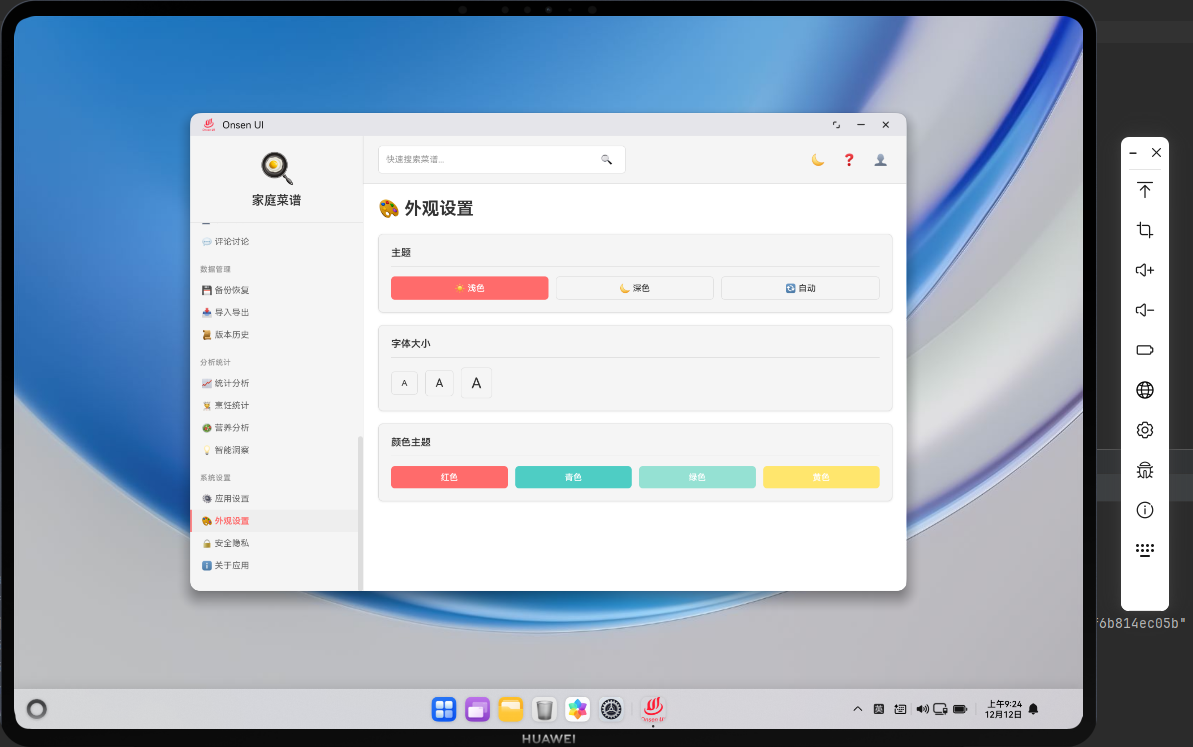
📌 模块概述
外观设置页面允许用户自定义应用的视觉风格,包括浅色/深色/自动主题、字体大小和主色调等。大部分效果可以通过 CSS 变量和类名切换在 Web 层直接实现;在某些场景下,还需要 ArkTS 原生层配合,例如在系统级状态栏或导航栏上同步深色/浅色模式。借助 Cordova&OpenHarmony 架构,我们可以让主题设置在 Web 与原生之间保持一致。
🔗 主题切换流程
- 用户在外观设置页面点击「浅色」「深色」「自动」等按钮;
- Web 层在
setTheme(theme)中将选择写入settings表,并切换body上的类名; - CSS 中通过
body.dark-theme等规则控制背景和文字颜色; - 若在鸿蒙设备上,需要同时通过 ArkTS 插件通知原生层切换系统栏颜色;
- 下次启动应用时,
renderAppearance()从settings中读取上次选择自动恢复。
🔧 外观设置界面(HTML 片段)
<div class="card">
  <div class="card-content">
    <div class="btn-group">
      <button class="btn" onclick="setTheme('light')">浅色</button>
      <button class="btn" onclick="setTheme('dark')">深色</button>
      <button class="btn" onclick="setTheme('auto')">自动</button>
    </div>
  </div>
</div>
这个 HTML 片段展示了主题选择按钮组,每个按钮调用 setTheme 并传入对应模式。
🔧 Web 层主题切换逻辑(JavaScript 片段)
async function setTheme(theme) {
  await db.saveSetting('theme', theme);
  if (theme === 'dark') {
    document.body.classList.add('dark-theme');
  } else {
    document.body.classList.remove('dark-theme');
  }
  showToast('主题已更改', 'success');
}
上述代码演示了最基础的主题切换:通过在 body 上添加或移除 dark-theme 类名,配合 CSS 中的变量覆盖即可完成深浅主题切换。
🔌 在鸿蒙原生层同步主题(ArkTS 片段)
// entry/src/main/ets/plugins/ThemePlugin.ets
import plugin from '@ohos.plugin';

@plugin
export default class ThemePlugin {
  async applyTheme(theme: string): Promise<void> {
    // 示例:根据 theme 调整系统栏或窗口样式
    console.info('apply theme: ' + theme);
  }
}
ArkTS 的 ThemePlugin 提供了一个 applyTheme 方法,接收 Web 层当前选择的主题字符串。真实应用中可以使用鸿蒙的窗口管理与系统栏 API 调整状态栏颜色等。
async function setThemeWithNative(theme) {
  await setTheme(theme);
  if (!window.cordova) return;
  cordova.exec(null, null, 'ThemePlugin', 'applyTheme', [theme]);
}
在 Web 层,我们可以在调用 setTheme 之后再调用 setThemeWithNative,把主题选择同步给 ArkTS 插件,使系统栏等原生 UI 元素也跟随切换。这样可以在整个应用中保持视觉一致性。
📝 小结
外观设置页面为家庭菜谱应用提供了个性化的视觉定制能力,用户可以根据自己的偏好选择浅色或深色主题。通过 Cordova&OpenHarmony 混合架构,我们在 Web 层实现了主题切换的核心逻辑,在 ArkTS 原生层同步系统级样式,实现了「Web 主题控制 + 原生视觉同步」的完整体验。
欢迎加入开源鸿蒙跨平台社区:https://openharmonycrossplatform.csdn.net

开源鸿蒙跨平台开发社区汇聚开发者与厂商,共建“一次开发,多端部署”的开源生态,致力于降低跨端开发门槛,推动万物智联创新。
更多推荐

 11
11 0
0- 0


 已为社区贡献25条内容

所有评论(0)