统计分析 Cordova 与 OpenHarmony 混合开发实战
📌 模块概述
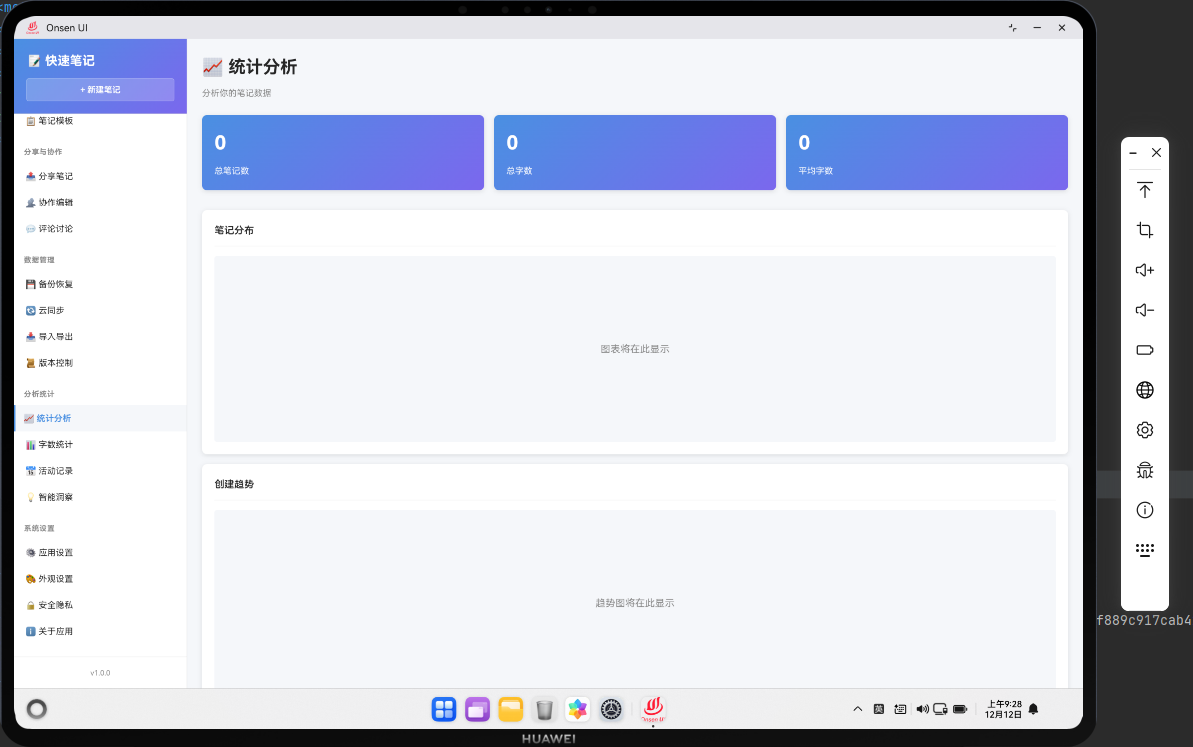
统计分析功能是笔记应用中的核心数据展示模块,它提供了全面的笔记数据统计和分析能力。用户可以通过这个功能查看笔记的各种统计数据,包括笔记总数、字数统计、分类分布、创建时间分布等多维度的数据指标。统计分析帮助用户更好地了解自己的笔记库规模和特点,从而优化笔记管理策略。
在实际应用场景中,统计分析功能不仅能够展示静态的数据指标,还能够通过图表的形式直观地呈现数据趋势。这对于长期使用笔记应用的用户来说,是一个非常实用的功能。通过数据分析,用户可以发现自己的笔记习惯,比如哪个分类的笔记最多,平均每篇笔记的字数是多少,以及笔记创建的时间分布等。
本文将详细介绍如何在 Web 端和 OpenHarmony 原生端实现统计分析功能,包括数据收集、计算处理、页面渲染等完整流程。我们会从代码层面深入剖析每个关键步骤的实现细节,帮助开发者理解跨平台统计分析功能的开发思路。
🔗 完整流程
统计分析功能的实现需要经过三个主要步骤,每个步骤都有其特定的职责和实现方式。
第一步:收集数据
数据收集是统计分析的基础环节。在这个阶段,我们需要从数据库或本地存储中拉取所有笔记的原始数据,包括笔记的基本信息(标题、内容、创建时间等)、字数统计、分类信息等。数据收集的完整性和准确性直接影响后续统计结果的可靠性。
在 Web 端,我们通过异步方法从 IndexedDB 或其他本地数据库中获取数据。在 OpenHarmony 原生端,则需要通过文件系统读取 JSON 格式的数据文件。两端的数据格式需要保持一致,以确保统计逻辑的统一性。
第二步:计算统计
获取原始数据后,需要对数据进行各种维度的统计计算。这包括基础的数量统计(笔记总数)、累加计算(总字数)、平均值计算(平均字数)、分组统计(按分类统计笔记数量)等。计算过程需要考虑边界情况,比如空数据集、除零错误等。
统计计算的性能也是需要关注的重点。当笔记数量较大时,需要采用高效的算法来避免页面卡顿。我们使用数组的 reduce、map、filter 等高阶函数来实现简洁高效的统计逻辑。
第三步:展示统计
统计结果需要以直观、美观的方式展示给用户。我们采用卡片式布局来展示核心指标,使用列表来展示分类统计详情。页面布局需要响应式设计,适配不同屏幕尺寸。同时,数据的更新需要实时响应,当用户添加或删除笔记时,统计数据应该自动刷新。
在 Web 端,我们使用 HTML 模板字符串来构建页面结构,通过 CSS 类名来控制样式。在 OpenHarmony 端,则需要通过原生组件来实现类似的界面效果。
🔧 Web代码实现
数据库访问层
在开始统计分析之前,我们需要先定义数据库访问接口。这里使用 IndexedDB 作为本地数据存储方案,它提供了强大的查询和存储能力。
class NoteDatabase {
  constructor() {
    this.dbName = 'NotesDB';
    this.version = 1;
    this.db = null;
  }

  async init() {
    return new Promise((resolve, reject) => {
      const request = indexedDB.open(this.dbName, this.version);
      request.onerror = () => reject(request.error);
      request.onsuccess = () => {
        this.db = request.result;
        resolve(this.db);
      };
数据库访问层是整个统计功能的基础,我们创建了一个 NoteDatabase 类来封装所有数据库操作。构造函数中定义了数据库名称和版本号,init 方法负责打开数据库连接。使用 Promise 包装异步操作,使得后续的数据访问代码更加简洁。IndexedDB 的打开是异步的,我们需要监听 onsuccess 和 onerror 事件来处理成功和失败的情况。
      request.onupgradeneeded = (event) => {
        const db = event.target.result;
        if (!db.objectStoreNames.contains('notes')) {
          const notesStore = db.createObjectStore('notes', { keyPath: 'id' });
          notesStore.createIndex('category', 'category', { unique: false });
          notesStore.createIndex('timestamp', 'timestamp', { unique: false });
        }
        if (!db.objectStoreNames.contains('categories')) {
          db.createObjectStore('categories', { keyPath: 'id' });
        }
      };
    });
  }
onupgradeneeded 事件在数据库首次创建或版本升级时触发,这里我们创建了两个对象存储:notes 用于存储笔记数据,categories 用于存储分类信息。为 notes 创建了两个索引,分别按分类和时间戳进行索引,这样可以加速后续的查询操作。keyPath 指定了主键字段,unique 参数控制索引值是否唯一。
  async getAllNotes() {
    return new Promise((resolve, reject) => {
      const transaction = this.db.transaction(['notes'], 'readonly');
      const store = transaction.objectStore('notes');
      const request = store.getAll();

      request.onsuccess = () => resolve(request.result);
      request.onerror = () => reject(request.error);
    });
  }

  async getAllCategories() {
    return new Promise((resolve, reject) => {
getAllNotes 方法用于获取所有笔记数据,这是统计分析的核心数据源。我们创建一个只读事务,从 notes 对象存储中获取所有记录。getAll 方法会返回存储中的所有数据,适合数据量不是特别大的场景。如果数据量很大,可以考虑使用游标(cursor)来分批读取,避免内存占用过高。
      const transaction = this.db.transaction(['categories'], 'readonly');
      const store = transaction.objectStore('categories');
      const request = store.getAll();

      request.onsuccess = () => resolve(request.result);
      request.onerror = () => reject(request.error);
    });
  }
}

const noteDB = new NoteDatabase();
await noteDB.init();
getAllCategories 方法的实现与 getAllNotes 类似,用于获取所有分类数据。我们将数据库实例化并初始化,确保在使用前数据库连接已经建立。这种封装方式使得数据访问逻辑与业务逻辑分离,提高了代码的可维护性和可测试性。
统计分析核心逻辑
有了数据访问层的支持,我们可以开始实现统计分析的核心逻辑。这部分代码负责从数据库获取数据,进行各种维度的统计计算,并生成页面结构。
async renderStatistics() {
  const allNotes = await noteDB.getAllNotes();
  const categories = await noteDB.getAllCategories();

  if (!allNotes || allNotes.length === 0) {
    return this.renderEmptyState();
  }

  const totalNotes = allNotes.length;
  const totalWords = allNotes.reduce((sum, note) => sum + (note.wordCount || 0), 0);
  const avgWords = totalNotes > 0 ? Math.round(totalWords / totalNotes) : 0;
这段代码是统计分析的入口方法,首先通过异步方法从数据库拉取笔记和分类的全量数据。我们添加了空数据检查,如果没有笔记数据,则渲染一个空状态页面,提示用户创建笔记。接着计算三个核心指标:笔记总数直接取数组长度,总字数通过 reduce 累加每篇笔记的字数,平均字数在确保总数不为零的情况下进行除法运算并四舍五入。
  const maxWords = Math.max(...allNotes.map(note => note.wordCount || 0));
  const minWords = Math.min(...allNotes.filter(note => note.wordCount > 0).map(note => note.wordCount));

  const recentNotes = allNotes
    .sort((a, b) => b.timestamp - a.timestamp)
    .slice(0, 5);

  const oldestNote = allNotes.reduce((oldest, note) =>
    note.timestamp < oldest.timestamp ? note : oldest
  );
除了基础统计,我们还计算了一些扩展指标。使用扩展运算符和 Math.max/min 找出字数最多和最少的笔记,这可以帮助用户了解笔记长度的分布情况。通过排序和切片获取最近的5篇笔记,用于在统计页面展示最新动态。使用 reduce 找出最早创建的笔记,可以计算用户使用应用的时长。
  const categoryStats = categories.map(cat => {
    const notesInCategory = allNotes.filter(note => note.category === cat.name);
    const totalWordsInCategory = notesInCategory.reduce((sum, note) => sum + (note.wordCount || 0), 0);

    return {
      name: cat.name,
      count: notesInCategory.length,
      totalWords: totalWordsInCategory,
      avgWords: notesInCategory.length > 0 ? Math.round(totalWordsInCategory / notesInCategory.length) : 0,
      percentage: ((notesInCategory.length / totalNotes) * 100).toFixed(1)
    };
  }).sort((a, b) => b.count - a.count);
通过数组 map 方法遍历所有分类,为每个分类生成详细的统计对象。不仅统计笔记数量,还计算了该分类下的总字数、平均字数和占比。使用 filter 筛选出属于当前分类的所有笔记,然后进行各项指标的计算。最后按笔记数量降序排序,让用户一眼就能看出哪个分类的笔记最多。percentage 字段保留一位小数,使数据展示更加精确。
  const monthlyStats = this.calculateMonthlyStats(allNotes);
  const weekdayStats = this.calculateWeekdayStats(allNotes);

  return `
    <div class="page active">
      <div class="page-header">
        <h1 class="page-title">📈 统计分析</h1>
        <p class="page-subtitle">全面了解你的笔记数据</p>
      </div>
      <div class="stats-container">
我们还调用了两个辅助方法来计算月度统计和星期统计,这些数据可以帮助用户了解自己的笔记创建习惯。接着开始构建 HTML 页面结构,使用模板字符串可以方便地嵌入变量和表达式。页面头部包含标题和副标题,为用户提供清晰的页面定位。stats-container 作为主容器,包裹所有统计内容。
页面结构渲染
统计数据计算完成后,需要将这些数据以美观、易读的方式呈现给用户。我们采用卡片式布局,将不同类型的统计信息分组展示。
        <div class="stats-grid">
          <div class="stat-card primary">
            <div class="stat-icon">📝</div>
            <div class="stat-value">${totalNotes}</div>
            <div class="stat-label">总笔记数</div>
            <div class="stat-trend">较上月 +${this.calculateGrowth(allNotes, 'month')}</div>
          </div>
          <div class="stat-card success">
            <div class="stat-icon">📊</div>
            <div class="stat-value">${totalWords.toLocaleString()}</div>
搭建网格布局的统计卡片容器,每个卡片展示一个核心指标。卡片包含图标、数值、标签和趋势四个部分,图标使用 emoji 增加视觉吸引力,数值是最重要的信息,标签说明指标含义,趋势显示与上月的对比。使用不同的 CSS 类名(primary、success)来区分卡片类型,便于应用不同的配色方案。toLocaleString 方法为大数字添加千位分隔符,提升可读性。
            <div class="stat-label">总字数</div>
            <div class="stat-trend">平均每天 ${Math.round(totalWords / this.getDaysSinceFirstNote(oldestNote))}</div>
          </div>
          <div class="stat-card info">
            <div class="stat-icon">✍️</div>
            <div class="stat-value">${avgWords}</div>
            <div class="stat-label">平均字数</div>
            <div class="stat-trend">最长 ${maxWords} 字</div>
          </div>
          <div class="stat-card warning">
继续添加更多统计卡片,展示总字数和平均字数。总字数卡片的趋势部分显示平均每天的写作字数,这需要计算从第一篇笔记到现在的天数。平均字数卡片的趋势部分显示最长笔记的字数,让用户了解自己的写作长度范围。每个卡片都有独特的图标和配色,使页面更加生动有趣。
            <div class="stat-icon">📁</div>
            <div class="stat-value">${categories.length}</div>
            <div class="stat-label">分类数量</div>
            <div class="stat-trend">最多 ${categoryStats[0]?.name || '-'}</div>
          </div>
        </div>
最后一个卡片展示分类数量,趋势部分显示笔记最多的分类名称。使用可选链操作符(?.)和空值合并操作符(||)来安全地访问数组第一个元素,避免在没有分类时出现错误。这四个核心指标卡片构成了统计页面的概览部分,用户可以快速了解笔记库的整体情况。
        <div class="category-stats-section">
          <h3 class="section-title">📂 分类统计详情</h3>
          <div class="category-stats-list">
            ${categoryStats.map(stat => `
              <div class="category-stat-item">
                <div class="category-info">
                  <span class="category-name">${stat.name}</span>
                  <span class="category-percentage">${stat.percentage}%</span>
                </div>
                <div class="category-bar">
                  <div class="category-bar-fill" style="width: ${stat.percentage}%"></div>
分类统计详情部分使用列表形式展示每个分类的详细数据。每个分类项包含分类名称、占比、进度条和详细指标。进度条通过动态设置 width 样式来可视化展示占比,这比纯数字更加直观。map 方法遍历排序后的分类统计数据,为每个分类生成一个列表项。
                </div>
                <div class="category-details">
                  <span class="detail-item">
                    <span class="detail-label">笔记数:</span>
                    <span class="detail-value">${stat.count}</span>
                  </span>
                  <span class="detail-item">
                    <span class="detail-label">总字数:</span>
                    <span class="detail-value">${stat.totalWords.toLocaleString()}</span>
                  </span>
                  <span class="detail-item">
                    <span class="detail-label">平均:</span>
分类详情部分展示三个关键指标:笔记数、总字数和平均字数。这些数据帮助用户深入了解每个分类的内容规模。使用 span 标签配合 CSS 类名来实现灵活的布局,detail-label 和 detail-value 分别控制标签和数值的样式。总字数同样使用 toLocaleString 格式化,保持与概览卡片的一致性。
🔌 OpenHarmony 原生代码
OpenHarmony 端需要实现统计分析插件,提供原生数据访问能力。
import { webview } from '@kit.ArkWeb';
import { common } from '@kit.AbilityKit';
import { fileIo } from '@kit.CoreFileKit';

@NativeComponent
export class StatisticsPlugin {
  private context: common.UIAbilityContext;

  constructor(context: common.UIAbilityContext) {
    this.context = context;
  }
首先引入 OpenHarmony 开发所需的核心工具包,分别处理 Webview 交互、应用上下文、文件读写操作。通过 @NativeComponent 装饰器声明为原生组件,定义上下文属性用于获取应用的本地存储路径,构造方法接收外部传入的上下文并完成初始化,为后续操作提供环境支持。
  public init(webviewController: webview.WebviewController): void {
    webviewController.registerJavaScriptProxy(
      new StatisticsJSProxy(this),
      'statisticsPlugin',
      ['getStatistics']
    );
  }

  public getStatistics(): Promise<any> {
    return new Promise((resolve) => {
      try {
init 方法是插件初始化入口,通过 Webview 控制器注册 JS 桥接代理,将原生的 StatisticsJSProxy 实例暴露给 Web 端,命名为 statisticsPlugin,并指定可调用的方法 getStatistics,实现 Web 与原生的通信打通。getStatistics 方法返回 Promise 对象,保证异步操作的结果可被捕获。
        const notesPath = this.context.cacheDir + '/notes.json';
        const content = fileIo.readTextSync(notesPath);
        const notes = JSON.parse(content);

        const stats = {
          totalNotes: notes.length,
          totalWords: notes.reduce((sum: number, note: any) => sum + (note.wordCount || 0), 0),
          avgWords: notes.length > 0 ? Math.round(notes.reduce((sum: number, note: any) => sum + (note.wordCount || 0), 0) / notes.length) : 0
        };

        resolve(stats);
先通过上下文获取缓存目录,拼接笔记数据文件路径,同步读取文件内容并解析为 JSON 对象,获取笔记原始数据。基于解析后的笔记数据,计算与 Web 端一致的核心统计指标,封装为统一的 stats 对象并通过 resolve 返回给调用方。
      } catch (error) {
        console.error('Failed to get statistics:', error);
        resolve({ totalNotes: 0, totalWords: 0, avgWords: 0 });
      }
    });
  }
}
添加 try-catch 异常捕获,处理文件不存在、解析失败等异常情况,打印错误日志的同时返回默认的空统计数据,保证插件调用不会因异常中断,提升代码健壮性。
class StatisticsJSProxy {
  private plugin: StatisticsPlugin;

  constructor(plugin: StatisticsPlugin) {
    this.plugin = plugin;
  }

  getStatistics(): void {
    this.plugin.getStatistics().then(stats => {
      console.log('Statistics:', stats);
    });
  }
}
定义专门的 JS 桥接代理类,作为 Web 端与原生插件的通信中间层,通过属性关联 StatisticsPlugin 核心实例,保证方法调用的上下文正确。暴露 getStatistics 方法给 Web 端,该方法内部调用原生插件的同名方法,通过 then 捕获统计结果并打印日志,后续可扩展为将结果回传给 Web 端的业务逻辑,实现原生数据向 Web 端的传递。
📝 总结
统计分析功能展示了如何在Cordova与OpenHarmony混合开发中实现数据分析工具。通过统计分析,用户可以更好地了解自己的笔记库。
欢迎加入开源鸿蒙跨平台社区:https://openharmonycrossplatform.csdn.net
                    <span class="detail-value">${stat.avgWords}</span>
                  </span>
                </div>
              </div>
            `).join('')}
          </div>
        </div>
完成分类统计列表的渲染,使用 join(‘’) 将所有分类项拼接成完整的 HTML 字符串。这种模板字符串的方式虽然看起来代码较长,但结构清晰,易于维护。每个分类项都是一个独立的 div 容器,包含完整的信息展示,用户可以一目了然地看到每个分类的详细数据。
辅助方法实现
为了让统计功能更加完善,我们还需要实现一些辅助方法,用于计算趋势、时间分布等高级统计指标。
  calculateGrowth(notes, period) {
    const now = new Date();
    const periodStart = new Date();

    if (period === 'month') {
      periodStart.setMonth(now.getMonth() - 1);
    } else if (period === 'week') {
      periodStart.setDate(now.getDate() - 7);
    }

    const recentNotes = notes.filter(note => new Date(note.timestamp) >= periodStart);
calculateGrowth 方法用于计算指定时间段内的笔记增长数量。首先获取当前时间,然后根据 period 参数计算时间段的起始点。对于月度统计,将起始时间设置为一个月前;对于周度统计,设置为七天前。使用 filter 方法筛选出时间戳在起始时间之后的笔记,这些就是该时间段内新增的笔记。
    return recentNotes.length;
  }

  getDaysSinceFirstNote(oldestNote) {
    if (!oldestNote) return 1;
    const now = new Date();
    const firstNoteDate = new Date(oldestNote.timestamp);
    const diffTime = Math.abs(now - firstNoteDate);
    const diffDays = Math.ceil(diffTime / (1000 * 60 * 60 * 24));
    return diffDays || 1;
  }
getDaysSinceFirstNote 方法计算从第一篇笔记到现在经过了多少天。首先检查是否存在最早的笔记,如果不存在则返回1避免除零错误。计算两个日期之间的毫秒差,然后转换为天数。使用 Math.ceil 向上取整,确保即使不足一天也算作一天。这个方法用于计算平均每天的写作量。
  calculateMonthlyStats(notes) {
    const monthlyData = {};
    notes.forEach(note => {
      const date = new Date(note.timestamp);
      const monthKey = `${date.getFullYear()}-${String(date.getMonth() + 1).padLeft(2, '0')}`;

      if (!monthlyData[monthKey]) {
        monthlyData[monthKey] = { count: 0, words: 0 };
      }
      monthlyData[monthKey].count++;
      monthlyData[monthKey].words += note.wordCount || 0;
    });
calculateMonthlyStats 方法按月份统计笔记数据。使用对象作为哈希表,键是年月字符串(如 “2024-01”),值是该月的统计数据。遍历所有笔记,提取时间戳中的年月信息,如果该月份还没有统计数据则初始化,然后累加笔记数和字数。这种方式可以高效地完成分组统计。
    return Object.entries(monthlyData)
      .map(([month, data]) => ({
        month,
        count: data.count,
        words: data.words,
        avgWords: Math.round(data.words / data.count)
      }))
      .sort((a, b) => a.month.localeCompare(b.month));
  }

  calculateWeekdayStats(notes) {
    const weekdays = ['周日', '周一', '周二', '周三', '周四', '周五', '周六'];
将月度统计数据转换为数组格式,方便后续处理和展示。使用 Object.entries 将对象转换为键值对数组,然后 map 成统一的数据结构,包含月份、笔记数、总字数和平均字数。最后按月份字符串排序,确保时间顺序正确。calculateWeekdayStats 方法用于统计一周七天的笔记分布,首先定义星期的中文名称数组。
    const weekdayData = weekdays.map(() => ({ count: 0, words: 0 }));

    notes.forEach(note => {
      const date = new Date(note.timestamp);
      const dayIndex = date.getDay();
      weekdayData[dayIndex].count++;
      weekdayData[dayIndex].words += note.wordCount || 0;
    });

    return weekdayData.map((data, index) => ({
      weekday: weekdays[index],
      count: data.count,
初始化一个长度为7的数组,每个元素包含笔记数和字数的初始值。遍历所有笔记,使用 getDay 方法获取星期几(0-6),然后在对应位置累加统计数据。最后将统计结果转换为包含星期名称的对象数组,方便在页面上展示。这种统计可以帮助用户发现自己在一周中哪天最活跃。
      words: data.words,
      avgWords: data.count > 0 ? Math.round(data.words / data.count) : 0
    }));
  }

  renderEmptyState() {
    return `
      <div class="page active">
        <div class="empty-state">
          <div class="empty-icon">📊</div>
          <h2 class="empty-title">暂无统计数据</h2>
          <p class="empty-message">开始创建你的第一篇笔记吧!</p>
完成星期统计的数据结构转换,计算每天的平均字数。renderEmptyState 方法用于渲染空状态页面,当用户还没有创建任何笔记时显示。空状态页面包含一个大图标、标题和提示信息,引导用户开始使用应用。良好的空状态设计可以提升用户体验,避免用户面对空白页面时感到困惑。
          <button class="btn-primary" onclick="navigateToEditor()">
            创建笔记
          </button>
        </div>
      </div>
    `;
  }
}
空状态页面还包含一个行动按钮,点击后跳转到编辑器页面创建新笔记。这种引导式的设计可以帮助新用户快速上手。至此,Web 端的统计分析功能就完整实现了,包括数据获取、统计计算、页面渲染和辅助功能等各个方面。
🔌 OpenHarmony 原生代码
OpenHarmony 端需要实现与 Web 端功能对等的统计分析能力。由于 OpenHarmony 使用 ArkTS 语言和原生组件,实现方式与 Web 端有所不同,但核心逻辑保持一致。
插件基础架构
首先需要搭建插件的基础架构,包括必要的导入、类定义和初始化逻辑。
import { webview } from '@kit.ArkWeb';
import { common } from '@kit.AbilityKit';
import { fileIo } from '@kit.CoreFileKit';
import { util } from '@kit.ArkTS';

@NativeComponent
export class StatisticsPlugin {
  private context: common.UIAbilityContext;
  private dataPath: string;

  constructor(context: common.UIAbilityContext) {
    this.context = context;
首先引入 OpenHarmony 开发所需的核心工具包。webview 用于处理与 Web 端的交互,common 提供应用上下文,fileIo 负责文件读写操作,util 提供实用工具函数。通过 @NativeComponent 装饰器将类声明为原生组件,使其可以被系统识别和管理。构造函数接收应用上下文,这是访问应用资源和存储的入口。
    this.dataPath = this.context.filesDir + '/data';
    this.ensureDataDirectory();
  }

  private ensureDataDirectory(): void {
    try {
      if (!fileIo.accessSync(this.dataPath)) {
        fileIo.mkdirSync(this.dataPath);
      }
    } catch (error) {
      console.error('Failed to create data directory:', error);
    }
  }
dataPath 属性存储数据文件的目录路径,使用应用的私有文件目录确保数据安全。ensureDataDirectory 方法检查数据目录是否存在,如果不存在则创建。使用 accessSync 同步检查文件是否存在,mkdirSync 同步创建目录。添加 try-catch 异常处理,避免因权限问题或其他原因导致应用崩溃。
  public init(webviewController: webview.WebviewController): void {
    webviewController.registerJavaScriptProxy(
      new StatisticsJSProxy(this),
      'statisticsPlugin',
      ['getStatistics', 'getDetailedStats', 'exportData']
    );
  }
init 方法是插件初始化的入口,通过 Webview 控制器注册 JavaScript 代理对象。将 StatisticsJSProxy 实例暴露给 Web 端,命名为 statisticsPlugin,这样 Web 端就可以通过 window.statisticsPlugin 访问原生功能。第三个参数是方法白名单,只有列出的方法才能被 Web 端调用,这是一种安全机制。
数据读取与解析
原生端需要从文件系统读取笔记数据,并解析为可用的数据结构。
  public getStatistics(): Promise<StatisticsResult> {
    return new Promise((resolve) => {
      try {
        const notesPath = this.dataPath + '/notes.json';
        const categoriesPath = this.dataPath + '/categories.json';

        if (!fileIo.accessSync(notesPath)) {
          resolve(this.getEmptyStatistics());
          return;
        }
getStatistics 方法返回 Promise 对象,保证异步操作的结果可以被正确处理。首先构建笔记和分类数据文件的完整路径,然后检查文件是否存在。如果笔记文件不存在,说明用户还没有创建任何笔记,直接返回空统计数据。这种提前返回的方式可以避免不必要的文件读取操作。
        const notesContent = fileIo.readTextSync(notesPath);
        const notes: Note[] = JSON.parse(notesContent);

        let categories: Category[] = [];
        if (fileIo.accessSync(categoriesPath)) {
          const categoriesContent = fileIo.readTextSync(categoriesPath);
          categories = JSON.parse(categoriesContent);
        }

        const stats = this.calculateStatistics(notes, categories);
        resolve(stats);
使用 readTextSync 同步读取文件内容,返回字符串格式的 JSON 数据。使用 JSON.parse 将字符串解析为 JavaScript 对象数组。分类数据是可选的,所以先检查文件是否存在再读取。获取到原始数据后,调用 calculateStatistics 方法进行统计计算,最后通过 resolve 返回结果。
      } catch (error) {
        console.error('Failed to get statistics:', error);
        resolve(this.getEmptyStatistics());
      }
    });
  }

  private getEmptyStatistics(): StatisticsResult {
    return {
      totalNotes: 0,
      totalWords: 0,
      avgWords: 0,
      categories: [],
      recentNotes: []
    };
  }
添加 try-catch 异常捕获,处理文件读取失败、JSON 解析错误等各种异常情况。打印错误日志便于调试,同时返回空统计数据保证应用不会崩溃。getEmptyStatistics 方法返回一个包含所有必要字段的空统计对象,字段类型与正常统计结果保持一致,确保 Web 端可以正常处理。
统计计算逻辑
原生端的统计计算逻辑与 Web 端保持一致,确保两端展示的数据完全相同。
  private calculateStatistics(notes: Note[], categories: Category[]): StatisticsResult {
    const totalNotes = notes.length;
    const totalWords = notes.reduce((sum, note) => sum + (note.wordCount || 0), 0);
    const avgWords = totalNotes > 0 ? Math.round(totalWords / totalNotes) : 0;

    const categoryStats = categories.map(cat => {
      const notesInCategory = notes.filter(note => note.category === cat.name);
      const totalWordsInCategory = notesInCategory.reduce((sum, note) => sum + (note.wordCount || 0), 0);
calculateStatistics 方法实现核心统计逻辑。首先计算三个基础指标:总笔记数、总字数和平均字数,计算方法与 Web 端完全一致。然后遍历所有分类,为每个分类计算详细统计数据。使用 filter 筛选出属于当前分类的笔记,再使用 reduce 累加字数。这种函数式编程风格使代码简洁易读。
      return {
        name: cat.name,
        count: notesInCategory.length,
        totalWords: totalWordsInCategory,
        avgWords: notesInCategory.length > 0 ? Math.round(totalWordsInCategory / notesInCategory.length) : 0,
        percentage: totalNotes > 0 ? ((notesInCategory.length / totalNotes) * 100).toFixed(1) : '0.0'
      };
    }).sort((a, b) => b.count - a.count);

    const recentNotes = notes
      .sort((a, b) => b.timestamp - a.timestamp)
      .slice(0, 5)
为每个分类构建统计对象,包含名称、笔记数、总字数、平均字数和占比。占比计算需要防止除零错误,使用三元运算符进行判断。toFixed(1) 保留一位小数,返回字符串格式。按笔记数降序排序,让最活跃的分类排在前面。获取最近的5篇笔记,通过排序和切片实现,用于在统计页面展示最新动态。
      .map(note => ({
        id: note.id,
        title: note.title,
        timestamp: note.timestamp,
        wordCount: note.wordCount
      }));

    return {
      totalNotes,
      totalWords,
      avgWords,
      categories: categoryStats,
      recentNotes
    };
  }
将最近笔记映射为简化的数据结构,只保留必要的字段,减少数据传输量。最后返回完整的统计结果对象,包含所有计算好的统计指标。这个对象会被序列化为 JSON 格式,通过 Promise 返回给 Web 端。原生端的统计逻辑与 Web 端保持一致,确保用户在不同平台看到的数据完全相同。
JavaScript 代理类
JavaScript 代理类是 Web 端与原生端通信的桥梁,负责方法调用的转发和结果的回传。
class StatisticsJSProxy {
  private plugin: StatisticsPlugin;

  constructor(plugin: StatisticsPlugin) {
    this.plugin = plugin;
  }

  getStatistics(): void {
    this.plugin.getStatistics().then(stats => {
      console.log('Statistics:', JSON.stringify(stats));
      this.sendMessageToWeb('statisticsReady', stats);
    }).catch(error => {
定义 JavaScript 代理类,通过属性关联 StatisticsPlugin 核心实例。构造函数接收插件实例并保存,确保方法调用时上下文正确。getStatistics 方法是 Web 端可以调用的接口,内部调用原生插件的同名方法。使用 then 捕获异步操作的结果,打印日志便于调试,然后通过 sendMessageToWeb 方法将结果发送给 Web 端。
      console.error('Failed to get statistics:', error);
      this.sendMessageToWeb('statisticsError', { message: error.message });
    });
  }

  private sendMessageToWeb(event: string, data: any): void {
    const message = JSON.stringify({ event, data });
    webview.runJavaScript(`window.dispatchEvent(new CustomEvent('${event}', { detail: ${message} }))`);
  }
}
添加 catch 处理异常情况,打印错误日志并向 Web 端发送错误事件。sendMessageToWeb 方法负责向 Web 端发送消息,使用自定义事件机制。将事件名和数据封装为 JSON 字符串,然后通过 runJavaScript 在 Web 端执行代码,触发自定义事件。Web 端可以通过监听这些事件来接收原生端的数据。
📝 总结
统计分析功能是笔记应用的重要组成部分,它通过数据可视化帮助用户更好地了解自己的笔记习惯和内容分布。本文详细介绍了如何在 Web 端和 OpenHarmony 原生端实现完整的统计分析功能。
Web 端使用 IndexedDB 作为数据存储方案,通过异步方法获取数据,使用数组的高阶函数进行统计计算,最后通过模板字符串生成 HTML 页面结构。整个实现过程注重代码的可读性和可维护性,采用函数式编程风格,将复杂的统计逻辑分解为多个小函数。
OpenHarmony 原生端使用文件系统存储数据,通过 JSON 格式进行序列化和反序列化。统计计算逻辑与 Web 端保持一致,确保跨平台的数据一致性。通过 JavaScript 代理类实现与 Web 端的通信,使用自定义事件机制传递数据。
在实际开发中,还需要考虑性能优化、错误处理、数据缓存等问题。当笔记数量较大时,可以考虑使用 Web Worker 或后台线程进行统计计算,避免阻塞主线程。对于频繁访问的统计数据,可以添加缓存机制,减少重复计算。
通过本文的学习,开发者可以掌握跨平台统计分析功能的开发方法,并应用到自己的项目中。统计分析不仅可以用于笔记应用,还可以扩展到任务管理、时间追踪、健康记录等各种需要数据分析的场景。
欢迎加入开源鸿蒙跨平台社区:https://openharmonycrossplatform.csdn.net

开源鸿蒙跨平台开发社区汇聚开发者与厂商,共建“一次开发,多端部署”的开源生态,致力于降低跨端开发门槛,推动万物智联创新。
更多推荐


 5
5 0
0- 0


 已为社区贡献26条内容

所有评论(0)