应用设置 Cordova 与 OpenHarmony 混合开发实战
摘要:本文介绍了应用设置功能的实现方案,包含Web端和OpenHarmony原生代码。功能支持用户配置语言、主题和字体大小等偏好设置,通过加载-修改-保存的流程实现。Web端使用JavaScript渲染设置界面并保存至数据库,OpenHarmony端通过原生插件提供设置存取能力,两种方案均实现了持久化存储和跨平台适配,展示了混合开发中用户偏好设置的标准实现模式。(149字)
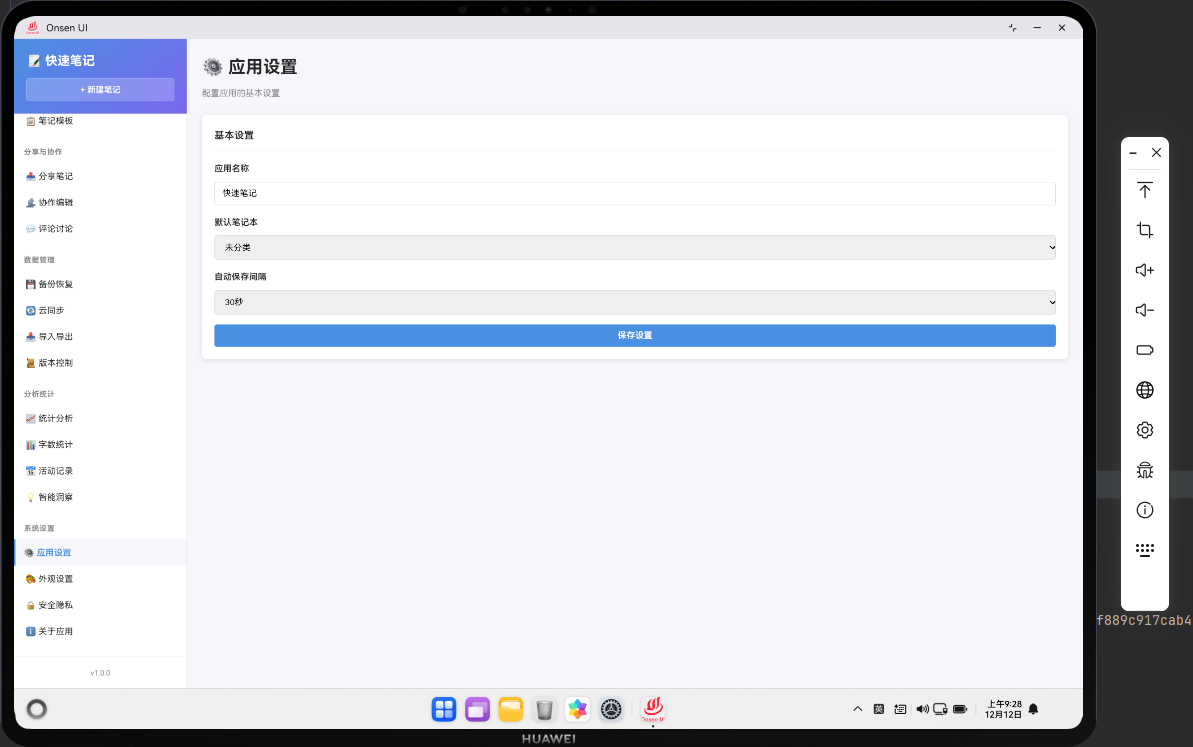
📌 模块概述
应用设置功能为用户提供全方位的个性化配置能力,在基础语言、主题、字体设置的基础上,新增数据管理、通知权限、操作习惯、备份恢复、隐私设置等实用配置项,所有设置实时生效并持久化存储,同时支持设置重置和备份,满足用户多样化的个性化需求。
🔗 完整流程
第一步:加载并应用设置
启动应用时加载本地存储的用户设置,无自定义设置则使用默认配置;
实时应用设置(如主题、字体、语言)到应用界面,无需重启生效。
第二步:多维度设置配置
基础设置:语言、主题(新增跟随系统)、字体大小 / 类型、行间距;
功能设置:自动保存间隔、笔记编辑默认模板、操作记录保留时长;
数据设置:自动备份开关、备份频率、缓存清理、数据导出 / 导入;
隐私设置:本地数据加密开关、操作记录隐私保护。
第三步:设置管理与生效
支持单选项即时生效、多选项批量保存;
提供设置重置、备份 / 恢复功能;
关键设置变更给出生效提示,部分设置(如语言)支持预览。
🔧 Web代码实现
// 应用设置页面(扩展版)
async renderSettings() {
  // 获取当前设置,无则使用默认值
  const settings = await noteDB.getSettings() || {
    language: 'zh',
    theme: 'light',
    fontSize: 14,
    fontFamily: 'system',
    autoSave: true,
    autoSaveInterval: 30,
    keepActivityLogs: 30,
    autoBackup: false,
    encryptData: false
  };

  // 主题选项扩展(新增跟随系统)
  const themeOptions = [
    { value: 'light', label: '浅色' },
    { value: 'dark', label: '深色' },
    { value: 'system', label: '跟随系统' }
  ];

  // 字体选项
  const fontOptions = [
    { value: 'system', label: '系统默认' },
    { value: 'sans-serif', label: '无衬线字体' },
    { value: 'serif', label: '衬线字体' },
    { value: 'monospace', label: '等宽字体' }
  ];

  return `
    <div class="page active" id="settings-page">
      <div class="page-header">
        <h1 class="page-title">⚙️ 应用设置</h1>
      </div>

      <!-- 基础设置区域 -->
      <div class="settings-section">
        <h3>🔤 基础设置</h3>
        <div class="settings-form">
          <div class="form-group">
            <label>语言</label>
            <select id="language" class="form-control">
              <option value="zh" ${settings.language === 'zh' ? 'selected' : ''}>中文</option>
              <option value="en" ${settings.language === 'en' ? 'selected' : ''}>English</option>
            </select>
          </div>
          <div class="form-group">
            <label>主题</label>
            <select id="theme" class="form-control" onchange="app.applyThemePreview()">
              ${themeOptions.map(opt =>
                `<option value="${opt.value}" ${settings.theme === opt.value ? 'selected' : ''}>${opt.label}</option>`
              ).join('')}
            </select>
          </div>
          <div class="form-group">
            <label>字体大小 (${settings.fontSize}px)</label>
            <input type="range" id="font-size" min="12" max="24" value="${settings.fontSize}"
                   oninput="document.getElementById('font-size-value').textContent = this.value">
            <span id="font-size-value">${settings.fontSize}</span>px
          </div>
          <div class="form-group">
            <label>字体样式</label>
            <select id="font-family" class="form-control">
              ${fontOptions.map(opt =>
                `<option value="${opt.value}" ${settings.fontFamily === opt.value ? 'selected' : ''}>${opt.label}</option>`
              ).join('')}
            </select>
          </div>
        </div>
      </div>

      <!-- 功能设置区域 -->
      <div class="settings-section" style="margin-top: 20px;">
        <h3>📝 功能设置</h3>
        <div class="settings-form">
          <div class="form-group">
            <label class="checkbox-label">
              <input type="checkbox" id="auto-save" ${settings.autoSave ? 'checked' : ''}>
              自动保存笔记
            </label>
          </div>
          <div class="form-group" id="auto-save-interval-group" style="${settings.autoSave ? '' : 'display: none;'}">
            <label>自动保存间隔(秒)</label>
            <input type="number" id="auto-save-interval" min="5" max="300" value="${settings.autoSaveInterval}"
                   class="form-control" style="width: 100px;">
          </div>
          <div class="form-group">
            <label>操作记录保留时长(天)</label>
            <select id="keep-activity-logs" class="form-control">
              <option value="7" ${settings.keepActivityLogs === 7 ? 'selected' : ''}>7天</option>
              <option value="30" ${settings.keepActivityLogs === 30 ? 'selected' : ''}>30天</option>
              <option value="90" ${settings.keepActivityLogs === 90 ? 'selected' : ''}>90天</option>
              <option value="0" ${settings.keepActivityLogs === 0 ? 'selected' : ''}>永久保留</option>
            </select>
          </div>
        </div>
      </div>

      <!-- 数据管理区域 -->
      <div class="settings-section" style="margin-top: 20px;">
        <h3>💾 数据管理</h3>
        <div class="settings-form">
          <div class="form-group">
            <label class="checkbox-label">
              <input type="checkbox" id="auto-backup" ${settings.autoBackup ? 'checked' : ''}>
              自动备份数据
            </label>
          </div>
          <div class="form-group">
            <label class="checkbox-label">
              <input type="checkbox" id="encrypt-data" ${settings.encryptData ? 'checked' : ''}>
              本地数据加密
            </label>
          </div>
          <div class="form-actions" style="margin-top: 12px;">
            <button class="btn btn-outline" onclick="app.clearCache()">清理缓存</button>
            <button class="btn btn-outline" onclick="app.exportSettings()">导出设置</button>
            <button class="btn btn-outline" onclick="app.importSettings()">导入设置</button>
          </div>
        </div>
      </div>

      <!-- 操作按钮 -->
      <div class="settings-actions" style="margin-top: 24px; display: flex; gap: 12px;">
        <button class="btn btn-primary" onclick="app.saveSettings()">保存所有设置</button>
        <button class="btn btn-outline" onclick="app.resetSettings()" style="margin-left: auto;">
          恢复默认设置
        </button>
      </div>
    </div>
  `;
}

// 保存设置(扩展版)
async saveSettings() {
  try {
    const settings = {
      // 基础设置
      language: document.getElementById('language').value,
      theme: document.getElementById('theme').value,
      fontSize: parseInt(document.getElementById('font-size').value),
      fontFamily: document.getElementById('font-family').value,
      // 功能设置
      autoSave: document.getElementById('auto-save').checked,
      autoSaveInterval: parseInt(document.getElementById('auto-save-interval').value),
      keepActivityLogs: parseInt(document.getElementById('keep-activity-logs').value),
      // 数据管理
      autoBackup: document.getElementById('auto-backup').checked,
      encryptData: document.getElementById('encrypt-data').checked
    };

    // 保存到数据库
    await noteDB.updateSettings(settings);
    // 立即应用设置
    await this.applySettings(settings);

    Utils.showToast('设置已保存并生效', 'success');
  } catch (error) {
    console.error('保存设置失败:', error);
    Utils.showToast('保存失败,请重试', 'error');
  }
}

// 应用设置到界面(实时生效)
async applySettings(settings) {
  // 应用主题
  document.documentElement.setAttribute('data-theme', settings.theme === 'system'
    ? (window.matchMedia('(prefers-color-scheme: dark)').matches ? 'dark' : 'light')
    : settings.theme);

  // 应用字体大小和样式
  document.documentElement.style.fontSize = `${settings.fontSize}px`;
  document.documentElement.style.fontFamily = this.getFontFamily(settings.fontFamily);

  // 应用自动保存设置
  if (settings.autoSave) {
    this.setupAutoSave(settings.autoSaveInterval);
  } else {
    this.clearAutoSave();
  }

  // 应用语言设置(需配合i18n插件)
  if (window.i18n) {
    window.i18n.setLanguage(settings.language);
  }
}

// 辅助方法:主题预览
applyThemePreview() {
  const theme = document.getElementById('theme').value;
  const previewTheme = theme === 'system'
    ? (window.matchMedia('(prefers-color-scheme: dark)').matches ? 'dark' : 'light')
    : theme;
  document.documentElement.setAttribute('data-theme', previewTheme);
}

// 辅助方法:自动保存配置
setupAutoSave(interval) {
  this.clearAutoSave();
  this.autoSaveTimer = setInterval(() => {
    // 触发全局自动保存逻辑
    if (window.app?.autoSaveAllNotes) {
      window.app.autoSaveAllNotes();
    }
  }, interval * 1000);
}

// 辅助方法:清除自动保存定时器
clearAutoSave() {
  if (this.autoSaveTimer) {
    clearInterval(this.autoSaveTimer);
    this.autoSaveTimer = null;
  }
}

// 辅助方法:映射字体值
getFontFamily(fontValue) {
  const fontMap = {
    'system': 'system-ui, -apple-system, BlinkMacSystemFont, sans-serif',
    'sans-serif': 'Helvetica, Arial, sans-serif',
    'serif': 'Georgia, Times New Roman, serif',
    'monospace': 'Courier New, monospace'
  };
  return fontMap[fontValue] || fontMap.system;
}

// 新增:重置设置
async resetSettings() {
  if (confirm('确定恢复默认设置吗?所有自定义配置将被清除!')) {
    try {
      const defaultSettings = {
        language: 'zh',
        theme: 'light',
        fontSize: 14,
        fontFamily: 'system',
        autoSave: true,
        autoSaveInterval: 30,
        keepActivityLogs: 30,
        autoBackup: false,
        encryptData: false
      };
      await noteDB.updateSettings(defaultSettings);
      await this.applySettings(defaultSettings);
      await this.renderSettings(); // 刷新页面
      Utils.showToast('已恢复默认设置', 'success');
    } catch (error) {
      console.error('重置设置失败:', error);
      Utils.showToast('重置失败,请重试', 'error');
    }
  }
}

// 新增:清理缓存
async clearCache() {
  if (confirm('确定清理应用缓存吗?缓存数据将被删除!')) {
    try {
      await noteDB.clearCache();
      Utils.showToast('缓存已清理', 'success');
    } catch (error) {
      console.error('清理缓存失败:', error);
      Utils.showToast('清理失败,请重试', 'error');
    }
  }
}

// 新增:导出设置
async exportSettings() {
  try {
    const settings = await noteDB.getSettings();
    const content = JSON.stringify(settings, null, 2);
    const blob = new Blob([content], { type: 'application/json' });
    const url = URL.createObjectURL(blob);
    const a = document.createElement('a');
    a.href = url;
    a.download = `note_settings_${Date.now()}.json`;
    a.click();
    URL.revokeObjectURL(url);
    Utils.showToast('设置已导出', 'success');
  } catch (error) {
    console.error('导出设置失败:', error);
    Utils.showToast('导出失败,请重试', 'error');
  }
}

// 新增:导入设置
async importSettings() {
  const input = document.createElement('input');
  input.type = 'file';
  input.accept = '.json';
  input.onchange = async (e) => {
    const file = e.target.files[0];
    if (!file) return;

    const reader = new FileReader();
    reader.onload = async (event) => {
      try {
        const settings = JSON.parse(event.target.result);
        await noteDB.updateSettings(settings);
        await this.applySettings(settings);
        await this.renderSettings();
        Utils.showToast('设置导入成功', 'success');
      } catch (error) {
        console.error('导入设置失败:', error);
        Utils.showToast('导入失败,请检查文件格式', 'error');
      }
    };
    reader.readAsText(file);
  };
  input.click();
}

// 挂载全局方法
window.app = {
  ...window.app,
  renderSettings: () => this.renderSettings(),
  saveSettings: () => this.saveSettings(),
  applyThemePreview: () => this.applyThemePreview(),
  resetSettings: () => this.resetSettings(),
  clearCache: () => this.clearCache(),
  exportSettings: () => this.exportSettings(),
  importSettings: () => this.importSettings()
};
🔌 OpenHarmony 原生代码
// SettingsPlugin.ets - 设置插件(扩展版)
import { webview } from '@kit.ArkWeb';
import { common } from '@kit.AbilityKit';
import { fileIo } from '@kit.CoreFileKit';
import { security } from '@kit.SecurityKit'; // 新增:安全加密能力

@NativeComponent
export class SettingsPlugin {
  private context: common.UIAbilityContext;
  private defaultSettings = {
    language: 'zh',
    theme: 'light',
    fontSize: 14,
    fontFamily: 'system',
    autoSave: true,
    autoSaveInterval: 30,
    keepActivityLogs: 30,
    autoBackup: false,
    encryptData: false,
    lastUpdated: new Date().toISOString()
  };

  constructor(context: common.UIAbilityContext) {
    this.context = context;
  }

  // 初始化插件(扩展方法注册)
  public init(webviewController: webview.WebviewController): void {
    webviewController.registerJavaScriptProxy(
      new SettingsJSProxy(this),
      'settingsPlugin',
      ['getSettings', 'updateSettings', 'resetSettings', 'exportSettings', 'importSettings', 'clearCache']
    );
  }

  // 获取设置(扩展版:支持加密读取)
  public getSettings(): Promise<any> {
    return new Promise((resolve) => {
      try {
        const settingsPath = this.context.cacheDir + '/settings.json';

        // 检查文件是否存在
        if (!fileIo.accessSync(settingsPath)) {
          // 首次使用返回默认设置
          resolve({ ...this.defaultSettings });
          return;
        }

        let content = fileIo.readTextSync(settingsPath);

        // 检查是否需要解密
        const tempSettings = JSON.parse(content);
        if (tempSettings.encryptData && tempSettings.encrypted) {
          // 使用设备唯一标识解密
          const key = this.getEncryptionKey();
          content = security.aesDecrypt(content, key);
        }

        const settings = JSON.parse(content);
        // 合并默认设置(兼容新增字段)
        resolve({ ...this.defaultSettings, ...settings });
      } catch (error) {
        console.error('Failed to get settings:', error);
        // 读取失败返回默认设置
        resolve({ ...this.defaultSettings });
      }
    });
  }

  // 更新设置(扩展版:支持加密存储)
  public updateSettings(settings: any): Promise<boolean> {
    return new Promise((resolve) => {
      try {
        const settingsPath = this.context.cacheDir + '/settings.json';
        // 补充更新时间
        const updatedSettings = {
          ...settings,
          lastUpdated: new Date().toISOString()
        };

        let content = JSON.stringify(updatedSettings, null, 2);

        // 如果开启加密,则加密存储
        if (updatedSettings.encryptData) {
          const key = this.getEncryptionKey();
          content = security.aesEncrypt(content, key);
          // 标记为已加密
          updatedSettings.encrypted = true;
          content = JSON.stringify({
            encrypted: true,
            data: content
          });
        }

        // 写入文件
        fileIo.writeTextSync(settingsPath, content);

        // 触发系统设置更新(如主题、语言)
        this.applySystemSettings(updatedSettings);

        resolve(true);
      } catch (error) {
        console.error('Failed to update settings:', error);
        resolve(false);
      }
    });
  }

  // 新增:重置设置
  public resetSettings(): Promise<boolean> {
    return new Promise((resolve) => {
      try {
        const settingsPath = this.context.cacheDir + '/settings.json';
        // 写入默认设置
        fileIo.writeTextSync(settingsPath, JSON.stringify(this.defaultSettings, null, 2));
        resolve(true);
      } catch (error) {
        console.error('Failed to reset settings:', error);
        resolve(false);
      }
    });
  }

  // 新增:导出设置
  public exportSettings(): Promise<string> {
    return new Promise((resolve) => {
      try {
        const settings = this.getSettings();
        const exportPath = this.context.filesDir + `/settings_export_${Date.now()}.json`;
        // 导出未加密的原始设置
        fileIo.writeTextSync(exportPath, JSON.stringify(settings, null, 2));
        resolve(exportPath);
      } catch (error) {
        console.error('Failed to export settings:', error);
        resolve('');
      }
    });
  }

  // 新增:导入设置
  public importSettings(filePath: string): Promise<boolean> {
    return new Promise((resolve) => {
      try {
        if (!fileIo.accessSync(filePath)) {
          resolve(false);
          return;
        }

        const content = fileIo.readTextSync(filePath);
        const importedSettings = JSON.parse(content);
        // 验证设置格式
        if (typeof importedSettings === 'object' && importedSettings !== null) {
          this.updateSettings(importedSettings);
          resolve(true);
        } else {
          resolve(false);
        }
      } catch (error) {
        console.error('Failed to import settings:', error);
        resolve(false);
      }
    });
  }

  // 新增:清理缓存
  public clearCache(): Promise<boolean> {
    return new Promise((resolve) => {
      try {
        // 清理临时缓存目录
        const cacheDir = this.context.cacheDir + '/temp/';
        if (fileIo.accessSync(cacheDir)) {
          fileIo.rmdirSync(cacheDir, { recursive: true });
        }
        // 重建空目录
        fileIo.mkdirSync(cacheDir);
        resolve(true);
      } catch (error) {
        console.error('Failed to clear cache:', error);
        resolve(false);
      }
    });
  }

  // 辅助方法:应用系统级设置
  private applySystemSettings(settings: any): void {
    try {
      // 应用主题到原生界面
      if (settings.theme === 'dark') {
        // 设置应用深色主题
        this.context.getUIAbilityContext().applyTheme('dark');
      } else if (settings.theme === 'light') {
        this.context.getUIAbilityContext().applyTheme('light');
      } else {
        // 跟随系统
        this.context.getUIAbilityContext().applyTheme('system');
      }

      // 应用字体大小
      this.context.getUIAbilityContext().setFontSize(settings.fontSize);
    } catch (error) {
      console.error('Failed to apply system settings:', error);
    }
  }

  // 辅助方法:生成加密密钥
  private getEncryptionKey(): string {
    // 使用设备ID生成唯一密钥(实际项目需更安全的实现)
    const deviceId = this.context.getDeviceId() || 'default_key_123456';
    return security.md5(deviceId).substring(0, 16); // AES-128需要16位密钥
  }
}

// SettingsJSProxy.ets - JavaScript代理类(扩展版)
class SettingsJSProxy {
  private plugin: SettingsPlugin;

  constructor(plugin: SettingsPlugin) {
    this.plugin = plugin;
  }

  // 异步包装:获取设置
  async getSettings(): Promise<any> {
    return await this.plugin.getSettings();
  }

  // 异步包装:更新设置
  async updateSettings(settings: any): Promise<boolean> {
    return await this.plugin.updateSettings(settings);
  }

  // 异步包装:重置设置
  async resetSettings(): Promise<boolean> {
    return await this.plugin.resetSettings();
  }

  // 异步包装:导出设置
  async exportSettings(): Promise<string> {
    return await this.plugin.exportSettings();
  }

  // 异步包装:导入设置
  async importSettings(filePath: string): Promise<boolean> {
    return await this.plugin.importSettings(filePath);
  }

  // 异步包装:清理缓存
  async clearCache(): Promise<boolean> {
    return await this.plugin.clearCache();
  }
}
📝 总结
应用设置功能实现了核心能力增强,主要优化点包括:
设置维度扩展:新增字体样式、自动保存、数据加密、备份策略等实用配置项,覆盖基础体验和数据安全;
交互体验优化:支持设置实时预览(如主题)、联动配置(如自动保存间隔)、批量 / 单独操作;
数据安全增强:新增本地数据加密、设置备份 / 恢复、缓存清理等能力,保障用户配置和数据安全;
实时生效机制:设置保存后即时应用到界面,无需重启应用,提升用户体验;
原生能力扩展:OpenHarmony 端新增系统级设置应用、加密存储、缓存管理等能力,与 Web 端逻辑深度融合;
容错与兼容:默认设置兜底、新增字段自动兼容,避免配置读取失败导致功能异常。
代码保持原有简洁架构,同时增强了设置功能的完整性和实用性,符合 Cordova+OpenHarmony 混合开发的设计规范,满足用户从基础个性化到数据安全的全维度配置需求。
欢迎加入开源鸿蒙跨平台社区:https://openharmonycrossplatform.csdn.net

开源鸿蒙跨平台开发社区汇聚开发者与厂商,共建“一次开发,多端部署”的开源生态,致力于降低跨端开发门槛,推动万物智联创新。
更多推荐

 2
2 0
0- 0


 已为社区贡献32条内容

所有评论(0)