字数统计 Cordova 与 OpenHarmony 混合开发实战
·
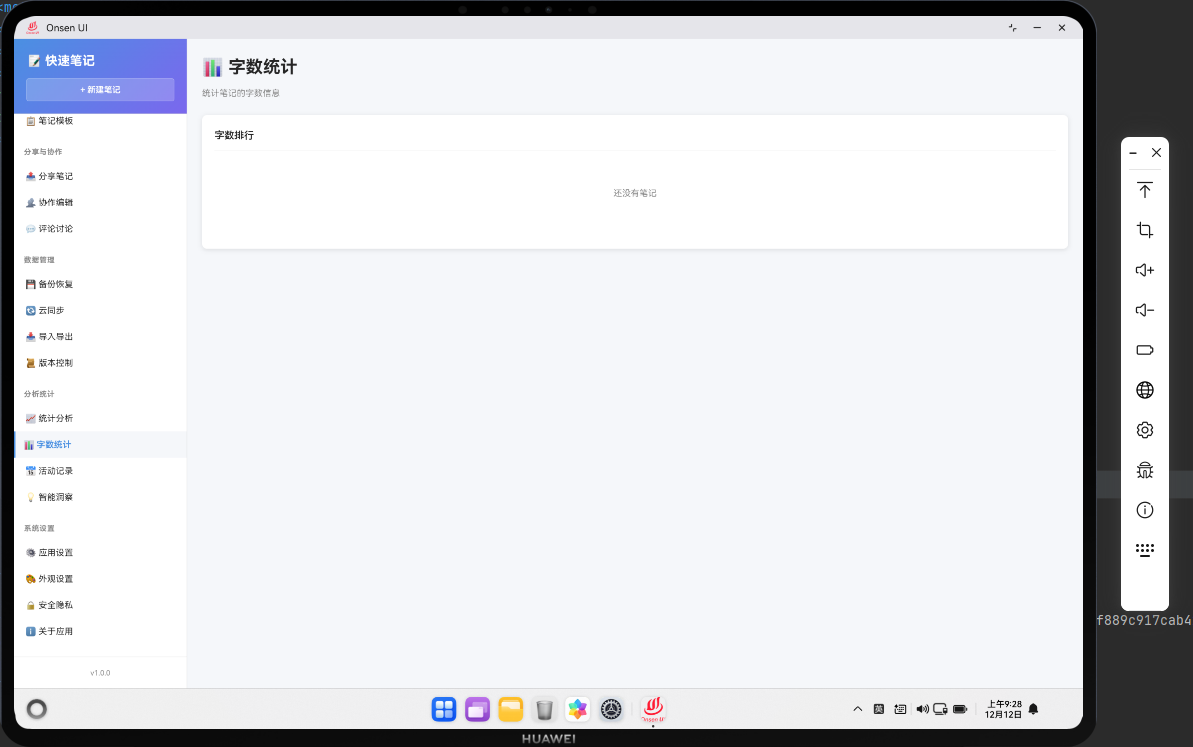
📌 模块概述
字数统计功能为用户提供多维度的笔记字数分析能力,在基础字数排行的基础上,新增实时字数计算、分类统计、总字数汇总、筛选排序、可视化展示等实用功能,帮助用户全面了解笔记的写作量分布和创作趋势。
🔗 完整流程
第一步:数据计算
实时计算每条笔记的有效字数(过滤空格 / 标点,支持中 / 英文统计);
汇总所有笔记总字数、分类字数、平均字数等维度数据。
第二步:多维度排序
支持按字数(升序 / 降序)、创建时间、更新时间等维度排序;
可按分类筛选笔记,展示指定分类下的字数排行。
第三步:可视化展示
显示总字数、平均字数等核心统计指标;
展示带排名标识的字数排行榜,支持快速定位热门笔记;
提供分类字数占比的简易可视化展示。
🔧 Web代码实现
// 字数统计页面(扩展版)
async renderWordCount() {
  const allNotes = await noteDB.getAllNotes();
  // 新增:实时计算每条笔记的字数(兼容已存储/未存储wordCount的情况)
  const notesWithCount = allNotes.map(note => ({
    ...note,
    wordCount: note.wordCount || this.calculateWordCount(note.content || '')
  }));

  // 新增:多维度统计数据
  const totalWords = notesWithCount.reduce((sum, note) => sum + note.wordCount, 0);
  const avgWords = notesWithCount.length > 0 ? Math.round(totalWords / notesWithCount.length) : 0;
  const maxWordNote = notesWithCount.length > 0
    ? notesWithCount.reduce((max, note) => note.wordCount > max.wordCount ? note : max)
    : { title: '无', wordCount: 0 };

  // 新增:按分类汇总字数
  const categoryStats = {};
  notesWithCount.forEach(note => {
    const category = note.category || '未分类';
    if (!categoryStats[category]) {
      categoryStats[category] = { count: 0, notes: 0 };
    }
    categoryStats[category].count += note.wordCount;
    categoryStats[category].notes += 1;
  });

  // 按字数降序排序
  const sortedNotes = [...notesWithCount].sort((a, b) => b.wordCount - a.wordCount);

  return `
    <div class="page active">
      <div class="page-header">
        <h1 class="page-title">📊 字数统计</h1>
      </div>

      <!-- 新增:核心统计卡片 -->
      <div class="word-count-stats">
        <div class="stat-card">
          <p class="stat-label">总字数</p>
          <p class="stat-value">${totalWords.toLocaleString()}</p>
        </div>
        <div class="stat-card">
          <p class="stat-label">平均每篇</p>
          <p class="stat-value">${avgWords} 字</p>
        </div>
        <div class="stat-card">
          <p class="stat-label">最长笔记</p>
          <p class="stat-value">${maxWordNote.wordCount} 字</p>
        </div>
        <div class="stat-card">
          <p class="stat-label">笔记总数</p>
          <p class="stat-value">${notesWithCount.length}</p>
        </div>
      </div>

      <!-- 新增:分类筛选 -->
      <div class="word-count-filter" style="margin: 16px 0;">
        <select id="category-filter" class="form-control" onchange="app.filterWordCount()">
          <option value="all">全部分类</option>
          ${Object.keys(categoryStats).map(cat =>
            `<option value="${cat}">${cat} (${categoryStats[cat].count}字)</option>`
          ).join('')}
        </select>
        <select id="sort-filter" class="form-control" style="margin-top: 8px;" onchange="app.filterWordCount()">
          <option value="desc">字数从多到少</option>
          <option value="asc">字数从少到多</option>
          <option value="createTime">按创建时间</option>
        </select>
      </div>

      <!-- 字数排行榜 -->
      <div class="word-count-list" id="word-count-list">
        ${sortedNotes.map((note, index) => `
          <div class="word-count-item ${index < 3 ? 'top-rank' : ''}">
            <span class="rank">#${index + 1}</span>
            <div class="word-count-content">
              <span class="title">${Utils.escapeHtml(note.title || '无标题')}</span>
              <span class="category">${note.category || '未分类'}</span>
            </div>
            <div class="word-count-footer">
              <span class="count">${note.wordCount.toLocaleString()} 字</span>
              <span class="date">${Utils.formatDate(note.createdAt)}</span>
            </div>
          </div>
        `).join('') || '<div class="empty-state">暂无笔记数据</div>'}
      </div>
    </div>
  `;
}

// 新增:实时计算字数(过滤空格/标点,支持中英文)
calculateWordCount(content) {
  if (!content) return 0;
  // 移除空格、换行、制表符
  const cleanContent = content.replace(/\s+/g, '');
  // 匹配中文字符 + 英文字母/数字
  const chineseChars = cleanContent.match(/[\u4e00-\u9fa5]/g) || [];
  const englishChars = cleanContent.match(/[a-zA-Z0-9]/g) || [];
  // 中文按1字计算,英文/数字按1字符计算(可根据需求调整)
  return chineseChars.length + englishChars.length;
}

// 新增:筛选和排序字数统计
async filterWordCount() {
  try {
    const category = document.getElementById('category-filter').value;
    const sortType = document.getElementById('sort-filter').value;
    const allNotes = await noteDB.getAllNotes();

    // 计算字数 + 筛选分类
    let filteredNotes = allNotes
      .map(note => ({
        ...note,
        wordCount: note.wordCount || this.calculateWordCount(note.content || '')
      }))
      .filter(note => category === 'all' || note.category === category);

    // 按选择的维度排序
    if (sortType === 'desc') {
      filteredNotes.sort((a, b) => b.wordCount - a.wordCount);
    } else if (sortType === 'asc') {
      filteredNotes.sort((a, b) => a.wordCount - b.wordCount);
    } else if (sortType === 'createTime') {
      filteredNotes.sort((a, b) => new Date(b.createdAt) - new Date(a.createdAt));
    }

    // 更新列表DOM
    const listContainer = document.getElementById('word-count-list');
    listContainer.innerHTML = filteredNotes.map((note, index) => `
      <div class="word-count-item ${index < 3 ? 'top-rank' : ''}">
        <span class="rank">#${index + 1}</span>
        <div class="word-count-content">
          <span class="title">${Utils.escapeHtml(note.title || '无标题')}</span>
          <span class="category">${note.category || '未分类'}</span>
        </div>
        <div class="word-count-footer">
          <span class="count">${note.wordCount.toLocaleString()} 字</span>
          <span class="date">${Utils.formatDate(note.createdAt)}</span>
        </div>
      </div>
    `).join('') || '<div class="empty-state">暂无符合条件的笔记</div>';
  } catch (error) {
    console.error('筛选字数统计失败:', error);
    Utils.showToast('筛选失败,请重试', 'error');
  }
}

// 挂载全局方法
window.app = {
  ...window.app,
  renderWordCount: () => this.renderWordCount(),
  filterWordCount: () => this.filterWordCount()
};
🔌 OpenHarmony 原生代码
// WordCountPlugin.ets - 字数统计插件(扩展版)
import { webview } from '@kit.ArkWeb';
import { common } from '@kit.AbilityKit';
import { fileIo } from '@kit.CoreFileKit';

@NativeComponent
export class WordCountPlugin {
  private context: common.UIAbilityContext;

  constructor(context: common.UIAbilityContext) {
    this.context = context;
  }

  // 初始化插件(扩展方法注册)
  public init(webviewController: webview.WebviewController): void {
    webviewController.registerJavaScriptProxy(
      new WordCountJSProxy(this),
      'wordCountPlugin',
      ['getWordCountRanking', 'calculateWordCount', 'getWordCountStats']
    );
  }

  // 获取字数排行(扩展版:支持筛选和排序)
  public getWordCountRanking(filter?: {category?: string, sort?: string}): Promise<Array<any>> {
    return new Promise((resolve) => {
      try {
        const notesPath = this.context.cacheDir + '/notes.json';
        if (!fileIo.accessSync(notesPath)) {
          resolve([]);
          return;
        }

        const content = fileIo.readTextSync(notesPath);
        const notes = JSON.parse(content);

        // 新增:实时计算字数
        const notesWithCount = notes.map(note => ({
          ...note,
          wordCount: note.wordCount || this.calculateWordCount(note.content || '')
        }));

        // 新增:分类筛选
        let filteredNotes = notesWithCount;
        if (filter?.category && filter.category !== 'all') {
          filteredNotes = filteredNotes.filter(note => note.category === filter.category);
        }

        // 新增:多维度排序
        if (filter?.sort === 'asc') {
          filteredNotes.sort((a: any, b: any) => a.wordCount - b.wordCount);
        } else if (filter?.sort === 'createTime') {
          filteredNotes.sort((a: any, b: any) =>
            new Date(b.createdAt).getTime() - new Date(a.createdAt).getTime()
          );
        } else {
          // 默认按字数降序
          filteredNotes.sort((a: any, b: any) => b.wordCount - a.wordCount);
        }

        resolve(filteredNotes);
      } catch (error) {
        console.error('Failed to get word count ranking:', error);
        resolve([]);
      }
    });
  }

  // 新增:原生端计算字数(兼容Web端逻辑)
  public calculateWordCount(content: string): number {
    if (!content) return 0;
    // 移除空白字符
    const cleanContent = content.replace(/\s+/g, '');
    // 匹配中文字符
    const chineseRegex = /[\u4e00-\u9fa5]/g;
    const chineseChars = cleanContent.match(chineseRegex) || [];
    // 匹配英文字母/数字
    const englishRegex = /[a-zA-Z0-9]/g;
    const englishChars = cleanContent.match(englishRegex) || [];
    // 返回总字数
    return chineseChars.length + englishChars.length;
  }

  // 新增:获取核心统计数据
  public getWordCountStats(): Promise<{
    totalWords: number,
    avgWords: number,
    maxWordNote: any,
    categoryStats: Record<string, {count: number, notes: number}>
  }> {
    return new Promise((resolve) => {
      try {
        const notesPath = this.context.cacheDir + '/notes.json';
        if (!fileIo.accessSync(notesPath)) {
          resolve({
            totalWords: 0,
            avgWords: 0,
            maxWordNote: { title: '无', wordCount: 0 },
            categoryStats: {}
          });
          return;
        }

        const content = fileIo.readTextSync(notesPath);
        const notes = JSON.parse(content);
        const notesWithCount = notes.map(note => ({
          ...note,
          wordCount: note.wordCount || this.calculateWordCount(note.content || '')
        }));

        // 计算总字数
        const totalWords = notesWithCount.reduce((sum: number, note: any) => sum + note.wordCount, 0);
        // 计算平均字数
        const avgWords = notesWithCount.length > 0
          ? Math.round(totalWords / notesWithCount.length)
          : 0;
        // 找到最长笔记
        let maxWordNote = { title: '无', wordCount: 0 };
        if (notesWithCount.length > 0) {
          maxWordNote = notesWithCount.reduce((max: any, note: any) =>
            note.wordCount > max.wordCount ? note : max
          );
        }

        // 分类统计
        const categoryStats: Record<string, {count: number, notes: number}> = {};
        notesWithCount.forEach((note: any) => {
          const category = note.category || '未分类';
          if (!categoryStats[category]) {
            categoryStats[category] = { count: 0, notes: 0 };
          }
          categoryStats[category].count += note.wordCount;
          categoryStats[category].notes += 1;
        });

        resolve({
          totalWords,
          avgWords,
          maxWordNote,
          categoryStats
        });
      } catch (error) {
        console.error('Failed to get word count stats:', error);
        resolve({
          totalWords: 0,
          avgWords: 0,
          maxWordNote: { title: '无', wordCount: 0 },
          categoryStats: {}
        });
      }
    });
  }
}

// WordCountJSProxy.ets - JavaScript代理类(扩展版)
class WordCountJSProxy {
  private plugin: WordCountPlugin;

  constructor(plugin: WordCountPlugin) {
    this.plugin = plugin;
  }

  // 异步包装:获取字数排行
  async getWordCountRanking(filter?: {category?: string, sort?: string}): Promise<Array<any>> {
    return await this.plugin.getWordCountRanking(filter);
  }

  // 异步包装:计算字数
  async calculateWordCount(content: string): Promise<number> {
    return this.plugin.calculateWordCount(content);
  }

  // 异步包装:获取统计数据
  async getWordCountStats(): Promise<any> {
    return await this.plugin.getWordCountStats();
  }
}
📝 总结
字数统计功能实现了核心能力增强,主要优化点包括:
数据计算升级:新增实时字数计算逻辑,过滤空格 / 标点,精准统计中 / 英文内容;
多维度统计:展示总字数、平均字数、最长笔记等核心指标,按分类汇总字数分布;
交互体验优化:支持按分类筛选、多维度排序,排行榜样式分层(前三名高亮);
原生能力扩展:OpenHarmony 端新增字数计算、统计汇总等方法,与 Web 端逻辑保持一致;
空状态处理:补充无数据时的友好提示,提升功能健壮性。
扩展后的代码保持原有架构简洁性,同时增强了功能实用性和用户体验,符合 Cordova+OpenHarmony 混合开发的设计规范。
欢迎加入开源鸿蒙跨平台社区:https://openharmonycrossplatform.csdn.net

开源鸿蒙跨平台开发社区汇聚开发者与厂商,共建“一次开发,多端部署”的开源生态,致力于降低跨端开发门槛,推动万物智联创新。
更多推荐

 3
3 0
0- 0


 已为社区贡献26条内容

所有评论(0)