Flutter & OpenHarmony 社交App评论列表组件开发详解
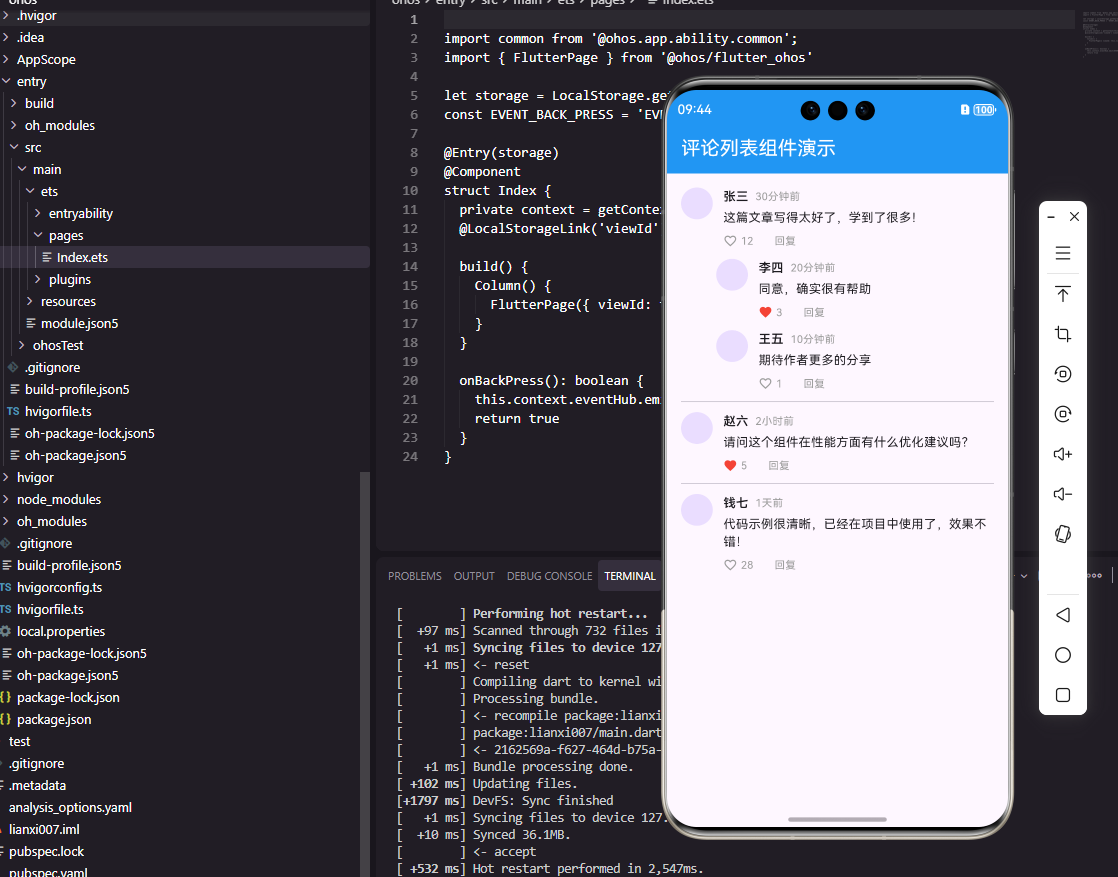
本文介绍了在Flutter中实现评论列表组件的关键技术,包括评论数据模型定义、嵌套回复结构处理以及用户交互设计。通过Comment类封装评论信息,支持多级回复功能;CommentItem组件采用动态缩进布局,根据嵌套深度调整显示位置;交互方面实现了点赞和回复功能,并优化了UI反馈。代码示例展示了头像显示、时间格式化、操作按钮等核心功能,为构建社交应用的评论模块提供了完整解决方案。
前言
评论功能是社交应用中促进用户互动的重要模块。一个完善的评论列表组件需要支持多级回复、点赞互动、时间显示以及加载更多等功能。本文将详细介绍如何在Flutter和OpenHarmony平台上构建功能丰富的评论列表组件,包括评论项设计、嵌套回复和性能优化等关键技术点。
Flutter评论列表实现
首先定义评论数据模型。
class Comment {
  final String id;
  final String userId;
  final String userName;
  final String userAvatar;
  final String content;
  final DateTime createdAt;
  final int likeCount;
  final bool isLiked;
  final List<Comment> replies;

  Comment({
    required this.id,
    required this.userId,
    required this.userName,
    required this.userAvatar,
    required this.content,
    required this.createdAt,
    this.likeCount = 0,
    this.isLiked = false,
    this.replies = const [],
  });
}
Comment类包含评论的完整信息,replies字段支持嵌套回复结构。使用const空列表作为默认值避免每次创建新实例。
class CommentItem extends StatelessWidget {
  final Comment comment;
  final Function(Comment) onReply;
  final Function(Comment) onLike;
  final int depth;

  const CommentItem({
    Key? key,
    required this.comment,
    required this.onReply,
    required this.onLike,
    this.depth = 0,
  }) : super(key: key);
CommentItem组件渲染单条评论,depth参数表示嵌套深度,用于控制回复的缩进。onReply和onLike回调处理用户交互。
Widget build(BuildContext context) {
return Padding(
padding: EdgeInsets.only(left: depth * 40.0),
child: Column(
crossAxisAlignment: CrossAxisAlignment.start,
children: [
Row(
crossAxisAlignment: CrossAxisAlignment.start,
children: [
CircleAvatar(
radius: 18,
backgroundImage: NetworkImage(comment.userAvatar),
),
SizedBox(width: 12),
左侧padding根据嵌套深度计算缩进量,每层缩进40像素。Row水平排列头像和评论内容,crossAxisAlignment设置顶部对齐确保长评论时布局正确。CircleAvatar显示评论者头像。
              Expanded(
                child: Column(
                  crossAxisAlignment: CrossAxisAlignment.start,
                  children: [
                    Row(
                      children: [
                        Text(
                          comment.userName,
                          style: TextStyle(
                            fontWeight: FontWeight.w600,
                            fontSize: 14,
                          ),
                        ),
                        SizedBox(width: 8),
                        Text(
                          _formatTime(comment.createdAt),
                          style: TextStyle(
                            color: Colors.grey,
                            fontSize: 12,
                          ),
                        ),
                      ],
                    ),
Expanded让评论内容区域占据剩余空间。用户名使用加粗字体突出显示,时间戳使用较小的灰色字体作为辅助信息。_formatTime方法将DateTime转换为友好的时间显示格式。
                    SizedBox(height: 4),
                    Text(
                      comment.content,
                      style: TextStyle(fontSize: 14),
                    ),
                    SizedBox(height: 8),
                    Row(
                      children: [
                        GestureDetector(
                          onTap: () => onLike(comment),
                          child: Row(
                            children: [
                              Icon(
                                comment.isLiked
                                  ? Icons.favorite
                                  : Icons.favorite_border,
                                size: 16,
                                color: comment.isLiked
                                  ? Colors.red
                                  : Colors.grey,
                              ),
                              SizedBox(width: 4),
                              Text(
                                '${comment.likeCount}',
                                style: TextStyle(
                                  color: Colors.grey,
                                  fontSize: 12,
                                ),
                              ),
                            ],
                          ),
                        ),
评论内容下方是操作按钮区域。点赞按钮显示当前点赞状态和数量,GestureDetector捕获点击事件。图标和数字的颜色根据点赞状态变化,提供清晰的视觉反馈。
                        SizedBox(width: 24),
                        GestureDetector(
                          onTap: () => onReply(comment),
                          child: Text(
                            '回复',
                            style: TextStyle(
                              color: Colors.grey,
                              fontSize: 12,
                            ),
                          ),
                        ),
                      ],
                    ),
                  ],
                ),
              ),
            ],
          ),
回复按钮让用户可以对评论进行回复,点击后触发onReply回调。按钮之间保持24像素间距,确保触摸区域不会重叠。
          if (comment.replies.isNotEmpty)
            ...comment.replies.map((reply) => Padding(
              padding: EdgeInsets.only(top: 12),
              child: CommentItem(
                comment: reply,
                onReply: onReply,
                onLike: onLike,
                depth: depth + 1,
              ),
            )),
        ],
      ),
    );
  }

  String _formatTime(DateTime time) {
    final diff = DateTime.now().difference(time);
    if (diff.inMinutes < 60) return '${diff.inMinutes}分钟前';
    if (diff.inHours < 24) return '${diff.inHours}小时前';
    return '${diff.inDays}天前';
  }
}
递归渲染回复列表,每个回复的depth加1实现逐级缩进。_formatTime方法将时间差转换为友好格式,这是社交应用的标准做法。展开运算符…将回复列表映射为Widget列表。
OpenHarmony ArkTS实现
鸿蒙系统上的评论组件实现。
interface Comment {
  id: string
  userId: string
  userName: string
  userAvatar: string
  content: string
  createdAt: number
  likeCount: number
  isLiked: boolean
  replies: Comment[]
}

@Component
struct CommentItem {
  @Prop comment: Comment
  @Prop depth: number = 0
  onReply: (comment: Comment) => void = () => {}
  onLike: (comment: Comment) => void = () => {}
TypeScript接口定义评论数据结构,createdAt使用时间戳格式。组件属性与Flutter版本对应。
  build() {
    Column() {
      Row() {
        Image(this.comment.userAvatar)
          .width(36)
          .height(36)
          .borderRadius(18)

        Column() {
          Row() {
            Text(this.comment.userName)
              .fontSize(14)
              .fontWeight(FontWeight.Medium)

            Text(this.formatTime(this.comment.createdAt))
              .fontSize(12)
              .fontColor('#8E8E93')
              .margin({ left: 8 })
          }
Row和Column组合实现评论布局。头像使用Image组件,borderRadius实现圆形效果。用户名和时间戳水平排列,样式设置与Flutter版本保持一致。
          Text(this.comment.content)
            .fontSize(14)
            .margin({ top: 4 })

          Row() {
            Row() {
              Image(this.comment.isLiked
                ? $r('app.media.ic_heart_filled')
                : $r('app.media.ic_heart_outline'))
                .width(16)
                .height(16)
                .fillColor(this.comment.isLiked ? Color.Red : Color.Gray)

              Text(this.comment.likeCount.toString())
                .fontSize(12)
                .fontColor('#8E8E93')
                .margin({ left: 4 })
            }
            .onClick(() => this.onLike(this.comment))
评论内容和操作按钮的布局。点赞按钮使用嵌套Row实现图标和数字的组合,onClick绑定点击事件。fillColor根据点赞状态设置图标颜色。
            Text('回复')
              .fontSize(12)
              .fontColor('#8E8E93')
              .margin({ left: 24 })
              .onClick(() => this.onReply(this.comment))
          }
          .margin({ top: 8 })
        }
        .alignItems(HorizontalAlign.Start)
        .layoutWeight(1)
        .margin({ left: 12 })
      }
      .alignItems(VerticalAlign.Top)
      .width('100%')
      .padding({ left: this.depth * 40 })
回复按钮绑定onReply回调。padding根据depth计算左侧缩进,实现嵌套回复的视觉层次。alignItems确保头像和内容顶部对齐。
      ForEach(this.comment.replies, (reply: Comment) => {
        CommentItem({
          comment: reply,
          depth: this.depth + 1,
          onReply: this.onReply,
          onLike: this.onLike
        })
      })
    }
  }

  formatTime(timestamp: number): string {
    const diff = Date.now() - timestamp
    const minutes = Math.floor(diff / 60000)
    if (minutes < 60) return `${minutes}分钟前`
    const hours = Math.floor(minutes / 60)
    if (hours < 24) return `${hours}小时前`
    return `${Math.floor(hours / 24)}天前`
  }
}
ForEach递归渲染回复列表,每层depth加1。formatTime方法将时间戳转换为友好格式,逻辑与Flutter版本相同。
总结
本文详细介绍了评论列表组件在Flutter和OpenHarmony两个平台上的实现。评论功能是社交应用促进用户互动的重要模块,需要支持嵌套回复、点赞互动等功能。递归组件设计是处理树形数据结构的有效方式。在实际项目中,还需要考虑评论加载、分页、举报等功能的实现。
欢迎加入开源鸿蒙跨平台社区:https://openharmonycrossplatform.csdn.net

开源鸿蒙跨平台开发社区汇聚开发者与厂商,共建“一次开发,多端部署”的开源生态,致力于降低跨端开发门槛,推动万物智联创新。
更多推荐
 4
4 0
0- 0


 已为社区贡献21条内容

所有评论(0)