高级搜索 Cordova 与 OpenHarmony 混合开发实战
本文介绍了高级搜索功能的实现方案。该功能支持多条件组合搜索(关键词、分类、标签、日期范围),采用AND逻辑确保结果精确性。文章详细说明了搜索流程:构建条件、执行搜索(包含性能优化建议)和显示结果(支持排序)。提供了Web端JavaScript实现代码,包括界面渲染和搜索逻辑,并提及了OpenHarmony原生代码的兼容性考虑。该功能特别适合笔记量大时快速定位内容,可通过索引和缓存优化性能。
📌 模块概述
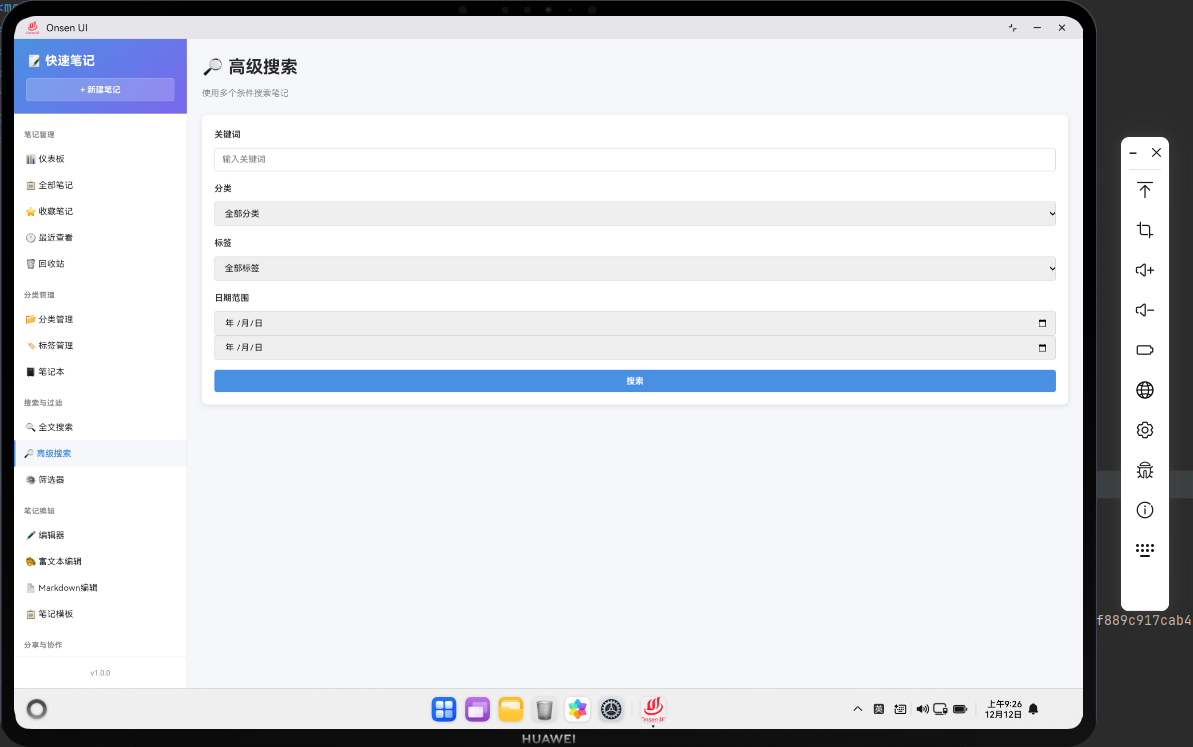
高级搜索功能提供了比全文搜索更强大的搜索能力。用户可以通过多个条件来搜索笔记,比如按分类、标签、日期范围、关键词等。高级搜索可以帮助用户快速定位特定的笔记,特别是当笔记数量很多时。
高级搜索的实现需要支持多条件组合搜索,并且要考虑搜索性能。我们可以使用索引、缓存等技术来优化搜索性能。
🔗 完整流程
第一步:构建搜索条件
高级搜索需要用户输入多个搜索条件,比如关键词、分类、标签、日期范围等。这些条件需要被收集并验证。用户可以选择性地填写这些条件,只有非空的条件才会被用于搜索。
搜索条件的组合方式可以是AND(所有条件都满足)或OR(任意条件满足)。我们选择AND方式,这样可以提供更精确的搜索结果。
第二步:执行多条件搜索
执行搜索时,我们需要遍历所有笔记,检查每个笔记是否满足所有搜索条件。这涉及到多个过滤操作的组合。为了提高性能,我们可以先执行最严格的条件,这样可以快速减少需要检查的笔记数量。
第三步:显示搜索结果
搜索结果应该以列表形式显示,并且可以按照不同的方式排序,比如按相关性、按日期、按标题等。用户可以保存搜索条件,以便下次快速使用。
🔧 Web代码实现
// 高级搜索页面渲染函数
async renderAdvancedSearch() {
  // 获取所有分类和标签用于下拉菜单
  const categories = await noteDB.getAllCategories();
  const tags = await noteDB.getAllTags();

  return `
    <div class="page active">
      <div class="page-header">
        <h1 class="page-title">🔎 高级搜索</h1>
      </div>
      <div class="search-form">
        <div class="form-group">
          <label>关键词</label>
          <input type="text" id="search-keyword" class="form-control" placeholder="输入关键词">
        </div>
        <div class="form-group">
          <label>分类</label>
          <select id="search-category" class="form-control">
            <option value="">全部分类</option>
            ${categories.map(cat => `<option value="${cat.name}">${cat.name}</option>`).join('')}
          </select>
        </div>
        <div class="form-group">
          <label>标签</label>
          <select id="search-tags" class="form-control" multiple>
            ${tags.map(tag => `<option value="${tag.name}">${tag.name}</option>`).join('')}
          </select>
        </div>
        <div class="form-group">
          <label>开始日期</label>
          <input type="date" id="search-start-date" class="form-control">
        </div>
        <div class="form-group">
          <label>结束日期</label>
          <input type="date" id="search-end-date" class="form-control">
        </div>
        <button class="btn btn-primary" onclick="app.performAdvancedSearch()">搜索</button>
      </div>
      <div id="advanced-search-results"></div>
    </div>
  `;
}
这段代码展示了高级搜索页面的初始化。包含关键词、分类、标签、日期范围等多个搜索条件。
// 执行高级搜索函数
async performAdvancedSearch() {
  try {
    // 收集搜索条件
    const keyword = document.getElementById('search-keyword').value.trim();
    const category = document.getElementById('search-category').value;
    const selectedTags = Array.from(document.getElementById('search-tags').selectedOptions).map(opt => opt.value);
    const startDate = document.getElementById('search-start-date').value;
    const endDate = document.getElementById('search-end-date').value;

    // 验证至少有一个搜索条件
    if (!keyword && !category && selectedTags.length === 0 && !startDate && !endDate) {
      Utils.showToast('请输入至少一个搜索条件', 'error');
      return;
    }

    // 获取所有笔记
    const allNotes = await noteDB.getAllNotes();

    // 执行多条件搜索
    let results = allNotes;

    // 按关键词过滤
    if (keyword) {
      const normalizedKeyword = keyword.toLowerCase();
      results = results.filter(note =>
        note.title.toLowerCase().includes(normalizedKeyword) ||
        note.content.toLowerCase().includes(normalizedKeyword)
      );
    }

    // 按分类过滤
    if (category) {
      results = results.filter(note => note.category === category);
    }

    // 按标签过滤
    if (selectedTags.length > 0) {
      results = results.filter(note =>
        note.tags && selectedTags.some(tag => note.tags.includes(tag))
      );
    }

    // 按日期范围过滤
    if (startDate && endDate) {
      const start = new Date(startDate).getTime();
      const end = new Date(endDate).getTime();
      results = results.filter(note => {
        const noteTime = new Date(note.createdAt).getTime();
        return noteTime >= start && noteTime <= end;
      });
    }

    // 按更新时间排序
    results.sort((a, b) => new Date(b.updatedAt) - new Date(a.updatedAt));

    // 生成搜索结果HTML
    const resultsHTML = results.map(note => `
      <div class="search-result-item">
        <div class="result-title" onclick="app.navigateTo('edit-note', ${note.id})">
          ${Utils.escapeHtml(note.title)}
        </div>
        <div class="result-meta">
          <span>${note.category || '未分类'}</span>
          <span>${note.tags ? note.tags.join(', ') : ''}</span>
          <span>${Utils.formatDate(note.updatedAt)}</span>
        </div>
      </div>
    `).join('');

    // 显示搜索结果
    const resultsContainer = document.getElementById('advanced-search-results');
    if (results.length === 0) {
      resultsContainer.innerHTML = '<p class="empty-state">未找到匹配的笔记</p>';
    } else {
      resultsContainer.innerHTML = `<p class="search-count">找到 ${results.length} 个结果</p>${resultsHTML}`;
    }
  } catch (error) {
    console.error('高级搜索失败:', error);
    Utils.showToast('搜索失败,请重试', 'error');
  }
}
这段代码实现了高级搜索功能。支持多条件组合搜索,包括关键词、分类、标签和日期范围。
🔌 OpenHarmony 原生代码
// AdvancedSearchPlugin.ets - 高级搜索插件
import { webview } from '@kit.ArkWeb';
import { common } from '@kit.AbilityKit';
import { fileIo } from '@kit.CoreFileKit';

@NativeComponent
export class AdvancedSearchPlugin {
  private context: common.UIAbilityContext;

  constructor(context: common.UIAbilityContext) {
    this.context = context;
  }

  // 初始化插件
  public init(webviewController: webview.WebviewController): void {
    webviewController.registerJavaScriptProxy(
      new AdvancedSearchJSProxy(this),
      'advancedSearchPlugin',
      ['advancedSearch', 'saveSearchCondition', 'getSavedConditions']
    );
  }

  // 执行高级搜索
  public advancedSearch(keyword: string, category: string, tags: Array<string>,
                       startDate: string, endDate: string): Promise<Array<any>> {
    return new Promise((resolve) => {
      try {
        const notesPath = this.context.cacheDir + '/notes.json';
        const content = fileIo.readTextSync(notesPath);
        let results = JSON.parse(content);

        // 按关键词过滤
        if (keyword) {
          const normalizedKeyword = keyword.toLowerCase();
          results = results.filter((note: any) =>
            note.title.toLowerCase().includes(normalizedKeyword) ||
            note.content.toLowerCase().includes(normalizedKeyword)
          );
        }

        // 按分类过滤
        if (category) {
          results = results.filter((note: any) => note.category === category);
        }

        // 按标签过滤
        if (tags && tags.length > 0) {
          results = results.filter((note: any) =>
            note.tags && tags.some(tag => note.tags.includes(tag))
          );
        }

        // 按日期范围过滤
        if (startDate && endDate) {
          const start = new Date(startDate).getTime();
          const end = new Date(endDate).getTime();
          results = results.filter((note: any) => {
            const noteTime = new Date(note.createdAt).getTime();
            return noteTime >= start && noteTime <= end;
          });
        }

        resolve(results);
      } catch (error) {
        console.error('Failed to advanced search:', error);
        resolve([]);
      }
    });
  }

  // 保存搜索条件
  public saveSearchCondition(name: string, keyword: string, category: string,
                            tags: Array<string>, startDate: string, endDate: string): Promise<boolean> {
    return new Promise((resolve) => {
      try {
        const conditionsPath = this.context.cacheDir + '/search_conditions.json';
        let conditions: Array<any> = [];

        try {
          const content = fileIo.readTextSync(conditionsPath);
          conditions = JSON.parse(content);
        } catch {
          conditions = [];
        }

        // 添加新的搜索条件
        const newCondition = {
          id: Date.now(),
          name: name,
          keyword: keyword,
          category: category,
          tags: tags,
          startDate: startDate,
          endDate: endDate,
          createdAt: new Date().toISOString()
        };

        conditions.push(newCondition);
        fileIo.writeTextSync(conditionsPath, JSON.stringify(conditions, null, 2));
        resolve(true);
      } catch (error) {
        console.error('Failed to save search condition:', error);
        resolve(false);
      }
    });
  }

  // 获取保存的搜索条件
  public getSavedConditions(): Promise<Array<any>> {
    return new Promise((resolve) => {
      try {
        const conditionsPath = this.context.cacheDir + '/search_conditions.json';
        const content = fileIo.readTextSync(conditionsPath);
        const conditions = JSON.parse(content);
        resolve(conditions);
      } catch (error) {
        console.error('Failed to get saved conditions:', error);
        resolve([]);
      }
    });
  }
}

// AdvancedSearchJSProxy.ets - JavaScript代理类
class AdvancedSearchJSProxy {
  private plugin: AdvancedSearchPlugin;

  constructor(plugin: AdvancedSearchPlugin) {
    this.plugin = plugin;
  }

  advancedSearch(keyword: string, category: string, tags: Array<string>,
                startDate: string, endDate: string): void {
    this.plugin.advancedSearch(keyword, category, tags, startDate, endDate).then(results => {
      console.log('Advanced search results:', results.length);
    });
  }

  saveSearchCondition(name: string, keyword: string, category: string,
                     tags: Array<string>, startDate: string, endDate: string): void {
    this.plugin.saveSearchCondition(name, keyword, category, tags, startDate, endDate).then(success => {
      console.log('Search condition saved:', success);
    });
  }

  getSavedConditions(): void {
    this.plugin.getSavedConditions().then(conditions => {
      console.log('Saved conditions:', conditions.length);
    });
  }
}
Web-Native 通信
// 在Web端调用原生高级搜索方法
async function advancedSearchNative(keyword, category, tags, startDate, endDate) {
  return new Promise((resolve) => {
    cordova.exec(
      function(results) {
        console.log('Advanced search results from native:', results);
        resolve(results);
      },
      function(error) {
        console.error('Failed to advanced search:', error);
        resolve([]);
      },
      'AdvancedSearchPlugin',
      'advancedSearch',
      [keyword, category, tags, startDate, endDate]
    );
  });
}

// 在Web端调用原生方法保存搜索条件
async function saveSearchConditionNative(name, keyword, category, tags, startDate, endDate) {
  return new Promise((resolve) => {
    cordova.exec(
      function(success) {
        console.log('Search condition saved:', success);
        resolve(success);
      },
      function(error) {
        console.error('Failed to save search condition:', error);
        resolve(false);
      },
      'AdvancedSearchPlugin',
      'saveSearchCondition',
      [name, keyword, category, tags, startDate, endDate]
    );
  });
}
📝 总结
高级搜索功能展示了如何在Cordova与OpenHarmony混合开发中实现一个功能强大的搜索系统。通过支持多条件组合搜索,我们为用户提供了一个灵活而高效的搜索工具。
高级搜索的实现涉及到复杂的条件组合、性能优化和用户体验等多个方面。通过合理的设计,我们可以为用户提供一个强大的搜索能力。
欢迎加入开源鸿蒙跨平台社区:https://openharmonycrossplatform.csdn.net

开源鸿蒙跨平台开发社区汇聚开发者与厂商,共建“一次开发,多端部署”的开源生态,致力于降低跨端开发门槛,推动万物智联创新。
更多推荐
 18
18 0
0- 0


 已为社区贡献28条内容

所有评论(0)