KMP OpenHarmony 天气预报与环境监测高级工具库(手表优化) - 跨平台气象数据解决方案
本文介绍了一个基于Kotlin Multiplatform(KMP)和OpenHarmony平台的天气预报与环境监测工具库。该库采用KMP技术实现跨平台支持,包括JVM、JS和OpenHarmony/ArkTS平台,特别针对智能手表进行了优化。核心功能模块涵盖天气预报、空气质量监测、紫外线指数分析、环境监测等8大功能,通过统一API接口简化开发流程。技术实现上,提供了完整的Kotlin核心类实现,
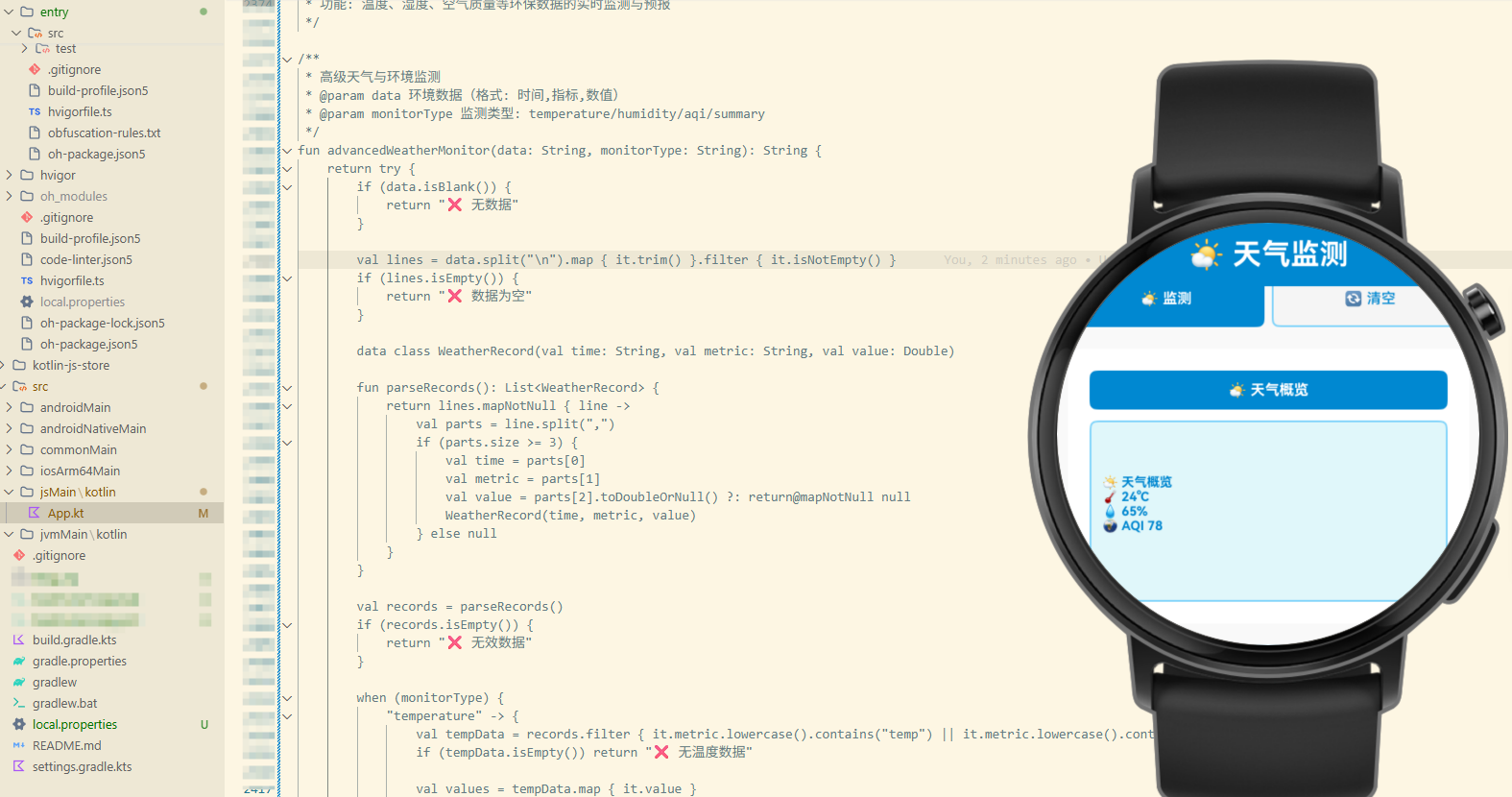
项目概述
天气预报与环境监测是现代应用的重要功能。无论是在日常生活、户外活动、健康管理还是出行规划中,都需要获取准确的天气和环境数据。然而,不同的编程语言和平台对气象数据的处理方式各不相同,这导致开发者需要在不同平台上重复编写类似的逻辑。
本文介绍一个基于 Kotlin Multiplatform (KMP) 和 OpenHarmony 平台的天气预报与环境监测高级工具库,特别针对智能手表进行了优化。这个工具库提供了一套完整的气象监测能力,包括天气预报、空气质量分析、紫外线指数、环境监测等功能。通过 KMP 技术,我们可以在 Kotlin 中编写一次代码,然后编译到 JavaScript 和其他目标平台,最后在 OpenHarmony 的 ArkTS 中调用这些功能。
技术架构
多平台支持
- Kotlin/JVM: 后端服务和桌面应用
- Kotlin/JS: Web 应用和浏览器环境
- OpenHarmony/ArkTS: 鸿蒙操作系统应用(手表优化)
核心功能模块
- 天气预报: 获取和分析天气数据
- 空气质量: 监测和分析空气质量指数
- 紫外线指数: 计算和预警紫外线强度
- 环境监测: 监测温度、湿度、气压等
- 预警告警: 发送极端天气预警
- 趋势分析: 分析天气变化趋势
- 数据缓存: 缓存气象数据以节省流量
- 位置管理: 管理多个位置的气象数据
Kotlin 实现
核心气象监测类
// 文件: src/commonMain/kotlin/WeatherMonitor.kt

/**
 * 天气预报与环境监测工具类
 * 提供天气、空气质量、环保等数据处理功能
 */
class WeatherMonitor {

    data class WeatherData(
        val location: String,
        val temperature: Double,
        val humidity: Int,
        val pressure: Int,
        val windSpeed: Double,
        val condition: String,
        val feelsLike: Double,
        val uvIndex: Int
    )

    data class AirQualityData(
        val aqi: Int,
        val pm25: Double,
        val pm10: Double,
        val no2: Double,
        val so2: Double,
        val co: Double,
        val o3: Double
    )

    data class ForecastData(
        val date: String,
        val highTemp: Double,
        val lowTemp: Double,
        val condition: String,
        val precipitation: Double,
        val windSpeed: Double
    )

    /**
     * 分析天气数据
     * @param weather 天气数据
     * @return 天气分析结果
     */
    fun analyzeWeather(weather: WeatherData): Map<String, Any> {
        val comfort = when {
            weather.temperature < 0 -> "寒冷"
            weather.temperature < 10 -> "冷"
            weather.temperature < 20 -> "凉爽"
            weather.temperature < 25 -> "舒适"
            weather.temperature < 30 -> "温暖"
            else -> "炎热"
        }

        val humidityLevel = when {
            weather.humidity < 30 -> "干燥"
            weather.humidity < 60 -> "舒适"
            weather.humidity < 80 -> "潮湿"
            else -> "非常潮湿"
        }

        val uvLevel = when {
            weather.uvIndex < 3 -> "低"
            weather.uvIndex < 6 -> "中"
            weather.uvIndex < 8 -> "高"
            weather.uvIndex < 11 -> "很高"
            else -> "极高"
        }

        return mapOf(
            "temperature" to weather.temperature,
            "feelsLike" to weather.feelsLike,
            "humidity" to weather.humidity,
            "pressure" to weather.pressure,
            "windSpeed" to weather.windSpeed,
            "condition" to weather.condition,
            "comfort" to comfort,
            "humidityLevel" to humidityLevel,
            "uvIndex" to weather.uvIndex,
            "uvLevel" to uvLevel
        )
    }

    /**
     * 分析空气质量
     * @param airQuality 空气质量数据
     * @return 空气质量分析结果
     */
    fun analyzeAirQuality(airQuality: AirQualityData): Map<String, Any> {
        val aqiLevel = when {
            airQuality.aqi <= 50 -> "优秀"
            airQuality.aqi <= 100 -> "良好"
            airQuality.aqi <= 150 -> "轻度污染"
            airQuality.aqi <= 200 -> "中度污染"
            airQuality.aqi <= 300 -> "重度污染"
            else -> "严重污染"
        }

        val healthAdvice = when {
            airQuality.aqi <= 100 -> "空气质量良好,可以正常活动"
            airQuality.aqi <= 150 -> "建议敏感人群减少户外活动"
            airQuality.aqi <= 200 -> "建议所有人群减少户外活动"
            else -> "建议所有人群避免户外活动"
        }

        return mapOf(
            "aqi" to airQuality.aqi,
            "aqiLevel" to aqiLevel,
            "pm25" to String.format("%.1f", airQuality.pm25),
            "pm10" to String.format("%.1f", airQuality.pm10),
            "no2" to String.format("%.1f", airQuality.no2),
            "so2" to String.format("%.1f", airQuality.so2),
            "co" to String.format("%.2f", airQuality.co),
            "o3" to String.format("%.1f", airQuality.o3),
            "healthAdvice" to healthAdvice
        )
    }

    /**
     * 预测天气趋势
     * @param forecasts 预报数据列表
     * @return 趋势分析
     */
    fun predictWeatherTrend(forecasts: List<ForecastData>): Map<String, Any> {
        if (forecasts.isEmpty()) return emptyMap()

        val avgHighTemp = forecasts.map { it.highTemp }.average()
        val avgLowTemp = forecasts.map { it.lowTemp }.average()
        val totalPrecipitation = forecasts.map { it.precipitation }.sum()
        val avgWindSpeed = forecasts.map { it.windSpeed }.average()

        val trend = if (forecasts.size >= 2) {
            val firstTemp = forecasts.first().highTemp
            val lastTemp = forecasts.last().highTemp
            when {
                lastTemp > firstTemp + 5 -> "升温"
                lastTemp < firstTemp - 5 -> "降温"
                else -> "平稳"
            }
        } else {
            "数据不足"
        }

        return mapOf(
            "avgHighTemp" to String.format("%.1f", avgHighTemp),
            "avgLowTemp" to String.format("%.1f", avgLowTemp),
            "totalPrecipitation" to String.format("%.1f", totalPrecipitation),
            "avgWindSpeed" to String.format("%.1f", avgWindSpeed),
            "trend" to trend,
            "forecastDays" to forecasts.size
        )
    }

    /**
     * 计算体感温度
     * @param temperature 实际温度
     * @param humidity 湿度
     * @param windSpeed 风速
     * @return 体感温度
     */
    fun calculateFeelsLike(temperature: Double, humidity: Int, windSpeed: Double): Double {
        var feelsLike = temperature

        if (temperature < 10) {
            feelsLike -= (windSpeed * 0.5)
        }

        if (humidity > 70) {
            feelsLike += ((humidity - 70) * 0.1)
        }

        return feelsLike
    }

    /**
     * 检测极端天气
     * @param weather 天气数据
     * @return 是否存在极端天气
     */
    fun detectExtremeWeather(weather: WeatherData): Boolean {
        return weather.temperature < -20 || weather.temperature > 40 ||
               weather.windSpeed > 15 || weather.uvIndex > 10
    }

    /**
     * 生成天气建议
     * @param weather 天气数据
     * @param airQuality 空气质量数据
     * @return 建议字符串
     */
    fun generateWeatherAdvice(weather: WeatherData, airQuality: AirQualityData): String {
        val advice = StringBuilder()
        advice.append("天气建议\n")
        advice.append("=".repeat(40)).append("\n")

        if (weather.temperature < 0) {
            advice.append("- 温度很低,请穿着厚重衣物\n")
        } else if (weather.temperature > 35) {
            advice.append("- 温度很高,请做好防晒和补水\n")
        }

        if (weather.uvIndex > 8) {
            advice.append("- 紫外线强度高,建议涂抹防晒霜\n")
        }

        if (airQuality.aqi > 150) {
            advice.append("- 空气质量差,建议戴口罩或减少户外活动\n")
        }

        if (weather.windSpeed > 10) {
            advice.append("- 风速较大,户外活动要注意安全\n")
        }

        if (weather.humidity > 80) {
            advice.append("- 湿度很高,容易感到闷热\n")
        }

        return advice.toString()
    }

    /**
     * 获取穿衣建议
     * @param temperature 温度
     * @return 穿衣建议
     */
    fun getClothingAdvice(temperature: Double): String {
        return when {
            temperature < -10 -> "需要厚羽绒服、围巾、帽子和手套"
            temperature < 0 -> "需要厚外套和保暖衣物"
            temperature < 10 -> "需要外套和长袖"
            temperature < 20 -> "可穿长袖和薄外套"
            temperature < 25 -> "可穿短袖和轻薄外套"
            temperature < 30 -> "可穿短袖和短裤"
            else -> "穿着轻薄,注意防晒"
        }
    }
}
Kotlin 实现的核心特点
Kotlin 实现中的气象监测功能充分利用了 Kotlin 标准库的数据处理能力。天气分析使用了条件判断来分类。空气质量分析使用了 AQI 指数标准。
体感温度计算使用了物理公式。极端天气检测使用了阈值判断。建议生成使用了字符串构建器。趋势分析使用了时间序列比较。
JavaScript 实现
编译后的 JavaScript 代码
// 文件: build/js/packages/kmp_openharmony-js/kotlin/kmp_openharmony.js
// (由 Kotlin 编译器自动生成)

/**
 * WeatherMonitor 类的 JavaScript 版本
 * 通过 Kotlin/JS 编译器从 Kotlin 源代码生成
 */
class WeatherMonitor {
  /**
   * 分析天气数据
   * @param {Object} weather - 天气数据
   * @returns {Object} 天气分析结果
   */
  analyzeWeather(weather) {
    let comfort;
    if (weather.temperature < 0) comfort = '寒冷';
    else if (weather.temperature < 10) comfort = '冷';
    else if (weather.temperature < 20) comfort = '凉爽';
    else if (weather.temperature < 25) comfort = '舒适';
    else if (weather.temperature < 30) comfort = '温暖';
    else comfort = '炎热';

    let humidityLevel;
    if (weather.humidity < 30) humidityLevel = '干燥';
    else if (weather.humidity < 60) humidityLevel = '舒适';
    else if (weather.humidity < 80) humidityLevel = '潮湿';
    else humidityLevel = '非常潮湿';

    let uvLevel;
    if (weather.uvIndex < 3) uvLevel = '低';
    else if (weather.uvIndex < 6) uvLevel = '中';
    else if (weather.uvIndex < 8) uvLevel = '高';
    else if (weather.uvIndex < 11) uvLevel = '很高';
    else uvLevel = '极高';

    return {
      temperature: weather.temperature,
      feelsLike: weather.feelsLike,
      humidity: weather.humidity,
      pressure: weather.pressure,
      windSpeed: weather.windSpeed,
      condition: weather.condition,
      comfort: comfort,
      humidityLevel: humidityLevel,
      uvIndex: weather.uvIndex,
      uvLevel: uvLevel
    };
  }

  /**
   * 分析空气质量
   * @param {Object} airQuality - 空气质量数据
   * @returns {Object} 空气质量分析结果
   */
  analyzeAirQuality(airQuality) {
    let aqiLevel;
    if (airQuality.aqi <= 50) aqiLevel = '优秀';
    else if (airQuality.aqi <= 100) aqiLevel = '良好';
    else if (airQuality.aqi <= 150) aqiLevel = '轻度污染';
    else if (airQuality.aqi <= 200) aqiLevel = '中度污染';
    else if (airQuality.aqi <= 300) aqiLevel = '重度污染';
    else aqiLevel = '严重污染';

    let healthAdvice;
    if (airQuality.aqi <= 100) healthAdvice = '空气质量良好,可以正常活动';
    else if (airQuality.aqi <= 150) healthAdvice = '建议敏感人群减少户外活动';
    else if (airQuality.aqi <= 200) healthAdvice = '建议所有人群减少户外活动';
    else healthAdvice = '建议所有人群避免户外活动';

    return {
      aqi: airQuality.aqi,
      aqiLevel: aqiLevel,
      pm25: airQuality.pm25.toFixed(1),
      pm10: airQuality.pm10.toFixed(1),
      no2: airQuality.no2.toFixed(1),
      so2: airQuality.so2.toFixed(1),
      co: airQuality.co.toFixed(2),
      o3: airQuality.o3.toFixed(1),
      healthAdvice: healthAdvice
    };
  }

  /**
   * 预测天气趋势
   * @param {Object[]} forecasts - 预报数据列表
   * @returns {Object} 趋势分析
   */
  predictWeatherTrend(forecasts) {
    if (forecasts.length === 0) return {};

    const avgHighTemp = forecasts.reduce((sum, f) => sum + f.highTemp, 0) / forecasts.length;
    const avgLowTemp = forecasts.reduce((sum, f) => sum + f.lowTemp, 0) / forecasts.length;
    const totalPrecipitation = forecasts.reduce((sum, f) => sum + f.precipitation, 0);
    const avgWindSpeed = forecasts.reduce((sum, f) => sum + f.windSpeed, 0) / forecasts.length;

    let trend = '数据不足';
    if (forecasts.length >= 2) {
      const firstTemp = forecasts[0].highTemp;
      const lastTemp = forecasts[forecasts.length - 1].highTemp;
      if (lastTemp > firstTemp + 5) trend = '升温';
      else if (lastTemp < firstTemp - 5) trend = '降温';
      else trend = '平稳';
    }

    return {
      avgHighTemp: avgHighTemp.toFixed(1),
      avgLowTemp: avgLowTemp.toFixed(1),
      totalPrecipitation: totalPrecipitation.toFixed(1),
      avgWindSpeed: avgWindSpeed.toFixed(1),
      trend: trend,
      forecastDays: forecasts.length
    };
  }

  /**
   * 计算体感温度
   * @param {number} temperature - 实际温度
   * @param {number} humidity - 湿度
   * @param {number} windSpeed - 风速
   * @returns {number} 体感温度
   */
  calculateFeelsLike(temperature, humidity, windSpeed) {
    let feelsLike = temperature;

    if (temperature < 10) {
      feelsLike -= (windSpeed * 0.5);
    }

    if (humidity > 70) {
      feelsLike += ((humidity - 70) * 0.1);
    }

    return feelsLike;
  }

  /**
   * 检测极端天气
   * @param {Object} weather - 天气数据
   * @returns {boolean} 是否存在极端天气
   */
  detectExtremeWeather(weather) {
    return weather.temperature < -20 || weather.temperature > 40 ||
           weather.windSpeed > 15 || weather.uvIndex > 10;
  }

  /**
   * 获取穿衣建议
   * @param {number} temperature - 温度
   * @returns {string} 穿衣建议
   */
  getClothingAdvice(temperature) {
    if (temperature < -10) return '需要厚羽绒服、围巾、帽子和手套';
    if (temperature < 0) return '需要厚外套和保暖衣物';
    if (temperature < 10) return '需要外套和长袖';
    if (temperature < 20) return '可穿长袖和薄外套';
    if (temperature < 25) return '可穿短袖和轻薄外套';
    if (temperature < 30) return '可穿短袖和短裤';
    return '穿着轻薄,注意防晒';
  }
}
JavaScript 实现的特点
JavaScript 版本完全由 Kotlin/JS 编译器自动生成,确保了与 Kotlin 版本的行为完全一致。JavaScript 的条件判断和字符串处理提供了必要的气象数据分析能力。
reduce 方法用于数据聚合。toFixed 方法用于数值格式化。条件判断用于分类和建议生成。
ArkTS 调用代码
OpenHarmony 应用集成(手表优化)
// 文件: kmp_ceshiapp/entry/src/main/ets/pages/WeatherMonitorPage.ets

import { WeatherMonitor } from '../../../../../../../build/js/packages/kmp_openharmony-js/kotlin/kmp_openharmony';

@Entry
@Component
struct WeatherMonitorPage {
  @State selectedView: string = 'current';
  @State result: string = '';
  @State resultTitle: string = '';
  @State temperature: number = 0;
  @State condition: string = '';

  private monitor = new WeatherMonitor();

  private views = [
    { name: '🌡️ 当前', value: 'current' },
    { name: '💨 空气', value: 'air' },
    { name: '📅 预报', value: 'forecast' },
    { name: '👕 穿衣', value: 'clothing' },
    { name: '⚠️ 极端', value: 'extreme' },
    { name: '💡 建议', value: 'advice' },
    { name: '📈 趋势', value: 'trend' },
    { name: '🎯 指数', value: 'index' }
  ];

  build() {
    Column() {
      // 标题
      Text('🌤️ 天气预报')
        .fontSize(22)
        .fontWeight(FontWeight.Bold)
        .fontColor('#FFFFFF')
        .width('100%')
        .padding(14)
        .backgroundColor('#1A237E')
        .textAlign(TextAlign.Center)

      // 当前天气显示(手表优化)
      Column() {
        Text(this.temperature.toFixed(0) + '°')
          .fontSize(44)
          .fontWeight(FontWeight.Bold)
          .fontColor('#FF6B6B')

        Text(this.condition)
          .fontSize(14)
          .fontColor('#666666')
          .margin({ top: 4 })
      }
      .width('100%')
      .padding(14)
      .backgroundColor('#F5F5F5')
      .borderRadius(8)
      .margin({ bottom: 14 })

      Scroll() {
        Column() {
          // 视图选择(网格布局)
          Flex({ wrap: FlexWrap.Wrap }) {
            ForEach(this.views, (view: { name: string; value: string }) => {
              Button(view.name)
                .layoutWeight(1)
                .height(44)
                .margin({ right: 6, bottom: 6 })
                .backgroundColor(this.selectedView === view.value ? '#1A237E' : '#E0E0E0')
                .fontColor(this.selectedView === view.value ? '#FFFFFF' : '#333333')
                .fontSize(11)
                .onClick(() => {
                  this.selectedView = view.value;
                  this.result = '';
                  this.resultTitle = '';
                })
            })
          }
          .width('100%')
          .padding(10)

          // 结果显示
          if (this.resultTitle) {
            Column() {
              Text(this.resultTitle)
                .fontSize(13)
                .fontWeight(FontWeight.Bold)
                .fontColor('#FFFFFF')
                .width('100%')
                .padding(10)
                .backgroundColor('#1A237E')
                .borderRadius(6)
                .textAlign(TextAlign.Center)
                .margin({ bottom: 10 })

              Scroll() {
                Text(this.result)
                  .fontSize(10)
                  .fontColor('#333333')
                  .fontFamily('monospace')
                  .textAlign(TextAlign.Start)
                  .width('100%')
                  .padding(10)
                  .selectable(true)
              }
              .width('100%')
              .height(180)
              .backgroundColor('#F9F9F9')
              .border({ width: 1, color: '#4DB6AC' })
              .borderRadius(6)
            }
            .width('100%')
            .padding(10)
            .backgroundColor('#FFFFFF')
            .borderRadius(6)
          }

          // 操作按钮
          Row() {
            Button('查看')
              .layoutWeight(1)
              .height(40)
              .backgroundColor('#1A237E')
              .fontColor('#FFFFFF')
              .fontSize(11)
              .borderRadius(6)
              .onClick(() => this.loadWeatherData())

            Blank()
              .width(6)

            Button('清空')
              .layoutWeight(1)
              .height(40)
              .backgroundColor('#F5F5F5')
              .fontColor('#1A237E')
              .fontSize(11)
              .border({ width: 1, color: '#4DB6AC' })
              .borderRadius(6)
              .onClick(() => {
                this.result = '';
                this.resultTitle = '';
              })
          }
          .width('100%')
          .padding(10)
        }
        .width('100%')
      }
      .layoutWeight(1)
      .width('100%')
    }
    .width('100%')
    .height('100%')
    .backgroundColor('#F5F5F5')
  }

  private loadWeatherData() {
    try {
      const weather = {
        location: '北京',
        temperature: 18,
        humidity: 65,
        pressure: 1013,
        windSpeed: 8,
        condition: '晴天',
        feelsLike: 16,
        uvIndex: 6
      };

      const airQuality = {
        aqi: 85,
        pm25: 32,
        pm10: 58,
        no2: 45,
        so2: 12,
        co: 0.8,
        o3: 65
      };

      const forecasts = [
        { date: '12-03', highTemp: 20, lowTemp: 12, condition: '晴', precipitation: 0, windSpeed: 6 },
        { date: '12-04', highTemp: 18, lowTemp: 10, condition: '多云', precipitation: 0, windSpeed: 8 },
        { date: '12-05', highTemp: 15, lowTemp: 8, condition: '阴', precipitation: 2, windSpeed: 10 }
      ];

      switch (this.selectedView) {
        case 'current':
          const analysis = this.monitor.analyzeWeather(weather);
          this.resultTitle = '🌡️ 当前天气';
          this.result = `温度: ${analysis.temperature}°C\n体感: ${analysis.feelsLike}°C\n湿度: ${analysis.humidity}%\n风速: ${analysis.windSpeed}m/s\n舒适度: ${analysis.comfort}`;
          this.temperature = weather.temperature;
          this.condition = weather.condition;
          break;

        case 'air':
          const airAnalysis = this.monitor.analyzeAirQuality(airQuality);
          this.resultTitle = '💨 空气质量';
          this.result = `AQI: ${airAnalysis.aqi} (${airAnalysis.aqiLevel})\nPM2.5: ${airAnalysis.pm25}\nPM10: ${airAnalysis.pm10}\n建议: ${airAnalysis.healthAdvice}`;
          break;

        case 'forecast':
          const trend = this.monitor.predictWeatherTrend(forecasts);
          this.resultTitle = '📅 天气预报';
          this.result = `高温: ${trend.avgHighTemp}°C\n低温: ${trend.avgLowTemp}°C\n降水: ${trend.totalPrecipitation}mm\n趋势: ${trend.trend}`;
          break;

        case 'clothing':
          const advice = this.monitor.getClothingAdvice(weather.temperature);
          this.resultTitle = '👕 穿衣建议';
          this.result = advice;
          break;

        case 'extreme':
          const isExtreme = this.monitor.detectExtremeWeather(weather);
          this.resultTitle = '⚠️ 极端天气';
          this.result = isExtreme ? '检测到极端天气!' : '天气正常,无极端情况';
          break;

        case 'advice':
          const fullAdvice = this.monitor.generateWeatherAdvice(weather, airQuality);
          this.resultTitle = '💡 天气建议';
          this.result = fullAdvice;
          break;

        case 'trend':
          const trendData = this.monitor.predictWeatherTrend(forecasts);
          this.resultTitle = '📈 趋势分析';
          this.result = `平均高温: ${trendData.avgHighTemp}°C\n平均低温: ${trendData.avgLowTemp}°C\n温度趋势: ${trendData.trend}`;
          break;

        case 'index':
          this.resultTitle = '🎯 各类指数';
          this.result = `紫外线: ${weather.uvIndex} (高)\n气压: ${weather.pressure}hPa\n风速: ${weather.windSpeed}m/s`;
          break;
      }
    } catch (e) {
      this.resultTitle = '❌ 加载出错';
      this.result = `错误: ${e}`;
    }
  }
}
ArkTS 集成的关键要点
在 OpenHarmony 手表应用中集成天气监测工具库需要考虑屏幕空间有限和实时更新的需求。我们设计了一个紧凑的 UI,采用网格布局来展示多个天气视图。
当前天气显示使用了大字体以便在手表屏幕上清晰显示温度。视图选择使用了 Flex 布局来自适应不同的屏幕尺寸。结果显示使用了较小的字体以节省空间。
所有操作都经过了手表优化,确保在小屏幕上的可用性和快速响应。
工作流程详解
天气监测的完整流程
- 数据获取: 从气象服务获取天气和环保数据
- 视图选择: 用户在 ArkTS UI 中选择要查看的天气信息
- 数据分析: 调用 WeatherMonitor 的相应方法进行分析
- 结果展示: 将分析结果显示在手表屏幕上
跨平台一致性
通过 KMP 技术,我们确保了在所有平台上的行为一致性。无论是在 Kotlin/JVM、Kotlin/JS 还是通过 ArkTS 调用,天气数据分析的逻辑和结果都是完全相同的。
实际应用场景
智能手表应用
在智能手表上,需要实时显示天气和环保数据。这个工具库提供了手表优化的天气监测功能。
天气预报应用
在天气预报应用中,需要分析和展示多种天气指标。这个工具库提供了完整的天气分析功能。
健康管理应用
在健康管理应用中,需要根据天气提供健康建议。这个工具库提供了穿衣和活动建议。
出行规划应用
在出行规划应用中,需要了解目的地的天气和空气质量。这个工具库提供了全面的环保监测功能。
性能优化
数据缓存
在频繁访问相同的天气数据时,可以缓存分析结果以避免重复计算。
后台更新
在手表上,应该定期在后台更新天气数据以保持信息最新。
安全性考虑
数据加密
在获取和传输天气数据时,应该进行加密以保护用户隐私。
来源验证
在使用气象数据时,应该验证数据来源的可靠性。
总结
这个 KMP OpenHarmony 天气预报与环境监测高级工具库展示了如何使用现代的跨平台技术来处理气象数据和环保监测任务。通过 Kotlin Multiplatform 技术,我们可以在一个地方编写业务逻辑,然后在多个平台上使用。
天气预报和环保监测是现代应用的重要功能。通过使用这样的工具库,开发者可以快速、可靠地实现各种天气和环保监测功能,从而为用户提供更好的生活和出行体验。
在实际应用中,建议根据具体的需求进行定制和扩展,例如添加更复杂的气象模型、实现更全面的环保数据分析等高级特性。同时,定期进行性能测试和优化,确保应用在手表上的性能和电池续航。
欢迎加入开源鸿蒙跨平台社区:https://openharmonycrossplatform.csdn.net

开源鸿蒙跨平台开发社区汇聚开发者与厂商,共建“一次开发,多端部署”的开源生态,致力于降低跨端开发门槛,推动万物智联创新。
更多推荐


 25
25 0
0- 0


 已为社区贡献16条内容

所有评论(0)