KMP 实现鸿蒙跨端:Kotlin 密码强度检测工具
本文介绍了基于Kotlin Multiplatform的密码强度检测工具开发,可在鸿蒙跨端应用中使用。该工具具备多维度评估功能,包括密码长度、字符类型多样性、常见漏洞检测等核心功能。通过Kotlin实现密码强度计算算法,能识别连续字符、重复字符等安全漏洞,并提供强度分类和改进建议。工具特点包括实时反馈、跨端兼容性,适用于用户注册、安全审计等场景,帮助用户创建更安全的密码。
目录
概述
本文档介绍如何在 Kotlin Multiplatform (KMP) 鸿蒙跨端开发中实现一个完整的密码强度检测工具系统。密码安全是现代应用开发中的一个关键问题,涉及密码复杂度评估、安全建议、密码破解风险评估等多个方面。无论是进行用户账户管理、安全认证还是数据保护,一个功能强大的密码强度检测工具都能提供必要的支持。
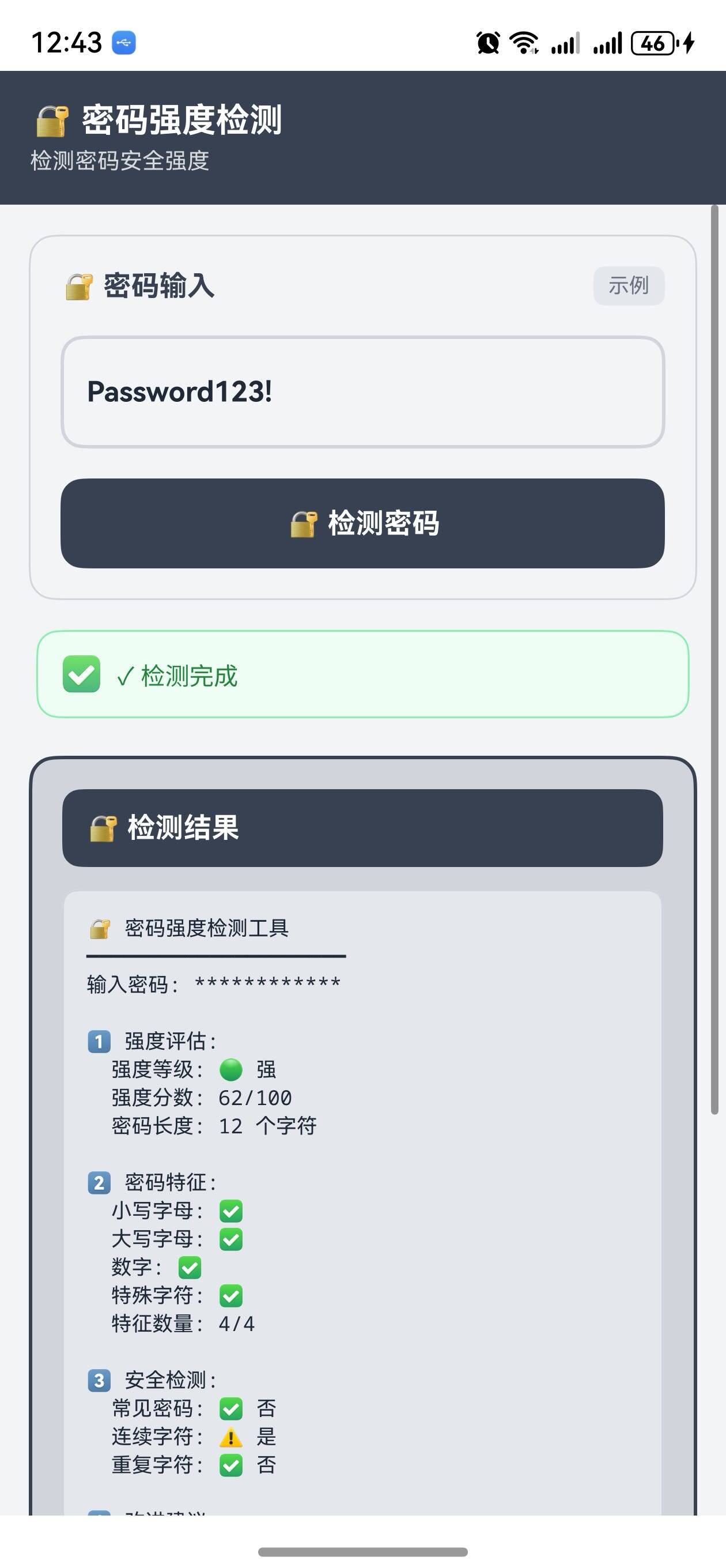
这个案例展示了如何使用 Kotlin 的字符串处理、正则表达式和密码学原理来创建一个功能丰富的密码安全分析工具。密码强度检测工具需要能够评估密码的复杂度、检测常见的弱密码模式、提供密码改进建议、估算密码破解时间等。通过 KMP,这个工具可以无缝编译到 JavaScript,在 OpenHarmony 应用中运行,并支持用户输入进行实时密码强度评估。
在实际应用中,密码强度检测工具广泛应用于以下场景:用户注册和密码修改页面、密码管理器、安全审计系统、合规性检查、员工培训等。通过支持多种密码复杂度标准、检测常见的安全漏洞、提供实时的改进建议,我们可以帮助用户创建更加安全的密码。同时,通过 KMP 框架的跨端能力,我们可以在不同平台上使用相同的密码检测逻辑,确保安全标准的一致性。
工具的特点
- 多维度评估:从长度、字符类型、复杂度等多个维度评估密码强度
- 常见漏洞检测:检测常见的弱密码模式和安全漏洞
- 破解时间估算:估算密码被破解所需的时间
- 改进建议:提供具体的密码改进建议
- 实时反馈:在用户输入时提供实时的强度评估
- 跨端兼容:一份 Kotlin 代码可同时服务多个平台
工具功能
1. 密码长度评估
密码长度是影响密码强度的最基本因素。一般来说,密码越长,被破解的难度越大。根据 NIST(美国国家标准与技术研究所)的建议,密码长度应该至少为 8 个字符,但更好的做法是使用 12 个或更多字符。密码长度的增加会呈指数级地增加破解所需的时间。例如,一个 8 位密码可能在几小时内被破解,而一个 16 位密码可能需要数年时间。
- 最小长度检查:确保密码长度至少为 8 个字符
- 推荐长度:建议使用 12 个或更多字符
- 长度评分:根据长度给出相应的评分
2. 字符类型多样性
密码中包含的字符类型越多样,密码的强度越高。通常,密码应该包含大写字母、小写字母、数字和特殊字符。这些不同类型的字符组合可以大大增加密码空间,使得暴力破解变得更加困难。例如,一个只包含小写字母的 8 位密码有 26^8 种可能性,而一个包含大小写字母、数字和特殊字符的 8 位密码有 94^8 种可能性,后者的可能性要大得多。
- 大写字母:检查是否包含大写字母
- 小写字母:检查是否包含小写字母
- 数字:检查是否包含数字
- 特殊字符:检查是否包含特殊字符
3. 常见漏洞检测
许多用户倾向于使用容易记住的密码,但这些密码往往包含常见的安全漏洞。检测工具可以识别这些漏洞,如连续的字符、重复的字符、键盘上的连续按键、常见的单词等。通过识别这些漏洞,我们可以帮助用户避免使用容易被破解的密码。
- 连续字符:检测如 “abc” 或 “123” 这样的连续字符
- 重复字符:检测如 “aaa” 或 “111” 这样的重复字符
- 键盘模式:检测如 “qwerty” 这样的键盘连续按键
- 常见单词:检测如 “password” 或 “123456” 这样的常见密码
4. 破解时间估算
通过估算密码被破解所需的时间,我们可以给用户一个直观的安全感受。这个估算基于密码的复杂度和当前计算机的破解速度。虽然这个估算不是完全准确的,但它可以帮助用户理解密码强度的重要性。
- 暴力破解时间:估算通过暴力破解破解密码所需的时间
- 字典攻击时间:估算通过字典攻击破解密码所需的时间
- 彩虹表攻击时间:估算通过彩虹表攻击破解密码所需的时间
5. 改进建议
基于密码的分析结果,工具可以提供具体的改进建议。这些建议帮助用户创建更加安全的密码。例如,如果密码太短,建议增加长度;如果密码缺少某种字符类型,建议添加该类型的字符。
- 长度建议:如果密码太短,建议增加长度
- 字符类型建议:如果缺少某种字符类型,建议添加
- 避免模式建议:建议避免使用常见的模式
- 个性化建议:根据密码的具体情况提供个性化的建议
核心实现
1. 密码强度计算
fun calculatePasswordStrength(password: String): Int {
    var strength = 0

    // 长度评分
    when {
        password.length >= 16 -> strength += 30
        password.length >= 12 -> strength += 25
        password.length >= 8 -> strength += 20
        password.length >= 6 -> strength += 10
        else -> strength += 5
    }

    // 字符类型评分
    if (password.any { it.isUpperCase() }) strength += 15
    if (password.any { it.isLowerCase() }) strength += 15
    if (password.any { it.isDigit() }) strength += 15
    if (password.any { !it.isLetterOrDigit() }) strength += 25

    // 减少常见漏洞的分数
    if (hasSequentialCharacters(password)) strength -= 10
    if (hasRepeatingCharacters(password)) strength -= 10
    if (hasKeyboardPattern(password)) strength -= 15
    if (isCommonPassword(password)) strength -= 30

    return strength.coerceIn(0, 100)
}
代码说明: 密码强度计算通过累加不同维度的评分来实现。首先根据密码长度给予基础分数,然后根据包含的字符类型增加分数。最后,检测常见的安全漏洞并减少相应的分数。这种方法确保了评分的公平性和准确性。
2. 常见漏洞检测
fun hasSequentialCharacters(password: String): Boolean {
    for (i in 0 until password.length - 2) {
        val char1 = password[i].code
        val char2 = password[i + 1].code
        val char3 = password[i + 2].code

        if (char2 == char1 + 1 && char3 == char2 + 1) {
            return true
        }
        if (char2 == char1 - 1 && char3 == char2 - 1) {
            return true
        }
    }
    return false
}

fun hasRepeatingCharacters(password: String): Boolean {
    for (i in 0 until password.length - 2) {
        if (password[i] == password[i + 1] && password[i + 1] == password[i + 2]) {
            return true
        }
    }
    return false
}

fun hasKeyboardPattern(password: String): Boolean {
    val patterns = listOf(
        "qwerty", "asdfgh", "zxcvbn",
        "123456", "qazwsx", "qweasd"
    )
    val lowerPassword = password.lowercase()
    return patterns.any { lowerPassword.contains(it) }
}

fun isCommonPassword(password: String): Boolean {
    val commonPasswords = listOf(
        "password", "123456", "12345678", "qwerty",
        "abc123", "monkey", "1234567", "letmein",
        "trustno1", "dragon", "baseball", "111111"
    )
    return commonPasswords.contains(password.lowercase())
}
代码说明: 常见漏洞检测通过检查密码中是否存在特定的模式来实现。连续字符检测通过比较相邻字符的 ASCII 码来实现。重复字符检测通过检查是否有三个连续相同的字符来实现。键盘模式检测通过检查是否包含常见的键盘连续按键模式来实现。常见密码检测通过检查密码是否在常见密码列表中来实现。
3. 强度分类
fun classifyPasswordStrength(strength: Int): String {
    return when {
        strength >= 80 -> "非常强"
        strength >= 60 -> "强"
        strength >= 40 -> "中等"
        strength >= 20 -> "弱"
        else -> "非常弱"
    }
}

fun getStrengthDetails(password: String): Map<String, Any> {
    val strength = calculatePasswordStrength(password)
    val classification = classifyPasswordStrength(strength)

    return mapOf(
        "strength" to strength,
        "classification" to classification,
        "length" to password.length,
        "hasUpperCase" to password.any { it.isUpperCase() },
        "hasLowerCase" to password.any { it.isLowerCase() },
        "hasDigits" to password.any { it.isDigit() },
        "hasSpecialChars" to password.any { !it.isLetterOrDigit() },
        "hasSequential" to hasSequentialCharacters(password),
        "hasRepeating" to hasRepeatingCharacters(password),
        "hasKeyboardPattern" to hasKeyboardPattern(password),
        "isCommon" to isCommonPassword(password)
    )
}
代码说明: 强度分类根据强度分数将密码分为五个等级。此外,还提供了详细的强度信息,包括密码长度、包含的字符类型、检测到的漏洞等。这些信息帮助用户更好地理解密码的强度和安全性。
4. 改进建议
fun getPasswordSuggestions(password: String): List<String> {
    val suggestions = mutableListOf<String>()

    if (password.length < 12) {
        suggestions.add("增加密码长度到至少 12 个字符")
    }

    if (!password.any { it.isUpperCase() }) {
        suggestions.add("添加大写字母")
    }

    if (!password.any { it.isLowerCase() }) {
        suggestions.add("添加小写字母")
    }

    if (!password.any { it.isDigit() }) {
        suggestions.add("添加数字")
    }

    if (!password.any { !it.isLetterOrDigit() }) {
        suggestions.add("添加特殊字符(如 !@#$%^&*)")
    }

    if (hasSequentialCharacters(password)) {
        suggestions.add("避免使用连续的字符(如 abc 或 123)")
    }

    if (hasRepeatingCharacters(password)) {
        suggestions.add("避免使用重复的字符(如 aaa 或 111)")
    }

    if (hasKeyboardPattern(password)) {
        suggestions.add("避免使用键盘上的连续按键模式")
    }

    if (isCommonPassword(password)) {
        suggestions.add("避免使用常见的密码")
    }

    return suggestions
}
代码说明: 改进建议根据密码的具体情况提供。如果密码太短,建议增加长度。如果缺少某种字符类型,建议添加。如果检测到常见的漏洞模式,建议避免使用这些模式。这些建议是具体的、可行的,能够帮助用户创建更加安全的密码。
5. 破解时间估算
fun estimateCrackTime(password: String): Map<String, String> {
    val strength = calculatePasswordStrength(password)
    val charsetSize = calculateCharsetSize(password)
    val passwordSpace = Math.pow(charsetSize.toDouble(), password.length.toDouble())

    // 假设破解速度为每秒 1 亿次尝试
    val crackSpeed = 100_000_000.0
    val averageAttemptsNeeded = passwordSpace / 2
    val secondsNeeded = averageAttemptsNeeded / crackSpeed

    return mapOf(
        "seconds" to formatTime(secondsNeeded.toLong()),
        "bruteForce" to formatTime(secondsNeeded.toLong()),
        "dictionary" to formatTime((secondsNeeded * 0.01).toLong()),
        "rainbow" to formatTime((secondsNeeded * 0.001).toLong())
    )
}

fun calculateCharsetSize(password: String): Int {
    var size = 0
    if (password.any { it.isLowerCase() }) size += 26
    if (password.any { it.isUpperCase() }) size += 26
    if (password.any { it.isDigit() }) size += 10
    if (password.any { !it.isLetterOrDigit() }) size += 32
    return size
}

fun formatTime(seconds: Long): String {
    return when {
        seconds < 60 -> "$seconds 秒"
        seconds < 3600 -> "${seconds / 60} 分钟"
        seconds < 86400 -> "${seconds / 3600} 小时"
        seconds < 31536000 -> "${seconds / 86400} 天"
        else -> "${seconds / 31536000} 年"
    }
}
代码说明: 破解时间估算基于密码的复杂度和假设的破解速度。我们计算密码空间的大小,然后除以破解速度得到平均破解时间。虽然这个估算基于假设,但它可以给用户一个直观的安全感受。我们还提供了不同攻击方式的破解时间估算。
Kotlin 源代码
// PasswordStrengthChecker.kt
class PasswordStrengthChecker {

    fun calculatePasswordStrength(password: String): Int {
        var strength = 0

        when {
            password.length >= 16 -> strength += 30
            password.length >= 12 -> strength += 25
            password.length >= 8 -> strength += 20
            password.length >= 6 -> strength += 10
            else -> strength += 5
        }

        if (password.any { it.isUpperCase() }) strength += 15
        if (password.any { it.isLowerCase() }) strength += 15
        if (password.any { it.isDigit() }) strength += 15
        if (password.any { !it.isLetterOrDigit() }) strength += 25

        if (hasSequentialCharacters(password)) strength -= 10
        if (hasRepeatingCharacters(password)) strength -= 10
        if (hasKeyboardPattern(password)) strength -= 15
        if (isCommonPassword(password)) strength -= 30

        return strength.coerceIn(0, 100)
    }

    fun classifyPasswordStrength(strength: Int): String {
        return when {
            strength >= 80 -> "非常强"
            strength >= 60 -> "强"
            strength >= 40 -> "中等"
            strength >= 20 -> "弱"
            else -> "非常弱"
        }
    }

    fun hasSequentialCharacters(password: String): Boolean {
        for (i in 0 until password.length - 2) {
            val char1 = password[i].code
            val char2 = password[i + 1].code
            val char3 = password[i + 2].code

            if (char2 == char1 + 1 && char3 == char2 + 1) return true
            if (char2 == char1 - 1 && char3 == char2 - 1) return true
        }
        return false
    }

    fun hasRepeatingCharacters(password: String): Boolean {
        for (i in 0 until password.length - 2) {
            if (password[i] == password[i + 1] && password[i + 1] == password[i + 2]) {
                return true
            }
        }
        return false
    }

    fun hasKeyboardPattern(password: String): Boolean {
        val patterns = listOf(
            "qwerty", "asdfgh", "zxcvbn",
            "123456", "qazwsx", "qweasd"
        )
        val lowerPassword = password.lowercase()
        return patterns.any { lowerPassword.contains(it) }
    }

    fun isCommonPassword(password: String): Boolean {
        val commonPasswords = listOf(
            "password", "123456", "12345678", "qwerty",
            "abc123", "monkey", "1234567", "letmein",
            "trustno1", "dragon", "baseball", "111111"
        )
        return commonPasswords.contains(password.lowercase())
    }

    fun getPasswordSuggestions(password: String): List<String> {
        val suggestions = mutableListOf<String>()

        if (password.length < 12) {
            suggestions.add("增加密码长度到至少 12 个字符")
        }

        if (!password.any { it.isUpperCase() }) {
            suggestions.add("添加大写字母")
        }

        if (!password.any { it.isLowerCase() }) {
            suggestions.add("添加小写字母")
        }

        if (!password.any { it.isDigit() }) {
            suggestions.add("添加数字")
        }

        if (!password.any { !it.isLetterOrDigit() }) {
            suggestions.add("添加特殊字符(如 !@#$%^&*)")
        }

        if (hasSequentialCharacters(password)) {
            suggestions.add("避免使用连续的字符(如 abc 或 123)")
        }

        if (hasRepeatingCharacters(password)) {
            suggestions.add("避免使用重复的字符(如 aaa 或 111)")
        }

        if (hasKeyboardPattern(password)) {
            suggestions.add("避免使用键盘上的连续按键模式")
        }

        if (isCommonPassword(password)) {
            suggestions.add("避免使用常见的密码")
        }

        return suggestions
    }

    fun getStrengthDetails(password: String): Map<String, Any> {
        val strength = calculatePasswordStrength(password)
        val classification = classifyPasswordStrength(strength)

        return mapOf(
            "strength" to strength,
            "classification" to classification,
            "length" to password.length,
            "hasUpperCase" to password.any { it.isUpperCase() },
            "hasLowerCase" to password.any { it.isLowerCase() },
            "hasDigits" to password.any { it.isDigit() },
            "hasSpecialChars" to password.any { !it.isLetterOrDigit() },
            "hasSequential" to hasSequentialCharacters(password),
            "hasRepeating" to hasRepeatingCharacters(password),
            "hasKeyboardPattern" to hasKeyboardPattern(password),
            "isCommon" to isCommonPassword(password)
        )
    }

    fun estimateCrackTime(password: String): Map<String, String> {
        val charsetSize = calculateCharsetSize(password)
        val passwordSpace = Math.pow(charsetSize.toDouble(), password.length.toDouble())

        val crackSpeed = 100_000_000.0
        val averageAttemptsNeeded = passwordSpace / 2
        val secondsNeeded = averageAttemptsNeeded / crackSpeed

        return mapOf(
            "bruteForce" to formatTime(secondsNeeded.toLong()),
            "dictionary" to formatTime((secondsNeeded * 0.01).toLong()),
            "rainbow" to formatTime((secondsNeeded * 0.001).toLong())
        )
    }

    fun calculateCharsetSize(password: String): Int {
        var size = 0
        if (password.any { it.isLowerCase() }) size += 26
        if (password.any { it.isUpperCase() }) size += 26
        if (password.any { it.isDigit() }) size += 10
        if (password.any { !it.isLetterOrDigit() }) size += 32
        return size
    }

    fun formatTime(seconds: Long): String {
        return when {
            seconds < 60 -> "$seconds 秒"
            seconds < 3600 -> "${seconds / 60} 分钟"
            seconds < 86400 -> "${seconds / 3600} 小时"
            seconds < 31536000 -> "${seconds / 86400} 天"
            else -> "${seconds / 31536000} 年"
        }
    }
}

fun main() {
    val checker = PasswordStrengthChecker()

    val password = "MySecurePass123!"
    val strength = checker.calculatePasswordStrength(password)
    val classification = checker.classifyPasswordStrength(strength)

    println("密码: $password")
    println("强度: $strength/100")
    println("分类: $classification")

    val suggestions = checker.getPasswordSuggestions(password)
    println("改进建议:")
    suggestions.forEach { println("- $it") }

    val crackTime = checker.estimateCrackTime(password)
    println("破解时间估算: $crackTime")
}
Kotlin 代码说明: 这个实现提供了完整的密码强度检测功能。PasswordStrengthChecker 类包含了强度计算、漏洞检测、分类、建议生成和破解时间估算等多个方法。每个方法都有明确的功能定义和错误处理。通过组合这些方法,我们可以为用户提供全面的密码安全评估。
JavaScript 编译代码
// PasswordStrengthChecker.js
class PasswordStrengthChecker {
    calculatePasswordStrength(password) {
        let strength = 0;

        if (password.length >= 16) strength += 30;
        else if (password.length >= 12) strength += 25;
        else if (password.length >= 8) strength += 20;
        else if (password.length >= 6) strength += 10;
        else strength += 5;

        if (/[A-Z]/.test(password)) strength += 15;
        if (/[a-z]/.test(password)) strength += 15;
        if (/[0-9]/.test(password)) strength += 15;
        if (/[^A-Za-z0-9]/.test(password)) strength += 25;

        if (this.hasSequentialCharacters(password)) strength -= 10;
        if (this.hasRepeatingCharacters(password)) strength -= 10;
        if (this.hasKeyboardPattern(password)) strength -= 15;
        if (this.isCommonPassword(password)) strength -= 30;

        return Math.max(0, Math.min(100, strength));
    }

    classifyPasswordStrength(strength) {
        if (strength >= 80) return "非常强";
        if (strength >= 60) return "强";
        if (strength >= 40) return "中等";
        if (strength >= 20) return "弱";
        return "非常弱";
    }

    hasSequentialCharacters(password) {
        for (let i = 0; i < password.length - 2; i++) {
            const char1 = password.charCodeAt(i);
            const char2 = password.charCodeAt(i + 1);
            const char3 = password.charCodeAt(i + 2);

            if (char2 === char1 + 1 && char3 === char2 + 1) return true;
            if (char2 === char1 - 1 && char3 === char2 - 1) return true;
        }
        return false;
    }

    hasRepeatingCharacters(password) {
        for (let i = 0; i < password.length - 2; i++) {
            if (password[i] === password[i + 1] && password[i + 1] === password[i + 2]) {
                return true;
            }
        }
        return false;
    }

    hasKeyboardPattern(password) {
        const patterns = ["qwerty", "asdfgh", "zxcvbn", "123456", "qazwsx", "qweasd"];
        const lowerPassword = password.toLowerCase();
        return patterns.some(pattern => lowerPassword.includes(pattern));
    }

    isCommonPassword(password) {
        const commonPasswords = [
            "password", "123456", "12345678", "qwerty",
            "abc123", "monkey", "1234567", "letmein",
            "trustno1", "dragon", "baseball", "111111"
        ];
        return commonPasswords.includes(password.toLowerCase());
    }

    getPasswordSuggestions(password) {
        const suggestions = [];

        if (password.length < 12) suggestions.push("增加密码长度到至少 12 个字符");
        if (!/[A-Z]/.test(password)) suggestions.push("添加大写字母");
        if (!/[a-z]/.test(password)) suggestions.push("添加小写字母");
        if (!/[0-9]/.test(password)) suggestions.push("添加数字");
        if (!/[^A-Za-z0-9]/.test(password)) suggestions.push("添加特殊字符(如 !@#$%^&*)");
        if (this.hasSequentialCharacters(password)) suggestions.push("避免使用连续的字符");
        if (this.hasRepeatingCharacters(password)) suggestions.push("避免使用重复的字符");
        if (this.hasKeyboardPattern(password)) suggestions.push("避免使用键盘上的连续按键模式");
        if (this.isCommonPassword(password)) suggestions.push("避免使用常见的密码");

        return suggestions;
    }

    getStrengthDetails(password) {
        const strength = this.calculatePasswordStrength(password);
        const classification = this.classifyPasswordStrength(strength);

        return {
            strength: strength,
            classification: classification,
            length: password.length,
            hasUpperCase: /[A-Z]/.test(password),
            hasLowerCase: /[a-z]/.test(password),
            hasDigits: /[0-9]/.test(password),
            hasSpecialChars: /[^A-Za-z0-9]/.test(password),
            hasSequential: this.hasSequentialCharacters(password),
            hasRepeating: this.hasRepeatingCharacters(password),
            hasKeyboardPattern: this.hasKeyboardPattern(password),
            isCommon: this.isCommonPassword(password)
        };
    }

    estimateCrackTime(password) {
        const charsetSize = this.calculateCharsetSize(password);
        const passwordSpace = Math.pow(charsetSize, password.length);

        const crackSpeed = 100000000;
        const averageAttemptsNeeded = passwordSpace / 2;
        const secondsNeeded = averageAttemptsNeeded / crackSpeed;

        return {
            bruteForce: this.formatTime(Math.round(secondsNeeded)),
            dictionary: this.formatTime(Math.round(secondsNeeded * 0.01)),
            rainbow: this.formatTime(Math.round(secondsNeeded * 0.001))
        };
    }

    calculateCharsetSize(password) {
        let size = 0;
        if (/[a-z]/.test(password)) size += 26;
        if (/[A-Z]/.test(password)) size += 26;
        if (/[0-9]/.test(password)) size += 10;
        if (/[^A-Za-z0-9]/.test(password)) size += 32;
        return size;
    }

    formatTime(seconds) {
        if (seconds < 60) return `${seconds} 秒`;
        if (seconds < 3600) return `${Math.floor(seconds / 60)} 分钟`;
        if (seconds < 86400) return `${Math.floor(seconds / 3600)} 小时`;
        if (seconds < 31536000) return `${Math.floor(seconds / 86400)} 天`;
        return `${Math.floor(seconds / 31536000)} 年`;
    }
}

// 使用示例
const checker = new PasswordStrengthChecker();
const password = "MySecurePass123!";
const strength = checker.calculatePasswordStrength(password);
const classification = checker.classifyPasswordStrength(strength);

console.log(`密码: ${password}`);
console.log(`强度: ${strength}/100`);
console.log(`分类: ${classification}`);

const suggestions = checker.getPasswordSuggestions(password);
console.log("改进建议:");
suggestions.forEach(item => console.log(`- ${item}`));

const crackTime = checker.estimateCrackTime(password);
console.log("破解时间估算:", crackTime);
JavaScript 代码说明: JavaScript 版本是 Kotlin 代码的直接转译。由于 JavaScript 和 Kotlin 在语法上有差异,我们使用正则表达式替代 Kotlin 的字符检查方法。整体逻辑和算法与 Kotlin 版本保持一致,确保跨平台的一致性。
ArkTS 调用代码
// PasswordStrengthPage.ets
import { PasswordStrengthChecker } from './PasswordStrengthChecker';

@Entry
@Component
struct PasswordStrengthPage {
    @State password: string = '';
    @State strength: number = 0;
    @State classification: string = '';
    @State suggestions: string[] = [];
    @State details: string = '';
    @State crackTime: string = '';
    @State showResult: boolean = false;

    private checker: PasswordStrengthChecker = new PasswordStrengthChecker();

    checkPassword() {
        if (this.password.length === 0) {
            AlertDialog.show({
                message: '请输入密码'
            });
            return;
        }

        try {
            this.strength = this.checker.calculatePasswordStrength(this.password);
            this.classification = this.checker.classifyPasswordStrength(this.strength);
            this.suggestions = this.checker.getPasswordSuggestions(this.password);

            const strengthDetails = this.checker.getStrengthDetails(this.password);
            this.details = `长度: ${strengthDetails.length} | 大写: ${strengthDetails.hasUpperCase ? '✓' : '✗'} | 小写: ${strengthDetails.hasLowerCase ? '✓' : '✗'} | 数字: ${strengthDetails.hasDigits ? '✓' : '✗'} | 特殊: ${strengthDetails.hasSpecialChars ? '✓' : '✗'}`;

            const crackTimeData = this.checker.estimateCrackTime(this.password);
            this.crackTime = `暴力破解: ${crackTimeData.bruteForce} | 字典: ${crackTimeData.dictionary}`;

            this.showResult = true;
        } catch (error) {
            AlertDialog.show({
                message: '检测失败: ' + error.message
            });
        }
    }

    getStrengthColor(): string {
        if (this.strength >= 80) return '#52c41a';
        if (this.strength >= 60) return '#faad14';
        if (this.strength >= 40) return '#ff7a45';
        return '#ff6b6b';
    }

    build() {
        Column() {
            Text('密码强度检测工具')
                .fontSize(24)
                .fontWeight(FontWeight.Bold)
                .margin({ top: 20, bottom: 20 })

            // 密码输入
            TextInput({ placeholder: '输入密码进行检测' })
                .type(InputType.Password)
                .value(this.password)
                .onChange((value: string) => {
                    this.password = value;
                    if (value.length > 0) {
                        this.checkPassword();
                    }
                })
                .margin({ bottom: 20 })
                .padding(10)
                .border({ width: 1, color: '#cccccc' })

            // 强度显示
            if (this.showResult) {
                Column() {
                    Row() {
                        Text('强度:')
                            .width(60)

                        Progress({ value: this.strength, total: 100 })
                            .color(this.getStrengthColor())
                            .flex(1)
                            .margin({ right: 10 })

                        Text(`${this.strength}/100`)
                            .width(50)
                            .textAlign(TextAlign.End)
                    }
                    .margin({ bottom: 15 })

                    Row() {
                        Text('等级:')
                            .width(60)
                        Text(this.classification)
                            .fontSize(16)
                            .fontColor(this.getStrengthColor())
                            .fontWeight(FontWeight.Bold)
                    }
                    .margin({ bottom: 15 })

                    Text('详细信息:')
                        .fontSize(12)
                        .fontColor('#666666')
                        .margin({ bottom: 5 })

                    Text(this.details)
                        .fontSize(11)
                        .fontColor('#999999')
                        .margin({ bottom: 15 })

                    Text('破解时间:')
                        .fontSize(12)
                        .fontColor('#666666')
                        .margin({ bottom: 5 })

                    Text(this.crackTime)
                        .fontSize(11)
                        .fontColor('#999999')
                        .margin({ bottom: 20 })

                    if (this.suggestions.length > 0) {
                        Column() {
                            Text('改进建议:')
                                .fontSize(14)
                                .fontWeight(FontWeight.Bold)
                                .margin({ bottom: 10 })

                            Column() {
                                ForEach(this.suggestions, (item: string) => {
                                    Row() {
                                        Text('•')
                                            .margin({ right: 8 })
                                            .fontColor('#ff6b6b')
                                        Text(item)
                                            .flex(1)
                                    }
                                    .margin({ bottom: 8 })
                                })
                            }
                            .width('100%')
                        }
                        .width('100%')
                        .padding(10)
                        .backgroundColor('#fff7f0')
                        .borderRadius(4)
                    }
                }
                .width('100%')
                .padding(15)
                .backgroundColor('#f5f5f5')
                .borderRadius(4)
            }
        }
        .padding(20)
        .width('100%')
        .height('100%')
        .backgroundColor('#ffffff')
        .scrollable(true)
    }
}
ArkTS 代码说明: 这个示例展示了如何在 ArkTS 中构建一个完整的密码强度检测用户界面。页面包含了密码输入框、强度进度条、等级显示、详细信息、破解时间估算和改进建议等组件。用户可以输入密码,系统会实时显示密码的强度评分、分类、详细信息和改进建议。整个界面采用了现代化的设计,提供了良好的用户体验。
实战案例
案例 1: 用户注册页面
在用户注册页面中,可以使用密码强度检测工具实时显示密码的强度,帮助用户创建更加安全的密码。
val checker = PasswordStrengthChecker()
val userPassword = "MyNewPassword123!"
val strength = checker.calculatePasswordStrength(userPassword)
val suggestions = checker.getPasswordSuggestions(userPassword)
println("密码强度: $strength, 建议: $suggestions")
案例 2: 密码修改提醒
在密码修改功能中,可以使用密码强度检测工具检查新密码的强度,确保用户设置的新密码足够安全。
val checker = PasswordStrengthChecker()
val newPassword = "NewPass2024!"
val details = checker.getStrengthDetails(newPassword)
if (details["strength"] as Int >= 60) {
    println("新密码足够安全")
} else {
    println("新密码强度不足,请改进")
}
案例 3: 安全审计
在安全审计系统中,可以使用密码强度检测工具检查所有用户的密码强度,识别弱密码并要求用户更改。
val checker = PasswordStrengthChecker()
val userPasswords = listOf("password123", "MySecurePass!", "qwerty")
userPasswords.forEach { password ->
    val strength = checker.calculatePasswordStrength(password)
    val classification = checker.classifyPasswordStrength(strength)
    println("密码: $password, 分类: $classification")
}
最佳实践
1. 安全标准
- 遵循 NIST 指南:使用美国国家标准与技术研究所的密码安全建议
- 定期更新规则:随着破解技术的发展,定期更新密码检测规则
- 避免过度限制:不要对密码施加过度的限制,影响用户体验
2. 用户体验
- 实时反馈:在用户输入时提供实时的强度评估
- 清晰的建议:提供具体的、可行的改进建议
- 视觉反馈:使用颜色和进度条等视觉元素显示强度
3. 隐私保护
- 不存储密码:永远不要存储用户的明文密码
- 客户端检测:优先在客户端进行密码强度检测
- 安全传输:确保密码在传输过程中被加密
4. 性能优化
- 缓存检测结果:对于频繁检测的密码,缓存检测结果
- 异步处理:对于复杂的检测,使用异步处理避免阻塞
- 限制检测频率:避免过于频繁的检测操作
5. 可维护性
- 模块化设计:将不同的检测规则分解为独立的方法
- 充分的注释:为复杂的检测逻辑添加详细的注释
- 单元测试:编写单元测试确保检测的准确性
总结
密码强度检测工具是现代应用安全中的一个重要组件。通过使用 Kotlin Multiplatform,我们可以编写一次代码,然后在多个平台上运行,大大提高了开发效率和代码的可维护性。这个案例展示了如何实现密码强度计算、漏洞检测、分类、建议生成和破解时间估算等功能。
在实际应用中,应该根据具体的安全需求选择合适的检测规则和标准,并遵循最佳实践来确保用户密码的安全性。同时,应该定期进行测试和优化,以提高应用的安全性和用户体验。通过合理使用密码强度检测工具,我们可以帮助用户创建更加安全的密码,保护他们的账户安全。
欢迎加入开源鸿蒙跨平台社区:https://openharmonycrossplatform.csdn.net

开源鸿蒙跨平台开发社区汇聚开发者与厂商,共建“一次开发,多端部署”的开源生态,致力于降低跨端开发门槛,推动万物智联创新。
更多推荐
 4
4 0
0- 0


 已为社区贡献15条内容

所有评论(0)