Flutter for OpenHarmony 实战:电子英汉词典完整开发指南
本文介绍了使用Flutter for OpenHarmony开发电子英汉词典的完整流程。内容涵盖词典应用的背景、功能规划、数据结构设计(包含词条类定义、JSON序列化等)、技术选型(UI组件和状态管理)以及UI界面实现(搜索框、统计栏和词条卡片)。文章重点讲解了如何通过Flutter框架在鸿蒙平台上实现词典的核心功能,包括词条管理、搜索算法和界面交互,为开发者提供了开发教育类应用的实用指南。
Flutter for OpenHarmony 实战:电子英汉词典完整开发指南
文章目录
摘要
欢迎加入开源鸿蒙跨平台社区:开源鸿蒙跨平台开发者社区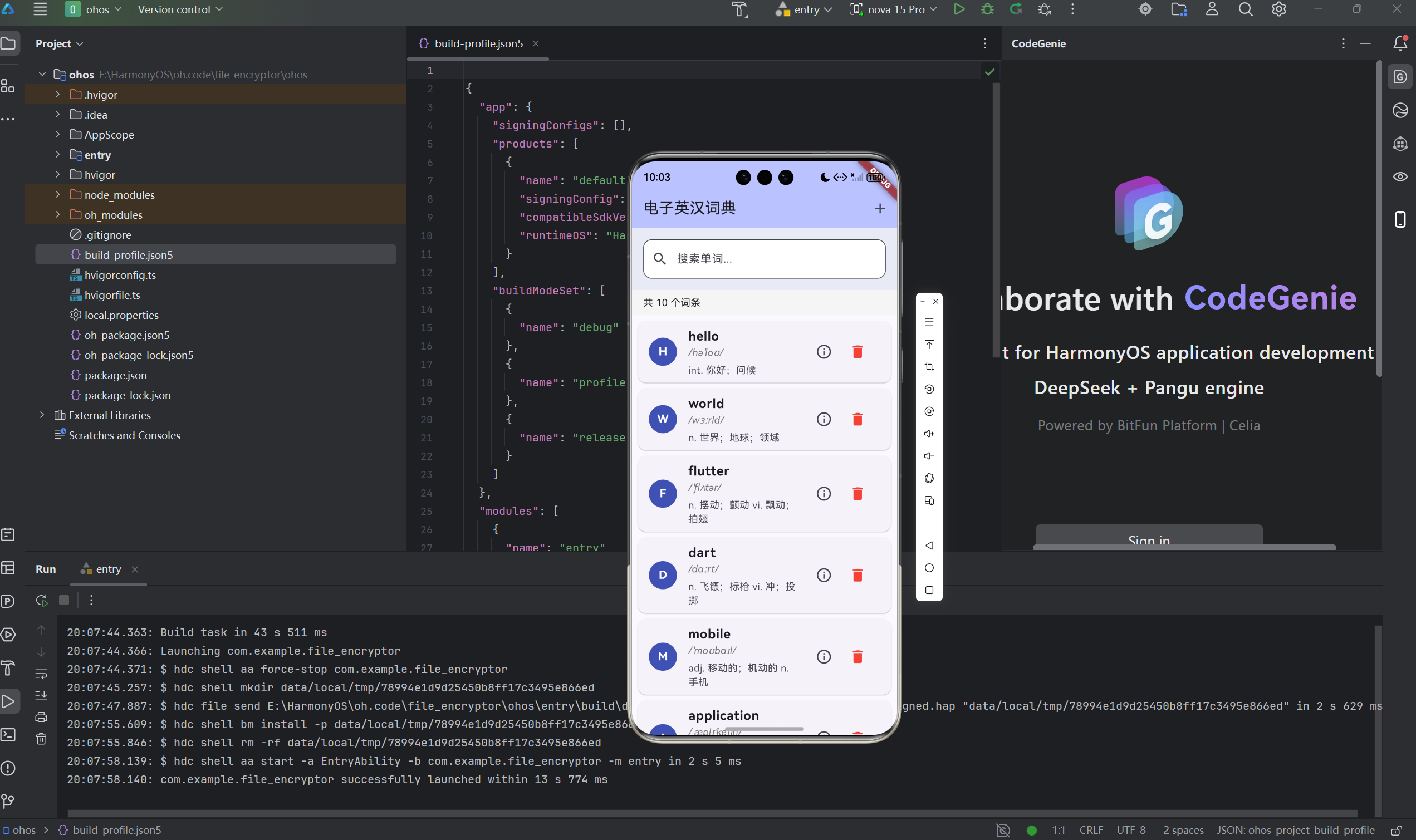
电子英汉词典是实用的教育类应用,展示了数据模型设计、搜索算法实现、列表管理等核心技术。本文将详细介绍如何使用Flutter for OpenHarmony框架开发一款功能完整的电子英汉词典。文章涵盖了词条数据模型、前缀匹配搜索算法、增删改查功能、JSON序列化等核心技术点。通过本文学习,读者将掌握Flutter在鸿蒙平台上的数据处理技巧,了解词典类应用的实现方法。
一、项目背景与功能概述
1.1 电子词典应用背景
电子词典是语言学习的必备工具:
- 快速查询单词释义
- 收藏和管理生词
- 提供发音和例句
- 支持离线使用
1.2 应用功能规划
| 功能模块 | 具体功能 |
|---|---|
| 词典显示 | 显示所有词条列表 |
| 搜索功能 | 前缀匹配搜索 |
| 添加词条 | 添加新的单词和释义 |
| 删除词条 | 删除不需要的词条 |
| 查看详情 | 显示完整词条信息 |
| 统计信息 | 显示词条数量和搜索结果 |
1.3 词条数据结构
每个词条包含以下信息:
- word:英文单词
- phonetic:国际音标
- definition:中文释义
- example:英文例句
二、词典数据结构设计
2.1 词条类定义
class DictionaryEntry {
  final String word;        // 英文单词
  final String phonetic;    // 音标
  final String definition;  // 中文释义
  final String example;     // 例句

  DictionaryEntry({
    required this.word,
    required this.phonetic,
    required this.definition,
    required this.example,
  });
}
2.2 JSON序列化
支持JSON格式的数据持久化:
// 从JSON创建
factory DictionaryEntry.fromJson(Map<String, dynamic> json) {
  return DictionaryEntry(
    word: json['word'] ?? '',
    phonetic: json['phonetic'] ?? '',
    definition: json['definition'] ?? '',
    example: json['example'] ?? '',
  );
}

// 转换为JSON
Map<String, dynamic> toJson() {
  return {
    'word': word,
    'phonetic': phonetic,
    'definition': definition,
    'example': example,
  };
}
2.3 copyWith方法
实现不可变数据的复制:
DictionaryEntry copyWith({
  String? word,
  String? phonetic,
  String? definition,
  String? example,
}) {
  return DictionaryEntry(
    word: word ?? this.word,
    phonetic: phonetic ?? this.phonetic,
    definition: definition ?? this.definition,
    example: example ?? this.example,
  );
}
2.4 内置词库
初始化10个常用单词:
final List<DictionaryEntry> _builtinDictionary = [
  DictionaryEntry(
    word: 'hello',
    phonetic: '/həˈloʊ/',
    definition: 'int. 你好;问候',
    example: 'Hello, how are you?',
  ),
  DictionaryEntry(
    word: 'world',
    phonetic: '/wɜːrld/',
    definition: 'n. 世界;地球;领域',
    example: 'Welcome to the world of programming.',
  ),
  // ... 更多词条
];
三、技术选型与架构设计
3.1 核心技术栈
UI组件
- TextField:搜索输入框
- ListView.builder:词条列表
- Card:词条卡片展示
- AlertDialog:添加词条和详情弹窗
状态管理
- StatefulWidget管理词典状态
- setState更新UI
数据结构
- List:存储所有词条
- List:存储搜索结果
3.2 应用架构
DictionaryApp (应用根组件)
    └── DictionaryPage (词典页面)
        ├── AppBar (导航栏 + 添加按钮)
        ├── 搜索框区域
        │   ├── TextField (输入框)
        │   └── Clear按钮
        ├── 统计信息
        │   ├── 词条总数
        │   └── 搜索结果数
        └── 词条列表
            └── WordCard (多个)
                ├── CircleAvatar (首字母)
                ├── 单词和释义
                └── 操作按钮
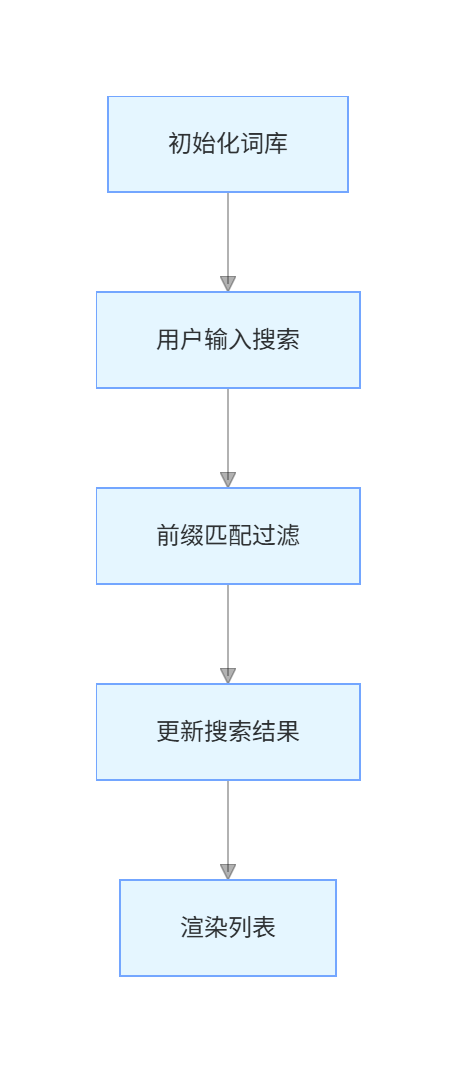
3.3 数据流设计
四、UI界面实现
4.1 搜索框设计
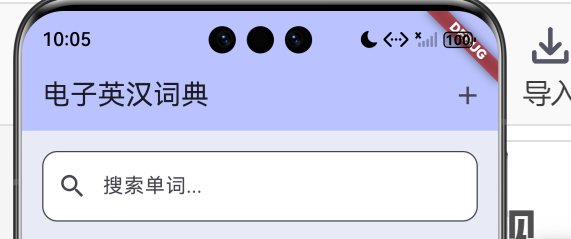
Container(
  padding: const EdgeInsets.all(16),
  color: Colors.indigo.shade50,
  child: TextField(
    controller: _searchController,
    focusNode: _searchFocusNode,
    decoration: InputDecoration(
      hintText: '搜索单词...',
      prefixIcon: const Icon(Icons.search),
      suffixIcon: _searchController.text.isNotEmpty
          ? IconButton(
              icon: const Icon(Icons.clear),
              onPressed: () {
                _searchController.clear();
                _searchWords('');
                _searchFocusNode.requestFocus();
              },
            )
          : null,
      border: OutlineInputBorder(
        borderRadius: BorderRadius.circular(12),
      ),
      filled: true,
      fillColor: Colors.white,
    ),
    onChanged: _searchWords,
    textInputAction: TextInputAction.search,
  ),
)
4.2 统计信息栏
Container(
  padding: const EdgeInsets.symmetric(horizontal: 16, vertical: 8),
  color: Colors.grey.shade100,
  child: Row(
    children: [
      Text(
        '共 ${_dictionary.length} 个词条',
        style: const TextStyle(fontSize: 14),
      ),
      const SizedBox(width: 16),
      if (_searchController.text.isNotEmpty)
        Text(
          '找到 ${_searchResults.length} 个结果',
          style: const TextStyle(
            fontSize: 14,
            color: Colors.indigo,
          ),
        ),
    ],
  ),
)
4.3 词条卡片设计
Widget _buildWordCard(DictionaryEntry entry, int index) {
  return Card(
    margin: const EdgeInsets.only(bottom: 8),
    child: ListTile(
      leading: CircleAvatar(
        backgroundColor: Colors.indigo,
        child: Text(
          entry.word[0].toUpperCase(),
          style: const TextStyle(
            color: Colors.white,
            fontWeight: FontWeight.bold,
          ),
        ),
      ),
      title: Text(
        entry.word,
        style: const TextStyle(
          fontWeight: FontWeight.bold,
          fontSize: 18,
        ),
      ),
      subtitle: Column(
        crossAxisAlignment: CrossAxisAlignment.start,
        children: [
          if (entry.phonetic.isNotEmpty)
            Text(
              entry.phonetic,
              style: TextStyle(
                color: Colors.grey.shade600,
                fontStyle: FontStyle.italic,
              ),
            ),
          const SizedBox(height: 4),
          Text(
            entry.definition,
            maxLines: 2,
            overflow: TextOverflow.ellipsis,
          ),
        ],
      ),
      trailing: Row(
        mainAxisSize: MainAxisSize.min,
        children: [
          IconButton(
            icon: const Icon(Icons.info_outline),
            onPressed: () => _showWordDetail(entry),
          ),
          IconButton(
            icon: const Icon(Icons.delete),
            color: Colors.red,
            onPressed: () => _confirmDelete(index),
          ),
        ],
      ),
      onTap: () => _showWordDetail(entry),
    ),
  );
}
五、搜索功能实现
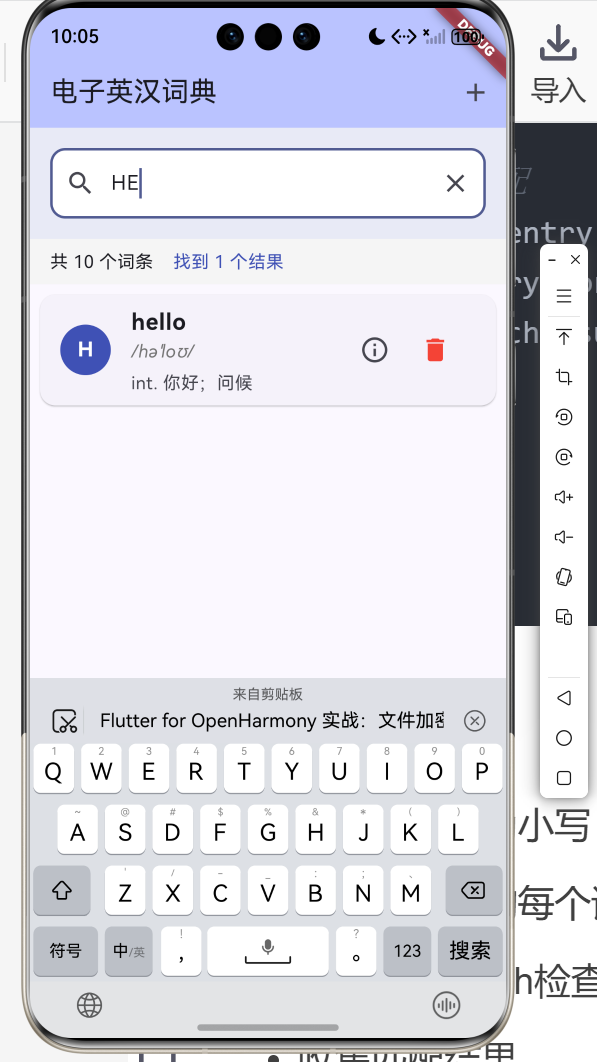
5.1 前缀匹配算法
void _searchWords(String query) {
  setState(() {
    if (query.isEmpty) {
      // 空查询显示全部
      _searchResults.clear();
      _searchResults.addAll(_dictionary);
    } else {
      _searchResults.clear();
      String lowerQuery = query.toLowerCase();

      // 前缀匹配
      for (var entry in _dictionary) {
        if (entry.word.toLowerCase().startsWith(lowerQuery)) {
          _searchResults.add(entry);
        }
      }
    }
  });
}
算法原理
- 将搜索词转为小写
- 遍历词典中的每个词条
- 使用startsWith检查前缀匹配
- 收集匹配结果
5.2 搜索算法分析
时间复杂度
- 前缀匹配:O(n),n为词条数量
- 每次搜索遍历整个词典
空间复杂度
- O(k),k为匹配结果数量
优化方向
- 使用Trie树:O(m),m为搜索词长度
- 预处理建立索引
- 缓存搜索结果
5.3 实时搜索
TextField(
  onChanged: _searchWords,  // 输入时实时搜索
)
5.4 清空搜索
suffixIcon: _searchController.text.isNotEmpty
    ? IconButton(
        icon: const Icon(Icons.clear),
        onPressed: () {
          _searchController.clear();
          _searchWords('');
          _searchFocusNode.requestFocus();
        },
      )
    : null,
六、词条管理功能
6.1 添加词条
void _showAddWordDialog() {
  final wordController = TextEditingController();
  final phoneticController = TextEditingController();
  final definitionController = TextEditingController();
  final exampleController = TextEditingController();

  showDialog(
    context: context,
    builder: (context) => AlertDialog(
      title: const Text('添加词条'),
      content: SizedBox(
        width: double.maxFinite,
        child: Column(
          mainAxisSize: MainAxisSize.min,
          children: [
            TextField(
              controller: wordController,
              decoration: const InputDecoration(
                labelText: '单词',
                border: OutlineInputBorder(),
              ),
            ),
            const SizedBox(height: 12),
            TextField(
              controller: phoneticController,
              decoration: const InputDecoration(
                labelText: '音标',
                border: OutlineInputBorder(),
              ),
            ),
            const SizedBox(height: 12),
            TextField(
              controller: definitionController,
              decoration: const InputDecoration(
                labelText: '中文释义',
                border: OutlineInputBorder(),
              ),
              maxLines: 2,
            ),
            const SizedBox(height: 12),
            TextField(
              controller: exampleController,
              decoration: const InputDecoration(
                labelText: '例句',
                border: OutlineInputBorder(),
              ),
              maxLines: 2,
            ),
          ],
        ),
      ),
      actions: [
        TextButton(
          onPressed: () => Navigator.pop(context),
          child: const Text('取消'),
        ),
        TextButton(
          onPressed: () {
            if (wordController.text.isNotEmpty &&
                definitionController.text.isNotEmpty) {
              setState(() {
                _dictionary.add(DictionaryEntry(
                  word: wordController.text.trim(),
                  phonetic: phoneticController.text.trim(),
                  definition: definitionController.text.trim(),
                  example: exampleController.text.trim(),
                ));
                _searchWords(_searchController.text);
              });
              Navigator.pop(context);
            }
          },
          child: const Text('添加'),
        ),
      ],
    ),
  );
}
输入验证
- 单词不能为空
- 释义不能为空
- 音标和例句可选
6.2 删除词条
void _deleteWord(int index) {
  setState(() {
    final entry = _searchResults[index];
    _dictionary.remove(entry);
    _searchResults.removeAt(index);
  });
}
6.3 确认删除
void _confirmDelete(int index) {
  showDialog(
    context: context,
    builder: (context) => AlertDialog(
      title: const Text('确认删除'),
      content: Text('确定要删除 "${_searchResults[index].word}" 吗?'),
      actions: [
        TextButton(
          onPressed: () => Navigator.pop(context),
          child: const Text('取消'),
        ),
        TextButton(
          onPressed: () {
            _deleteWord(index);
            Navigator.pop(context);
          },
          child: const Text('删除', style: TextStyle(color: Colors.red)),
        ),
      ],
    ),
  );
}
6.4 查看详情
void _showWordDetail(DictionaryEntry entry) {
  showDialog(
    context: context,
    builder: (context) => AlertDialog(
      title: Text(entry.word),
      content: Column(
        mainAxisSize: MainAxisSize.min,
        crossAxisAlignment: CrossAxisAlignment.start,
        children: [
          if (entry.phonetic.isNotEmpty)
            Text(
              entry.phonetic,
              style: TextStyle(
                fontSize: 16,
                color: Colors.grey.shade600,
              ),
            ),
          const SizedBox(height: 12),
          const Text(
            '释义',
            style: TextStyle(fontWeight: FontWeight.bold),
          ),
          const SizedBox(height: 4),
          Text(entry.definition),
          if (entry.example.isNotEmpty) ...[
            const SizedBox(height: 12),
            const Text(
              '例句',
              style: TextStyle(fontWeight: FontWeight.bold),
            ),
            const SizedBox(height: 4),
            Text(entry.example),
          ],
        ],
      ),
      actions: [
        TextButton(
          onPressed: () => Navigator.pop(context),
          child: const Text('关闭'),
        ),
      ],
    ),
  );
}
七、完整代码实现
7.1 初始化词典
void _initializeDictionary() {
  _dictionary.clear();
  _dictionary.addAll(_builtinDictionary);
  _searchResults.clear();
  _searchResults.addAll(_dictionary);
  setState(() {});
}
7.2 状态管理
class _DictionaryPageState extends State<DictionaryPage> {
final List<DictionaryEntry> _dictionary = [];
final List<DictionaryEntry> _searchResults = [];
final TextEditingController _searchController = TextEditingController();
final FocusNode _searchFocusNode = FocusNode();
void initState() {
super.initState();
_initializeDictionary();
}
void dispose() {
_searchController.dispose();
_searchFocusNode.dispose();
super.dispose();
}
}
7.3 空状态处理
Expanded(
  child: _searchResults.isEmpty
      ? Center(
          child: Text(
            _searchController.text.isEmpty ? '暂无词条' : '未找到匹配的单词',
            style: TextStyle(
              fontSize: 16,
              color: Colors.grey.shade600,
            ),
          ),
        )
      : ListView.builder(
          padding: const EdgeInsets.all(8),
          itemCount: _searchResults.length,
          itemBuilder: (context, index) {
            final entry = _searchResults[index];
            return _buildWordCard(entry, index);
          },
        ),
)
八、运行效果与测试
8.1 项目运行命令
cd E:\HarmonyOS\oh.code\english_chinese_dictionary
flutter run -d ohos
8.2 功能测试清单
搜索功能测试
- 输入"h"显示所有h开头的单词
- 输入"hel"精确匹配hello
- 清空搜索恢复全部显示
- 输入不存在的单词显示提示
添加词条测试
- 点击添加按钮打开对话框
- 输入单词和释义后添加成功
- 新词条立即显示在列表中
- 搜索时能找到新词条
删除词条测试
- 点击删除显示确认对话框
- 确认后词条被删除
- 词条统计数字减少
查看详情测试
- 点击词条卡片显示详情
- 详情显示完整的音标、释义、例句
空状态测试
- 删除所有词条显示"暂无词条"
- 搜索无结果显示"未找到匹配的单词"
九、总结
本文详细介绍了使用Flutter for OpenHarmony开发电子英汉词典的完整过程,涵盖了以下核心技术点:
- 数据模型设计:DictionaryEntry类、JSON序列化、copyWith
- 搜索算法:前缀匹配、实时搜索、大小写处理
- 词条管理:添加、删除、查看详情
- UI设计:搜索框、统计栏、卡片列表
- 状态管理:setState、列表同步
- 输入验证:空值检查、数据清理
这个项目展示了Flutter在数据处理和UI管理方面的完整流程。读者可以基于此项目添加更多功能,如:
- 数据持久化(本地存储)
- 发音功能(TTS)
- 收藏夹功能
- 历史记录
- 多语言支持
- 导入导出词库
通过本文的学习,读者应该能够独立开发类似的词典应用,掌握Flutter在鸿蒙平台上的数据处理技巧。
欢迎加入开源鸿蒙跨平台社区: 开源鸿蒙跨平台开发者社区

开源鸿蒙跨平台开发社区汇聚开发者与厂商,共建“一次开发,多端部署”的开源生态,致力于降低跨端开发门槛,推动万物智联创新。
更多推荐

 16
16 0
0- 0


 已为社区贡献84条内容

所有评论(0)