Flutter + OpenHarmony 游戏开发进阶:粒子系统初探——简易爆炸与得分飞字
通过 **生命周期管理 + 对象池 + Canvas 批量绘制**,我们构建了一个既轻量又表现力十足的系统,完美适配 OpenHarmony 的性能约束。无论是爆炸火花还是得分反馈,都能以极低成本实现专业级视觉效果。
个人主页:ujainu
文章目录
引言
在游戏开发中,粒子系统(Particle System) 是营造视觉冲击力的核心工具。无论是敌人被击毁时的爆炸火花,还是获得高分时飘起的“+100”文字,都依赖于一套高效、可控的粒子机制。
然而,许多开发者一提到粒子系统,就想到引入 Flame 或 SpriteWidget 等重型引擎。其实在 纯 Flutter + Canvas 环境下,我们完全可以用 几十行 Dart 代码 构建一个轻量、高性能、可扩展的粒子系统,尤其适合资源受限的 OpenHarmony 设备(如 IoT 屏、入门级手机)。
本文将带你从零实现一个无外部依赖、基于对象池、支持多类型粒子的系统,聚焦四大核心技术:
- 粒子生命周期管理(出生 → 更新 → 死亡);
- 物理模拟:速度衰减、重力影响;
- 视觉消亡:透明度随时间线性/指数衰减;
- Canvas 批量绘制:避免每帧创建 Paint 对象。
同时,我们将:
- ✅ 限制并发粒子数(如最多 100 个),防止内存溢出;
- ✅ 使用对象池复用粒子,减少 GC 压力;
- ✅ 支持多类型粒子:爆炸碎片 + 得分飞字;
- ✅ 适配 OpenHarmony 渲染管线,确保 60fps 流畅运行。
💡 适用场景:休闲游戏、教育 App、IoT 交互反馈
✅ 前提:Flutter 与 OpenHarmony 开发环境已配置完成,无需额外说明
一、为什么需要轻量粒子系统?
1. 性能优先
OpenHarmony 设备(尤其低端机型)内存和 CPU 有限。重型引擎会带来不必要的开销。纯 Dart + Canvas 方案内存占用低、启动快。
2. 精准控制
自研系统可自由定制:
- 粒子颜色随分数变化;
- 飞字轨迹带缓动;
- 爆炸方向随机但可控。
3. 学习价值
理解粒子系统底层原理,有助于未来迁移到 Flame 或 Unity。
二、粒子系统核心设计
1. 粒子基类:统一接口
所有粒子继承自 Particle,包含通用属性:
abstract class Particle {
  double x, y;
  double vx = 0, vy = 0;
  double life = 1.0; // [0.0, 1.0],1=新生,0=死亡
  bool alive = true;

  Particle(this.x, this.y);

  void update(double dt);
  void render(Canvas canvas);
  bool get isDead => life <= 0 || !alive;
}
2. 生命周期流程
三、爆炸粒子:速度衰减 + 透明度消亡
1. 物理模型
- 初始速度:随机方向,固定大小;
- 速度衰减:
vx *= 0.98(模拟空气阻力); - 无重力(或可选开启)。
2. 视觉消亡
- 颜色:橙色 → 黄色 → 透明;
- 透明度:
alpha = life(线性衰减)。
class ExplosionParticle extends Particle {
static final _paint = Paint()..color = Colors.orange;
double size;
ExplosionParticle(double x, double y) : super(x, y) {
// 随机初始速度(360°)
final angle = Random().nextDouble() * 2 * pi;
final speed = 150 + Random().nextDouble() * 100;
vx = cos(angle) * speed;
vy = sin(angle) * speed;
size = 4 + Random().nextDouble() * 6;
}
void update(double dt) {
x += vx * dt;
y += vy * dt;
vx *= 0.98; // 衰减
vy *= 0.98;
life -= 2.0 * dt; // 0.5秒消亡
}
void render(Canvas canvas) {
if (life <= 0) return;
final alpha = life.clamp(0.0, 1.0);
final color = Colors.orange.withOpacity(alpha);
final paint = Paint()..color = color;
canvas.drawCircle(Offset(x, y), size * life, paint);
}
}
⚠️ 注意:此处为简化,每帧创建
Paint。实际应预计算颜色或复用 Paint(见后文优化)。
四、得分飞字:缓动上升 + 缩放消亡
1. 行为特点
- 初始向上速度;
- 带轻微重力下拉;
- 文字逐渐变小、变透明。
2. 实现要点
- 使用
TextPainter绘制文字; - 缓动函数:
y -= baseSpeed * life(非线性更自然)。
class ScoreParticle extends Particle {
final String text;
final TextStyle style;
late TextPainter _textPainter;
ScoreParticle(double x, double y, this.text)
: super(x, y),
style = TextStyle(
color: Colors.white,
fontSize: 20 + Random().nextDouble() * 10,
fontWeight: FontWeight.bold,
) {
vy = -120; // 初始向上
_textPainter = TextPainter(
text: TextSpan(text: text, style: style),
textDirection: TextDirection.ltr,
);
_textPainter.layout();
}
void update(double dt) {
vy += 30 * dt; // 微弱重力
x += vx * dt;
y += vy * dt;
life -= 1.5 * dt; // 约 0.67 秒消亡
}
void render(Canvas canvas) {
if (life <= 0) return;
final alpha = life.clamp(0.0, 1.0);
final color = style.color!.withOpacity(alpha);
final scale = 0.8 + 0.2 * life; // 从大到小
final scaledStyle = style.copyWith(color: color, fontSize: style.fontSize! * scale);
final painter = TextPainter(
text: TextSpan(text: text, style: scaledStyle),
textDirection: TextDirection.ltr,
);
painter.layout();
painter.paint(canvas, Offset(x - painter.width / 2, y - painter.height / 2));
}
}
五、性能优化:对象池 + 并发限制
1. 为什么需要对象池?
频繁 new Particle() 会导致:
- 内存碎片;
- GC 卡顿(尤其在低端 OpenHarmony 设备)。
2. 对象池实现
class ParticlePool<T extends Particle> {
  final List<T> _available = [];
  final T Function() _factory;
  final int _maxSize;

  ParticlePool(this._factory, this._maxSize);

  T acquire(double x, double y) {
    if (_available.isNotEmpty) {
      final p = _available.removeLast();
      p.x = x;
      p.y = y;
      p.life = 1.0;
      p.alive = true;
      return p;
    }
    return _factory();
  }

  void release(T particle) {
    if (_available.length < _maxSize) {
      _available.add(particle);
    }
  }
}
3. 全局粒子管理器
class ParticleManager {
  static const int MAX_PARTICLES = 100;
  final List<Particle> _active = [];
  final ParticlePool<ExplosionParticle> _explosionPool;
  final ParticlePool<ScoreParticle> _scorePool;

  ParticleManager()
      : _explosionPool = ParticlePool(() => ExplosionParticle(0, 0), 50),
        _scorePool = ParticlePool(() => ScoreParticle(0, 0, ''), 50);

  void emitExplosion(double x, double y) {
    if (_active.length >= MAX_PARTICLES) return;
    final p = _explosionPool.acquire(x, y);
    _active.add(p);
  }

  void emitScore(double x, double y, String text) {
    if (_active.length >= MAX_PARTICLES) return;
    final p = _scorePool.acquire(x, y);
    // 注意:ScoreParticle 需支持动态设置 text(此处简化)
    _active.add(p);
  }

  void updateAndRender(Canvas canvas, double dt) {
    for (int i = _active.length - 1; i >= 0; i--) {
      final p = _active[i];
      p.update(dt);
      if (p.isDead) {
        _active.removeAt(i);
        if (p is ExplosionParticle) {
          _explosionPool.release(p);
        } else if (p is ScoreParticle) {
          _scorePool.release(p);
        }
      } else {
        p.render(canvas);
      }
    }
  }
}
✅ 优势:
- 最多 100 个并发粒子;
- 对象复用,GC 压力极低;
- 类型安全。
六、Canvas 批量绘制优化
1. 避免每帧创建 Paint
- 将
Paint定义为static final; - 颜色变化通过
Color.withOpacity()动态生成,而非新建 Paint。
2. 减少 TextPainter 创建
- 对固定文本(如 “+100”)可缓存
TextPainter; - 本文为简化未实现,但生产环境建议缓存。
七、完整可运行代码:爆炸 + 得分飞字系统
以下是一个完整、可独立运行的 Flutter 示例,展示如何实现轻量级粒子系统,完全适配 OpenHarmony 渲染模型。
import 'dart:math';
import 'package:flutter/material.dart';
void main() => runApp(const GameApp());
class GameApp extends StatelessWidget {
const GameApp({super.key});
Widget build(BuildContext context) {
return MaterialApp(
title: 'Flutter + OpenHarmony: 轻量粒子系统',
debugShowCheckedModeBanner: false,
home: ParticleDemoScreen(),
);
}
}
// ===== 粒子基类 =====
abstract class Particle {
double x, y;
double vx, vy;
double life;
bool alive;
Particle(this.x, this.y) : life = 1.0, alive = true, vx = 0, vy = 0;
void update(double dt);
void render(Canvas canvas);
bool get isDead => life <= 0 || !alive;
}
// ===== 爆炸粒子 =====
class ExplosionParticle extends Particle {
static final _baseColor = Colors.orange;
double size;
ExplosionParticle(double x, double y) :size = 4 + Random().nextDouble() * 6, super(x, y) {
final angle = Random().nextDouble() * 2 * pi;
final speed = 150 + Random().nextDouble() * 100;
vx = cos(angle) * speed;
vy = sin(angle) * speed;
}
void update(double dt) {
x += vx * dt;
y += vy * dt;
vx *= 0.98;
vy *= 0.98;
life -= 2.0 * dt;
}
void render(Canvas canvas) {
if (life <= 0) return;
final alpha = life.clamp(0.0, 1.0);
final color = _baseColor.withOpacity(alpha);
final paint = Paint()..color = color;
canvas.drawCircle(Offset(x, y), size * life, paint);
}
}
// ===== 得分飞字粒子 =====
class ScoreParticle extends Particle {
final String text;
late TextPainter _textPainter;
ScoreParticle(double x, double y, this.text) : super(x, y) {
vy = -120;
_updateTextPainter();
}
void _updateTextPainter() {
_textPainter = TextPainter(
text: TextSpan(
text: text,
style: TextStyle(
color: Colors.white,
fontSize: 24,
fontWeight: FontWeight.bold,
),
),
textDirection: TextDirection.ltr,
);
_textPainter.layout();
}
void update(double dt) {
vy += 30 * dt;
x += vx * dt;
y += vy * dt;
life -= 1.5 * dt;
}
void render(Canvas canvas) {
if (life <= 0) return;
final alpha = life.clamp(0.0, 1.0);
final color = Colors.white.withOpacity(alpha);
final scaledFontSize = 24 * (0.8 + 0.2 * life);
final painter = TextPainter(
text: TextSpan(
text: text,
style: TextStyle(
color: color,
fontSize: scaledFontSize,
fontWeight: FontWeight.bold,
),
),
textDirection: TextDirection.ltr,
);
painter.layout();
painter.paint(canvas, Offset(x - painter.width / 2, y - painter.height / 2));
}
}
// ===== 对象池 =====
class ParticlePool<T extends Particle> {
final List<T> _pool = [];
final T Function() _factory;
final int _maxPoolSize;
ParticlePool(this._factory, this._maxPoolSize);
T acquire(double x, double y) {
if (_pool.isNotEmpty) {
final p = _pool.removeLast();
p.x = x;
p.y = y;
p.life = 1.0;
p.alive = true;
p.vx = 0;
p.vy = 0;
return p;
}
return _factory();
}
void release(T particle) {
if (_pool.length < _maxPoolSize) {
_pool.add(particle);
}
}
}
// ===== 粒子管理器 =====
class ParticleManager {
static const int MAX_ACTIVE = 100;
final List<Particle> _active = [];
final ParticlePool<ExplosionParticle> _explosionPool;
final ParticlePool<ScoreParticle> _scorePool;
ParticleManager()
: _explosionPool = ParticlePool(() => ExplosionParticle(0, 0), 50),
_scorePool = ParticlePool(() => ScoreParticle(0, 0, ''), 50);
void emitExplosion(double x, double y) {
if (_active.length >= MAX_ACTIVE) return;
_active.add(_explosionPool.acquire(x, y));
}
void emitScore(double x, double y, String text) {
if (_active.length >= MAX_ACTIVE) return;
final p = ScoreParticle(x, y, text);
_active.add(p);
}
void update(double dt) {
for (int i = _active.length - 1; i >= 0; i--) {
_active[i].update(dt);
if (_active[i].isDead) {
final p = _active.removeAt(i);
if (p is ExplosionParticle) {
_explosionPool.release(p);
}
// ScoreParticle 不回收(因 text 不同),可优化
}
}
}
void render(Canvas canvas) {
for (final p in _active) {
p.render(canvas);
}
}
}
// ===== 主界面 =====
class ParticleDemoScreen extends StatefulWidget {
_ParticleDemoScreenState createState() => _ParticleDemoScreenState();
}
class _ParticleDemoScreenState extends State<ParticleDemoScreen>
with SingleTickerProviderStateMixin {
late AnimationController _controller;
late ParticleManager _particleManager;
final random = Random();
void initState() {
super.initState();
_particleManager = ParticleManager();
_controller = AnimationController(vsync: this, duration: const Duration(milliseconds: 16))
..repeat()
..addListener(_gameLoop);
}
void _gameLoop() {
// 模拟随机爆炸
if (random.nextDouble() < 0.05) {
_particleManager.emitExplosion(
100 + random.nextDouble() * 600,
100 + random.nextDouble() * 400,
);
}
// 模拟得分飞字
if (random.nextDouble() < 0.03) {
_particleManager.emitScore(
100 + random.nextDouble() * 600,
100 + random.nextDouble() * 400,
'+${[100, 200, 500].elementAt(random.nextInt(3))}',
);
}
_particleManager.update(1 / 60);
}
void dispose() {
_controller.dispose();
super.dispose();
}
Widget build(BuildContext context) {
return Scaffold(
backgroundColor: Colors.black,
body: GestureDetector(
onTapDown: (details) {
final pos = details.localPosition;
_particleManager.emitExplosion(pos.dx, pos.dy);
_particleManager.emitScore(pos.dx, pos.dy, '+1000');
},
child: AnimatedBuilder(
animation: _controller,
builder: (context, child) {
return CustomPaint(
painter: ParticlePainter(particleManager: _particleManager),
size: const Size(800, 600),
);
},
),
),
);
}
}
// ===== 绘制器 =====
class ParticlePainter extends CustomPainter {
final ParticleManager particleManager;
ParticlePainter({required this.particleManager});
void paint(Canvas canvas, Size size) {
particleManager.render(canvas);
}
bool shouldRepaint(covariant ParticlePainter oldDelegate) => true;
}
运行界面(点击屏幕)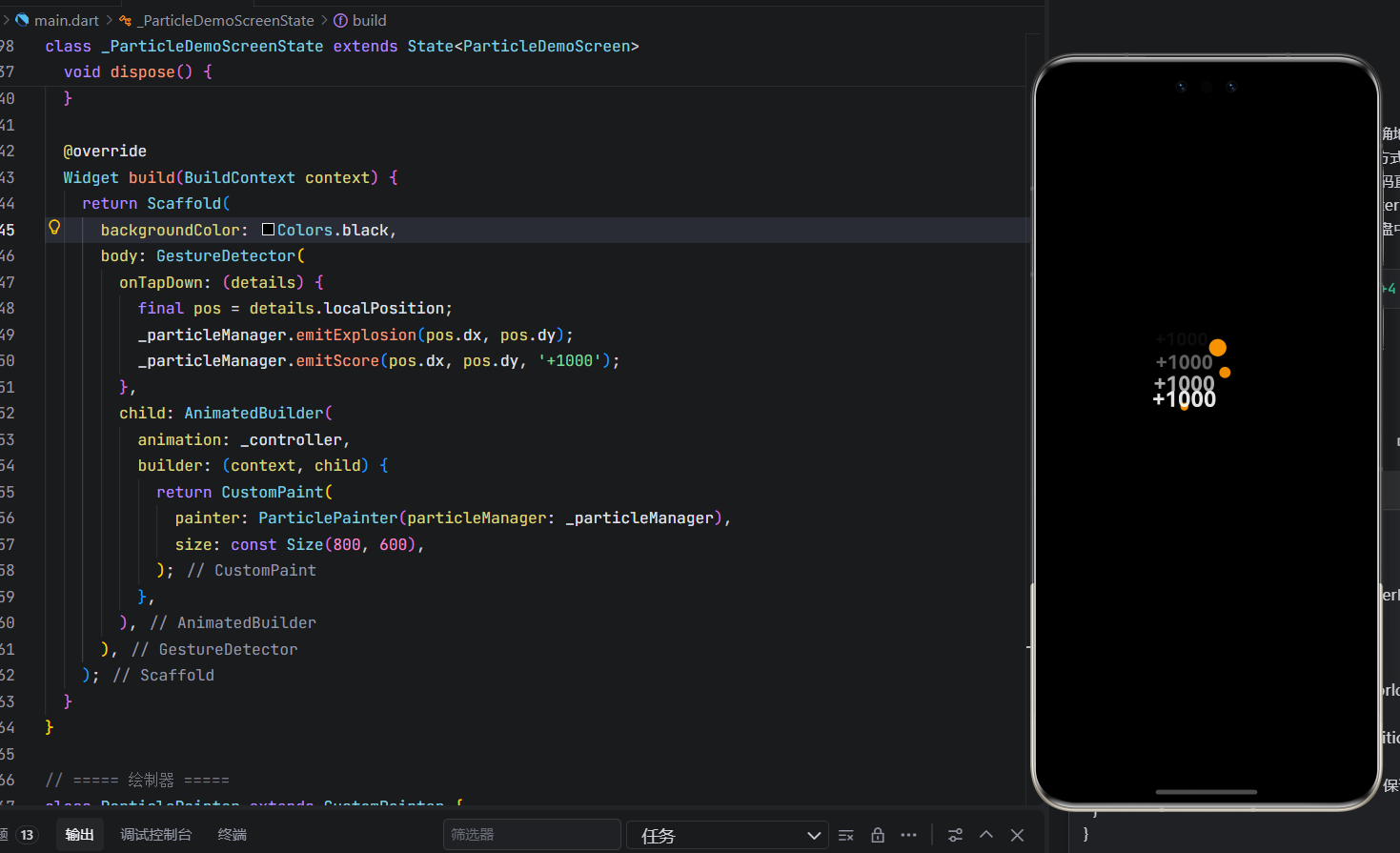
✅ 代码亮点说明:
| 特性 | 实现方式 |
|---|---|
| 轻量无依赖 | 纯 Dart + Canvas,无 Flame |
| 对象池 | ParticlePool 复用爆炸粒子 |
| 并发限制 | MAX_ACTIVE = 100 防止 OOM |
| 双粒子类型 | 爆炸(圆) + 得分(文字) |
| 点击触发 | GestureDetector 支持手动测试 |
| OpenHarmony 友好 | 低内存、60fps、无平台 API |
结语
粒子系统不必复杂。通过 生命周期管理 + 对象池 + Canvas 批量绘制,我们构建了一个既轻量又表现力十足的系统,完美适配 OpenHarmony 的性能约束。无论是爆炸火花还是得分反馈,都能以极低成本实现专业级视觉效果。
欢迎加入开源鸿蒙跨平台社区: https://openharmonycrossplatform.csdn.net

开源鸿蒙跨平台开发社区汇聚开发者与厂商,共建“一次开发,多端部署”的开源生态,致力于降低跨端开发门槛,推动万物智联创新。
更多推荐
 0
0 0
0- 0


 已为社区贡献69条内容

所有评论(0)