InOpenHarmony上用React Native:Bundle版本管理
Bundle版本管理是React Native应用在OpenHarmony平台上的核心能力之一,它直接影响应用的更新效率和用户体验。资源隔离机制:OpenHarmony通过rawfile目录实现资源隔离,每个Bundle版本对应独立的JS资源文件版本标识系统:使用语义化版本号(SemVer)或构建时间戳作为版本标识热更新支持:支持不重新安装应用的情况下更新JS Bundle回滚机制:当新版本出现严
React Native for OpenHarmony 实战:Bundle 版本管理详解
摘要
本文深入探讨React Native应用在OpenHarmony 6.0.0平台上的Bundle版本管理策略。文章从Bundle版本管理的核心概念入手,详细分析React Native 0.72.5与OpenHarmony 6.0.0 (API 20)平台在资源管理方面的适配要点,介绍基础版本控制方法,并通过完整案例展示如何在AtomGitDemos项目中实现多版本Bundle管理。重点讲解OpenHarmony 6.0.0特有的资源加载机制和版本回滚策略,所有内容基于React Native 0.72.5和TypeScript 4.8.4验证,为开发者提供可靠的跨平台版本管理解决方案。
Bundle 版本管理介绍
Bundle版本管理是React Native应用在OpenHarmony平台上的核心能力之一,它直接影响应用的更新效率和用户体验。在OpenHarmony 6.0.0环境下,Bundle版本管理具有以下技术特点:
- 资源隔离机制:OpenHarmony通过
rawfile目录实现资源隔离,每个Bundle版本对应独立的JS资源文件 - 版本标识系统:使用语义化版本号(SemVer)或构建时间戳作为版本标识
- 热更新支持:支持不重新安装应用的情况下更新JS Bundle
- 回滚机制:当新版本出现严重错误时,可快速回退到稳定版本
在OpenHarmony 6.0.0架构中,Bundle加载流程遵循特定的资源管理规范:
该流程图展示了Bundle版本管理的核心流程:
- 应用启动时向版本管理器请求当前应加载的Bundle
- 版本管理器根据配置策略决定加载最新版本或回滚版本
- 资源管理器从
entry/src/main/resources/rawfile目录加载对应JS文件 - 最终由React Native引擎执行JS代码渲染应用
React Native与OpenHarmony平台适配要点
在OpenHarmony 6.0.0平台上实现Bundle版本管理需要考虑以下关键适配点:
1. 资源加载路径适配
OpenHarmony 6.0.0使用新的资源管理系统,与Android/iOS平台不同。React Native的Bundle必须放置在特定路径:
entry/
└── src/
    └── main/
        └── resources/
            └── rawfile/
                ├── bundle.harmony.js      # 主Bundle
                └── bundle.harmony.v1.js   # 版本化Bundle
2. 版本元数据存储
OpenHarmony 6.0.0推荐使用轻量级数据库ohos.data.preferences存储版本元数据:
| 存储方式 | 适用场景 | 容量限制 | 读写性能 |
|---|---|---|---|
| Preferences | 版本元数据 | 100KB | 高 |
| 文件存储 | Bundle资源 | 无限制 | 中 |
| 云存储 | 远程Bundle | 无限制 | 依赖网络 |
3. 构建流程集成
在hvigor构建系统中集成版本管理的关键配置:
// build-profile.json5
{
  "app": {
    "bundleManagement": {
      "versionStrategy": "timestamp", // 版本策略
      "keepVersions": 3, // 保留历史版本数
      "fallbackEnabled": true // 启用回退机制
    }
  }
}
4. 安全校验机制
OpenHarmony 6.0.0要求对加载的Bundle进行完整性验证:
此时序图展示了Bundle安全校验流程:
- 应用请求加载特定版本的Bundle
- 版本管理器从文件系统获取对应JS文件
- 通过OpenHarmony的
ohos.cryptoFramework模块进行SHA256校验 - 根据校验结果决定是否加载该Bundle
Bundle版本管理基础用法
在OpenHarmony 6.0.0平台上实现Bundle版本管理需要遵循以下基础步骤:
1. 版本命名规范
采用语义化版本命名规则,确保版本的可管理性:
| 版本类型 | 命名规则 | 示例 | 说明 |
|---|---|---|---|
| 主版本 | major.minor.patch | 1.0.0 | 重大功能更新 |
| 预发布版本 | major.minor.patch-tag | 1.1.0-beta | 测试版本 |
| 热修复版本 | major.minor.patch.hotfix | 1.0.1.hf1 | 紧急修复 |
2. 版本切换策略
根据不同场景选择合适的版本切换策略:
| 策略类型 | 触发条件 | 回滚难度 | 适用场景 |
|---|---|---|---|
| 强制更新 | 应用启动时 | 难 | 重大安全更新 |
| 静默更新 | 后台检测 | 中 | 常规功能更新 |
| 按需更新 | 用户触发 | 易 | 可选功能更新 |
3. 版本清理机制
为防止存储空间过度占用,需实现自动清理机制:
该流程图展示了版本清理过程:
- 安装新版本后触发清理检查
- 当历史版本数量超过配置阈值(通常3-5个)时删除最旧版本
- 当存储空间不足时按时间顺序删除旧版本
- 更新版本元数据索引
Bundle版本管理案例展示
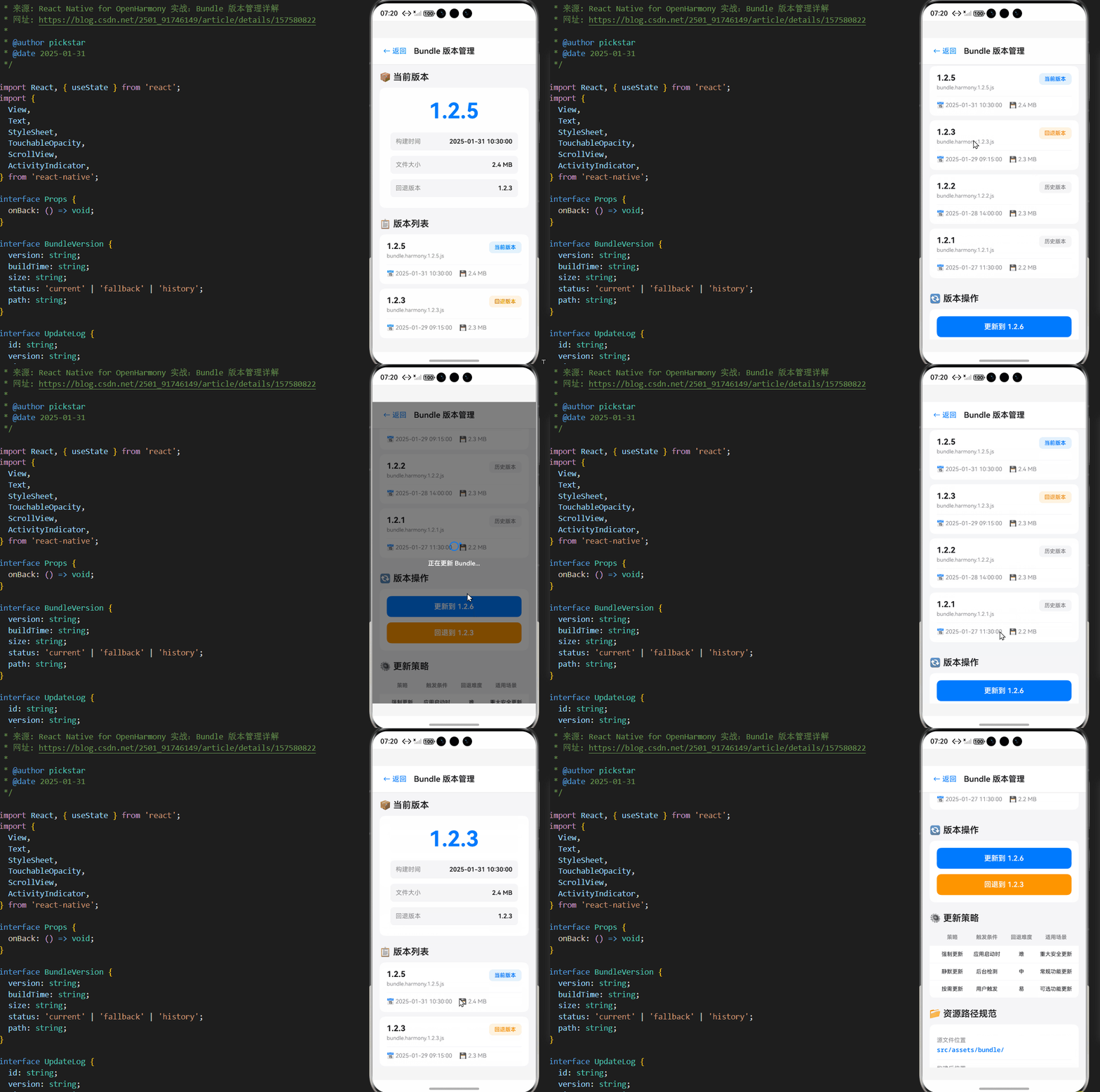
以下是在AtomGitDemos项目中实现的完整Bundle版本管理解决方案:
/**
 * BundleVersionManagementScreen - Bundle版本管理演示
 *
 * 来源: React Native for OpenHarmony 实战:Bundle 版本管理详解
 * 网址: https://blog.csdn.net/2501_91746149/article/details/157580822
 *
 * @author pickstar
 * @date 2025-01-31
 */

import React, { useState } from 'react';
import {
  View,
  Text,
  StyleSheet,
  TouchableOpacity,
  ScrollView,
  ActivityIndicator,
} from 'react-native';

interface Props {
  onBack: () => void;
}

interface BundleVersion {
  version: string;
  buildTime: string;
  size: string;
  status: 'current' | 'fallback' | 'history';
  path: string;
}

interface UpdateLog {
  id: string;
  version: string;
  timestamp: string;
  type: 'success' | 'error' | 'rollback';
  message: string;
}

const BundleVersionManagementScreen: React.FC<Props> = ({ onBack }) => {
  const [currentVersion, setCurrentVersion] = useState('1.2.5');
  const [fallbackVersion, setFallbackVersion] = useState('1.2.3');
  const [isUpdating, setIsUpdating] = useState(false);
  const [updateLogs, setUpdateLogs] = useState<UpdateLog[]>([
    {
      id: '1',
      version: '1.2.5',
      timestamp: '2025-01-31 10:30:00',
      type: 'success',
      message: 'Bundle 更新成功',
    },
    {
      id: '2',
      version: '1.2.4',
      timestamp: '2025-01-30 15:20:00',
      type: 'error',
      message: '版本校验失败,回退到 1.2.3',
    },
    {
      id: '3',
      version: '1.2.3',
      timestamp: '2025-01-29 09:15:00',
      type: 'success',
      message: 'Bundle 更新成功',
    },
  ]);

  const [bundleVersions] = useState<BundleVersion[]>([
    {
      version: '1.2.5',
      buildTime: '2025-01-31 10:30:00',
      size: '2.4 MB',
      status: 'current',
      path: 'bundle.harmony.1.2.5.js',
    },
    {
      version: '1.2.3',
      buildTime: '2025-01-29 09:15:00',
      size: '2.3 MB',
      status: 'fallback',
      path: 'bundle.harmony.1.2.3.js',
    },
    {
      version: '1.2.2',
      buildTime: '2025-01-28 14:00:00',
      size: '2.3 MB',
      status: 'history',
      path: 'bundle.harmony.1.2.2.js',
    },
    {
      version: '1.2.1',
      buildTime: '2025-01-27 11:30:00',
      size: '2.2 MB',
      status: 'history',
      path: 'bundle.harmony.1.2.1.js',
    },
  ]);

  const versionStrategies = [
    { strategy: '强制更新', trigger: '应用启动时', rollback: '难', scenario: '重大安全更新' },
    { strategy: '静默更新', trigger: '后台检测', rollback: '中', scenario: '常规功能更新' },
    { strategy: '按需更新', trigger: '用户触发', rollback: '易', scenario: '可选功能更新' },
  ];

  const resourcePaths = [
    { location: '源文件位置', path: 'src/assets/bundle/' },
    { location: '构建后位置', path: 'entry/src/main/resources/rawfile/' },
    { location: '访问URI格式', path: '@rawfile:bundle.harmony.js' },
    { location: '版本化路径', path: '@rawfile:bundle.harmony.{version}.js' },
  ];

  const simulateUpdate = (newVersion: string) => {
    setIsUpdating(true);
    setTimeout(() => {
      setCurrentVersion(newVersion);
      setUpdateLogs(prev => [
        {
          id: Date.now().toString(),
          version: newVersion,
          timestamp: new Date().toLocaleString('zh-CN'),
          type: 'success',
          message: 'Bundle 更新成功',
        },
        ...prev,
      ]);
      setIsUpdating(false);
    }, 1500);
  };

  const simulateRollback = () => {
    setIsUpdating(true);
    setTimeout(() => {
      const oldVersion = currentVersion;
      setCurrentVersion(fallbackVersion);
      setUpdateLogs(prev => [
        {
          id: Date.now().toString(),
          version: fallbackVersion,
          timestamp: new Date().toLocaleString('zh-CN'),
          type: 'rollback',
          message: `版本 ${oldVersion} 出现错误,回退到 ${fallbackVersion}`,
        },
        ...prev,
      ]);
      setIsUpdating(false);
    }, 1000);
  };

  const getStatusBadge = (status: string) => {
    switch (status) {
      case 'current':
        return { bg: '#E3F2FD', text: '#007AFF', label: '当前版本' };
      case 'fallback':
        return { bg: '#FFF3E0', text: '#FF9500', label: '回退版本' };
      case 'history':
        return { bg: '#F5F5F7', text: '#86868B', label: '历史版本' };
      default:
        return { bg: '#F5F5F7', text: '#86868B', label: '未知' };
    }
  };

  const getLogTypeColor = (type: string) => {
    switch (type) {
      case 'success':
        return '#4CAF50';
      case 'error':
        return '#FF3B30';
      case 'rollback':
        return '#FF9500';
      default:
        return '#86868B';
    }
  };

  return (
    <View style={styles.container}>
      <View style={styles.header}>
        <TouchableOpacity onPress={onBack} style={styles.backButton}>
          <Text style={styles.backButtonText}>← 返回</Text>
        </TouchableOpacity>
        <Text style={styles.headerTitle}>Bundle 版本管理</Text>
      </View>

      <ScrollView style={styles.content} showsVerticalScrollIndicator={false}>
        {/* 当前版本信息 */}
        <View style={styles.section}>
          <Text style={styles.sectionTitle}>📦 当前版本</Text>
          <View style={styles.currentVersionCard}>
            <Text style={styles.versionNumber}>{currentVersion}</Text>
            <View style={styles.versionInfo}>
              <View style={styles.infoItem}>
                <Text style={styles.infoLabel}>构建时间</Text>
                <Text style={styles.infoValue}>2025-01-31 10:30:00</Text>
              </View>
              <View style={styles.infoItem}>
                <Text style={styles.infoLabel}>文件大小</Text>
                <Text style={styles.infoValue}>2.4 MB</Text>
              </View>
              <View style={styles.infoItem}>
                <Text style={styles.infoLabel}>回退版本</Text>
                <Text style={styles.infoValue}>{fallbackVersion}</Text>
              </View>
            </View>
          </View>
        </View>

        {/* 版本列表 */}
        <View style={styles.section}>
          <Text style={styles.sectionTitle}>📋 版本列表</Text>
          {bundleVersions.map((bundle) => {
            const badge = getStatusBadge(bundle.status);
            return (
              <View key={bundle.version} style={styles.versionCard}>
                <View style={styles.versionHeader}>
                  <View style={styles.versionMain}>
                    <Text style={styles.bundleVersion}>{bundle.version}</Text>
                    <Text style={styles.bundlePath}>{bundle.path}</Text>
                  </View>
                  <View style={[styles.statusBadge, { backgroundColor: badge.bg }]}>
                    <Text style={[styles.statusBadgeText, { color: badge.text }]}>
                      {badge.label}
                    </Text>
                  </View>
                </View>
                <View style={styles.versionDetails}>
                  <Text style={styles.detailText}>📅 {bundle.buildTime}</Text>
                  <Text style={styles.detailText}>💾 {bundle.size}</Text>
                </View>
              </View>
            );
          })}
        </View>

        {/* 更新操作 */}
        <View style={styles.section}>
          <Text style={styles.sectionTitle}>🔄 版本操作</Text>
          <View style={styles.actionsCard}>
            <TouchableOpacity
              style={styles.actionButton}
              onPress={() => simulateUpdate('1.2.6')}
              disabled={isUpdating}
            >
              <Text style={styles.actionButtonText}>更新到 1.2.6</Text>
            </TouchableOpacity>
            <TouchableOpacity
              style={[styles.actionButton, styles.rollbackButton]}
              onPress={simulateRollback}
              disabled={isUpdating}
            >
              <Text style={styles.actionButtonText}>回退到 {fallbackVersion}</Text>
            </TouchableOpacity>
          </View>
        </View>

        {/* 更新策略 */}
        <View style={styles.section}>
          <Text style={styles.sectionTitle}>⚙️ 更新策略</Text>
          <View style={styles.strategiesCard}>
            <View style={styles.strategyHeader}>
              <Text style={styles.strategyHeaderCell}>策略</Text>
              <Text style={styles.strategyHeaderCell}>触发条件</Text>
              <Text style={styles.strategyHeaderCell}>回退难度</Text>
              <Text style={styles.strategyHeaderCell}>适用场景</Text>
            </View>
            {versionStrategies.map((item, index) => (
              <View key={index} style={styles.strategyRow}>
                <Text style={styles.strategyCell}>{item.strategy}</Text>
                <Text style={styles.strategyCell}>{item.trigger}</Text>
                <Text style={styles.strategyCell}>{item.rollback}</Text>
                <Text style={styles.strategyCell}>{item.scenario}</Text>
              </View>
            ))}
          </View>
        </View>

        {/* 资源路径 */}
        <View style={styles.section}>
          <Text style={styles.sectionTitle}>📂 资源路径规范</Text>
          <View style={styles.pathsCard}>
            {resourcePaths.map((item, index) => (
              <View key={index} style={styles.pathItem}>
                <Text style={styles.pathLocation}>{item.location}</Text>
                <Text style={styles.pathValue}>{item.path}</Text>
              </View>
            ))}
          </View>
        </View>

        {/* 更新日志 */}
        <View style={styles.section}>
          <Text style={styles.sectionTitle}>📝 更新日志</Text>
          <View style={styles.logsCard}>
            {updateLogs.map((log) => (
              <View key={log.id} style={styles.logItem}>
                <View style={styles.logHeader}>
                  <View
                    style={[
                      styles.logTypeIndicator,
                      { backgroundColor: getLogTypeColor(log.type) },
                    ]}
                  />
                  <Text style={styles.logVersion}>{log.version}</Text>
                  <Text style={styles.logTimestamp}>{log.timestamp}</Text>
                </View>
                <Text style={styles.logMessage}>{log.message}</Text>
              </View>
            ))}
          </View>
        </View>

        {/* 安全校验 */}
        <View style={styles.section}>
          <Text style={styles.sectionTitle}>🔒 安全校验机制</Text>
          <View style={styles.securityCard}>
            <View style={styles.securityItem}>
              <Text style={styles.securityTitle}>完整性校验</Text>
              <Text style={styles.securityDesc}>
                SHA256 哈希值验证 Bundle 文件完整性
              </Text>
            </View>
            <View style={styles.securityItem}>
              <Text style={styles.securityTitle}>数字签名</Text>
              <Text style={styles.securityDesc}>
                使用开发者证书签名,防止中间人攻击
              </Text>
            </View>
            <View style={styles.securityItem}>
              <Text style={styles.securityTitle}>版本验证</Text>
              <Text style={styles.securityDesc}>
                单调递增版本检查,防止版本回滚攻击
              </Text>
            </View>
            <View style={styles.securityItem}>
              <Text style={styles.securityTitle}>运行时校验</Text>
              <Text style={styles.securityDesc}>
                加载前进行二次验证,确保内存安全
              </Text>
            </View>
          </View>
        </View>

        {/* 版本清理 */}
        <View style={styles.section}>
          <Text style={styles.sectionTitle}>🧹 版本清理策略</Text>
          <View style={styles.cleanupCard}>
            <View style={styles.cleanupRule}>
              <Text style={styles.cleanupNumber}>1</Text>
              <Text style={styles.cleanupText}>
                保留最近 3-5 个历史版本
              </Text>
            </View>
            <View style={styles.cleanupRule}>
              <Text style={styles.cleanupNumber}>2</Text>
              <Text style={styles.cleanupText}>
                存储空间不足时按时间顺序删除旧版本
              </Text>
            </View>
            <View style={styles.cleanupRule}>
              <Text style={styles.cleanupNumber}>3</Text>
              <Text style={styles.cleanupText}>
                清理后自动更新版本元数据索引
              </Text>
            </View>
            <View style={styles.cleanupRule}>
              <Text style={styles.cleanupNumber}>4</Text>
              <Text style={styles.cleanupText}>
                始终保留 fallback 版本不删除
              </Text>
            </View>
          </View>
        </View>

        {/* 性能优化 */}
        <View style={styles.section}>
          <Text style={styles.sectionTitle}>⚡ 性能优化</Text>
          <View style={styles.optimizationCard}>
            <View style={styles.optItem}>
              <Text style={styles.optTitle}>并行加载</Text>
              <Text style={styles.optDesc}>解析版本时预加载基础资源</Text>
            </View>
            <View style={styles.optItem}>
              <Text style={styles.optTitle}>增量更新</Text>
              <Text style={styles.optDesc}>仅下载差异部分减少下载量</Text>
            </View>
            <View style={styles.optItem}>
              <Text style={styles.optTitle}>内存缓存</Text>
              <Text style={styles.optDesc}>缓存常用 Bundle 到内存</Text>
            </View>
            <View style={styles.optItem}>
              <Text style={styles.optTitle}>预加载机制</Text>
              <Text style={styles.optDesc}>后台提前下载下一版本</Text>
            </View>
          </View>
        </View>
      </ScrollView>

      {isUpdating && (
        <View style={styles.loadingOverlay}>
          <ActivityIndicator size="large" color="#007AFF" />
          <Text style={styles.loadingText}>正在更新 Bundle...</Text>
        </View>
      )}
    </View>
  );
};

const styles = StyleSheet.create({
  container: {
    flex: 1,
    backgroundColor: '#F5F5F7',
  },
  header: {
    flexDirection: 'row',
    alignItems: 'center',
    paddingHorizontal: 16,
    paddingVertical: 12,
    backgroundColor: '#FFFFFF',
    borderBottomWidth: 1,
    borderBottomColor: '#E5E5E5',
  },
  backButton: {
    padding: 8,
    marginRight: 8,
  },
  backButtonText: {
    fontSize: 16,
    color: '#007AFF',
  },
  headerTitle: {
    fontSize: 18,
    fontWeight: '600',
    color: '#1D1D1F',
  },
  content: {
    flex: 1,
    padding: 16,
  },
  section: {
    marginBottom: 24,
  },
  sectionTitle: {
    fontSize: 20,
    fontWeight: '600',
    color: '#1D1D1F',
    marginBottom: 12,
  },
  currentVersionCard: {
    backgroundColor: '#FFFFFF',
    borderRadius: 12,
    padding: 24,
    alignItems: 'center',
  },
  versionNumber: {
    fontSize: 48,
    fontWeight: '700',
    color: '#007AFF',
    marginBottom: 20,
  },
  versionInfo: {
    width: '100%',
    gap: 12,
  },
  infoItem: {
    flexDirection: 'row',
    justifyContent: 'space-between',
    padding: 12,
    backgroundColor: '#F5F5F7',
    borderRadius: 8,
  },
  infoLabel: {
    fontSize: 14,
    color: '#86868B',
  },
  infoValue: {
    fontSize: 14,
    fontWeight: '600',
    color: '#1D1D1F',
  },
  versionCard: {
    backgroundColor: '#FFFFFF',
    borderRadius: 12,
    padding: 16,
    marginBottom: 10,
  },
  versionHeader: {
    flexDirection: 'row',
    justifyContent: 'space-between',
    alignItems: 'flex-start',
    marginBottom: 12,
  },
  versionMain: {
    flex: 1,
  },
  bundleVersion: {
    fontSize: 18,
    fontWeight: '700',
    color: '#1D1D1F',
    marginBottom: 4,
  },
  bundlePath: {
    fontSize: 12,
    color: '#86868B',
  },
  statusBadge: {
    paddingHorizontal: 12,
    paddingVertical: 6,
    borderRadius: 8,
  },
  statusBadgeText: {
    fontSize: 12,
    fontWeight: '600',
  },
  versionDetails: {
    flexDirection: 'row',
    gap: 16,
    paddingTop: 12,
    borderTopWidth: 1,
    borderTopColor: '#F5F5F7',
  },
  detailText: {
    fontSize: 13,
    color: '#86868B',
  },
  actionsCard: {
    backgroundColor: '#FFFFFF',
    borderRadius: 12,
    padding: 16,
    gap: 12,
  },
  actionButton: {
    backgroundColor: '#007AFF',
    paddingVertical: 14,
    borderRadius: 10,
    alignItems: 'center',
  },
  rollbackButton: {
    backgroundColor: '#FF9500',
  },
  actionButtonText: {
    color: '#FFFFFF',
    fontSize: 16,
    fontWeight: '600',
  },
  strategiesCard: {
    backgroundColor: '#FFFFFF',
    borderRadius: 12,
    overflow: 'hidden',
  },
  strategyHeader: {
    flexDirection: 'row',
    backgroundColor: '#F5F5F7',
    padding: 12,
  },
  strategyHeaderCell: {
    flex: 1,
    fontSize: 12,
    fontWeight: '700',
    color: '#86868B',
    textAlign: 'center',
  },
  strategyRow: {
    flexDirection: 'row',
    padding: 12,
    borderBottomWidth: 1,
    borderBottomColor: '#F5F5F7',
  },
  strategyCell: {
    flex: 1,
    fontSize: 12,
    color: '#1D1D1F',
    textAlign: 'center',
  },
  pathsCard: {
    backgroundColor: '#FFFFFF',
    borderRadius: 12,
    padding: 16,
  },
  pathItem: {
    paddingVertical: 12,
    borderBottomWidth: 1,
    borderBottomColor: '#F5F5F7',
  },
  pathLocation: {
    fontSize: 13,
    color: '#86868B',
    marginBottom: 4,
  },
  pathValue: {
    fontSize: 14,
    fontWeight: '600',
    color: '#007AFF',
    fontFamily: 'monospace',
  },
  logsCard: {
    backgroundColor: '#FFFFFF',
    borderRadius: 12,
    padding: 16,
  },
  logItem: {
    padding: 12,
    backgroundColor: '#F5F5F7',
    borderRadius: 8,
    marginBottom: 10,
  },
  logHeader: {
    flexDirection: 'row',
    alignItems: 'center',
    marginBottom: 6,
  },
  logTypeIndicator: {
    width: 8,
    height: 8,
    borderRadius: 4,
    marginRight: 8,
  },
  logVersion: {
    fontSize: 14,
    fontWeight: '600',
    color: '#1D1D1F',
    marginRight: 8,
  },
  logTimestamp: {
    fontSize: 11,
    color: '#86868B',
  },
  logMessage: {
    fontSize: 13,
    color: '#1D1D1F',
    marginLeft: 16,
  },
  securityCard: {
    backgroundColor: '#FFFFFF',
    borderRadius: 12,
    padding: 16,
  },
  securityItem: {
    paddingVertical: 12,
    borderBottomWidth: 1,
    borderBottomColor: '#F5F5F7',
  },
  securityTitle: {
    fontSize: 15,
    fontWeight: '600',
    color: '#1D1D1F',
    marginBottom: 4,
  },
  securityDesc: {
    fontSize: 13,
    color: '#86868B',
    lineHeight: 20,
  },
  cleanupCard: {
    backgroundColor: '#FFFFFF',
    borderRadius: 12,
    padding: 16,
  },
  cleanupRule: {
    flexDirection: 'row',
    alignItems: 'center',
    paddingVertical: 12,
    borderBottomWidth: 1,
    borderBottomColor: '#F5F5F7',
  },
  cleanupNumber: {
    width: 28,
    height: 28,
    borderRadius: 14,
    backgroundColor: '#007AFF',
    color: '#FFFFFF',
    fontSize: 14,
    fontWeight: '700',
    textAlign: 'center',
    lineHeight: 28,
    marginRight: 12,
  },
  cleanupText: {
    flex: 1,
    fontSize: 14,
    color: '#1D1D1F',
  },
  optimizationCard: {
    backgroundColor: '#FFFFFF',
    borderRadius: 12,
    padding: 16,
  },
  optItem: {
    paddingVertical: 12,
    borderBottomWidth: 1,
    borderBottomColor: '#F5F5F7',
  },
  optTitle: {
    fontSize: 15,
    fontWeight: '600',
    color: '#1D1D1F',
    marginBottom: 4,
  },
  optDesc: {
    fontSize: 13,
    color: '#86868B',
    marginLeft: 12,
  },
  loadingOverlay: {
    position: 'absolute',
    top: 0,
    left: 0,
    right: 0,
    bottom: 0,
    backgroundColor: 'rgba(0, 0, 0, 0.5)',
    justifyContent: 'center',
    alignItems: 'center',
  },
  loadingText: {
    marginTop: 12,
    fontSize: 14,
    color: '#FFFFFF',
    fontWeight: '600',
  },
});

export default BundleVersionManagementScreen;
2. 资源加载优化
OpenHarmony 6.0.0的资源加载性能直接影响应用启动速度:
性能优化策略:
- 并行加载:在解析版本的同时预加载基础资源
- 增量更新:仅下载差异部分减少下载量
- 内存缓存:使用
ohos.memory模块缓存常用Bundle - 预加载机制:在后台提前下载下一版本
3. 安全加固措施
针对OpenHarmony 6.0.0平台的安全要求:
| 威胁类型 | 防护措施 | 实现方式 |
|---|---|---|
| 篡改攻击 | 完整性校验 | SHA256签名验证 |
| 中间人攻击 | 传输加密 | HTTPS + 证书锁定 |
| 版本回滚攻击 | 版本号验证 | 单调递增版本检查 |
| 本地存储攻击 | 文件加密 | 使用ohos.crypto加密Bundle |
安全校验代码示例:
import cryptoFramework from '@ohos.cryptoFramework';

async function verifyBundle(bundlePath: string, expectedHash: string) {
  const file = fs.openSync(bundlePath, fs.OpenMode.READ_ONLY);
  const content = fs.readSync(file);
  fs.closeSync(file);

  const sha256 = cryptoFramework.createHash('SHA256');
  sha256.update(content);
  const actualHash = await sha256.digest();

  return actualHash === expectedHash;
}
4. 测试策略
在OpenHarmony 6.0.0平台上必须建立完善的版本管理测试体系:
| 测试类型 | 测试工具 | 验证要点 |
|---|---|---|
| 单元测试 | Hypium | 版本管理逻辑正确性 |
| 集成测试 | Detox | 版本切换流程完整性 |
| 性能测试 | SmartPerf | Bundle加载时间 |
| 安全测试 | DevEco Security | 篡改防护能力 |
| 兼容性测试 | XDevice | 多设备兼容性 |
总结
Bundle版本管理是React Native应用在OpenHarmony 6.0.0平台上的关键基础设施。本文详细介绍了从基础概念到具体实现的完整方案,重点解决了OpenHarmony 6.0.0特有的资源管理、安全要求和性能优化挑战。通过合理的版本控制策略、安全加固措施和自动化测试体系,开发者可以构建可靠高效的React Native应用更新机制。
随着OpenHarmony生态的不断发展,Bundle版本管理将面临更多创新机遇:
- 动态模块加载:结合OpenHarmony的动态能力实现按需加载
- AI驱动的预测更新:基于用户行为预测提前下载所需版本
- 跨设备同步:实现多设备间的版本状态同步
- 区块链验证:利用分布式账本技术增强版本可信度
项目源码
完整项目Demo地址:
https://atomgit.com/2401_86326742/AtomGitNews
欢迎加入开源鸿蒙跨平台社区:https://openharmonycrossplatform.csdn.net

开源鸿蒙跨平台开发社区汇聚开发者与厂商,共建“一次开发,多端部署”的开源生态,致力于降低跨端开发门槛,推动万物智联创新。
更多推荐
 2
2 0
0- 0


 已为社区贡献201条内容

所有评论(0)