Flutter + OpenHarmony高保真计时器(Timer)App 实现:预设管理、滑轮时间选择与倒计时联动全解析
·

个人主页:ujainu
文章目录
引言
在厨房烹饪、学习专注、健身训练等日常场景中,计时器(Timer) 是一个不可或缺的工具。与秒表不同,计时器的核心是从设定时间倒数至零,并在结束时提供明确提醒。一个优秀的计时器应用应具备:
- ✅ 直观的时间设置:支持小时/分钟/秒三级调节;
- ✅ 常用预设管理:快速启动“刷牙”“蒸蛋”等高频任务;
- ✅ 流畅的倒计时逻辑:精确到秒,支持暂停与继续;
- ✅ 沉浸式 UI 体验:虚实结合的时间显示、滑轮选择器、深色/浅色主题适配;
- ✅ 可扩展性:支持用户自定义添加/删除预设。
本文将基于 Flutter + Cupertino 风格滑轮选择器 + Material Design 3,带您从零构建一个高保真、可运行、工程规范的计时器界面。我们将围绕核心模块展开深度解析,助您掌握 Flutter 在状态管理、UI 构建、交互设计等方面的实战技巧。
一、数据模型设计:TimerPreset
class TimerPreset {
  final String name;
  final int hours;
  final int minutes;
  final int seconds;

  TimerPreset({
    required this.name,
    this.hours = 0,
    this.minutes = 0,
    this.seconds = 0,
  });
}
name:预设名称(如“面膜”),便于用户识别;hours/minutes/seconds:默认值为 0,支持灵活组合(如0:15:00表示 15 分钟);- 使用 命名构造参数,提升调用可读性。
预置常用场景:
List<TimerPreset> _presets = [
  TimerPreset(name: '刷牙', minutes: 2),
  TimerPreset(name: '蒸蛋', minutes: 10),
  TimerPreset(name: '面膜', minutes: 15),
  TimerPreset(name: '午睡', minutes: 30),
];
💡 设计哲学:预设不是硬编码,而是可由用户动态增删的列表,体现“个性化”理念。
二、主页面状态管理:_TimerMainPageState
1. 核心状态变量
int _hours = 0, _minutes = 0, _seconds = 0; // 当前设定时间
bool _isRunning = false;                    // 是否正在倒计时
Timer? _countdownTimer;                     // 倒计时定时器(可空)
bool _isEditing = false;                    // 是否处于编辑模式(用于删除预设)
- 使用 可空 Timer(
Timer?),避免未初始化时的异常; _isEditing控制预设列表是否显示删除按钮,实现“编辑态”切换。
2. 倒计时逻辑:精准逐秒递减
void _startCountdown() {
  if (_isRunning || (_hours == 0 && _minutes == 0 && _seconds == 0)) return;

  _isRunning = true;
  _countdownTimer?.cancel(); // 确保旧定时器被清理
  _countdownTimer = Timer.periodic(const Duration(seconds: 1), (timer) {
    if (_seconds > 0) {
      setState(() => _seconds--);
    } else if (_minutes > 0) {
      setState(() {
        _minutes--;
        _seconds = 59;
      });
    } else if (_hours > 0) {
      setState(() {
        _hours--;
        _minutes = 59;
        _seconds = 59;
      });
    } else {
      _isRunning = false;
      timer.cancel();
      ScaffoldMessenger.of(context).showSnackBar(const SnackBar(content: Text('时间到!')));
    }
  });
}
🔍 逻辑说明:
- 边界检查:时间为 0 时禁止启动;
- 逐级借位:秒→分→时,模拟真实钟表行为;
- 结束处理:取消定时器 + 弹出提示,避免重复触发;
- setState 分块更新:确保 UI 只在必要时刷新。
⚠️ 性能安全:每次只更新一个字段,减少不必要的重绘。
3. 暂停与重置
void _pauseCountdown() {
  _isRunning = false;
  _countdownTimer?.cancel();
}
- 暂停即停止定时器,保留当前剩余时间;
- 用户可随时再次点击“开始”继续倒计时。
三、UI 构建:沉浸式时间显示 + 预设列表
1. 时间显示区域:虚实结合设计
Container(
  decoration: BoxDecoration(...),
  child: Column(
    children: [
      // 上方虚时间(固定值,仅作视觉引导)
      Row(children: [Text('23'), Text('59'), Text('00')]),

      // 实际时间(可点击,运行时置灰)
      GestureDetector(
        onTap: _isRunning ? null : () => _showTimePicker(),
        child: AnimatedDefaultTextStyle(
          style: TextStyle(
            color: _isRunning ? Colors.black : Colors.grey,
          ),
          child: Text(timeStr),
        ),
      ),

      // 下方虚时间
      Row(children: [Text('01'), Text('01'), Text('02')]),
    ],
  ),
)
🎨 设计亮点:
- 上下虚时间:营造“滑轮”视觉错觉,暗示可滚动调节;
- 运行时禁用点击:防止倒计时中误操作;
- 颜色反馈:运行时文字变深色(强调),非运行时变灰色(弱化);
- 等宽字体:
'Courier New'确保数字对齐,提升专业感。
2. 预设列表:支持编辑删除
for (var i = 0; i < _presets.length; i++)
  Container(
    child: ListTile(
      title: Text(_presets[i].name),
      subtitle: Text(_formatTime(...)),
      trailing: _isEditing
          ? IconButton(icon: Icon(Icons.delete), onPressed: () => _deletePreset(i))
          : null,
      onTap: () => _usePreset(_presets[i]),
    ),
  ),
- 编辑模式切换:通过 AppBar 右侧图标控制;
- 删除安全:仅在编辑态显示删除按钮,避免误触;
- 点击应用:一键加载预设时间到主计时器。
四、时间选择器:Cupertino 滑轮风格
1. 底部弹窗集成
void _showTimePicker() async {
  final result = await showModalBottomSheet<List<int>>(...);
  if (result != null) {
    setState(() {
      _hours = result[0]; _minutes = result[1]; _seconds = result[2];
    });
  }
}
- 使用
showModalBottomSheet实现 iOS 风格弹窗; - 返回
[h, m, s]列表,简洁高效。
2. 滑轮组件封装
Widget _buildCupertinoPickerInDialog(...) {
  return CupertinoPicker.builder(
    itemExtent: 32,
    scrollController: FixedExtentScrollController(initialItem: initialIndex),
    itemBuilder: (context, index) => Center(child: Text('${list[index]}'.padLeft(2, '0'))),
    onSelectedItemChanged: onSelected,
  );
}
- 自动补零:
padLeft(2, '0')确保5显示为05; - 初始位置:通过
FixedExtentScrollController定位到当前值; - 紧凑布局:
itemExtent: 32节省空间,适配小屏设备。
✅ 跨平台一致性:虽使用
CupertinoPicker,但在 Android 上同样可用,且视觉协调。
五、添加预设页面:AddTimerPage
1. 页面结构
- 顶部:AppBar(含关闭与确认按钮);
- 中部:滑轮时间选择器(同主页面);
- 下部:名称输入框 + 只读铃声项。
2. 数据回传
onPressed: () {
  if (_name.isEmpty) return;
  final preset = TimerPreset(name: _name, hours: _hours, ...);
  Navigator.pop(context, preset); // 将新预设传回主页面
}
- 主页面通过
await Navigator.push接收返回值; - 仅当名称非空时才允许保存,保证数据有效性。
3. 输入框设计
TextField(
  decoration: InputDecoration(
    hintText: '计时器名称',
    border: InputBorder.none, // 无边框,融入卡片
  ),
  onChanged: (v) => setState(() => _name = v),
)
- 无边框设计:与背景卡片融为一体,视觉更干净;
- 实时更新:
onChanged确保状态同步。
六、主题与样式:Material Design 3 适配
theme: ThemeData(
  useMaterial3: true,
  brightness: Brightness.light,
  scaffoldBackgroundColor: Colors.white,
),
darkTheme: ThemeData(
  useMaterial3: true,
  brightness: Brightness.dark,
  scaffoldBackgroundColor: Colors.black,
),
- 所有卡片、文字、图标均通过
isDark动态切换颜色; - 示例:卡片背景
isDark ? Colors.grey[800]! : Colors.grey[100]!; - 阴影透明度随主题调整,确保深色模式下不刺眼。
七、交互细节与优化亮点
| 功能 | 优化点 |
|---|---|
| 时间设置 | 虚实结合 + 滑轮选择,降低学习成本 |
| 倒计时精度 | 秒级递减,逻辑严谨,无跳秒 |
| 预设管理 | 支持增删,编辑态隔离,防止误操作 |
| 运行反馈 | 文字颜色变化 + 按钮图标切换 |
| 结束提醒 | SnackBar 提示,未来可扩展为通知/震动 |
| 代码复用 | _buildCupertinoPicker 在两页面复用 |
八、总代码和运行界面
import 'dart:async';
import 'package:flutter/material.dart';
import 'package:flutter/cupertino.dart';
void main() {
runApp(const MyApp());
}
class MyApp extends StatelessWidget {
const MyApp({super.key});
Widget build(BuildContext context) {
return MaterialApp(
title: '计时器',
debugShowCheckedModeBanner: false,
theme: ThemeData(
useMaterial3: true,
brightness: Brightness.light,
scaffoldBackgroundColor: Colors.white,
appBarTheme: const AppBarTheme(backgroundColor: Colors.white, foregroundColor: Colors.black),
),
darkTheme: ThemeData(
useMaterial3: true,
brightness: Brightness.dark,
scaffoldBackgroundColor: Colors.black,
appBarTheme: const AppBarTheme(backgroundColor: Colors.black, foregroundColor: Colors.white),
),
home: const TimerMainPage(),
);
}
}
// ===========================
// 数据模型
// ===========================
class TimerPreset {
final String name;
final int hours;
final int minutes;
final int seconds;
TimerPreset({
required this.name,
this.hours = 0,
this.minutes = 0,
this.seconds = 0,
});
}
// ===========================
// 主计时器页面
// ===========================
class TimerMainPage extends StatefulWidget {
const TimerMainPage({super.key});
State<TimerMainPage> createState() => _TimerMainPageState();
}
class _TimerMainPageState extends State<TimerMainPage> {
int _hours = 0;
int _minutes = 0;
int _seconds = 0;
bool _isRunning = false;
Timer? _countdownTimer;
List<TimerPreset> _presets = [
TimerPreset(name: '刷牙', hours: 0, minutes: 2, seconds: 0),
TimerPreset(name: '蒸蛋', hours: 0, minutes: 10, seconds: 0),
TimerPreset(name: '面膜', hours: 0, minutes: 15, seconds: 0),
TimerPreset(name: '午睡', hours: 0, minutes: 30, seconds: 0),
];
bool _isEditing = false;
void _startCountdown() {
if (_isRunning || (_hours == 0 && _minutes == 0 && _seconds == 0)) return;
_isRunning = true;
_countdownTimer?.cancel();
_countdownTimer = Timer.periodic(const Duration(seconds: 1), (timer) {
if (_seconds > 0) {
setState(() => _seconds--);
} else if (_minutes > 0) {
setState(() {
_minutes--;
_seconds = 59;
});
} else if (_hours > 0) {
setState(() {
_hours--;
_minutes = 59;
_seconds = 59;
});
} else {
_isRunning = false;
timer.cancel();
ScaffoldMessenger.of(context).showSnackBar(const SnackBar(content: Text('时间到!')));
}
});
}
void _pauseCountdown() {
_isRunning = false;
_countdownTimer?.cancel();
}
void _usePreset(TimerPreset preset) {
if (_isRunning) return;
setState(() {
_hours = preset.hours;
_minutes = preset.minutes;
_seconds = preset.seconds;
});
}
void _goToAdd() async {
final result = await Navigator.push(
context,
MaterialPageRoute(builder: (ctx) => AddTimerPage(
initialHours: _hours,
initialMinutes: _minutes,
initialSeconds: _seconds,
)),
);
if (result is TimerPreset) {
setState(() {
_presets.add(result);
});
}
}
String _formatTime(int h, int m, int s) {
return '${h.toString().padLeft(2, '0')}:${m.toString().padLeft(2, '0')}:${s.toString().padLeft(2, '0')}';
}
// 删除预设
void _deletePreset(int index) {
setState(() {
_presets.removeAt(index);
});
}
// 切换编辑模式
void _toggleEdit() {
setState(() {
_isEditing = !_isEditing;
});
}
Widget build(BuildContext context) {
final isDark = Theme.of(context).brightness == Brightness.dark;
final timeStr = _formatTime(_hours, _minutes, _seconds);
return Scaffold(
appBar: AppBar(
backgroundColor: isDark ? Colors.black : Colors.white,
elevation: 0,
title: const Text('计时器', style: TextStyle(fontWeight: FontWeight.bold)),
actions: [
IconButton(
icon: Icon(_isEditing ? Icons.check : Icons.edit),
onPressed: _toggleEdit,
),
],
),
body: Stack(
children: [
SingleChildScrollView(
padding: const EdgeInsets.symmetric(horizontal: 24),
child: Column(
crossAxisAlignment: CrossAxisAlignment.center,
children: [
const SizedBox(height: 32),
// === 合并的时间调节区域(主界面)===
Container(
decoration: BoxDecoration(
color: isDark ? Colors.grey[800]! : Colors.grey[100]!,
borderRadius: BorderRadius.circular(16),
boxShadow: [
BoxShadow(
color: isDark ? Colors.black.withOpacity(0.1) : Colors.grey.withOpacity(0.1),
blurRadius: 4,
),
],
),
child: Column(
children: [
// 上方虚时间
Padding(
padding: const EdgeInsets.symmetric(vertical: 8),
child: Row(
mainAxisAlignment: MainAxisAlignment.spaceEvenly,
children: [
Text('23', style: TextStyle(fontSize: 36, color: Colors.grey.withOpacity(0.5))),
Text('59', style: TextStyle(fontSize: 36, color: Colors.grey.withOpacity(0.5))),
Text('00', style: TextStyle(fontSize: 36, color: Colors.grey.withOpacity(0.5))),
],
),
),
// 可点击的实际时间(带暂停态样式)
GestureDetector(
onTap: _isRunning ? null : () => _showTimePicker(),
child: Padding(
padding: const EdgeInsets.symmetric(vertical: 12),
child: AnimatedDefaultTextStyle(
duration: const Duration(milliseconds: 200),
style: TextStyle(
fontSize: 72,
fontWeight: FontWeight.bold,
fontFamily: 'Courier New',
color: _isRunning
? (isDark ? Colors.white : Colors.black)
: Colors.grey,
),
child: Text(timeStr),
),
),
),
// 下方虚时间
Padding(
padding: const EdgeInsets.symmetric(vertical: 8),
child: Row(
mainAxisAlignment: MainAxisAlignment.spaceEvenly,
children: [
Text('01', style: TextStyle(fontSize: 36, color: Colors.grey.withOpacity(0.5))),
Text('01', style: TextStyle(fontSize: 36, color: Colors.grey.withOpacity(0.5))),
Text('02', style: TextStyle(fontSize: 36, color: Colors.grey.withOpacity(0.5))),
],
),
),
],
),
),
const SizedBox(height: 48),
// 常用计时器
Row(
mainAxisAlignment: MainAxisAlignment.spaceBetween,
children: [
const Text('常用计时器', style: TextStyle(fontSize: 14, color: Colors.grey)),
TextButton(
onPressed: _goToAdd,
child: const Text('添加', style: TextStyle(color: Colors.blue)),
),
],
),
const SizedBox(height: 12),
// 列表(带删除功能)
for (var i = 0; i < _presets.length; i++)
Container(
margin: const EdgeInsets.only(bottom: 12),
decoration: BoxDecoration(
color: isDark ? Colors.grey[800]! : Colors.grey[100]!,
borderRadius: BorderRadius.circular(16),
boxShadow: [
BoxShadow(
color: isDark ? Colors.black.withOpacity(0.1) : Colors.grey.withOpacity(0.1),
blurRadius: 4,
),
],
),
child: ListTile(
contentPadding: const EdgeInsets.symmetric(horizontal: 16, vertical: 12),
title: Text(_presets[i].name, style: const TextStyle(fontSize: 18)),
subtitle: Text(
_formatTime(_presets[i].hours, _presets[i].minutes, _presets[i].seconds),
style: const TextStyle(fontSize: 14, color: Colors.grey),
),
trailing: _isEditing
? IconButton(
icon: const Icon(Icons.delete, size: 16),
onPressed: () => _deletePreset(i),
)
: null,
onTap: () => _usePreset(_presets[i]),
),
),
const SizedBox(height: 120), // 为底部按钮留空间
],
),
),
// 固定播放按钮
Positioned(
bottom: 32,
left: 0,
right: 0,
child: Center(
child: FloatingActionButton(
onPressed: _isRunning ? _pauseCountdown : _startCountdown,
backgroundColor: Colors.blue,
tooltip: _isRunning ? '暂停' : '开始',
child: Icon(
_isRunning ? Icons.pause : Icons.play_arrow,
color: Colors.white,
size: 28,
),
),
),
),
],
),
);
}
void _showTimePicker() async {
if (_isRunning) return;
final result = await showModalBottomSheet<List<int>>(
context: context,
builder: (ctx) {
int h = _hours;
int m = _minutes;
int s = _seconds;
return StatefulBuilder(
builder: (context, setState) {
return Container(
height: 220,
padding: const EdgeInsets.symmetric(horizontal: 24),
child: Column(
children: [
const SizedBox(height: 16),
const Text('设置计时时间', style: TextStyle(fontSize: 18)),
const SizedBox(height: 16),
Expanded(
child: Row(
mainAxisAlignment: MainAxisAlignment.spaceEvenly,
children: [
_buildCupertinoPickerInDialog(
list: List.generate(24, (i) => i),
initialIndex: h,
onSelected: (v) => h = v,
label: '小时',
),
_buildCupertinoPickerInDialog(
list: List.generate(60, (i) => i),
initialIndex: m,
onSelected: (v) => m = v,
label: '分钟',
),
_buildCupertinoPickerInDialog(
list: List.generate(60, (i) => i),
initialIndex: s,
onSelected: (v) => s = v,
label: '秒',
),
],
),
),
TextButton(
onPressed: () {
Navigator.pop(ctx, [h, m, s]);
},
child: const Text('确定'),
),
],
),
);
},
);
},
);
if (result != null) {
setState(() {
_hours = result[0];
_minutes = result[1];
_seconds = result[2];
});
}
}
Widget _buildCupertinoPickerInDialog({
required List<int> list,
required int initialIndex,
required ValueChanged<int> onSelected,
required String label,
}) {
return Expanded(
child: Column(
children: [
Text(label, style: const TextStyle(fontSize: 12, color: Colors.grey)),
CupertinoPicker.builder(
itemExtent: 32,
backgroundColor: Colors.transparent,
magnification: 1.0,
squeeze: 1.0,
scrollController: FixedExtentScrollController(initialItem: initialIndex),
itemBuilder: (context, index) {
return Center(child: Text('${list[index]}'.padLeft(2, '0')));
},
childCount: list.length,
onSelectedItemChanged: onSelected,
),
],
),
);
}
}
// ===========================
// 添加计时器页面
// ===========================
class AddTimerPage extends StatefulWidget {
final int initialHours;
final int initialMinutes;
final int initialSeconds;
const AddTimerPage({
super.key,
this.initialHours = 0,
this.initialMinutes = 0,
this.initialSeconds = 0,
});
State<AddTimerPage> createState() => _AddTimerPageState();
}
class _AddTimerPageState extends State<AddTimerPage> {
late int _hours;
late int _minutes;
late int _seconds;
String _name = '';
void initState() {
super.initState();
_hours = widget.initialHours;
_minutes = widget.initialMinutes;
_seconds = widget.initialSeconds;
}
Widget _buildCupertinoPicker({
required List<int> list,
required int initialIndex,
required ValueChanged<int> onSelected,
required String label,
}) {
return Expanded(
child: Column(
children: [
Text(label, style: const TextStyle(fontSize: 12, color: Colors.grey)),
CupertinoPicker.builder(
itemExtent: 32,
backgroundColor: Colors.transparent,
magnification: 1.0,
squeeze: 1.0,
scrollController: FixedExtentScrollController(initialItem: initialIndex),
itemBuilder: (context, index) {
return Center(child: Text('${list[index]}'.padLeft(2, '0')));
},
childCount: list.length,
onSelectedItemChanged: onSelected,
),
],
),
);
}
Widget build(BuildContext context) {
final isDark = Theme.of(context).brightness == Brightness.dark;
return Scaffold(
appBar: AppBar(
backgroundColor: isDark ? Colors.black : Colors.white,
elevation: 0,
title: const Text('添加计时器'),
leading: IconButton(
icon: const Icon(Icons.close),
onPressed: () => Navigator.pop(context),
),
actions: [
IconButton(
icon: const Icon(Icons.check),
onPressed: () {
if (_name.isEmpty) return;
final preset = TimerPreset(
name: _name,
hours: _hours,
minutes: _minutes,
seconds: _seconds,
);
Navigator.pop(context, preset);
},
),
],
),
body: Padding(
padding: const EdgeInsets.all(20),
child: Column(
crossAxisAlignment: CrossAxisAlignment.start,
children: [
// === 合并的时间调节区域(添加页)===
Container(
decoration: BoxDecoration(
color: isDark ? Colors.grey[800]! : Colors.grey[100]!,
borderRadius: BorderRadius.circular(16),
boxShadow: [
BoxShadow(
color: isDark ? Colors.black.withOpacity(0.1) : Colors.grey.withOpacity(0.1),
blurRadius: 4,
),
],
),
child: Column(
children: [
// 上方虚时间
Padding(
padding: const EdgeInsets.symmetric(vertical: 8),
child: Row(
mainAxisAlignment: MainAxisAlignment.spaceEvenly,
children: [
Text('23', style: TextStyle(fontSize: 36, color: Colors.grey.withOpacity(0.5))),
Text('59', style: TextStyle(fontSize: 36, color: Colors.grey.withOpacity(0.5))),
Text('00', style: TextStyle(fontSize: 36, color: Colors.grey.withOpacity(0.5))),
],
),
),
// 滑轮选择器
SizedBox(
height: 120,
child: Row(
mainAxisAlignment: MainAxisAlignment.spaceEvenly,
children: [
_buildCupertinoPicker(
list: List.generate(24, (i) => i),
initialIndex: _hours,
onSelected: (v) => setState(() => _hours = v),
label: '小时',
),
_buildCupertinoPicker(
list: List.generate(60, (i) => i),
initialIndex: _minutes,
onSelected: (v) => setState(() => _minutes = v),
label: '分钟',
),
_buildCupertinoPicker(
list: List.generate(60, (i) => i),
initialIndex: _seconds,
onSelected: (v) => setState(() => _seconds = v),
label: '秒',
),
],
),
),
// 下方虚时间
Padding(
padding: const EdgeInsets.symmetric(vertical: 8),
child: Row(
mainAxisAlignment: MainAxisAlignment.spaceEvenly,
children: [
Text('01', style: TextStyle(fontSize: 36, color: Colors.grey.withOpacity(0.5))),
Text('01', style: TextStyle(fontSize: 36, color: Colors.grey.withOpacity(0.5))),
Text('02', style: TextStyle(fontSize: 36, color: Colors.grey.withOpacity(0.5))),
],
),
),
],
),
),
const SizedBox(height: 20),
// 名称输入
Container(
decoration: BoxDecoration(
color: isDark ? Colors.grey[800]! : Colors.grey[100]!,
borderRadius: BorderRadius.circular(16),
boxShadow: [
BoxShadow(
color: isDark ? Colors.black.withOpacity(0.1) : Colors.grey.withOpacity(0.1),
blurRadius: 4,
),
],
),
padding: const EdgeInsets.symmetric(horizontal: 16, vertical: 12),
child: TextField(
decoration: InputDecoration(
hintText: '计时器名称',
border: InputBorder.none,
hintStyle: TextStyle(color: Colors.grey.withOpacity(0.5)),
),
onChanged: (v) => setState(() => _name = v),
),
),
const SizedBox(height: 20),
// 铃声(只读)
Container(
decoration: BoxDecoration(
color: isDark ? Colors.grey[800]! : Colors.grey[100]!,
borderRadius: BorderRadius.circular(16),
boxShadow: [
BoxShadow(
color: isDark ? Colors.black.withOpacity(0.1) : Colors.grey.withOpacity(0.1),
blurRadius: 4,
),
],
),
padding: const EdgeInsets.symmetric(horizontal: 16, vertical: 12),
child: Row(
mainAxisAlignment: MainAxisAlignment.spaceBetween,
children: [
const Text('铃声', style: TextStyle(fontSize: 16)),
const Text('默认铃声', style: TextStyle(fontSize: 14, color: Colors.grey)),
const Icon(Icons.arrow_forward_ios, size: 14, color: Colors.grey),
],
),
),
],
),
),
);
}
}
运行界面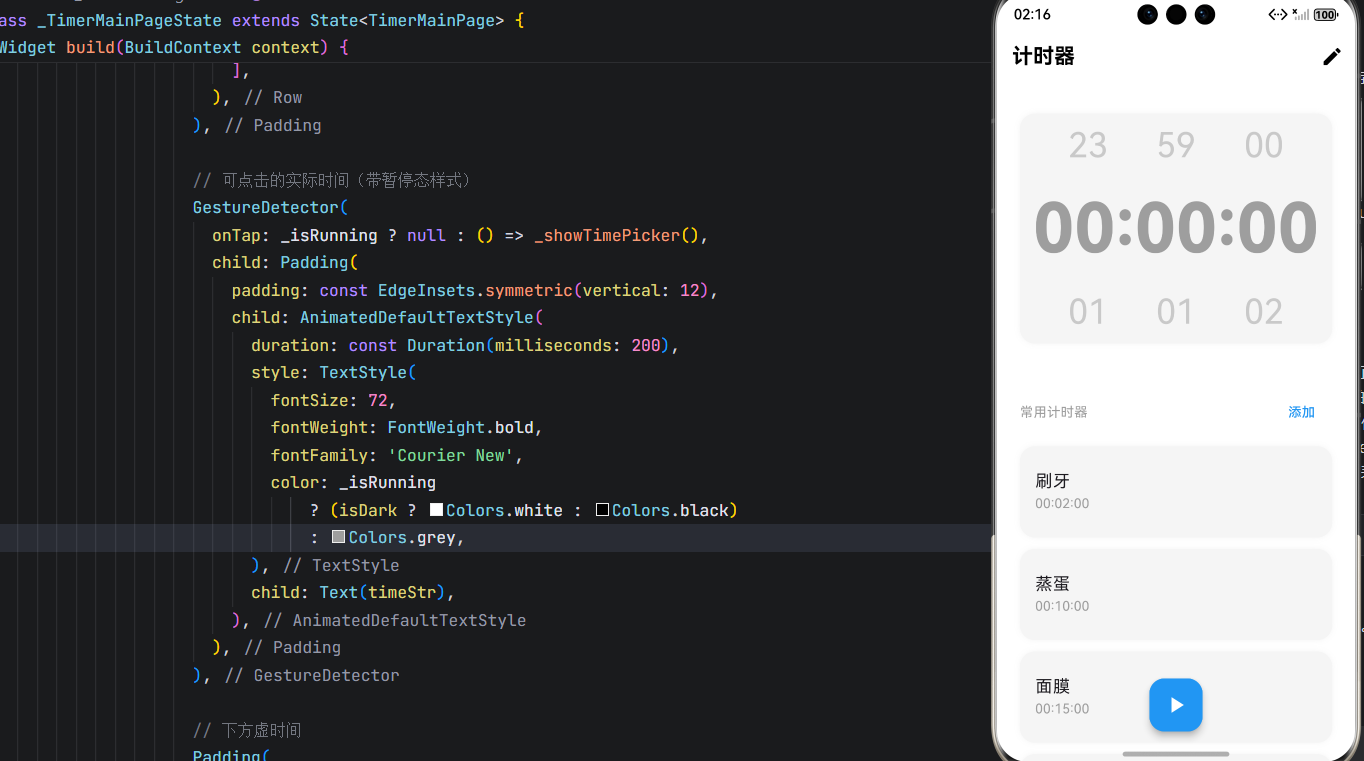
点击中间时间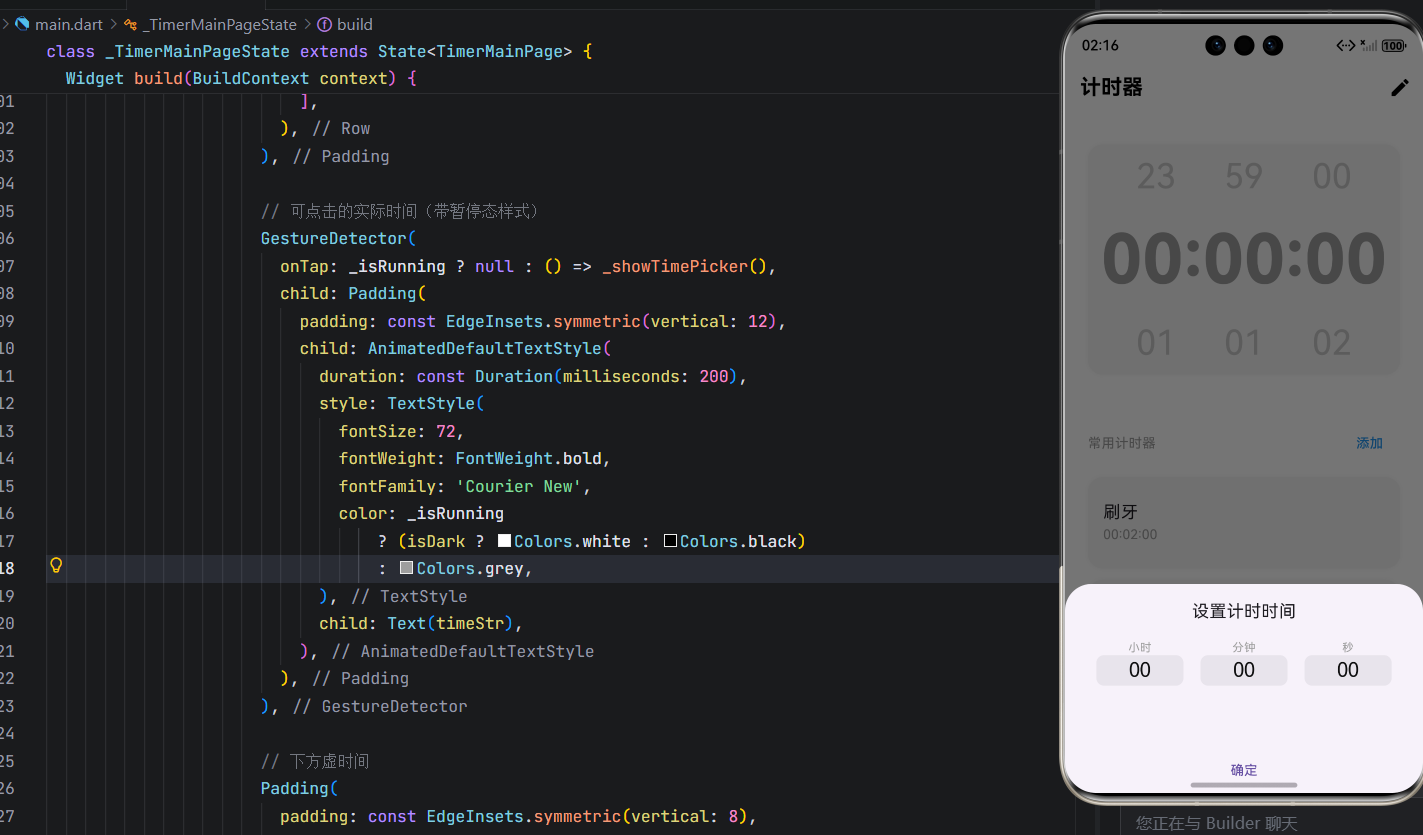
确定计时时间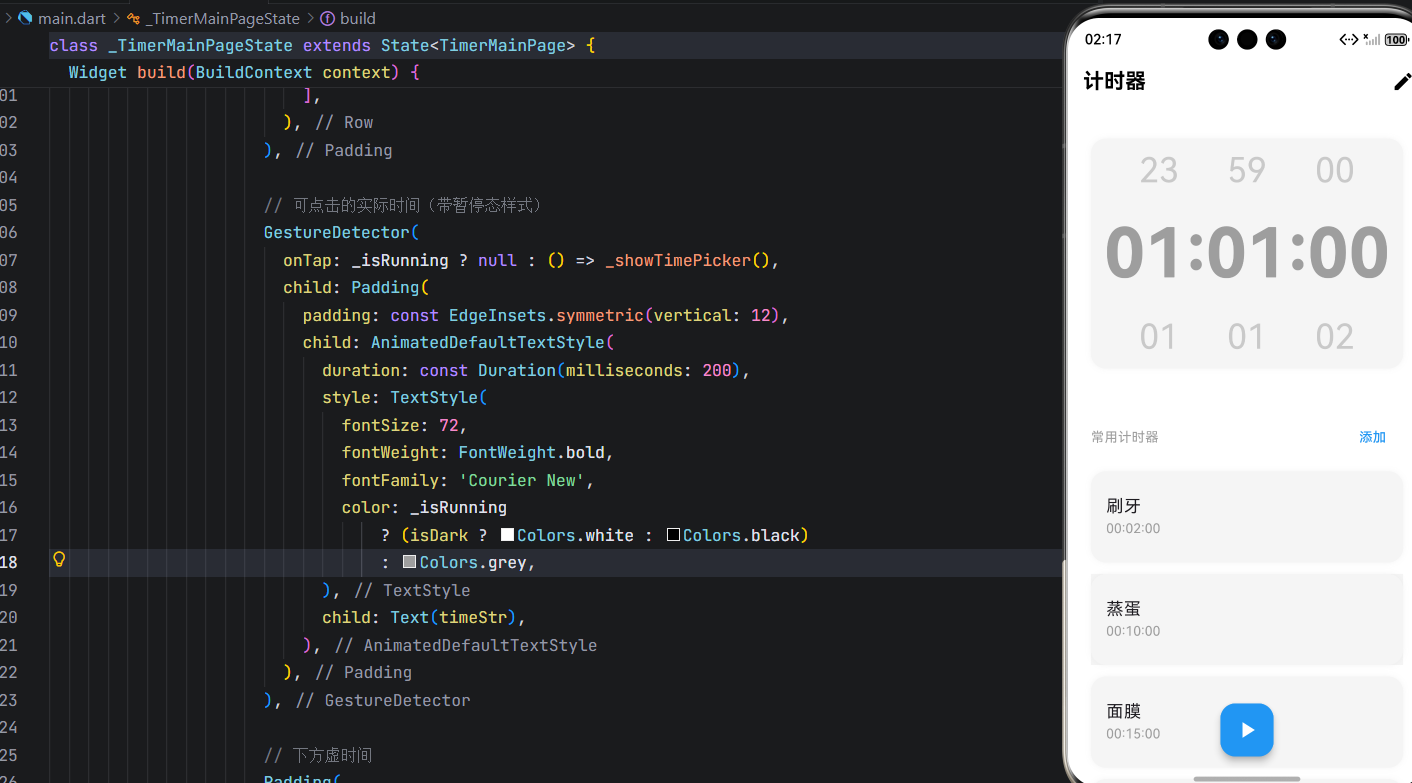
开始计时(时间字体会变黑)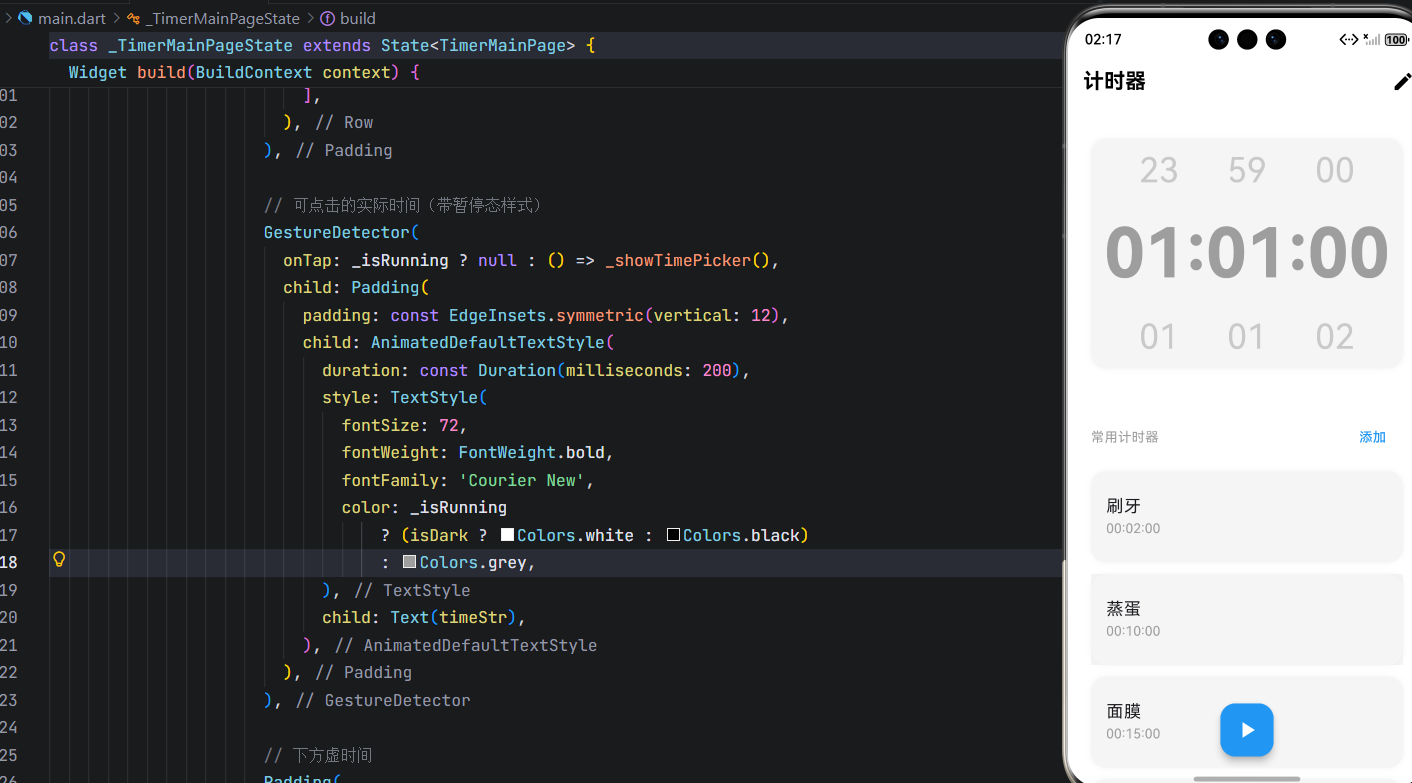
添加计时器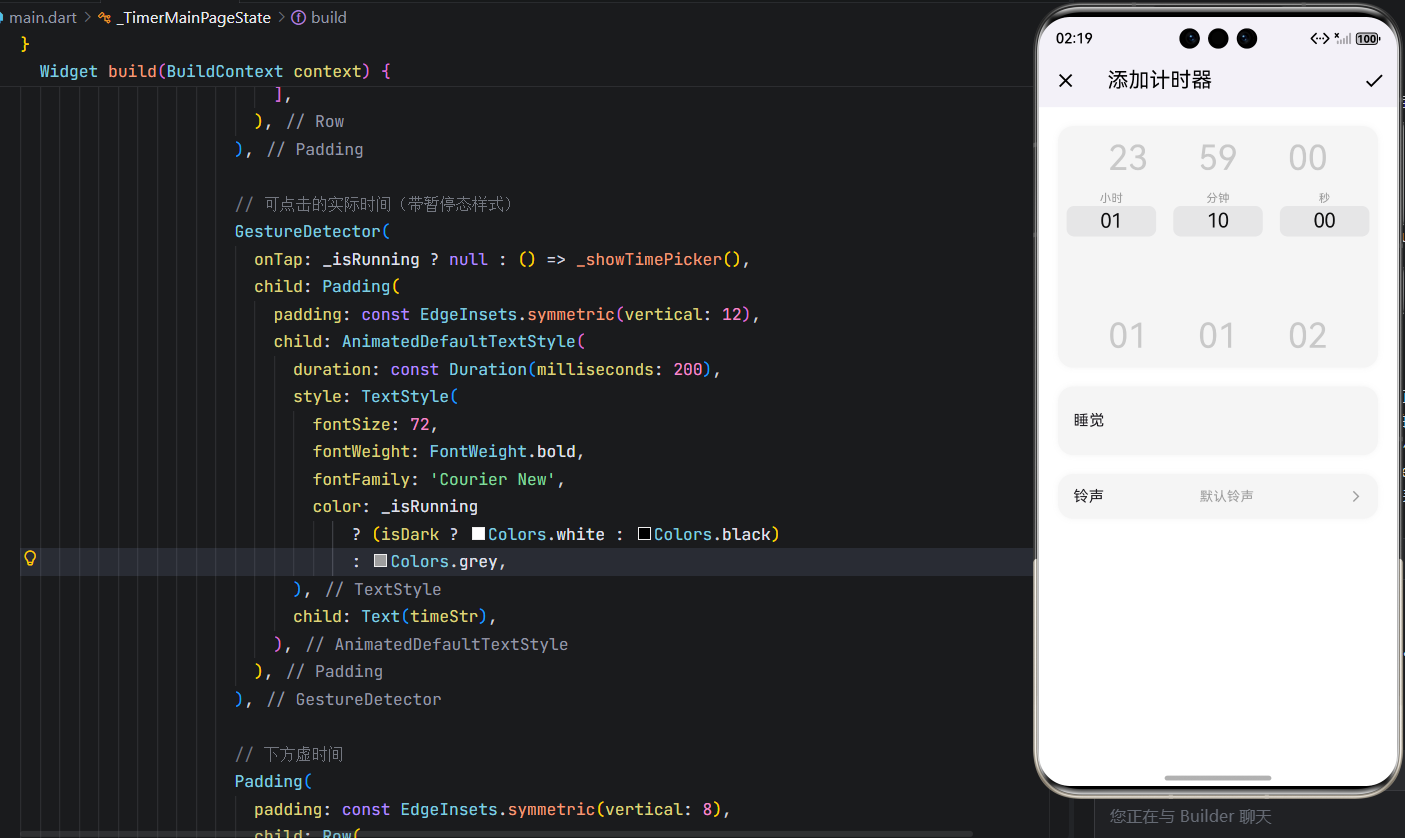
删除常用计时器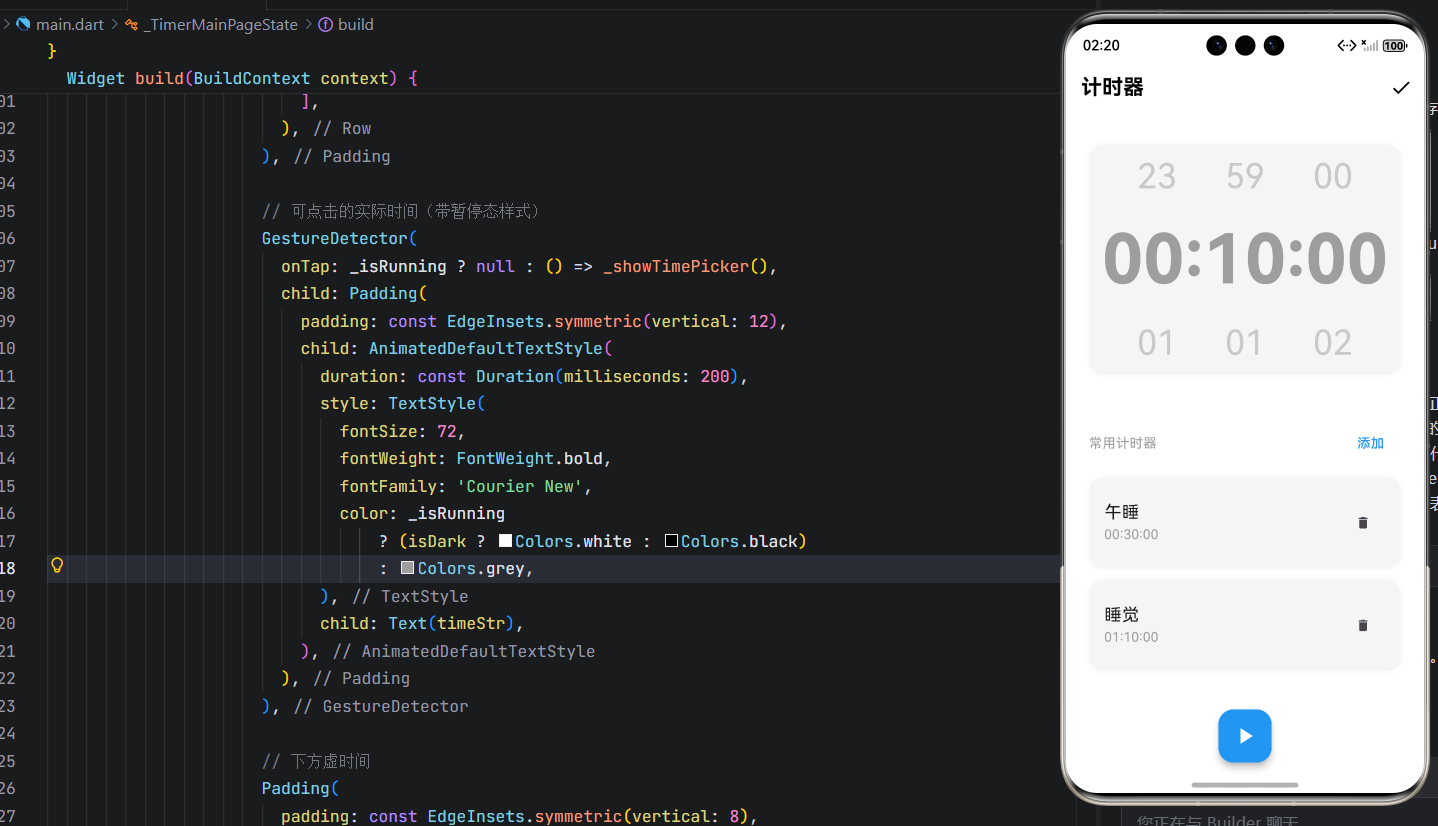
八、未来扩展建议
- 铃声自定义:当前为只读,可接入音频选择器;
- 后台运行:通过平台通道实现锁屏/后台倒计时;
- 重复计时:支持“循环 N 次”或“每日提醒”;
- 历史记录:存储最近使用的预设,智能推荐;
- 动画增强:倒计时结束时添加粒子动效。
结语
通过本文,我们不仅实现了一个功能完整的计时器界面,更展示了 Flutter 在复杂状态管理、自定义 UI 构建、跨平台交互设计等方面的卓越能力。该模块代码结构清晰、用户体验流畅,可直接用于 OpenHarmony 或任何 Flutter 项目中。
希望本文能为您在 Flutter 开发道路上提供有价值的参考,也欢迎您在评论区交流优化建议!
欢迎加入开源鸿蒙跨平台社区: https://openharmonycrossplatform.csdn.net

开源鸿蒙跨平台开发社区汇聚开发者与厂商,共建“一次开发,多端部署”的开源生态,致力于降低跨端开发门槛,推动万物智联创新。
更多推荐


 10
10 0
0- 0


 已为社区贡献59条内容

所有评论(0)