flutter_for_openharmony家庭药箱管理app实战+数据统计实现
本文介绍了在Flutter for OpenHarmony应用中实现数据统计功能的方案。系统包含药品统计、分类分布、用药依从性和健康记录四大模块,采用卡片式布局结合多种可视化方式(数字卡片、饼图、环形进度条等)。通过Provider管理数据,实现各模块独立展示:药品统计显示总量、过期等关键指标;分类分布使用彩色饼图直观呈现药品类别占比;用药依从性通过环形进度条展示服药情况;健康记录模块统计用户健康
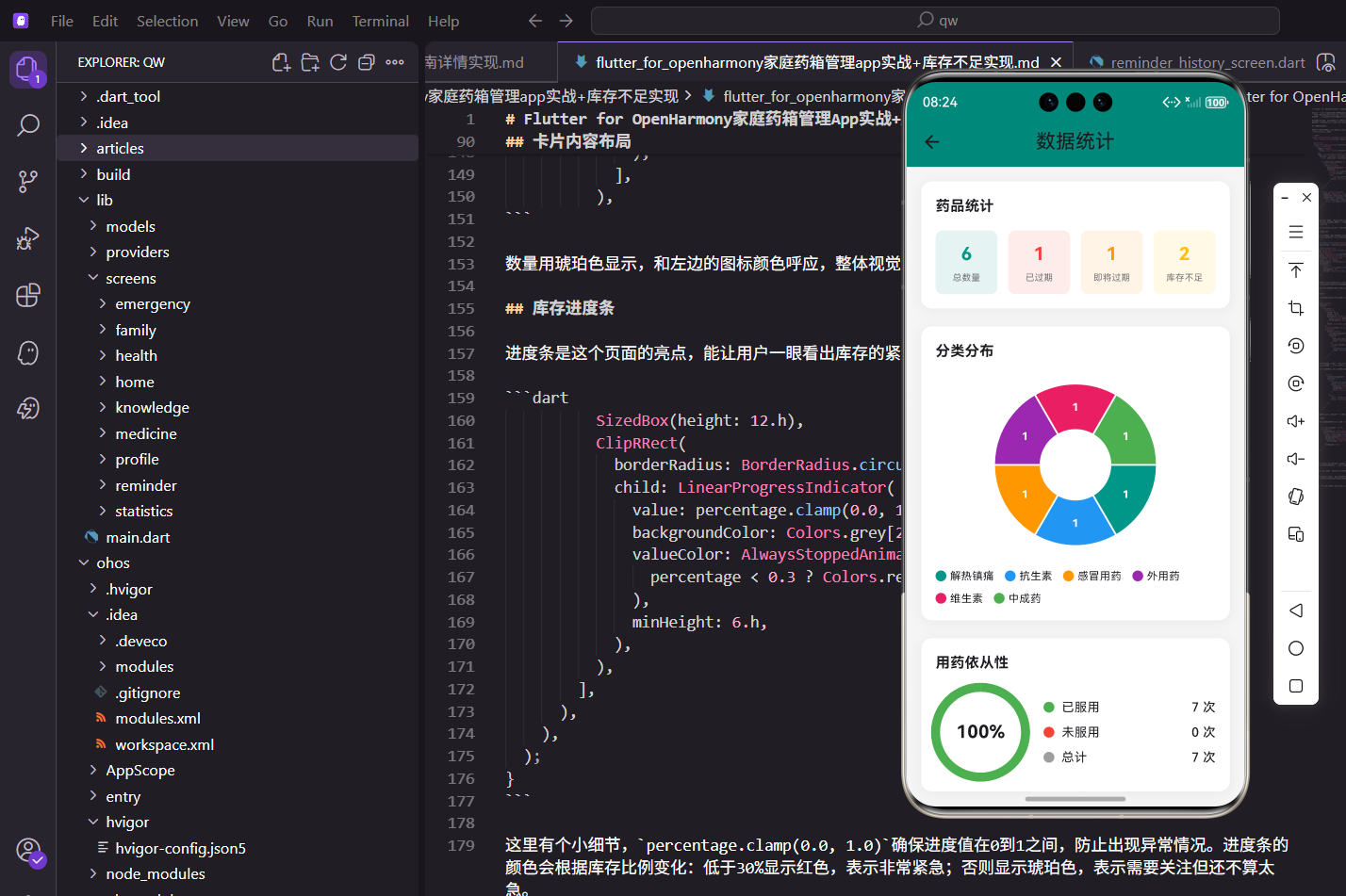
数据统计功能为用户提供了一个全面的数据分析页面,通过图表和数字展示药品管理、用药依从性、健康记录等多维度的统计信息。本文将介绍如何在Flutter for OpenHarmony应用中实现数据统计功能,打造一个专业的数据可视化工具。
功能设计思路
数据统计页面是对应用内所有数据的综合分析和展示。页面包含四个核心模块:药品统计、分类分布、用药依从性、健康记录统计。通过这些模块,用户可以全面了解自己的药品管理情况、用药习惯、健康数据记录情况,发现潜在问题。
页面采用卡片式布局,每个模块独立成卡片。药品统计使用数字卡片展示,分类分布使用饼图展示,用药依从性使用环形进度条展示,健康记录使用图标和数字展示。多种可视化方式的结合,让数据更加直观易懂。
页面结构实现
页面使用无状态组件,通过Consumer监听多个Provider的数据变化:
Widget build(BuildContext context) {
return Scaffold(
appBar: AppBar(title: const Text('数据统计')),
body: SingleChildScrollView(
padding: EdgeInsets.all(16.w),
child: Column(
crossAxisAlignment: CrossAxisAlignment.start,
children: [
_buildMedicineStats(context),
SizedBox(height: 20.h),
_buildCategoryChart(context),
SizedBox(height: 20.h),
_buildComplianceStats(context),
SizedBox(height: 20.h),
_buildHealthStats(context),
],
),
),
);
}
页面结构清晰,四个统计模块依次排列。使用SingleChildScrollView让页面可以滚动,适应不同屏幕尺寸。各个模块之间用SizedBox进行间隔,视觉上更加舒适。
药品统计模块
药品统计模块展示药品的总数量、过期数量、即将过期数量、库存不足数量:
Widget _buildMedicineStats(BuildContext context) {
  return Consumer<MedicineProvider>(
    builder: (context, provider, child) {
      return Container(
        padding: EdgeInsets.all(16.w),
        decoration: BoxDecoration(
          color: Colors.white,
          borderRadius: BorderRadius.circular(12.r),
          boxShadow: [
            BoxShadow(color: Colors.black.withOpacity(0.05), blurRadius: 10, offset: const Offset(0, 2)),
          ],
        ),
        child: Column(
          crossAxisAlignment: CrossAxisAlignment.start,
          children: [
            Text('药品统计', style: TextStyle(fontSize: 16.sp, fontWeight: FontWeight.bold)),
            SizedBox(height: 16.h),
            Row(
              children: [
                Expanded(child: _buildStatCard('总数量', '${provider.medicines.length}', Colors.teal)),
                SizedBox(width: 12.w),
                Expanded(child: _buildStatCard('已过期', '${provider.expiredMedicines.length}', Colors.red)),
                SizedBox(width: 12.w),
                Expanded(child: _buildStatCard('即将过期', '${provider.expiringSoonMedicines.length}', Colors.orange)),
                SizedBox(width: 12.w),
                Expanded(child: _buildStatCard('库存不足', '${provider.lowStockMedicines.length}', Colors.amber)),
              ],
            ),
          ],
        ),
      );
    },
  );
}

Widget _buildStatCard(String label, String value, Color color) {
  return Container(
    padding: EdgeInsets.all(12.w),
    decoration: BoxDecoration(
      color: color.withOpacity(0.1),
      borderRadius: BorderRadius.circular(8.r),
    ),
    child: Column(
      children: [
        Text(value, style: TextStyle(fontSize: 20.sp, fontWeight: FontWeight.bold, color: color)),
        SizedBox(height: 4.h),
        Text(label, style: TextStyle(fontSize: 10.sp, color: Colors.grey[600])),
      ],
    ),
  );
}
统计模块通过Provider的getter方法获取各类药品数量。四个统计卡片横向排列,每个卡片使用不同的颜色:总数量用青色,已过期用红色,即将过期用橙色,库存不足用琥珀色。数值使用大号粗体字体突出显示,标签使用小号灰色字体。这种设计让用户可以快速了解药品管理的整体情况。
分类分布图表
分类分布使用饼图展示不同类别药品的数量占比:
Widget _buildCategoryChart(BuildContext context) {
  return Consumer<MedicineProvider>(
    builder: (context, provider, child) {
      final categories = provider.categories;
      if (categories.isEmpty) {
        return const SizedBox.shrink();
      }

      final colors = [
        Colors.teal,
        Colors.blue,
        Colors.orange,
        Colors.purple,
        Colors.pink,
        Colors.green,
        Colors.red,
        Colors.amber,
      ];

      return Container(
        padding: EdgeInsets.all(16.w),
        decoration: BoxDecoration(
          color: Colors.white,
          borderRadius: BorderRadius.circular(12.r),
          boxShadow: [
            BoxShadow(color: Colors.black.withOpacity(0.05), blurRadius: 10, offset: const Offset(0, 2)),
          ],
        ),
        child: Column(
          crossAxisAlignment: CrossAxisAlignment.start,
          children: [
            Text('分类分布', style: TextStyle(fontSize: 16.sp, fontWeight: FontWeight.bold)),
            SizedBox(height: 16.h),
            SizedBox(
              height: 200.h,
              child: PieChart(
                PieChartData(
                  sectionsSpace: 2,
                  centerSpaceRadius: 40.r,
                  sections: categories.asMap().entries.map((entry) {
                    final index = entry.key;
                    final category = entry.value;
                    final count = provider.getMedicinesByCategory(category).length;
                    return PieChartSectionData(
                      value: count.toDouble(),
                      title: '$count',
                      color: colors[index % colors.length],
                      radius: 50.r,
                      titleStyle: TextStyle(fontSize: 12.sp, color: Colors.white, fontWeight: FontWeight.bold),
                    );
                  }).toList(),
                ),
              ),
            ),
            SizedBox(height: 16.h),
            Wrap(
              spacing: 12.w,
              runSpacing: 8.h,
              children: categories.asMap().entries.map((entry) {
                final index = entry.key;
                final category = entry.value;
                return Row(
                  mainAxisSize: MainAxisSize.min,
                  children: [
                    Container(
                      width: 12.w,
                      height: 12.w,
                      decoration: BoxDecoration(
                        color: colors[index % colors.length],
                        shape: BoxShape.circle,
                      ),
                    ),
                    SizedBox(width: 4.w),
                    Text(category, style: TextStyle(fontSize: 12.sp)),
                  ],
                );
              }).toList(),
            ),
          ],
        ),
      );
    },
  );
}
饼图使用PieChart组件实现,每个分类对应一个扇形区域。通过asMap().entries可以同时获取索引和分类名称,索引用于选择颜色。饼图下方是图例,使用Wrap组件让图例自动换行。每个图例包含一个彩色圆点和分类名称,颜色与饼图对应。这种设计让用户可以直观了解各类药品的数量分布。
用药依从性统计
用药依从性使用环形进度条展示,配合详细的数据列表:
Widget _buildComplianceStats(BuildContext context) {
  return Consumer<ReminderProvider>(
    builder: (context, provider, child) {
      final records = provider.records;
      final takenCount = records.where((r) => r.isTaken).length;
      final totalCount = records.length;
      final rate = totalCount > 0 ? (takenCount / totalCount * 100) : 0.0;

      return Container(
        padding: EdgeInsets.all(16.w),
        decoration: BoxDecoration(
          color: Colors.white,
          borderRadius: BorderRadius.circular(12.r),
          boxShadow: [
            BoxShadow(color: Colors.black.withOpacity(0.05), blurRadius: 10, offset: const Offset(0, 2)),
          ],
        ),
        child: Column(
          crossAxisAlignment: CrossAxisAlignment.start,
          children: [
            Text('用药依从性', style: TextStyle(fontSize: 16.sp, fontWeight: FontWeight.bold)),
            SizedBox(height: 16.h),
            Row(
              children: [
                SizedBox(
                  width: 100.w,
                  height: 100.w,
                  child: Stack(
                    alignment: Alignment.center,
                    children: [
                      SizedBox(
                        width: 100.w,
                        height: 100.w,
                        child: CircularProgressIndicator(
                          value: rate / 100,
                          strokeWidth: 10.w,
                          backgroundColor: Colors.grey[200],
                          valueColor: AlwaysStoppedAnimation<Color>(
                            rate >= 80 ? Colors.green : rate >= 60 ? Colors.orange : Colors.red,
                          ),
                        ),
                      ),
                      Text(
                        '${rate.toStringAsFixed(0)}%',
                        style: TextStyle(fontSize: 20.sp, fontWeight: FontWeight.bold),
                      ),
                    ],
                  ),
                ),
                SizedBox(width: 20.w),
                Expanded(
                  child: Column(
                    crossAxisAlignment: CrossAxisAlignment.start,
                    children: [
                      _buildComplianceRow('已服用', takenCount, Colors.green),
                      SizedBox(height: 8.h),
                      _buildComplianceRow('未服用', totalCount - takenCount, Colors.red),
                      SizedBox(height: 8.h),
                      _buildComplianceRow('总计', totalCount, Colors.grey),
                    ],
                  ),
                ),
              ],
            ),
          ],
        ),
      );
    },
  );
}

Widget _buildComplianceRow(String label, int count, Color color) {
  return Row(
    children: [
      Container(
        width: 12.w,
        height: 12.w,
        decoration: BoxDecoration(color: color, shape: BoxShape.circle),
      ),
      SizedBox(width: 8.w),
      Text(label, style: TextStyle(fontSize: 14.sp)),
      const Spacer(),
      Text('$count 次', style: TextStyle(fontSize: 14.sp, fontWeight: FontWeight.w500)),
    ],
  );
}
这段代码通过筛选服药记录计算依从性百分比。左侧是环形进度条,使用CircularProgressIndicator实现,进度条颜色根据依从性高低动态变化:≥80%为绿色,60-80%为橙色,<60%为红色。中心显示百分比数值。右侧是详细的数据列表,包括已服用、未服用、总计三项,每项前面有彩色圆点标识。
健康记录统计
健康记录统计展示各类健康数据的记录次数:
Widget _buildHealthStats(BuildContext context) {
  return Consumer<HealthProvider>(
    builder: (context, provider, child) {
      final bpCount = provider.getRecordsByType('blood_pressure').length;
      final bsCount = provider.getRecordsByType('blood_sugar').length;
      final weightCount = provider.getRecordsByType('weight').length;
      final tempCount = provider.getRecordsByType('temperature').length;

      return Container(
        padding: EdgeInsets.all(16.w),
        decoration: BoxDecoration(
          color: Colors.white,
          borderRadius: BorderRadius.circular(12.r),
          boxShadow: [
            BoxShadow(color: Colors.black.withOpacity(0.05), blurRadius: 10, offset: const Offset(0, 2)),
          ],
        ),
        child: Column(
          crossAxisAlignment: CrossAxisAlignment.start,
          children: [
            Text('健康记录统计', style: TextStyle(fontSize: 16.sp, fontWeight: FontWeight.bold)),
            SizedBox(height: 16.h),
            Row(
              children: [
                Expanded(child: _buildHealthStatItem('血压', bpCount, Icons.favorite, Colors.red)),
                Expanded(child: _buildHealthStatItem('血糖', bsCount, Icons.water_drop, Colors.blue)),
                Expanded(child: _buildHealthStatItem('体重', weightCount, Icons.monitor_weight, Colors.green)),
                Expanded(child: _buildHealthStatItem('体温', tempCount, Icons.thermostat, Colors.orange)),
              ],
            ),
          ],
        ),
      );
    },
  );
}

Widget _buildHealthStatItem(String label, int count, IconData icon, Color color) {
  return Column(
    children: [
      Icon(icon, color: color, size: 24.sp),
      SizedBox(height: 8.h),
      Text('$count', style: TextStyle(fontSize: 18.sp, fontWeight: FontWeight.bold)),
      Text(label, style: TextStyle(fontSize: 12.sp, color: Colors.grey[600])),
    ],
  );
}
健康记录统计通过getRecordsByType方法分别获取血压、血糖、体重、体温四类记录的数量。四个统计项横向排列,每个统计项包含图标、数值和标签,布局统一。图标使用不同颜色:血压用红色心形,血糖用蓝色水滴,体重用绿色体重秤,体温用橙色温度计。这种设计让用户可以快速了解自己记录了多少健康数据。
技术要点
多Provider整合:页面通过多个Consumer分别监听药品、提醒、健康三个Provider的数据,实现了全面的数据统计。这种设计让代码结构清晰,职责分明。
数据可视化:页面使用了多种可视化方式,包括数字卡片、饼图、环形进度条、图标统计等。不同的数据类型使用不同的展示方式,让信息传达更加高效。
动态颜色:用药依从性的进度条颜色根据百分比动态变化,让用户可以直观判断自己的用药情况。这种设计体现了对用户体验的关注。
空状态处理:分类分布图表在没有分类数据时返回空组件,避免显示异常。这种细节处理让应用更加健壮。
总结
数据统计功能通过多维度的数据分析和可视化展示,为用户提供了全面的数据洞察。从药品管理到用药习惯,从健康记录到依从性分析,每个模块都体现了对数据的深度挖掘。这种数据驱动的管理方式,可以帮助用户更好地了解自己的健康管理情况,发现问题,改进习惯。
欢迎加入开源鸿蒙跨平台社区:https://openharmonycrossplatform.csdn.net

开源鸿蒙跨平台开发社区汇聚开发者与厂商,共建“一次开发,多端部署”的开源生态,致力于降低跨端开发门槛,推动万物智联创新。
更多推荐
 4
4 0
0- 0


 已为社区贡献30条内容

所有评论(0)