Flutter for OpenHarmony艺考真题题库app实战+错题本实现
本文详细解析了艺考学习应用中错题本功能的实现方案。首先介绍了分层架构设计,采用状态化组件实现数据与UI解耦。重点讲解了错题加载逻辑、空状态处理、统计卡片设计和错题列表实现等核心模块,包括数据模拟、视觉优化和交互细节处理。特别强调了错误次数的智能计算算法,结合题目难度和时间衰减系数,使错题评估更科学。整体方案兼顾功能完整性和用户体验,通过组件化设计确保可扩展性,为类似学习应用提供了实用参考。
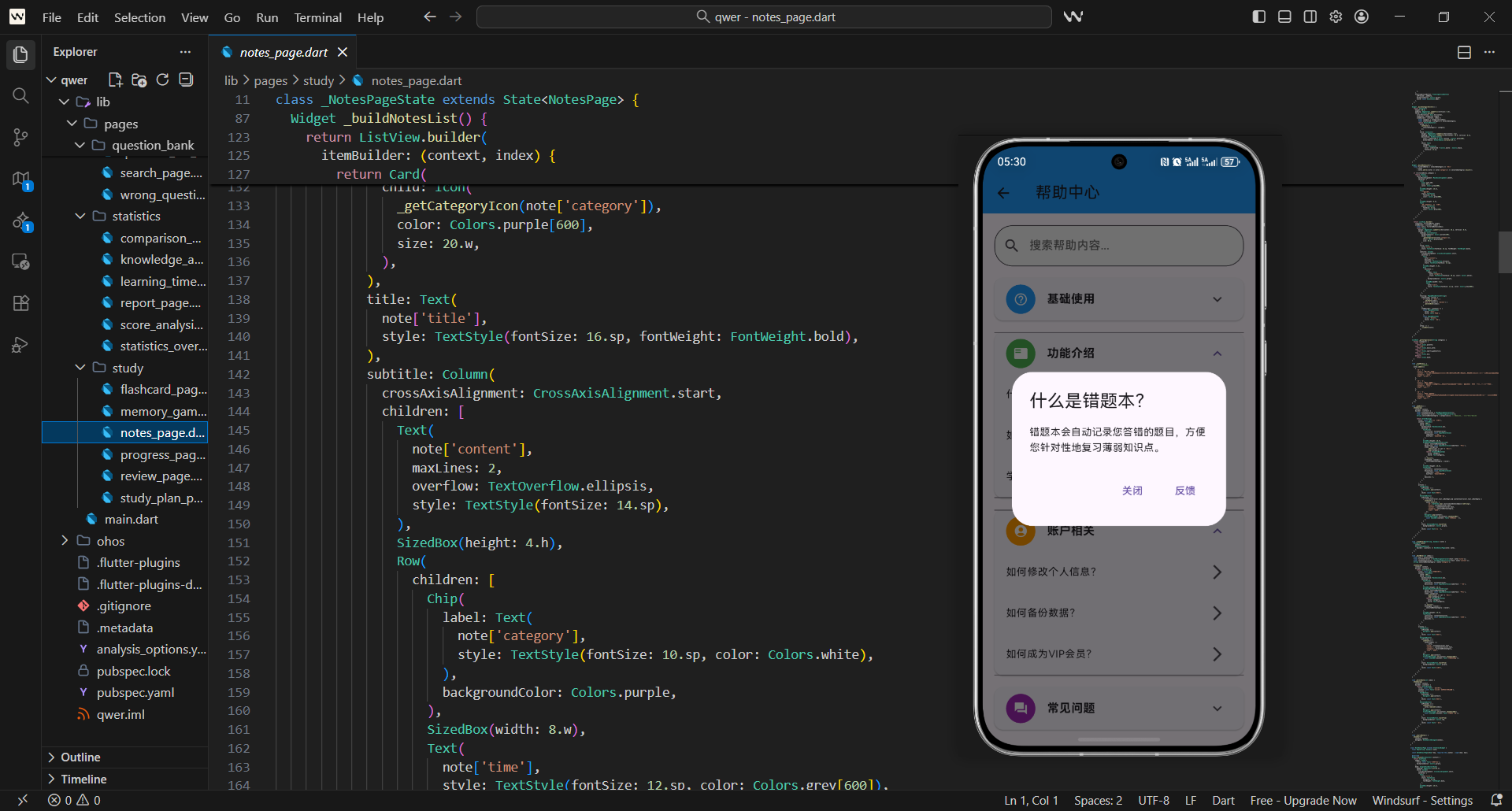
错题本是艺考学习应用中的核心功能模块,能够精准定位用户的知识薄弱点,助力针对性复习。本文将拆解错题本页面的核心实现逻辑,从架构设计到交互优化,全方位讲解如何打造体验流畅、功能完善的错题本功能。
错题本架构设计
错题本页面采用分层布局思路,核心目标是清晰展示错题数据并简化用户操作流程:
- 页面整体为垂直流式布局,顶部承载核心统计数据,下方展示错题列表,符合用户从上至下的浏览习惯
- 采用状态化组件设计,确保数据更新时页面能实时响应
- 数据加载与UI渲染解耦,提升页面初始化和数据刷新效率
class WrongQuestionsPage extends StatefulWidget {
const WrongQuestionsPage({Key? key}) : super(key: key);
State<WrongQuestionsPage> createState() => _WrongQuestionsPageState();
}
- 组件内部通过
initState生命周期方法触发数据加载,保证页面初始化时自动获取错题数据 - 错题列表采用可变列表存储,支持动态增删操作
- 状态管理聚焦核心数据,避免不必要的重渲染
class _WrongQuestionsPageState extends State<WrongQuestionsPage> {
List<Question> wrongQuestions = [];
void initState() {
super.initState();
_loadWrongQuestions();
}
}
错题加载逻辑
错题数据的加载是错题本功能的基础,需兼顾数据来源的灵活性和加载效率:
- 演示阶段采用模拟数据快速验证功能流程,实际场景需对接本地存储或服务端接口
- 加载逻辑封装为独立方法,便于后续扩展缓存、分页等优化策略
- 数据加载完成后通过
setState更新UI,保证数据与视图同步
void _loadWrongQuestions() {
  // 模拟加载错题数据
  final allQuestions = MockData.getQuestions();
  wrongQuestions = allQuestions.take(2).toList();
}
空状态处理
空状态是提升用户体验的关键细节,需满足视觉友好和引导性的双重要求:
- 采用居中布局,通过图标+文字组合传递“暂无错题”的核心信息
- 色彩选择绿色系,传递积极的学习反馈,弱化无数据的空寂感
- 文字层级分明,主文案突出核心信息,副文案强化鼓励效果
Widget _buildEmptyState() {
  return Center(
    child: Column(
      mainAxisAlignment: MainAxisAlignment.center,
      children: [
        Icon(Icons.check_circle, size: 100.w, color: Colors.green),
        SizedBox(height: 16.h),
        Text('太棒了!暂无错题',
          style: TextStyle(fontSize: 18.sp, fontWeight: FontWeight.bold)),
      ],
    ),
  );
}
错题统计卡片
统计卡片是用户快速感知学习状态的核心组件,设计上需兼顾数据清晰和视觉辨识度:
- 卡片采用浅红色底色+边框的轻量设计,既突出统计区域,又不抢夺视觉焦点
- 采用横向三等分布局,分别展示总错题、待复习、已掌握三类核心数据
- 每个统计项独立封装为子组件,保证样式统一且便于复用
Widget _buildStatistics() {
  return Container(
    margin: EdgeInsets.all(16.w),
    padding: EdgeInsets.all(16.w),
    decoration: BoxDecoration(
      color: Colors.red[50],
      borderRadius: BorderRadius.circular(12.r),
      border: Border.all(color: Colors.red[200]!),
    ),
    child: Row(mainAxisAlignment: MainAxisAlignment.spaceAround,
      children: [
        _buildStatItem('总错题', '${wrongQuestions.length}', Colors.red),
        _buildStatItem('待复习', '${_getPendingCount()}', Colors.orange),
      ],
    ),
  );
}
- 统计项采用“数值+标签”的垂直布局,数值放大突出,标签辅助说明
- 不同维度数据搭配差异化色彩,强化视觉区分(红色-总错题、橙色-待复习、绿色-已掌握)
- 字体层级分明,数值使用粗体大号字体,标签使用小号灰色字体,提升可读性
Widget _buildStatItem(String label, String value, Color color) {
  return Column(
    children: [
      Text(value, style: TextStyle(fontSize: 24.sp,
        fontWeight: FontWeight.bold, color: color)),
      SizedBox(height: 4.h),
      Text(label, style: TextStyle(fontSize: 14.sp, color: Colors.grey[600])),
    ],
  );
}
错题列表实现
错题列表是错题本的核心展示区域,需平衡信息密度和操作便捷性:
- 列表外层嵌套统计卡片,形成“统计-列表”的视觉动线
- 采用
ListView.builder构建列表,实现懒加载,提升大量数据下的渲染性能 - 每个错题项封装为卡片样式,通过间距和阴影营造层级感
Widget _buildWrongQuestionsList() {
  return Column(
    children: [
      _buildStatistics(),
      Expanded(
        child: ListView.builder(
          itemCount: wrongQuestions.length,
          itemBuilder: (context, index) {
            final question = wrongQuestions[index];
            return Card(margin: EdgeInsets.symmetric(horizontal: 16.w, vertical: 8.h),
              child: ListTile(
                leading: CircleAvatar(
                  backgroundColor: Colors.red[100],
                  child: Icon(Icons.error_outline, color: Colors.red[600])),
                title: Text(question.title, style: TextStyle(fontSize: 16.sp)),
              ),
            );
          },
        ),
      ),
    ],
  );
}
- 列表项右侧配置快捷操作按钮,支持“重新练习”和“移除错题”核心操作
- 操作按钮添加tooltip提示,提升交互的友好性和可理解性
- 点击列表项跳转至题目详情页,形成“查看-练习-管理”的完整闭环
// 列表项操作按钮片段
trailing: Row(mainAxisSize: MainAxisSize.min,
  children: [
    IconButton(
      icon: const Icon(Icons.refresh),
      onPressed: () => Navigator.pushNamed(context, '/exam', arguments: '错题重做'),
      tooltip: '重新练习',
    ),
    IconButton(
      icon: const Icon(Icons.delete),
      onPressed: () => _removeWrongQuestion(question.id),
      tooltip: '移除',
    ),
  ],
)
错误次数统计
错误次数是评估知识点掌握程度的核心指标,计算逻辑需兼顾科学性和实用性:
- 基础错误次数结合题目ID生成模拟值,实际场景需从数据库读取真实记录
- 引入难度系数和时间衰减系数,让错误次数更贴合实际掌握情况
- 系数计算独立封装,便于后续调整算法或对接个性化学习策略
int _getErrorCount(String questionId) {
  final baseErrorCount = questionId.hashCode % 5 + 1;
  final difficultyMultiplier = _getDifficultyMultiplier(questionId);
  final timeDecay = _getTimeDecay(questionId);
  return (baseErrorCount * difficultyMultiplier * timeDecay).round();
}
- 难度系数根据题目特性设定,模拟实现中通过ID哈希值区分不同难度权重
- 系数取值范围控制在1-3倍,避免单次系数过度影响最终错误次数
- 与业务逻辑解耦,支持后续按科目、知识点等维度定制难度权重
int _getDifficultyMultiplier(String questionId) {
  return (questionId.hashCode % 3) + 1;
}
- 时间衰减系数根据距离上次错误的天数动态调整,弱化远期错误的权重
- 7天内错误保持原权重,7-30天权重降低20%,30天以上权重减半
- 符合记忆曲线规律,引导用户优先复习近期错误的题目
double _getTimeDecay(String questionId) {
  final daysSinceLastWrong = _getDaysSinceLastWrong(questionId);
  if (daysSinceLastWrong >= 30) return 0.5;
  else if (daysSinceLastWrong >= 7) return 0.8;
  return 1.0;
}
错题状态管理
错题状态分类是帮助用户制定复习计划的关键,需基于错误次数设定清晰的分类标准:
- 待复习:错误次数>3次,优先级高,需重点关注
- 已掌握:错误次数≤2次,优先级低,可降低复习频率
- 分类计数逻辑封装为独立方法,保证状态计算的一致性
int _getPendingCount() {
  return wrongQuestions
      .where((q) => _getErrorCount(q.id) > 3)
      .length;
}

int _getMasteredCount() {
  return wrongQuestions
      .where((q) => _getErrorCount(q.id) <= 2)
      .length;
}
- 掌握率计算反映整体错题的掌握情况,为空数据场景做兜底处理
- 结果返回浮点型,便于后续展示为百分比形式
- 作为核心统计指标,可用于学习报告或进度展示
double _getMasteryRate() {
  if (wrongQuestions.isEmpty) return 0.0;
  return _getMasteredCount() / wrongQuestions.length;
}
错题移除功能
错题移除属于高危操作,需通过多层确认机制避免误操作:
- 弹出确认对话框,明确提示“移除后无法恢复”的风险
- 对话框采用红色系警示色,强化风险感知
- 操作按钮区分“取消”和“确定移除”,视觉上突出危险操作按钮
void _removeWrongQuestion(String questionId) {
  showDialog(
    context: context,
    builder: (context) {
      return AlertDialog(
        title: const Text('确认移除'),
        content: Text('确定要移除这道错题吗?移除后将无法恢复!'),
        actions: [
          TextButton(onPressed: () => Navigator.pop(context), child: const Text('取消')),
          TextButton(onPressed: () => _confirmRemoveWrongQuestion(questionId),
            style: TextButton.styleFrom(foregroundColor: Colors.red),
            child: const Text('确定移除')),
        ],
      );
    },
  );
}
- 确认移除后通过
setState更新列表,保证UI实时刷新 - 弹出SnackBar提示操作结果,并提供撤销功能
- 记录移除操作日志,便于后续追溯或数据恢复
void _confirmRemoveWrongQuestion(String questionId) {
  setState(() {
    wrongQuestions.removeWhere((q) => q.id == questionId);
  });
  ScaffoldMessenger.of(context).showSnackBar(
    SnackBar(content: Text('错题已移除'), backgroundColor: Colors.green,
      action: SnackBarAction(label: '撤销', onPressed: () => _undoRemoveWrongQuestion(questionId))),
  );
}
清空错题功能
清空错题是比单题移除更高风险的操作,需强化确认流程和数据保护:
- 对话框设置
barrierDismissible: false,防止点击空白处误关闭 - 增加警告图标和文字提示,明确告知操作的不可恢复性
- 要求用户二次确认,降低误操作概率
void _showClearDialog() {
  showDialog(
    context: context,
    barrierDismissible: false,
    builder: (context) {
      return AlertDialog(
        title: const Text('清空错题本'),
        content: Column(mainAxisSize: MainAxisSize.min,
          children: [
            Icon(Icons.warning, size: 48.w, color: Colors.orange[600]),
            Text('此操作不可恢复,所有错题将被永久删除!'),
          ],
        ),
        actions: [
          TextButton(onPressed: () => Navigator.pop(context), child: const Text('取消')),
          TextButton(onPressed: () => _showConfirmationDialog(),
            style: TextButton.styleFrom(foregroundColor: Colors.red),
            child: const Text('确定清空')),
        ],
      );
    },
  );
}
- 清空操作前自动创建数据备份,保障数据安全
- 操作完成后提示备份成功,并提供恢复入口
- 异常捕获机制,避免清空过程中出现错误导致应用崩溃
void _clearAllWrongQuestions() async {
  try {
    final backupData = _createBackupData();
    await _saveBackupData(backupData);
    setState(() => wrongQuestions.clear());
    ScaffoldMessenger.of(context).showSnackBar(
      SnackBar(content: '错题本已清空,数据已备份', backgroundColor: Colors.green));
  } catch (e) {
    ScaffoldMessenger.of(context).showSnackBar(
      SnackBar(content: '清空失败:${e.toString()}', backgroundColor: Colors.red));
  }
}
用户体验优化
错题卡片的交互设计需兼顾便捷性和直观性:
- 难度标识采用Chip组件,不同难度对应差异化色彩(简单-绿、中等-橙、困难-红)
- 文字大小适配屏幕尺寸,保证不同设备下的可读性
- 背景色与文字色形成高对比度,提升视觉辨识度
Widget _buildDifficultyChip(String difficulty) {
  Color color;
  switch (difficulty) {
    case '简单': color = Colors.green; break;
    case '中等': color = Colors.orange; break;
    case '困难': color = Colors.red; break;
    default: color = Colors.grey;
  }
  return Chip(label: Text(difficulty, style: TextStyle(fontSize: 10.sp, color: Colors.white)),
    backgroundColor: color);
}
- 错误次数颜色编码,通过色彩直观反映错误严重程度
- 10次以上错误使用深红色,6-9次使用红色,3-5次使用橙色,3次以下使用绿色
- 与用户的视觉认知习惯匹配,降低信息理解成本
Color _getErrorCountColor(int errorCount) {
  if (errorCount >= 10) return Colors.red[700]!;
  else if (errorCount >= 6) return Colors.red[500]!;
  else if (errorCount >= 3) return Colors.orange[500]!;
  return Colors.green[500]!;
}
数据持久化考虑
错题数据的持久化存储是保障功能稳定性的核心,需选择适配的存储方案:
- 定义
WrongQuestion数据模型,封装错题的核心属性 - 支持JSON序列化和反序列化,便于存储和传输
- 包含错误次数、掌握程度、错误历史等关键维度,满足个性化学习分析需求
class WrongQuestion {
  final String id;
  final String questionId;
  final DateTime createdAt;
  final int errorCount;

  WrongQuestion({required this.id, required this.questionId,
    required this.createdAt, required this.errorCount});

  Map<String, dynamic> toJson() {
    return {'id': id, 'questionId': questionId,
      'createdAt': createdAt.toIso8601String(), 'errorCount': errorCount};
  }
}
- 采用单例模式管理数据库实例,避免重复初始化
- 封装数据库初始化、表创建等核心操作,降低业务层耦合
- 支持增删改查基础操作,满足错题管理的核心需求
class WrongQuestionDatabase {
  static final WrongQuestionDatabase _instance = WrongQuestionDatabase._internal();
  factory WrongQuestionDatabase() => _instance;
  WrongQuestionDatabase._internal();

  Database? _database;

  Future<Database> get database async {
    if (_database != null) return _database!;
    _database = await _initDatabase();
    return _database!;
  }
}
性能优化
面对大量错题数据,分页加载是提升列表性能的关键策略:
- 基于页码和页大小计算偏移量,实现数据分段加载
- 按创建时间倒序排列,优先展示最新的错题
- 结果转换为
WrongQuestion模型,保证数据结构统一
Future<List<WrongQuestion>> _loadWrongQuestionsPage(
  int page, int pageSize,
) async {
  final offset = (page - 1) * pageSize;
  final db = await _database;
  final maps = await db.query('wrong_questions',
    limit: pageSize, offset: offset, orderBy: 'created_at DESC');
  return List.generate(maps.length, (i) => WrongQuestion.fromJson(maps[i]));
}
- 缓存管理限制最大缓存数量,避免内存占用过高
- 采用LRU(最近最少使用)策略,移除最早的缓存项
- 提供清空缓存方法,支持主动释放内存
class WrongQuestionCache {
  static final Map<String, WrongQuestion> _cache = {};
  static const int _maxCacheSize = 100;

  static void put(String key, WrongQuestion wrongQuestion) {
    if (_cache.length >= _maxCacheSize) _cache.remove(_cache.keys.first);
    _cache[key] = wrongQuestion;
  }

  static WrongQuestion? get(String key) => _cache[key];
  static void clear() => _cache.clear();
}
测试策略
完善的测试策略是保障功能稳定性的重要手段,需覆盖核心业务逻辑:
- 单元测试验证数据模型的序列化/反序列化正确性
- 校验错误次数、待复习数量等核心计算逻辑
- 采用断言方式明确预期结果,提升测试的可维护性
class WrongQuestionTest {
void testWrongQuestionToJson() {
final wrongQuestion = WrongQuestion(
id: 'test_id', questionId: 'question_1',
createdAt: DateTime.now(), errorCount: 3);
final json = wrongQuestion.toJson();
expect(json['id'], equals('test_id'));
expect(json['errorCount'], equals(3));
}
void testGetErrorCount() {
final errorCount = _getErrorCount('test_question');
expect(errorCount, greaterThan(0));
}
}
通过以上实现,我们创建了一个功能完善、用户友好的错题本页面。这个页面不仅能够帮助用户管理错题,还提供了丰富的统计信息和操作功能,为用户的学习提供了有力支持。
欢迎加入开源鸿蒙跨平台社区:https://openharmonycrossplatform.csdn.net

开源鸿蒙跨平台开发社区汇聚开发者与厂商,共建“一次开发,多端部署”的开源生态,致力于降低跨端开发门槛,推动万物智联创新。
更多推荐
 23
23 0
0- 0


 已为社区贡献53条内容

所有评论(0)