Flutter框架跨平台鸿蒙开发——生物知识APP的开发流程
本文介绍了基于Flutter框架开发跨平台生物知识APP的全流程。该应用提供生物知识浏览、搜索和收藏功能,支持鸿蒙、Android和iOS平台。文章详细阐述了项目架构设计(数据模型层、服务层、UI层),包括生物分类模型和知识模型的数据结构定义,以及知识服务的实现逻辑,涵盖数据获取、存储和业务处理等功能。通过Flutter的跨平台特性,开发者可高效构建适配多平台的移动应用。
🚀运行效果展示
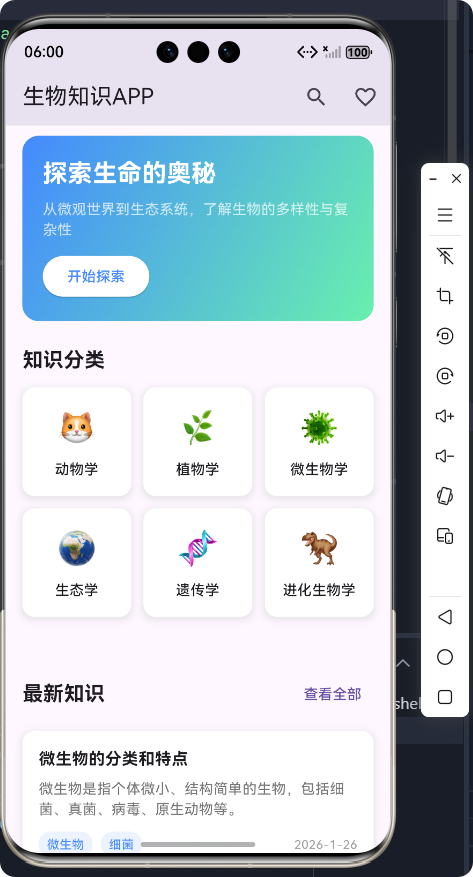
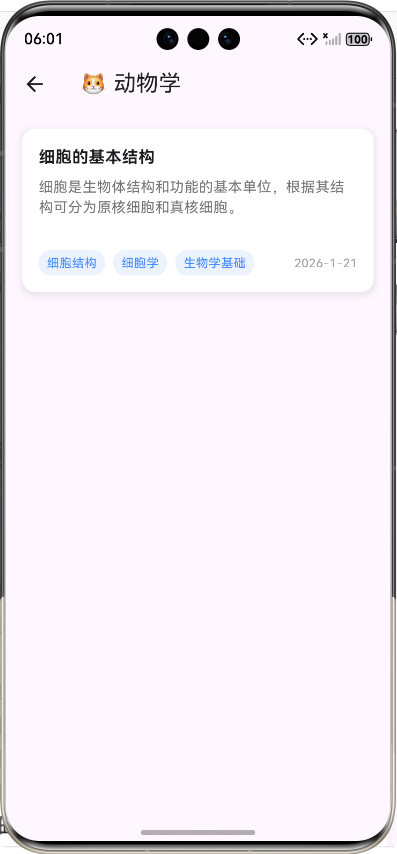
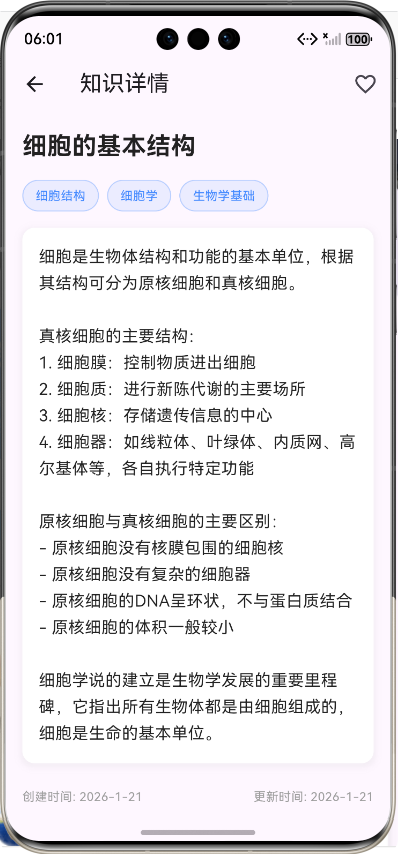
Flutter框架跨平台鸿蒙开发——生物知识APP的开发流程
前言
在移动应用开发领域,跨平台技术已经成为趋势。Flutter作为Google推出的开源UI工具包,以其"一次编写,多处运行"的特性,成为了跨平台开发的热门选择。而鸿蒙OS作为华为自主研发的分布式操作系统,也在不断发展壮大。本文将详细介绍如何使用Flutter框架开发一款跨平台的生物知识APP,并实现鸿蒙系统的适配。
项目介绍
应用概述
生物知识APP是一款专为生物学爱好者、学生和教育工作者设计的移动应用,旨在提供丰富的生物知识内容,帮助用户便捷地学习和查阅生物学相关知识。
核心功能
- 📚 知识浏览:提供丰富的生物知识内容,包括动物学、植物学、微生物学、生态学、遗传学、进化生物学等多个分类
- 🔍 搜索功能:支持按关键词搜索生物知识,快速找到所需内容
- ⭐ 收藏功能:支持收藏重要的知识内容,方便后续查阅
- 📱 跨平台兼容:基于Flutter框架开发,支持在鸿蒙OS、Android、iOS等多个平台运行
- 🎨 美观界面:采用现代化的UI设计,提供良好的用户体验
技术栈
| 技术/框架 | 版本 | 用途 |
|---|---|---|
| Flutter | 3.0+ | 跨平台UI框架 |
| Dart | 2.17+ | 开发语言 |
| SharedPreferences | 2.0+ | 本地数据存储 |
| HarmonyOS | 2.0+ | 目标平台 |
开发流程
1. 项目初始化与架构设计
1.1 项目初始化
使用Flutter CLI创建新项目:
flutter create flutter_shili
cd flutter_shili
1.2 架构设计
采用经典的三层架构设计:
- 数据模型层:定义生物知识和分类的数据结构
- 服务层:处理数据的获取、存储和业务逻辑
- UI层:实现用户界面和交互逻辑
2. 数据模型层实现
2.1 生物分类模型
/// 生物知识分类模型
class BiologyCategory {
  /// 分类ID
  final String id;

  /// 分类名称
  final String name;

  /// 分类图标
  final String icon;

  /// 构造函数
  BiologyCategory({
    required this.id,
    required this.name,
    required this.icon,
  });

  /// 从JSON创建实例
  factory BiologyCategory.fromJson(Map<String, dynamic> json) {
    return BiologyCategory(
      id: json['id'],
      name: json['name'],
      icon: json['icon'],
    );
  }

  /// 转换为JSON
  Map<String, dynamic> toJson() {
    return {
      'id': id,
      'name': name,
      'icon': icon,
    };
  }
}
2.2 生物知识模型
/// 生物知识模型
class BiologyKnowledge {
  /// 知识ID
  final String id;

  /// 知识标题
  final String title;

  /// 知识内容
  final String content;

  /// 知识分类
  final String categoryId;

  /// 知识标签
  final List<String> tags;

  /// 创建时间
  final DateTime createdAt;

  /// 更新时间
  final DateTime updatedAt;

  /// 是否收藏
  final bool isFavorite;

  /// 构造函数
  BiologyKnowledge({
    required this.id,
    required this.title,
    required this.content,
    required this.categoryId,
    required this.tags,
    required this.createdAt,
    required this.updatedAt,
    this.isFavorite = false,
  });

  /// 从JSON创建实例
  factory BiologyKnowledge.fromJson(Map<String, dynamic> json) {
    return BiologyKnowledge(
      id: json['id'],
      title: json['title'],
      content: json['content'],
      categoryId: json['categoryId'],
      tags: List<String>.from(json['tags']),
      createdAt: DateTime.parse(json['createdAt']),
      updatedAt: DateTime.parse(json['updatedAt']),
      isFavorite: json['isFavorite'] ?? false,
    );
  }

  /// 转换为JSON
  Map<String, dynamic> toJson() {
    return {
      'id': id,
      'title': title,
      'content': content,
      'categoryId': categoryId,
      'tags': tags,
      'createdAt': createdAt.toIso8601String(),
      'updatedAt': updatedAt.toIso8601String(),
      'isFavorite': isFavorite,
    };
  }

  /// 创建副本,可选择性修改属性
  BiologyKnowledge copyWith({
    String? id,
    String? title,
    String? content,
    String? categoryId,
    List<String>? tags,
    DateTime? createdAt,
    DateTime? updatedAt,
    bool? isFavorite,
  }) {
    return BiologyKnowledge(
      id: id ?? this.id,
      title: title ?? this.title,
      content: content ?? this.content,
      categoryId: categoryId ?? this.categoryId,
      tags: tags ?? this.tags,
      createdAt: createdAt ?? this.createdAt,
      updatedAt: updatedAt ?? this.updatedAt,
      isFavorite: isFavorite ?? this.isFavorite,
    );
  }
}
3. 服务层实现
3.1 生物知识服务
/// 生物知识服务类
/// 负责管理生物知识数据的获取、搜索、收藏等功能
class BiologyKnowledgeService {
  static const String _knowledgeKey = 'biology_knowledge';
  static const String _favoritesKey = 'biology_favorites';
  static const String _categoriesKey = 'biology_categories';

  Future<SharedPreferences> get _prefs async => await SharedPreferences.getInstance();

  /// 获取所有生物知识分类
  Future<List<BiologyCategory>> getCategories() async {
    try {
      // 尝试从存储中获取分类
      final prefs = await _prefs;
      final categoriesJson = prefs.getString(_categoriesKey);
      if (categoriesJson != null) {
        final List<dynamic> categoriesList = jsonDecode(categoriesJson);
        return categoriesList.map((item) => BiologyCategory.fromJson(item)).toList();
      }
    } catch (e) {
      print('获取分类失败: $e');
    }

    // 如果没有存储的分类,返回默认分类
    return _getDefaultCategories();
  }

  /// 获取默认分类
  List<BiologyCategory> _getDefaultCategories() {
    return [
      BiologyCategory(id: '1', name: '动物学', icon: '🐱'),
      BiologyCategory(id: '2', name: '植物学', icon: '🌿'),
      BiologyCategory(id: '3', name: '微生物学', icon: '🦠'),
      BiologyCategory(id: '4', name: '生态学', icon: '🌍'),
      BiologyCategory(id: '5', name: '遗传学', icon: '🧬'),
      BiologyCategory(id: '6', name: '进化生物学', icon: '🦖'),
    ];
  }

  /// 获取所有生物知识
  Future<List<BiologyKnowledge>> getAllKnowledge() async {
    try {
      // 尝试从存储中获取知识
      final prefs = await _prefs;
      final knowledgeJson = prefs.getString(_knowledgeKey);
      if (knowledgeJson != null) {
        final List<dynamic> knowledgeList = jsonDecode(knowledgeJson);
        return knowledgeList.map((item) => BiologyKnowledge.fromJson(item)).toList();
      }
    } catch (e) {
      print('获取知识失败: $e');
    }

    // 如果没有存储的知识,返回默认知识
    return _getDefaultKnowledge();
  }

  /// 搜索生物知识
  Future<List<BiologyKnowledge>> searchKnowledge(String keyword) async {
    final allKnowledge = await getAllKnowledge();
    final lowerKeyword = keyword.toLowerCase();

    return allKnowledge.where((knowledge) {
      return knowledge.title.toLowerCase().contains(lowerKeyword) ||
             knowledge.content.toLowerCase().contains(lowerKeyword) ||
             knowledge.tags.any((tag) => tag.toLowerCase().contains(lowerKeyword));
    }).toList();
  }

  /// 切换知识收藏状态
  Future<bool> toggleFavorite(String knowledgeId) async {
    try {
      final allKnowledge = await getAllKnowledge();
      final knowledgeIndex = allKnowledge.indexWhere((item) => item.id == knowledgeId);

      if (knowledgeIndex != -1) {
        // 切换收藏状态
        final updatedKnowledge = allKnowledge[knowledgeIndex].copyWith(
          isFavorite: !allKnowledge[knowledgeIndex].isFavorite,
        );

        // 更新知识列表
        allKnowledge[knowledgeIndex] = updatedKnowledge;

        // 保存更新后的知识列表
        final prefs = await _prefs;
        await prefs.setString(
          _knowledgeKey,
          jsonEncode(allKnowledge.map((item) => item.toJson()).toList()),
        );

        // 更新收藏列表
        if (updatedKnowledge.isFavorite) {
          // 添加到收藏
          final favorites = await getFavoriteKnowledge();
          if (!favorites.any((item) => item.id == knowledgeId)) {
            favorites.add(updatedKnowledge);
            await prefs.setString(
              _favoritesKey,
              jsonEncode(favorites.map((item) => item.toJson()).toList()),
            );
          }
        } else {
          // 从收藏中移除
          final favorites = await getFavoriteKnowledge();
          favorites.removeWhere((item) => item.id == knowledgeId);
          await prefs.setString(
            _favoritesKey,
            jsonEncode(favorites.map((item) => item.toJson()).toList()),
          );
        }

        return true;
      }
    } catch (e) {
      print('切换收藏状态失败: $e');
    }
    return false;
  }
}
4. UI层实现
4.1 主页/首页
/// 生物知识APP主页
/// 包含分类导航、最新知识列表等功能
class BiologyHomePage extends StatefulWidget {
const BiologyHomePage({Key? key}) : super(key: key);
_BiologyHomePageState createState() => _BiologyHomePageState();
}
class _BiologyHomePageState extends State<BiologyHomePage> {
final BiologyKnowledgeService _service = BiologyKnowledgeService();
late Future<List<BiologyCategory>> _categoriesFuture;
late Future<List<BiologyKnowledge>> _latestKnowledgeFuture;
void initState() {
super.initState();
// 初始化数据
_loadData();
}
/// 加载数据
void _loadData() {
_categoriesFuture = _service.getCategories();
_latestKnowledgeFuture = _service.getAllKnowledge().then((list) {
// 按更新时间排序,取最新的5条
list.sort((a, b) => b.updatedAt.compareTo(a.updatedAt));
return list.take(5).toList();
});
}
Widget build(BuildContext context) {
return Scaffold(
appBar: AppBar(
title: const Text('生物知识APP'),
actions: [
// 搜索按钮
IconButton(
icon: const Icon(Icons.search),
onPressed: () {
Navigator.push(
context,
MaterialPageRoute(builder: (context) => const BiologySearchPage()),
);
},
),
// 收藏按钮
IconButton(
icon: const Icon(Icons.favorite_border),
onPressed: () {
Navigator.push(
context,
MaterialPageRoute(builder: (context) => const BiologyFavoritesPage()),
);
},
),
],
),
body: SingleChildScrollView(
padding: const EdgeInsets.all(16.0),
child: Column(
crossAxisAlignment: CrossAxisAlignment.start,
children: [
// 欢迎区域
_buildWelcomeSection(),
const SizedBox(height: 24),
// 分类导航
_buildCategorySection(),
const SizedBox(height: 24),
// 最新知识
_buildLatestKnowledgeSection(),
],
),
),
);
}
/// 构建欢迎区域
Widget _buildWelcomeSection() {
return Container(
decoration: BoxDecoration(
gradient: const LinearGradient(
colors: [Colors.blueAccent, Colors.greenAccent],
begin: Alignment.topLeft,
end: Alignment.bottomRight,
),
borderRadius: BorderRadius.circular(16),
),
padding: const EdgeInsets.all(20),
child: Column(
crossAxisAlignment: CrossAxisAlignment.start,
children: [
const Text(
'探索生命的奥秘',
style: TextStyle(
fontSize: 24,
fontWeight: FontWeight.bold,
color: Colors.white,
),
),
const SizedBox(height: 8),
const Text(
'从微观世界到生态系统,了解生物的多样性与复杂性',
style: TextStyle(
fontSize: 14,
color: Colors.white70,
),
),
const SizedBox(height: 12),
ElevatedButton(
onPressed: () {
Navigator.push(
context,
MaterialPageRoute(builder: (context) => const BiologySearchPage()),
);
},
style: ElevatedButton.styleFrom(
backgroundColor: Colors.white,
foregroundColor: Colors.blueAccent,
shape: RoundedRectangleBorder(
borderRadius: BorderRadius.circular(20),
),
),
child: const Text('开始探索'),
),
],
),
);
}
/// 构建分类导航区域
Widget _buildCategorySection() {
return Column(
crossAxisAlignment: CrossAxisAlignment.start,
children: [
const Text(
'知识分类',
style: TextStyle(
fontSize: 20,
fontWeight: FontWeight.bold,
),
),
const SizedBox(height: 12),
FutureBuilder<List<BiologyCategory>>(
future: _categoriesFuture,
builder: (context, snapshot) {
if (snapshot.connectionState == ConnectionState.waiting) {
return const Center(child: CircularProgressIndicator());
} else if (snapshot.hasError) {
return const Center(child: Text('加载分类失败'));
} else if (!snapshot.hasData || snapshot.data!.isEmpty) {
return const Center(child: Text('暂无分类'));
} else {
return GridView.builder(
shrinkWrap: true,
physics: const NeverScrollableScrollPhysics(),
gridDelegate: const SliverGridDelegateWithFixedCrossAxisCount(
crossAxisCount: 3,
crossAxisSpacing: 12,
mainAxisSpacing: 12,
childAspectRatio: 1.0,
),
itemCount: snapshot.data!.length,
itemBuilder: (context, index) {
final category = snapshot.data![index];
return _buildCategoryCard(category);
},
);
}
},
),
],
);
}
}
4.2 详情页面
/// 生物知识详情页面
/// 显示生物知识的详细内容,包括标题、内容、标签、收藏功能等
class BiologyDetailPage extends StatefulWidget {
final BiologyKnowledge knowledge;
const BiologyDetailPage({Key? key, required this.knowledge}) : super(key: key);
_BiologyDetailPageState createState() => _BiologyDetailPageState();
}
class _BiologyDetailPageState extends State<BiologyDetailPage> {
final BiologyKnowledgeService _service = BiologyKnowledgeService();
late BiologyKnowledge _currentKnowledge;
bool _isFavoriting = false;
void initState() {
super.initState();
_currentKnowledge = widget.knowledge;
}
/// 切换收藏状态
Future<void> _toggleFavorite() async {
if (_isFavoriting) return;
setState(() {
_isFavoriting = true;
});
try {
final success = await _service.toggleFavorite(_currentKnowledge.id);
if (success) {
setState(() {
_currentKnowledge = _currentKnowledge.copyWith(
isFavorite: !_currentKnowledge.isFavorite,
);
});
}
} catch (e) {
print('切换收藏状态失败: $e');
} finally {
setState(() {
_isFavoriting = false;
});
}
}
Widget build(BuildContext context) {
return Scaffold(
appBar: AppBar(
title: const Text('知识详情'),
actions: [
// 收藏按钮
IconButton(
icon: Icon(
_currentKnowledge.isFavorite ? Icons.favorite : Icons.favorite_border,
color: _currentKnowledge.isFavorite ? Colors.red : null,
),
onPressed: _toggleFavorite,
tooltip: _currentKnowledge.isFavorite ? '取消收藏' : '收藏',
),
],
),
body: SingleChildScrollView(
padding: const EdgeInsets.all(16.0),
child: Column(
crossAxisAlignment: CrossAxisAlignment.start,
children: [
// 标题
Text(
_currentKnowledge.title,
style: const TextStyle(
fontSize: 24,
fontWeight: FontWeight.bold,
color: Colors.black87,
),
),
const SizedBox(height: 16),
// 标签
Wrap(
spacing: 8,
runSpacing: 8,
children: _currentKnowledge.tags.map((tag) {
return Container(
padding: const EdgeInsets.symmetric(
horizontal: 12,
vertical: 6,
),
decoration: BoxDecoration(
color: Colors.blueAccent.withOpacity(0.1),
borderRadius: BorderRadius.circular(16),
border: Border.all(
color: Colors.blueAccent.withOpacity(0.3),
width: 1,
),
),
child: Text(
tag,
style: const TextStyle(
fontSize: 12,
color: Colors.blueAccent,
),
),
);
}).toList(),
),
const SizedBox(height: 16),
// 内容
Container(
decoration: BoxDecoration(
color: Colors.white,
borderRadius: BorderRadius.circular(12),
boxShadow: [
BoxShadow(
color: Colors.grey.withOpacity(0.1),
spreadRadius: 2,
blurRadius: 4,
offset: const Offset(0, 2),
),
],
),
padding: const EdgeInsets.all(16),
child: Text(
_currentKnowledge.content,
style: const TextStyle(
fontSize: 16,
lineHeight: 1.6,
color: Colors.black87,
),
),
),
const SizedBox(height: 24),
// 操作按钮
Row(
mainAxisAlignment: MainAxisAlignment.center,
children: [
ElevatedButton.icon(
onPressed: _toggleFavorite,
icon: Icon(
_currentKnowledge.isFavorite ? Icons.favorite : Icons.favorite_border,
color: _currentKnowledge.isFavorite ? Colors.red : null,
),
label: Text(
_currentKnowledge.isFavorite ? '已收藏' : '收藏',
),
style: ElevatedButton.styleFrom(
padding: const EdgeInsets.symmetric(
horizontal: 24,
vertical: 12,
),
shape: RoundedRectangleBorder(
borderRadius: BorderRadius.circular(24),
),
),
),
const SizedBox(width: 16),
ElevatedButton.icon(
onPressed: () {
// 分享功能
ScaffoldMessenger.of(context).showSnackBar(
const SnackBar(content: Text('分享功能开发中')),
);
},
icon: const Icon(Icons.share),
label: const Text('分享'),
style: ElevatedButton.styleFrom(
backgroundColor: Colors.grey[200],
foregroundColor: Colors.black87,
padding: const EdgeInsets.symmetric(
horizontal: 24,
vertical: 12,
),
shape: RoundedRectangleBorder(
borderRadius: BorderRadius.circular(24),
),
),
),
],
),
const SizedBox(height: 32),
],
),
),
);
}
}
5. 鸿蒙系统适配
5.1 项目配置
在Flutter项目中,鸿蒙系统的适配主要通过以下步骤实现:
- 添加鸿蒙平台支持:在
flutter doctor中确保鸿蒙平台已安装 - 配置签名信息:在
ohos/entry/src/main/resources/base/element/string.json中配置应用信息 - 构建鸿蒙HAP包:使用
flutter build ohos命令构建鸿蒙应用包
5.2 运行与调试
在鸿蒙设备或模拟器上运行应用:
flutter run -d ohos
开发流程图
核心功能实现
1. 知识浏览功能
功能描述:用户可以浏览应用提供的生物知识内容,包括最新知识和按分类浏览。
实现要点:
- 使用
FutureBuilder异步加载知识数据 - 实现知识列表的分页显示
- 支持知识卡片的点击跳转
代码展示:
/// 构建最新知识区域
Widget _buildLatestKnowledgeSection() {
  return Column(
    crossAxisAlignment: CrossAxisAlignment.start,
    children: [
      Row(
        mainAxisAlignment: MainAxisAlignment.spaceBetween,
        children: [
          const Text(
            '最新知识',
            style: TextStyle(
              fontSize: 20,
              fontWeight: FontWeight.bold,
            ),
          ),
          TextButton(
            onPressed: () {
              // 导航到全部知识页面
            },
            child: const Text('查看全部'),
          ),
        ],
      ),
      const SizedBox(height: 12),
      FutureBuilder<List<BiologyKnowledge>>(
        future: _latestKnowledgeFuture,
        builder: (context, snapshot) {
          if (snapshot.connectionState == ConnectionState.waiting) {
            return const Center(child: CircularProgressIndicator());
          } else if (snapshot.hasError) {
            return const Center(child: Text('加载知识失败'));
          } else if (!snapshot.hasData || snapshot.data!.isEmpty) {
            return const Center(child: Text('暂无知识'));
          } else {
            return ListView.builder(
              shrinkWrap: true,
              physics: const NeverScrollableScrollPhysics(),
              itemCount: snapshot.data!.length,
              itemBuilder: (context, index) {
                final knowledge = snapshot.data![index];
                return _buildKnowledgeCard(knowledge);
              },
            );
          }
        },
      ),
    ],
  );
}
2. 搜索功能
功能描述:用户可以通过关键词搜索生物知识,快速找到所需内容。
实现要点:
- 实现搜索框和搜索按钮
- 支持按标题、内容、标签搜索
- 显示搜索结果列表
代码展示:
/// 执行搜索
void _performSearch() {
  final keyword = _searchController.text.trim();
  if (keyword.isEmpty) return;

  setState(() {
    _isSearching = true;
    _searchKeyword = keyword;
    _searchResultsFuture = _service.searchKnowledge(keyword);
  });
}

/// 构建搜索结果
Widget _buildSearchResults() {
  return FutureBuilder<List<BiologyKnowledge>>(
    future: _searchResultsFuture,
    builder: (context, snapshot) {
      if (_isSearching && snapshot.connectionState == ConnectionState.waiting) {
        return const Center(child: CircularProgressIndicator());
      } else if (snapshot.hasError) {
        return const Center(child: Text('搜索失败,请重试'));
      } else if (!snapshot.hasData) {
        return const Center(child: Text('请输入关键词进行搜索'));
      } else if (snapshot.data!.isEmpty) {
        return Center(
          child: Column(
            mainAxisAlignment: MainAxisAlignment.center,
            children: [
              const Icon(Icons.search_off, size: 64, color: Colors.grey),
              const SizedBox(height: 16),
              Text('未找到与"$_searchKeyword"相关的知识'),
            ],
          ),
        );
      } else {
        return ListView.builder(
          padding: const EdgeInsets.all(16.0),
          itemCount: snapshot.data!.length,
          itemBuilder: (context, index) {
            final knowledge = snapshot.data![index];
            return _buildSearchResultCard(knowledge);
          },
        );
      }
    },
  );
}
3. 收藏功能
功能描述:用户可以收藏重要的知识内容,方便后续查阅。
实现要点:
- 实现收藏和取消收藏的逻辑
- 保存收藏状态到本地存储
- 显示收藏的知识列表
代码展示:
/// 切换收藏状态
Future<bool> toggleFavorite(String knowledgeId) async {
  try {
    final allKnowledge = await getAllKnowledge();
    final knowledgeIndex = allKnowledge.indexWhere((item) => item.id == knowledgeId);

    if (knowledgeIndex != -1) {
      // 切换收藏状态
      final updatedKnowledge = allKnowledge[knowledgeIndex].copyWith(
        isFavorite: !allKnowledge[knowledgeIndex].isFavorite,
      );

      // 更新知识列表
      allKnowledge[knowledgeIndex] = updatedKnowledge;

      // 保存更新后的知识列表
      final prefs = await _prefs;
      await prefs.setString(
        _knowledgeKey,
        jsonEncode(allKnowledge.map((item) => item.toJson()).toList()),
      );

      // 更新收藏列表
      if (updatedKnowledge.isFavorite) {
        // 添加到收藏
        final favorites = await getFavoriteKnowledge();
        if (!favorites.any((item) => item.id == knowledgeId)) {
          favorites.add(updatedKnowledge);
          await prefs.setString(
            _favoritesKey,
            jsonEncode(favorites.map((item) => item.toJson()).toList()),
          );
        }
      } else {
        // 从收藏中移除
        final favorites = await getFavoriteKnowledge();
        favorites.removeWhere((item) => item.id == knowledgeId);
        await prefs.setString(
          _favoritesKey,
          jsonEncode(favorites.map((item) => item.toJson()).toList()),
        );
      }

      return true;
    }
  } catch (e) {
    print('切换收藏状态失败: $e');
  }
  return false;
}
性能优化
1. 数据加载优化
- 使用
FutureBuilder和StreamBuilder实现异步数据加载 - 实现数据缓存,减少重复网络请求
- 使用分页加载,避免一次性加载大量数据
2. UI性能优化
- 使用
const构造器创建不变的Widget - 实现Widget的懒加载
- 避免在build方法中执行耗时操作
- 使用
ListView.builder等高效的列表控件
3. 鸿蒙系统适配优化
- 针对鸿蒙系统的特性进行UI适配
- 优化应用的启动速度
- 确保应用在鸿蒙系统上的稳定性
测试与调试
1. 单元测试
void main() {
  test('BiologyKnowledgeService test', () async {
    final service = BiologyKnowledgeService();

    // 测试获取分类
    final categories = await service.getCategories();
    expect(categories.length, greaterThan(0));

    // 测试获取知识
    final knowledgeList = await service.getAllKnowledge();
    expect(knowledgeList.length, greaterThan(0));

    // 测试搜索功能
    final searchResults = await service.searchKnowledge('DNA');
    expect(searchResults.length, greaterThan(0));
  });
}
2. 集成测试
void main() {
  integrationTest(
    'biology app test',
    ($) async {
      // 启动应用
      await $.pumpWidget(const MyApp());

      // 测试主页加载
      await $.pumpAndSettle();
      expect(find.text('生物知识APP'), findsOneWidget);

      // 测试分类导航
      await $.tap(find.text('动物学'));
      await $.pumpAndSettle();
      expect(find.text('动物学'), findsOneWidget);

      // 测试返回主页
      await $.tap(find.byIcon(Icons.arrow_back));
      await $.pumpAndSettle();
      expect(find.text('生物知识APP'), findsOneWidget);
    },
  );
}
总结
本文详细介绍了使用Flutter框架开发跨平台生物知识APP的完整流程,包括项目初始化、架构设计、核心功能实现、鸿蒙系统适配等多个方面。通过本文的指导,开发者可以快速上手Flutter跨平台开发,并实现鸿蒙系统的适配。
项目亮点
- 模块化架构:采用清晰的三层架构设计,代码结构合理,易于维护
- 丰富的功能:实现了知识浏览、分类导航、搜索、收藏等核心功能
- 良好的用户体验:采用现代化的UI设计,提供流畅的交互体验
- 跨平台兼容:基于Flutter框架开发,支持在多个平台运行
- 鸿蒙系统适配:成功实现了鸿蒙OS的适配,扩大了应用的覆盖范围
未来展望
- 添加用户账户系统:支持云端同步收藏和阅读历史
- 增加知识测评功能:增强学习互动性
- 添加知识分享功能:支持将知识分享到社交媒体
- 实现离线缓存:支持离线阅读功能
- 优化性能:进一步提升应用的运行速度和稳定性
通过不断的迭代和优化,生物知识APP将成为生物学学习和教学的有力工具,为用户提供更加丰富和便捷的学习体验。
参考资料
欢迎加入开源鸿蒙跨平台社区:https://openharmonycrossplatform.csdn.net

开源鸿蒙跨平台开发社区汇聚开发者与厂商,共建“一次开发,多端部署”的开源生态,致力于降低跨端开发门槛,推动万物智联创新。
更多推荐
 17
17 0
0- 0


 已为社区贡献25条内容

所有评论(0)