Flutter框架跨平台鸿蒙开发——Container裁剪效果
override@override),),'自定义形状',),),),),),
·
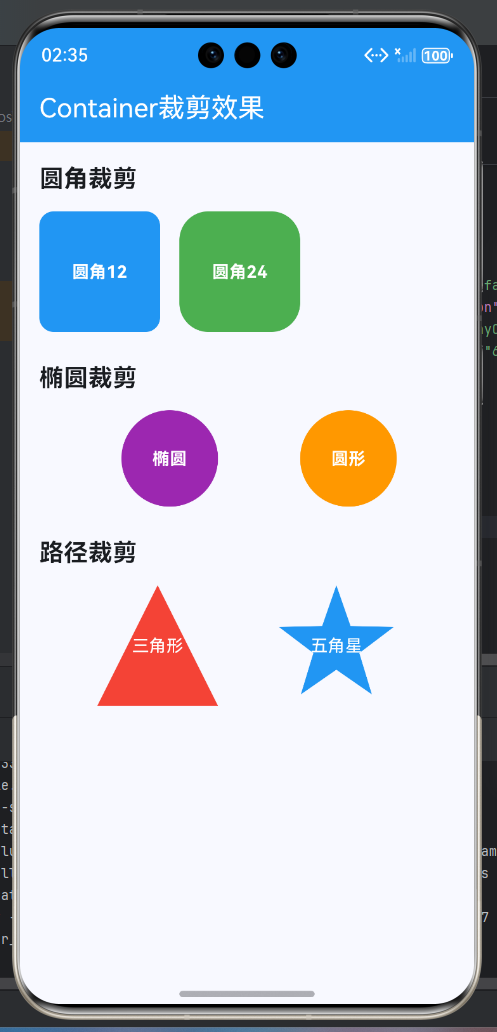
Container的clipBehavior属性提供了强大的裁剪功能,可以控制子组件超出容器边界时的显示方式。本文将深入探讨Container的裁剪效果,包括裁剪类型、圆角裁剪、路径裁剪、自定义裁剪以及实际应用场景。
一、裁剪基础
Flutter提供了多种裁剪方式,每种裁剪方式都有其特定的应用场景。
1.1 裁剪类型对比
1.2 裁剪特性对比
| 裁剪类型 | 边缘质量 | 性能 | 适用场景 | 内存消耗 |
|---|---|---|---|---|
| none | 无裁剪 | 最好 | 不需要裁剪 | 最低 |
| hardEdge | 锯齿 | 好 | 简单矩形 | 低 |
| antiAlias | 平滑 | 中等 | 圆角圆形 | 中 |
| antiAliasWithSaveLayer | 最佳 | 较差 | 复杂动画 | 高 |
二、圆角裁剪
2.1 基础圆角裁剪
class RoundedClipContainer extends StatelessWidget {
const RoundedClipContainer({super.key});
Widget build(BuildContext context) {
return Wrap(
spacing: 16,
runSpacing: 16,
children: [
// 小圆角
Container(
width: 120,
height: 100,
decoration: BoxDecoration(
color: Colors.blue,
borderRadius: BorderRadius.circular(8),
image: const DecorationImage(
image: NetworkImage('https://via.placeholder.com/200'),
fit: BoxFit.cover,
),
),
clipBehavior: Clip.antiAlias,
child: const Center(
child: Text(
'小圆角',
style: TextStyle(color: Colors.white, fontWeight: FontWeight.bold),
),
),
),
// 中圆角
Container(
width: 120,
height: 100,
decoration: BoxDecoration(
color: Colors.green,
borderRadius: BorderRadius.circular(16),
image: const DecorationImage(
image: NetworkImage('https://via.placeholder.com/200'),
fit: BoxFit.cover,
),
),
clipBehavior: Clip.antiAlias,
child: const Center(
child: Text(
'中圆角',
style: TextStyle(color: Colors.white, fontWeight: FontWeight.bold),
),
),
),
// 大圆角
Container(
width: 120,
height: 100,
decoration: BoxDecoration(
color: Colors.orange,
borderRadius: BorderRadius.circular(24),
image: const DecorationImage(
image: NetworkImage('https://via.placeholder.com/200'),
fit: BoxFit.cover,
),
),
clipBehavior: Clip.antiAlias,
child: const Center(
child: Text(
'大圆角',
style: TextStyle(color: Colors.white, fontWeight: FontWeight.bold),
),
),
),
],
);
}
}
2.2 不规则圆角
class IrregularRoundedClip extends StatelessWidget {
const IrregularRoundedClip({super.key});
Widget build(BuildContext context) {
return Row(
mainAxisAlignment: MainAxisAlignment.spaceEvenly,
children: [
// 只有左上圆角
Container(
width: 100,
height: 100,
decoration: BoxDecoration(
color: Colors.purple,
borderRadius: const BorderRadius.only(
topLeft: Radius.circular(20),
),
),
clipBehavior: Clip.antiAlias,
child: const Center(
child: Text(
'左上',
style: TextStyle(color: Colors.white),
),
),
),
// 对角圆角
Container(
width: 100,
height: 100,
decoration: BoxDecoration(
color: Colors.teal,
borderRadius: const BorderRadius.only(
topLeft: Radius.circular(20),
bottomRight: Radius.circular(20),
),
),
clipBehavior: Clip.antiAlias,
child: const Center(
child: Text(
'对角',
style: TextStyle(color: Colors.white),
),
),
),
// 顶部圆角
Container(
width: 100,
height: 100,
decoration: BoxDecoration(
color: Colors.red,
borderRadius: const BorderRadius.only(
topLeft: Radius.circular(20),
topRight: Radius.circular(20),
),
),
clipBehavior: Clip.antiAlias,
child: const Center(
child: Text(
'顶部',
style: TextStyle(color: Colors.white),
),
),
),
],
);
}
}
2.3 椭圆和圆形裁剪
class EllipseClipContainer extends StatelessWidget {
const EllipseClipContainer({super.key});
Widget build(BuildContext context) {
return Row(
mainAxisAlignment: MainAxisAlignment.spaceEvenly,
children: [
// 椭圆
Container(
width: 120,
height: 80,
decoration: const BoxDecoration(
color: Colors.blue,
shape: BoxShape.circle,
),
clipBehavior: Clip.antiAlias,
child: const Center(
child: Text(
'椭圆',
style: TextStyle(color: Colors.white, fontWeight: FontWeight.bold),
),
),
),
// 圆形
Container(
width: 100,
height: 100,
decoration: const BoxDecoration(
color: Colors.green,
shape: BoxShape.circle,
),
clipBehavior: Clip.antiAlias,
child: const Center(
child: Text(
'圆形',
style: TextStyle(color: Colors.white, fontWeight: FontWeight.bold),
),
),
),
// 圆形头像
Container(
width: 80,
height: 80,
decoration: BoxDecoration(
border: Border.all(color: Colors.white, width: 3),
shape: BoxShape.circle,
),
clipBehavior: Clip.antiAlias,
child: const CircleAvatar(
backgroundImage: NetworkImage('https://via.placeholder.com/150'),
radius: 40,
),
),
],
);
}
}
三、Clip组件裁剪
3.1 ClipRRect矩形圆角
class ClipRRectExample extends StatelessWidget {
const ClipRRectExample({super.key});
Widget build(BuildContext context) {
return Column(
children: [
// ClipRRect基础
ClipRRect(
borderRadius: BorderRadius.circular(20),
child: Container(
width: 200,
height: 100,
color: Colors.blue,
child: const Center(
child: Text(
'ClipRRect',
style: TextStyle(color: Colors.white, fontSize: 20),
),
),
),
),
const SizedBox(height: 16),
// 图片裁剪
ClipRRect(
borderRadius: BorderRadius.circular(16),
child: Image.network(
'https://via.placeholder.com/200x120',
width: 200,
height: 120,
fit: BoxFit.cover,
),
),
],
);
}
}
3.2 ClipOval椭圆裁剪
class ClipOvalExample extends StatelessWidget {
const ClipOvalExample({super.key});
Widget build(BuildContext context) {
return Row(
mainAxisAlignment: MainAxisAlignment.spaceEvenly,
children: [
// 椭圆
ClipOval(
child: Container(
width: 120,
height: 80,
color: Colors.orange,
child: const Center(
child: Text(
'椭圆',
style: TextStyle(color: Colors.white),
),
),
),
),
// 圆形
ClipOval(
child: Container(
width: 80,
height: 80,
color: Colors.purple,
child: const Center(
child: Text(
'圆形',
style: TextStyle(color: Colors.white, fontWeight: FontWeight.bold),
),
),
),
),
// 图片圆形
ClipOval(
child: Image.network(
'https://via.placeholder.com/100',
width: 80,
height: 80,
fit: BoxFit.cover,
),
),
],
);
}
}
3.3 ClipRect矩形裁剪
class ClipRectExample extends StatelessWidget {
const ClipRectExample({super.key});
Widget build(BuildContext context) {
return Container(
width: 200,
height: 150,
color: Colors.grey.shade200,
child: Stack(
children: [
Positioned(
left: -50,
top: 20,
child: ClipRect(
child: Container(
width: 200,
height: 80,
color: Colors.blue,
child: const Center(
child: Text(
'部分显示',
style: TextStyle(color: Colors.white),
),
),
),
),
),
],
),
);
}
}
四、路径裁剪
4.1 ClipPath基础
class ClipPathExample extends StatelessWidget {
const ClipPathExample({super.key});
Widget build(BuildContext context) {
return Row(
mainAxisAlignment: MainAxisAlignment.spaceEvenly,
children: [
// 三角形
ClipPath(
clipper: const TriangleClipper(),
child: Container(
width: 100,
height: 100,
color: Colors.red,
child: const Center(
child: Text(
'三角形',
style: TextStyle(color: Colors.white),
),
),
),
),
// 五边形
ClipPath(
clipper: const PentagonClipper(),
child: Container(
width: 100,
height: 100,
color: Colors.green,
child: const Center(
child: Text(
'五边形',
style: TextStyle(color: Colors.white),
),
),
),
),
// 六边形
ClipPath(
clipper: const HexagonClipper(),
child: Container(
width: 100,
height: 100,
color: Colors.blue,
child: const Center(
child: Text(
'六边形',
style: TextStyle(color: Colors.white),
),
),
),
),
],
);
}
}
class TriangleClipper extends CustomClipper<Path> {
const TriangleClipper();
Path getClip(Size size) {
final path = Path()
..moveTo(size.width / 2, 0)
..lineTo(size.width, size.height)
..lineTo(0, size.height)
..close();
return path;
}
bool shouldReclip(covariant CustomClipper<Path> oldClipper) => false;
}
class PentagonClipper extends CustomClipper<Path> {
const PentagonClipper();
Path getClip(Size size) {
final path = Path();
final center = Offset(size.width / 2, size.height / 2);
final radius = size.width / 2;
for (int i = 0; i < 5; i++) {
final angle = (i * 2 * 3.14159) / 5 - 3.14159 / 2;
final x = center.dx + radius * cos(angle);
final y = center.dy + radius * sin(angle);
if (i == 0) {
path.moveTo(x, y);
} else {
path.lineTo(x, y);
}
}
path.close();
return path;
}
bool shouldReclip(covariant CustomClipper<Path> oldClipper) => false;
}
class HexagonClipper extends CustomClipper<Path> {
const HexagonClipper();
Path getClip(Size size) {
final path = Path();
final center = Offset(size.width / 2, size.height / 2);
final radius = size.width / 2;
for (int i = 0; i < 6; i++) {
final angle = (i * 2 * 3.14159) / 6;
final x = center.dx + radius * cos(angle);
final y = center.dy + radius * sin(angle);
if (i == 0) {
path.moveTo(x, y);
} else {
path.lineTo(x, y);
}
}
path.close();
return path;
}
bool shouldReclip(covariant CustomClipper<Path> oldClipper) => false;
}
4.2 波浪形裁剪
class WaveClipper extends CustomClipper<Path> {
final double waveHeight;
final double waveLength;
const WaveClipper({
this.waveHeight = 20,
this.waveLength = 100,
});
Path getClip(Size size) {
final path = Path()
..moveTo(0, size.height)
..lineTo(0, waveHeight);
for (double x = 0; x <= size.width; x++) {
final y = waveHeight +
sin(x * 2 * 3.14159 / waveLength) * waveHeight;
path.lineTo(x, y);
}
path.lineTo(size.width, size.height);
path.close();
return path;
}
bool shouldReclip(covariant WaveClipper oldClipper) =>
waveHeight != oldClipper.waveHeight ||
waveLength != oldClipper.waveLength;
}
4.3 星形裁剪
class StarClipper extends CustomClipper<Path> {
final int points;
final double innerRadiusRatio;
const StarClipper({
this.points = 5,
this.innerRadiusRatio = 0.5,
});
Path getClip(Size size) {
final path = Path();
final center = Offset(size.width / 2, size.height / 2);
final outerRadius = size.width / 2;
final innerRadius = outerRadius * innerRadiusRatio;
for (int i = 0; i < points * 2; i++) {
final radius = i % 2 == 0 ? outerRadius : innerRadius;
final angle = (i * 3.14159) / points - 3.14159 / 2;
final x = center.dx + radius * cos(angle);
final y = center.dy + radius * sin(angle);
if (i == 0) {
path.moveTo(x, y);
} else {
path.lineTo(x, y);
}
}
path.close();
return path;
}
bool shouldReclip(covariant StarClipper oldClipper) =>
points != oldClipper.points ||
innerRadiusRatio != oldClipper.innerRadiusRatio;
}
五、自定义裁剪
5.1 不规则形状裁剪
class CustomShapeClipper extends CustomClipper<Path> {
Path getClip(Size size) {
final path = Path()
..moveTo(0, size.height * 0.3)
..quadraticBezierTo(
size.width * 0.3, 0,
size.width * 0.5, size.height * 0.2,
)
..quadraticBezierTo(
size.width * 0.7, size.height * 0.4,
size.width, size.height * 0.3,
)
..lineTo(size.width, size.height)
..lineTo(0, size.height)
..close();
return path;
}
bool shouldReclip(covariant CustomClipper<Path> oldClipper) => false;
}
class CustomShapeContainer extends StatelessWidget {
const CustomShapeContainer({super.key});
Widget build(BuildContext context) {
return Container(
width: 200,
height: 150,
color: Colors.grey.shade200,
child: ClipPath(
clipper: const CustomShapeClipper(),
child: Container(
width: 200,
height: 150,
decoration: BoxDecoration(
gradient: LinearGradient(
colors: [Colors.purple, Colors.blue],
),
),
child: const Center(
child: Text(
'自定义形状',
style: TextStyle(
color: Colors.white,
fontSize: 18,
fontWeight: FontWeight.bold,
),
),
),
),
),
);
}
}
5.2 组合裁剪
class CompositeClipContainer extends StatelessWidget {
const CompositeClipContainer({super.key});
Widget build(BuildContext context) {
return Container(
width: 200,
height: 200,
color: Colors.grey.shade200,
child: ClipPath(
clipper: const StarClipper(points: 5),
child: ClipRRect(
borderRadius: BorderRadius.circular(10),
child: Container(
decoration: BoxDecoration(
gradient: RadialGradient(
colors: [Colors.orange, Colors.red],
),
),
child: const Center(
child: Text(
'组合裁剪',
style: TextStyle(
color: Colors.white,
fontWeight: FontWeight.bold,
),
),
),
),
),
),
);
}
}
六、裁剪动画
6.1 圆角动画
class AnimatedRoundedClipContainer extends StatefulWidget {
const AnimatedRoundedClipContainer({super.key});
State<AnimatedRoundedClipContainer> createState() => _AnimatedRoundedClipContainerState();
}
class _AnimatedRoundedClipContainerState extends State<AnimatedRoundedClipContainer>
with SingleTickerProviderStateMixin {
late AnimationController _controller;
late Animation<double> _animation;
void initState() {
super.initState();
_controller = AnimationController(
duration: const Duration(seconds: 2),
vsync: this,
)..repeat(reverse: true);
_animation = Tween<double>(begin: 0, end: 50).animate(
CurvedAnimation(
parent: _controller,
curve: Curves.easeInOut,
),
);
}
void dispose() {
_controller.dispose();
super.dispose();
}
Widget build(BuildContext context) {
return AnimatedBuilder(
animation: _animation,
builder: (context, child) {
return ClipRRect(
borderRadius: BorderRadius.circular(_animation.value),
child: Container(
width: 200,
height: 100,
color: Colors.blue,
child: const Center(
child: Text(
'圆角动画',
style: TextStyle(
color: Colors.white,
fontSize: 18,
fontWeight: FontWeight.bold,
),
),
),
),
);
},
);
}
}
6.2 形状变换动画
class ShapeMorphContainer extends StatefulWidget {
const ShapeMorphContainer({super.key});
State<ShapeMorphContainer> createState() => _ShapeMorphContainerState();
}
class _ShapeMorphContainerState extends State<ShapeMorphContainer>
with SingleTickerProviderStateMixin {
late AnimationController _controller;
late Animation<double> _animation;
void initState() {
super.initState();
_controller = AnimationController(
duration: const Duration(seconds: 4),
vsync: this,
)..repeat();
_animation = Tween<double>(begin: 0, end: 1).animate(_controller);
}
void dispose() {
_controller.dispose();
super.dispose();
}
Widget build(BuildContext context) {
return AnimatedBuilder(
animation: _animation,
builder: (context, child) {
return Container(
width: 150,
height: 150,
child: ClipPath(
clipper: _MorphingClipper(animation.value),
child: Container(
decoration: BoxDecoration(
gradient: LinearGradient(
colors: [
Colors.purple,
Colors.pink,
],
),
),
child: const Center(
child: Text(
'形状变换',
style: TextStyle(
color: Colors.white,
fontWeight: FontWeight.bold,
),
),
),
),
),
);
},
);
}
}
class _MorphingClipper extends CustomClipper<Path> {
final double progress;
_MorphingClipper(this.progress);
Path getClip(Size size) {
final path = Path();
final center = Offset(size.width / 2, size.height / 2);
final radius = size.width / 2;
final sides = 3 + progress * 5; // 3到8边形
final sideCount = sides.toInt();
for (int i = 0; i < sideCount; i++) {
final angle = (i * 2 * 3.14159) / sideCount - 3.14159 / 2;
final x = center.dx + radius * cos(angle);
final y = center.dy + radius * sin(angle);
if (i == 0) {
path.moveTo(x, y);
} else {
path.lineTo(x, y);
}
}
path.close();
return path;
}
bool shouldReclip(covariant _MorphingClipper oldClipper) =>
progress != oldClipper.progress;
}
七、裁剪应用场景
7.1 头像裁剪
class AvatarClipContainer extends StatelessWidget {
const AvatarClipContainer({super.key});
Widget build(BuildContext context) {
return Row(
mainAxisAlignment: MainAxisAlignment.spaceEvenly,
children: [
// 圆形头像
ClipOval(
child: Image.network(
'https://via.placeholder.com/80',
width: 80,
height: 80,
fit: BoxFit.cover,
),
),
// 圆角头像
ClipRRect(
borderRadius: BorderRadius.circular(12),
child: Image.network(
'https://via.placeholder.com/80x100',
width: 80,
height: 100,
fit: BoxFit.cover,
),
),
// 六边形头像
ClipPath(
clipper: const HexagonClipper(),
child: Image.network(
'https://via.placeholder.com/80',
width: 80,
height: 80,
fit: BoxFit.cover,
),
),
],
);
}
}
7.2 卡片裁剪
class CardClipContainer extends StatelessWidget {
const CardClipContainer({super.key});
Widget build(BuildContext context) {
return Container(
width: 200,
decoration: BoxDecoration(
gradient: LinearGradient(
colors: [Colors.blue.shade100, Colors.blue.shade300],
),
borderRadius: BorderRadius.circular(16),
),
child: ClipPath(
clipper: const WaveClipper(waveHeight: 15),
child: Container(
height: 100,
decoration: BoxDecoration(
gradient: LinearGradient(
colors: [Colors.blue, Colors.purple],
),
),
child: const Center(
child: Text(
'波浪卡片',
style: TextStyle(
color: Colors.white,
fontSize: 18,
fontWeight: FontWeight.bold,
),
),
),
),
),
);
}
}
八、完整裁剪示例
class ContainerClipExample extends StatelessWidget {
const ContainerClipExample({super.key});
Widget build(BuildContext context) {
return Scaffold(
appBar: AppBar(
title: const Text('Container裁剪效果'),
backgroundColor: Colors.blue,
foregroundColor: Colors.white,
),
body: ListView(
padding: const EdgeInsets.all(16),
children: [
const Text(
'圆角裁剪',
style: TextStyle(fontSize: 20, fontWeight: FontWeight.bold),
),
const SizedBox(height: 12),
const RoundedClipContainer(),
const SizedBox(height: 16),
const IrregularRoundedClip(),
const SizedBox(height: 16),
const EllipseClipContainer(),
const SizedBox(height: 24),
const Text(
'Clip组件裁剪',
style: TextStyle(fontSize: 20, fontWeight: FontWeight.bold),
),
const SizedBox(height: 12),
const ClipRRectExample(),
const SizedBox(height: 16),
const ClipOvalExample(),
const SizedBox(height: 24),
const Text(
'路径裁剪',
style: TextStyle(fontSize: 20, fontWeight: FontWeight.bold),
),
const SizedBox(height: 12),
const ClipPathExample(),
const SizedBox(height: 16),
const CustomShapeContainer(),
const SizedBox(height: 16),
const CompositeClipContainer(),
const SizedBox(height: 24),
const Text(
'裁剪动画',
style: TextStyle(fontSize: 20, fontWeight: FontWeight.bold),
),
const SizedBox(height: 12),
const AnimatedRoundedClipContainer(),
const SizedBox(height: 16),
const ShapeMorphContainer(),
const SizedBox(height: 24),
const Text(
'应用场景',
style: TextStyle(fontSize: 20, fontWeight: FontWeight.bold),
),
const SizedBox(height: 12),
const AvatarClipContainer(),
const SizedBox(height: 16),
const CardClipContainer(),
],
),
);
}
}
欢迎加入开源鸿蒙跨平台社区:https://openharmonycrossplatform.csdn.net

开源鸿蒙跨平台开发社区汇聚开发者与厂商,共建“一次开发,多端部署”的开源生态,致力于降低跨端开发门槛,推动万物智联创新。
更多推荐

 13
13 0
0- 0



 已为社区贡献21条内容

所有评论(0)