flutter_for_openharmony口腔护理app实战+刷牙记录实现
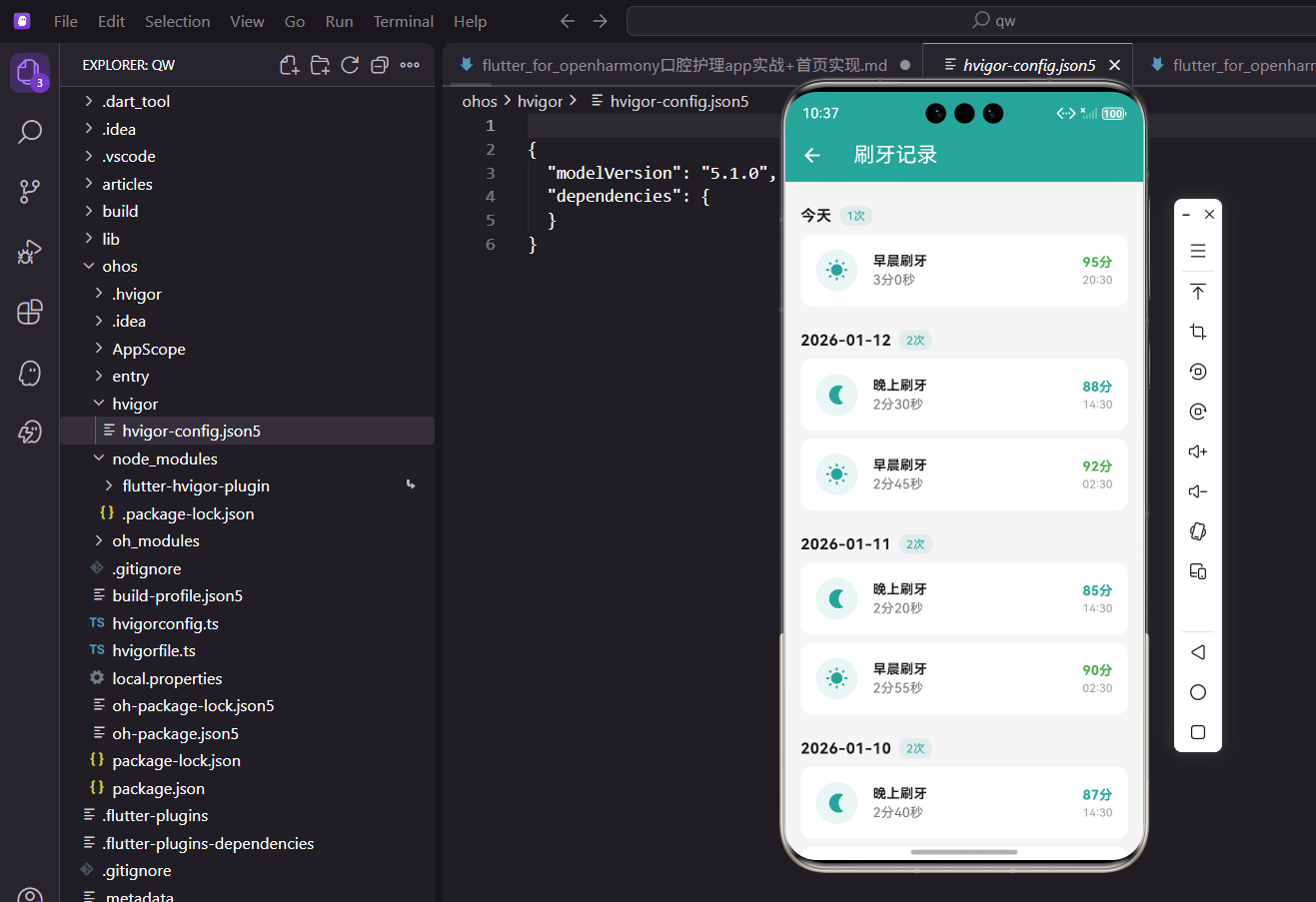
本文介绍了Flutter中实现刷牙记录页面的关键步骤。主要内容包括:1) 按日期分组展示记录,2) 区分早晨、中午、晚上刷牙时段,3) 展示刷牙时长、评分等详细信息,4) 处理无记录状态。技术要点涉及数据分组处理、列表构建、卡片组件设计等,通过日期排序、时段图标和简洁布局,实现了直观易用的记录查看功能。
引言
刷牙记录是口腔护理应用的核心功能之一。通过记录每次刷牙的时间、时长和评分,用户可以追踪自己的刷牙习惯,了解护理质量的变化趋势。一个设计良好的刷牙记录页面,不仅要展示数据,还要让用户一目了然地看到自己的护理情况。
本文将详细介绍如何在 Flutter 中实现一个按日期分组、信息丰富的刷牙记录列表页面。
功能设计
刷牙记录页面需要实现以下功能:
- 按日期分组:将记录按天分组展示,便于用户查看每天的刷牙情况
- 时段标识:区分早晨、中午、晚上的刷牙记录
- 详细信息:展示刷牙时长、评分、具体时间等信息
- 空状态处理:没有记录时显示友好的提示
页面基础结构
刷牙记录页面使用 StatelessWidget 实现,数据通过 Consumer 从 AppProvider 获取:
class BrushHistoryPage extends StatelessWidget {
const BrushHistoryPage({super.key});
Widget build(BuildContext context) {
return Scaffold(
appBar: AppBar(title: const Text('刷牙记录')),
body: Consumer<AppProvider>(
builder: (context, provider, _) {
if (provider.brushRecords.isEmpty) {
return const Center(child: Text('暂无刷牙记录'));
}
首先检查记录是否为空,如果没有记录则显示居中的提示文字。这种空状态处理是良好用户体验的基础。
数据分组处理
将刷牙记录按日期分组是这个页面的关键逻辑:
          // 按日期分组
          final grouped = <String, List>{};
          for (var record in provider.brushRecords) {
            final dateKey = DateFormat('yyyy-MM-dd').format(record.dateTime);
            grouped.putIfAbsent(dateKey, () => []).add(record);
          }

          final dates = grouped.keys.toList()..sort((a, b) => b.compareTo(a));
使用 Map 来存储分组数据,日期字符串作为键,记录列表作为值。putIfAbsent 方法确保每个日期只创建一次列表。最后对日期进行降序排序,让最新的记录显示在最前面。
列表构建
使用 ListView.builder 构建分组列表:
          return ListView.builder(
            padding: const EdgeInsets.all(16),
            itemCount: dates.length,
            itemBuilder: (context, index) {
              final date = dates[index];
              final records = grouped[date]!;
              final isToday = date == DateFormat('yyyy-MM-dd').format(DateTime.now());
itemCount 设为日期数量而非记录数量,因为我们是按日期分组展示。通过比较日期字符串判断是否为今天。
日期标题区域
每个日期组的标题区域展示日期和当天刷牙次数:
              return Column(
                crossAxisAlignment: CrossAxisAlignment.start,
                children: [
                  Padding(
                    padding: const EdgeInsets.symmetric(vertical: 8),
                    child: Row(
                      children: [
                        Text(
                          isToday ? '今天' : date,
                          style: const TextStyle(fontWeight: FontWeight.bold, fontSize: 16),
                        ),
                        const SizedBox(width: 8),
                        Container(
                          padding: const EdgeInsets.symmetric(horizontal: 8, vertical: 2),
                          decoration: BoxDecoration(
                            color: const Color(0xFF26A69A).withOpacity(0.1),
                            borderRadius: BorderRadius.circular(10),
                          ),
                          child: Text(
                            '${records.length}次',
                            style: const TextStyle(color: Color(0xFF26A69A), fontSize: 12),
                          ),
                        ),
                      ],
                    ),
                  ),
如果是今天的记录,显示"今天"而不是日期,更加友好。次数标签使用主题色的浅色背景,形成视觉焦点。
记录卡片列表
每个日期下展示该日的所有刷牙记录:
                  ...records.map((record) => _buildRecordCard(record)),
                  const SizedBox(height: 8),
                ],
              );
            },
          );
        },
      ),
    );
  }
使用展开运算符将记录映射为卡片组件列表。每个日期组之间留有间距,保持视觉上的分隔。
记录卡片组件
记录卡片是展示单条刷牙记录的核心组件:
Widget _buildRecordCard(dynamic record) {
  String typeLabel;
  IconData typeIcon;
  switch (record.type) {
    case 'morning':
      typeLabel = '早晨';
      typeIcon = Icons.wb_sunny;
      break;
    case 'noon':
      typeLabel = '中午';
      typeIcon = Icons.wb_cloudy;
      break;
    case 'evening':
      typeLabel = '晚上';
      typeIcon = Icons.nightlight;
      break;
    default:
      typeLabel = '其他';
      typeIcon = Icons.access_time;
  }
根据刷牙时段选择对应的标签和图标。早晨用太阳图标,中午用云朵图标,晚上用月亮图标,这种视觉设计直观易懂。
卡片的容器样式:
  return Container(
    margin: const EdgeInsets.only(bottom: 8),
    padding: const EdgeInsets.all(16),
    decoration: BoxDecoration(
      color: Colors.white,
      borderRadius: BorderRadius.circular(12),
    ),
    child: Row(
      children: [
        Container(
          padding: const EdgeInsets.all(10),
          decoration: BoxDecoration(
            color: const Color(0xFF26A69A).withOpacity(0.1),
            shape: BoxShape.circle,
          ),
          child: Icon(typeIcon, color: const Color(0xFF26A69A)),
        ),
        const SizedBox(width: 16),
卡片使用白色背景和圆角设计,图标放在圆形浅色容器中,与应用整体风格保持一致。
中间区域展示刷牙类型和时长:
        Expanded(
          child: Column(
            crossAxisAlignment: CrossAxisAlignment.start,
            children: [
              Text('$typeLabel刷牙', style: const TextStyle(fontWeight: FontWeight.bold)),
              Text(
                '${record.durationSeconds ~/ 60}分${record.durationSeconds % 60}秒',
                style: TextStyle(color: Colors.grey.shade600),
              ),
            ],
          ),
        ),
时长通过整除和取余运算转换为分秒格式。~/ 是 Dart 中的整除运算符,% 是取余运算符。
右侧区域展示评分和时间:
        Column(
          crossAxisAlignment: CrossAxisAlignment.end,
          children: [
            Text(
              '${record.score}分',
              style: TextStyle(
                fontWeight: FontWeight.bold,
                color: record.score >= 90 ? Colors.green
                    : (record.score >= 80 ? const Color(0xFF26A69A) : Colors.orange),
              ),
            ),
            Text(
              DateFormat('HH:mm').format(record.dateTime),
              style: TextStyle(color: Colors.grey.shade500, fontSize: 12),
            ),
          ],
        ),
      ],
    ),
  );
}
评分根据分数高低使用不同颜色:90分以上绿色,80分以上主题色,80分以下橙色。这种颜色编码让用户快速了解刷牙质量。
数据模型定义
刷牙记录的数据模型在 oral_models.dart 中定义:
class BrushRecord {
  final String id;
  final DateTime dateTime;
  final String type;
  final int durationSeconds;
  final int score;

  BrushRecord({
    String? id,
    required this.dateTime,
    required this.type,
    required this.durationSeconds,
    required this.score,
  }) : id = id ?? DateTime.now().millisecondsSinceEpoch.toString();
}
模型包含时间、类型、时长和评分四个核心字段。ID 使用时间戳自动生成,确保唯一性。
Provider 数据管理
在 AppProvider 中管理刷牙记录:
List<BrushRecord> _brushRecords = [];
List<BrushRecord> get brushRecords => _brushRecords;

void addBrushRecord(BrushRecord record) {
  _brushRecords.insert(0, record);
  notifyListeners();
}
新记录插入到列表开头,这样最新的记录会显示在最前面。每次添加后通知界面更新。
测试数据生成
为了开发调试,在 initTestData 中生成测试数据:
void initTestData() {
  final now = DateTime.now();
  _brushRecords = [
    BrushRecord(
      dateTime: now.subtract(const Duration(hours: 2)),
      type: 'morning',
      durationSeconds: 180,
      score: 95,
    ),
    BrushRecord(
      dateTime: now.subtract(const Duration(hours: 14)),
      type: 'evening',
      durationSeconds: 150,
      score: 88,
    ),
    BrushRecord(
      dateTime: now.subtract(const Duration(days: 1, hours: 3)),
      type: 'morning',
      durationSeconds: 120,
      score: 75,
    ),
  ];
}
测试数据包含不同时段、不同评分的记录,便于测试各种显示效果。
日期格式化技巧
项目中使用 intl 包进行日期格式化:
import 'package:intl/intl.dart';

// 完整日期
DateFormat('yyyy-MM-dd').format(dateTime)

// 只显示时间
DateFormat('HH:mm').format(dateTime)

// 月日时分
DateFormat('MM-dd HH:mm').format(dateTime)
DateFormat 支持多种格式化模式,可以根据需求灵活组合。
分组算法优化
当数据量较大时,可以优化分组算法:
Map<String, List<BrushRecord>> groupByDate(List<BrushRecord> records) {
  return records.fold<Map<String, List<BrushRecord>>>(
    {},
    (map, record) {
      final key = DateFormat('yyyy-MM-dd').format(record.dateTime);
      (map[key] ??= []).add(record);
      return map;
    },
  );
}
使用 fold 方法可以在一次遍历中完成分组,比 for 循环更加函数式。
列表性能优化
对于大量数据,可以使用 ListView.separated 添加分隔线:
ListView.separated(
  itemCount: dates.length,
  separatorBuilder: (context, index) => const Divider(),
  itemBuilder: (context, index) {
    // 构建日期组
  },
)
或者使用 SliverList 配合 CustomScrollView 实现更复杂的滚动效果。
下拉刷新功能
可以添加下拉刷新功能来更新数据:
RefreshIndicator(
  onRefresh: () async {
    await provider.refreshBrushRecords();
  },
  child: ListView.builder(...),
)
RefreshIndicator 包裹列表组件,下拉时触发刷新回调。
滑动删除功能
可以为记录卡片添加滑动删除功能:
Dismissible(
  key: Key(record.id),
  direction: DismissDirection.endToStart,
  background: Container(
    color: Colors.red,
    alignment: Alignment.centerRight,
    padding: const EdgeInsets.only(right: 16),
    child: const Icon(Icons.delete, color: Colors.white),
  ),
  onDismissed: (direction) {
    provider.deleteBrushRecord(record.id);
  },
  child: _buildRecordCard(record),
)
Dismissible 组件提供了滑动删除的交互效果,红色背景和删除图标提示用户这是删除操作。
空状态优化
可以为空状态添加更丰富的视觉效果:
if (provider.brushRecords.isEmpty) {
  return Center(
    child: Column(
      mainAxisAlignment: MainAxisAlignment.center,
      children: [
        Icon(Icons.brush, size: 64, color: Colors.grey.shade300),
        const SizedBox(height: 16),
        Text('暂无刷牙记录', style: TextStyle(color: Colors.grey.shade500)),
        const SizedBox(height: 8),
        Text('完成刷牙后记录会显示在这里',
             style: TextStyle(color: Colors.grey.shade400, fontSize: 12)),
      ],
    ),
  );
}
添加图标和说明文字,让空状态页面更加友好。
筛选功能思路
可以添加按时段筛选的功能:
String _selectedType = 'all';

List<BrushRecord> get filteredRecords {
  if (_selectedType == 'all') return _brushRecords;
  return _brushRecords.where((r) => r.type == _selectedType).toList();
}
在页面顶部添加筛选按钮,用户可以只查看早晨、中午或晚上的记录。
统计信息展示
可以在页面顶部添加统计摘要:
Container(
  padding: const EdgeInsets.all(16),
  child: Row(
    mainAxisAlignment: MainAxisAlignment.spaceAround,
    children: [
      _buildStatItem('本周', '${weeklyCount}次'),
      _buildStatItem('本月', '${monthlyCount}次'),
      _buildStatItem('平均分', '${avgScore}分'),
    ],
  ),
)
展示本周、本月的刷牙次数和平均评分,让用户对整体情况有所了解。
总结
本文详细介绍了口腔护理 App 中刷牙记录功能的实现。通过按日期分组和丰富的视觉设计,我们构建了一个信息清晰、易于浏览的记录列表页面。核心技术点包括:
- 使用
Map实现数据按日期分组 - 通过
switch语句映射时段到图标和标签 - 使用颜色编码直观展示评分等级
- 利用
DateFormat进行日期格式化
这些技术和设计思路可以应用到其他类似的记录列表功能中。
欢迎加入开源鸿蒙跨平台社区:https://openharmonycrossplatform.csdn.net

开源鸿蒙跨平台开发社区汇聚开发者与厂商,共建“一次开发,多端部署”的开源生态,致力于降低跨端开发门槛,推动万物智联创新。
更多推荐

 6
6 0
0- 0


 已为社区贡献18条内容

所有评论(0)