Flutter 框架跨平台鸿蒙开发 - 校园打印店排队查询应用开发教程
数据模型设计:合理的数据结构设计UI界面开发:Material Design 3风格界面功能实现排队系统:智能排队算法、实时状态更新用户体验优化:动画效果、加载状态、错误处理性能优化:列表优化、状态管理、内存管理扩展功能:文件上传、推送通知、本地存储测试策略:单元测试、Widget测试、集成测试这款应用不仅功能完整,而且代码结构清晰,易于维护和扩展。通过本教程的学习,你可以掌握Flutter应用开
Flutter校园打印店排队查询应用开发教程
项目概述
本教程将带你开发一个功能完整的Flutter校园打印店排队查询应用。这款应用专为校园师生设计,提供实时排队状态查询、在线排队预约、打印任务管理和智能推荐功能,让校园打印变得更加便捷高效。
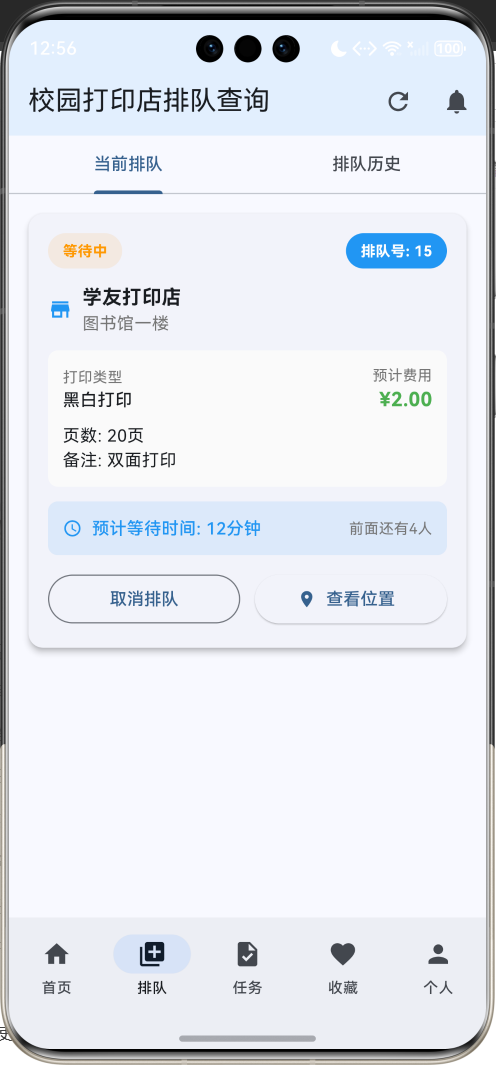
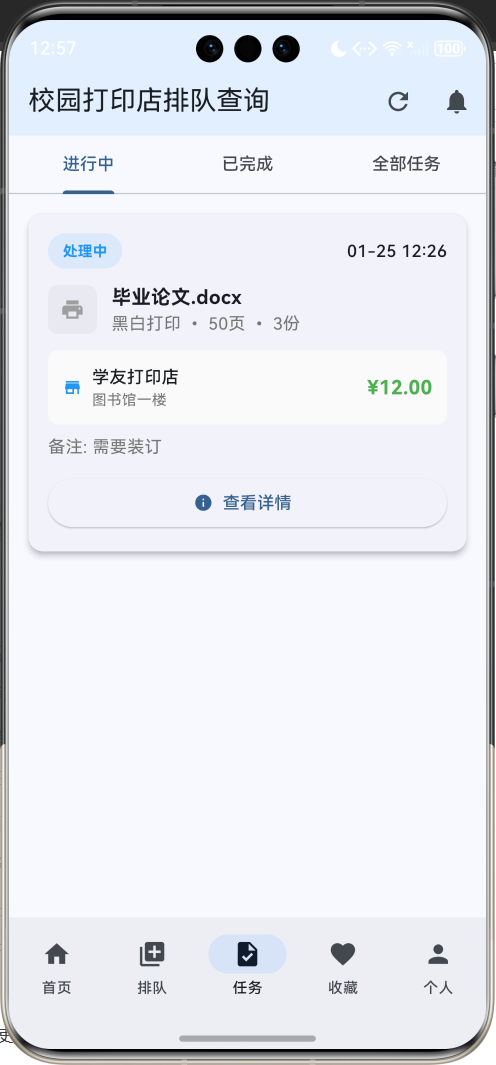
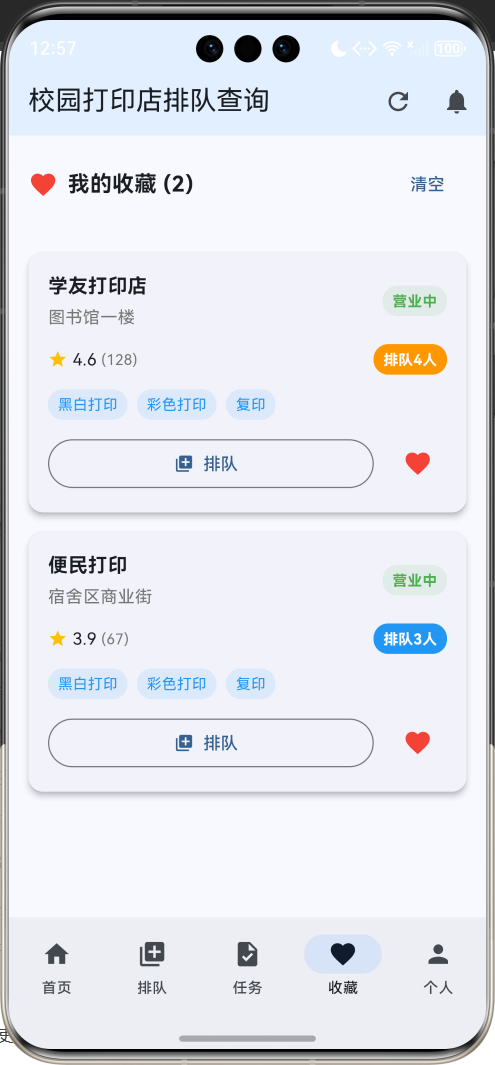
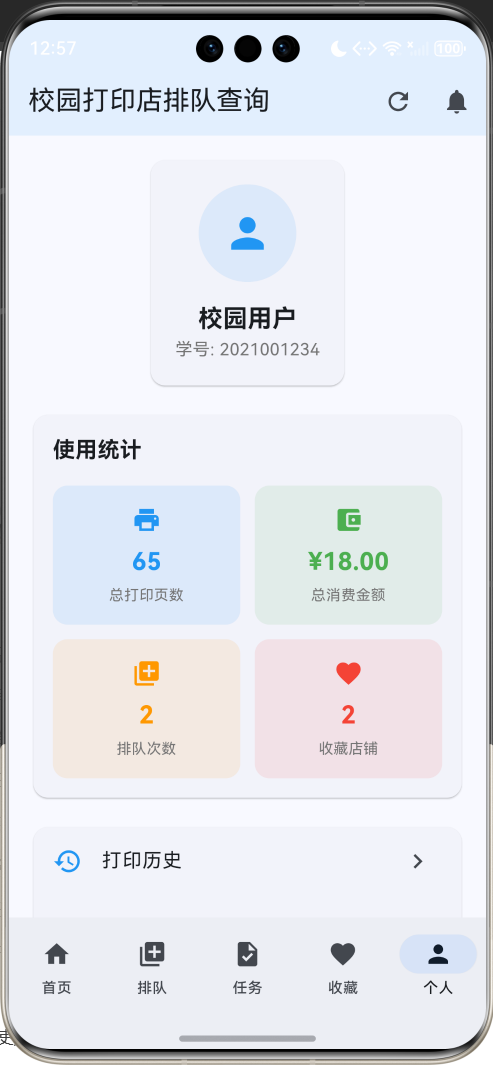
运行效果图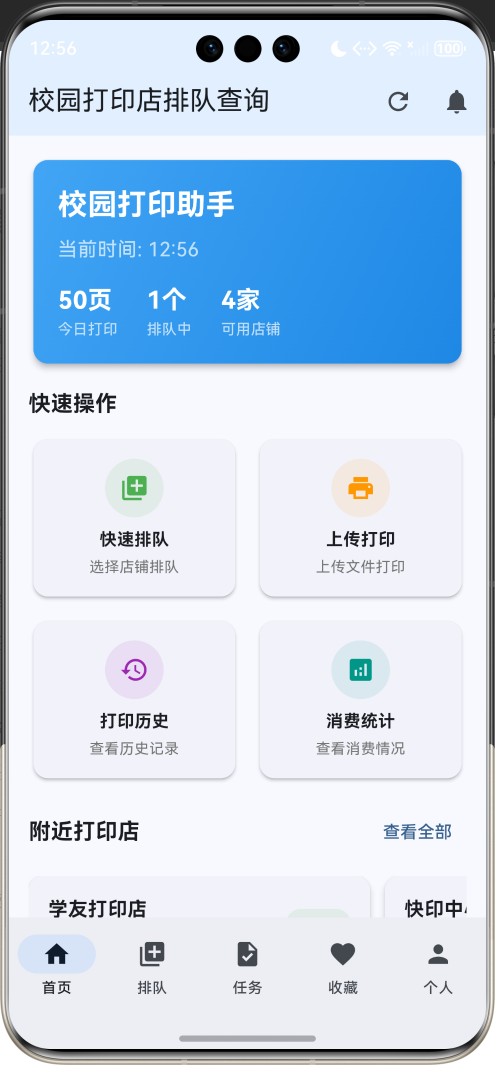
应用特色
- 实时排队查询:显示各打印店当前排队人数和预计等待时间
- 智能排队系统:支持在线取号排队,避免现场等待
- 多店铺覆盖:涵盖校园内所有打印店信息
- 打印任务管理:管理个人打印任务和历史记录
- 价格对比功能:对比不同店铺的打印价格
- 繁忙度预测:基于历史数据预测店铺繁忙时段
- 消息通知系统:排队进度和任务完成通知
- 用户评价系统:查看其他用户的服务评价
- 收藏管理:收藏常用打印店
- 统计分析:个人打印消费和使用统计
技术栈
- 框架:Flutter 3.x
- 语言:Dart
- UI组件:Material Design 3
- 状态管理:StatefulWidget
- 动画:AnimationController + Tween
- 数据存储:内存存储(可扩展为本地数据库)
项目结构设计
核心数据模型
1. 打印店模型(PrintShop)
class PrintShop {
  final String id;              // 唯一标识
  final String name;            // 店铺名称
  final String location;        // 位置描述
  final String address;         // 详细地址
  final String phone;           // 联系电话
  final List<String> services;  // 服务项目
  final Map<String, double> prices; // 价格表
  final double rating;          // 评分
  final int reviewCount;        // 评价数量
  final String operatingHours;  // 营业时间
  ShopStatus status;           // 营业状态
  int currentQueue;            // 当前排队人数
  int estimatedWaitTime;       // 预计等待时间(分钟)
  final List<String> features;  // 特色服务
  final String description;     // 店铺描述
  final DateTime lastUpdated;   // 最后更新时间
  bool isFavorite;             // 是否收藏
  final String ownerName;       // 店主姓名
  final List<String> equipment; // 设备信息
}
2. 状态枚举
enum ShopStatus { open, closed, busy, maintenance, full }

enum QueueStatus {
  waiting,      // 等待中
  processing,   // 处理中
  completed,    // 已完成
  cancelled,    // 已取消
  expired,      // 已过期
}

enum PrintType {
  blackWhite,   // 黑白打印
  color,        // 彩色打印
  copy,         // 复印
  scan,         // 扫描
  binding,      // 装订
  lamination,   // 塑封
}
3. 排队记录模型(QueueRecord)
class QueueRecord {
  final String id;
  final String shopId;
  final String userId;
  final int queueNumber;
  final DateTime createTime;
  final QueueStatus status;
  final String printType;
  final int pageCount;
  final double estimatedPrice;
  final String notes;
  final DateTime? completionTime;
  final String? cancellationReason;
  int estimatedWaitTime;
}
4. 打印任务模型(PrintTask)
class PrintTask {
  final String id;
  final String shopId;
  final String userId;
  final String fileName;
  final PrintType printType;
  final int pageCount;
  final int copies;
  final String paperSize;
  final bool isDoubleSided;
  final double totalPrice;
  final QueueStatus status;
  final DateTime createTime;
  final DateTime? completionTime;
  final String notes;
}
5. 评价模型(Review)
class Review {
  final String id;
  final String shopId;
  final String userId;
  final String userName;
  final double rating;
  final String content;
  final DateTime createTime;
  final List<String> tags;
  final String serviceType;
  final bool isRecommended;
  final double serviceRating;
  final double speedRating;
  final double priceRating;
}
页面架构
应用采用底部导航栏设计,包含五个主要页面:
- 首页:显示附近打印店和实时排队状态
- 排队页面:管理当前排队和历史记录
- 任务页面:管理打印任务和文件
- 收藏页面:管理收藏的打印店
- 个人页面:用户信息、设置和统计
详细实现步骤
第一步:项目初始化
创建新的Flutter项目:
flutter create campus_print_queue
cd campus_print_queue
第二步:主应用结构
class CampusPrintQueueApp extends StatelessWidget {
const CampusPrintQueueApp({super.key});
Widget build(BuildContext context) {
return MaterialApp(
title: 'Flutter校园打印店排队查询',
theme: ThemeData(
colorScheme: ColorScheme.fromSeed(seedColor: Colors.blue),
useMaterial3: true,
),
home: const CampusPrintQueueHomePage(),
debugShowCheckedModeBanner: false,
);
}
}
第三步:数据初始化
创建示例打印店数据:
void _initializeData() {
  _printShops.addAll([
    PrintShop(
      id: '1',
      name: '学友打印店',
      location: '图书馆一楼',
      address: '校园图书馆一楼东侧',
      phone: '138-0000-0001',
      services: ['黑白打印', '彩色打印', '复印', '装订'],
      prices: {
        '黑白打印': 0.1,
        '彩色打印': 0.5,
        '复印': 0.1,
        '装订': 2.0,
      },
      rating: 4.6,
      reviewCount: 128,
      operatingHours: '08:00-22:00',
      status: ShopStatus.open,
      currentQueue: 5,
      estimatedWaitTime: 15,
      features: ['24小时营业', '自助打印', '微信支付', '支付宝支付'],
      description: '位于图书馆一楼,设备齐全,服务周到。',
      lastUpdated: DateTime.now().subtract(const Duration(minutes: 2)),
      isFavorite: true,
      ownerName: '张老板',
      equipment: ['激光打印机', '彩色打印机', '复印机', '装订机'],
    ),
    // 更多打印店数据...
  ]);
}
第四步:首页实现
首页布局
Widget _buildHomePage() {
  return RefreshIndicator(
    onRefresh: _refreshData,
    child: SingleChildScrollView(
      padding: const EdgeInsets.all(16),
      child: Column(
        crossAxisAlignment: CrossAxisAlignment.start,
        children: [
          // 欢迎卡片
          _buildWelcomeCard(),

          const SizedBox(height: 16),

          // 快速操作
          _buildQuickActions(),

          const SizedBox(height: 16),

          // 附近打印店
          _buildNearbyShops(),

          const SizedBox(height: 16),

          // 实时排队状态
          _buildQueueStatus(),
        ],
      ),
    ),
  );
}
欢迎卡片组件
Widget _buildWelcomeCard() {
  return Card(
    elevation: 4,
    child: Container(
      width: double.infinity,
      padding: const EdgeInsets.all(20),
      decoration: BoxDecoration(
        borderRadius: BorderRadius.circular(12),
        gradient: LinearGradient(
          colors: [Colors.blue.shade400, Colors.blue.shade600],
          begin: Alignment.topLeft,
          end: Alignment.bottomRight,
        ),
      ),
      child: Column(
        crossAxisAlignment: CrossAxisAlignment.start,
        children: [
          const Text(
            '校园打印助手',
            style: TextStyle(
              fontSize: 24,
              fontWeight: FontWeight.bold,
              color: Colors.white,
            ),
          ),
          const SizedBox(height: 8),
          Text(
            '当前时间: ${_formatTime(DateTime.now())}',
            style: const TextStyle(
              fontSize: 16,
              color: Colors.white70,
            ),
          ),
          const SizedBox(height: 16),
          Row(
            children: [
              _buildStatItem('今日打印', '${_todayPrintCount}页'),
              const SizedBox(width: 24),
              _buildStatItem('排队中', '${_currentQueueCount}个'),
              const SizedBox(width: 24),
              _buildStatItem('可用店铺', '${_availableShopCount}家'),
            ],
          ),
        ],
      ),
    ),
  );
}

Widget _buildStatItem(String label, String value) {
  return Column(
    crossAxisAlignment: CrossAxisAlignment.start,
    children: [
      Text(
        value,
        style: const TextStyle(
          fontSize: 20,
          fontWeight: FontWeight.bold,
          color: Colors.white,
        ),
      ),
      Text(
        label,
        style: const TextStyle(
          fontSize: 12,
          color: Colors.white70,
        ),
      ),
    ],
  );
}
快速操作组件
Widget _buildQuickActions() {
  return Column(
    crossAxisAlignment: CrossAxisAlignment.start,
    children: [
      const Text(
        '快速操作',
        style: TextStyle(fontSize: 18, fontWeight: FontWeight.bold),
      ),
      const SizedBox(height: 12),
      Row(
        children: [
          Expanded(
            child: _buildActionCard(
              icon: Icons.queue,
              title: '快速排队',
              subtitle: '选择店铺排队',
              color: Colors.green,
              onTap: _showQuickQueue,
            ),
          ),
          const SizedBox(width: 12),
          Expanded(
            child: _buildActionCard(
              icon: Icons.print,
              title: '上传打印',
              subtitle: '上传文件打印',
              color: Colors.orange,
              onTap: _showUploadPrint,
            ),
          ),
        ],
      ),
      const SizedBox(height: 12),
      Row(
        children: [
          Expanded(
            child: _buildActionCard(
              icon: Icons.history,
              title: '打印历史',
              subtitle: '查看历史记录',
              color: Colors.purple,
              onTap: _showPrintHistory,
            ),
          ),
          const SizedBox(width: 12),
          Expanded(
            child: _buildActionCard(
              icon: Icons.analytics,
              title: '消费统计',
              subtitle: '查看消费情况',
              color: Colors.teal,
              onTap: _showConsumptionStats,
            ),
          ),
        ],
      ),
    ],
  );
}

Widget _buildActionCard({
  required IconData icon,
  required String title,
  required String subtitle,
  required Color color,
  required VoidCallback onTap,
}) {
  return Card(
    elevation: 2,
    child: InkWell(
      onTap: onTap,
      borderRadius: BorderRadius.circular(12),
      child: Padding(
        padding: const EdgeInsets.all(16),
        child: Column(
          children: [
            Container(
              width: 48,
              height: 48,
              decoration: BoxDecoration(
                color: color.withOpacity(0.1),
                borderRadius: BorderRadius.circular(24),
              ),
              child: Icon(icon, color: color, size: 24),
            ),
            const SizedBox(height: 8),
            Text(
              title,
              style: const TextStyle(
                fontSize: 14,
                fontWeight: FontWeight.bold,
              ),
            ),
            const SizedBox(height: 4),
            Text(
              subtitle,
              style: TextStyle(
                fontSize: 12,
                color: Colors.grey.shade600,
              ),
              textAlign: TextAlign.center,
            ),
          ],
        ),
      ),
    ),
  );
}
附近打印店组件
Widget _buildNearbyShops() {
  return Column(
    crossAxisAlignment: CrossAxisAlignment.start,
    children: [
      Row(
        children: [
          const Text(
            '附近打印店',
            style: TextStyle(fontSize: 18, fontWeight: FontWeight.bold),
          ),
          const Spacer(),
          TextButton(
            onPressed: _showAllShops,
            child: const Text('查看全部'),
          ),
        ],
      ),
      const SizedBox(height: 12),
      SizedBox(
        height: 200,
        child: ListView.builder(
          scrollDirection: Axis.horizontal,
          itemCount: _printShops.take(5).length,
          itemBuilder: (context, index) {
            final shop = _printShops[index];
            return Container(
              width: 280,
              margin: const EdgeInsets.only(right: 12),
              child: _buildShopCard(shop, isHorizontal: true),
            );
          },
        ),
      ),
    ],
  );
}
实时排队状态组件
Widget _buildQueueStatus() {
  return Column(
    crossAxisAlignment: CrossAxisAlignment.start,
    children: [
      const Text(
        '实时排队状态',
        style: TextStyle(fontSize: 18, fontWeight: FontWeight.bold),
      ),
      const SizedBox(height: 12),
      ...(_printShops.take(3).map((shop) => Container(
        margin: const EdgeInsets.only(bottom: 8),
        child: Card(
          child: ListTile(
            leading: Container(
              width: 40,
              height: 40,
              decoration: BoxDecoration(
                color: _getStatusColor(shop.status).withOpacity(0.1),
                borderRadius: BorderRadius.circular(20),
              ),
              child: Icon(
                Icons.store,
                color: _getStatusColor(shop.status),
              ),
            ),
            title: Text(shop.name),
            subtitle: Text(shop.location),
            trailing: Column(
              mainAxisAlignment: MainAxisAlignment.center,
              crossAxisAlignment: CrossAxisAlignment.end,
              children: [
                Container(
                  padding: const EdgeInsets.symmetric(
                    horizontal: 8,
                    vertical: 4,
                  ),
                  decoration: BoxDecoration(
                    color: _getQueueColor(shop.currentQueue),
                    borderRadius: BorderRadius.circular(12),
                  ),
                  child: Text(
                    '${shop.currentQueue}人',
                    style: const TextStyle(
                      color: Colors.white,
                      fontSize: 12,
                      fontWeight: FontWeight.bold,
                    ),
                  ),
                ),
                const SizedBox(height: 4),
                Text(
                  '约${shop.estimatedWaitTime}分钟',
                  style: TextStyle(
                    fontSize: 12,
                    color: Colors.grey.shade600,
                  ),
                ),
              ],
            ),
            onTap: () => _showShopDetail(shop),
          ),
        ),
      ))),
    ],
  );
}
第五步:排队页面实现
排队页面布局
Widget _buildQueuePage() {
  return DefaultTabController(
    length: 2,
    child: Column(
      children: [
        const TabBar(
          tabs: [
            Tab(text: '当前排队'),
            Tab(text: '排队历史'),
          ],
        ),
        Expanded(
          child: TabBarView(
            children: [
              _buildCurrentQueue(),
              _buildQueueHistory(),
            ],
          ),
        ),
      ],
    ),
  );
}
当前排队组件
Widget _buildCurrentQueue() {
  final currentQueues = _queueRecords.where((q) =>
      q.status == QueueStatus.waiting ||
      q.status == QueueStatus.processing).toList();

  return currentQueues.isEmpty
      ? _buildEmptyState('暂无排队', '快去选择打印店排队吧!')
      : ListView.builder(
          padding: const EdgeInsets.all(16),
          itemCount: currentQueues.length,
          itemBuilder: (context, index) =>
              _buildQueueCard(currentQueues[index]),
        );
}

Widget _buildQueueCard(QueueRecord queue) {
  final shop = _getShopById(queue.shopId);
  if (shop == null) return const SizedBox();

  return Card(
    elevation: 4,
    margin: const EdgeInsets.only(bottom: 16),
    child: Padding(
      padding: const EdgeInsets.all(16),
      child: Column(
        crossAxisAlignment: CrossAxisAlignment.start,
        children: [
          // 排队状态和编号
          Row(
            children: [
              Container(
                padding: const EdgeInsets.symmetric(
                  horizontal: 12,
                  vertical: 6,
                ),
                decoration: BoxDecoration(
                  color: _getQueueStatusColor(queue.status).withOpacity(0.1),
                  borderRadius: BorderRadius.circular(16),
                ),
                child: Text(
                  _getQueueStatusText(queue.status),
                  style: TextStyle(
                    color: _getQueueStatusColor(queue.status),
                    fontSize: 12,
                    fontWeight: FontWeight.bold,
                  ),
                ),
              ),
              const Spacer(),
              Container(
                padding: const EdgeInsets.symmetric(
                  horizontal: 12,
                  vertical: 6,
                ),
                decoration: BoxDecoration(
                  color: Colors.blue,
                  borderRadius: BorderRadius.circular(16),
                ),
                child: Text(
                  '排队号: ${queue.queueNumber}',
                  style: const TextStyle(
                    color: Colors.white,
                    fontSize: 12,
                    fontWeight: FontWeight.bold,
                  ),
                ),
              ),
            ],
          ),

          const SizedBox(height: 12),

          // 打印店信息
          Row(
            children: [
              Icon(Icons.store, color: Colors.blue, size: 20),
              const SizedBox(width: 8),
              Expanded(
                child: Column(
                  crossAxisAlignment: CrossAxisAlignment.start,
                  children: [
                    Text(
                      shop.name,
                      style: const TextStyle(
                        fontSize: 16,
                        fontWeight: FontWeight.bold,
                      ),
                    ),
                    Text(
                      shop.location,
                      style: TextStyle(
                        color: Colors.grey.shade600,
                        fontSize: 14,
                      ),
                    ),
                  ],
                ),
              ),
            ],
          ),

          const SizedBox(height: 12),

          // 任务信息
          Container(
            padding: const EdgeInsets.all(12),
            decoration: BoxDecoration(
              color: Colors.grey.shade50,
              borderRadius: BorderRadius.circular(8),
            ),
            child: Column(
              crossAxisAlignment: CrossAxisAlignment.start,
              children: [
                Row(
                  children: [
                    Expanded(
                      child: Column(
                        crossAxisAlignment: CrossAxisAlignment.start,
                        children: [
                          Text(
                            '打印类型',
                            style: TextStyle(
                              color: Colors.grey.shade600,
                              fontSize: 12,
                            ),
                          ),
                          Text(
                            queue.printType,
                            style: const TextStyle(
                              fontWeight: FontWeight.w500,
                            ),
                          ),
                        ],
                      ),
                    ),
                    Column(
                      crossAxisAlignment: CrossAxisAlignment.end,
                      children: [
                        Text(
                          '预计费用',
                          style: TextStyle(
                            color: Colors.grey.shade600,
                            fontSize: 12,
                          ),
                        ),
                        Text(
                          '¥${queue.estimatedPrice.toStringAsFixed(2)}',
                          style: const TextStyle(
                            fontSize: 16,
                            fontWeight: FontWeight.bold,
                            color: Colors.green,
                          ),
                        ),
                      ],
                    ),
                  ],
                ),
                const SizedBox(height: 8),
                Text('页数: ${queue.pageCount}页'),
                if (queue.notes.isNotEmpty)
                  Text('备注: ${queue.notes}'),
              ],
            ),
          ),

          const SizedBox(height: 12),

          // 等待信息
          Container(
            padding: const EdgeInsets.all(12),
            decoration: BoxDecoration(
              color: Colors.blue.withOpacity(0.1),
              borderRadius: BorderRadius.circular(8),
            ),
            child: Row(
              children: [
                Icon(Icons.access_time, color: Colors.blue, size: 16),
                const SizedBox(width: 8),
                Text(
                  '预计等待时间: ${queue.estimatedWaitTime}分钟',
                  style: const TextStyle(
                    color: Colors.blue,
                    fontWeight: FontWeight.w500,
                  ),
                ),
                const Spacer(),
                Text(
                  '前面还有${shop.currentQueue - 1}人',
                  style: TextStyle(
                    color: Colors.grey.shade600,
                    fontSize: 12,
                  ),
                ),
              ],
            ),
          ),

          const SizedBox(height: 12),

          // 操作按钮
          Row(
            children: [
              if (queue.status == QueueStatus.waiting) ...[
                Expanded(
                  child: OutlinedButton(
                    onPressed: () => _cancelQueue(queue),
                    child: const Text('取消排队'),
                  ),
                ),
                const SizedBox(width: 12),
              ],
              Expanded(
                child: ElevatedButton.icon(
                  onPressed: () => _showShopDetail(shop),
                  icon: const Icon(Icons.location_on, size: 16),
                  label: const Text('查看位置'),
                ),
              ),
            ],
          ),
        ],
      ),
    ),
  );
}
第六步:任务页面实现
任务页面布局
Widget _buildTaskPage() {
  return DefaultTabController(
    length: 3,
    child: Column(
      children: [
        const TabBar(
          tabs: [
            Tab(text: '进行中'),
            Tab(text: '已完成'),
            Tab(text: '全部任务'),
          ],
        ),
        Expanded(
          child: TabBarView(
            children: [
              _buildActiveTasks(),
              _buildCompletedTasks(),
              _buildAllTasks(),
            ],
          ),
        ),
      ],
    ),
  );
}
任务卡片组件
Widget _buildTaskCard(PrintTask task) {
  final shop = _getShopById(task.shopId);
  if (shop == null) return const SizedBox();

  return Card(
    elevation: 4,
    margin: const EdgeInsets.only(bottom: 16),
    child: Padding(
      padding: const EdgeInsets.all(16),
      child: Column(
        crossAxisAlignment: CrossAxisAlignment.start,
        children: [
          // 任务状态和时间
          Row(
            children: [
              Container(
                padding: const EdgeInsets.symmetric(
                  horizontal: 12,
                  vertical: 6,
                ),
                decoration: BoxDecoration(
                  color: _getQueueStatusColor(task.status).withOpacity(0.1),
                  borderRadius: BorderRadius.circular(16),
                ),
                child: Text(
                  _getQueueStatusText(task.status),
                  style: TextStyle(
                    color: _getQueueStatusColor(task.status),
                    fontSize: 12,
                    fontWeight: FontWeight.bold,
                  ),
                ),
              ),
              const Spacer(),
              Text(
                _formatDateTime(task.createTime),
                style: const TextStyle(
                  fontSize: 14,
                  fontWeight: FontWeight.w500,
                ),
              ),
            ],
          ),

          const SizedBox(height: 12),

          // 文件信息
          Row(
            children: [
              Container(
                width: 40,
                height: 40,
                decoration: BoxDecoration(
                  color: _getPrintTypeColor(task.printType).withOpacity(0.1),
                  borderRadius: BorderRadius.circular(8),
                ),
                child: Icon(
                  _getPrintTypeIcon(task.printType),
                  color: _getPrintTypeColor(task.printType),
                  size: 20,
                ),
              ),
              const SizedBox(width: 12),
              Expanded(
                child: Column(
                  crossAxisAlignment: CrossAxisAlignment.start,
                  children: [
                    Text(
                      task.fileName,
                      style: const TextStyle(
                        fontSize: 16,
                        fontWeight: FontWeight.bold,
                      ),
                      maxLines: 1,
                      overflow: TextOverflow.ellipsis,
                    ),
                    Text(
                      '${_getPrintTypeText(task.printType)} • ${task.pageCount}页 • ${task.copies}份',
                      style: TextStyle(
                        color: Colors.grey.shade600,
                        fontSize: 14,
                      ),
                    ),
                  ],
                ),
              ),
            ],
          ),

          const SizedBox(height: 12),

          // 打印店信息
          Container(
            padding: const EdgeInsets.all(12),
            decoration: BoxDecoration(
              color: Colors.grey.shade50,
              borderRadius: BorderRadius.circular(8),
            ),
            child: Row(
              children: [
                Icon(Icons.store, color: Colors.blue, size: 16),
                const SizedBox(width: 8),
                Expanded(
                  child: Column(
                    crossAxisAlignment: CrossAxisAlignment.start,
                    children: [
                      Text(
                        shop.name,
                        style: const TextStyle(fontWeight: FontWeight.w500),
                      ),
                      Text(
                        shop.location,
                        style: TextStyle(
                          color: Colors.grey.shade600,
                          fontSize: 12,
                        ),
                      ),
                    ],
                  ),
                ),
                Text(
                  '¥${task.totalPrice.toStringAsFixed(2)}',
                  style: const TextStyle(
                    fontSize: 16,
                    fontWeight: FontWeight.bold,
                    color: Colors.green,
                  ),
                ),
              ],
            ),
          ),

          if (task.notes.isNotEmpty) ...[
            const SizedBox(height: 8),
            Text(
              '备注: ${task.notes}',
              style: TextStyle(
                color: Colors.grey.shade600,
                fontSize: 14,
              ),
            ),
          ],

          const SizedBox(height: 12),

          // 操作按钮
          Row(
            children: [
              if (task.status == QueueStatus.waiting) ...[
                Expanded(
                  child: OutlinedButton(
                    onPressed: () => _cancelTask(task),
                    child: const Text('取消任务'),
                  ),
                ),
                const SizedBox(width: 12),
              ],
              Expanded(
                child: ElevatedButton.icon(
                  onPressed: () => _showTaskDetail(task),
                  icon: const Icon(Icons.info, size: 16),
                  label: const Text('查看详情'),
                ),
              ),
            ],
          ),
        ],
      ),
    ),
  );
}
第七步:收藏页面实现
收藏页面布局
Widget _buildFavoritePage() {
  return Column(
    children: [
      if (_favoriteShops.isNotEmpty) ...[
        Container(
          padding: const EdgeInsets.all(16),
          child: Row(
            children: [
              const Icon(Icons.favorite, color: Colors.red),
              const SizedBox(width: 8),
              Text(
                '我的收藏 (${_favoriteShops.length})',
                style: const TextStyle(
                  fontSize: 18,
                  fontWeight: FontWeight.bold,
                ),
              ),
              const Spacer(),
              TextButton(
                onPressed: _clearAllFavorites,
                child: const Text('清空'),
              ),
            ],
          ),
        ),
      ],
      Expanded(
        child: _favoriteShops.isEmpty
            ? _buildEmptyState('暂无收藏', '收藏常用打印店,方便下次使用')
            : ListView.builder(
                padding: const EdgeInsets.all(16),
                itemCount: _favoriteShops.length,
                itemBuilder: (context, index) =>
                    _buildShopCard(_favoriteShops[index]),
              ),
      ),
    ],
  );
}
第八步:个人页面实现
个人页面布局
Widget _buildProfilePage() {
  return SingleChildScrollView(
    padding: const EdgeInsets.all(16),
    child: Column(
      children: [
        // 用户信息卡片
        Card(
          child: Padding(
            padding: const EdgeInsets.all(20),
            child: Column(
              children: [
                CircleAvatar(
                  radius: 40,
                  backgroundColor: Colors.blue.withOpacity(0.1),
                  child: const Icon(
                    Icons.person,
                    size: 40,
                    color: Colors.blue,
                  ),
                ),
                const SizedBox(height: 16),
                const Text(
                  '校园用户',
                  style: TextStyle(
                    fontSize: 20,
                    fontWeight: FontWeight.bold,
                  ),
                ),
                Text(
                  '学号: 2021001234',
                  style: TextStyle(color: Colors.grey.shade600),
                ),
              ],
            ),
          ),
        ),

        const SizedBox(height: 16),

        // 统计信息
        Card(
          child: Padding(
            padding: const EdgeInsets.all(16),
            child: Column(
              crossAxisAlignment: CrossAxisAlignment.start,
              children: [
                const Text(
                  '使用统计',
                  style: TextStyle(
                    fontSize: 18,
                    fontWeight: FontWeight.bold,
                  ),
                ),
                const SizedBox(height: 16),
                Row(
                  children: [
                    Expanded(
                      child: _buildStatCard(
                        '总打印页数',
                        '${_totalPrintPages}',
                        Icons.print,
                        Colors.blue,
                      ),
                    ),
                    const SizedBox(width: 12),
                    Expanded(
                      child: _buildStatCard(
                        '总消费金额',
                        '¥${_totalSpent.toStringAsFixed(2)}',
                        Icons.account_balance_wallet,
                        Colors.green,
                      ),
                    ),
                  ],
                ),
                const SizedBox(height: 12),
                Row(
                  children: [
                    Expanded(
                      child: _buildStatCard(
                        '排队次数',
                        '${_totalQueueCount}',
                        Icons.queue,
                        Colors.orange,
                      ),
                    ),
                    const SizedBox(width: 12),
                    Expanded(
                      child: _buildStatCard(
                        '收藏店铺',
                        '${_favoriteShops.length}',
                        Icons.favorite,
                        Colors.red,
                      ),
                    ),
                  ],
                ),
              ],
            ),
          ),
        ),

        const SizedBox(height: 16),

        // 功能菜单
        Card(
          child: Column(
            children: [
              ListTile(
                leading: const Icon(Icons.history, color: Colors.blue),
                title: const Text('打印历史'),
                trailing: const Icon(Icons.chevron_right),
                onTap: _showPrintHistory,
              ),
              ListTile(
                leading: const Icon(Icons.analytics, color: Colors.green),
                title: const Text('消费统计'),
                trailing: const Icon(Icons.chevron_right),
                onTap: _showConsumptionStats,
              ),
              ListTile(
                leading: const Icon(Icons.notifications, color: Colors.orange),
                title: const Text('消息通知'),
                trailing: const Icon(Icons.chevron_right),
                onTap: _showNotifications,
              ),
              ListTile(
                leading: const Icon(Icons.settings, color: Colors.grey),
                title: const Text('设置'),
                trailing: const Icon(Icons.chevron_right),
                onTap: _showSettings,
              ),
            ],
          ),
        ),

        const SizedBox(height: 16),

        // 其他功能
        Card(
          child: Column(
            children: [
              ListTile(
                leading: const Icon(Icons.help, color: Colors.blue),
                title: const Text('帮助中心'),
                trailing: const Icon(Icons.chevron_right),
                onTap: _showHelp,
              ),
              ListTile(
                leading: const Icon(Icons.feedback, color: Colors.green),
                title: const Text('意见反馈'),
                trailing: const Icon(Icons.chevron_right),
                onTap: _showFeedback,
              ),
              ListTile(
                leading: const Icon(Icons.info, color: Colors.orange),
                title: const Text('关于我们'),
                trailing: const Icon(Icons.chevron_right),
                onTap: _showAbout,
              ),
            ],
          ),
        ),
      ],
    ),
  );
}

Widget _buildStatCard(String title, String value, IconData icon, Color color) {
  return Container(
    padding: const EdgeInsets.all(16),
    decoration: BoxDecoration(
      color: color.withOpacity(0.1),
      borderRadius: BorderRadius.circular(12),
    ),
    child: Column(
      children: [
        Icon(icon, color: color, size: 24),
        const SizedBox(height: 8),
        Text(
          value,
          style: TextStyle(
            fontSize: 20,
            fontWeight: FontWeight.bold,
            color: color,
          ),
        ),
        const SizedBox(height: 4),
        Text(
          title,
          style: TextStyle(
            fontSize: 12,
            color: Colors.grey.shade600,
          ),
          textAlign: TextAlign.center,
        ),
      ],
    ),
  );
}
核心功能详解
1. 实时排队系统
void _updateQueueStatus() {
  setState(() {
    for (var shop in _printShops) {
      // 模拟排队人数变化
      final random = Random();
      shop.currentQueue = max(0, shop.currentQueue + random.nextInt(3) - 1);
      shop.estimatedWaitTime = shop.currentQueue * 3; // 每人约3分钟
      shop.lastUpdated = DateTime.now();
    }
  });
}
2. 智能推荐算法
List<PrintShop> _getRecommendedShops() {
  return _printShops.where((shop) {
    // 根据距离、排队人数、评分等因素推荐
    final distanceScore = 1.0; // 假设都在校园内
    final queueScore = 1.0 - (shop.currentQueue / 20.0);
    final ratingScore = shop.rating / 5.0;

    final totalScore = (distanceScore + queueScore + ratingScore) / 3.0;
    return totalScore > 0.6;
  }).toList()
    ..sort((a, b) => a.currentQueue.compareTo(b.currentQueue));
}
3. 价格计算系统
double _calculatePrice(PrintTask task) {
  final shop = _getShopById(task.shopId);
  if (shop == null) return 0.0;

  final basePrice = shop.prices[_getPrintTypeText(task.printType)] ?? 0.0;
  double totalPrice = basePrice * task.pageCount * task.copies;

  // 双面打印折扣
  if (task.isDoubleSided) {
    totalPrice *= 0.8;
  }

  return totalPrice;
}
4. 通知系统
void _sendNotification(String title, String message) {
  // 模拟推送通知
  ScaffoldMessenger.of(context).showSnackBar(
    SnackBar(
      content: Column(
        mainAxisSize: MainAxisSize.min,
        crossAxisAlignment: CrossAxisAlignment.start,
        children: [
          Text(
            title,
            style: const TextStyle(fontWeight: FontWeight.bold),
          ),
          Text(message),
        ],
      ),
      duration: const Duration(seconds: 3),
      action: SnackBarAction(
        label: '查看',
        onPressed: () {
          // 跳转到相关页面
        },
      ),
    ),
  );
}
性能优化
1. 列表优化
使用ListView.builder实现虚拟滚动:
ListView.builder(
  padding: const EdgeInsets.all(16),
  itemCount: _printShops.length,
  itemBuilder: (context, index) {
    final shop = _printShops[index];
    return _buildShopCard(shop);
  },
)
2. 状态管理优化
合理使用setState,避免不必要的重建:
void _updateShopQueue(String shopId, int newQueue) {
  setState(() {
    final shopIndex = _printShops.indexWhere((shop) => shop.id == shopId);
    if (shopIndex != -1) {
      _printShops[shopIndex].currentQueue = newQueue;
      _printShops[shopIndex].estimatedWaitTime = newQueue * 3;
      _printShops[shopIndex].lastUpdated = DateTime.now();
    }
  });
}
3. 内存管理
及时释放资源:
void dispose() {
_refreshTimer?.cancel();
_fadeController.dispose();
super.dispose();
}
扩展功能
1. 文件上传
可以集成file_picker插件实现文件选择:
dependencies:
  file_picker: ^6.1.1
2. 推送通知
使用firebase_messaging实现推送通知:
dependencies:
  firebase_messaging: ^14.7.9
3. 本地存储
使用shared_preferences保存用户设置:
dependencies:
  shared_preferences: ^2.2.0
4. 网络请求
集成http插件实现在线数据获取:
dependencies:
  http: ^1.1.0
测试策略
1. 单元测试
测试核心业务逻辑:
test('should calculate print price correctly', () {
  final task = PrintTask(
    printType: PrintType.blackWhite,
    pageCount: 10,
    copies: 2,
    isDoubleSided: true,
  );

  final price = _calculatePrice(task);
  expect(price, equals(1.6)); // 0.1 * 10 * 2 * 0.8
});
2. Widget测试
测试UI组件:
testWidgets('should display shop name', (WidgetTester tester) async {
  await tester.pumpWidget(MyApp());
  expect(find.text('学友打印店'), findsOneWidget);
});
3. 集成测试
测试完整用户流程:
testWidgets('should join queue when button is tapped',
    (WidgetTester tester) async {
  await tester.pumpWidget(MyApp());
  await tester.tap(find.text('快速排队'));
  await tester.pumpAndSettle();

  expect(find.text('选择打印店'), findsOneWidget);
});
部署发布
1. Android打包
flutter build apk --release
2. iOS打包
flutter build ios --release
3. 应用商店发布
准备应用图标、截图和描述,提交到各大应用商店。
总结
本教程详细介绍了Flutter校园打印店排队查询应用的完整开发过程,涵盖了:
- 数据模型设计:合理的数据结构设计
- UI界面开发:Material Design 3风格界面
- 功能实现:实时排队查询、智能排队、任务管理、收藏功能
- 排队系统:智能排队算法、实时状态更新
- 用户体验优化:动画效果、加载状态、错误处理
- 性能优化:列表优化、状态管理、内存管理
- 扩展功能:文件上传、推送通知、本地存储
- 测试策略:单元测试、Widget测试、集成测试
这款应用不仅功能完整,而且代码结构清晰,易于维护和扩展。通过本教程的学习,你可以掌握Flutter应用开发的核心技能,为后续开发更复杂的应用打下坚实基础。
欢迎加入开源鸿蒙跨平台社区:https://openharmonycrossplatform.csdn.net

开源鸿蒙跨平台开发社区汇聚开发者与厂商,共建“一次开发,多端部署”的开源生态,致力于降低跨端开发门槛,推动万物智联创新。
更多推荐

 20
20 0
0- 0


 已为社区贡献11条内容

所有评论(0)