Flutter 框架跨平台鸿蒙开发 - 火漆印章收藏应用开发教程
letter, // 字母pattern, // 图案badge, // 徽章animal, // 动物plant, // 植物symbol, // 符号custom, // 定制Flutter应用架构设计复杂数据模型的设计和管理多页面导航和状态管理搜索和筛选功能的实现分类管理系统的构建动画效果的实现性能优化技巧测试策略和部署流程你可以根据自己的需求进行功能扩展和定制,比如添加价值评估、社区分享、
Flutter火漆印章收藏应用开发教程
项目概述
本教程将带你开发一个功能完整的Flutter火漆印章收藏应用。这款应用专为火漆印章收藏爱好者设计,提供印章收藏管理、分类整理、使用记录追踪、愿望清单管理等功能,帮助用户科学管理自己的火漆印章收藏品。
运行效果图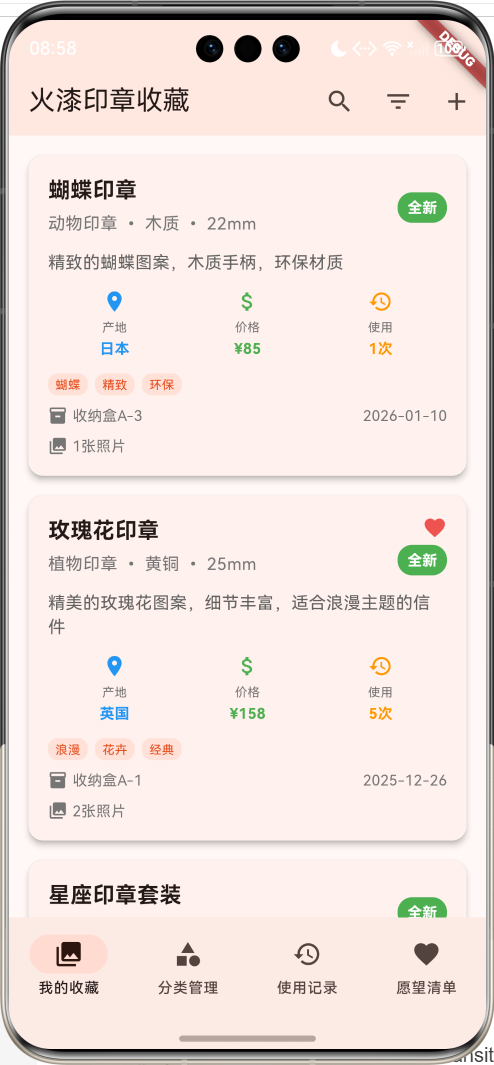
应用特色
- 印章收藏管理:记录印章的详细信息,包括名称、材质、尺寸、产地等
- 智能分类系统:按字母、图案、徽章、动物、植物等类别管理印章
- 使用记录追踪:记录每次使用印章的详细信息和效果
- 愿望清单管理:管理想要购买的印章,设置优先级和预算
- 多维度筛选:支持按分类、材质、品相、收藏状态等筛选
- 收藏状态管理:标记喜爱的印章,快速查找
- 照片记录功能:支持为每个印章添加多张照片
- 存储位置管理:记录印章的存放位置,便于查找
技术栈
- 框架:Flutter 3.x
- 语言:Dart
- UI组件:Material Design 3
- 状态管理:StatefulWidget
- 动画:AnimationController + FadeTransition
- 数据存储:内存存储(可扩展为本地数据库)
- 导航:NavigationBar
项目结构设计
核心数据模型
1. 火漆印章模型(WaxSeal)
class WaxSeal {
  final String id;              // 唯一标识
  final String name;            // 印章名称
  final String category;        // 类别:字母、图案、徽章等
  final String material;        // 材质:黄铜、银、木质等
  final String size;            // 尺寸
  final String origin;          // 产地/品牌
  final DateTime purchaseDate;  // 购买日期
  final double price;           // 价格
  final String condition;       // 品相:全新、良好、一般、磨损
  final String description;     // 描述
  final List<String> photos;    // 照片
  final List<String> tags;      // 标签
  final String storageLocation; // 存放位置
  bool isFavorite;             // 是否收藏
  int usageCount;              // 使用次数
}
2. 使用记录模型(UsageRecord)
class UsageRecord {
  final String id;              // 唯一标识
  final String sealId;          // 关联的印章ID
  final DateTime usageDate;     // 使用日期
  final String purpose;         // 用途:信件、文件、装饰等
  final String waxColor;        // 蜡的颜色
  final String notes;           // 备注
  final List<String> photos;    // 照片
}
3. 收藏分类模型(SealCategory)
class SealCategory {
  final String id;              // 唯一标识
  final String name;            // 分类名称
  final String description;     // 描述
  final String iconName;        // 图标名称
  final Color color;            // 主题色
  int count;                   // 印章数量
}
4. 愿望清单模型(WishlistItem)
class WishlistItem {
  final String id;              // 唯一标识
  final String name;            // 印章名称
  final String category;        // 分类
  final String description;     // 描述
  final double estimatedPrice;  // 预估价格
  final String priority;        // 优先级:高、中、低
  final String source;          // 来源:网店、实体店、拍卖等
  final DateTime addedDate;     // 添加日期
  final String notes;           // 备注
  final List<String> photos;    // 照片
  bool isAcquired;             // 是否已获得
}
枚举定义
印章类别枚举
enum SealCategoryType {
  letter,   // 字母
  pattern,  // 图案
  badge,    // 徽章
  animal,   // 动物
  plant,    // 植物
  symbol,   // 符号
  custom,   // 定制
}
材质枚举
enum SealMaterial {
  brass,    // 黄铜
  silver,   // 银
  wood,     // 木质
  steel,    // 钢
  pewter,   // 锡合金
  resin,    // 树脂
}
品相枚举
enum SealCondition {
  mint,      // 全新
  excellent, // 优秀
  good,      // 良好
  fair,      // 一般
  poor,      // 磨损
}
页面架构
应用采用底部导航栏设计,包含四个主要页面:
- 我的收藏页面:展示所有印章收藏,支持搜索和筛选
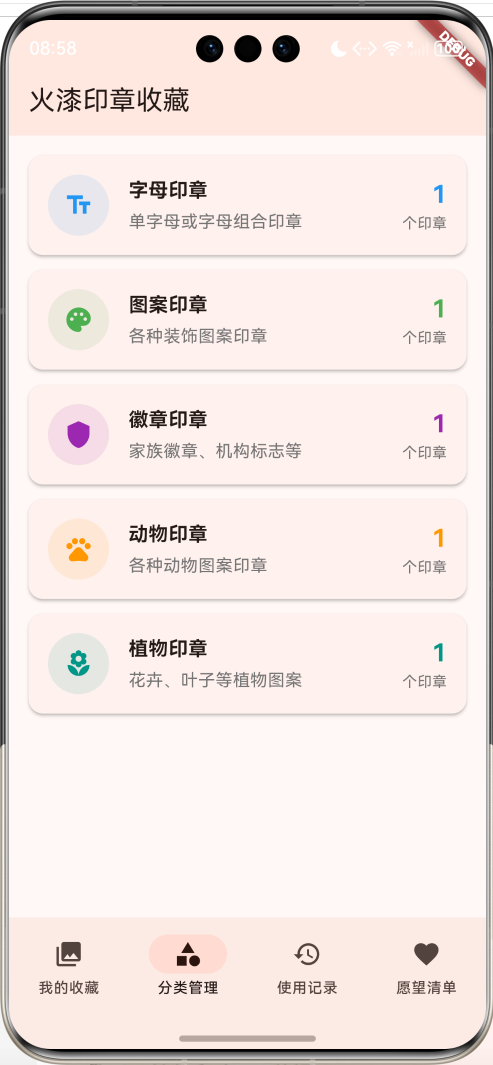
- 分类管理页面:按类别管理印章,查看各类别统计
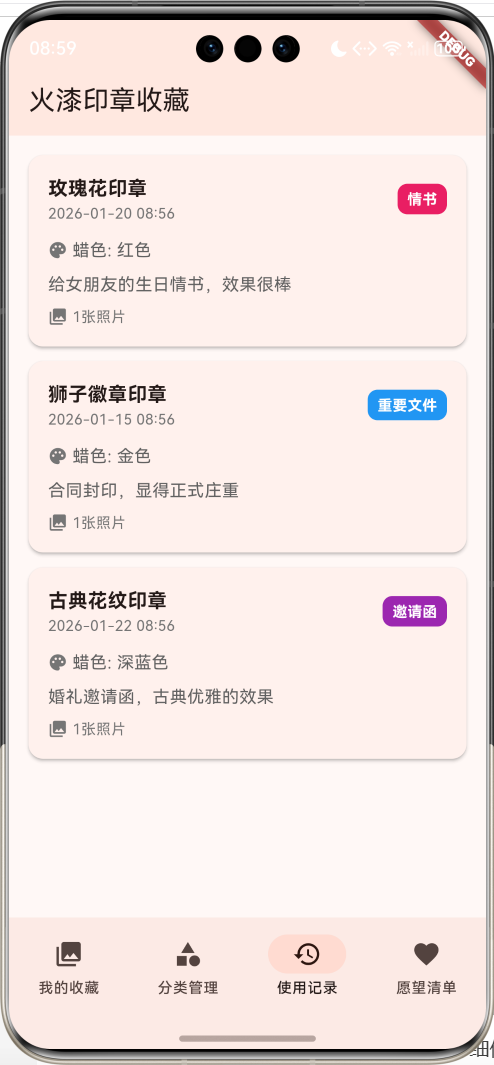
- 使用记录页面:记录和查看印章使用历史
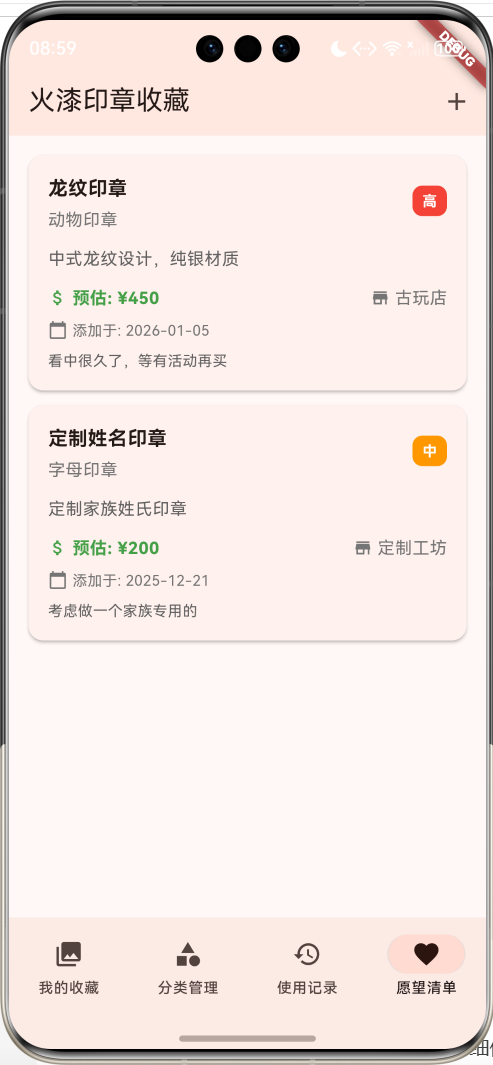
- 愿望清单页面:管理想要购买的印章
详细实现步骤
第一步:项目初始化
创建新的Flutter项目:
flutter create seal_collection_app
cd seal_collection_app
第二步:主应用结构
class MyApp extends StatelessWidget {
const MyApp({super.key});
Widget build(BuildContext context) {
return MaterialApp(
title: '火漆印章收藏',
theme: ThemeData(
colorScheme: ColorScheme.fromSeed(seedColor: Colors.deepOrange),
useMaterial3: true,
),
home: const SealCollectionHomePage(),
);
}
}
第三步:数据初始化
创建示例印章和分类数据:
void _initializeData() {
  // 初始化分类
  _categories = [
    SealCategory(
      id: '1',
      name: '字母印章',
      description: '单字母或字母组合印章',
      iconName: 'text_fields',
      color: Colors.blue,
      count: 0,
    ),
    SealCategory(
      id: '2',
      name: '图案印章',
      description: '各种装饰图案印章',
      iconName: 'palette',
      color: Colors.green,
      count: 0,
    ),
    // 更多分类...
  ];

  // 初始化示例印章数据
  _seals = [
    WaxSeal(
      id: '1',
      name: '玫瑰花印章',
      category: '植物印章',
      material: '黄铜',
      size: '25mm',
      origin: '英国',
      purchaseDate: DateTime.now().subtract(const Duration(days: 30)),
      price: 158.0,
      condition: '全新',
      description: '精美的玫瑰花图案,细节丰富,适合浪漫主题的信件',
      photos: ['rose_seal_1.jpg', 'rose_seal_2.jpg'],
      tags: ['浪漫', '花卉', '经典'],
      storageLocation: '收纳盒A-1',
      isFavorite: true,
      usageCount: 5,
    ),
    // 更多印章数据...
  ];
}
第四步:印章收藏页面
印章卡片组件
Widget _buildSealCard(WaxSeal seal) {
  return Card(
    elevation: 4,
    margin: const EdgeInsets.only(bottom: 16),
    child: InkWell(
      onTap: () => _showSealDetail(seal),
      child: Padding(
        padding: const EdgeInsets.all(16),
        child: Column(
          crossAxisAlignment: CrossAxisAlignment.start,
          children: [
            // 标题行
            Row(
              children: [
                Expanded(
                  child: Column(
                    crossAxisAlignment: CrossAxisAlignment.start,
                    children: [
                      Text(
                        seal.name,
                        style: const TextStyle(
                          fontSize: 18,
                          fontWeight: FontWeight.bold,
                        ),
                      ),
                      Text(
                        '${seal.category} • ${seal.material} • ${seal.size}',
                        style: TextStyle(
                          color: Colors.grey.shade600,
                          fontSize: 14,
                        ),
                      ),
                    ],
                  ),
                ),
                // 收藏状态和品相标签
                Column(
                  crossAxisAlignment: CrossAxisAlignment.end,
                  children: [
                    if (seal.isFavorite)
                      Icon(
                        Icons.favorite,
                        color: Colors.red.shade400,
                        size: 20,
                      ),
                    Container(
                      padding: const EdgeInsets.symmetric(horizontal: 8, vertical: 4),
                      decoration: BoxDecoration(
                        color: _getConditionColor(seal.condition),
                        borderRadius: BorderRadius.circular(12),
                      ),
                      child: Text(
                        seal.condition,
                        style: const TextStyle(
                          color: Colors.white,
                          fontSize: 12,
                          fontWeight: FontWeight.bold,
                        ),
                      ),
                    ),
                  ],
                ),
              ],
            ),

            // 描述
            Text(
              seal.description,
              style: TextStyle(
                color: Colors.grey.shade700,
                fontSize: 14,
              ),
              maxLines: 2,
              overflow: TextOverflow.ellipsis,
            ),

            // 详细信息
            Row(
              children: [
                Expanded(
                  child: _buildInfoItem(
                    Icons.place,
                    '产地',
                    seal.origin,
                    Colors.blue,
                  ),
                ),
                Expanded(
                  child: _buildInfoItem(
                    Icons.attach_money,
                    '价格',
                    '¥${seal.price.toStringAsFixed(0)}',
                    Colors.green,
                  ),
                ),
                Expanded(
                  child: _buildInfoItem(
                    Icons.history,
                    '使用',
                    '${seal.usageCount}次',
                    Colors.orange,
                  ),
                ),
              ],
            ),

            // 标签显示
            if (seal.tags.isNotEmpty)
              Wrap(
                spacing: 6,
                runSpacing: 4,
                children: seal.tags.take(3).map((tag) => Container(
                      padding: const EdgeInsets.symmetric(horizontal: 6, vertical: 2),
                      decoration: BoxDecoration(
                        color: Colors.deepOrange.withValues(alpha: 0.1),
                        borderRadius: BorderRadius.circular(8),
                      ),
                      child: Text(
                        tag,
                        style: TextStyle(
                          color: Colors.deepOrange.shade700,
                          fontSize: 10,
                        ),
                      ),
                    )).toList(),
              ),
          ],
        ),
      ),
    ),
  );
}
信息项组件
Widget _buildInfoItem(IconData icon, String label, String value, Color color) {
  return Column(
    children: [
      Icon(icon, color: color, size: 20),
      const SizedBox(height: 4),
      Text(
        label,
        style: TextStyle(
          fontSize: 10,
          color: Colors.grey.shade600,
        ),
      ),
      const SizedBox(height: 2),
      Text(
        value,
        style: TextStyle(
          fontSize: 12,
          fontWeight: FontWeight.bold,
          color: color,
        ),
      ),
    ],
  );
}
第五步:分类管理功能
分类卡片组件
Widget _buildCategoryCard(SealCategory category) {
  return Card(
    elevation: 2,
    margin: const EdgeInsets.only(bottom: 12),
    child: InkWell(
      onTap: () => _showCategorySeals(category),
      child: Padding(
        padding: const EdgeInsets.all(16),
        child: Row(
          children: [
            // 分类图标
            Container(
              width: 50,
              height: 50,
              decoration: BoxDecoration(
                color: category.color.withValues(alpha: 0.1),
                borderRadius: BorderRadius.circular(25),
              ),
              child: Icon(
                _getCategoryIcon(category.iconName),
                color: category.color,
                size: 24,
              ),
            ),
            const SizedBox(width: 16),
            // 分类信息
            Expanded(
              child: Column(
                crossAxisAlignment: CrossAxisAlignment.start,
                children: [
                  Text(
                    category.name,
                    style: const TextStyle(
                      fontSize: 16,
                      fontWeight: FontWeight.bold,
                    ),
                  ),
                  Text(
                    category.description,
                    style: TextStyle(
                      color: Colors.grey.shade600,
                      fontSize: 14,
                    ),
                  ),
                ],
              ),
            ),
            // 数量统计
            Column(
              crossAxisAlignment: CrossAxisAlignment.end,
              children: [
                Text(
                  '${category.count}',
                  style: TextStyle(
                    fontSize: 20,
                    fontWeight: FontWeight.bold,
                    color: category.color,
                  ),
                ),
                Text(
                  '个印章',
                  style: TextStyle(
                    fontSize: 12,
                    color: Colors.grey.shade600,
                  ),
                ),
              ],
            ),
          ],
        ),
      ),
    ),
  );
}
图标映射函数
IconData _getCategoryIcon(String iconName) {
  switch (iconName) {
    case 'text_fields':
      return Icons.text_fields;
    case 'palette':
      return Icons.palette;
    case 'shield':
      return Icons.shield;
    case 'pets':
      return Icons.pets;
    case 'local_florist':
      return Icons.local_florist;
    default:
      return Icons.category;
  }
}
第六步:使用记录功能
使用记录卡片
Widget _buildUsageRecordCard(UsageRecord record) {
  final seal = _seals.firstWhere((s) => s.id == record.sealId);

  return Card(
    elevation: 2,
    margin: const EdgeInsets.only(bottom: 12),
    child: Padding(
      padding: const EdgeInsets.all(16),
      child: Column(
        crossAxisAlignment: CrossAxisAlignment.start,
        children: [
          // 标题行
          Row(
            children: [
              Expanded(
                child: Column(
                  crossAxisAlignment: CrossAxisAlignment.start,
                  children: [
                    Text(
                      seal.name,
                      style: const TextStyle(
                        fontSize: 16,
                        fontWeight: FontWeight.bold,
                      ),
                    ),
                    Text(
                      _formatDateTime(record.usageDate),
                      style: TextStyle(
                        color: Colors.grey.shade600,
                        fontSize: 12,
                      ),
                    ),
                  ],
                ),
              ),
              // 用途标签
              Container(
                padding: const EdgeInsets.symmetric(horizontal: 8, vertical: 4),
                decoration: BoxDecoration(
                  color: _getPurposeColor(record.purpose),
                  borderRadius: BorderRadius.circular(8),
                ),
                child: Text(
                  record.purpose,
                  style: const TextStyle(
                    color: Colors.white,
                    fontSize: 12,
                    fontWeight: FontWeight.bold,
                  ),
                ),
              ),
            ],
          ),

          // 蜡的颜色
          Row(
            children: [
              Icon(
                Icons.palette,
                size: 16,
                color: Colors.grey.shade600,
              ),
              const SizedBox(width: 4),
              Text(
                '蜡色: ${record.waxColor}',
                style: TextStyle(
                  color: Colors.grey.shade700,
                  fontSize: 14,
                ),
              ),
            ],
          ),

          // 备注
          if (record.notes.isNotEmpty)
            Text(
              record.notes,
              style: TextStyle(
                color: Colors.grey.shade700,
                fontSize: 14,
              ),
            ),
        ],
      ),
    ),
  );
}
用途颜色映射
Color _getPurposeColor(String purpose) {
  switch (purpose) {
    case '情书':
      return Colors.pink;
    case '重要文件':
      return Colors.blue;
    case '邀请函':
      return Colors.purple;
    case '装饰':
      return Colors.green;
    default:
      return Colors.grey;
  }
}
第七步:愿望清单功能
愿望清单卡片
Widget _buildWishlistCard(WishlistItem item) {
  return Card(
    elevation: 2,
    margin: const EdgeInsets.only(bottom: 12),
    child: InkWell(
      onTap: () => _showWishlistDetail(item),
      child: Padding(
        padding: const EdgeInsets.all(16),
        child: Column(
          crossAxisAlignment: CrossAxisAlignment.start,
          children: [
            // 标题行
            Row(
              children: [
                Expanded(
                  child: Column(
                    crossAxisAlignment: CrossAxisAlignment.start,
                    children: [
                      Text(
                        item.name,
                        style: const TextStyle(
                          fontSize: 16,
                          fontWeight: FontWeight.bold,
                        ),
                      ),
                      Text(
                        item.category,
                        style: TextStyle(
                          color: Colors.grey.shade600,
                          fontSize: 14,
                        ),
                      ),
                    ],
                  ),
                ),
                // 优先级标签
                Column(
                  crossAxisAlignment: CrossAxisAlignment.end,
                  children: [
                    Container(
                      padding: const EdgeInsets.symmetric(horizontal: 8, vertical: 4),
                      decoration: BoxDecoration(
                        color: _getPriorityColor(item.priority),
                        borderRadius: BorderRadius.circular(8),
                      ),
                      child: Text(
                        item.priority,
                        style: const TextStyle(
                          color: Colors.white,
                          fontSize: 12,
                          fontWeight: FontWeight.bold,
                        ),
                      ),
                    ),
                    if (item.isAcquired)
                      const Icon(
                        Icons.check_circle,
                        color: Colors.green,
                        size: 20,
                      ),
                  ],
                ),
              ],
            ),

            // 描述
            Text(
              item.description,
              style: TextStyle(
                color: Colors.grey.shade700,
                fontSize: 14,
              ),
              maxLines: 2,
              overflow: TextOverflow.ellipsis,
            ),

            // 价格和来源
            Row(
              children: [
                Expanded(
                  child: Row(
                    children: [
                      Icon(
                        Icons.attach_money,
                        size: 16,
                        color: Colors.green.shade600,
                      ),
                      const SizedBox(width: 4),
                      Text(
                        '预估: ¥${item.estimatedPrice.toStringAsFixed(0)}',
                        style: TextStyle(
                          color: Colors.green.shade600,
                          fontSize: 14,
                          fontWeight: FontWeight.bold,
                        ),
                      ),
                    ],
                  ),
                ),
                Row(
                  children: [
                    Icon(
                      Icons.store,
                      size: 16,
                      color: Colors.grey.shade600,
                    ),
                    const SizedBox(width: 4),
                    Text(
                      item.source,
                      style: TextStyle(
                        color: Colors.grey.shade600,
                        fontSize: 14,
                      ),
                    ),
                  ],
                ),
              ],
            ),
          ],
        ),
      ),
    ),
  );
}
优先级颜色映射
Color _getPriorityColor(String priority) {
  switch (priority) {
    case '高':
      return Colors.red;
    case '中':
      return Colors.orange;
    case '低':
      return Colors.green;
    default:
      return Colors.grey;
  }
}
第八步:搜索和筛选功能
多维度筛选
List<WaxSeal> _getFilteredSeals() {
  return _seals.where((seal) {
    // 搜索过滤
    if (_searchQuery.isNotEmpty) {
      final query = _searchQuery.toLowerCase();
      if (!seal.name.toLowerCase().contains(query) &&
          !seal.description.toLowerCase().contains(query) &&
          !seal.tags.any((tag) => tag.toLowerCase().contains(query))) {
        return false;
      }
    }

    // 分类过滤
    if (_selectedCategory != null && seal.category != _selectedCategory) {
      return false;
    }

    // 材质过滤
    if (_selectedMaterial != null && seal.material != _selectedMaterial) {
      return false;
    }

    // 品相过滤
    if (_selectedCondition != null && seal.condition != _selectedCondition) {
      return false;
    }

    // 收藏过滤
    if (_showFavoritesOnly && !seal.isFavorite) {
      return false;
    }

    return true;
  }).toList()
    ..sort((a, b) => b.purchaseDate.compareTo(a.purchaseDate));
}
筛选对话框
void _showFilterDialog() {
  showDialog(
    context: context,
    builder: (context) => AlertDialog(
      title: const Text('筛选印章'),
      content: SingleChildScrollView(
        child: Column(
          crossAxisAlignment: CrossAxisAlignment.start,
          children: [
            const Text('分类:'),
            Wrap(
              spacing: 8,
              children: [
                FilterChip(
                  label: const Text('全部'),
                  selected: _selectedCategory == null,
                  onSelected: (selected) {
                    setState(() {
                      _selectedCategory = selected ? null : _selectedCategory;
                    });
                  },
                ),
                ..._categories.map((category) => FilterChip(
                      label: Text(category.name),
                      selected: _selectedCategory == category.name,
                      onSelected: (selected) {
                        setState(() {
                          _selectedCategory = selected ? category.name : null;
                        });
                      },
                    )),
              ],
            ),

            const Text('材质:'),
            Wrap(
              spacing: 8,
              children: ['黄铜', '银', '木质', '钢', '锡合金', '树脂'].map((material) => FilterChip(
                    label: Text(material),
                    selected: _selectedMaterial == material,
                    onSelected: (selected) {
                      setState(() {
                        _selectedMaterial = selected ? material : null;
                      });
                    },
                  )).toList(),
            ),

            SwitchListTile(
              title: const Text('仅显示收藏'),
              value: _showFavoritesOnly,
              onChanged: (value) {
                setState(() {
                  _showFavoritesOnly = value;
                });
              },
            ),
          ],
        ),
      ),
    ),
  );
}
第九步:动画效果实现
淡入动画
void _setupAnimations() {
  _fadeAnimationController = AnimationController(
    duration: const Duration(milliseconds: 800),
    vsync: this,
  );

  _fadeAnimation = Tween<double>(
    begin: 0.0,
    end: 1.0,
  ).animate(CurvedAnimation(
    parent: _fadeAnimationController,
    curve: Curves.easeInOut,
  ));

  _fadeAnimationController.forward();
}

// 在build方法中使用
body: FadeTransition(
  opacity: _fadeAnimation,
  child: IndexedStack(
    index: _selectedIndex,
    children: [
      _buildSealsPage(),
      _buildCategoriesPage(),
      _buildUsageRecordsPage(),
      _buildWishlistPage(),
    ],
  ),
),
核心功能详解
1. 印章信息管理
应用提供了完整的印章信息管理功能:
// 印章详细信息结构
class SealInfo {
  // 基本信息
  String name;           // 印章名称
  String category;       // 分类
  String material;       // 材质
  String size;          // 尺寸
  String origin;        // 产地

  // 收藏信息
  DateTime purchaseDate; // 购买日期
  double price;         // 价格
  String condition;     // 品相
  String storageLocation; // 存放位置

  // 使用信息
  int usageCount;       // 使用次数
  bool isFavorite;      // 是否收藏

  // 扩展信息
  String description;   // 描述
  List<String> tags;    // 标签
  List<String> photos;  // 照片
}
2. 智能分类系统
// 分类管理算法
class CategoryManager {
  static void updateCategoryCounts(List<SealCategory> categories, List<WaxSeal> seals) {
    for (var category in categories) {
      category.count = seals.where((seal) => seal.category == category.name).length;
    }
  }

  static List<WaxSeal> getSealsByCategory(String categoryName, List<WaxSeal> seals) {
    return seals.where((seal) => seal.category == categoryName).toList();
  }

  static Map<String, int> getCategoryDistribution(List<WaxSeal> seals) {
    final distribution = <String, int>{};
    for (final seal in seals) {
      distribution[seal.category] = (distribution[seal.category] ?? 0) + 1;
    }
    return distribution;
  }
}
3. 使用记录分析
// 使用统计分析
class UsageAnalyzer {
  static Map<String, int> getUsageByPurpose(List<UsageRecord> records) {
    final usage = <String, int>{};
    for (final record in records) {
      usage[record.purpose] = (usage[record.purpose] ?? 0) + 1;
    }
    return usage;
  }

  static Map<String, int> getUsageByWaxColor(List<UsageRecord> records) {
    final colors = <String, int>{};
    for (final record in records) {
      colors[record.waxColor] = (colors[record.waxColor] ?? 0) + 1;
    }
    return colors;
  }

  static List<WaxSeal> getMostUsedSeals(List<WaxSeal> seals, int limit) {
    final sortedSeals = List<WaxSeal>.from(seals);
    sortedSeals.sort((a, b) => b.usageCount.compareTo(a.usageCount));
    return sortedSeals.take(limit).toList();
  }
}
4. 愿望清单管理
// 愿望清单优先级算法
class WishlistManager {
  static List<WishlistItem> sortByPriority(List<WishlistItem> items) {
    final priorityOrder = {'高': 3, '中': 2, '低': 1};
    items.sort((a, b) {
      final aPriority = priorityOrder[a.priority] ?? 0;
      final bPriority = priorityOrder[b.priority] ?? 0;
      if (aPriority != bPriority) {
        return bPriority.compareTo(aPriority);
      }
      return a.addedDate.compareTo(b.addedDate);
    });
    return items;
  }

  static double getTotalEstimatedCost(List<WishlistItem> items) {
    return items.where((item) => !item.isAcquired)
                .fold(0.0, (sum, item) => sum + item.estimatedPrice);
  }

  static List<WishlistItem> getHighPriorityItems(List<WishlistItem> items) {
    return items.where((item) => item.priority == '高' && !item.isAcquired).toList();
  }
}
性能优化
1. 列表优化
使用ListView.builder实现虚拟滚动:
ListView.builder(
  padding: const EdgeInsets.all(16),
  itemCount: filteredSeals.length,
  itemBuilder: (context, index) {
    final seal = filteredSeals[index];
    return _buildSealCard(seal);
  },
)
2. 状态管理优化
合理使用setState,避免不必要的重建:
void _updateSealFavoriteStatus(String sealId, bool isFavorite) {
  setState(() {
    final index = _seals.indexWhere((s) => s.id == sealId);
    if (index != -1) {
      _seals[index].isFavorite = isFavorite;
    }
  });
}
3. 内存管理
及时释放动画控制器:
void dispose() {
_fadeAnimationController.dispose();
super.dispose();
}
4. 搜索优化
// 搜索结果缓存
class SearchCache {
  static final Map<String, List<WaxSeal>> _cache = {};

  static List<WaxSeal> search(String query, List<WaxSeal> seals) {
    if (_cache.containsKey(query)) {
      return _cache[query]!;
    }

    final results = seals.where((seal) {
      final searchText = '${seal.name} ${seal.description} ${seal.tags.join(' ')}'.toLowerCase();
      return searchText.contains(query.toLowerCase());
    }).toList();

    _cache[query] = results;
    return results;
  }

  static void clearCache() {
    _cache.clear();
  }
}
扩展功能
1. 数据持久化
使用sqflite数据库保存数据:
dependencies:
  sqflite: ^2.3.0

class DatabaseHelper {
  static final DatabaseHelper _instance = DatabaseHelper._internal();
  factory DatabaseHelper() => _instance;
  DatabaseHelper._internal();

  static Database? _database;

  Future<Database> get database async {
    if (_database != null) return _database!;
    _database = await _initDatabase();
    return _database!;
  }

  Future<Database> _initDatabase() async {
    String path = join(await getDatabasesPath(), 'seal_collection.db');
    return await openDatabase(
      path,
      version: 1,
      onCreate: _onCreate,
    );
  }

  Future<void> _onCreate(Database db, int version) async {
    // 创建印章表
    await db.execute('''
      CREATE TABLE seals(
        id TEXT PRIMARY KEY,
        name TEXT NOT NULL,
        category TEXT NOT NULL,
        material TEXT NOT NULL,
        size TEXT NOT NULL,
        origin TEXT NOT NULL,
        purchase_date TEXT NOT NULL,
        price REAL NOT NULL,
        condition_status TEXT NOT NULL,
        description TEXT,
        tags TEXT,
        storage_location TEXT,
        is_favorite INTEGER NOT NULL,
        usage_count INTEGER NOT NULL
      )
    ''');

    // 创建使用记录表
    await db.execute('''
      CREATE TABLE usage_records(
        id TEXT PRIMARY KEY,
        seal_id TEXT NOT NULL,
        usage_date TEXT NOT NULL,
        purpose TEXT NOT NULL,
        wax_color TEXT NOT NULL,
        notes TEXT,
        FOREIGN KEY (seal_id) REFERENCES seals (id)
      )
    ''');

    // 创建愿望清单表
    await db.execute('''
      CREATE TABLE wishlist_items(
        id TEXT PRIMARY KEY,
        name TEXT NOT NULL,
        category TEXT NOT NULL,
        description TEXT,
        estimated_price REAL NOT NULL,
        priority TEXT NOT NULL,
        source TEXT NOT NULL,
        added_date TEXT NOT NULL,
        notes TEXT,
        is_acquired INTEGER NOT NULL
      )
    ''');
  }

  // 插入印章
  Future<int> insertSeal(WaxSeal seal) async {
    final db = await database;
    return await db.insert('seals', {
      'id': seal.id,
      'name': seal.name,
      'category': seal.category,
      'material': seal.material,
      'size': seal.size,
      'origin': seal.origin,
      'purchase_date': seal.purchaseDate.toIso8601String(),
      'price': seal.price,
      'condition_status': seal.condition,
      'description': seal.description,
      'tags': seal.tags.join(','),
      'storage_location': seal.storageLocation,
      'is_favorite': seal.isFavorite ? 1 : 0,
      'usage_count': seal.usageCount,
    });
  }

  // 获取所有印章
  Future<List<WaxSeal>> getAllSeals() async {
    final db = await database;
    final List<Map<String, dynamic>> maps = await db.query('seals');
    return List.generate(maps.length, (i) => WaxSeal.fromMap(maps[i]));
  }
}
2. 照片管理功能
集成image_picker进行照片管理:
dependencies:
  image_picker: ^1.0.4

class PhotoManager {
  final ImagePicker _picker = ImagePicker();

  Future<String?> pickImage() async {
    final XFile? image = await _picker.pickImage(source: ImageSource.camera);
    if (image != null) {
      final String fileName = '${DateTime.now().millisecondsSinceEpoch}.jpg';
      final String localPath = await _saveImageToLocal(image.path, fileName);
      return localPath;
    }
    return null;
  }

  Future<String> _saveImageToLocal(String imagePath, String fileName) async {
    final Directory appDir = await getApplicationDocumentsDirectory();
    final String localPath = '${appDir.path}/photos/$fileName';

    await Directory('${appDir.path}/photos').create(recursive: true);
    await File(imagePath).copy(localPath);

    return localPath;
  }

  Widget buildPhotoGrid(List<String> photoPaths) {
    return GridView.builder(
      shrinkWrap: true,
      physics: const NeverScrollableScrollPhysics(),
      gridDelegate: const SliverGridDelegateWithFixedCrossAxisCount(
        crossAxisCount: 3,
        crossAxisSpacing: 8,
        mainAxisSpacing: 8,
      ),
      itemCount: photoPaths.length,
      itemBuilder: (context, index) {
        return ClipRRect(
          borderRadius: BorderRadius.circular(8),
          child: Image.file(
            File(photoPaths[index]),
            fit: BoxFit.cover,
          ),
        );
      },
    );
  }
}
3. 数据导出功能
导出收藏清单为CSV或PDF:
dependencies:
  csv: ^5.0.2
  pdf: ^3.10.4

class DataExporter {
  Future<void> exportSealsToCSV(List<WaxSeal> seals) async {
    List<List<dynamic>> rows = [];

    // 添加表头
    rows.add([
      '名称',
      '分类',
      '材质',
      '尺寸',
      '产地',
      '购买日期',
      '价格',
      '品相',
      '使用次数',
      '存放位置',
      '是否收藏',
      '描述'
    ]);

    // 添加数据行
    for (final seal in seals) {
      rows.add([
        seal.name,
        seal.category,
        seal.material,
        seal.size,
        seal.origin,
        seal.purchaseDate.toString(),
        seal.price,
        seal.condition,
        seal.usageCount,
        seal.storageLocation,
        seal.isFavorite ? '是' : '否',
        seal.description,
      ]);
    }

    String csv = const ListToCsvConverter().convert(rows);

    final Directory directory = await getApplicationDocumentsDirectory();
    final String path = '${directory.path}/seal_collection_export.csv';
    final File file = File(path);
    await file.writeAsString(csv);

    await Share.shareFiles([path], text: '印章收藏清单导出');
  }

  Future<void> exportCollectionReportToPDF(List<WaxSeal> seals) async {
    final pdf = pw.Document();

    pdf.addPage(
      pw.Page(
        pageFormat: PdfPageFormat.a4,
        build: (pw.Context context) {
          return pw.Column(
            crossAxisAlignment: pw.CrossAxisAlignment.start,
            children: [
              pw.Text(
                '火漆印章收藏报告',
                style: pw.TextStyle(
                  fontSize: 24,
                  fontWeight: pw.FontWeight.bold,
                ),
              ),
              pw.SizedBox(height: 20),
              pw.Text('收藏统计:'),
              pw.Text('总数量: ${seals.length}个'),
              pw.Text('总价值: ¥${seals.fold(0.0, (sum, seal) => sum + seal.price).toStringAsFixed(2)}'),
              pw.Text('收藏数量: ${seals.where((s) => s.isFavorite).length}个'),
              pw.SizedBox(height: 20),
              pw.Text('印章清单:'),
              pw.Table.fromTextArray(
                headers: ['名称', '分类', '材质', '价格', '品相'],
                data: seals.map((s) => [
                  s.name,
                  s.category,
                  s.material,
                  '¥${s.price.toStringAsFixed(0)}',
                  s.condition,
                ]).toList(),
              ),
            ],
          );
        },
      ),
    );

    final output = await getTemporaryDirectory();
    final file = File('${output.path}/collection_report.pdf');
    await file.writeAsBytes(await pdf.save());

    await Share.shareFiles([file.path], text: '印章收藏报告');
  }
}
4. 云同步功能
集成Firebase进行数据同步:
dependencies:
  firebase_core: ^2.24.2
  cloud_firestore: ^4.13.6

class FirebaseService {
  final FirebaseFirestore _firestore = FirebaseFirestore.instance;

  Future<void> syncSeals(List<WaxSeal> seals) async {
    final batch = _firestore.batch();

    for (final seal in seals) {
      final docRef = _firestore
          .collection('users')
          .doc(_getCurrentUserId())
          .collection('seals')
          .doc(seal.id);
      batch.set(docRef, seal.toMap());
    }

    await batch.commit();
  }

  Stream<List<WaxSeal>> getSealsStream() {
    return _firestore
        .collection('users')
        .doc(_getCurrentUserId())
        .collection('seals')
        .orderBy('purchase_date', descending: true)
        .snapshots()
        .map((snapshot) => snapshot.docs
            .map((doc) => WaxSeal.fromMap(doc.data()))
            .toList());
  }

  Future<void> syncWishlist(List<WishlistItem> items) async {
    final batch = _firestore.batch();

    for (final item in items) {
      final docRef = _firestore
          .collection('users')
          .doc(_getCurrentUserId())
          .collection('wishlist')
          .doc(item.id);
      batch.set(docRef, item.toMap());
    }

    await batch.commit();
  }

  String _getCurrentUserId() {
    return 'user_id'; // 实际应用中获取当前用户ID
  }
}
5. 价值评估功能
class ValueAssessment {
  // 根据品相计算价值系数
  static double getConditionMultiplier(String condition) {
    switch (condition) {
      case '全新':
        return 1.0;
      case '优秀':
        return 0.9;
      case '良好':
        return 0.8;
      case '一般':
        return 0.6;
      case '磨损':
        return 0.4;
      default:
        return 0.5;
    }
  }

  // 计算当前价值
  static double calculateCurrentValue(WaxSeal seal) {
    final baseValue = seal.price;
    final conditionMultiplier = getConditionMultiplier(seal.condition);
    final ageInYears = DateTime.now().difference(seal.purchaseDate).inDays / 365;

    // 考虑年代价值(某些印章可能升值)
    double ageMultiplier = 1.0;
    if (seal.material == '银' || seal.material == '黄铜') {
      ageMultiplier = 1.0 + (ageInYears * 0.02); // 每年升值2%
    }

    return baseValue * conditionMultiplier * ageMultiplier;
  }

  // 生成价值报告
  static Map<String, dynamic> generateValueReport(List<WaxSeal> seals) {
    double totalPurchaseValue = 0;
    double totalCurrentValue = 0;

    for (final seal in seals) {
      totalPurchaseValue += seal.price;
      totalCurrentValue += calculateCurrentValue(seal);
    }

    return {
      'totalPurchaseValue': totalPurchaseValue,
      'totalCurrentValue': totalCurrentValue,
      'valueChange': totalCurrentValue - totalPurchaseValue,
      'valueChangePercentage': ((totalCurrentValue - totalPurchaseValue) / totalPurchaseValue) * 100,
      'averageValue': totalCurrentValue / seals.length,
      'mostValuableSeals': seals
          .map((s) => {'seal': s, 'value': calculateCurrentValue(s)})
          .toList()
        ..sort((a, b) => b['value'].compareTo(a['value']))
        ..take(5),
    };
  }
}
测试策略
1. 单元测试
测试核心业务逻辑:
// test/seal_test.dart
import 'package:flutter_test/flutter_test.dart';
import 'package:seal_collection_app/models/wax_seal.dart';

void main() {
  group('WaxSeal Tests', () {
    test('should create seal with correct properties', () {
      final seal = WaxSeal(
        id: '1',
        name: '测试印章',
        category: '字母印章',
        material: '黄铜',
        size: '25mm',
        origin: '英国',
        purchaseDate: DateTime.now(),
        price: 100.0,
        condition: '全新',
        description: '测试描述',
        photos: [],
        tags: ['测试'],
        storageLocation: 'A-1',
      );

      expect(seal.name, equals('测试印章'));
      expect(seal.isFavorite, isFalse);
      expect(seal.usageCount, equals(0));
    });

    test('should handle favorite status correctly', () {
      final seal = WaxSeal(
        id: '1',
        name: '测试印章',
        category: '字母印章',
        material: '黄铜',
        size: '25mm',
        origin: '英国',
        purchaseDate: DateTime.now(),
        price: 100.0,
        condition: '全新',
        description: '测试描述',
        photos: [],
        tags: ['测试'],
        storageLocation: 'A-1',
        isFavorite: true,
      );

      expect(seal.isFavorite, isTrue);
    });
  });
}
2. Widget测试
测试UI组件:
// test/widget_test.dart
import 'package:flutter/material.dart';
import 'package:flutter_test/flutter_test.dart';
import 'package:seal_collection_app/main.dart';

void main() {
  testWidgets('App should display navigation bar', (WidgetTester tester) async {
    await tester.pumpWidget(const MyApp());

    expect(find.byType(NavigationBar), findsOneWidget);
    expect(find.text('我的收藏'), findsOneWidget);
    expect(find.text('分类管理'), findsOneWidget);
    expect(find.text('使用记录'), findsOneWidget);
    expect(find.text('愿望清单'), findsOneWidget);
  });

  testWidgets('Should show seal collection', (WidgetTester tester) async {
    await tester.pumpWidget(const MyApp());

    await tester.pumpAndSettle();

    expect(find.byType(Card), findsWidgets);
    expect(find.text('玫瑰花印章'), findsOneWidget);
  });
}
3. 集成测试
测试完整用户流程:
// integration_test/app_test.dart
import 'package:flutter/material.dart';
import 'package:flutter_test/flutter_test.dart';
import 'package:integration_test/integration_test.dart';
import 'package:seal_collection_app/main.dart' as app;

void main() {
  IntegrationTestWidgetsFlutterBinding.ensureInitialized();

  group('App Integration Tests', () {
    testWidgets('Complete user flow test', (WidgetTester tester) async {
      app.main();
      await tester.pumpAndSettle();

      // 测试搜索功能
      await tester.tap(find.byIcon(Icons.search));
      await tester.pumpAndSettle();

      await tester.enterText(find.byType(TextField), '玫瑰');
      await tester.tap(find.text('搜索'));
      await tester.pumpAndSettle();

      expect(find.text('玫瑰花印章'), findsOneWidget);

      // 测试分类导航
      await tester.tap(find.text('分类管理'));
      await tester.pumpAndSettle();

      expect(find.text('字母印章'), findsOneWidget);

      // 测试筛选功能
      await tester.tap(find.text('我的收藏'));
      await tester.pumpAndSettle();

      await tester.tap(find.byIcon(Icons.filter_list));
      await tester.pumpAndSettle();

      await tester.tap(find.text('仅显示收藏'));
      await tester.tap(find.text('应用'));
      await tester.pumpAndSettle();

      expect(find.byIcon(Icons.favorite), findsWidgets);
    });
  });
}
部署和发布
1. Android发布
# 生成签名密钥
keytool -genkey -v -keystore ~/key.jks -keyalg RSA -keysize 2048 -validity 10000 -alias key

# 配置android/app/build.gradle
android {
    signingConfigs {
        release {
            keyAlias keystoreProperties['keyAlias']
            keyPassword keystoreProperties['keyPassword']
            storeFile keystoreProperties['storeFile'] ? file(keystoreProperties['storeFile']) : null
            storePassword keystoreProperties['storePassword']
        }
    }
    buildTypes {
        release {
            signingConfig signingConfigs.release
        }
    }
}

# 构建APK
flutter build apk --release
2. iOS发布
# 构建iOS应用
flutter build ios --release

# 使用Xcode进行代码签名和发布
open ios/Runner.xcworkspace
3. Web发布
# 构建Web应用
flutter build web --release

# 部署到服务器
# 将build/web目录内容上传到Web服务器
总结
本教程详细介绍了如何使用Flutter开发一个功能完整的火漆印章收藏应用。应用包含了印章收藏管理、分类整理、使用记录、愿望清单等核心功能,采用了Material Design 3设计规范,提供了良好的用户体验。
通过本项目的学习,你将掌握:
- Flutter应用架构设计
- 复杂数据模型的设计和管理
- 多页面导航和状态管理
- 搜索和筛选功能的实现
- 分类管理系统的构建
- 动画效果的实现
- 性能优化技巧
- 测试策略和部署流程
这个应用不仅适合火漆印章收藏爱好者使用,也为其他收藏类应用的开发提供了很好的参考模板。你可以根据自己的需求进行功能扩展和定制,比如添加价值评估、社区分享、拍卖信息等高级功能。
欢迎加入开源鸿蒙跨平台社区:https://openharmonycrossplatform.csdn.net

开源鸿蒙跨平台开发社区汇聚开发者与厂商,共建“一次开发,多端部署”的开源生态,致力于降低跨端开发门槛,推动万物智联创新。
更多推荐

 21
21 0
0- 0


 已为社区贡献30条内容

所有评论(0)