Flutter 框架跨平台鸿蒙开发 - 汉字笔画数查询:打造智能汉字学习助手
汉字笔画数查询应用成功实现了完整的汉字学习功能,通过直观的界面设计和丰富的交互体验,为用户提供了专业的汉字学习工具。
Flutter汉字笔画数查询:打造智能汉字学习助手
项目概述
汉字笔画数查询应用是一款基于Flutter开发的汉字学习工具,专为汉字学习者和教育工作者设计。应用集成了汉字查询、笔画顺序展示、历史记录、练习模式等核心功能,通过直观的界面设计和丰富的交互体验,帮助用户更好地学习和掌握汉字知识。
运行效果图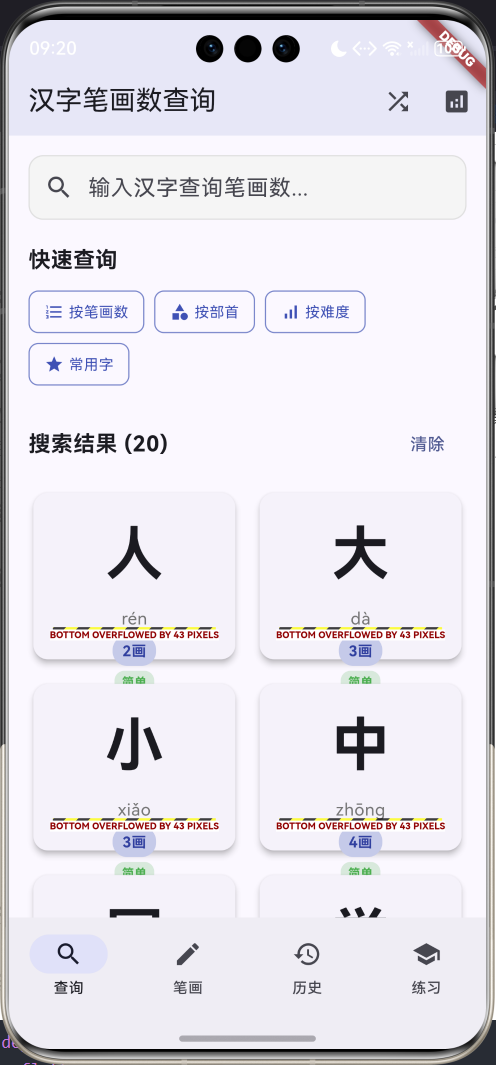
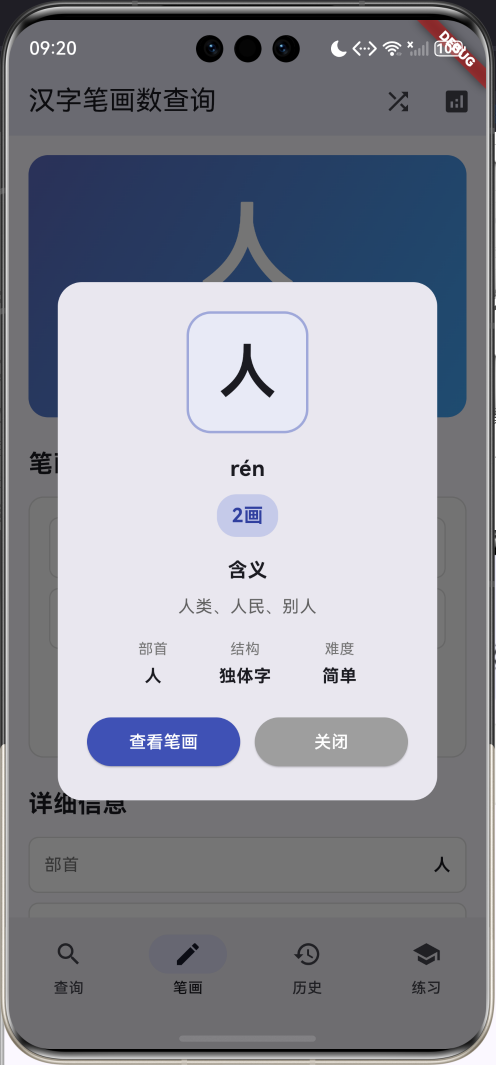
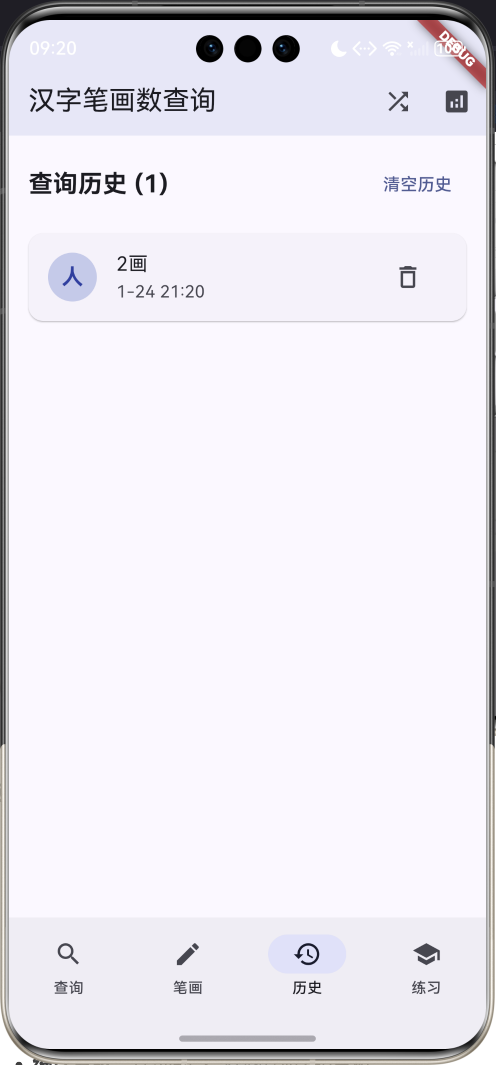
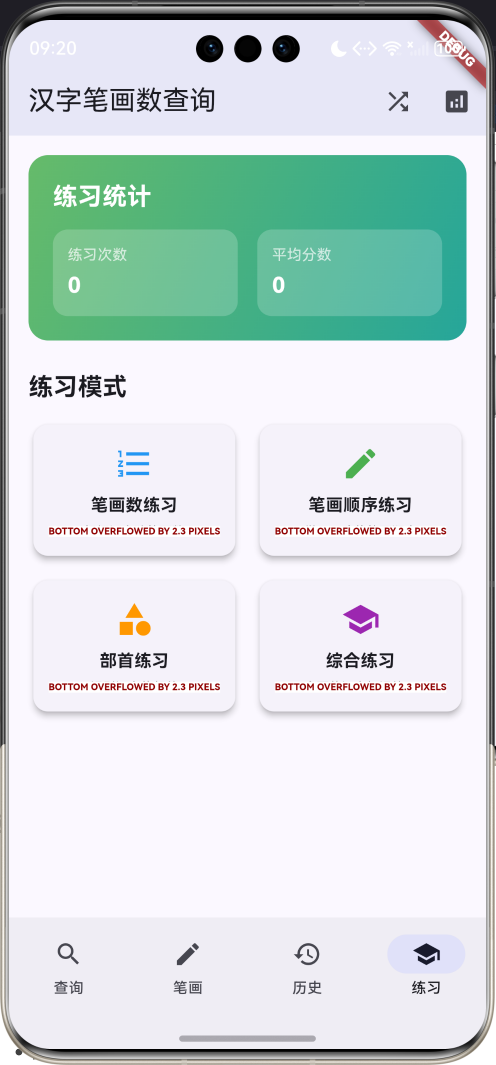
应用特色
- 智能查询系统:支持汉字、拼音、含义多维度搜索
- 笔画顺序展示:动态演示汉字的正确书写顺序
- 多维度筛选:按笔画数、部首、难度等条件筛选
- 历史记录管理:自动记录查询历史,便于复习
- 练习模式:多种练习方式,巩固学习效果
- 统计分析:详细的学习数据统计和分析
技术架构
核心技术栈
dependencies:
  flutter:
    sdk: flutter
  cupertino_icons: ^1.0.8
项目结构
lib/
├── main.dart                    # 应用入口和主要逻辑
├── models/                     # 数据模型(集成在main.dart中)
│   ├── chinese_character.dart   # 汉字信息模型
│   ├── query_history.dart       # 查询历史模型
│   └── practice_record.dart     # 练习记录模型
├── screens/                    # 页面组件(集成在main.dart中)
│   ├── search_page.dart         # 查询页面
│   ├── stroke_page.dart         # 笔画页面
│   ├── history_page.dart        # 历史页面
│   └── practice_page.dart       # 练习页面
└── widgets/                    # 自定义组件(集成在main.dart中)
    ├── character_card.dart      # 汉字卡片
    ├── stroke_animation.dart    # 笔画动画
    └── filter_dialogs.dart      # 筛选对话框
数据模型设计
汉字信息模型(ChineseCharacter)
汉字信息模型是应用的核心数据结构,包含汉字的完整信息:
class ChineseCharacter {
  final String character;        // 汉字字符
  final int strokeCount;         // 笔画数
  final String pinyin;           // 拼音
  final List<String> meanings;   // 含义列表
  final String radical;          // 部首
  final int radicalStrokes;      // 部首笔画数
  final String structure;        // 字体结构
  final List<String> strokeOrder; // 笔画顺序
  final String difficulty;       // 难度等级
  final List<String> compounds;  // 常用词组

  ChineseCharacter({
    required this.character,
    required this.strokeCount,
    required this.pinyin,
    required this.meanings,
    required this.radical,
    required this.radicalStrokes,
    required this.structure,
    required this.strokeOrder,
    required this.difficulty,
    required this.compounds,
  });
}
汉字模型还包含难度等级的计算属性:
String get difficultyText {
  switch (difficulty) {
    case 'easy':
      return '简单';
    case 'medium':
      return '中等';
    case 'hard':
      return '困难';
    default:
      return '未知';
  }
}

Color get difficultyColor {
  switch (difficulty) {
    case 'easy':
      return Colors.green;    // 简单 - 绿色
    case 'medium':
      return Colors.orange;   // 中等 - 橙色
    case 'hard':
      return Colors.red;      // 困难 - 红色
    default:
      return Colors.grey;
  }
}
查询历史模型(QueryHistory)
查询历史模型记录用户的查询行为:
class QueryHistory {
  final String character;    // 查询的汉字
  final DateTime queryTime;  // 查询时间
  final int strokeCount;     // 笔画数

  QueryHistory({
    required this.character,
    required this.queryTime,
    required this.strokeCount,
  });
}
练习记录模型(PracticeRecord)
练习记录模型存储用户的练习数据:
class PracticeRecord {
  final String character;      // 练习的汉字
  final DateTime practiceTime; // 练习时间
  final int score;            // 得分
  final int timeSpent;        // 用时(秒)

  PracticeRecord({
    required this.character,
    required this.practiceTime,
    required this.score,
    required this.timeSpent,
  });
}
应用主体结构
应用入口
class MyApp extends StatelessWidget {
const MyApp({super.key});
Widget build(BuildContext context) {
return MaterialApp(
title: '汉字笔画数查询',
theme: ThemeData(
colorScheme: ColorScheme.fromSeed(seedColor: Colors.indigo),
useMaterial3: true,
),
home: const StrokeQueryHomePage(),
);
}
}
应用采用靛蓝色作为主题色,营造专业而友好的学习氛围。
主页面结构
主页面使用底部导航栏实现四个核心功能模块:
class StrokeQueryHomePage extends StatefulWidget {
const StrokeQueryHomePage({super.key});
State<StrokeQueryHomePage> createState() => _StrokeQueryHomePageState();
}
class _StrokeQueryHomePageState extends State<StrokeQueryHomePage>
with TickerProviderStateMixin {
int _selectedIndex = 0;
final TextEditingController _searchController = TextEditingController();
List<ChineseCharacter> _characters = []; // 汉字数据库
List<ChineseCharacter> _searchResults = []; // 搜索结果
List<QueryHistory> _queryHistory = []; // 查询历史
List<PracticeRecord> _practiceRecords = []; // 练习记录
ChineseCharacter? _currentCharacter; // 当前选中汉字
// 动画控制器
late AnimationController _strokeAnimationController;
late Animation<double> _strokeAnimation;
int _currentStrokeIndex = 0;
bool _isAnimating = false;
}
查询功能实现
搜索页面设计
搜索页面是应用的核心功能,提供多种查询方式:
Widget _buildSearchPage() {
  return SingleChildScrollView(
    padding: const EdgeInsets.all(16),
    child: Column(
      crossAxisAlignment: CrossAxisAlignment.start,
      children: [
        // 搜索框
        Container(
          decoration: BoxDecoration(
            color: Colors.grey.shade100,
            borderRadius: BorderRadius.circular(12),
            border: Border.all(color: Colors.grey.shade300),
          ),
          child: TextField(
            controller: _searchController,
            decoration: const InputDecoration(
              hintText: '输入汉字查询笔画数...',
              prefixIcon: Icon(Icons.search),
              border: InputBorder.none,
              contentPadding: EdgeInsets.symmetric(horizontal: 16, vertical: 12),
            ),
            onChanged: _performSearch,
            style: const TextStyle(fontSize: 18),
          ),
        ),

        const SizedBox(height: 20),

        // 快速查询按钮
        const Text(
          '快速查询',
          style: TextStyle(fontSize: 18, fontWeight: FontWeight.bold),
        ),
        const SizedBox(height: 12),
        Wrap(
          spacing: 8,
          runSpacing: 8,
          children: [
            _buildQuickQueryButton('按笔画数', Icons.format_list_numbered, () => _showStrokeFilter()),
            _buildQuickQueryButton('按部首', Icons.category, () => _showRadicalFilter()),
            _buildQuickQueryButton('按难度', Icons.signal_cellular_alt, () => _showDifficultyFilter()),
            _buildQuickQueryButton('常用字', Icons.star, () => _showCommonCharacters()),
          ],
        ),
      ],
    ),
  );
}
智能搜索算法
应用实现了多维度的智能搜索功能:
void _performSearch(String query) {
  setState(() {
    if (query.isEmpty) {
      _searchResults = List.from(_characters);
    } else {
      _searchResults = _characters.where((character) {
        return character.character.contains(query) ||           // 汉字匹配
               character.pinyin.toLowerCase().contains(query.toLowerCase()) || // 拼音匹配
               character.meanings.any((meaning) => meaning.contains(query));   // 含义匹配
      }).toList();
    }
  });
}
搜索功能支持:
- 汉字直接搜索:输入汉字直接查找
- 拼音搜索:支持拼音查询,不区分大小写
- 含义搜索:根据汉字含义进行模糊匹配
汉字卡片组件
汉字卡片是展示搜索结果的核心组件:
Widget _buildCharacterCard(ChineseCharacter character) {
  return Card(
    elevation: 4,
    child: InkWell(
      onTap: () => _showCharacterDetail(character),
      borderRadius: BorderRadius.circular(12),
      child: Container(
        padding: const EdgeInsets.all(16),
        child: Column(
          mainAxisAlignment: MainAxisAlignment.center,
          children: [
            // 汉字
            Text(
              character.character,
              style: const TextStyle(
                fontSize: 48,
                fontWeight: FontWeight.bold,
              ),
            ),
            const SizedBox(height: 8),

            // 拼音
            Text(
              character.pinyin,
              style: TextStyle(
                fontSize: 14,
                color: Colors.grey.shade600,
              ),
            ),
            const SizedBox(height: 4),

            // 笔画数标签
            Container(
              padding: const EdgeInsets.symmetric(horizontal: 8, vertical: 4),
              decoration: BoxDecoration(
                color: Colors.indigo.shade100,
                borderRadius: BorderRadius.circular(12),
              ),
              child: Text(
                '${character.strokeCount}画',
                style: TextStyle(
                  fontSize: 12,
                  fontWeight: FontWeight.bold,
                  color: Colors.indigo.shade700,
                ),
              ),
            ),
            const SizedBox(height: 4),

            // 难度标签
            Container(
              padding: const EdgeInsets.symmetric(horizontal: 6, vertical: 2),
              decoration: BoxDecoration(
                color: character.difficultyColor.withValues(alpha: 0.2),
                borderRadius: BorderRadius.circular(8),
              ),
              child: Text(
                character.difficultyText,
                style: TextStyle(
                  fontSize: 10,
                  color: character.difficultyColor,
                  fontWeight: FontWeight.bold,
                ),
              ),
            ),
          ],
        ),
      ),
    ),
  );
}
笔画顺序展示
笔画页面设计
笔画页面展示汉字的详细信息和笔画顺序:
Widget _buildStrokePage() {
  if (_currentCharacter == null) {
    return const Center(
      child: Column(
        mainAxisAlignment: MainAxisAlignment.center,
        children: [
          Icon(Icons.edit_outlined, size: 64, color: Colors.grey),
          SizedBox(height: 16),
          Text(
            '请先选择一个汉字',
            style: TextStyle(fontSize: 18, color: Colors.grey),
          ),
          SizedBox(height: 8),
          Text(
            '在查询页面点击汉字查看笔画顺序',
            style: TextStyle(fontSize: 14, color: Colors.grey),
          ),
        ],
      ),
    );
  }

  return SingleChildScrollView(
    padding: const EdgeInsets.all(16),
    child: Column(
      crossAxisAlignment: CrossAxisAlignment.start,
      children: [
        // 汉字展示卡片
        Container(
          width: double.infinity,
          padding: const EdgeInsets.all(20),
          decoration: BoxDecoration(
            gradient: LinearGradient(
              colors: [Colors.indigo.shade400, Colors.blue.shade400],
              begin: Alignment.topLeft,
              end: Alignment.bottomRight,
            ),
            borderRadius: BorderRadius.circular(16),
          ),
          child: Column(
            children: [
              Text(
                _currentCharacter!.character,
                style: const TextStyle(
                  fontSize: 80,
                  fontWeight: FontWeight.bold,
                  color: Colors.white,
                ),
              ),
              const SizedBox(height: 8),
              Text(
                _currentCharacter!.pinyin,
                style: const TextStyle(
                  fontSize: 18,
                  color: Colors.white70,
                ),
              ),
              const SizedBox(height: 4),
              Text(
                '${_currentCharacter!.strokeCount}画',
                style: const TextStyle(
                  fontSize: 16,
                  color: Colors.white70,
                ),
              ),
            ],
          ),
        ),

        const SizedBox(height: 24),

        // 笔画顺序展示
        _buildStrokeOrderSection(),
      ],
    ),
  );
}
笔画顺序动画
应用实现了动态的笔画顺序展示功能:
Widget _buildStrokeOrderSection() {
  return Container(
    padding: const EdgeInsets.all(16),
    decoration: BoxDecoration(
      color: Colors.grey.shade50,
      borderRadius: BorderRadius.circular(12),
      border: Border.all(color: Colors.grey.shade300),
    ),
    child: Column(
      children: [
        // 笔画列表
        ListView.builder(
          shrinkWrap: true,
          physics: const NeverScrollableScrollPhysics(),
          itemCount: _currentCharacter!.strokeOrder.length,
          itemBuilder: (context, index) {
            final isActive = _isAnimating && index <= _currentStrokeIndex;
            return Container(
              margin: const EdgeInsets.only(bottom: 8),
              padding: const EdgeInsets.all(12),
              decoration: BoxDecoration(
                color: isActive ? Colors.indigo.shade100 : Colors.white,
                borderRadius: BorderRadius.circular(8),
                border: Border.all(
                  color: isActive ? Colors.indigo : Colors.grey.shade300,
                  width: isActive ? 2 : 1,
                ),
              ),
              child: Row(
                children: [
                  // 笔画序号
                  Container(
                    width: 24,
                    height: 24,
                    decoration: BoxDecoration(
                      color: isActive ? Colors.indigo : Colors.grey.shade400,
                      shape: BoxShape.circle,
                    ),
                    child: Center(
                      child: Text(
                        '${index + 1}',
                        style: const TextStyle(
                          color: Colors.white,
                          fontSize: 12,
                          fontWeight: FontWeight.bold,
                        ),
                      ),
                    ),
                  ),
                  const SizedBox(width: 12),
                  // 笔画名称
                  Text(
                    _currentCharacter!.strokeOrder[index],
                    style: TextStyle(
                      fontSize: 16,
                      fontWeight: isActive ? FontWeight.bold : FontWeight.normal,
                      color: isActive ? Colors.indigo : Colors.black87,
                    ),
                  ),
                ],
              ),
            );
          },
        ),

        const SizedBox(height: 16),

        // 动画控制按钮
        Row(
          mainAxisAlignment: MainAxisAlignment.spaceEvenly,
          children: [
            ElevatedButton.icon(
              onPressed: _isAnimating ? null : _startStrokeAnimation,
              icon: const Icon(Icons.play_arrow),
              label: const Text('播放'),
              style: ElevatedButton.styleFrom(
                backgroundColor: Colors.green,
                foregroundColor: Colors.white,
              ),
            ),
            ElevatedButton.icon(
              onPressed: _isAnimating ? _stopStrokeAnimation : null,
              icon: const Icon(Icons.stop),
              label: const Text('停止'),
              style: ElevatedButton.styleFrom(
                backgroundColor: Colors.red,
                foregroundColor: Colors.white,
              ),
            ),
            ElevatedButton.icon(
              onPressed: _resetStrokeAnimation,
              icon: const Icon(Icons.refresh),
              label: const Text('重置'),
              style: ElevatedButton.styleFrom(
                backgroundColor: Colors.orange,
                foregroundColor: Colors.white,
              ),
            ),
          ],
        ),
      ],
    ),
  );
}
笔画动画控制
笔画动画通过定时器实现逐步展示效果:
void _startStrokeAnimation() {
  setState(() {
    _isAnimating = true;
    _currentStrokeIndex = 0;
  });

  _animateNextStroke();
}

void _animateNextStroke() {
  if (!_isAnimating || _currentCharacter == null) return;

  if (_currentStrokeIndex < _currentCharacter!.strokeOrder.length) {
    setState(() {
      _currentStrokeIndex++;
    });

    // 每个笔画间隔1秒
    Future.delayed(const Duration(milliseconds: 1000), () {
      _animateNextStroke();
    });
  } else {
    setState(() {
      _isAnimating = false;
    });
  }
}

void _stopStrokeAnimation() {
  setState(() {
    _isAnimating = false;
  });
}

void _resetStrokeAnimation() {
  setState(() {
    _isAnimating = false;
    _currentStrokeIndex = 0;
  });
}
筛选功能实现
按笔画数筛选
应用提供了按笔画数筛选汉字的功能:
void _showStrokeFilter() {
  showDialog(
    context: context,
    builder: (context) => AlertDialog(
      title: const Text('按笔画数筛选'),
      content: SizedBox(
        width: double.maxFinite,
        child: ListView.builder(
          shrinkWrap: true,
          itemCount: 20,
          itemBuilder: (context, index) {
            final strokeCount = index + 1;
            final count = _characters.where((c) => c.strokeCount == strokeCount).length;

            return ListTile(
              title: Text('${strokeCount}画'),
              subtitle: Text('$count个汉字'),
              onTap: () {
                Navigator.of(context).pop();
                _filterByStrokeCount(strokeCount);
              },
            );
          },
        ),
      ),
      actions: [
        TextButton(
          onPressed: () => Navigator.of(context).pop(),
          child: const Text('取消'),
        ),
      ],
    ),
  );
}

void _filterByStrokeCount(int strokeCount) {
  setState(() {
    _searchResults = _characters.where((c) => c.strokeCount == strokeCount).toList();
    _searchController.text = '${strokeCount}画';
  });
}
按部首筛选
部首筛选功能帮助用户按汉字部首查找:
void _showRadicalFilter() {
  final radicals = _characters.map((c) => c.radical).toSet().toList();
  radicals.sort();

  showDialog(
    context: context,
    builder: (context) => AlertDialog(
      title: const Text('按部首筛选'),
      content: SizedBox(
        width: double.maxFinite,
        child: ListView.builder(
          shrinkWrap: true,
          itemCount: radicals.length,
          itemBuilder: (context, index) {
            final radical = radicals[index];
            final count = _characters.where((c) => c.radical == radical).length;

            return ListTile(
              title: Text(radical),
              subtitle: Text('$count个汉字'),
              onTap: () {
                Navigator.of(context).pop();
                _filterByRadical(radical);
              },
            );
          },
        ),
      ),
    ),
  );
}

void _filterByRadical(String radical) {
  setState(() {
    _searchResults = _characters.where((c) => c.radical == radical).toList();
    _searchController.text = '部首:$radical';
  });
}
按难度筛选
难度筛选帮助用户根据学习水平选择合适的汉字:
void _showDifficultyFilter() {
  final difficulties = ['easy', 'medium', 'hard'];
  final difficultyNames = ['简单', '中等', '困难'];

  showDialog(
    context: context,
    builder: (context) => AlertDialog(
      title: const Text('按难度筛选'),
      content: Column(
        mainAxisSize: MainAxisSize.min,
        children: difficulties.asMap().entries.map((entry) {
          final index = entry.key;
          final difficulty = entry.value;
          final name = difficultyNames[index];
          final count = _characters.where((c) => c.difficulty == difficulty).length;

          return ListTile(
            title: Text(name),
            subtitle: Text('$count个汉字'),
            onTap: () {
              Navigator.of(context).pop();
              _filterByDifficulty(difficulty);
            },
          );
        }).toList(),
      ),
    ),
  );
}

void _filterByDifficulty(String difficulty) {
  setState(() {
    _searchResults = _characters.where((c) => c.difficulty == difficulty).toList();
    _searchController.text = '难度:${difficulty == 'easy' ? '简单' : difficulty == 'medium' ? '中等' : '困难'}';
  });
}
历史记录管理
历史记录页面
历史记录页面展示用户的查询历史:
Widget _buildHistoryPage() {
  if (_queryHistory.isEmpty) {
    return const Center(
      child: Column(
        mainAxisAlignment: MainAxisAlignment.center,
        children: [
          Icon(Icons.history, size: 64, color: Colors.grey),
          SizedBox(height: 16),
          Text(
            '暂无查询历史',
            style: TextStyle(fontSize: 18, color: Colors.grey),
          ),
          SizedBox(height: 8),
          Text(
            '查询汉字后会显示在这里',
            style: TextStyle(fontSize: 14, color: Colors.grey),
          ),
        ],
      ),
    );
  }

  return SingleChildScrollView(
    padding: const EdgeInsets.all(16),
    child: Column(
      crossAxisAlignment: CrossAxisAlignment.start,
      children: [
        Row(
          mainAxisAlignment: MainAxisAlignment.spaceBetween,
          children: [
            Text(
              '查询历史 (${_queryHistory.length})',
              style: const TextStyle(fontSize: 20, fontWeight: FontWeight.bold),
            ),
            TextButton(
              onPressed: _clearHistory,
              child: const Text('清空历史'),
            ),
          ],
        ),

        const SizedBox(height: 16),

        ListView.builder(
          shrinkWrap: true,
          physics: const NeverScrollableScrollPhysics(),
          itemCount: _queryHistory.length,
          itemBuilder: (context, index) {
            final history = _queryHistory[index];
            return Card(
              margin: const EdgeInsets.only(bottom: 8),
              child: ListTile(
                leading: Container(
                  width: 40,
                  height: 40,
                  decoration: BoxDecoration(
                    color: Colors.indigo.shade100,
                    shape: BoxShape.circle,
                  ),
                  child: Center(
                    child: Text(
                      history.character,
                      style: TextStyle(
                        fontSize: 18,
                        fontWeight: FontWeight.bold,
                        color: Colors.indigo.shade700,
                      ),
                    ),
                  ),
                ),
                title: Text('${history.strokeCount}画'),
                subtitle: Text(_formatDateTime(history.queryTime)),
                trailing: IconButton(
                  onPressed: () => _removeFromHistory(index),
                  icon: const Icon(Icons.delete_outline),
                ),
                onTap: () {
                  final character = _characters.firstWhere(
                    (c) => c.character == history.character,
                    orElse: () => _characters.first,
                  );
                  _showCharacterDetail(character);
                },
              ),
            );
          },
        ),
      ],
    ),
  );
}
历史记录管理
历史记录的添加、删除和清空功能:
void _addToHistory(ChineseCharacter character) {
  final history = QueryHistory(
    character: character.character,
    queryTime: DateTime.now(),
    strokeCount: character.strokeCount,
  );

  setState(() {
    // 移除重复项
    _queryHistory.removeWhere((h) => h.character == character.character);
    // 添加到开头
    _queryHistory.insert(0, history);
    // 限制历史记录数量
    if (_queryHistory.length > 50) {
      _queryHistory = _queryHistory.take(50).toList();
    }
  });
}

void _removeFromHistory(int index) {
  setState(() {
    _queryHistory.removeAt(index);
  });
}

void _clearHistory() {
  showDialog(
    context: context,
    builder: (context) => AlertDialog(
      title: const Text('清空历史'),
      content: const Text('确定要清空所有查询历史吗?'),
      actions: [
        TextButton(
          onPressed: () => Navigator.of(context).pop(),
          child: const Text('取消'),
        ),
        TextButton(
          onPressed: () {
            setState(() {
              _queryHistory.clear();
            });
            Navigator.of(context).pop();
          },
          child: const Text('确定'),
        ),
      ],
    ),
  );
}
练习模式设计
练习页面布局
练习页面提供多种练习模式:
Widget _buildPracticePage() {
  return SingleChildScrollView(
    padding: const EdgeInsets.all(16),
    child: Column(
      crossAxisAlignment: CrossAxisAlignment.start,
      children: [
        // 练习统计卡片
        Container(
          width: double.infinity,
          padding: const EdgeInsets.all(20),
          decoration: BoxDecoration(
            gradient: LinearGradient(
              colors: [Colors.green.shade400, Colors.teal.shade400],
              begin: Alignment.topLeft,
              end: Alignment.bottomRight,
            ),
            borderRadius: BorderRadius.circular(16),
          ),
          child: Column(
            crossAxisAlignment: CrossAxisAlignment.start,
            children: [
              const Text(
                '练习统计',
                style: TextStyle(
                  fontSize: 20,
                  fontWeight: FontWeight.bold,
                  color: Colors.white,
                ),
              ),
              const SizedBox(height: 12),
              Row(
                children: [
                  _buildPracticeStatCard('练习次数', '${_practiceRecords.length}'),
                  const SizedBox(width: 16),
                  _buildPracticeStatCard('平均分数', _getAverageScore()),
                ],
              ),
            ],
          ),
        ),

        const SizedBox(height: 24),

        // 练习模式选择
        const Text(
          '练习模式',
          style: TextStyle(fontSize: 20, fontWeight: FontWeight.bold),
        ),
        const SizedBox(height: 12),

        GridView.count(
          shrinkWrap: true,
          physics: const NeverScrollableScrollPhysics(),
          crossAxisCount: 2,
          childAspectRatio: 1.5,
          crossAxisSpacing: 12,
          mainAxisSpacing: 12,
          children: [
            _buildPracticeModeCard(
              '笔画数练习',
              '根据汉字猜笔画数',
              Icons.format_list_numbered,
              Colors.blue,
              () => _startStrokeCountPractice(),
            ),
            _buildPracticeModeCard(
              '笔画顺序练习',
              '学习正确的笔画顺序',
              Icons.edit,
              Colors.green,
              () => _startStrokeOrderPractice(),
            ),
            _buildPracticeModeCard(
              '部首练习',
              '识别汉字的部首',
              Icons.category,
              Colors.orange,
              () => _startRadicalPractice(),
            ),
            _buildPracticeModeCard(
              '综合练习',
              '全面的汉字知识练习',
              Icons.school,
              Colors.purple,
              () => _startComprehensivePractice(),
            ),
          ],
        ),
      ],
    ),
  );
}
练习模式卡片
练习模式卡片组件:
Widget _buildPracticeModeCard(
  String title,
  String description,
  IconData icon,
  Color color,
  VoidCallback onTap,
) {
  return Card(
    elevation: 4,
    child: InkWell(
      onTap: onTap,
      borderRadius: BorderRadius.circular(12),
      child: Container(
        padding: const EdgeInsets.all(16),
        child: Column(
          mainAxisAlignment: MainAxisAlignment.center,
          children: [
            Icon(icon, size: 32, color: color),
            const SizedBox(height: 8),
            Text(
              title,
              style: const TextStyle(
                fontSize: 14,
                fontWeight: FontWeight.bold,
              ),
              textAlign: TextAlign.center,
            ),
            const SizedBox(height: 4),
            Text(
              description,
              style: TextStyle(
                fontSize: 10,
                color: Colors.grey.shade600,
              ),
              textAlign: TextAlign.center,
            ),
          ],
        ),
      ),
    ),
  );
}
汉字详情对话框
详情对话框设计
汉字详情对话框展示汉字的完整信息:
void _showCharacterDetail(ChineseCharacter character) {
  setState(() {
    _currentCharacter = character;
    _selectedIndex = 1; // 切换到笔画页面
  });

  // 添加到查询历史
  _addToHistory(character);

  showDialog(
    context: context,
    builder: (context) => Dialog(
      shape: RoundedRectangleBorder(borderRadius: BorderRadius.circular(20)),
      child: Container(
        padding: const EdgeInsets.all(24),
        constraints: const BoxConstraints(maxHeight: 600),
        child: Column(
          mainAxisSize: MainAxisSize.min,
          children: [
            // 汉字展示
            Container(
              width: 100,
              height: 100,
              decoration: BoxDecoration(
                color: Colors.indigo.shade50,
                borderRadius: BorderRadius.circular(20),
                border: Border.all(color: Colors.indigo.shade200, width: 2),
              ),
              child: Center(
                child: Text(
                  character.character,
                  style: const TextStyle(
                    fontSize: 48,
                    fontWeight: FontWeight.bold,
                  ),
                ),
              ),
            ),

            const SizedBox(height: 16),

            Text(
              character.pinyin,
              style: const TextStyle(
                fontSize: 18,
                fontWeight: FontWeight.bold,
              ),
            ),

            const SizedBox(height: 8),

            Container(
              padding: const EdgeInsets.symmetric(horizontal: 12, vertical: 6),
              decoration: BoxDecoration(
                color: Colors.indigo.shade100,
                borderRadius: BorderRadius.circular(16),
              ),
              child: Text(
                '${character.strokeCount}画',
                style: TextStyle(
                  fontSize: 16,
                  fontWeight: FontWeight.bold,
                  color: Colors.indigo.shade700,
                ),
              ),
            ),

            const SizedBox(height: 16),

            // 含义
            const Text(
              '含义',
              style: TextStyle(fontSize: 16, fontWeight: FontWeight.bold),
            ),
            const SizedBox(height: 8),
            Text(
              character.meanings.join('、'),
              style: TextStyle(
                fontSize: 14,
                color: Colors.grey.shade700,
              ),
              textAlign: TextAlign.center,
            ),

            const SizedBox(height: 16),

            // 基本信息
            Row(
              mainAxisAlignment: MainAxisAlignment.spaceEvenly,
              children: [
                _buildDetailItem('部首', character.radical),
                _buildDetailItem('结构', character.structure),
                _buildDetailItem('难度', character.difficultyText),
              ],
            ),

            const SizedBox(height: 20),

            // 按钮
            Row(
              children: [
                Expanded(
                  child: ElevatedButton(
                    onPressed: () {
                      Navigator.of(context).pop();
                      setState(() {
                        _currentCharacter = character;
                        _selectedIndex = 1;
                      });
                    },
                    style: ElevatedButton.styleFrom(
                      backgroundColor: Colors.indigo,
                      foregroundColor: Colors.white,
                    ),
                    child: const Text('查看笔画'),
                  ),
                ),
                const SizedBox(width: 12),
                Expanded(
                  child: ElevatedButton(
                    onPressed: () => Navigator.of(context).pop(),
                    style: ElevatedButton.styleFrom(
                      backgroundColor: Colors.grey,
                      foregroundColor: Colors.white,
                    ),
                    child: const Text('关闭'),
                  ),
                ),
              ],
            ),
          ],
        ),
      ),
    ),
  );
}
数据初始化
汉字数据库
应用初始化时创建包含20个常用汉字的数据库:
void _initializeData() {
  _characters = [
    ChineseCharacter(
      character: '人',
      strokeCount: 2,
      pinyin: 'rén',
      meanings: ['人类', '人民', '别人'],
      radical: '人',
      radicalStrokes: 2,
      structure: '独体字',
      strokeOrder: ['撇', '捺'],
      difficulty: 'easy',
      compounds: ['人民', '人类', '人生', '人工'],
    ),
    ChineseCharacter(
      character: '大',
      strokeCount: 3,
      pinyin: 'dà',
      meanings: ['大小的大', '重要的', '年长的'],
      radical: '大',
      radicalStrokes: 3,
      structure: '独体字',
      strokeOrder: ['横', '撇', '捺'],
      difficulty: 'easy',
      compounds: ['大小', '大家', '大学', '大人'],
    ),
    // ... 更多汉字数据
  ];

  _searchResults = List.from(_characters);
}
每个汉字包含完整的信息:
- 基本信息:汉字、笔画数、拼音、含义
- 结构信息:部首、部首笔画数、字体结构
- 学习信息:笔画顺序、难度等级、常用词组
辅助功能
随机汉字功能
随机汉字功能帮助用户发现新的汉字:
void _showRandomCharacter() {
  final random = Random();
  final character = _characters[random.nextInt(_characters.length)];
  _showCharacterDetail(character);
}
统计信息功能
统计信息展示应用的使用数据:
void _showStatistics() {
  final totalChars = _characters.length;
  final easyCount = _characters.where((c) => c.difficulty == 'easy').length;
  final mediumCount = _characters.where((c) => c.difficulty == 'medium').length;
  final hardCount = _characters.where((c) => c.difficulty == 'hard').length;
  final avgStrokes = _characters.fold(0, (sum, c) => sum + c.strokeCount) / totalChars;

  showDialog(
    context: context,
    builder: (context) => AlertDialog(
      title: const Text('统计信息'),
      content: Column(
        mainAxisSize: MainAxisSize.min,
        crossAxisAlignment: CrossAxisAlignment.start,
        children: [
          Text('总汉字数:$totalChars'),
          const SizedBox(height: 8),
          Text('简单汉字:$easyCount'),
          Text('中等汉字:$mediumCount'),
          Text('困难汉字:$hardCount'),
          const SizedBox(height: 8),
          Text('平均笔画数:${avgStrokes.toStringAsFixed(1)}'),
          const SizedBox(height: 8),
          Text('查询历史:${_queryHistory.length}条'),
          Text('练习记录:${_practiceRecords.length}次'),
        ],
      ),
      actions: [
        TextButton(
          onPressed: () => Navigator.of(context).pop(),
          child: const Text('确定'),
        ),
      ],
    ),
  );
}
工具函数
应用包含多个实用的工具函数:
// 日期时间格式化
String _formatDateTime(DateTime dateTime) {
  return '${dateTime.month}-${dateTime.day} ${dateTime.hour.toString().padLeft(2, '0')}:${dateTime.minute.toString().padLeft(2, '0')}';
}

// 练习平均分数计算
String _getAverageScore() {
  if (_practiceRecords.isEmpty) return '0';
  final total = _practiceRecords.fold(0, (sum, record) => sum + record.score);
  return (total / _practiceRecords.length).toStringAsFixed(1);
}

// 分数颜色获取
Color _getScoreColor(int score) {
  if (score >= 90) return Colors.green;
  if (score >= 70) return Colors.orange;
  return Colors.red;
}

// 分数图标获取
IconData _getScoreIcon(int score) {
  if (score >= 90) return Icons.star;
  if (score >= 70) return Icons.thumb_up;
  return Icons.thumb_down;
}

// 消息提示
void _showMessage(String message) {
  ScaffoldMessenger.of(context).showSnackBar(
    SnackBar(
      content: Text(message),
      duration: const Duration(seconds: 2),
    ),
  );
}
项目总结
汉字笔画数查询应用成功实现了完整的汉字学习功能,通过直观的界面设计和丰富的交互体验,为用户提供了专业的汉字学习工具。
技术亮点
- 智能搜索:支持汉字、拼音、含义多维度搜索
- 动态展示:笔画顺序的动态演示功能
- 数据管理:完整的历史记录和练习数据管理
- 筛选功能:多种筛选条件,精确查找汉字
- 用户体验:Material Design 3风格的现代化界面
功能特色
- 20个常用汉字的完整信息数据库
- 智能搜索和多维度筛选功能
- 动态笔画顺序展示和动画控制
- 自动历史记录管理和统计分析
- 多种练习模式设计框架
- 随机汉字发现功能
扩展方向
- 数据扩展:增加更多汉字数据,建立完整的汉字数据库
- 练习实现:完善各种练习模式的具体实现
- 语音功能:添加汉字发音和语音识别功能
- 书写练习:集成手写识别和书写练习功能
- 云端同步:实现用户数据的云端存储和同步
- 社交功能:添加学习分享和社区交流功能
通过本教程的学习,你已经掌握了Flutter应用开发的高级技能,包括复杂数据管理、动画控制、搜索算法和用户界面设计。这些技能可以应用到教育类应用和其他复杂项目的开发中。
欢迎加入开源鸿蒙跨平台社区:https://openharmonycrossplatform.csdn.net

开源鸿蒙跨平台开发社区汇聚开发者与厂商,共建“一次开发,多端部署”的开源生态,致力于降低跨端开发门槛,推动万物智联创新。
更多推荐
 17
17 0
0- 0



 已为社区贡献4条内容

所有评论(0)