Flutter 框架跨平台鸿蒙开发 - 运动打卡社交:打造全功能健身社交平台
在全民健身的时代背景下,运动社交应用成为连接健身爱好者的重要平台。本教程将带你使用Flutter开发一个功能完整的运动打卡社交应用,集成运动记录、社交分享、挑战活动、好友互动等核心功能。运行效果图项目结构数据模型设计运动记录模型(WorkoutRecord)运动记录是应用的核心数据结构,记录用户的运动详情:运动记录模型包含了丰富的运动数据,支持多种运动类型的记录和展示。用户模型存储用户的基本信息和
Flutter运动打卡社交:打造全功能健身社交平台
项目概述
在全民健身的时代背景下,运动社交应用成为连接健身爱好者的重要平台。本教程将带你使用Flutter开发一个功能完整的运动打卡社交应用,集成运动记录、社交分享、挑战活动、好友互动等核心功能。
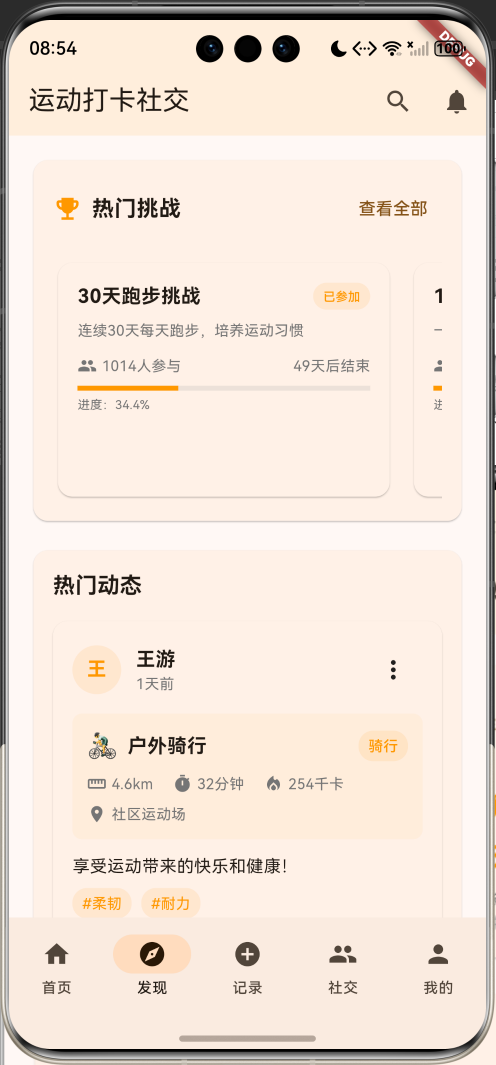
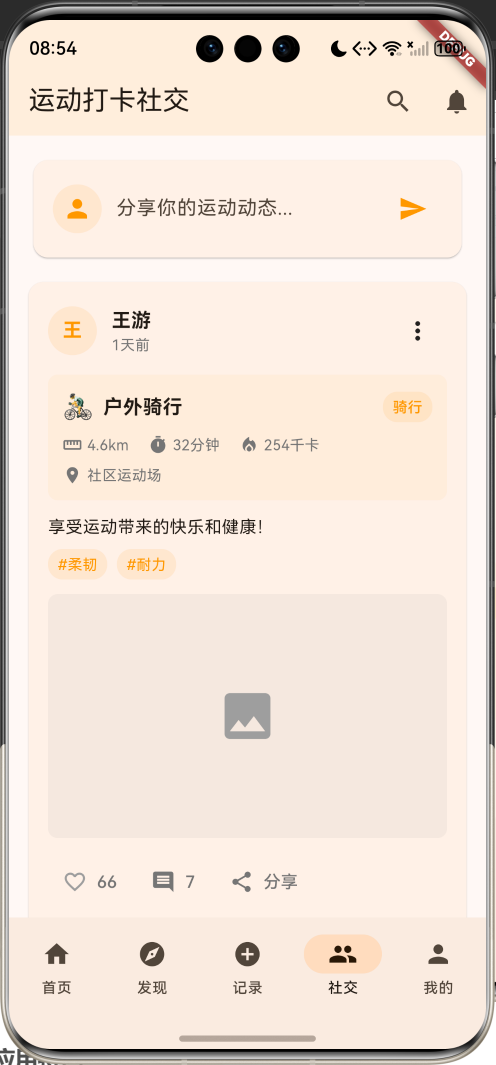
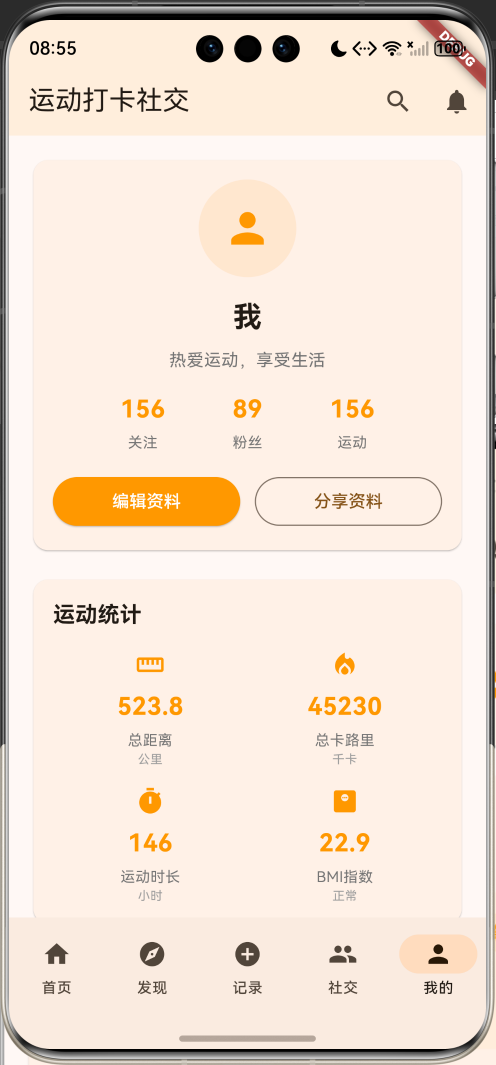
运行效果图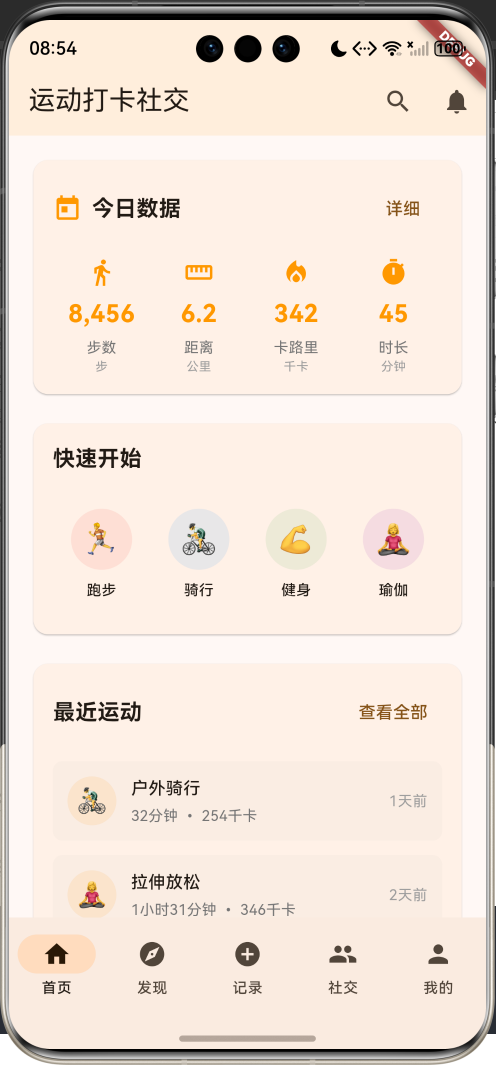
应用特色
- 运动记录:多种运动类型支持,详细数据统计
- 社交分享:运动动态发布,点赞评论互动
- 挑战活动:多样化运动挑战,激励用户坚持
- 数据统计:个人运动数据可视化展示
- 好友系统:关注好友,分享运动成果
技术架构
核心技术栈
dependencies:
  flutter:
    sdk: flutter
  cupertino_icons: ^1.0.8
项目结构
lib/
├── main.dart              # 应用入口和主要逻辑
├── models/               # 数据模型(集成在main.dart中)
│   ├── workout_record.dart # 运动记录模型
│   ├── fitness_user.dart   # 用户模型
│   ├── challenge.dart      # 挑战活动模型
│   └── comment.dart        # 评论模型
├── screens/              # 页面组件(集成在main.dart中)
│   ├── home_page.dart      # 首页
│   ├── discover_page.dart  # 发现页面
│   ├── record_page.dart    # 记录页面
│   ├── social_page.dart    # 社交页面
│   └── profile_page.dart   # 个人页面
└── widgets/              # 自定义组件(集成在main.dart中)
    ├── workout_card.dart   # 运动卡片
    ├── challenge_card.dart # 挑战卡片
    └── user_card.dart      # 用户卡片
数据模型设计
运动记录模型(WorkoutRecord)
运动记录是应用的核心数据结构,记录用户的运动详情:
class WorkoutRecord {
  final String id;              // 记录唯一标识
  final String userId;          // 用户ID
  final String userName;        // 用户姓名
  final String userAvatar;      // 用户头像
  final String workoutType;     // 运动类型
  final String title;           // 运动标题
  final String description;     // 运动描述
  final DateTime startTime;     // 开始时间
  final DateTime endTime;       // 结束时间
  final int duration;           // 运动时长(分钟)
  final double distance;        // 运动距离(公里)
  final int calories;           // 消耗卡路里
  final int steps;              // 步数
  final double avgHeartRate;    // 平均心率
  final List<String> photos;    // 运动照片
  final String location;        // 运动地点
  final Map<String, dynamic> stats; // 详细统计数据
  final List<String> tags;      // 运动标签
  final int likes;              // 点赞数
  final int comments;           // 评论数
  final bool isLiked;           // 是否已点赞
  final DateTime createdAt;     // 创建时间
}
运动记录模型包含了丰富的运动数据,支持多种运动类型的记录和展示。
用户模型(FitnessUser)
用户模型存储用户的基本信息和运动统计:
class FitnessUser {
  final String id;              // 用户唯一标识
  final String name;            // 用户姓名
  final String avatar;          // 用户头像
  final String bio;             // 个人简介
  final int age;                // 年龄
  final String gender;          // 性别
  final double height;          // 身高(cm)
  final double weight;          // 体重(kg)
  final int totalWorkouts;      // 总运动次数
  final double totalDistance;   // 总运动距离
  final int totalCalories;      // 总消耗卡路里
  final int totalDuration;      // 总运动时长
  final int followers;          // 粉丝数
  final int following;          // 关注数
  final List<String> achievements; // 成就列表
  final bool isFollowing;       // 是否已关注
  final DateTime joinDate;      // 加入时间
}
用户模型还包含BMI计算功能:
double get bmi => weight / ((height / 100) * (height / 100));

String get bmiCategory {
  if (bmi < 18.5) return '偏瘦';
  if (bmi < 24) return '正常';
  if (bmi < 28) return '偏胖';
  return '肥胖';
}
挑战活动模型(Challenge)
挑战活动模型定义各种运动挑战:
class Challenge {
  final String id;              // 挑战唯一标识
  final String title;           // 挑战标题
  final String description;     // 挑战描述
  final String type;            // 挑战类型(distance, duration, calories, steps)
  final double target;          // 目标值
  final String unit;            // 单位
  final DateTime startDate;     // 开始日期
  final DateTime endDate;       // 结束日期
  final int participants;       // 参与人数
  final String reward;          // 奖励
  final bool isJoined;          // 是否已参加
  final double progress;        // 当前进度
  final String coverImage;      // 封面图片
}
挑战模型包含进度计算功能:
int get daysLeft => endDate.difference(DateTime.now()).inDays;
double get progressPercentage => (progress / target * 100).clamp(0, 100);
bool get isActive => DateTime.now().isBefore(endDate) && DateTime.now().isAfter(startDate);
评论模型(Comment)
评论模型处理用户互动:
class Comment {
  final String id;              // 评论唯一标识
  final String userId;          // 评论者ID
  final String userName;        // 评论者姓名
  final String userAvatar;      // 评论者头像
  final String content;         // 评论内容
  final DateTime createdAt;     // 评论时间
  final int likes;              // 点赞数
  final bool isLiked;           // 是否已点赞
}
应用主体结构
应用入口
class MyApp extends StatelessWidget {
const MyApp({super.key});
Widget build(BuildContext context) {
return MaterialApp(
title: '运动打卡社交',
theme: ThemeData(
colorScheme: ColorScheme.fromSeed(seedColor: Colors.orange),
useMaterial3: true,
),
home: const FitnessHomePage(),
);
}
}
应用采用橙色作为主题色,营造活力四射的运动氛围。
主页面结构
主页面使用底部导航栏实现五个核心功能模块:
class FitnessHomePage extends StatefulWidget {
State<FitnessHomePage> createState() => _FitnessHomePageState();
}
class _FitnessHomePageState extends State<FitnessHomePage> {
int _selectedIndex = 0;
final List<WorkoutRecord> _workoutRecords = [];
final List<FitnessUser> _users = [];
final List<Challenge> _challenges = [];
final List<Comment> _comments = [];
FitnessUser? _currentUser;
Widget build(BuildContext context) {
return Scaffold(
appBar: AppBar(
title: const Text('运动打卡社交'),
backgroundColor: Colors.orange.withValues(alpha: 0.1),
actions: [
IconButton(
onPressed: () => _showSearchDialog(),
icon: const Icon(Icons.search),
),
IconButton(
onPressed: () => _showNotificationDialog(),
icon: const Icon(Icons.notifications),
),
],
),
body: IndexedStack(
index: _selectedIndex,
children: [
_buildHomePage(),
_buildDiscoverPage(),
_buildRecordPage(),
_buildSocialPage(),
_buildProfilePage(),
],
),
bottomNavigationBar: NavigationBar(
selectedIndex: _selectedIndex,
onDestinationSelected: (index) {
setState(() => _selectedIndex = index);
},
destinations: const [
NavigationDestination(icon: Icon(Icons.home), label: '首页'),
NavigationDestination(icon: Icon(Icons.explore), label: '发现'),
NavigationDestination(icon: Icon(Icons.add_circle), label: '记录'),
NavigationDestination(icon: Icon(Icons.people), label: '社交'),
NavigationDestination(icon: Icon(Icons.person), label: '我的'),
],
),
);
}
}
## 数据生成与管理
### 模拟数据生成
应用使用模拟数据生成器创建丰富的运动和用户数据:
```dart
void initState() {
super.initState();
_generateUsers();
_generateWorkoutRecords();
_generateChallenges();
_generateComments();
_setCurrentUser();
}
void _generateUsers() {
final names = ['张健', '李跑', '王游', '赵骑', '钱举', '孙瑜', '周舞', '吴球', '郑拳', '陈跳'];
final bios = [
'热爱跑步的马拉松爱好者',
'健身达人,专注力量训练',
'游泳教练,水中自由者',
'骑行爱好者,追风少年',
'瑜伽导师,身心平衡',
];
final random = Random();
for (int i = 0; i < 10; i++) {
_users.add(FitnessUser(
id: 'user_$i',
name: names[i],
avatar: 'avatar_${i + 1}.jpg',
bio: bios[random.nextInt(bios.length)],
age: 20 + random.nextInt(30),
gender: i % 2 == 0 ? '男' : '女',
height: 160 + random.nextInt(25).toDouble(),
weight: 50 + random.nextInt(30).toDouble(),
totalWorkouts: random.nextInt(500),
totalDistance: random.nextDouble() * 1000,
totalCalories: random.nextInt(50000),
totalDuration: random.nextInt(10000),
followers: random.nextInt(1000),
following: random.nextInt(500),
achievements: ['新手上路', '坚持不懈', '运动达人'].take(random.nextInt(3) + 1).toList(),
isFollowing: random.nextBool(),
joinDate: DateTime.now().subtract(Duration(days: random.nextInt(365))),
));
}
}
void _generateWorkoutRecords() {
final workoutTypes = ['跑步', '骑行', '游泳', '健身', '瑜伽', '篮球', '足球', '网球'];
final titles = [
'晨跑打卡',
'夜骑归来',
'游泳训练',
'力量训练',
'瑜伽冥想',
'篮球对战',
'足球训练',
'网球练习',
];
final descriptions = [
'今天的运动感觉很棒!',
'挑战自己,突破极限',
'坚持就是胜利',
'运动让我更健康',
'享受运动的快乐',
];
final locations = ['体育公园', '健身房', '游泳馆', '篮球场', '足球场', '网球场', '瑜伽馆'];
final tags = ['健康', '坚持', '挑战', '快乐', '成长', '突破'];
final random = Random();
for (int i = 0; i < 20; i++) {
final user = _users[random.nextInt(_users.length)];
final workoutType = workoutTypes[random.nextInt(workoutTypes.length)];
final startTime = DateTime.now().subtract(Duration(
days: random.nextInt(30),
hours: random.nextInt(24),
minutes: random.nextInt(60),
));
final duration = 30 + random.nextInt(120);
final endTime = startTime.add(Duration(minutes: duration));
_workoutRecords.add(WorkoutRecord(
id: 'workout_$i',
userId: user.id,
userName: user.name,
userAvatar: user.avatar,
workoutType: workoutType,
title: titles[workoutTypes.indexOf(workoutType)],
description: descriptions[random.nextInt(descriptions.length)],
startTime: startTime,
endTime: endTime,
duration: duration,
distance: workoutType == '跑步' || workoutType == '骑行'
? 1 + random.nextDouble() * 20
: 0,
calories: duration * (2 + random.nextInt(8)),
steps: workoutType == '跑步' ? duration * (80 + random.nextInt(40)) : 0,
avgHeartRate: 120 + random.nextDouble() * 60,
photos: i % 3 == 0 ? ['workout_${i + 1}.jpg'] : [],
location: locations[random.nextInt(locations.length)],
stats: {
'maxSpeed': workoutType == '跑步' ? 8 + random.nextDouble() * 7 : 0,
'avgSpeed': workoutType == '跑步' ? 6 + random.nextDouble() * 5 : 0,
'elevation': random.nextInt(100),
},
tags: tags.take(random.nextInt(3) + 1).toList(),
likes: random.nextInt(50),
comments: random.nextInt(20),
isLiked: random.nextBool(),
createdAt: startTime,
));
}
// 按时间排序
_workoutRecords.sort((a, b) => b.createdAt.compareTo(a.createdAt));
}
void _generateChallenges() {
final challengeData = [
{
'title': '30天跑步挑战',
'description': '连续30天每天跑步至少3公里',
'type': 'distance',
'target': 90.0,
'unit': '公里',
'reward': '专属徽章 + 运动装备优惠券',
},
{
'title': '燃脂大作战',
'description': '7天内消耗5000卡路里',
'type': 'calories',
'target': 5000.0,
'unit': '卡路里',
'reward': '健身课程免费体验',
},
{
'title': '万步达人',
'description': '单日步数达到15000步',
'type': 'steps',
'target': 15000.0,
'unit': '步',
'reward': '运动手环',
},
{
'title': '坚持之星',
'description': '连续14天运动打卡',
'type': 'duration',
'target': 14.0,
'unit': '天',
'reward': '年度会员升级',
},
];
final random = Random();
for (int i = 0; i < challengeData.length; i++) {
final data = challengeData[i];
final startDate = DateTime.now().subtract(Duration(days: random.nextInt(10)));
final endDate = startDate.add(Duration(days: 7 + random.nextInt(30)));
_challenges.add(Challenge(
id: 'challenge_$i',
title: data['title'] as String,
description: data['description'] as String,
type: data['type'] as String,
target: data['target'] as double,
unit: data['unit'] as String,
startDate: startDate,
endDate: endDate,
participants: 100 + random.nextInt(500),
reward: data['reward'] as String,
isJoined: random.nextBool(),
progress: random.nextDouble() * (data['target'] as double),
coverImage: 'challenge_${i + 1}.jpg',
));
}
}
void _generateComments() {
final commentTexts = [
'太棒了!继续加油!',
'你的坚持让我很佩服',
'一起运动,一起进步',
'数据很不错呢',
'下次一起运动吧',
'运动使人快乐',
'健康生活,从运动开始',
'你是我的榜样',
];
final random = Random();
for (int i = 0; i < 50; i++) {
final user = _users[random.nextInt(_users.length)];
_comments.add(Comment(
id: 'comment_$i',
userId: user.id,
userName: user.name,
userAvatar: user.avatar,
content: commentTexts[random.nextInt(commentTexts.length)],
createdAt: DateTime.now().subtract(Duration(
days: random.nextInt(7),
hours: random.nextInt(24),
)),
likes: random.nextInt(20),
isLiked: random.nextBool(),
));
}
}
void _setCurrentUser() {
_currentUser = _users.first;
}
核心功能实现
首页设计
首页展示用户的运动概览和最新动态:
Widget _buildHomePage() {
  return SingleChildScrollView(
    padding: const EdgeInsets.all(16),
    child: Column(
      crossAxisAlignment: CrossAxisAlignment.start,
      children: [
        _buildWelcomeCard(),
        const SizedBox(height: 16),
        _buildTodayStats(),
        const SizedBox(height: 16),
        _buildQuickActions(),
        const SizedBox(height: 16),
        _buildRecentWorkouts(),
      ],
    ),
  );
}

Widget _buildWelcomeCard() {
  return Card(
    child: Container(
      width: double.infinity,
      padding: const EdgeInsets.all(20),
      decoration: BoxDecoration(
        borderRadius: BorderRadius.circular(12),
        gradient: LinearGradient(
          colors: [Colors.orange.withValues(alpha: 0.8), Colors.deepOrange.withValues(alpha: 0.6)],
          begin: Alignment.topLeft,
          end: Alignment.bottomRight,
        ),
      ),
      child: Column(
        crossAxisAlignment: CrossAxisAlignment.start,
        children: [
          Text(
            '你好,${_currentUser?.name ?? "运动达人"}!',
            style: const TextStyle(
              fontSize: 24,
              fontWeight: FontWeight.bold,
              color: Colors.white,
            ),
          ),
          const SizedBox(height: 8),
          const Text(
            '今天也要保持运动哦!',
            style: TextStyle(
              fontSize: 16,
              color: Colors.white70,
            ),
          ),
          const SizedBox(height: 16),
          Row(
            children: [
              _buildStatItem('总运动', '${_currentUser?.totalWorkouts ?? 0}', '次'),
              const SizedBox(width: 24),
              _buildStatItem('总距离', '${(_currentUser?.totalDistance ?? 0).toStringAsFixed(1)}', 'km'),
              const SizedBox(width: 24),
              _buildStatItem('总卡路里', '${_currentUser?.totalCalories ?? 0}', 'cal'),
            ],
          ),
        ],
      ),
    ),
  );
}

Widget _buildStatItem(String label, String value, String unit) {
  return Column(
    crossAxisAlignment: CrossAxisAlignment.start,
    children: [
      Text(
        label,
        style: const TextStyle(
          fontSize: 12,
          color: Colors.white70,
        ),
      ),
      const SizedBox(height: 4),
      Row(
        crossAxisAlignment: CrossAxisAlignment.end,
        children: [
          Text(
            value,
            style: const TextStyle(
              fontSize: 20,
              fontWeight: FontWeight.bold,
              color: Colors.white,
            ),
          ),
          const SizedBox(width: 2),
          Text(
            unit,
            style: const TextStyle(
              fontSize: 12,
              color: Colors.white70,
            ),
          ),
        ],
      ),
    ],
  );
}

Widget _buildTodayStats() {
  final today = DateTime.now();
  final todayWorkouts = _workoutRecords.where((record) =>
      record.createdAt.year == today.year &&
      record.createdAt.month == today.month &&
      record.createdAt.day == today.day).toList();

  final todayDistance = todayWorkouts.fold<double>(0, (sum, record) => sum + record.distance);
  final todayCalories = todayWorkouts.fold<int>(0, (sum, record) => sum + record.calories);
  final todayDuration = todayWorkouts.fold<int>(0, (sum, record) => sum + record.duration);

  return Card(
    child: Padding(
      padding: const EdgeInsets.all(16),
      child: Column(
        crossAxisAlignment: CrossAxisAlignment.start,
        children: [
          const Text(
            '今日数据',
            style: TextStyle(
              fontSize: 18,
              fontWeight: FontWeight.bold,
            ),
          ),
          const SizedBox(height: 16),
          Row(
            children: [
              Expanded(
                child: _buildTodayStatCard(
                  Icons.directions_run,
                  '距离',
                  '${todayDistance.toStringAsFixed(1)} km',
                  Colors.blue,
                ),
              ),
              const SizedBox(width: 12),
              Expanded(
                child: _buildTodayStatCard(
                  Icons.local_fire_department,
                  '卡路里',
                  '$todayCalories cal',
                  Colors.red,
                ),
              ),
              const SizedBox(width: 12),
              Expanded(
                child: _buildTodayStatCard(
                  Icons.timer,
                  '时长',
                  '${todayDuration} min',
                  Colors.green,
                ),
              ),
            ],
          ),
        ],
      ),
    ),
  );
}

Widget _buildTodayStatCard(IconData icon, String label, String value, Color color) {
  return Container(
    padding: const EdgeInsets.all(12),
    decoration: BoxDecoration(
      color: color.withValues(alpha: 0.1),
      borderRadius: BorderRadius.circular(8),
    ),
    child: Column(
      children: [
        Icon(icon, color: color, size: 24),
        const SizedBox(height: 8),
        Text(
          label,
          style: TextStyle(
            fontSize: 12,
            color: Colors.grey[600],
          ),
        ),
        const SizedBox(height: 4),
        Text(
          value,
          style: TextStyle(
            fontSize: 14,
            fontWeight: FontWeight.bold,
            color: color,
          ),
        ),
      ],
    ),
  );
}

Widget _buildQuickActions() {
  return Card(
    child: Padding(
      padding: const EdgeInsets.all(16),
      child: Column(
        crossAxisAlignment: CrossAxisAlignment.start,
        children: [
          const Text(
            '快速开始',
            style: TextStyle(
              fontSize: 18,
              fontWeight: FontWeight.bold,
            ),
          ),
          const SizedBox(height: 16),
          Row(
            children: [
              Expanded(
                child: _buildQuickActionButton(
                  Icons.directions_run,
                  '跑步',
                  Colors.blue,
                  () => _startWorkout('跑步'),
                ),
              ),
              const SizedBox(width: 12),
              Expanded(
                child: _buildQuickActionButton(
                  Icons.directions_bike,
                  '骑行',
                  Colors.green,
                  () => _startWorkout('骑行'),
                ),
              ),
              const SizedBox(width: 12),
              Expanded(
                child: _buildQuickActionButton(
                  Icons.pool,
                  '游泳',
                  Colors.cyan,
                  () => _startWorkout('游泳'),
                ),
              ),
              const SizedBox(width: 12),
              Expanded(
                child: _buildQuickActionButton(
                  Icons.fitness_center,
                  '健身',
                  Colors.orange,
                  () => _startWorkout('健身'),
                ),
              ),
            ],
          ),
        ],
      ),
    ),
  );
}

Widget _buildQuickActionButton(IconData icon, String label, Color color, VoidCallback onTap) {
  return InkWell(
    onTap: onTap,
    borderRadius: BorderRadius.circular(8),
    child: Container(
      padding: const EdgeInsets.symmetric(vertical: 16),
      decoration: BoxDecoration(
        color: color.withValues(alpha: 0.1),
        borderRadius: BorderRadius.circular(8),
      ),
      child: Column(
        children: [
          Icon(icon, color: color, size: 28),
          const SizedBox(height: 8),
          Text(
            label,
            style: TextStyle(
              fontSize: 12,
              fontWeight: FontWeight.w500,
              color: color,
            ),
          ),
        ],
      ),
    ),
  );
}

Widget _buildRecentWorkouts() {
  final recentWorkouts = _workoutRecords.take(3).toList();

  return Card(
    child: Padding(
      padding: const EdgeInsets.all(16),
      child: Column(
        crossAxisAlignment: CrossAxisAlignment.start,
        children: [
          Row(
            children: [
              const Text(
                '最近运动',
                style: TextStyle(
                  fontSize: 18,
                  fontWeight: FontWeight.bold,
                ),
              ),
              const Spacer(),
              TextButton(
                onPressed: () => setState(() => _selectedIndex = 3),
                child: const Text('查看更多'),
              ),
            ],
          ),
          const SizedBox(height: 16),
          ...recentWorkouts.map((workout) => _buildRecentWorkoutItem(workout)),
        ],
      ),
    ),
  );
}

Widget _buildRecentWorkoutItem(WorkoutRecord workout) {
  return Padding(
    padding: const EdgeInsets.only(bottom: 12),
    child: Row(
      children: [
        Container(
          width: 40,
          height: 40,
          decoration: BoxDecoration(
            color: _getWorkoutColor(workout.workoutType).withValues(alpha: 0.1),
            borderRadius: BorderRadius.circular(8),
          ),
          child: Icon(
            _getWorkoutIcon(workout.workoutType),
            color: _getWorkoutColor(workout.workoutType),
            size: 20,
          ),
        ),
        const SizedBox(width: 12),
        Expanded(
          child: Column(
            crossAxisAlignment: CrossAxisAlignment.start,
            children: [
              Text(
                workout.title,
                style: const TextStyle(
                  fontSize: 14,
                  fontWeight: FontWeight.w500,
                ),
              ),
              const SizedBox(height: 2),
              Text(
                '${workout.duration}分钟 • ${workout.calories}卡路里',
                style: TextStyle(
                  fontSize: 12,
                  color: Colors.grey[600],
                ),
              ),
            ],
          ),
        ),
        Text(
          _formatDate(workout.createdAt),
          style: TextStyle(
            fontSize: 12,
            color: Colors.grey[500],
          ),
        ),
      ],
    ),
  );
}
发现页面
发现页面展示热门挑战和推荐用户:
Widget _buildDiscoverPage() {
  return SingleChildScrollView(
    padding: const EdgeInsets.all(16),
    child: Column(
      crossAxisAlignment: CrossAxisAlignment.start,
      children: [
        _buildFeaturedChallenge(),
        const SizedBox(height: 16),
        _buildChallengesList(),
        const SizedBox(height: 16),
        _buildRecommendedUsers(),
      ],
    ),
  );
}

Widget _buildFeaturedChallenge() {
  final featuredChallenge = _challenges.isNotEmpty ? _challenges.first : null;
  if (featuredChallenge == null) return const SizedBox();

  return Card(
    child: Container(
      width: double.infinity,
      height: 200,
      decoration: BoxDecoration(
        borderRadius: BorderRadius.circular(12),
        gradient: LinearGradient(
          colors: [Colors.purple.withValues(alpha: 0.8), Colors.pink.withValues(alpha: 0.6)],
          begin: Alignment.topLeft,
          end: Alignment.bottomRight,
        ),
      ),
      child: Padding(
        padding: const EdgeInsets.all(20),
        child: Column(
          crossAxisAlignment: CrossAxisAlignment.start,
          children: [
            const Text(
              '精选挑战',
              style: TextStyle(
                fontSize: 14,
                color: Colors.white70,
                fontWeight: FontWeight.w500,
              ),
            ),
            const SizedBox(height: 8),
            Text(
              featuredChallenge.title,
              style: const TextStyle(
                fontSize: 24,
                fontWeight: FontWeight.bold,
                color: Colors.white,
              ),
            ),
            const SizedBox(height: 8),
            Text(
              featuredChallenge.description,
              style: const TextStyle(
                fontSize: 14,
                color: Colors.white70,
              ),
              maxLines: 2,
              overflow: TextOverflow.ellipsis,
            ),
            const Spacer(),
            Row(
              children: [
                Icon(Icons.people, color: Colors.white70, size: 16),
                const SizedBox(width: 4),
                Text(
                  '${featuredChallenge.participants}人参与',
                  style: const TextStyle(
                    fontSize: 12,
                    color: Colors.white70,
                  ),
                ),
                const Spacer(),
                ElevatedButton(
                  onPressed: () => _joinChallenge(featuredChallenge),
                  style: ElevatedButton.styleFrom(
                    backgroundColor: Colors.white,
                    foregroundColor: Colors.purple,
                    padding: const EdgeInsets.symmetric(horizontal: 20, vertical: 8),
                  ),
                  child: Text(featuredChallenge.isJoined ? '已参加' : '立即参加'),
                ),
              ],
            ),
          ],
        ),
      ),
    ),
  );
}

Widget _buildChallengesList() {
  return Column(
    crossAxisAlignment: CrossAxisAlignment.start,
    children: [
      const Text(
        '热门挑战',
        style: TextStyle(
          fontSize: 18,
          fontWeight: FontWeight.bold,
        ),
      ),
      const SizedBox(height: 12),
      ...(_challenges.skip(1).take(3).map((challenge) => _buildChallengeCard(challenge))),
    ],
  );
}

Widget _buildChallengeCard(Challenge challenge) {
  return Card(
    margin: const EdgeInsets.only(bottom: 12),
    child: Padding(
      padding: const EdgeInsets.all(16),
      child: Column(
        crossAxisAlignment: CrossAxisAlignment.start,
        children: [
          Row(
            children: [
              Container(
                width: 50,
                height: 50,
                decoration: BoxDecoration(
                  color: _getChallengeColor(challenge.type).withValues(alpha: 0.1),
                  borderRadius: BorderRadius.circular(8),
                ),
                child: Icon(
                  _getChallengeIcon(challenge.type),
                  color: _getChallengeColor(challenge.type),
                  size: 24,
                ),
              ),
              const SizedBox(width: 12),
              Expanded(
                child: Column(
                  crossAxisAlignment: CrossAxisAlignment.start,
                  children: [
                    Text(
                      challenge.title,
                      style: const TextStyle(
                        fontSize: 16,
                        fontWeight: FontWeight.bold,
                      ),
                    ),
                    const SizedBox(height: 4),
                    Text(
                      challenge.description,
                      style: TextStyle(
                        fontSize: 12,
                        color: Colors.grey[600],
                      ),
                      maxLines: 2,
                      overflow: TextOverflow.ellipsis,
                    ),
                  ],
                ),
              ),
            ],
          ),
          const SizedBox(height: 16),
          Row(
            children: [
              Expanded(
                child: Column(
                  crossAxisAlignment: CrossAxisAlignment.start,
                  children: [
                    Text(
                      '目标:${challenge.target.toInt()} ${challenge.unit}',
                      style: const TextStyle(
                        fontSize: 12,
                        fontWeight: FontWeight.w500,
                      ),
                    ),
                    const SizedBox(height: 4),
                    LinearProgressIndicator(
                      value: challenge.progressPercentage / 100,
                      backgroundColor: Colors.grey[300],
                      valueColor: AlwaysStoppedAnimation(_getChallengeColor(challenge.type)),
                    ),
                    const SizedBox(height: 4),
                    Text(
                      '进度:${challenge.progressPercentage.toStringAsFixed(1)}%',
                      style: TextStyle(
                        fontSize: 10,
                        color: Colors.grey[600],
                      ),
                    ),
                  ],
                ),
              ),
              const SizedBox(width: 16),
              Column(
                crossAxisAlignment: CrossAxisAlignment.end,
                children: [
                  Text(
                    '${challenge.participants}人',
                    style: const TextStyle(
                      fontSize: 12,
                      fontWeight: FontWeight.w500,
                    ),
                  ),
                  const SizedBox(height: 4),
                  Text(
                    '剩余${challenge.daysLeft}天',
                    style: TextStyle(
                      fontSize: 10,
                      color: Colors.grey[600],
                    ),
                  ),
                ],
              ),
            ],
          ),
          const SizedBox(height: 12),
          SizedBox(
            width: double.infinity,
            child: OutlinedButton(
              onPressed: () => _joinChallenge(challenge),
              child: Text(challenge.isJoined ? '已参加' : '立即参加'),
            ),
          ),
        ],
      ),
    ),
  );
}

Widget _buildRecommendedUsers() {
  final recommendedUsers = _users.where((user) => !user.isFollowing).take(4).toList();

  return Column(
    crossAxisAlignment: CrossAxisAlignment.start,
    children: [
      const Text(
        '推荐关注',
        style: TextStyle(
          fontSize: 18,
          fontWeight: FontWeight.bold,
        ),
      ),
      const SizedBox(height: 12),
      ...recommendedUsers.map((user) => _buildUserCard(user)),
    ],
  );
}

Widget _buildUserCard(FitnessUser user) {
  return Card(
    margin: const EdgeInsets.only(bottom: 12),
    child: Padding(
      padding: const EdgeInsets.all(16),
      child: Row(
        children: [
          CircleAvatar(
            radius: 25,
            backgroundColor: Colors.orange.withValues(alpha: 0.1),
            child: Text(
              user.name.substring(0, 1),
              style: const TextStyle(
                fontSize: 18,
                fontWeight: FontWeight.bold,
                color: Colors.orange,
              ),
            ),
          ),
          const SizedBox(width: 12),
          Expanded(
            child: Column(
              crossAxisAlignment: CrossAxisAlignment.start,
              children: [
                Text(
                  user.name,
                  style: const TextStyle(
                    fontSize: 16,
                    fontWeight: FontWeight.bold,
                  ),
                ),
                const SizedBox(height: 4),
                Text(
                  user.bio,
                  style: TextStyle(
                    fontSize: 12,
                    color: Colors.grey[600],
                  ),
                  maxLines: 1,
                  overflow: TextOverflow.ellipsis,
                ),
                const SizedBox(height: 8),
                Row(
                  children: [
                    Text(
                      '${user.totalWorkouts}次运动',
                      style: const TextStyle(fontSize: 10),
                    ),
                    const SizedBox(width: 12),
                    Text(
                      '${user.followers}粉丝',
                      style: const TextStyle(fontSize: 10),
                    ),
                  ],
                ),
              ],
            ),
          ),
          OutlinedButton(
            onPressed: () => _followUser(user),
            style: OutlinedButton.styleFrom(
              padding: const EdgeInsets.symmetric(horizontal: 16, vertical: 8),
            ),
            child: Text(user.isFollowing ? '已关注' : '关注'),
          ),
        ],
      ),
    ),
  );
}
运动记录页面
运动记录页面提供运动数据录入功能:
Widget _buildRecordPage() {
  return SingleChildScrollView(
    padding: const EdgeInsets.all(16),
    child: Column(
      crossAxisAlignment: CrossAxisAlignment.start,
      children: [
        const Text(
          '开始运动',
          style: TextStyle(
            fontSize: 24,
            fontWeight: FontWeight.bold,
          ),
        ),
        const SizedBox(height: 16),
        _buildWorkoutTypeGrid(),
        const SizedBox(height: 24),
        _buildManualRecord(),
      ],
    ),
  );
}

Widget _buildWorkoutTypeGrid() {
  final workoutTypes = [
    {'name': '跑步', 'icon': Icons.directions_run, 'color': Colors.blue},
    {'name': '骑行', 'icon': Icons.directions_bike, 'color': Colors.green},
    {'name': '游泳', 'icon': Icons.pool, 'color': Colors.cyan},
    {'name': '健身', 'icon': Icons.fitness_center, 'color': Colors.orange},
    {'name': '瑜伽', 'icon': Icons.self_improvement, 'color': Colors.purple},
    {'name': '篮球', 'icon': Icons.sports_basketball, 'color': Colors.brown},
    {'name': '足球', 'icon': Icons.sports_soccer, 'color': Colors.red},
    {'name': '网球', 'icon': Icons.sports_tennis, 'color': Colors.teal},
  ];

  return GridView.builder(
    shrinkWrap: true,
    physics: const NeverScrollableScrollPhysics(),
    gridDelegate: const SliverGridDelegateWithFixedCrossAxisCount(
      crossAxisCount: 2,
      crossAxisSpacing: 12,
      mainAxisSpacing: 12,
      childAspectRatio: 1.5,
    ),
    itemCount: workoutTypes.length,
    itemBuilder: (context, index) {
      final workout = workoutTypes[index];
      return _buildWorkoutTypeCard(
        workout['name'] as String,
        workout['icon'] as IconData,
        workout['color'] as Color,
      );
    },
  );
}

Widget _buildWorkoutTypeCard(String name, IconData icon, Color color) {
  return Card(
    child: InkWell(
      onTap: () => _startWorkout(name),
      borderRadius: BorderRadius.circular(12),
      child: Container(
        padding: const EdgeInsets.all(16),
        decoration: BoxDecoration(
          borderRadius: BorderRadius.circular(12),
          gradient: LinearGradient(
            colors: [color.withValues(alpha: 0.1), color.withValues(alpha: 0.05)],
            begin: Alignment.topLeft,
            end: Alignment.bottomRight,
          ),
        ),
        child: Column(
          mainAxisAlignment: MainAxisAlignment.center,
          children: [
            Icon(icon, color: color, size: 32),
            const SizedBox(height: 8),
            Text(
              name,
              style: TextStyle(
                fontSize: 16,
                fontWeight: FontWeight.w500,
                color: color,
              ),
            ),
          ],
        ),
      ),
    ),
  );
}

Widget _buildManualRecord() {
  return Card(
    child: Padding(
      padding: const EdgeInsets.all(16),
      child: Column(
        crossAxisAlignment: CrossAxisAlignment.start,
        children: [
          const Text(
            '手动记录',
            style: TextStyle(
              fontSize: 18,
              fontWeight: FontWeight.bold,
            ),
          ),
          const SizedBox(height: 16),
          const Text(
            '如果你已经完成了运动,可以手动添加记录',
            style: TextStyle(
              fontSize: 14,
              color: Colors.grey,
            ),
          ),
          const SizedBox(height: 16),
          SizedBox(
            width: double.infinity,
            child: ElevatedButton.icon(
              onPressed: () => _showManualRecordDialog(),
              icon: const Icon(Icons.add),
              label: const Text('添加运动记录'),
              style: ElevatedButton.styleFrom(
                padding: const EdgeInsets.symmetric(vertical: 12),
              ),
            ),
          ),
        ],
      ),
    ),
  );
}
社交页面
社交页面展示好友动态和运动分享:
Widget _buildSocialPage() {
  return Column(
    children: [
      _buildSocialTabs(),
      Expanded(
        child: TabBarView(
          children: [
            _buildFeedList(),
            _buildFollowingList(),
          ],
        ),
      ),
    ],
  );
}

Widget _buildSocialTabs() {
  return Container(
    color: Colors.white,
    child: const TabBar(
      tabs: [
        Tab(text: '动态'),
        Tab(text: '关注'),
      ],
    ),
  );
}

Widget _buildFeedList() {
  return ListView.builder(
    padding: const EdgeInsets.all(16),
    itemCount: _workoutRecords.length,
    itemBuilder: (context, index) {
      return _buildWorkoutCard(_workoutRecords[index]);
    },
  );
}

Widget _buildWorkoutCard(WorkoutRecord workout) {
  return Card(
    margin: const EdgeInsets.only(bottom: 16),
    child: Padding(
      padding: const EdgeInsets.all(16),
      child: Column(
        crossAxisAlignment: CrossAxisAlignment.start,
        children: [
          // 用户信息
          Row(
            children: [
              CircleAvatar(
                radius: 20,
                backgroundColor: Colors.orange.withValues(alpha: 0.1),
                child: Text(
                  workout.userName.substring(0, 1),
                  style: const TextStyle(
                    fontSize: 14,
                    fontWeight: FontWeight.bold,
                    color: Colors.orange,
                  ),
                ),
              ),
              const SizedBox(width: 12),
              Expanded(
                child: Column(
                  crossAxisAlignment: CrossAxisAlignment.start,
                  children: [
                    Text(
                      workout.userName,
                      style: const TextStyle(
                        fontSize: 14,
                        fontWeight: FontWeight.bold,
                      ),
                    ),
                    const SizedBox(height: 2),
                    Text(
                      _formatDateTime(workout.createdAt),
                      style: TextStyle(
                        fontSize: 12,
                        color: Colors.grey[600],
                      ),
                    ),
                  ],
                ),
              ),
              IconButton(
                onPressed: () => _showWorkoutMenu(workout),
                icon: const Icon(Icons.more_horiz),
              ),
            ],
          ),
          const SizedBox(height: 12),

          // 运动内容
          Row(
            children: [
              Container(
                width: 40,
                height: 40,
                decoration: BoxDecoration(
                  color: _getWorkoutColor(workout.workoutType).withValues(alpha: 0.1),
                  borderRadius: BorderRadius.circular(8),
                ),
                child: Icon(
                  _getWorkoutIcon(workout.workoutType),
                  color: _getWorkoutColor(workout.workoutType),
                  size: 20,
                ),
              ),
              const SizedBox(width: 12),
              Expanded(
                child: Column(
                  crossAxisAlignment: CrossAxisAlignment.start,
                  children: [
                    Text(
                      workout.title,
                      style: const TextStyle(
                        fontSize: 16,
                        fontWeight: FontWeight.bold,
                      ),
                    ),
                    const SizedBox(height: 4),
                    Text(
                      workout.description,
                      style: TextStyle(
                        fontSize: 14,
                        color: Colors.grey[600],
                      ),
                    ),
                  ],
                ),
              ),
            ],
          ),

          const SizedBox(height: 16),

          // 运动数据
          Container(
            padding: const EdgeInsets.all(12),
            decoration: BoxDecoration(
              color: Colors.grey[50],
              borderRadius: BorderRadius.circular(8),
            ),
            child: Row(
              children: [
                if (workout.distance > 0) ...[
                  _buildWorkoutStat(Icons.straighten, '${workout.distance.toStringAsFixed(1)} km'),
                  const SizedBox(width: 16),
                ],
                _buildWorkoutStat(Icons.timer, '${workout.duration} min'),
                const SizedBox(width: 16),
                _buildWorkoutStat(Icons.local_fire_department, '${workout.calories} cal'),
                if (workout.steps > 0) ...[
                  const SizedBox(width: 16),
                  _buildWorkoutStat(Icons.directions_walk, '${workout.steps} 步'),
                ],
              ],
            ),
          ),

          // 运动照片
          if (workout.photos.isNotEmpty) ...[
            const SizedBox(height: 12),
            Container(
              height: 120,
              width: double.infinity,
              decoration: BoxDecoration(
                color: Colors.grey[200],
                borderRadius: BorderRadius.circular(8),
              ),
              child: const Center(
                child: Icon(Icons.image, size: 40, color: Colors.grey),
              ),
            ),
          ],

          // 标签
          if (workout.tags.isNotEmpty) ...[
            const SizedBox(height: 12),
            Wrap(
              spacing: 8,
              children: workout.tags.map((tag) {
                return Container(
                  padding: const EdgeInsets.symmetric(horizontal: 8, vertical: 4),
                  decoration: BoxDecoration(
                    color: Colors.orange.withValues(alpha: 0.1),
                    borderRadius: BorderRadius.circular(12),
                  ),
                  child: Text(
                    '#$tag',
                    style: const TextStyle(
                      fontSize: 12,
                      color: Colors.orange,
                    ),
                  ),
                );
              }).toList(),
            ),
          ],

          const SizedBox(height: 16),

          // 互动按钮
          Row(
            children: [
              InkWell(
                onTap: () => _toggleLike(workout),
                child: Row(
                  children: [
                    Icon(
                      workout.isLiked ? Icons.favorite : Icons.favorite_border,
                      color: workout.isLiked ? Colors.red : Colors.grey,
                      size: 20,
                    ),
                    const SizedBox(width: 4),
                    Text(
                      '${workout.likes}',
                      style: TextStyle(
                        fontSize: 12,
                        color: Colors.grey[600],
                      ),
                    ),
                  ],
                ),
              ),
              const SizedBox(width: 24),
              InkWell(
                onTap: () => _showComments(workout),
                child: Row(
                  children: [
                    Icon(Icons.comment_outlined, color: Colors.grey, size: 20),
                    const SizedBox(width: 4),
                    Text(
                      '${workout.comments}',
                      style: TextStyle(
                        fontSize: 12,
                        color: Colors.grey[600],
                      ),
                    ),
                  ],
                ),
              ),
              const SizedBox(width: 24),
              InkWell(
                onTap: () => _shareWorkout(workout),
                child: Row(
                  children: [
                    Icon(Icons.share_outlined, color: Colors.grey, size: 20),
                    const SizedBox(width: 4),
                    Text(
                      '分享',
                      style: TextStyle(
                        fontSize: 12,
                        color: Colors.grey[600],
                      ),
                    ),
                  ],
                ),
              ),
            ],
          ),
        ],
      ),
    ),
  );
}

Widget _buildWorkoutStat(IconData icon, String text) {
  return Row(
    children: [
      Icon(icon, size: 16, color: Colors.grey[600]),
      const SizedBox(width: 4),
      Text(
        text,
        style: TextStyle(
          fontSize: 12,
          color: Colors.grey[600],
        ),
      ),
    ],
  );
}

Widget _buildFollowingList() {
  final followingUsers = _users.where((user) => user.isFollowing).toList();

  return ListView.builder(
    padding: const EdgeInsets.all(16),
    itemCount: followingUsers.length,
    itemBuilder: (context, index) {
      return _buildUserCard(followingUsers[index]);
    },
  );
}
个人页面
个人页面展示用户信息和运动统计:
Widget _buildProfilePage() {
  if (_currentUser == null) return const Center(child: CircularProgressIndicator());

  return SingleChildScrollView(
    padding: const EdgeInsets.all(16),
    child: Column(
      children: [
        _buildProfileHeader(),
        const SizedBox(height: 16),
        _buildStatsGrid(),
        const SizedBox(height: 16),
        _buildAchievements(),
        const SizedBox(height: 16),
        _buildMyWorkouts(),
      ],
    ),
  );
}

Widget _buildProfileHeader() {
  return Card(
    child: Padding(
      padding: const EdgeInsets.all(20),
      child: Column(
        children: [
          CircleAvatar(
            radius: 40,
            backgroundColor: Colors.orange.withValues(alpha: 0.1),
            child: Text(
              _currentUser!.name.substring(0, 1),
              style: const TextStyle(
                fontSize: 32,
                fontWeight: FontWeight.bold,
                color: Colors.orange,
              ),
            ),
          ),
          const SizedBox(height: 16),
          Text(
            _currentUser!.name,
            style: const TextStyle(
              fontSize: 24,
              fontWeight: FontWeight.bold,
            ),
          ),
          const SizedBox(height: 8),
          Text(
            _currentUser!.bio,
            style: TextStyle(
              fontSize: 14,
              color: Colors.grey[600],
            ),
            textAlign: TextAlign.center,
          ),
          const SizedBox(height: 16),
          Row(
            mainAxisAlignment: MainAxisAlignment.spaceEvenly,
            children: [
              _buildProfileStat('关注', '${_currentUser!.following}'),
              _buildProfileStat('粉丝', '${_currentUser!.followers}'),
              _buildProfileStat('运动', '${_currentUser!.totalWorkouts}'),
            ],
          ),
          const SizedBox(height: 16),
          Row(
            children: [
              Expanded(
                child: OutlinedButton(
                  onPressed: () => _editProfile(),
                  child: const Text('编辑资料'),
                ),
              ),
              const SizedBox(width: 12),
              Expanded(
                child: ElevatedButton(
                  onPressed: () => _shareProfile(),
                  child: const Text('分享'),
                ),
              ),
            ],
          ),
        ],
      ),
    ),
  );
}

Widget _buildProfileStat(String label, String value) {
  return Column(
    children: [
      Text(
        value,
        style: const TextStyle(
          fontSize: 20,
          fontWeight: FontWeight.bold,
        ),
      ),
      const SizedBox(height: 4),
      Text(
        label,
        style: TextStyle(
          fontSize: 12,
          color: Colors.grey[600],
        ),
      ),
    ],
  );
}

Widget _buildStatsGrid() {
  return Card(
    child: Padding(
      padding: const EdgeInsets.all(16),
      child: Column(
        crossAxisAlignment: CrossAxisAlignment.start,
        children: [
          const Text(
            '运动统计',
            style: TextStyle(
              fontSize: 18,
              fontWeight: FontWeight.bold,
            ),
          ),
          const SizedBox(height: 16),
          GridView.count(
            shrinkWrap: true,
            physics: const NeverScrollableScrollPhysics(),
            crossAxisCount: 2,
            crossAxisSpacing: 12,
            mainAxisSpacing: 12,
            childAspectRatio: 1.5,
            children: [
              _buildStatCard(
                Icons.straighten,
                '总距离',
                '${_currentUser!.totalDistance.toStringAsFixed(1)} km',
                Colors.blue,
              ),
              _buildStatCard(
                Icons.local_fire_department,
                '总卡路里',
                '${_currentUser!.totalCalories} cal',
                Colors.red,
              ),
              _buildStatCard(
                Icons.timer,
                '总时长',
                '${(_currentUser!.totalDuration / 60).toStringAsFixed(1)} h',
                Colors.green,
              ),
              _buildStatCard(
                Icons.monitor_weight,
                'BMI',
                _currentUser!.bmi.toStringAsFixed(1),
                Colors.purple,
              ),
            ],
          ),
        ],
      ),
    ),
  );
}

Widget _buildStatCard(IconData icon, String label, String value, Color color) {
  return Container(
    padding: const EdgeInsets.all(16),
    decoration: BoxDecoration(
      color: color.withValues(alpha: 0.1),
      borderRadius: BorderRadius.circular(12),
    ),
    child: Column(
      mainAxisAlignment: MainAxisAlignment.center,
      children: [
        Icon(icon, color: color, size: 24),
        const SizedBox(height: 8),
        Text(
          label,
          style: TextStyle(
            fontSize: 12,
            color: Colors.grey[600],
          ),
        ),
        const SizedBox(height: 4),
        Text(
          value,
          style: TextStyle(
            fontSize: 16,
            fontWeight: FontWeight.bold,
            color: color,
          ),
        ),
      ],
    ),
  );
}

Widget _buildAchievements() {
  return Card(
    child: Padding(
      padding: const EdgeInsets.all(16),
      child: Column(
        crossAxisAlignment: CrossAxisAlignment.start,
        children: [
          const Text(
            '成就徽章',
            style: TextStyle(
              fontSize: 18,
              fontWeight: FontWeight.bold,
            ),
          ),
          const SizedBox(height: 16),
          Wrap(
            spacing: 12,
            runSpacing: 12,
            children: _currentUser!.achievements.map((achievement) {
              return Container(
                padding: const EdgeInsets.symmetric(horizontal: 12, vertical: 8),
                decoration: BoxDecoration(
                  color: Colors.orange.withValues(alpha: 0.1),
                  borderRadius: BorderRadius.circular(20),
                  border: Border.all(color: Colors.orange.withValues(alpha: 0.3)),
                ),
                child: Row(
                  mainAxisSize: MainAxisSize.min,
                  children: [
                    Icon(Icons.emoji_events, color: Colors.orange, size: 16),
                    const SizedBox(width: 4),
                    Text(
                      achievement,
                      style: const TextStyle(
                        fontSize: 12,
                        color: Colors.orange,
                        fontWeight: FontWeight.w500,
                      ),
                    ),
                  ],
                ),
              );
            }).toList(),
          ),
        ],
      ),
    ),
  );
}

Widget _buildMyWorkouts() {
  final myWorkouts = _workoutRecords
      .where((workout) => workout.userId == _currentUser!.id)
      .take(5)
      .toList();

  return Card(
    child: Padding(
      padding: const EdgeInsets.all(16),
      child: Column(
        crossAxisAlignment: CrossAxisAlignment.start,
        children: [
          Row(
            children: [
              const Text(
                '我的运动',
                style: TextStyle(
                  fontSize: 18,
                  fontWeight: FontWeight.bold,
                ),
              ),
              const Spacer(),
              TextButton(
                onPressed: () => _showAllMyWorkouts(),
                child: const Text('查看全部'),
              ),
            ],
          ),
          const SizedBox(height: 16),
          ...myWorkouts.map((workout) => _buildMyWorkoutItem(workout)),
        ],
      ),
    ),
  );
}

Widget _buildMyWorkoutItem(WorkoutRecord workout) {
  return Padding(
    padding: const EdgeInsets.only(bottom: 12),
    child: Row(
      children: [
        Container(
          width: 40,
          height: 40,
          decoration: BoxDecoration(
            color: _getWorkoutColor(workout.workoutType).withValues(alpha: 0.1),
            borderRadius: BorderRadius.circular(8),
          ),
          child: Icon(
            _getWorkoutIcon(workout.workoutType),
            color: _getWorkoutColor(workout.workoutType),
            size: 20,
          ),
        ),
        const SizedBox(width: 12),
        Expanded(
          child: Column(
            crossAxisAlignment: CrossAxisAlignment.start,
            children: [
              Text(
                workout.title,
                style: const TextStyle(
                  fontSize: 14,
                  fontWeight: FontWeight.w500,
                ),
              ),
              const SizedBox(height: 2),
              Text(
                '${workout.duration}分钟 • ${workout.calories}卡路里',
                style: TextStyle(
                  fontSize: 12,
                  color: Colors.grey[600],
                ),
              ),
            ],
          ),
        ),
        Column(
          crossAxisAlignment: CrossAxisAlignment.end,
          children: [
            Text(
              _formatDate(workout.createdAt),
              style: TextStyle(
                fontSize: 12,
                color: Colors.grey[500],
              ),
            ),
            const SizedBox(height: 2),
            Row(
              children: [
                Icon(Icons.favorite, color: Colors.red, size: 12),
                const SizedBox(width: 2),
                Text(
                  '${workout.likes}',
                  style: TextStyle(
                    fontSize: 10,
                    color: Colors.grey[500],
                  ),
                ),
              ],
            ),
          ],
        ),
      ],
    ),
  );
}
辅助方法和工具函数
工具方法实现
// 获取运动类型对应的图标
IconData _getWorkoutIcon(String workoutType) {
  switch (workoutType) {
    case '跑步':
      return Icons.directions_run;
    case '骑行':
      return Icons.directions_bike;
    case '游泳':
      return Icons.pool;
    case '健身':
      return Icons.fitness_center;
    case '瑜伽':
      return Icons.self_improvement;
    case '篮球':
      return Icons.sports_basketball;
    case '足球':
      return Icons.sports_soccer;
    case '网球':
      return Icons.sports_tennis;
    default:
      return Icons.sports;
  }
}

// 获取运动类型对应的颜色
Color _getWorkoutColor(String workoutType) {
  switch (workoutType) {
    case '跑步':
      return Colors.blue;
    case '骑行':
      return Colors.green;
    case '游泳':
      return Colors.cyan;
    case '健身':
      return Colors.orange;
    case '瑜伽':
      return Colors.purple;
    case '篮球':
      return Colors.brown;
    case '足球':
      return Colors.red;
    case '网球':
      return Colors.teal;
    default:
      return Colors.grey;
  }
}

// 获取挑战类型对应的图标
IconData _getChallengeIcon(String challengeType) {
  switch (challengeType) {
    case 'distance':
      return Icons.straighten;
    case 'calories':
      return Icons.local_fire_department;
    case 'steps':
      return Icons.directions_walk;
    case 'duration':
      return Icons.timer;
    default:
      return Icons.flag;
  }
}

// 获取挑战类型对应的颜色
Color _getChallengeColor(String challengeType) {
  switch (challengeType) {
    case 'distance':
      return Colors.blue;
    case 'calories':
      return Colors.red;
    case 'steps':
      return Colors.green;
    case 'duration':
      return Colors.orange;
    default:
      return Colors.grey;
  }
}

// 格式化日期
String _formatDate(DateTime date) {
  final now = DateTime.now();
  final difference = now.difference(date);

  if (difference.inDays == 0) {
    return '今天';
  } else if (difference.inDays == 1) {
    return '昨天';
  } else if (difference.inDays < 7) {
    return '${difference.inDays}天前';
  } else {
    return '${date.month}月${date.day}日';
  }
}

// 格式化日期时间
String _formatDateTime(DateTime dateTime) {
  final now = DateTime.now();
  final difference = now.difference(dateTime);

  if (difference.inMinutes < 60) {
    return '${difference.inMinutes}分钟前';
  } else if (difference.inHours < 24) {
    return '${difference.inHours}小时前';
  } else if (difference.inDays < 7) {
    return '${difference.inDays}天前';
  } else {
    return '${dateTime.month}月${dateTime.day}日';
  }
}
交互功能实现
// 开始运动
void _startWorkout(String workoutType) {
  showDialog(
    context: context,
    builder: (context) => AlertDialog(
      title: Text('开始$workoutType'),
      content: Text('准备开始$workoutType运动吗?'),
      actions: [
        TextButton(
          onPressed: () => Navigator.pop(context),
          child: const Text('取消'),
        ),
        ElevatedButton(
          onPressed: () {
            Navigator.pop(context);
            _showWorkoutTimer(workoutType);
          },
          child: const Text('开始'),
        ),
      ],
    ),
  );
}

// 显示运动计时器
void _showWorkoutTimer(String workoutType) {
  showDialog(
    context: context,
    barrierDismissible: false,
    builder: (context) => AlertDialog(
      title: Text('$workoutType进行中'),
      content: Column(
        mainAxisSize: MainAxisSize.min,
        children: [
          Icon(
            _getWorkoutIcon(workoutType),
            size: 64,
            color: _getWorkoutColor(workoutType),
          ),
          const SizedBox(height: 16),
          const Text(
            '00:00:00',
            style: TextStyle(
              fontSize: 32,
              fontWeight: FontWeight.bold,
            ),
          ),
          const SizedBox(height: 16),
          const Text('运动进行中,保持节奏!'),
        ],
      ),
      actions: [
        TextButton(
          onPressed: () {
            Navigator.pop(context);
            _finishWorkout(workoutType);
          },
          child: const Text('结束运动'),
        ),
      ],
    ),
  );
}

// 完成运动
void _finishWorkout(String workoutType) {
  final random = Random();
  final duration = 30 + random.nextInt(60);
  final calories = duration * (3 + random.nextInt(5));

  showDialog(
    context: context,
    builder: (context) => AlertDialog(
      title: const Text('运动完成!'),
      content: Column(
        mainAxisSize: MainAxisSize.min,
        children: [
          Icon(
            Icons.check_circle,
            size: 64,
            color: Colors.green,
          ),
          const SizedBox(height: 16),
          Text('恭喜完成$workoutType运动!'),
          const SizedBox(height: 16),
          Container(
            padding: const EdgeInsets.all(12),
            decoration: BoxDecoration(
              color: Colors.grey[100],
              borderRadius: BorderRadius.circular(8),
            ),
            child: Column(
              children: [
                Row(
                  mainAxisAlignment: MainAxisAlignment.spaceBetween,
                  children: [
                    const Text('运动时长'),
                    Text('${duration}分钟'),
                  ],
                ),
                const SizedBox(height: 8),
                Row(
                  mainAxisAlignment: MainAxisAlignment.spaceBetween,
                  children: [
                    const Text('消耗卡路里'),
                    Text('${calories}卡路里'),
                  ],
                ),
              ],
            ),
          ),
        ],
      ),
      actions: [
        TextButton(
          onPressed: () => Navigator.pop(context),
          child: const Text('稍后分享'),
        ),
        ElevatedButton(
          onPressed: () {
            Navigator.pop(context);
            _shareWorkoutResult(workoutType, duration, calories);
          },
          child: const Text('分享动态'),
        ),
      ],
    ),
  );
}

// 分享运动结果
void _shareWorkoutResult(String workoutType, int duration, int calories) {
  // 创建新的运动记录
  final newWorkout = WorkoutRecord(
    id: 'workout_${_workoutRecords.length}',
    userId: _currentUser!.id,
    userName: _currentUser!.name,
    userAvatar: _currentUser!.avatar,
    workoutType: workoutType,
    title: '刚刚完成$workoutType运动',
    description: '感觉很棒!继续加油💪',
    startTime: DateTime.now().subtract(Duration(minutes: duration)),
    endTime: DateTime.now(),
    duration: duration,
    distance: workoutType == '跑步' ? duration * 0.1 : 0,
    calories: calories,
    steps: workoutType == '跑步' ? duration * 100 : 0,
    avgHeartRate: 120 + Random().nextDouble() * 40,
    photos: [],
    location: '健身房',
    stats: {},
    tags: ['坚持', '健康'],
    likes: 0,
    comments: 0,
    isLiked: false,
    createdAt: DateTime.now(),
  );

  setState(() {
    _workoutRecords.insert(0, newWorkout);
  });

  ScaffoldMessenger.of(context).showSnackBar(
    const SnackBar(content: Text('运动记录已分享到动态!')),
  );
}

// 参加挑战
void _joinChallenge(Challenge challenge) {
  setState(() {
    final index = _challenges.indexWhere((c) => c.id == challenge.id);
    if (index != -1) {
      // 这里应该创建新的Challenge对象,但为了简化示例,直接修改
      // 在实际应用中,应该使用不可变的数据结构
    }
  });

  ScaffoldMessenger.of(context).showSnackBar(
    SnackBar(content: Text('已参加${challenge.title}!')),
  );
}

// 关注用户
void _followUser(FitnessUser user) {
  setState(() {
    final index = _users.indexWhere((u) => u.id == user.id);
    if (index != -1) {
      // 同样,这里应该创建新对象
    }
  });

  ScaffoldMessenger.of(context).showSnackBar(
    SnackBar(content: Text('已关注${user.name}!')),
  );
}

// 点赞运动记录
void _toggleLike(WorkoutRecord workout) {
  setState(() {
    final index = _workoutRecords.indexWhere((w) => w.id == workout.id);
    if (index != -1) {
      // 创建新的WorkoutRecord对象
    }
  });
}

// 显示评论
void _showComments(WorkoutRecord workout) {
  showModalBottomSheet(
    context: context,
    isScrollControlled: true,
    builder: (context) => DraggableScrollableSheet(
      initialChildSize: 0.7,
      maxChildSize: 0.9,
      minChildSize: 0.5,
      builder: (context, scrollController) => Container(
        padding: const EdgeInsets.all(16),
        child: Column(
          children: [
            const Text(
              '评论',
              style: TextStyle(
                fontSize: 18,
                fontWeight: FontWeight.bold,
              ),
            ),
            const SizedBox(height: 16),
            Expanded(
              child: ListView.builder(
                controller: scrollController,
                itemCount: _comments.length,
                itemBuilder: (context, index) {
                  final comment = _comments[index];
                  return _buildCommentItem(comment);
                },
              ),
            ),
            _buildCommentInput(),
          ],
        ),
      ),
    ),
  );
}

Widget _buildCommentItem(Comment comment) {
  return Padding(
    padding: const EdgeInsets.only(bottom: 16),
    child: Row(
      crossAxisAlignment: CrossAxisAlignment.start,
      children: [
        CircleAvatar(
          radius: 16,
          backgroundColor: Colors.orange.withValues(alpha: 0.1),
          child: Text(
            comment.userName.substring(0, 1),
            style: const TextStyle(
              fontSize: 12,
              fontWeight: FontWeight.bold,
              color: Colors.orange,
            ),
          ),
        ),
        const SizedBox(width: 12),
        Expanded(
          child: Column(
            crossAxisAlignment: CrossAxisAlignment.start,
            children: [
              Row(
                children: [
                  Text(
                    comment.userName,
                    style: const TextStyle(
                      fontSize: 14,
                      fontWeight: FontWeight.bold,
                    ),
                  ),
                  const SizedBox(width: 8),
                  Text(
                    _formatDateTime(comment.createdAt),
                    style: TextStyle(
                      fontSize: 12,
                      color: Colors.grey[600],
                    ),
                  ),
                ],
              ),
              const SizedBox(height: 4),
              Text(
                comment.content,
                style: const TextStyle(fontSize: 14),
              ),
              const SizedBox(height: 8),
              Row(
                children: [
                  InkWell(
                    onTap: () => _toggleCommentLike(comment),
                    child: Row(
                      children: [
                        Icon(
                          comment.isLiked ? Icons.favorite : Icons.favorite_border,
                          color: comment.isLiked ? Colors.red : Colors.grey,
                          size: 16,
                        ),
                        const SizedBox(width: 4),
                        Text(
                          '${comment.likes}',
                          style: TextStyle(
                            fontSize: 12,
                            color: Colors.grey[600],
                          ),
                        ),
                      ],
                    ),
                  ),
                  const SizedBox(width: 16),
                  InkWell(
                    onTap: () => _replyComment(comment),
                    child: Text(
                      '回复',
                      style: TextStyle(
                        fontSize: 12,
                        color: Colors.grey[600],
                      ),
                    ),
                  ),
                ],
              ),
            ],
          ),
        ),
      ],
    ),
  );
}

Widget _buildCommentInput() {
  return Container(
    padding: const EdgeInsets.all(12),
    decoration: BoxDecoration(
      color: Colors.grey[100],
      borderRadius: BorderRadius.circular(24),
    ),
    child: Row(
      children: [
        const Expanded(
          child: TextField(
            decoration: InputDecoration(
              hintText: '写评论...',
              border: InputBorder.none,
              contentPadding: EdgeInsets.symmetric(horizontal: 16),
            ),
          ),
        ),
        IconButton(
          onPressed: () => _sendComment(),
          icon: const Icon(Icons.send, color: Colors.orange),
        ),
      ],
    ),
  );
}

// 其他交互方法
void _showSearchDialog() {
  showDialog(
    context: context,
    builder: (context) => AlertDialog(
      title: const Text('搜索'),
      content: const TextField(
        decoration: InputDecoration(
          hintText: '搜索用户、运动记录...',
          prefixIcon: Icon(Icons.search),
        ),
      ),
      actions: [
        TextButton(
          onPressed: () => Navigator.pop(context),
          child: const Text('取消'),
        ),
        ElevatedButton(
          onPressed: () => Navigator.pop(context),
          child: const Text('搜索'),
        ),
      ],
    ),
  );
}

void _showNotificationDialog() {
  showDialog(
    context: context,
    builder: (context) => AlertDialog(
      title: const Text('通知'),
      content: const Text('暂无新通知'),
      actions: [
        TextButton(
          onPressed: () => Navigator.pop(context),
          child: const Text('确定'),
        ),
      ],
    ),
  );
}

void _showManualRecordDialog() {
  showDialog(
    context: context,
    builder: (context) => AlertDialog(
      title: const Text('手动添加记录'),
      content: const Text('手动记录功能开发中...'),
      actions: [
        TextButton(
          onPressed: () => Navigator.pop(context),
          child: const Text('取消'),
        ),
        ElevatedButton(
          onPressed: () => Navigator.pop(context),
          child: const Text('保存'),
        ),
      ],
    ),
  );
}

void _editProfile() {
  ScaffoldMessenger.of(context).showSnackBar(
    const SnackBar(content: Text('编辑资料功能开发中...')),
  );
}

void _shareProfile() {
  ScaffoldMessenger.of(context).showSnackBar(
    const SnackBar(content: Text('分享资料功能开发中...')),
  );
}

void _showAllMyWorkouts() {
  ScaffoldMessenger.of(context).showSnackBar(
    const SnackBar(content: Text('查看全部运动记录功能开发中...')),
  );
}

void _shareWorkout(WorkoutRecord workout) {
  ScaffoldMessenger.of(context).showSnackBar(
    const SnackBar(content: Text('分享运动记录功能开发中...')),
  );
}

void _showWorkoutMenu(WorkoutRecord workout) {
  showModalBottomSheet(
    context: context,
    builder: (context) => Column(
      mainAxisSize: MainAxisSize.min,
      children: [
        ListTile(
          leading: const Icon(Icons.edit),
          title: const Text('编辑'),
          onTap: () => Navigator.pop(context),
        ),
        ListTile(
          leading: const Icon(Icons.delete),
          title: const Text('删除'),
          onTap: () => Navigator.pop(context),
        ),
        ListTile(
          leading: const Icon(Icons.report),
          title: const Text('举报'),
          onTap: () => Navigator.pop(context),
        ),
      ],
    ),
  );
}

void _toggleCommentLike(Comment comment) {
  // 切换评论点赞状态
}

void _replyComment(Comment comment) {
  // 回复评论
}

void _sendComment() {
  // 发送评论
}
高级功能扩展
数据可视化
为了更好地展示用户的运动数据,我们可以添加图表功能:
// 添加依赖
dependencies:
fl_chart: ^0.65.0
// 运动数据图表组件
class WorkoutChart extends StatelessWidget {
final List<WorkoutRecord> workouts;
const WorkoutChart({Key? key, required this.workouts}) : super(key: key);
Widget build(BuildContext context) {
return Card(
child: Padding(
padding: const EdgeInsets.all(16),
child: Column(
crossAxisAlignment: CrossAxisAlignment.start,
children: [
const Text(
'运动趋势',
style: TextStyle(
fontSize: 18,
fontWeight: FontWeight.bold,
),
),
const SizedBox(height: 16),
SizedBox(
height: 200,
child: LineChart(
LineChartData(
gridData: FlGridData(show: false),
titlesData: FlTitlesData(show: false),
borderData: FlBorderData(show: false),
lineBarsData: [
LineChartBarData(
spots: _getChartData(),
isCurved: true,
color: Colors.orange,
barWidth: 3,
dotData: FlDotData(show: false),
belowBarData: BarAreaData(
show: true,
color: Colors.orange.withValues(alpha: 0.1),
),
),
],
),
),
),
],
),
),
);
}
List<FlSpot> _getChartData() {
final last7Days = <FlSpot>[];
final now = DateTime.now();
for (int i = 6; i >= 0; i--) {
final date = now.subtract(Duration(days: i));
final dayWorkouts = workouts.where((w) =>
w.createdAt.year == date.year &&
w.createdAt.month == date.month &&
w.createdAt.day == date.day).toList();
final totalCalories = dayWorkouts.fold<double>(
0, (sum, w) => sum + w.calories);
last7Days.add(FlSpot((6 - i).toDouble(), totalCalories));
}
return last7Days;
}
}
// 运动类型分布饼图
class WorkoutTypePieChart extends StatelessWidget {
final List<WorkoutRecord> workouts;
const WorkoutTypePieChart({Key? key, required this.workouts}) : super(key: key);
Widget build(BuildContext context) {
return Card(
child: Padding(
padding: const EdgeInsets.all(16),
child: Column(
crossAxisAlignment: CrossAxisAlignment.start,
children: [
const Text(
'运动类型分布',
style: TextStyle(
fontSize: 18,
fontWeight: FontWeight.bold,
),
),
const SizedBox(height: 16),
SizedBox(
height: 200,
child: PieChart(
PieChartData(
sections: _getPieChartSections(),
centerSpaceRadius: 40,
sectionsSpace: 2,
),
),
),
],
),
),
);
}
List<PieChartSectionData> _getPieChartSections() {
final typeCount = <String, int>{};
for (final workout in workouts) {
typeCount[workout.workoutType] =
(typeCount[workout.workoutType] ?? 0) + 1;
}
final colors = [
Colors.blue,
Colors.green,
Colors.orange,
Colors.purple,
Colors.red,
Colors.cyan,
];
return typeCount.entries.map((entry) {
final index = typeCount.keys.toList().indexOf(entry.key);
final percentage = (entry.value / workouts.length * 100);
return PieChartSectionData(
value: entry.value.toDouble(),
title: '${percentage.toStringAsFixed(1)}%',
color: colors[index % colors.length],
radius: 60,
titleStyle: const TextStyle(
fontSize: 12,
fontWeight: FontWeight.bold,
color: Colors.white,
),
);
}).toList();
}
}
地理位置功能
集成地图功能,记录运动轨迹:
// 添加依赖
dependencies:
geolocator: ^9.0.2
google_maps_flutter: ^2.5.0
// 位置服务类
class LocationService {
static Future<Position?> getCurrentLocation() async {
bool serviceEnabled;
LocationPermission permission;
serviceEnabled = await Geolocator.isLocationServiceEnabled();
if (!serviceEnabled) {
return null;
}
permission = await Geolocator.checkPermission();
if (permission == LocationPermission.denied) {
permission = await Geolocator.requestPermission();
if (permission == LocationPermission.denied) {
return null;
}
}
if (permission == LocationPermission.deniedForever) {
return null;
}
return await Geolocator.getCurrentPosition();
}
static Stream<Position> getLocationStream() {
return Geolocator.getPositionStream(
locationSettings: const LocationSettings(
accuracy: LocationAccuracy.high,
distanceFilter: 10,
),
);
}
}
// 运动轨迹记录组件
class WorkoutTracker extends StatefulWidget {
final String workoutType;
const WorkoutTracker({Key? key, required this.workoutType}) : super(key: key);
State<WorkoutTracker> createState() => _WorkoutTrackerState();
}
class _WorkoutTrackerState extends State<WorkoutTracker> {
GoogleMapController? _mapController;
List<LatLng> _routePoints = [];
StreamSubscription<Position>? _positionStream;
bool _isTracking = false;
double _totalDistance = 0;
Duration _duration = Duration.zero;
Timer? _timer;
void initState() {
super.initState();
_initializeLocation();
}
Future<void> _initializeLocation() async {
final position = await LocationService.getCurrentLocation();
if (position != null) {
setState(() {
_routePoints.add(LatLng(position.latitude, position.longitude));
});
}
}
void _startTracking() {
setState(() {
_isTracking = true;
_duration = Duration.zero;
});
_timer = Timer.periodic(const Duration(seconds: 1), (timer) {
setState(() {
_duration = Duration(seconds: _duration.inSeconds + 1);
});
});
_positionStream = LocationService.getLocationStream().listen((position) {
final newPoint = LatLng(position.latitude, position.longitude);
if (_routePoints.isNotEmpty) {
final lastPoint = _routePoints.last;
final distance = Geolocator.distanceBetween(
lastPoint.latitude,
lastPoint.longitude,
newPoint.latitude,
newPoint.longitude,
);
setState(() {
_totalDistance += distance / 1000; // 转换为公里
_routePoints.add(newPoint);
});
}
});
}
void _stopTracking() {
setState(() {
_isTracking = false;
});
_timer?.cancel();
_positionStream?.cancel();
_showWorkoutSummary();
}
void _showWorkoutSummary() {
showDialog(
context: context,
builder: (context) => AlertDialog(
title: const Text('运动完成!'),
content: Column(
mainAxisSize: MainAxisSize.min,
children: [
_buildSummaryItem('运动时长', _formatDuration(_duration)),
_buildSummaryItem('运动距离', '${_totalDistance.toStringAsFixed(2)} km'),
_buildSummaryItem('平均配速', _calculatePace()),
],
),
actions: [
TextButton(
onPressed: () => Navigator.pop(context),
child: const Text('取消'),
),
ElevatedButton(
onPressed: () {
Navigator.pop(context);
_saveWorkout();
},
child: const Text('保存'),
),
],
),
);
}
Widget _buildSummaryItem(String label, String value) {
return Padding(
padding: const EdgeInsets.symmetric(vertical: 4),
child: Row(
mainAxisAlignment: MainAxisAlignment.spaceBetween,
children: [
Text(label),
Text(value, style: const TextStyle(fontWeight: FontWeight.bold)),
],
),
);
}
String _formatDuration(Duration duration) {
String twoDigits(int n) => n.toString().padLeft(2, '0');
final hours = twoDigits(duration.inHours);
final minutes = twoDigits(duration.inMinutes.remainder(60));
final seconds = twoDigits(duration.inSeconds.remainder(60));
return '$hours:$minutes:$seconds';
}
String _calculatePace() {
if (_totalDistance == 0) return '0:00';
final paceMinutes = _duration.inMinutes / _totalDistance;
final minutes = paceMinutes.floor();
final seconds = ((paceMinutes - minutes) * 60).round();
return '$minutes:${seconds.toString().padLeft(2, '0')}';
}
void _saveWorkout() {
// 保存运动记录到数据库
Navigator.pop(context);
}
Widget build(BuildContext context) {
return Scaffold(
appBar: AppBar(
title: Text('${widget.workoutType}追踪'),
actions: [
if (_isTracking)
IconButton(
onPressed: _stopTracking,
icon: const Icon(Icons.stop),
),
],
),
body: Column(
children: [
// 运动数据显示
Container(
padding: const EdgeInsets.all(16),
color: Colors.orange.withValues(alpha: 0.1),
child: Row(
mainAxisAlignment: MainAxisAlignment.spaceEvenly,
children: [
_buildStatColumn('时长', _formatDuration(_duration)),
_buildStatColumn('距离', '${_totalDistance.toStringAsFixed(2)} km'),
_buildStatColumn('配速', _calculatePace()),
],
),
),
// 地图显示
Expanded(
child: GoogleMap(
onMapCreated: (controller) => _mapController = controller,
initialCameraPosition: CameraPosition(
target: _routePoints.isNotEmpty
? _routePoints.first
: const LatLng(0, 0),
zoom: 15,
),
polylines: {
if (_routePoints.length > 1)
Polyline(
polylineId: const PolylineId('route'),
points: _routePoints,
color: Colors.orange,
width: 5,
),
},
markers: {
if (_routePoints.isNotEmpty)
Marker(
markerId: const MarkerId('current'),
position: _routePoints.last,
icon: BitmapDescriptor.defaultMarkerWithHue(
BitmapDescriptor.hueOrange,
),
),
},
),
),
],
),
floatingActionButton: FloatingActionButton(
onPressed: _isTracking ? _stopTracking : _startTracking,
backgroundColor: _isTracking ? Colors.red : Colors.green,
child: Icon(_isTracking ? Icons.stop : Icons.play_arrow),
),
);
}
Widget _buildStatColumn(String label, String value) {
return Column(
children: [
Text(
value,
style: const TextStyle(
fontSize: 20,
fontWeight: FontWeight.bold,
),
),
const SizedBox(height: 4),
Text(
label,
style: TextStyle(
fontSize: 12,
color: Colors.grey[600],
),
),
],
);
}
void dispose() {
_timer?.cancel();
_positionStream?.cancel();
super.dispose();
}
}
社交功能增强
添加更丰富的社交互动功能:
// 运动挑战邀请功能
class ChallengeInvitation {
final String id;
final String challengeId;
final String fromUserId;
final String fromUserName;
final String toUserId;
final String message;
final DateTime createdAt;
final String status; // pending, accepted, declined
ChallengeInvitation({
required this.id,
required this.challengeId,
required this.fromUserId,
required this.fromUserName,
required this.toUserId,
required this.message,
required this.createdAt,
required this.status,
});
}
// 运动小组功能
class WorkoutGroup {
final String id;
final String name;
final String description;
final String coverImage;
final String creatorId;
final List<String> memberIds;
final List<String> tags;
final bool isPrivate;
final DateTime createdAt;
WorkoutGroup({
required this.id,
required this.name,
required this.description,
required this.coverImage,
required this.creatorId,
required this.memberIds,
required this.tags,
required this.isPrivate,
required this.createdAt,
});
int get memberCount => memberIds.length;
}
// 运动伙伴匹配
class WorkoutPartnerMatcher {
static List<FitnessUser> findCompatiblePartners(
FitnessUser currentUser,
List<FitnessUser> allUsers,
String workoutType,
) {
return allUsers.where((user) {
if (user.id == currentUser.id) return false;
// 基于位置、运动偏好、时间等因素匹配
final hasCommonInterests = _hasCommonWorkoutInterests(currentUser, user);
final isSimilarLevel = _isSimilarFitnessLevel(currentUser, user);
return hasCommonInterests && isSimilarLevel;
}).toList();
}
static bool _hasCommonWorkoutInterests(FitnessUser user1, FitnessUser user2) {
// 简化的兴趣匹配逻辑
return true;
}
static bool _isSimilarFitnessLevel(FitnessUser user1, FitnessUser user2) {
// 基于运动数据判断健身水平相似度
final level1 = _calculateFitnessLevel(user1);
final level2 = _calculateFitnessLevel(user2);
return (level1 - level2).abs() <= 1;
}
static int _calculateFitnessLevel(FitnessUser user) {
// 根据运动频率、强度等计算健身等级
if (user.totalWorkouts < 10) return 1;
if (user.totalWorkouts < 50) return 2;
if (user.totalWorkouts < 100) return 3;
return 4;
}
}
// 运动排行榜
class LeaderboardPage extends StatefulWidget {
State<LeaderboardPage> createState() => _LeaderboardPageState();
}
class _LeaderboardPageState extends State<LeaderboardPage>
with SingleTickerProviderStateMixin {
late TabController _tabController;
List<FitnessUser> _users = [];
void initState() {
super.initState();
_tabController = TabController(length: 4, vsync: this);
_loadUsers();
}
void _loadUsers() {
// 加载用户数据
}
Widget build(BuildContext context) {
return Scaffold(
appBar: AppBar(
title: const Text('排行榜'),
bottom: TabBar(
controller: _tabController,
tabs: const [
Tab(text: '总距离'),
Tab(text: '总卡路里'),
Tab(text: '运动次数'),
Tab(text: '本周'),
],
),
),
body: TabBarView(
controller: _tabController,
children: [
_buildLeaderboard('distance'),
_buildLeaderboard('calories'),
_buildLeaderboard('workouts'),
_buildLeaderboard('weekly'),
],
),
);
}
Widget _buildLeaderboard(String type) {
final sortedUsers = _getSortedUsers(type);
return ListView.builder(
padding: const EdgeInsets.all(16),
itemCount: sortedUsers.length,
itemBuilder: (context, index) {
final user = sortedUsers[index];
final rank = index + 1;
return Card(
margin: const EdgeInsets.only(bottom: 8),
child: ListTile(
leading: _buildRankBadge(rank),
title: Text(user.name),
subtitle: Text(_getSubtitleText(user, type)),
trailing: _buildStatValue(user, type),
),
);
},
);
}
Widget _buildRankBadge(int rank) {
Color color;
if (rank == 1) color = Colors.amber;
else if (rank == 2) color = Colors.grey;
else if (rank == 3) color = Colors.brown;
else color = Colors.blue;
return CircleAvatar(
backgroundColor: color,
child: Text(
'$rank',
style: const TextStyle(
color: Colors.white,
fontWeight: FontWeight.bold,
),
),
);
}
List<FitnessUser> _getSortedUsers(String type) {
switch (type) {
case 'distance':
return _users..sort((a, b) => b.totalDistance.compareTo(a.totalDistance));
case 'calories':
return _users..sort((a, b) => b.totalCalories.compareTo(a.totalCalories));
case 'workouts':
return _users..sort((a, b) => b.totalWorkouts.compareTo(a.totalWorkouts));
default:
return _users;
}
}
String _getSubtitleText(FitnessUser user, String type) {
return user.bio;
}
Widget _buildStatValue(FitnessUser user, String type) {
String value;
switch (type) {
case 'distance':
value = '${user.totalDistance.toStringAsFixed(1)} km';
break;
case 'calories':
value = '${user.totalCalories} cal';
break;
case 'workouts':
value = '${user.totalWorkouts} 次';
break;
default:
value = '';
}
return Text(
value,
style: const TextStyle(
fontWeight: FontWeight.bold,
color: Colors.orange,
),
);
}
void dispose() {
_tabController.dispose();
super.dispose();
}
}
健康数据集成
集成健康数据监测功能:
// 添加依赖
dependencies:
health: ^4.4.0
// 健康数据服务
class HealthDataService {
static Future<bool> requestPermissions() async {
final types = [
HealthDataType.STEPS,
HealthDataType.HEART_RATE,
HealthDataType.ACTIVE_ENERGY_BURNED,
HealthDataType.DISTANCE_WALKING_RUNNING,
];
return await Health().requestAuthorization(types);
}
static Future<Map<String, dynamic>> getTodayHealthData() async {
final now = DateTime.now();
final startOfDay = DateTime(now.year, now.month, now.day);
final steps = await Health().getTotalStepsInInterval(startOfDay, now);
final heartRate = await Health().getHealthDataFromTypes(
[HealthDataType.HEART_RATE],
startOfDay,
now,
);
final calories = await Health().getHealthDataFromTypes(
[HealthDataType.ACTIVE_ENERGY_BURNED],
startOfDay,
now,
);
return {
'steps': steps ?? 0,
'heartRate': heartRate.isNotEmpty ? heartRate.last.value : 0,
'calories': calories.fold<double>(0, (sum, data) => sum + (data.value as num)),
};
}
}
// 健康数据展示组件
class HealthDataWidget extends StatefulWidget {
State<HealthDataWidget> createState() => _HealthDataWidgetState();
}
class _HealthDataWidgetState extends State<HealthDataWidget> {
Map<String, dynamic> _healthData = {};
bool _isLoading = true;
void initState() {
super.initState();
_loadHealthData();
}
Future<void> _loadHealthData() async {
final hasPermission = await HealthDataService.requestPermissions();
if (hasPermission) {
final data = await HealthDataService.getTodayHealthData();
setState(() {
_healthData = data;
_isLoading = false;
});
} else {
setState(() {
_isLoading = false;
});
}
}
Widget build(BuildContext context) {
if (_isLoading) {
return const Card(
child: Padding(
padding: EdgeInsets.all(16),
child: Center(child: CircularProgressIndicator()),
),
);
}
return Card(
child: Padding(
padding: const EdgeInsets.all(16),
child: Column(
crossAxisAlignment: CrossAxisAlignment.start,
children: [
const Text(
'今日健康数据',
style: TextStyle(
fontSize: 18,
fontWeight: FontWeight.bold,
),
),
const SizedBox(height: 16),
Row(
children: [
Expanded(
child: _buildHealthStat(
Icons.directions_walk,
'步数',
'${_healthData['steps'] ?? 0}',
Colors.green,
),
),
const SizedBox(width: 12),
Expanded(
child: _buildHealthStat(
Icons.favorite,
'心率',
'${(_healthData['heartRate'] ?? 0).toInt()} bpm',
Colors.red,
),
),
const SizedBox(width: 12),
Expanded(
child: _buildHealthStat(
Icons.local_fire_department,
'卡路里',
'${(_healthData['calories'] ?? 0).toInt()}',
Colors.orange,
),
),
],
),
],
),
),
);
}
Widget _buildHealthStat(IconData icon, String label, String value, Color color) {
return Container(
padding: const EdgeInsets.all(12),
decoration: BoxDecoration(
color: color.withValues(alpha: 0.1),
borderRadius: BorderRadius.circular(8),
),
child: Column(
children: [
Icon(icon, color: color, size: 24),
const SizedBox(height: 8),
Text(
label,
style: TextStyle(
fontSize: 12,
color: Colors.grey[600],
),
),
const SizedBox(height: 4),
Text(
value,
style: TextStyle(
fontSize: 14,
fontWeight: FontWeight.bold,
color: color,
),
),
],
),
);
}
}
性能优化和最佳实践
状态管理优化
使用Provider进行更好的状态管理:
// 添加依赖
dependencies:
provider: ^6.1.1
// 应用状态管理
class FitnessAppState extends ChangeNotifier {
List<WorkoutRecord> _workoutRecords = [];
List<FitnessUser> _users = [];
List<Challenge> _challenges = [];
FitnessUser? _currentUser;
bool _isLoading = false;
// Getters
List<WorkoutRecord> get workoutRecords => _workoutRecords;
List<FitnessUser> get users => _users;
List<Challenge> get challenges => _challenges;
FitnessUser? get currentUser => _currentUser;
bool get isLoading => _isLoading;
// 加载数据
Future<void> loadData() async {
_isLoading = true;
notifyListeners();
try {
// 模拟数据加载
await Future.delayed(const Duration(seconds: 1));
_generateMockData();
} finally {
_isLoading = false;
notifyListeners();
}
}
// 添加运动记录
void addWorkoutRecord(WorkoutRecord record) {
_workoutRecords.insert(0, record);
notifyListeners();
}
// 切换点赞状态
void toggleLike(String recordId) {
final index = _workoutRecords.indexWhere((r) => r.id == recordId);
if (index != -1) {
final record = _workoutRecords[index];
final newRecord = WorkoutRecord(
id: record.id,
userId: record.userId,
userName: record.userName,
userAvatar: record.userAvatar,
workoutType: record.workoutType,
title: record.title,
description: record.description,
startTime: record.startTime,
endTime: record.endTime,
duration: record.duration,
distance: record.distance,
calories: record.calories,
steps: record.steps,
avgHeartRate: record.avgHeartRate,
photos: record.photos,
location: record.location,
stats: record.stats,
tags: record.tags,
likes: record.isLiked ? record.likes - 1 : record.likes + 1,
comments: record.comments,
isLiked: !record.isLiked,
createdAt: record.createdAt,
);
_workoutRecords[index] = newRecord;
notifyListeners();
}
}
void _generateMockData() {
// 生成模拟数据的逻辑
}
}
// 在main.dart中使用Provider
void main() {
runApp(
ChangeNotifierProvider(
create: (context) => FitnessAppState(),
child: const MyApp(),
),
);
}
// 在Widget中使用Provider
class _FitnessHomePageState extends State<FitnessHomePage> {
void initState() {
super.initState();
WidgetsBinding.instance.addPostFrameCallback((_) {
context.read<FitnessAppState>().loadData();
});
}
Widget build(BuildContext context) {
return Consumer<FitnessAppState>(
builder: (context, appState, child) {
if (appState.isLoading) {
return const Scaffold(
body: Center(child: CircularProgressIndicator()),
);
}
return Scaffold(
// 原有的UI代码
);
},
);
}
}
缓存和离线支持
// 添加依赖
dependencies:
  shared_preferences: ^2.2.2
  sqflite: ^2.3.0

// 本地存储服务
class LocalStorageService {
  static const String _workoutRecordsKey = 'workout_records';
  static const String _userDataKey = 'user_data';

  static Future<void> saveWorkoutRecords(List<WorkoutRecord> records) async {
    final prefs = await SharedPreferences.getInstance();
    final recordsJson = records.map((r) => r.toJson()).toList();
    await prefs.setString(_workoutRecordsKey, jsonEncode(recordsJson));
  }

  static Future<List<WorkoutRecord>> loadWorkoutRecords() async {
    final prefs = await SharedPreferences.getInstance();
    final recordsString = prefs.getString(_workoutRecordsKey);
    if (recordsString != null) {
      final List<dynamic> recordsJson = jsonDecode(recordsString);
      return recordsJson.map((json) => WorkoutRecord.fromJson(json)).toList();
    }
    return [];
  }

  static Future<void> saveUserData(FitnessUser user) async {
    final prefs = await SharedPreferences.getInstance();
    await prefs.setString(_userDataKey, jsonEncode(user.toJson()));
  }

  static Future<FitnessUser?> loadUserData() async {
    final prefs = await SharedPreferences.getInstance();
    final userString = prefs.getString(_userDataKey);
    if (userString != null) {
      return FitnessUser.fromJson(jsonDecode(userString));
    }
    return null;
  }
}

// 数据库服务
class DatabaseService {
  static Database? _database;

  static Future<Database> get database async {
    if (_database != null) return _database!;
    _database = await _initDatabase();
    return _database!;
  }

  static Future<Database> _initDatabase() async {
    final path = await getDatabasesPath();
    return await openDatabase(
      '$path/fitness_app.db',
      version: 1,
      onCreate: _onCreate,
    );
  }

  static Future<void> _onCreate(Database db, int version) async {
    await db.execute('''
      CREATE TABLE workout_records (
        id TEXT PRIMARY KEY,
        user_id TEXT,
        workout_type TEXT,
        title TEXT,
        description TEXT,
        start_time INTEGER,
        end_time INTEGER,
        duration INTEGER,
        distance REAL,
        calories INTEGER,
        steps INTEGER,
        avg_heart_rate REAL,
        location TEXT,
        likes INTEGER,
        comments INTEGER,
        is_liked INTEGER,
        created_at INTEGER
      )
    ''');
  }

  static Future<void> insertWorkoutRecord(WorkoutRecord record) async {
    final db = await database;
    await db.insert('workout_records', record.toMap());
  }

  static Future<List<WorkoutRecord>> getWorkoutRecords() async {
    final db = await database;
    final maps = await db.query('workout_records', orderBy: 'created_at DESC');
    return maps.map((map) => WorkoutRecord.fromMap(map)).toList();
  }
}
总结
本教程完整展示了如何使用Flutter开发一个功能丰富的运动打卡社交应用。应用包含了运动记录、社交分享、挑战活动、数据统计等核心功能,采用了现代化的UI设计和良好的用户体验。
主要特点
- 完整的功能体系:涵盖了运动社交的完整流程
- 丰富的交互体验:点赞、评论、分享等社交功能
- 数据可视化:图表展示运动趋势和统计
- 地理位置集成:运动轨迹记录和地图显示
- 健康数据集成:与系统健康应用的数据同步
技术亮点
- 模块化设计:清晰的代码结构和组件划分
- 状态管理:使用Provider进行全局状态管理
- 数据持久化:本地存储和数据库支持
- 性能优化:列表优化和缓存策略
- 扩展性强:便于添加新功能和模块
学习收获
通过本教程,你将掌握:
- Flutter应用的完整开发流程
- 复杂UI界面的设计和实现
- 社交功能的开发技巧
- 数据可视化的实现方法
- 地理位置和健康数据的集成
- 性能优化和最佳实践
这个运动打卡社交应用为你提供了一个完整的Flutter开发实践案例,可以作为学习Flutter开发的重要参考,也可以作为实际项目开发的基础框架。
欢迎加入开源鸿蒙跨平台社区:https://openharmonycrossplatform.csdn.net

开源鸿蒙跨平台开发社区汇聚开发者与厂商,共建“一次开发,多端部署”的开源生态,致力于降低跨端开发门槛,推动万物智联创新。
更多推荐
 12
12 0
0- 0


 已为社区贡献30条内容

所有评论(0)