Flutter 框架跨平台鸿蒙开发 - 少儿编程学习应用开发教程
通过本教程,我们成功开发了一个功能完整的Flutter少儿编程学习应用。
Flutter少儿编程学习应用开发教程
项目概述
随着数字化时代的到来,编程教育越来越受到重视,特别是少儿编程教育已成为培养孩子逻辑思维和创新能力的重要途径。然而,传统的编程学习方式往往枯燥乏味,难以激发孩子的学习兴趣。本教程将带你开发一个专为儿童设计的编程学习应用,通过游戏化的学习方式、丰富的课程内容和成就系统,让编程学习变得有趣且高效。
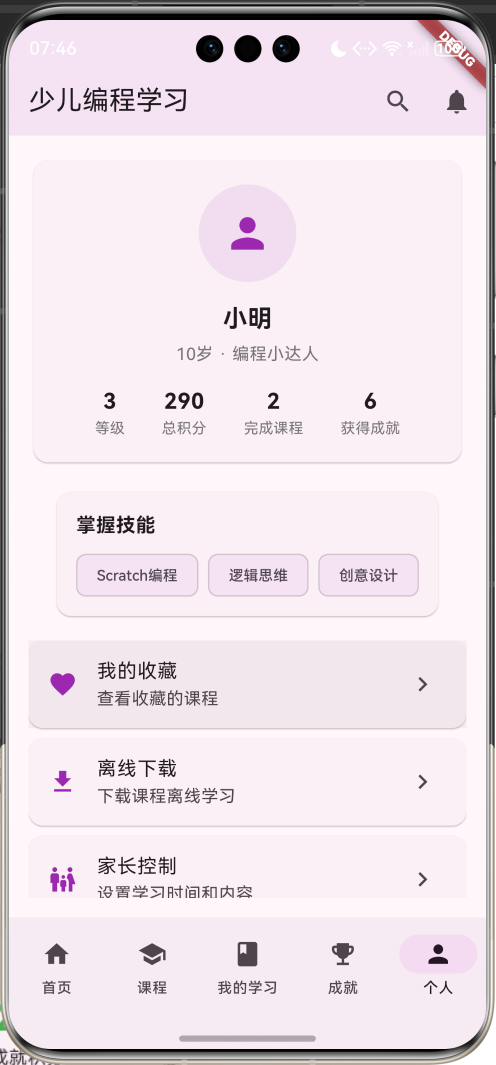
运行效果图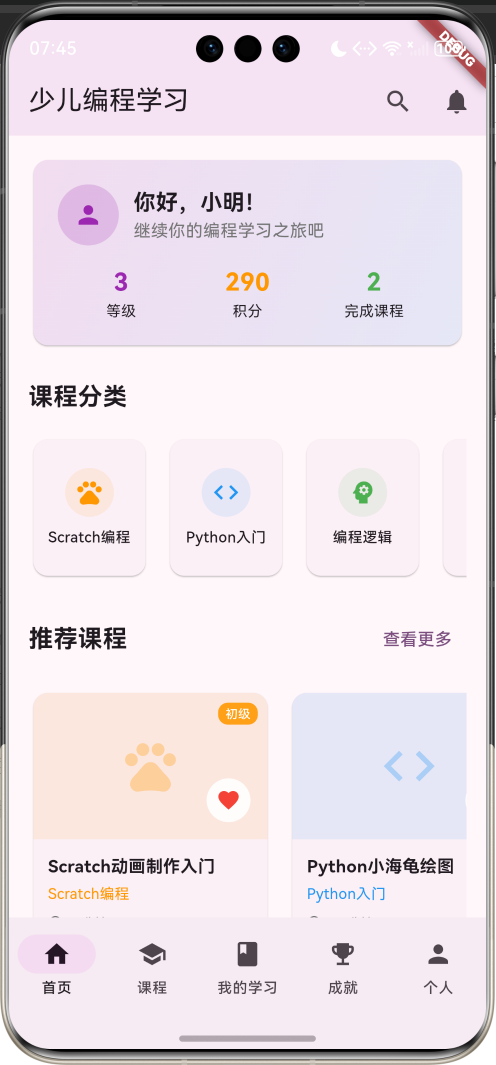
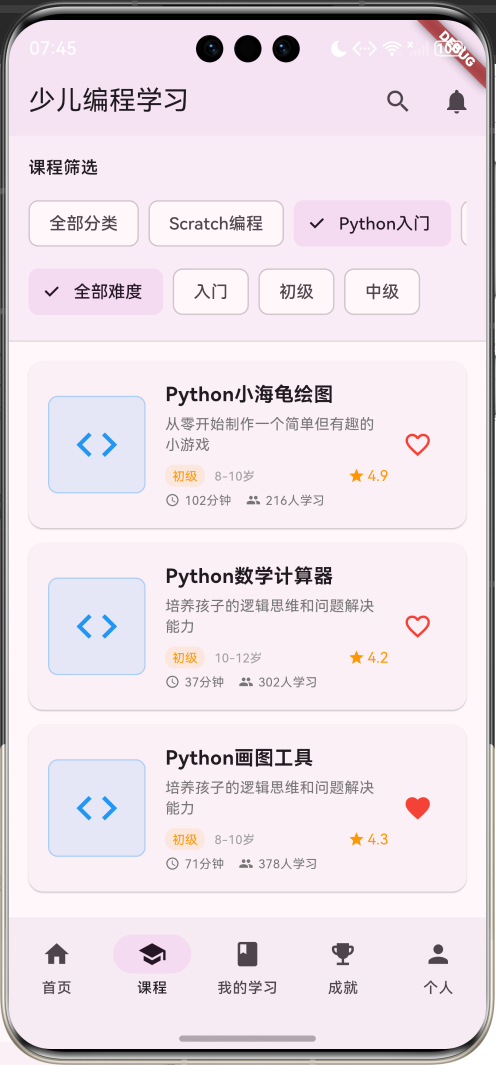
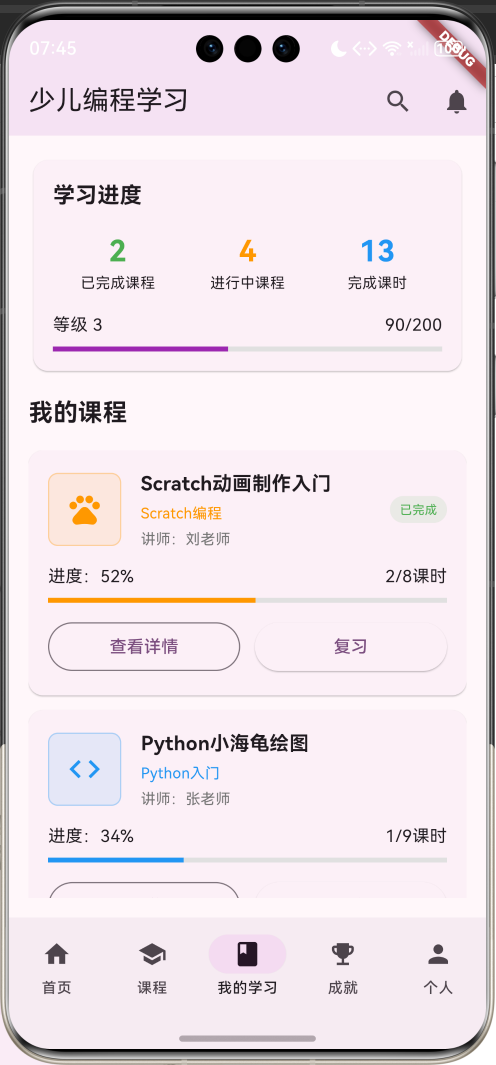
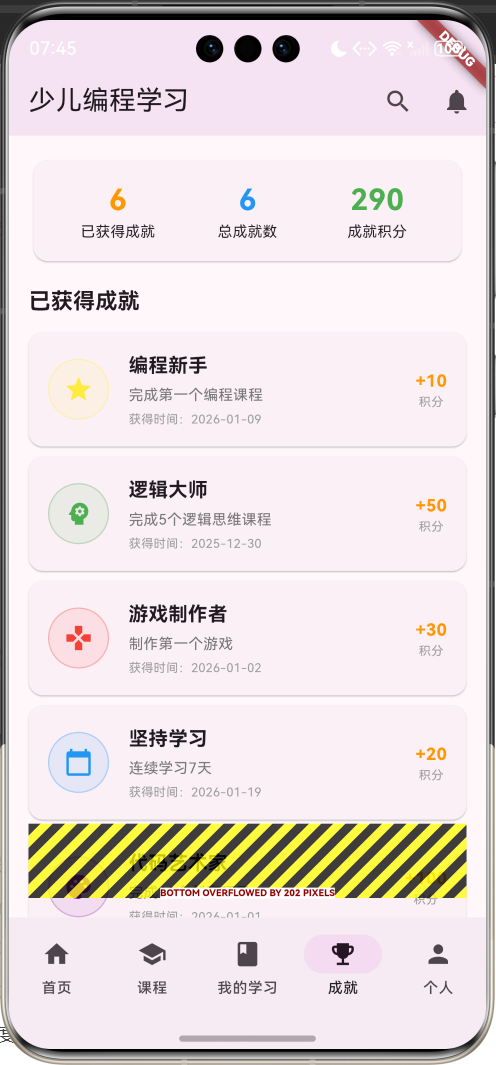
应用特色
- 游戏化学习体验:通过积分、等级、成就系统激发学习兴趣
- 分层次课程体系:从Scratch图形化编程到Python代码编程的完整学习路径
- 多样化学习内容:视频教学、互动练习、编程项目、知识测验
- 个性化学习进度:根据年龄和能力推荐合适的课程内容
- 家长控制功能:学习时间管理、内容过滤、进度监控
- 成就激励系统:通过完成学习任务获得成就和积分奖励
技术栈
- 框架:Flutter 3.x
- 开发语言:Dart
- UI设计:Material Design 3
- 状态管理:StatefulWidget
- 数据存储:内存存储(可扩展为本地数据库)
核心功能模块
1. 课程学习系统
- 多分类课程浏览(Scratch、Python、逻辑思维等)
- 课程详情展示和学习进度跟踪
- 多媒体学习内容(视频、互动、测验、项目)
- 个性化课程推荐
2. 学习进度管理
- 个人学习数据统计
- 课程完成进度跟踪
- 学习时长记录
- 技能掌握情况
3. 成就激励系统
- 多样化成就类型
- 积分和等级系统
- 学习里程碑记录
- 成就分享功能
4. 个人中心
- 学生档案管理
- 学习统计展示
- 家长控制设置
- 帮助和支持
数据模型设计
CourseCategory(课程分类)模型
class CourseCategory {
  final String id;              // 分类唯一标识
  final String name;            // 分类名称
  final IconData icon;          // 分类图标
  final Color color;            // 分类颜色
  final String description;     // 分类描述
  final int courseCount;        // 课程数量
  final String ageRange;        // 适合年龄
}
CourseCategory模型定义了编程课程的分类信息,为不同类型的编程学习提供清晰的分类管理。
ProgrammingCourse(编程课程)模型
class ProgrammingCourse {
  final String id;              // 课程唯一标识
  final String title;           // 课程标题
  final String description;     // 课程描述
  final String categoryId;      // 分类ID
  final String difficulty;      // 难度等级
  final int duration;           // 课程时长
  final String ageRange;        // 适合年龄
  final List<String> skills;    // 学习技能
  final String instructor;      // 讲师姓名
  final double rating;          // 课程评分
  final int studentCount;       // 学习人数
  final bool isCompleted;       // 是否完成
  final int progress;           // 学习进度
  final List<Lesson> lessons;   // 课时列表
  final String thumbnail;       // 课程缩略图
  final bool isFavorite;        // 是否收藏
  final List<String> tags;      // 课程标签
}
ProgrammingCourse模型包含了编程课程的完整信息,通过计算属性提供分类名称、颜色、图标等显示信息。
Lesson(课时)模型
class Lesson {
  final String id;              // 课时唯一标识
  final String title;           // 课时标题
  final String description;     // 课时描述
  final int duration;           // 课时时长
  final String type;            // 课时类型(视频、互动、测验、项目)
  final bool isCompleted;       // 是否完成
  final bool isLocked;          // 是否锁定
  final List<String> concepts;  // 学习概念
}
Lesson模型定义了课程中的具体课时信息,支持多种学习类型和进度管理。
Achievement(成就)模型
class Achievement {
  final String id;              // 成就唯一标识
  final String title;           // 成就标题
  final String description;     // 成就描述
  final IconData icon;          // 成就图标
  final Color color;            // 成就颜色
  final bool isUnlocked;        // 是否解锁
  final DateTime? unlockedDate; // 解锁日期
  final int points;             // 成就积分
}
Achievement模型管理学习成就系统,通过积分和等级激励学生持续学习。
StudentProfile(学生档案)模型
class StudentProfile {
  final String id;              // 学生唯一标识
  final String name;            // 学生姓名
  final String avatar;          // 头像
  final int age;                // 年龄
  final int totalPoints;        // 总积分
  final int level;              // 等级
  final int completedCourses;   // 完成课程数
  final int totalLessons;       // 完成课时数
  final List<String> skills;    // 掌握技能
  final List<Achievement> achievements; // 获得成就
  final DateTime joinDate;      // 加入日期
}
StudentProfile模型存储学生的学习档案和成长记录,为个性化学习提供数据支持。
项目结构设计
lib/
├── main.dart                 # 应用入口文件
├── models/                   # 数据模型
│   ├── course_category.dart # 课程分类模型
│   ├── programming_course.dart # 编程课程模型
│   ├── lesson.dart          # 课时模型
│   ├── achievement.dart     # 成就模型
│   └── student_profile.dart # 学生档案模型
├── screens/                  # 页面文件
│   ├── home_screen.dart     # 首页
│   ├── courses_screen.dart  # 课程页面
│   ├── learning_screen.dart # 我的学习页面
│   ├── achievements_screen.dart # 成就页面
│   └── profile_screen.dart  # 个人中心页面
├── widgets/                  # 自定义组件
│   ├── course_card.dart     # 课程卡片
│   ├── category_card.dart   # 分类卡片
│   ├── lesson_item.dart     # 课时项目
│   └── achievement_card.dart # 成就卡片
└── services/                 # 业务逻辑
    └── learning_service.dart # 学习数据服务
主界面设计与实现
底部导航栏设计
应用采用五个主要功能模块的底部导航设计:
- 首页:展示学习概况和推荐内容
- 课程:浏览和搜索编程课程
- 我的学习:管理个人学习进度
- 成就:查看获得的成就和积分
- 个人:个人信息和设置
bottomNavigationBar: NavigationBar(
  selectedIndex: _selectedIndex,
  onDestinationSelected: (index) {
    setState(() => _selectedIndex = index);
  },
  destinations: const [
    NavigationDestination(icon: Icon(Icons.home), label: '首页'),
    NavigationDestination(icon: Icon(Icons.school), label: '课程'),
    NavigationDestination(icon: Icon(Icons.book), label: '我的学习'),
    NavigationDestination(icon: Icon(Icons.emoji_events), label: '成就'),
    NavigationDestination(icon: Icon(Icons.person), label: '个人'),
  ],
),
应用栏设计
appBar: AppBar(
  title: const Text('少儿编程学习'),
  backgroundColor: Colors.purple.withValues(alpha: 0.1),
  actions: [
    IconButton(
      onPressed: () {
        _showSearchDialog();
      },
      icon: const Icon(Icons.search),
    ),
    IconButton(
      onPressed: () {
        _showNotificationDialog();
      },
      icon: const Icon(Icons.notifications),
    ),
  ],
),
应用栏采用紫色主题,体现编程学习的科技感。提供搜索和通知功能,增强用户体验。
首页设计实现
欢迎卡片设计
首页顶部展示个性化的欢迎信息和学习统计:
Card(
  child: Container(
    width: double.infinity,
    padding: const EdgeInsets.all(20),
    decoration: BoxDecoration(
      borderRadius: BorderRadius.circular(12),
      gradient: LinearGradient(
        colors: [Colors.purple.withValues(alpha: 0.1), Colors.blue.withValues(alpha: 0.1)],
        begin: Alignment.topLeft,
        end: Alignment.bottomRight,
      ),
    ),
    child: Column(
      crossAxisAlignment: CrossAxisAlignment.start,
      children: [
        Row(
          children: [
            CircleAvatar(
              radius: 25,
              backgroundColor: Colors.purple.withValues(alpha: 0.2),
              child: const Icon(Icons.person, color: Colors.purple),
            ),
            const SizedBox(width: 12),
            Expanded(
              child: Column(
                crossAxisAlignment: CrossAxisAlignment.start,
                children: [
                  Text(
                    '你好,${_profile.name}!',
                    style: const TextStyle(fontSize: 18, fontWeight: FontWeight.bold),
                  ),
                  Text(
                    '继续你的编程学习之旅吧',
                    style: TextStyle(fontSize: 14, color: Colors.grey[600]),
                  ),
                ],
              ),
            ),
          ],
        ),
        const SizedBox(height: 16),
        Row(
          children: [
            Expanded(
              child: Column(
                children: [
                  Text(
                    '${_profile.level}',
                    style: const TextStyle(fontSize: 20, fontWeight: FontWeight.bold, color: Colors.purple),
                  ),
                  const Text('等级', style: TextStyle(fontSize: 12)),
                ],
              ),
            ),
            Expanded(
              child: Column(
                children: [
                  Text(
                    '${_profile.totalPoints}',
                    style: const TextStyle(fontSize: 20, fontWeight: FontWeight.bold, color: Colors.orange),
                  ),
                  const Text('积分', style: TextStyle(fontSize: 12)),
                ],
              ),
            ),
            Expanded(
              child: Column(
                children: [
                  Text(
                    '${_profile.completedCourses}',
                    style: const TextStyle(fontSize: 20, fontWeight: FontWeight.bold, color: Colors.green),
                  ),
                  const Text('完成课程', style: TextStyle(fontSize: 12)),
                ],
              ),
            ),
          ],
        ),
      ],
    ),
  ),
),
欢迎卡片特点:
- 个性化问候:显示学生姓名和鼓励语
- 学习统计:展示等级、积分、完成课程数
- 渐变背景:使用紫蓝渐变营造科技感
- 头像展示:个性化的用户头像
课程分类展示
首页展示水平滚动的课程分类:
SizedBox(
  height: 120,
  child: ListView.builder(
    scrollDirection: Axis.horizontal,
    itemCount: _categories.length,
    itemBuilder: (context, index) {
      return _buildCategoryCard(_categories[index]);
    },
  ),
),
分类卡片设计
Widget _buildCategoryCard(CourseCategory category) {
  return Container(
    width: 100,
    margin: const EdgeInsets.only(right: 12),
    child: Card(
      child: InkWell(
        onTap: () {
          setState(() {
            _selectedCategoryId = category.id;
            _selectedIndex = 1;
          });
        },
        borderRadius: BorderRadius.circular(12),
        child: Padding(
          padding: const EdgeInsets.all(12),
          child: Column(
            mainAxisAlignment: MainAxisAlignment.center,
            children: [
              Container(
                width: 40,
                height: 40,
                decoration: BoxDecoration(
                  color: category.color.withValues(alpha: 0.1),
                  borderRadius: BorderRadius.circular(20),
                ),
                child: Icon(
                  category.icon,
                  color: category.color,
                  size: 24,
                ),
              ),
              const SizedBox(height: 8),
              Text(
                category.name,
                style: const TextStyle(fontSize: 12, fontWeight: FontWeight.w500),
                textAlign: TextAlign.center,
                maxLines: 2,
                overflow: TextOverflow.ellipsis,
              ),
            ],
          ),
        ),
      ),
    ),
  );
}
分类卡片特点:
- 视觉识别:每个分类使用独特的颜色和图标
- 紧凑设计:适合水平滚动展示
- 交互导航:点击分类直接跳转到对应课程列表
课程浏览页面实现
课程筛选功能
课程页面顶部提供多维度筛选功能:
Widget _buildCourseFilters() {
  return Container(
    padding: const EdgeInsets.all(16),
    decoration: BoxDecoration(
      color: Colors.purple.withValues(alpha: 0.05),
      border: Border(bottom: BorderSide(color: Colors.grey.withValues(alpha: 0.3))),
    ),
    child: Column(
      crossAxisAlignment: CrossAxisAlignment.start,
      children: [
        const Text('课程筛选', style: TextStyle(fontWeight: FontWeight.w600)),
        const SizedBox(height: 12),
        // 分类筛选
        SingleChildScrollView(
          scrollDirection: Axis.horizontal,
          child: Row(
            children: [
              FilterChip(
                label: const Text('全部分类'),
                selected: _selectedCategoryId.isEmpty,
                onSelected: (selected) {
                  setState(() {
                    _selectedCategoryId = '';
                  });
                },
              ),
              const SizedBox(width: 8),
              ..._categories.map((category) {
                return Padding(
                  padding: const EdgeInsets.only(right: 8),
                  child: FilterChip(
                    label: Text(category.name),
                    selected: _selectedCategoryId == category.id,
                    onSelected: (selected) {
                      setState(() {
                        _selectedCategoryId = selected ? category.id : '';
                      });
                    },
                  ),
                );
              }),
            ],
          ),
        ),
        const SizedBox(height: 8),
        // 难度筛选
        SingleChildScrollView(
          scrollDirection: Axis.horizontal,
          child: Row(
            children: [
              FilterChip(
                label: const Text('全部难度'),
                selected: _selectedDifficulty.isEmpty,
                onSelected: (selected) {
                  setState(() {
                    _selectedDifficulty = '';
                  });
                },
              ),
              const SizedBox(width: 8),
              ...['入门', '初级', '中级'].map((difficulty) {
                return Padding(
                  padding: const EdgeInsets.only(right: 8),
                  child: FilterChip(
                    label: Text(difficulty),
                    selected: _selectedDifficulty == difficulty,
                    onSelected: (selected) {
                      setState(() {
                        _selectedDifficulty = selected ? difficulty : '';
                      });
                    },
                  ),
                );
              }),
            ],
          ),
        ),
      ],
    ),
  );
}
筛选功能支持以下维度:
- 分类筛选:Scratch编程、Python入门、编程逻辑、游戏制作、机器人编程、网页制作
- 难度筛选:入门、初级、中级
- 关键词搜索:支持课程标题和描述的模糊搜索
课程卡片设计
每个编程课程以卡片形式展示关键信息:
Widget _buildCourseListCard(ProgrammingCourse course) {
  return Card(
    margin: const EdgeInsets.only(bottom: 12),
    child: InkWell(
      onTap: () => _showCourseDetail(course),
      borderRadius: BorderRadius.circular(12),
      child: Padding(
        padding: const EdgeInsets.all(16),
        child: Row(
          children: [
            Container(
              width: 80,
              height: 80,
              decoration: BoxDecoration(
                color: course.categoryColor.withValues(alpha: 0.1),
                borderRadius: BorderRadius.circular(8),
                border: Border.all(color: course.categoryColor.withValues(alpha: 0.3)),
              ),
              child: Icon(
                course.categoryIcon,
                color: course.categoryColor,
                size: 40,
              ),
            ),
            const SizedBox(width: 16),
            Expanded(
              child: Column(
                crossAxisAlignment: CrossAxisAlignment.start,
                children: [
                  Text(
                    course.title,
                    style: const TextStyle(
                      fontSize: 16,
                      fontWeight: FontWeight.bold,
                    ),
                  ),
                  const SizedBox(height: 4),
                  Text(
                    course.description,
                    style: TextStyle(fontSize: 12, color: Colors.grey[600]),
                    maxLines: 2,
                    overflow: TextOverflow.ellipsis,
                  ),
                  const SizedBox(height: 8),
                  Row(
                    children: [
                      Container(
                        padding: const EdgeInsets.symmetric(horizontal: 6, vertical: 2),
                        decoration: BoxDecoration(
                          color: course.difficultyColor.withValues(alpha: 0.1),
                          borderRadius: BorderRadius.circular(8),
                        ),
                        child: Text(
                          course.difficulty,
                          style: TextStyle(
                            fontSize: 10,
                            color: course.difficultyColor,
                          ),
                        ),
                      ),
                      const SizedBox(width: 8),
                      Text(
                        course.ageRange,
                        style: TextStyle(fontSize: 10, color: Colors.grey[500]),
                      ),
                      const Spacer(),
                      Icon(Icons.star, color: Colors.orange, size: 14),
                      const SizedBox(width: 2),
                      Text(
                        course.rating.toStringAsFixed(1),
                        style: const TextStyle(fontSize: 12, color: Colors.orange),
                      ),
                    ],
                  ),
                  const SizedBox(height: 4),
                  Row(
                    children: [
                      Icon(Icons.access_time, size: 12, color: Colors.grey[600]),
                      const SizedBox(width: 4),
                      Text(
                        '${course.duration}分钟',
                        style: TextStyle(fontSize: 10, color: Colors.grey[600]),
                      ),
                      const SizedBox(width: 12),
                      Icon(Icons.people, size: 12, color: Colors.grey[600]),
                      const SizedBox(width: 4),
                      Text(
                        '${course.studentCount}人学习',
                        style: TextStyle(fontSize: 10, color: Colors.grey[600]),
                      ),
                    ],
                  ),
                ],
              ),
            ),
            IconButton(
              onPressed: () {
                setState(() {
                  // 切换收藏状态
                });
              },
              icon: Icon(
                course.isFavorite ? Icons.favorite : Icons.favorite_border,
                color: Colors.red,
              ),
            ),
          ],
        ),
      ),
    ),
  );
}
课程卡片设计特点:
- 视觉层次:使用分类颜色和图标创建视觉识别
- 关键信息:突出显示难度、年龄、评分、时长等核心数据
- 状态标识:显示收藏状态和学习进度
- 交互设计:支持收藏切换和详情查看
课程详情对话框
详情展示设计
点击课程卡片可以查看完整的课程信息:
void _showCourseDetail(ProgrammingCourse course) {
  showDialog(
    context: context,
    builder: (context) => Dialog(
      child: Container(
        width: double.maxFinite,
        height: MediaQuery.of(context).size.height * 0.8,
        child: Column(
          children: [
            // 标题栏
            Container(
              padding: const EdgeInsets.all(16),
              decoration: BoxDecoration(
                color: course.categoryColor.withValues(alpha: 0.1),
                borderRadius: const BorderRadius.vertical(top: Radius.circular(12)),
              ),
              child: Row(
                children: [
                  Icon(course.categoryIcon, color: course.categoryColor),
                  const SizedBox(width: 8),
                  Expanded(
                    child: Text(
                      course.title,
                      style: const TextStyle(
                        fontSize: 18,
                        fontWeight: FontWeight.bold,
                      ),
                    ),
                  ),
                  IconButton(
                    onPressed: () => Navigator.pop(context),
                    icon: const Icon(Icons.close),
                  ),
                ],
              ),
            ),
            // 内容区域
            Expanded(
              child: SingleChildScrollView(
                padding: const EdgeInsets.all(16),
                child: Column(
                  crossAxisAlignment: CrossAxisAlignment.start,
                  children: [
                    // 基本信息
                    Row(
                      children: [
                        Container(
                          padding: const EdgeInsets.symmetric(horizontal: 8, vertical: 4),
                          decoration: BoxDecoration(
                            color: course.difficultyColor.withValues(alpha: 0.1),
                            borderRadius: BorderRadius.circular(12),
                          ),
                          child: Text(
                            course.difficulty,
                            style: TextStyle(
                              fontSize: 12,
                              color: course.difficultyColor,
                              fontWeight: FontWeight.w500,
                            ),
                          ),
                        ),
                        const SizedBox(width: 8),
                        Text('适合年龄:${course.ageRange}'),
                        const SizedBox(width: 8),
                        Text('时长:${course.duration}分钟'),
                      ],
                    ),
                    const SizedBox(height: 16),
                    Text(
                      course.description,
                      style: const TextStyle(fontSize: 14),
                    ),
                    const SizedBox(height: 16),

                    // 学习技能
                    const Text(
                      '学习技能',
                      style: TextStyle(fontSize: 16, fontWeight: FontWeight.bold),
                    ),
                    const SizedBox(height: 8),
                    Wrap(
                      spacing: 8,
                      runSpacing: 8,
                      children: course.skills.map((skill) {
                        return Chip(
                          label: Text(skill, style: const TextStyle(fontSize: 12)),
                          backgroundColor: course.categoryColor.withValues(alpha: 0.1),
                          materialTapTargetSize: MaterialTapTargetSize.shrinkWrap,
                        );
                      }).toList(),
                    ),
                    const SizedBox(height: 16),

                    // 课程大纲
                    const Text(
                      '课程大纲',
                      style: TextStyle(fontSize: 16, fontWeight: FontWeight.bold),
                    ),
                    const SizedBox(height: 8),
                    ...course.lessons.asMap().entries.map((entry) {
                      final index = entry.key;
                      final lesson = entry.value;
                      return _buildLessonItem(lesson, index + 1);
                    }),
                  ],
                ),
              ),
            ),
            // 底部操作按钮
            Container(
              padding: const EdgeInsets.all(16),
              decoration: BoxDecoration(
                border: Border(top: BorderSide(color: Colors.grey.withValues(alpha: 0.3))),
              ),
              child: Row(
                children: [
                  Expanded(
                    child: OutlinedButton.icon(
                      onPressed: () {
                        Navigator.pop(context);
                        setState(() {
                          // 切换收藏状态
                        });
                      },
                      icon: Icon(course.isFavorite ? Icons.favorite : Icons.favorite_border),
                      label: Text(course.isFavorite ? '已收藏' : '收藏'),
                    ),
                  ),
                  const SizedBox(width: 12),
                  Expanded(
                    child: ElevatedButton.icon(
                      onPressed: () {
                        Navigator.pop(context);
                        _startLearning(course);
                      },
                      icon: const Icon(Icons.play_arrow),
                      label: const Text('开始学习'),
                    ),
                  ),
                ],
              ),
            ),
          ],
        ),
      ),
    ),
  );
}
课时项目设计
课程大纲中的每个课时以项目形式展示:
Widget _buildLessonItem(Lesson lesson, int index) {
  return Container(
    margin: const EdgeInsets.only(bottom: 8),
    padding: const EdgeInsets.all(12),
    decoration: BoxDecoration(
      color: lesson.isCompleted
          ? Colors.green.withValues(alpha: 0.1)
          : lesson.isLocked
              ? Colors.grey.withValues(alpha: 0.1)
              : Colors.blue.withValues(alpha: 0.1),
      borderRadius: BorderRadius.circular(8),
      border: Border.all(
        color: lesson.isCompleted
            ? Colors.green.withValues(alpha: 0.3)
            : lesson.isLocked
                ? Colors.grey.withValues(alpha: 0.3)
                : Colors.blue.withValues(alpha: 0.3),
      ),
    ),
    child: Row(
      children: [
        Container(
          width: 30,
          height: 30,
          decoration: BoxDecoration(
            color: lesson.isCompleted
                ? Colors.green
                : lesson.isLocked
                    ? Colors.grey
                    : lesson.typeColor,
            borderRadius: BorderRadius.circular(15),
          ),
          child: Icon(
            lesson.isCompleted
                ? Icons.check
                : lesson.isLocked
                    ? Icons.lock
                    : lesson.typeIcon,
            color: Colors.white,
            size: 16,
          ),
        ),
        const SizedBox(width: 12),
        Expanded(
          child: Column(
            crossAxisAlignment: CrossAxisAlignment.start,
            children: [
              Text(
                lesson.title,
                style: TextStyle(
                  fontSize: 14,
                  fontWeight: FontWeight.w500,
                  color: lesson.isLocked ? Colors.grey : null,
                ),
              ),
              const SizedBox(height: 2),
              Text(
                lesson.description,
                style: TextStyle(
                  fontSize: 12,
                  color: lesson.isLocked ? Colors.grey : Colors.grey[600],
                ),
                maxLines: 1,
                overflow: TextOverflow.ellipsis,
              ),
            ],
          ),
        ),
        Text(
          '${lesson.duration}分钟',
          style: TextStyle(
            fontSize: 12,
            color: lesson.isLocked ? Colors.grey : Colors.grey[600],
          ),
        ),
      ],
    ),
  );
}
课程详情特点:
- 完整信息展示:包含难度、年龄、技能、大纲等完整内容
- 课时状态管理:显示完成、锁定、可学习等不同状态
- 类型图标:使用不同图标区分视频、互动、测验、项目
- 操作按钮:提供收藏和开始学习的便捷入口
- 响应式设计:适配不同屏幕尺寸
我的学习页面
学习进度展示
我的学习页面顶部展示学习统计和等级进度:
Card(
  child: Padding(
    padding: const EdgeInsets.all(16),
    child: Column(
      crossAxisAlignment: CrossAxisAlignment.start,
      children: [
        const Text(
          '学习进度',
          style: TextStyle(fontSize: 18, fontWeight: FontWeight.bold),
        ),
        const SizedBox(height: 16),
        Row(
          children: [
            Expanded(
              child: Column(
                children: [
                  Text(
                    '${_profile.completedCourses}',
                    style: const TextStyle(fontSize: 24, fontWeight: FontWeight.bold, color: Colors.green),
                  ),
                  const Text('已完成课程', style: TextStyle(fontSize: 12)),
                ],
              ),
            ),
            Expanded(
              child: Column(
                children: [
                  Text(
                    '${_myCourses.length - _profile.completedCourses}',
                    style: const TextStyle(fontSize: 24, fontWeight: FontWeight.bold, color: Colors.orange),
                  ),
                  const Text('进行中课程', style: TextStyle(fontSize: 12)),
                ],
              ),
            ),
            Expanded(
              child: Column(
                children: [
                  Text(
                    '${_profile.totalLessons}',
                    style: const TextStyle(fontSize: 24, fontWeight: FontWeight.bold, color: Colors.blue),
                  ),
                  const Text('完成课时', style: TextStyle(fontSize: 12)),
                ],
              ),
            ),
          ],
        ),
        const SizedBox(height: 16),
        // 等级进度条
        Row(
          children: [
            Text('等级 ${_profile.level}'),
            const Spacer(),
            Text('${_profile.currentLevelProgress}/${_profile.nextLevelPoints - (_profile.level - 1) * 100}'),
          ],
        ),
        const SizedBox(height: 8),
        LinearProgressIndicator(
          value: _profile.currentLevelProgress / (_profile.nextLevelPoints - (_profile.level - 1) * 100),
          backgroundColor: Colors.grey[300],
          valueColor: const AlwaysStoppedAnimation<Color>(Colors.purple),
        ),
      ],
    ),
  ),
),
我的课程卡片
每个学习中的课程以卡片形式展示进度信息:
Widget _buildMyLearningCard(ProgrammingCourse course) {
  return Card(
    margin: const EdgeInsets.only(bottom: 12),
    child: InkWell(
      onTap: () => _showCourseDetail(course),
      borderRadius: BorderRadius.circular(12),
      child: Padding(
        padding: const EdgeInsets.all(16),
        child: Column(
          crossAxisAlignment: CrossAxisAlignment.start,
          children: [
            Row(
              children: [
                Container(
                  width: 60,
                  height: 60,
                  decoration: BoxDecoration(
                    color: course.categoryColor.withValues(alpha: 0.1),
                    borderRadius: BorderRadius.circular(8),
                    border: Border.all(color: course.categoryColor.withValues(alpha: 0.3)),
                  ),
                  child: Icon(
                    course.categoryIcon,
                    color: course.categoryColor,
                    size: 30,
                  ),
                ),
                const SizedBox(width: 16),
                Expanded(
                  child: Column(
                    crossAxisAlignment: CrossAxisAlignment.start,
                    children: [
                      Text(
                        course.title,
                        style: const TextStyle(
                          fontSize: 16,
                          fontWeight: FontWeight.bold,
                        ),
                      ),
                      const SizedBox(height: 4),
                      Text(
                        course.categoryName,
                        style: TextStyle(
                          fontSize: 12,
                          color: course.categoryColor,
                        ),
                      ),
                      const SizedBox(height: 4),
                      Text(
                        '讲师:${course.instructor}',
                        style: TextStyle(fontSize: 12, color: Colors.grey[600]),
                      ),
                    ],
                  ),
                ),
                if (course.isCompleted)
                  Container(
                    padding: const EdgeInsets.symmetric(horizontal: 8, vertical: 4),
                    decoration: BoxDecoration(
                      color: Colors.green.withValues(alpha: 0.1),
                      borderRadius: BorderRadius.circular(12),
                    ),
                    child: const Text(
                      '已完成',
                      style: TextStyle(fontSize: 10, color: Colors.green),
                    ),
                  ),
              ],
            ),
            const SizedBox(height: 12),
            // 进度条
            Row(
              children: [
                Text('进度:${course.progress}%'),
                const Spacer(),
                Text('${course.lessons.where((l) => l.isCompleted).length}/${course.lessons.length}课时'),
              ],
            ),
            const SizedBox(height: 8),
            LinearProgressIndicator(
              value: course.progress / 100,
              backgroundColor: Colors.grey[300],
              valueColor: AlwaysStoppedAnimation<Color>(course.categoryColor),
            ),
            const SizedBox(height: 12),
            Row(
              children: [
                Expanded(
                  child: OutlinedButton(
                    onPressed: () => _showCourseDetail(course),
                    child: const Text('查看详情'),
                  ),
                ),
                const SizedBox(width: 12),
                Expanded(
                  child: ElevatedButton(
                    onPressed: () => _continueLearning(course),
                    child: Text(course.isCompleted ? '复习' : '继续学习'),
                  ),
                ),
              ],
            ),
          ],
        ),
      ),
    ),
  );
}
我的学习功能特点:
- 学习统计:显示完成课程、进行中课程、完成课时数
- 等级进度:可视化显示当前等级和升级进度
- 课程进度:每个课程显示详细的学习进度
- 快速操作:提供查看详情和继续学习的快捷按钮
成就系统页面
成就统计展示
成就页面顶部展示成就获得情况:
Card(
  child: Padding(
    padding: const EdgeInsets.all(16),
    child: Row(
      children: [
        Expanded(
          child: Column(
            children: [
              Text(
                '${unlockedAchievements.length}',
                style: const TextStyle(fontSize: 24, fontWeight: FontWeight.bold, color: Colors.orange),
              ),
              const Text('已获得成就', style: TextStyle(fontSize: 12)),
            ],
          ),
        ),
        Expanded(
          child: Column(
            children: [
              Text(
                '${_achievements.length}',
                style: const TextStyle(fontSize: 24, fontWeight: FontWeight.bold, color: Colors.blue),
              ),
              const Text('总成就数', style: TextStyle(fontSize: 12)),
            ],
          ),
        ),
        Expanded(
          child: Column(
            children: [
              Text(
                '${unlockedAchievements.fold(0, (sum, a) => sum + a.points)}',
                style: const TextStyle(fontSize: 24, fontWeight: FontWeight.bold, color: Colors.green),
              ),
              const Text('成就积分', style: TextStyle(fontSize: 12)),
            ],
          ),
        ),
      ],
    ),
  ),
),
成就列表卡片
每个成就以列表项形式展示详细信息:
Widget _buildAchievementListCard(Achievement achievement, bool isUnlocked) {
  return Card(
    margin: const EdgeInsets.only(bottom: 8),
    child: Padding(
      padding: const EdgeInsets.all(16),
      child: Row(
        children: [
          Container(
            width: 50,
            height: 50,
            decoration: BoxDecoration(
              color: isUnlocked
                  ? achievement.color.withValues(alpha: 0.1)
                  : Colors.grey.withValues(alpha: 0.1),
              borderRadius: BorderRadius.circular(25),
              border: Border.all(
                color: isUnlocked
                    ? achievement.color.withValues(alpha: 0.3)
                    : Colors.grey.withValues(alpha: 0.3),
              ),
            ),
            child: Icon(
              achievement.icon,
              color: isUnlocked ? achievement.color : Colors.grey,
              size: 24,
            ),
          ),
          const SizedBox(width: 16),
          Expanded(
            child: Column(
              crossAxisAlignment: CrossAxisAlignment.start,
              children: [
                Text(
                  achievement.title,
                  style: TextStyle(
                    fontSize: 16,
                    fontWeight: FontWeight.bold,
                    color: isUnlocked ? null : Colors.grey,
                  ),
                ),
                const SizedBox(height: 4),
                Text(
                  achievement.description,
                  style: TextStyle(
                    fontSize: 12,
                    color: isUnlocked ? Colors.grey[600] : Colors.grey,
                  ),
                ),
                if (isUnlocked && achievement.unlockedDate != null) ...[
                  const SizedBox(height: 4),
                  Text(
                    '获得时间:${achievement.unlockedDate!.toString().substring(0, 10)}',
                    style: const TextStyle(fontSize: 10, color: Colors.grey),
                  ),
                ],
              ],
            ),
          ),
          Column(
            children: [
              Text(
                '+${achievement.points}',
                style: TextStyle(
                  fontSize: 14,
                  fontWeight: FontWeight.bold,
                  color: isUnlocked ? Colors.orange : Colors.grey,
                ),
              ),
              const Text('积分', style: TextStyle(fontSize: 10, color: Colors.grey)),
            ],
          ),
        ],
      ),
    ),
  );
}
成就系统特点:
- 成就分类:区分已获得和未获得成就
- 视觉反馈:使用颜色和图标区分成就状态
- 积分奖励:每个成就都有对应的积分奖励
- 时间记录:记录成就获得的具体时间
- 激励机制:通过成就系统激发学习动力
个人中心页面
用户信息展示
个人中心页面展示学生的基本信息和学习统计:
Card(
  child: Padding(
    padding: const EdgeInsets.all(20),
    child: Column(
      children: [
        CircleAvatar(
          radius: 40,
          backgroundColor: Colors.purple.withValues(alpha: 0.1),
          child: const Icon(Icons.person, size: 40, color: Colors.purple),
        ),
        const SizedBox(height: 16),
        Text(
          _profile.name,
          style: const TextStyle(fontSize: 20, fontWeight: FontWeight.bold),
        ),
        const SizedBox(height: 4),
        Text(
          '${_profile.age}岁 · 编程小达人',
          style: TextStyle(fontSize: 14, color: Colors.grey[600]),
        ),
        const SizedBox(height: 16),
        Row(
          mainAxisAlignment: MainAxisAlignment.spaceEvenly,
          children: [
            Column(
              children: [
                Text(
                  '${_profile.level}',
                  style: const TextStyle(fontSize: 18, fontWeight: FontWeight.bold),
                ),
                Text(
                  '等级',
                  style: TextStyle(fontSize: 12, color: Colors.grey[600]),
                ),
              ],
            ),
            Column(
              children: [
                Text(
                  '${_profile.totalPoints}',
                  style: const TextStyle(fontSize: 18, fontWeight: FontWeight.bold),
                ),
                Text(
                  '总积分',
                  style: TextStyle(fontSize: 12, color: Colors.grey[600]),
                ),
              ],
            ),
            Column(
              children: [
                Text(
                  '${_profile.completedCourses}',
                  style: const TextStyle(fontSize: 18, fontWeight: FontWeight.bold),
                ),
                Text(
                  '完成课程',
                  style: TextStyle(fontSize: 12, color: Colors.grey[600]),
                ),
              ],
            ),
            Column(
              children: [
                Text(
                  '${_profile.achievements.length}',
                  style: const TextStyle(fontSize: 18, fontWeight: FontWeight.bold),
                ),
                Text(
                  '获得成就',
                  style: TextStyle(fontSize: 12, color: Colors.grey[600]),
                ),
              ],
            ),
          ],
        ),
      ],
    ),
  ),
),
掌握技能展示
显示学生已掌握的编程技能:
Card(
  child: Padding(
    padding: const EdgeInsets.all(16),
    child: Column(
      crossAxisAlignment: CrossAxisAlignment.start,
      children: [
        const Text(
          '掌握技能',
          style: TextStyle(fontSize: 16, fontWeight: FontWeight.bold),
        ),
        const SizedBox(height: 12),
        Wrap(
          spacing: 8,
          runSpacing: 8,
          children: _profile.skills.map((skill) {
            return Chip(
              label: Text(skill, style: const TextStyle(fontSize: 12)),
              backgroundColor: Colors.purple.withValues(alpha: 0.1),
              materialTapTargetSize: MaterialTapTargetSize.shrinkWrap,
            );
          }).toList(),
        ),
      ],
    ),
  ),
),
功能菜单
提供各种功能的快捷入口:
ListView(
  children: [
    _buildMenuTile(Icons.favorite, '我的收藏', '查看收藏的课程', () {
      ScaffoldMessenger.of(context).showSnackBar(
        const SnackBar(content: Text('收藏功能开发中...')),
      );
    }),
    _buildMenuTile(Icons.download, '离线下载', '下载课程离线学习', () {
      ScaffoldMessenger.of(context).showSnackBar(
        const SnackBar(content: Text('离线下载功能开发中...')),
      );
    }),
    _buildMenuTile(Icons.family_restroom, '家长控制', '设置学习时间和内容', () {
      _showParentControlDialog();
    }),
    _buildMenuTile(Icons.notifications, '学习提醒', '设置学习提醒时间', () {
      ScaffoldMessenger.of(context).showSnackBar(
        const SnackBar(content: Text('学习提醒功能开发中...')),
      );
    }),
    _buildMenuTile(Icons.help, '帮助中心', '使用指南和常见问题', () {
      _showHelpDialog();
    }),
    _buildMenuTile(Icons.settings, '设置', '应用设置', () {
      ScaffoldMessenger.of(context).showSnackBar(
        const SnackBar(content: Text('设置功能开发中...')),
      );
    }),
  ],
),
个人中心功能特点:
- 用户信息展示:显示头像、姓名、年龄、称号
- 学习统计:展示等级、积分、完成课程、获得成就数
- 技能展示:以标签形式展示掌握的编程技能
- 功能菜单:提供收藏、下载、家长控制等功能入口
- 家长控制:专门的家长控制功能,管理学习时间和内容
数据生成与管理
课程分类初始化
系统预定义六个主要编程学习分类:
void _initializeCategories() {
  _categories.addAll([
    CourseCategory(
      id: 'scratch',
      name: 'Scratch编程',
      icon: Icons.pets,
      color: Colors.orange,
      description: '图形化编程,适合初学者',
      courseCount: 12,
      ageRange: '6-12岁',
    ),
    CourseCategory(
      id: 'python',
      name: 'Python入门',
      icon: Icons.code,
      color: Colors.blue,
      description: '简单易学的编程语言',
      courseCount: 8,
      ageRange: '10-16岁',
    ),
    CourseCategory(
      id: 'logic',
      name: '编程逻辑',
      icon: Icons.psychology,
      color: Colors.green,
      description: '培养逻辑思维能力',
      courseCount: 15,
      ageRange: '5-10岁',
    ),
    CourseCategory(
      id: 'game',
      name: '游戏制作',
      icon: Icons.games,
      color: Colors.red,
      description: '制作有趣的小游戏',
      courseCount: 10,
      ageRange: '8-14岁',
    ),
    CourseCategory(
      id: 'robot',
      name: '机器人编程',
      icon: Icons.smart_toy,
      color: Colors.purple,
      description: '控制机器人完成任务',
      courseCount: 6,
      ageRange: '8-16岁',
    ),
    CourseCategory(
      id: 'web',
      name: '网页制作',
      icon: Icons.web,
      color: Colors.teal,
      description: '制作自己的网页',
      courseCount: 9,
      ageRange: '12-18岁',
    ),
  ]);
}
编程课程数据生成
系统自动生成18个不同类型的编程课程:
void _generateCourses() {
  final courseTitles = [
    'Scratch动画制作入门', 'Python小海龟绘图', '逻辑思维训练营',
    '制作第一个小游戏', '机器人走迷宫', 'HTML网页基础',
    'Scratch互动故事', 'Python数学计算器', '算法思维启蒙',
    '贪吃蛇游戏制作', '智能机器人对话', 'CSS样式设计',
    'Scratch音乐创作', 'Python画图工具', '条件判断与循环',
    '飞机大战游戏', '机器人足球比赛', 'JavaScript交互效果',
  ];

  final descriptions = [
    '通过有趣的动画制作学习编程基础概念',
    '使用Python控制小海龟画出美丽的图案',
    '培养孩子的逻辑思维和问题解决能力',
    '从零开始制作一个简单但有趣的小游戏',
    '编程控制机器人在迷宫中找到出路',
    '学习网页制作的基础知识和技能',
  ];

  // 生成课程数据...
}
成就系统生成
创建多样化的成就类型激励学习:
void _generateAchievements() {
  final achievementData = [
    {'title': '编程新手', 'desc': '完成第一个编程课程', 'icon': Icons.star, 'color': Colors.yellow, 'points': 10},
    {'title': '逻辑大师', 'desc': '完成5个逻辑思维课程', 'icon': Icons.psychology, 'color': Colors.green, 'points': 50},
    {'title': '游戏制作者', 'desc': '制作第一个游戏', 'icon': Icons.games, 'color': Colors.red, 'points': 30},
    {'title': '坚持学习', 'desc': '连续学习7天', 'icon': Icons.calendar_today, 'color': Colors.blue, 'points': 20},
    {'title': '代码艺术家', 'desc': '完成10个创意项目', 'icon': Icons.palette, 'color': Colors.purple, 'points': 100},
    {'title': '机器人专家', 'desc': '完成机器人编程课程', 'icon': Icons.smart_toy, 'color': Colors.orange, 'points': 80},
  ];

  // 生成成就数据...
}
用户界面设计原则
Material Design 3 应用
应用全面采用Material Design 3设计规范:
- 颜色系统:使用紫色作为主题色,体现编程学习的科技感和创新性
- 组件设计:使用最新的Material 3组件,如NavigationBar、FilterChip等
- 视觉层次:通过不同的字体大小、颜色深浅建立清晰的信息层次
- 交互反馈:所有可点击元素都提供适当的视觉反馈
少儿友好设计
针对儿童用户的特殊需求:
-
分类色彩化:
- Scratch编程:橙色,温暖友好
- Python入门:蓝色,理性科技
- 编程逻辑:绿色,成长思维
- 游戏制作:红色,活力创意
- 机器人编程:紫色,未来科技
- 网页制作:青色,清新现代
-
难度标识:
- 入门:绿色,鼓励尝试
- 初级:橙色,适度挑战
- 中级:红色,进阶学习
-
游戏化元素:
- 积分系统:橙色积分图标
- 等级进度:紫色进度条
- 成就徽章:多彩成就图标
- 学习状态:绿色完成、蓝色进行中、灰色锁定
家长友好功能
考虑到家长的监管需求:
- 学习时间控制:设置每日学习时间限制
- 内容过滤:根据年龄筛选合适的学习内容
- 进度监控:家长可以查看孩子的学习进度
- 安全保护:确保学习内容的安全性和适宜性
总结
通过本教程,我们成功开发了一个功能完整的Flutter少儿编程学习应用。这个项目展示了教育类应用开发的多个重要方面:
技术成果
- 完整的应用架构:从数据模型设计到用户界面实现,构建了一个结构清晰、易于维护的教育应用架构
- Material Design 3应用:充分利用了Flutter的Material Design 3组件,创造了现代化且适合儿童的用户体验
- 游戏化设计:通过积分、等级、成就系统,将枯燥的学习过程转化为有趣的游戏体验
- 多层次内容管理:支持分类、课程、课时的层次化内容组织
功能特色
- 多维度学习体系:从图形化编程到代码编程的完整学习路径
- 个性化学习体验:根据年龄和能力推荐合适的学习内容
- 激励机制设计:通过成就系统和积分奖励激发学习兴趣
- 家长控制功能:平衡儿童自主学习和家长监管需求
开发经验
- 用户体验设计:针对儿童用户的特殊需求,采用友好的色彩搭配和直观的交互设计
- 教育理念融入:将编程教育的核心理念融入到应用设计中,注重逻辑思维和创新能力的培养
- 安全性考虑:在设计中充分考虑儿童用户的安全需求和家长的监管需求
- 可扩展性设计:预留了课程内容扩展、社交功能、在线互动等扩展接口
学习价值
这个项目不仅是一个实用的编程学习应用,更是学习Flutter教育类应用开发的优秀案例。通过这个项目,开发者可以掌握:
- 教育类应用的特殊设计需求
- 游戏化学习系统的实现方法
- 多层次内容管理的架构设计
- 儿童友好界面的设计原则
- 家长控制功能的实现方式
未来展望
基于当前的基础架构,这个应用还有很大的扩展空间:
- 在线编程环境:集成Scratch、Python等编程环境,支持在线编程实践
- AI智能助教:利用人工智能技术,提供个性化的学习指导和答疑
- 社区功能:建立学习者社区,支持作品分享和同伴学习
- AR/VR技术:利用增强现实和虚拟现实技术,提供沉浸式学习体验
- 多平台同步:支持手机、平板、电脑等多平台学习进度同步
少儿编程学习应用展示了Flutter在教育技术领域的强大潜力。通过合理的架构设计和用户体验优化,我们创造了一个既有趣又有效的编程学习工具,为培养下一代的编程人才贡献了技术力量。
欢迎加入开源鸿蒙跨平台社区:https://openharmonycrossplatform.csdn.net

开源鸿蒙跨平台开发社区汇聚开发者与厂商,共建“一次开发,多端部署”的开源生态,致力于降低跨端开发门槛,推动万物智联创新。
更多推荐
 16
16 0
0- 0


 已为社区贡献30条内容

所有评论(0)