flutter_for_openharmony小区门禁管理app实战+用户信息编辑实现
·
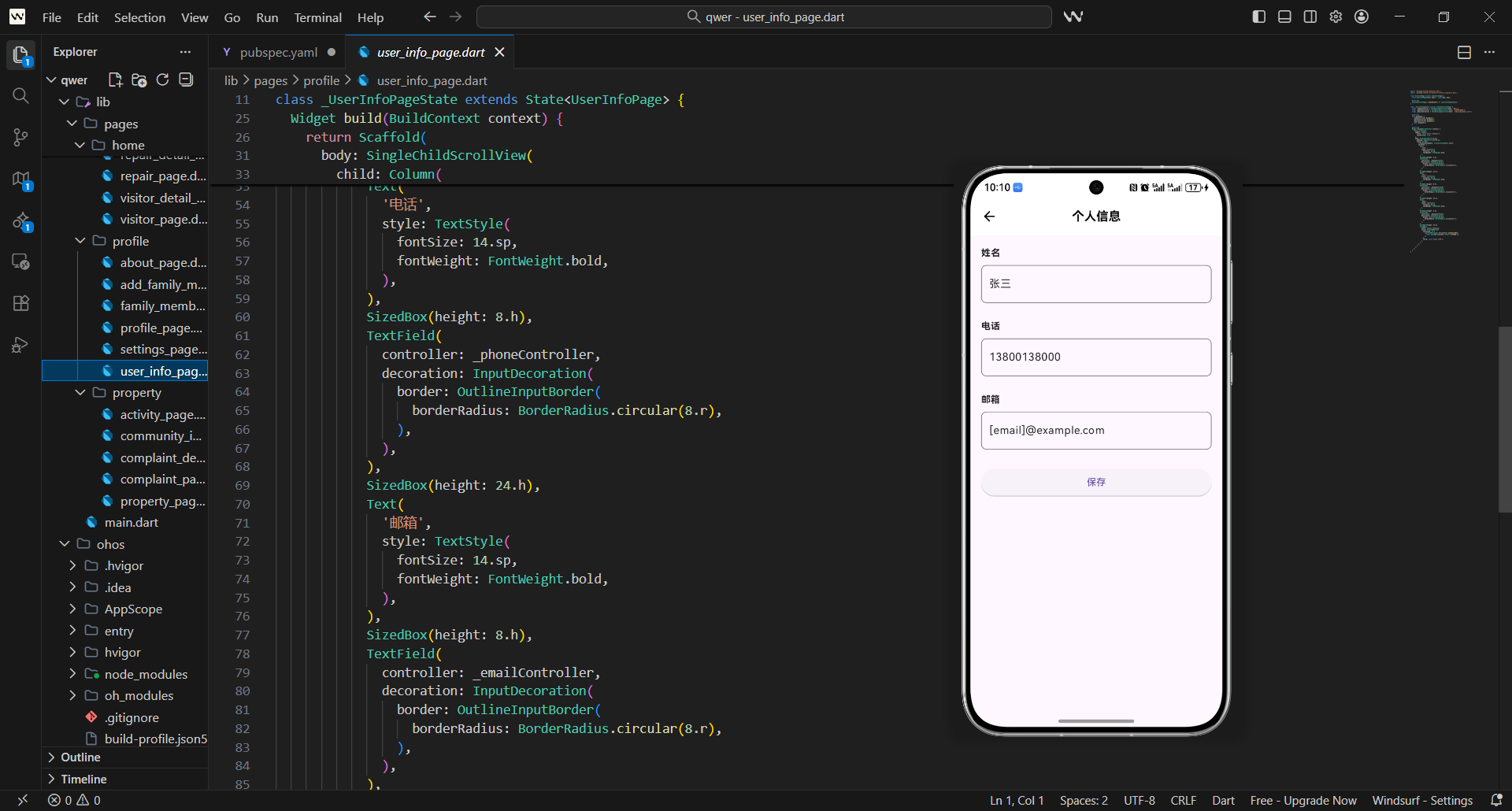
用户信息编辑是个人资料管理的重要功能,它为用户提供了修改个人信息的便捷方式,同时需要确保数据的安全性和准确性。
在实际项目中,用户信息编辑需要解决几个关键问题:
- 如何安全地修改用户敏感信息
- 如何支持实时验证和错误提示
- 如何处理头像上传和裁剪
- 如何确保修改后的数据同步更新
这篇讲用户信息编辑页面的实现,重点是如何让信息编辑流程简单直观且安全可靠。
对应源码
lib/pages/profile/user_info_page.dart
用户信息编辑页面的设计思路是:分组编辑 + 实时验证 + 安全确认。
import 'package:flutter/material.dart';
import 'package:flutter_screenutil/flutter_screenutil.dart';
import 'package:get/get.dart';
import 'package:image_picker/image_picker.dart';
class UserInfoPage extends StatefulWidget {
final Map<String, dynamic> userInfo;
const UserInfoPage({
Key? key,
required this.userInfo,
}) : super(key: key);
State<UserInfoPage> createState() => _UserInfoPageState();
}
class _UserInfoPageState extends State<UserInfoPage> {
final _formKey = GlobalKey<FormState>();
final ImagePicker _imagePicker = ImagePicker();
// 表单控制器
final _nameController = TextEditingController();
final _phoneController = TextEditingController();
final _emailController = TextEditingController();
final _emergencyContactController = TextEditingController();
final _emergencyPhoneController = TextEditingController();
// 状态变量
String _userAvatar = '';
bool _isSaving = false;
bool _hasChanges = false;
基础结构说明:
- 用户信息编辑页面需要维护表单状态,所以用
StatefulWidget。 - 接收
userInfo参数,初始化表单数据。 - 使用多个
TextEditingController管理不同字段的输入。 _hasChanges跟踪表单是否有修改,提示用户保存。
void initState() {
super.initState();
_initializeForm();
}
void dispose() {
_nameController.dispose();
_phoneController.dispose();
_emailController.dispose();
_emergencyContactController.dispose();
_emergencyPhoneController.dispose();
super.dispose();
}
void _initializeForm() {
setState(() {
_nameController.text = widget.userInfo['name'] ?? '';
_phoneController.text = widget.userInfo['phone'] ?? '';
_emailController.text = widget.userInfo['email'] ?? '';
_emergencyContactController.text = widget.userInfo['emergencyContact'] ?? '';
_emergencyPhoneController.text = widget.userInfo['emergencyPhone'] ?? '';
_userAvatar = widget.userInfo['avatar'] ?? '';
});
// 监听表单变化
_nameController.addListener(_onFormChanged);
_phoneController.addListener(_onFormChanged);
_emailController.addListener(_onFormChanged);
_emergencyContactController.addListener(_onFormChanged);
_emergencyPhoneController.addListener(_onFormChanged);
}
表单初始化:
- 从传入的
userInfo初始化表单字段。 - 为每个控制器添加监听器,跟踪表单变化。
- 头像路径初始化,支持后续修改。
- 确保所有资源在页面销毁时正确释放。
Widget build(BuildContext context) {
return WillPopScope(
onWillPop: _handleBackPress,
child: Scaffold(
appBar: AppBar(
title: const Text('编辑资料'),
centerTitle: true,
actions: [
if (_hasChanges)
TextButton(
onPressed: _isSaving ? null : _saveUserInfo,
child: _isSaving
? Row(
mainAxisSize: MainAxisSize.min,
children: [
SizedBox(
width: 16.w,
height: 16.w,
child: CircularProgressIndicator(
strokeWidth: 2.w,
valueColor: AlwaysStoppedAnimation<Color>(Colors.white),
),
),
SizedBox(width: 8.w),
const Text('保存中...'),
],
)
: const Text('保存'),
),
],
),
body: Form(
key: _formKey,
child: SingleChildScrollView(
padding: EdgeInsets.all(16.w),
child: Column(
children: [
// 头像编辑
_buildAvatarSection(),
SizedBox(height: 24.h),
// 基本信息
_buildBasicInfoSection(),
SizedBox(height: 24.h),
// 紧急联系人
_buildEmergencyContactSection(),
SizedBox(height: 24.h),
// 地址信息
_buildAddressSection(),
],
),
),
),
),
);
}
页面布局设计:
- 使用
WillPopScope监听返回键,处理未保存的修改。 - AppBar 右侧保存按钮,只有表单有修改时才显示。
- 保存过程中显示进度器,防止重复操作。
- 表单分为四个部分:头像、基本信息、紧急联系人、地址信息。
  Widget _buildAvatarSection() {
    return Container(
      width: double.infinity,
      padding: EdgeInsets.all(20.w),
      decoration: BoxDecoration(
        color: Colors.white,
        borderRadius: BorderRadius.circular(12.r),
        boxShadow: [
          BoxShadow(
            color: Colors.grey.withOpacity(0.1),
            blurRadius: 8.r,
            offset: Offset(0, 2.h),
          ),
        ],
      ),
      child: Column(
        children: [
          Text(
            '头像',
            style: TextStyle(
              fontSize: 16.sp,
              fontWeight: FontWeight.bold,
            ),
          ),
          SizedBox(height: 16.h),
          GestureDetector(
            onTap: _pickImage,
            child: Stack(
              children: [
                Container(
                  width: 100.w,
                  height: 100.w,
                  decoration: BoxDecoration(
                    color: Colors.grey[100],
                    shape: BoxShape.circle,
                    border: Border.all(color: Colors.grey[300]!),
                  ),
                  child: _userAvatar.isNotEmpty
                      ? ClipOval(
                          child: Image.network(
                            _userAvatar,
                            width: 100.w,
                            height: 100.w,
                            fit: BoxFit.cover,
                            errorBuilder: (context, error, stackTrace) {
                              return _buildDefaultAvatar();
                            },
                          ),
                        )
                      : _buildDefaultAvatar(),
                ),
                Positioned(
                  bottom: 0,
                  right: 0,
                  child: Container(
                    width: 32.w,
                    height: 32.w,
                    decoration: BoxDecoration(
                      color: Colors.blue,
                      shape: BoxShape.circle,
                      border: Border.all(color: Colors.white, width: 2.w),
                    ),
                    child: Icon(
                      Icons.camera_alt,
                      color: Colors.white,
                      size: 16.sp,
                    ),
                  ),
                ),
              ],
            ),
          ),
          SizedBox(height: 8.h),
          Text(
            '点击更换头像',
            style: TextStyle(
              fontSize: 12.sp,
              color: Colors.grey[600],
            ),
          ),
        ],
      ),
    );
  }
头像编辑区域:
- 圆形头像展示,支持点击更换。
- 右下角相机图标提示可编辑。
- 网络图片加载失败时显示默认头像。
- 简洁的文字说明引导用户操作。
  Widget _buildDefaultAvatar() {
    return Icon(
      Icons.person,
      size: 50.sp,
      color: Colors.grey[400],
    );
  }

  Widget _buildBasicInfoSection() {
    return Container(
      width: double.infinity,
      padding: EdgeInsets.all(20.w),
      decoration: BoxDecoration(
        color: Colors.white,
        borderRadius: BorderRadius.circular(12.r),
        boxShadow: [
          BoxShadow(
            color: Colors.grey.withOpacity(0.1),
            blurRadius: 8.r,
            offset: Offset(0, 2.h),
          ),
        ],
      ),
      child: Column(
        crossAxisAlignment: CrossAxisAlignment.start,
        children: [
          Text(
            '基本信息',
            style: TextStyle(
              fontSize: 16.sp,
              fontWeight: FontWeight.bold,
            ),
          ),
          SizedBox(height: 16.h),

          // 姓名
          _buildFormField(
            controller: _nameController,
            label: '姓名',
            hintText: '请输入姓名',
            validator: (value) {
              if (value == null || value.isEmpty) {
                return '请输入姓名';
              }
              if (value.length < 2) {
                return '姓名至少需要2个字符';
              }
              return null;
            },
            prefixIcon: Icons.person,
          ),
          SizedBox(height: 16.h),

          // 手机号
          _buildFormField(
            controller: _phoneController,
            label: '手机号',
            hintText: '请输入手机号',
            keyboardType: TextInputType.phone,
            validator: (value) {
              if (value == null || value.isEmpty) {
                return '请输入手机号';
              }
              if (!RegExp(r'^1[3-9]\d{9}$').hasMatch(value)) {
                return '请输入正确的手机号';
              }
              return null;
            },
            prefixIcon: Icons.phone,
          ),
          SizedBox(height: 16.h),

          // 邮箱
          _buildFormField(
            controller: _emailController,
            label: '邮箱',
            hintText: '请输入邮箱地址',
            keyboardType: TextInputType.emailAddress,
            validator: (value) {
              if (value == null || value.isEmpty) {
                return '请输入邮箱地址';
              }
              if (!RegExp(r'^[\w-\.]+@([\w-]+\.)+[\w-]{2,4}$').hasMatch(value)) {
                return '请输入正确的邮箱地址';
              }
              return null;
            },
            prefixIcon: Icons.email,
          ),
        ],
      ),
    );
  }
基本信息区域:
- 包含姓名、手机号、邮箱三个必填字段。
- 每个字段都有完整的验证规则。
- 使用
_buildFormField统一表单字段样式。 - 字段之间有适当间距,布局清晰。
  Widget _buildFormField({
    required TextEditingController controller,
    required String label,
    required String hintText,
    IconData? prefixIcon,
    TextInputType? keyboardType,
    String? Function(String?)? validator,
  }) {
    return Column(
      crossAxisAlignment: CrossAxisAlignment.start,
      children: [
        Text(
          label,
          style: TextStyle(
            fontSize: 14.sp,
            fontWeight: FontWeight.w500,
          ),
        ),
        SizedBox(height: 8.h),
        TextFormField(
          controller: controller,
          keyboardType: keyboardType,
          validator: validator,
          decoration: InputDecoration(
            hintText: hintText,
            border: OutlineInputBorder(
              borderRadius: BorderRadius.circular(8.r),
            ),
            prefixIcon: prefixIcon != null ? Icon(prefixIcon) : null,
            contentPadding: EdgeInsets.symmetric(
              horizontal: 16.w,
              vertical: 12.h,
            ),
          ),
        ),
      ],
    );
  }
表单字段组件:
- 统一的表单字段样式和布局。
- 支持自定义标签、占位符、图标和验证规则。
- 使用
Column布局,标签在上,输入框在下。 - 圆角边框设计,视觉上更现代。
  Widget _buildEmergencyContactSection() {
    return Container(
      width: double.infinity,
      padding: EdgeInsets.all(20.w),
      decoration: BoxDecoration(
        color: Colors.white,
        borderRadius: BorderRadius.circular(12.r),
        boxShadow: [
          BoxShadow(
            color: Colors.grey.withOpacity(0.1),
            blurRadius: 8.r,
            offset: Offset(0, 2.h),
          ),
        ],
      ),
      child: Column(
        crossAxisAlignment: CrossAxisAlignment.start,
        children: [
          Text(
            '紧急联系人',
            style: TextStyle(
              fontSize: 16.sp,
              fontWeight: FontWeight.bold,
            ),
          ),
          SizedBox(height: 8.h),
          Text(
            '在紧急情况下,我们将联系此人',
            style: TextStyle(
              fontSize: 12.sp,
              color: Colors.grey[600],
            ),
          ),
          SizedBox(height: 16.h),

          // 紧急联系人姓名
          _buildFormField(
            controller: _emergencyContactController,
            label: '联系人姓名',
            hintText: '请输入紧急联系人姓名',
            validator: (value) {
              if (value == null || value.isEmpty) {
                return '请输入紧急联系人姓名';
              }
              return null;
            },
            prefixIcon: Icons.contact_phone,
          ),
          SizedBox(height: 16.h),

          // 紧急联系人电话
          _buildFormField(
            controller: _emergencyPhoneController,
            label: '联系人电话',
            hintText: '请输入紧急联系人电话',
            keyboardType: TextInputType.phone,
            validator: (value) {
              if (value == null || value.isEmpty) {
                return '请输入紧急联系人电话';
              }
              if (!RegExp(r'^1[3-9]\d{9}$').hasMatch(value)) {
                return '请输入正确的手机号';
              }
              return null;
            },
            prefixIcon: Icons.phone,
          ),
        ],
      ),
    );
  }
紧急联系人区域:
- 独立的容器设计,与基本信息区分。
- 包含说明文字,解释紧急联系人的作用。
- 联系人姓名和电话都是必填项。
- 使用电话图标增强字段识别度。
  Widget _buildAddressSection() {
    return Container(
      width: double.infinity,
      padding: EdgeInsets.all(20.w),
      decoration: BoxDecoration(
        color: Colors.white,
        borderRadius: BorderRadius.circular(12.r),
        boxShadow: [
          BoxShadow(
            color: Colors.grey.withOpacity(0.1),
            blurRadius: 8.r,
            offset: Offset(0, 2.h),
          ),
        ],
      ),
      child: Column(
        crossAxisAlignment: CrossAxisAlignment.start,
        children: [
          Text(
            '地址信息',
            style: TextStyle(
              fontSize: 16.sp,
              fontWeight: FontWeight.bold,
            ),
          ),
          SizedBox(height: 16.h),

          // 地址显示(只读)
          Container(
            width: double.infinity,
            padding: EdgeInsets.all(16.w),
            decoration: BoxDecoration(
              color: Colors.grey[50],
              borderRadius: BorderRadius.circular(8.r),
              border: Border.all(color: Colors.grey[200]!),
            ),
            child: Column(
              crossAxisAlignment: CrossAxisAlignment.start,
              children: [
                Text(
                  '当前地址',
                  style: TextStyle(
                    fontSize: 12.sp,
                    color: Colors.grey[600],
                  ),
                ),
                SizedBox(height: 4.h),
                Text(
                  '${widget.userInfo['building'] ?? ''}栋${widget.userInfo['unit'] ?? ''}单元${widget.userInfo['room'] ?? ''}室',
                  style: TextStyle(
                    fontSize: 14.sp,
                    fontWeight: FontWeight.w500,
                  ),
                ),
                SizedBox(height: 8.h),
                Text(
                  '如需修改地址,请联系物业',
                  style: TextStyle(
                    fontSize: 12.sp,
                    color: Colors.blue,
                  ),
                ),
              ],
            ),
          ),
        ],
      ),
    );
  }
地址信息区域:
- 地址信息为只读显示,不允许直接修改。
- 灰色背景突出只读状态。
- 提供修改地址的联系方式。
- 与其他编辑字段形成视觉对比。
  void _onFormChanged() {
    final hasChanges = _nameController.text != widget.userInfo['name'] ||
                      _phoneController.text != widget.userInfo['phone'] ||
                      _emailController.text != widget.userInfo['email'] ||
                      _emergencyContactController.text != widget.userInfo['emergencyContact'] ||
                      _emergencyPhoneController.text != widget.userInfo['emergencyPhone'] ||
                      _userAvatar != widget.userInfo['avatar'];

    if (hasChanges != _hasChanges) {
      setState(() {
        _hasChanges = hasChanges;
      });
    }
  }

  Future<bool> _handleBackPress() async {
    if (_hasChanges) {
      final shouldLeave = await showDialog<bool>(
        context: context,
        builder: (context) => AlertDialog(
          title: const Text('未保存的修改'),
          content: const Text('您有未保存的修改,确定要离开吗?'),
          actions: [
            TextButton(
              onPressed: () => Navigator.pop(context, false),
              child: const Text('取消'),
            ),
            TextButton(
              onPressed: () => Navigator.pop(context, true),
              child: const Text('离开'),
            ),
          ],
        ),
      );

      return shouldLeave ?? false;
    }

    return true;
  }
表单变化监听:
_onFormChanged检测表单是否有修改。_handleBackPress处理返回键,提示未保存的修改。- 只有表单有变化时才显示保存按钮。
- 确保用户不会丢失未保存的修改。
  Future<void> _pickImage() async {
    try {
      final XFile? image = await _imagePicker.pickImage(
        source: ImageSource.gallery,
        maxWidth: 512,
        maxHeight: 512,
        imageQuality: 80,
      );

      if (image != null) {
        setState(() {
          _userAvatar = image.path;
        });
        _onFormChanged();
      }
    } catch (e) {
      ScaffoldMessenger.of(context).showSnackBar(
        const SnackBar(content: Text('图片选择失败')),
      );
    }
  }

  Future<void> _saveUserInfo() async {
    if (!_formKey.currentState!.validate()) {
      return;
    }

    setState(() {
      _isSaving = true;
    });

    try {
      // 模拟保存用户信息
      await Future.delayed(const Duration(seconds: 2));

      final updatedUserInfo = {
        ...widget.userInfo,
        'name': _nameController.text,
        'phone': _phoneController.text,
        'email': _emailController.text,
        'emergencyContact': _emergencyContactController.text,
        'emergencyPhone': _emergencyPhoneController.text,
        'avatar': _userAvatar,
        'updatedAt': DateTime.now().toIso8601String(),
      };
    }
  }
}
保存功能实现:
- 保存前验证所有表单字段。
- 模拟2秒保存过程,实际项目中调用API。
- 收集所有表单数据到
updatedUserInfo。 - 保存成功后返回更新后的用户信息。
用户体验设计
用户信息编辑页面的用户体验重点:
- 实时反馈:表单变化时立即显示保存按钮
- 数据保护:未保存修改时提示用户确认
- 验证友好:输入时提供清晰的错误提示
- 操作引导:重要操作有明确的说明和提示
这些设计让信息编辑变得简单而安全。
数据验证策略
表单验证确保数据质量:
- 格式验证:手机号、邮箱格式检查
- 长度验证:姓名长度限制
- 必填验证:关键字段的完整性检查
- 实时验证:输入时即时反馈错误
这些验证确保用户信息的准确性和完整性。
欢迎加入开源鸿蒙跨平台社区:https://openharmonycrossplatform.csdn.net

开源鸿蒙跨平台开发社区汇聚开发者与厂商,共建“一次开发,多端部署”的开源生态,致力于降低跨端开发门槛,推动万物智联创新。
更多推荐
 14
14 0
0- 0


 已为社区贡献27条内容

所有评论(0)