Flutter 框架跨平台鸿蒙开发 - 全国图书馆查询:探索知识的殿堂
全国图书馆查询是一款专为阅读爱好者和学习者打造的Flutter应用,提供全国范围内图书馆信息查询、藏书量统计和借阅规则展示功能。通过智能搜索和多维度筛选,让用户轻松找到附近的图书馆,了解借阅政策,规划学习之旅。运行效果图模型字段说明:计算属性详解:图书馆类型与视觉映射:借阅规则字段说明:计算属性的优势:数据生成特点:藏书量分级标准:省份覆盖范围(25个):筛选逻辑详解:搜索关键词筛选:类型筛选:省
Flutter全国图书馆查询:探索知识的殿堂
项目简介
全国图书馆查询是一款专为阅读爱好者和学习者打造的Flutter应用,提供全国范围内图书馆信息查询、藏书量统计和借阅规则展示功能。通过智能搜索和多维度筛选,让用户轻松找到附近的图书馆,了解借阅政策,规划学习之旅。
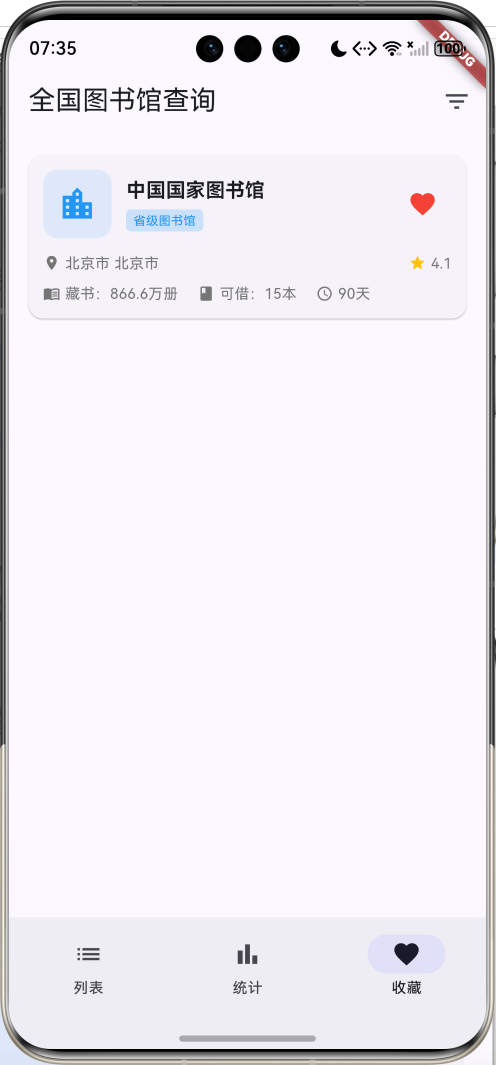
运行效果图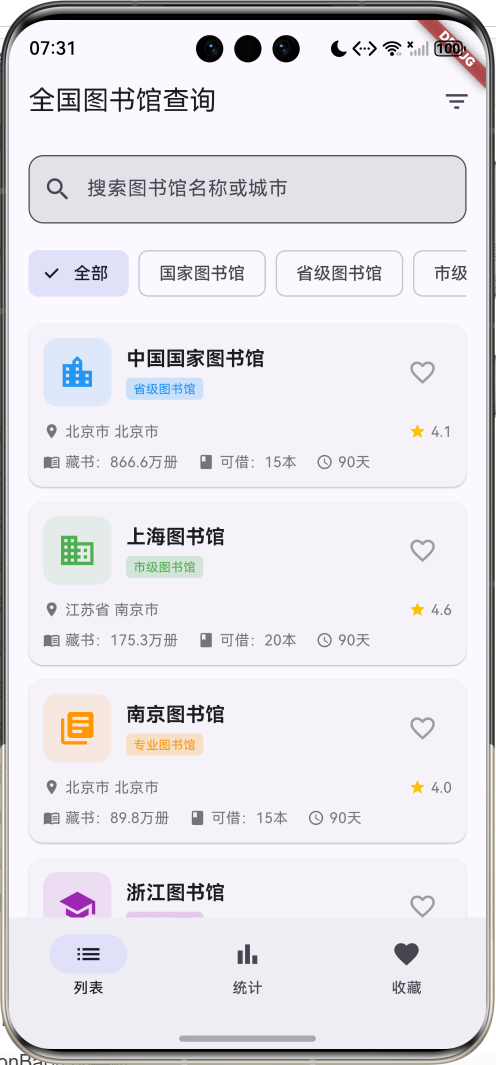
核心功能
- 图书馆数据库:收录30座图书馆
- 5大类型:国家图书馆、省级图书馆、市级图书馆、高校图书馆、专业图书馆
- 25个省份:覆盖全国主要省市
- 智能搜索:支持名称和城市快速搜索
- 类型筛选:按图书馆类型分类浏览
- 省份筛选:按地域查询图书馆
- 收藏功能:收藏常去的图书馆
- 统计分析:可视化展示类型和地域分布
- 详情页面:完整的图书馆信息展示
- 星级评分:用户评分展示
- 借阅规则:详细的借阅政策说明
- 服务项目:图书馆提供的各项服务
技术特点
- Material Design 3设计风格
- NavigationBar底部导航
- 三页面架构(列表、统计、收藏)
- ChoiceChip类型筛选
- DropdownButtonFormField省份选择
- LinearProgressIndicator统计可视化
- 渐变色背景设计
- 响应式卡片布局
- 计算属性优化
- 模拟数据生成
- 无需额外依赖包
核心代码实现
1. 图书馆数据模型
class Library {
  final String id;              // 图书馆ID
  final String name;            // 图书馆名称
  final String type;            // 类型
  final String province;        // 省份
  final String city;            // 城市
  final String address;         // 地址
  final int bookCount;          // 藏书量
  final String openTime;        // 开放时间
  final String phone;           // 联系电话
  final double rating;          // 评分
  final List<String> services;  // 服务项目
  final BorrowRule borrowRule;  // 借阅规则
  bool isFavorite;              // 是否收藏

  Library({
    required this.id,
    required this.name,
    required this.type,
    required this.province,
    required this.city,
    required this.address,
    required this.bookCount,
    required this.openTime,
    required this.phone,
    required this.rating,
    required this.services,
    required this.borrowRule,
    this.isFavorite = false,
  });

  // 计算属性:完整地址
  String get location => '$province $city';

  // 计算属性:藏书量文本
  String get bookCountText {
    if (bookCount >= 10000000) {
      return '${(bookCount / 10000000).toStringAsFixed(1)}千万册';
    } else if (bookCount >= 10000) {
      return '${(bookCount / 10000).toStringAsFixed(1)}万册';
    }
    return '$bookCount册';
  }

  // 计算属性:类型对应颜色
  Color get typeColor {
    switch (type) {
      case '国家图书馆': return Colors.red;
      case '省级图书馆': return Colors.blue;
      case '市级图书馆': return Colors.green;
      case '高校图书馆': return Colors.purple;
      case '专业图书馆': return Colors.orange;
      default: return Colors.grey;
    }
  }

  // 计算属性:类型对应图标
  IconData get typeIcon {
    switch (type) {
      case '国家图书馆': return Icons.account_balance;
      case '省级图书馆': return Icons.location_city;
      case '市级图书馆': return Icons.business;
      case '高校图书馆': return Icons.school;
      case '专业图书馆': return Icons.library_books;
      default: return Icons.local_library;
    }
  }
}
模型字段说明:
| 字段 | 类型 | 说明 |
|---|---|---|
| id | String | 唯一标识符 |
| name | String | 图书馆名称 |
| type | String | 图书馆类型 |
| province | String | 所在省份 |
| city | String | 所在城市 |
| address | String | 详细地址 |
| bookCount | int | 藏书数量 |
| openTime | String | 开放时间 |
| phone | String | 联系电话 |
| rating | double | 用户评分(1-5) |
| services | List | 服务项目列表 |
| borrowRule | BorrowRule | 借阅规则对象 |
| isFavorite | bool | 是否收藏 |
计算属性详解:
- location属性:组合省份和城市,返回完整地址显示
- bookCountText属性:智能格式化藏书量显示
- 千万册级别:显示为"X.X千万册"
- 万册级别:显示为"X.X万册"
- 千册以下:直接显示"X册"
- typeColor属性:根据图书馆类型返回对应的主题颜色
- typeIcon属性:根据图书馆类型返回对应的图标
图书馆类型与视觉映射:
| 类型 | 颜色 | 图标 | 说明 |
|---|---|---|---|
| 国家图书馆 | 红色 | account_balance | 国家级综合性图书馆 |
| 省级图书馆 | 蓝色 | location_city | 省级综合性图书馆 |
| 市级图书馆 | 绿色 | business | 市级公共图书馆 |
| 高校图书馆 | 紫色 | school | 大学图书馆 |
| 专业图书馆 | 橙色 | library_books | 专业领域图书馆 |
2. 借阅规则数据模型
class BorrowRule {
  final int maxBooks;           // 最大借书数量
  final int borrowDays;         // 借阅天数
  final int renewTimes;         // 续借次数
  final double deposit;         // 押金金额
  final String requirement;     // 办证要求
  final List<String> rules;     // 借阅规则列表

  BorrowRule({
    required this.maxBooks,
    required this.borrowDays,
    required this.renewTimes,
    required this.deposit,
    required this.requirement,
    required this.rules,
  });

  // 计算属性:最大借书数量文本
  String get maxBooksText => '$maxBooks本';

  // 计算属性:借阅天数文本
  String get borrowDaysText => '$borrowDays天';

  // 计算属性:续借次数文本
  String get renewTimesText => '$renewTimes次';

  // 计算属性:押金文本
  String get depositText =>
      deposit > 0 ? '¥${deposit.toStringAsFixed(0)}' : '免押金';
}
借阅规则字段说明:
| 字段 | 类型 | 说明 |
|---|---|---|
| maxBooks | int | 最大可借图书数量 |
| borrowDays | int | 借阅期限(天数) |
| renewTimes | int | 允许续借次数 |
| deposit | double | 办证押金金额 |
| requirement | String | 办证要求说明 |
| rules | List | 详细借阅规则列表 |
计算属性的优势:
- 格式化显示:自动添加单位(本、天、次、元)
- 条件判断:押金为0时显示"免押金"
- 代码复用:在UI中直接使用,无需重复格式化
- 维护性:修改格式只需改一处
3. 图书馆数据生成
void _generateLibraries() {
  final random = Random();

  // 30个知名图书馆名称
  final libraryNames = [
    '中国国家图书馆', '上海图书馆', '南京图书馆', '浙江图书馆',
    '广东省立中山图书馆', '湖南图书馆', '四川省图书馆', '陕西省图书馆',
    '北京大学图书馆', '清华大学图书馆', '复旦大学图书馆', '浙江大学图书馆',
    '武汉大学图书馆', '中山大学图书馆', '北京市图书馆', '深圳图书馆',
    '杭州图书馆', '成都图书馆', '西安图书馆', '南京市图书馆',
    '中国科学院图书馆', '中国医学科学院图书馆', '中国农业科学院图书馆',
    '首都图书馆', '天津图书馆', '重庆图书馆', '河北省图书馆',
    '山西省图书馆', '辽宁省图书馆', '吉林省图书馆',
  ];

  // 城市映射表
  final cities = {
    '北京市': ['北京市'],
    '上海市': ['上海市'],
    '江苏省': ['南京市', '苏州市', '无锡市'],
    '浙江省': ['杭州市', '宁波市', '温州市'],
    '广东省': ['广州市', '深圳市', '珠海市'],
    '陕西省': ['西安市', '咸阳市', '宝鸡市'],
    '四川省': ['成都市', '绵阳市', '德阳市'],
    '湖南省': ['长沙市', '株洲市', '湘潭市'],
    '湖北省': ['武汉市', '宜昌市', '襄阳市'],
    '河南省': ['郑州市', '洛阳市', '开封市'],
  };

  // 生成30个图书馆数据
  for (int i = 0; i < 30; i++) {
    final type = _types[random.nextInt(_types.length - 1) + 1];
    final province = _provinces[random.nextInt(10) + 1];
    final cityList = cities[province] ??
        ['${province.replaceAll('省', '').replaceAll('市', '')}市'];
    final city = cityList[random.nextInt(cityList.length)];

    // 根据类型设置藏书量范围
    int bookCount;
    if (type == '国家图书馆') {
      bookCount = 30000000 + random.nextInt(10000000);  // 3000-4000万册
    } else if (type == '省级图书馆') {
      bookCount = 5000000 + random.nextInt(5000000);    // 500-1000万册
    } else if (type == '高校图书馆') {
      bookCount = 3000000 + random.nextInt(3000000);    // 300-600万册
    } else if (type == '市级图书馆') {
      bookCount = 1000000 + random.nextInt(2000000);    // 100-300万册
    } else {
      bookCount = 500000 + random.nextInt(1000000);     // 50-150万册
    }

    _allLibraries.add(Library(
      id: 'library_$i',
      name: libraryNames[i % libraryNames.length],
      type: type,
      province: province,
      city: city,
      address: '$city${['中山路', '人民路', '文化路', '图书馆路'][random.nextInt(4)]}${random.nextInt(500) + 1}号',
      bookCount: bookCount,
      openTime: '周一至周日 9:00-21:00',
      phone: '010-${random.nextInt(90000000) + 10000000}',
      rating: 4.0 + random.nextDouble(),
      services: ['借阅', '阅览', '自习', '电子阅览', '讲座', '展览'],
      borrowRule: BorrowRule(
        maxBooks: [5, 10, 15, 20][random.nextInt(4)],
        borrowDays: [30, 60, 90][random.nextInt(3)],
        renewTimes: [1, 2, 3][random.nextInt(3)],
        deposit: random.nextBool() ? 0 : [100, 200, 300][random.nextInt(3)].toDouble(),
        requirement: '持有效身份证件办理读者证',
        rules: [
          '爱护图书,不得污损',
          '按时归还,逾期需缴纳滞纳金',
          '保持安静,禁止喧哗',
          '禁止携带食物饮料',
          '遵守图书馆各项规章制度',
        ],
      ),
      isFavorite: false,
    ));
  }
  _applyFilters();
}
数据生成特点:
- 真实性:使用真实的图书馆名称,增强用户体验
- 层次性:根据图书馆类型设置不同的藏书量范围
- 地域性:城市映射表确保省份和城市的对应关系
- 随机性:地址、电话、评分等采用随机生成
- 完整性:每个图书馆都包含完整的信息和借阅规则
藏书量分级标准:
| 图书馆类型 | 藏书量范围 | 说明 |
|---|---|---|
| 国家图书馆 | 3000-4000万册 | 国家级藏书规模 |
| 省级图书馆 | 500-1000万册 | 省级综合藏书 |
| 高校图书馆 | 300-600万册 | 大学学术藏书 |
| 市级图书馆 | 100-300万册 | 市级公共藏书 |
| 专业图书馆 | 50-150万册 | 专业领域藏书 |
省份覆盖范围(25个):
- 4个直辖市:北京、上海、天津、重庆
- 21个省份:河北、山西、辽宁、吉林、黑龙江、江苏、浙江、安徽、福建、江西、山东、河南、湖北、湖南、广东、海南、四川、贵州、云南、陕西、甘肃
4. 搜索和筛选功能
void _applyFilters() {
  setState(() {
    _filteredLibraries = _allLibraries.where((library) {
      // 搜索关键词筛选
      if (_searchQuery.isNotEmpty) {
        if (!library.name.toLowerCase().contains(_searchQuery.toLowerCase()) &&
            !library.city.toLowerCase().contains(_searchQuery.toLowerCase())) {
          return false;
        }
      }

      // 类型筛选
      if (_selectedType != '全部' && library.type != _selectedType) {
        return false;
      }

      // 省份筛选
      if (_selectedProvince != '全部' && library.province != _selectedProvince) {
        return false;
      }

      return true;
    }).toList();
  });
}
筛选逻辑详解:
-
搜索关键词筛选:
- 不区分大小写的模糊匹配
- 同时匹配图书馆名称和城市名称
- 使用
toLowerCase()和contains()实现
-
类型筛选:
- 精确匹配图书馆类型
- "全部"选项跳过类型检查
- 支持5种图书馆类型
-
省份筛选:
- 精确匹配省份名称
- "全部"选项跳过省份检查
- 支持25个省份选择
筛选条件组合:
| 筛选项 | 匹配方式 | 说明 |
|---|---|---|
| 搜索关键词 | 模糊匹配 | 匹配图书馆名称或城市 |
| 类型筛选 | 精确匹配 | 按5种类型筛选 |
| 省份筛选 | 精确匹配 | 按25个省份筛选 |
筛选流程:
- 检查搜索关键词是否匹配(空字符串跳过)
- 检查类型是否匹配("全部"跳过)
- 检查省份是否匹配("全部"跳过)
- 更新筛选结果列表
- 触发UI重新渲染
5. NavigationBar底部导航
bottomNavigationBar: NavigationBar(
  selectedIndex: _selectedIndex,
  onDestinationSelected: (index) {
    setState(() => _selectedIndex = index);
  },
  destinations: const [
    NavigationDestination(icon: Icon(Icons.list), label: '列表'),
    NavigationDestination(icon: Icon(Icons.bar_chart), label: '统计'),
    NavigationDestination(icon: Icon(Icons.favorite), label: '收藏'),
  ],
),
NavigationBar特点:
- Material Design 3风格:采用最新的设计规范
- 自动状态管理:自动处理选中状态的视觉反馈
- 流畅动画:切换时有平滑的过渡动画
- 无障碍支持:内置语义标签和键盘导航
三个页面功能:
| 页面 | 图标 | 功能描述 |
|---|---|---|
| 列表 | list | 显示所有图书馆卡片,支持搜索和筛选 |
| 统计 | bar_chart | 显示类型分布和地域分布统计图表 |
| 收藏 | favorite | 显示用户收藏的图书馆列表 |
IndexedStack配合使用:
Expanded(
  child: IndexedStack(
    index: _selectedIndex,
    children: [
      _buildLibraryListPage(),
      _buildStatisticsPage(),
      _buildFavoritePage(),
    ],
  ),
),
IndexedStack优势:
- 状态保持:切换页面时保持滚动位置和输入状态
- 性能优化:只构建一次,避免重复渲染
- 用户体验:切换流畅,无闪烁
- 内存效率:合理管理组件生命周期
6. 搜索栏设计
Widget _buildSearchBar() {
  return Container(
    padding: const EdgeInsets.all(16),
    child: TextField(
      decoration: InputDecoration(
        hintText: '搜索图书馆名称或城市',
        prefixIcon: const Icon(Icons.search),
        border: OutlineInputBorder(
          borderRadius: BorderRadius.circular(12),
        ),
        filled: true,
      ),
      onChanged: (value) {
        setState(() {
          _searchQuery = value;
          _applyFilters();
        });
      },
    ),
  );
}
搜索栏设计要点:
-
视觉设计:
- 圆角边框(12px)提升现代感
- 填充背景色增强层次感
- 搜索图标提供视觉提示
-
交互设计:
- 实时搜索(onChanged触发)
- 提示文本引导用户输入
- 响应式布局适配不同屏幕
-
功能实现:
- 支持中英文搜索
- 不区分大小写匹配
- 同时搜索名称和城市
搜索体验优化:
- 即时反馈:输入即搜索,无需点击按钮
- 智能匹配:模糊匹配提高搜索成功率
- 清晰提示:明确告知用户可搜索的内容
7. ChoiceChip类型筛选
Widget _buildTypeTabs() {
  return Container(
    height: 50,
    padding: const EdgeInsets.symmetric(horizontal: 16),
    child: ListView.builder(
      scrollDirection: Axis.horizontal,
      itemCount: _types.length,
      itemBuilder: (context, index) {
        final type = _types[index];
        final isSelected = type == _selectedType;
        return Padding(
          padding: const EdgeInsets.only(right: 8),
          child: ChoiceChip(
            label: Text(type),
            selected: isSelected,
            onSelected: (selected) {
              setState(() {
                _selectedType = type;
                _applyFilters();
              });
            },
          ),
        );
      },
    ),
  );
}
ChoiceChip特点:
- Material Design组件:符合设计规范的芯片组件
- 单选模式:同时只能选中一个选项
- 自动样式:选中和未选中状态自动切换
- 水平滚动:支持更多选项时的横向滚动
类型筛选选项:
- 全部、国家图书馆、省级图书馆、市级图书馆、高校图书馆、专业图书馆
布局特点:
- 固定高度:50px确保一致的视觉效果
- 水平间距:8px间距保持适当的视觉分离
- 边距控制:16px水平边距与整体布局协调
8. 图书馆卡片设计
Widget _buildLibraryCard(Library library) {
  return Card(
    margin: const EdgeInsets.only(bottom: 12),
    child: InkWell(
      onTap: () {
        Navigator.push(
          context,
          MaterialPageRoute(
            builder: (_) => LibraryDetailPage(library: library),
          ),
        );
      },
      child: Padding(
        padding: const EdgeInsets.all(12),
        child: Column(
          crossAxisAlignment: CrossAxisAlignment.start,
          children: [
            Row(
              children: [
                // 左侧:图标容器
                Container(
                  padding: const EdgeInsets.all(12),
                  decoration: BoxDecoration(
                    color: library.typeColor.withValues(alpha: 0.1),
                    borderRadius: BorderRadius.circular(12),
                  ),
                  child: Icon(
                    library.typeIcon,
                    color: library.typeColor,
                    size: 32,
                  ),
                ),
                const SizedBox(width: 12),
                // 中间:名称和类型
                Expanded(
                  child: Column(
                    crossAxisAlignment: CrossAxisAlignment.start,
                    children: [
                      Text(
                        library.name,
                        style: const TextStyle(
                          fontSize: 16,
                          fontWeight: FontWeight.bold,
                        ),
                        maxLines: 1,
                        overflow: TextOverflow.ellipsis,
                      ),
                      const SizedBox(height: 4),
                      Container(
                        padding: const EdgeInsets.symmetric(
                          horizontal: 6,
                          vertical: 2,
                        ),
                        decoration: BoxDecoration(
                          color: library.typeColor.withValues(alpha: 0.2),
                          borderRadius: BorderRadius.circular(4),
                        ),
                        child: Text(
                          library.type,
                          style: TextStyle(
                            fontSize: 10,
                            color: library.typeColor,
                          ),
                        ),
                      ),
                    ],
                  ),
                ),
                // 右侧:收藏按钮
                IconButton(
                  onPressed: () {
                    setState(() {
                      library.isFavorite = !library.isFavorite;
                    });
                  },
                  icon: Icon(
                    library.isFavorite ? Icons.favorite : Icons.favorite_border,
                    color: library.isFavorite ? Colors.red : Colors.grey,
                  ),
                ),
              ],
            ),
            const SizedBox(height: 12),
            // 地址和评分信息
            Row(
              children: [
                Icon(Icons.location_on, size: 14, color: Colors.grey[600]),
                const SizedBox(width: 4),
                Expanded(
                  child: Text(
                    library.location,
                    style: TextStyle(fontSize: 12, color: Colors.grey[600]),
                    maxLines: 1,
                    overflow: TextOverflow.ellipsis,
                  ),
                ),
                const SizedBox(width: 12),
                Icon(Icons.star, size: 14, color: Colors.amber),
                const SizedBox(width: 4),
                Text(
                  library.rating.toStringAsFixed(1),
                  style: TextStyle(fontSize: 12, color: Colors.grey[600]),
                ),
              ],
            ),
            const SizedBox(height: 8),
            // 藏书量和借阅信息
            Row(
              children: [
                Icon(Icons.menu_book, size: 14, color: Colors.grey[600]),
                const SizedBox(width: 4),
                Text(
                  '藏书:${library.bookCountText}',
                  style: TextStyle(fontSize: 12, color: Colors.grey[600]),
                ),
                const SizedBox(width: 16),
                Icon(Icons.book, size: 14, color: Colors.grey[600]),
                const SizedBox(width: 4),
                Text(
                  '可借:${library.borrowRule.maxBooksText}',
                  style: TextStyle(fontSize: 12, color: Colors.grey[600]),
                ),
                const SizedBox(width: 16),
                Icon(Icons.access_time, size: 14, color: Colors.grey[600]),
                const SizedBox(width: 4),
                Text(
                  library.borrowRule.borrowDaysText,
                  style: TextStyle(fontSize: 12, color: Colors.grey[600]),
                ),
              ],
            ),
          ],
        ),
      ),
    ),
  );
}
卡片布局结构分析:
-
顶部行:
- 左侧:类型图标(32px,带圆角背景)
- 中间:图书馆名称(粗体)+ 类型标签
- 右侧:收藏按钮(心形图标)
-
中间行:
- 地址信息:位置图标 + 省市信息
- 评分信息:星形图标 + 数字评分
-
底部行:
- 藏书量:书本图标 + 格式化数量
- 可借数量:图书图标 + 借阅限制
- 借阅期限:时间图标 + 天数
视觉设计要点:
| 元素 | 设计特点 | 作用 |
|---|---|---|
| 图标容器 | 圆角背景,主题色透明度0.1 | 突出类型特征 |
| 名称文本 | 16px粗体,单行省略 | 主要信息展示 |
| 类型标签 | 小尺寸,主题色背景 | 分类标识 |
| 收藏按钮 | 实心/空心切换,红色高亮 | 交互反馈 |
| 信息图标 | 14px小图标,灰色 | 信息分类 |
| 辅助文本 | 12px灰色文本 | 次要信息 |
交互设计:
- 点击卡片:导航到详情页面
- 点击收藏:切换收藏状态,图标和颜色变化
- 文本省略:长文本自动省略,保持布局整洁
9. 统计页面实现
Widget _buildStatisticsPage() {
  final typeStats = <String, int>{};
  final provinceStats = <String, int>{};
  int totalBooks = 0;

  // 统计数据计算
  for (var library in _allLibraries) {
    typeStats[library.type] = (typeStats[library.type] ?? 0) + 1;
    provinceStats[library.province] = (provinceStats[library.province] ?? 0) + 1;
    totalBooks += library.bookCount;
  }

  // 按数量降序排序
  final sortedTypes = typeStats.entries.toList()
    ..sort((a, b) => b.value.compareTo(a.value));
  final sortedProvinces = provinceStats.entries.toList()
    ..sort((a, b) => b.value.compareTo(a.value));

  return ListView(
    padding: const EdgeInsets.all(16),
    children: [
      // 总体统计卡片
      Card(
        child: Padding(
          padding: const EdgeInsets.all(16),
          child: Column(
            crossAxisAlignment: CrossAxisAlignment.start,
            children: [
              const Row(
                children: [
                  Icon(Icons.analytics, color: Colors.indigo),
                  SizedBox(width: 8),
                  Text(
                    '总体统计',
                    style: TextStyle(fontSize: 18, fontWeight: FontWeight.bold),
                  ),
                ],
              ),
              const SizedBox(height: 16),
              Row(
                children: [
                  Expanded(
                    child: _buildStatItem(
                      '图书馆数量',
                      '${_allLibraries.length}',
                      '座',
                      Icons.account_balance,
                      Colors.blue,
                    ),
                  ),
                  Expanded(
                    child: _buildStatItem(
                      '总藏书量',
                      '${(totalBooks / 10000000).toStringAsFixed(1)}',
                      '千万册',
                      Icons.menu_book,
                      Colors.green,
                    ),
                  ),
                ],
              ),
            ],
          ),
        ),
      ),
      const SizedBox(height: 16),
      // 类型分布卡片
      Card(
        child: Padding(
          padding: const EdgeInsets.all(16),
          child: Column(
            crossAxisAlignment: CrossAxisAlignment.start,
            children: [
              const Row(
                children: [
                  Icon(Icons.category, color: Colors.indigo),
                  SizedBox(width: 8),
                  Text(
                    '类型分布',
                    style: TextStyle(fontSize: 18, fontWeight: FontWeight.bold),
                  ),
                ],
              ),
              const SizedBox(height: 16),
              ...sortedTypes.map((entry) {
                final percentage = (entry.value / _allLibraries.length * 100);
                return Padding(
                  padding: const EdgeInsets.only(bottom: 12),
                  child: Column(
                    crossAxisAlignment: CrossAxisAlignment.start,
                    children: [
                      Row(
                        mainAxisAlignment: MainAxisAlignment.spaceBetween,
                        children: [
                          Text(entry.key, style: const TextStyle(fontSize: 14)),
                          Text('${entry.value} 座',
                              style: const TextStyle(
                                  fontSize: 14, fontWeight: FontWeight.bold)),
                        ],
                      ),
                      const SizedBox(height: 4),
                      LinearProgressIndicator(
                        value: percentage / 100,
                        backgroundColor: Colors.grey[200],
                        color: Colors.indigo,
                      ),
                      const SizedBox(height: 2),
                      Text(
                        '占比 ${percentage.toStringAsFixed(1)}%',
                        style: const TextStyle(fontSize: 12, color: Colors.grey),
                      ),
                    ],
                  ),
                );
              }),
            ],
          ),
        ),
      ),
      const SizedBox(height: 16),
      // 地域分布卡片
      Card(
        child: Padding(
          padding: const EdgeInsets.all(16),
          child: Column(
            crossAxisAlignment: CrossAxisAlignment.start,
            children: [
              const Row(
                children: [
                  Icon(Icons.map, color: Colors.indigo),
                  SizedBox(width: 8),
                  Text(
                    '地域分布',
                    style: TextStyle(fontSize: 18, fontWeight: FontWeight.bold),
                  ),
                ],
              ),
              const SizedBox(height: 16),
              ...sortedProvinces.take(10).map((entry) {
                final percentage = (entry.value / _allLibraries.length * 100);
                return Padding(
                  padding: const EdgeInsets.only(bottom: 12),
                  child: Column(
                    crossAxisAlignment: CrossAxisAlignment.start,
                    children: [
                      Row(
                        mainAxisAlignment: MainAxisAlignment.spaceBetween,
                        children: [
                          Text(entry.key, style: const TextStyle(fontSize: 14)),
                          Text('${entry.value} 座',
                              style: const TextStyle(
                                  fontSize: 14, fontWeight: FontWeight.bold)),
                        ],
                      ),
                      const SizedBox(height: 4),
                      LinearProgressIndicator(
                        value: percentage / 100,
                        backgroundColor: Colors.grey[200],
                        color: Colors.green,
                      ),
                      const SizedBox(height: 2),
                      Text(
                        '占比 ${percentage.toStringAsFixed(1)}%',
                        style: const TextStyle(fontSize: 12, color: Colors.grey),
                      ),
                    ],
                  ),
                );
              }),
            ],
          ),
        ),
      ),
    ],
  );
}
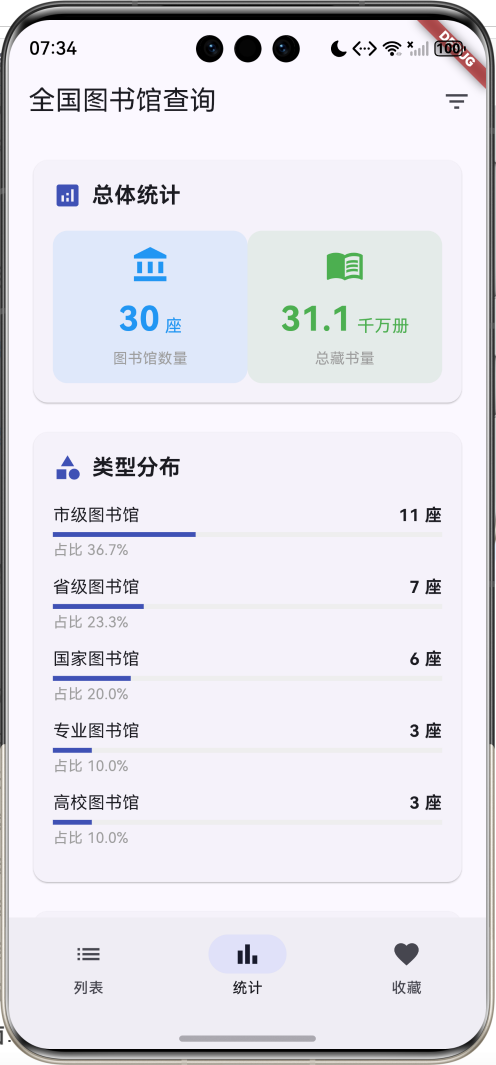
统计页面功能分析:
-
数据统计逻辑:
- 遍历所有图书馆数据
- 按类型和省份分组计数
- 计算总藏书量
- 按数量降序排序
-
总体统计:
- 图书馆总数量
- 总藏书量(千万册为单位)
- 使用统计项组件展示
-
类型分布:
- 5种类型的数量统计
- 百分比计算和可视化
- LinearProgressIndicator进度条展示
-
地域分布:
- 各省份图书馆数量
- 只显示前10个省份
- 百分比和进度条可视化
统计项组件:
Widget _buildStatItem(String label, String value, String unit, IconData icon, Color color) {
  return Container(
    padding: const EdgeInsets.all(12),
    decoration: BoxDecoration(
      color: color.withValues(alpha: 0.1),
      borderRadius: BorderRadius.circular(12),
    ),
    child: Column(
      children: [
        Icon(icon, color: color, size: 32),
        const SizedBox(height: 8),
        Row(
          mainAxisAlignment: MainAxisAlignment.center,
          crossAxisAlignment: CrossAxisAlignment.end,
          children: [
            Text(
              value,
              style: TextStyle(
                fontSize: 28,
                fontWeight: FontWeight.bold,
                color: color,
              ),
            ),
            const SizedBox(width: 4),
            Padding(
              padding: const EdgeInsets.only(bottom: 4),
              child: Text(
                unit,
                style: TextStyle(fontSize: 14, color: color),
              ),
            ),
          ],
        ),
        const SizedBox(height: 4),
        Text(
          label,
          style: const TextStyle(fontSize: 12, color: Colors.grey),
        ),
      ],
    ),
  );
}
可视化设计要点:
- 进度条:LinearProgressIndicator直观显示占比
- 颜色区分:不同统计类别使用不同颜色
- 数据标签:显示具体数量和百分比
- 排序展示:按数量降序排列,突出重点
10. 收藏页面实现
List<Library> get _favoriteLibraries {
  return _allLibraries.where((library) => library.isFavorite).toList();
}

Widget _buildFavoritePage() {
  if (_favoriteLibraries.isEmpty) {
    return Center(
      child: Column(
        mainAxisAlignment: MainAxisAlignment.center,
        children: [
          Icon(Icons.favorite_border, size: 80, color: Colors.grey[300]),
          const SizedBox(height: 16),
          Text('还没有收藏的图书馆', style: TextStyle(color: Colors.grey[600])),
          const SizedBox(height: 8),
          Text('快去列表页收藏常去的图书馆吧',
              style: TextStyle(color: Colors.grey[400], fontSize: 12)),
        ],
      ),
    );
  }

  return ListView.builder(
    padding: const EdgeInsets.all(16),
    itemCount: _favoriteLibraries.length,
    itemBuilder: (context, index) {
      return _buildLibraryCard(_favoriteLibraries[index]);
    },
  );
}
收藏功能特点:
- 计算属性:使用getter动态获取收藏列表
- 空状态处理:无收藏时显示引导界面
- 组件复用:复用图书馆卡片组件
- 实时更新:收藏状态变化时自动更新
空状态设计:
- 大图标:80px心形图标,浅灰色
- 主提示:明确告知当前状态
- 副提示:引导用户如何操作
- 居中布局:视觉焦点集中
11. 省份筛选对话框
void _showFilterDialog() {
  showModalBottomSheet(
    context: context,
    builder: (context) => Container(
      padding: const EdgeInsets.all(16),
      child: Column(
        mainAxisSize: MainAxisSize.min,
        crossAxisAlignment: CrossAxisAlignment.start,
        children: [
          const Text(
            '筛选条件',
            style: TextStyle(fontSize: 18, fontWeight: FontWeight.bold),
          ),
          const SizedBox(height: 16),
          DropdownButtonFormField<String>(
            value: _selectedProvince,
            decoration: const InputDecoration(
              labelText: '省份',
              border: OutlineInputBorder(),
            ),
            items: _provinces.map((province) {
              return DropdownMenuItem(
                value: province,
                child: Text(province),
              );
            }).toList(),
            onChanged: (value) {
              setState(() {
                _selectedProvince = value!;
                _applyFilters();
              });
              Navigator.pop(context);
            },
          ),
        ],
      ),
    ),
  );
}
对话框设计特点:
- ModalBottomSheet:从底部弹出,符合移动端习惯
- DropdownButtonFormField:标准的下拉选择组件
- 自动关闭:选择后自动关闭并应用筛选
- 表单装饰:带标签和边框的表单样式
交互流程:
- 点击筛选按钮
- 底部弹出省份选择对话框
- 选择省份
- 自动应用筛选并关闭对话框
- 列表页显示筛选结果
12. 图书馆详情页头部
Widget _buildHeader() {
  return Container(
    width: double.infinity,
    padding: const EdgeInsets.all(24),
    decoration: BoxDecoration(
      gradient: LinearGradient(
        colors: [
          library.typeColor.withValues(alpha: 0.3),
          library.typeColor.withValues(alpha: 0.1),
        ],
      ),
    ),
    child: Column(
      children: [
        Container(
          padding: const EdgeInsets.all(24),
          decoration: BoxDecoration(
            color: Colors.white,
            borderRadius: BorderRadius.circular(16),
          ),
          child: Icon(
            library.typeIcon,
            size: 64,
            color: library.typeColor,
          ),
        ),
        const SizedBox(height: 16),
        Text(
          library.name,
          style: const TextStyle(fontSize: 24, fontWeight: FontWeight.bold),
          textAlign: TextAlign.center,
        ),
        const SizedBox(height: 8),
        Container(
          padding: const EdgeInsets.symmetric(horizontal: 12, vertical: 4),
          decoration: BoxDecoration(
            color: library.typeColor.withValues(alpha: 0.2),
            borderRadius: BorderRadius.circular(12),
          ),
          child: Text(
            library.type,
            style: TextStyle(
              color: library.typeColor,
              fontWeight: FontWeight.bold,
            ),
          ),
        ),
      ],
    ),
  );
}
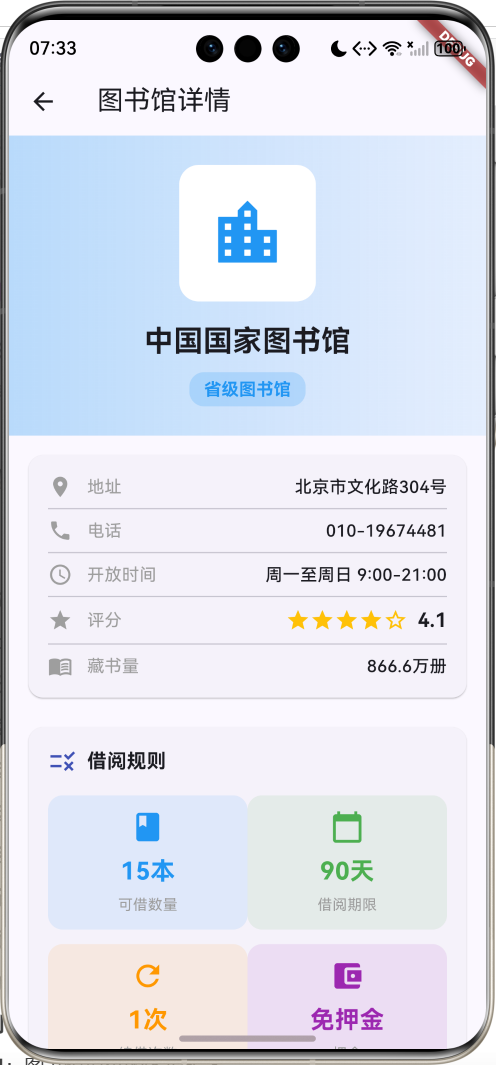
头部设计要点:
- 渐变背景:使用类型主题色的渐变效果
- 图标容器:白色圆角容器突出图标
- 大尺寸图标:64px图标增强视觉冲击
- 标题居中:24px粗体标题
- 类型标签:圆角标签显示类型
视觉层次:
- 背景渐变(最底层)
- 白色图标容器(中间层)
- 彩色图标(最上层)
- 文字信息(独立层)
13. 基本信息卡片
Widget _buildBasicInfo() {
  return Card(
    margin: const EdgeInsets.all(16),
    child: Padding(
      padding: const EdgeInsets.all(16),
      child: Column(
        children: [
          _buildInfoRow('地址', library.address, Icons.location_on),
          const Divider(),
          _buildInfoRow('电话', library.phone, Icons.phone),
          const Divider(),
          _buildInfoRow('开放时间', library.openTime, Icons.access_time),
          const Divider(),
          Row(
            children: [
              const Icon(Icons.star, size: 20, color: Colors.grey),
              const SizedBox(width: 12),
              const Text('评分', style: TextStyle(fontSize: 14, color: Colors.grey)),
              const Spacer(),
              Row(
                children: List.generate(5, (index) {
                  return Icon(
                    index < library.rating.floor() ? Icons.star : Icons.star_border,
                    size: 20,
                    color: Colors.amber,
                  );
                }),
              ),
              const SizedBox(width: 8),
              Text(
                library.rating.toStringAsFixed(1),
                style: const TextStyle(fontSize: 16, fontWeight: FontWeight.bold),
              ),
            ],
          ),
          const Divider(),
          _buildInfoRow('藏书量', library.bookCountText, Icons.menu_book),
        ],
      ),
    ),
  );
}

Widget _buildInfoRow(String label, String value, IconData icon) {
  return Row(
    crossAxisAlignment: CrossAxisAlignment.start,
    children: [
      Icon(icon, size: 20, color: Colors.grey),
      const SizedBox(width: 12),
      Text(label, style: const TextStyle(fontSize: 14, color: Colors.grey)),
      const SizedBox(width: 12),
      Expanded(
        child: Text(
          value,
          style: const TextStyle(fontSize: 14, fontWeight: FontWeight.w500),
          textAlign: TextAlign.right,
        ),
      ),
    ],
  );
}
基本信息展示内容:
| 信息项 | 图标 | 说明 |
|---|---|---|
| 地址 | location_on | 详细地址信息 |
| 电话 | phone | 联系电话 |
| 开放时间 | access_time | 营业时间 |
| 评分 | star | 星级评分(1-5星) |
| 藏书量 | menu_book | 格式化藏书数量 |
星级评分实现:
- 使用
List.generate生成5个星星图标 - 根据
rating.floor()判断实心或空心星星 - 琥珀色星星配合数字评分显示
信息行布局:
- 左侧:20px灰色图标
- 中间:标签文字(灰色)
- 右侧:值文字(右对齐,稍粗)
- 分割线:Divider组件分隔各信息项
14. 借阅规则卡片
Widget _buildBorrowRules() {
  return Card(
    margin: const EdgeInsets.symmetric(horizontal: 16, vertical: 8),
    child: Padding(
      padding: const EdgeInsets.all(16),
      child: Column(
        crossAxisAlignment: CrossAxisAlignment.start,
        children: [
          const Row(
            children: [
              Icon(Icons.rule, color: Colors.indigo),
              SizedBox(width: 8),
              Text(
                '借阅规则',
                style: TextStyle(fontSize: 16, fontWeight: FontWeight.bold),
              ),
            ],
          ),
          const SizedBox(height: 16),
          Row(
            children: [
              Expanded(
                child: _buildRuleItem(
                  '可借数量',
                  library.borrowRule.maxBooksText,
                  Icons.book,
                  Colors.blue,
                ),
              ),
              Expanded(
                child: _buildRuleItem(
                  '借阅期限',
                  library.borrowRule.borrowDaysText,
                  Icons.calendar_today,
                  Colors.green,
                ),
              ),
            ],
          ),
          const SizedBox(height: 12),
          Row(
            children: [
              Expanded(
                child: _buildRuleItem(
                  '续借次数',
                  library.borrowRule.renewTimesText,
                  Icons.refresh,
                  Colors.orange,
                ),
              ),
              Expanded(
                child: _buildRuleItem(
                  '押金',
                  library.borrowRule.depositText,
                  Icons.account_balance_wallet,
                  Colors.purple,
                ),
              ),
            ],
          ),
          const SizedBox(height: 16),
          const Divider(),
          const SizedBox(height: 8),
          Text(
            '办证要求',
            style: TextStyle(
              fontSize: 14,
              color: Colors.grey[700],
              fontWeight: FontWeight.bold,
            ),
          ),
          const SizedBox(height: 8),
          Text(
            library.borrowRule.requirement,
            style: const TextStyle(fontSize: 14, height: 1.6),
          ),
          const SizedBox(height: 16),
          const Text(
            '借阅须知',
            style: TextStyle(
              fontSize: 14,
              color: Colors.grey,
              fontWeight: FontWeight.bold,
            ),
          ),
          const SizedBox(height: 8),
          ...library.borrowRule.rules.map((rule) {
            return Padding(
              padding: const EdgeInsets.only(bottom: 6),
              child: Row(
                crossAxisAlignment: CrossAxisAlignment.start,
                children: [
                  const Text('• ', style: TextStyle(fontSize: 14)),
                  Expanded(
                    child: Text(
                      rule,
                      style: const TextStyle(fontSize: 14, height: 1.6),
                    ),
                  ),
                ],
              ),
            );
          }),
        ],
      ),
    ),
  );
}

Widget _buildRuleItem(String label, String value, IconData icon, Color color) {
  return Container(
    padding: const EdgeInsets.all(12),
    decoration: BoxDecoration(
      color: color.withValues(alpha: 0.1),
      borderRadius: BorderRadius.circular(12),
    ),
    child: Column(
      children: [
        Icon(icon, color: color, size: 28),
        const SizedBox(height: 8),
        Text(
          value,
          style: TextStyle(
            fontSize: 20,
            fontWeight: FontWeight.bold,
            color: color,
          ),
        ),
        const SizedBox(height: 4),
        Text(
          label,
          style: const TextStyle(fontSize: 12, color: Colors.grey),
        ),
      ],
    ),
  );
}
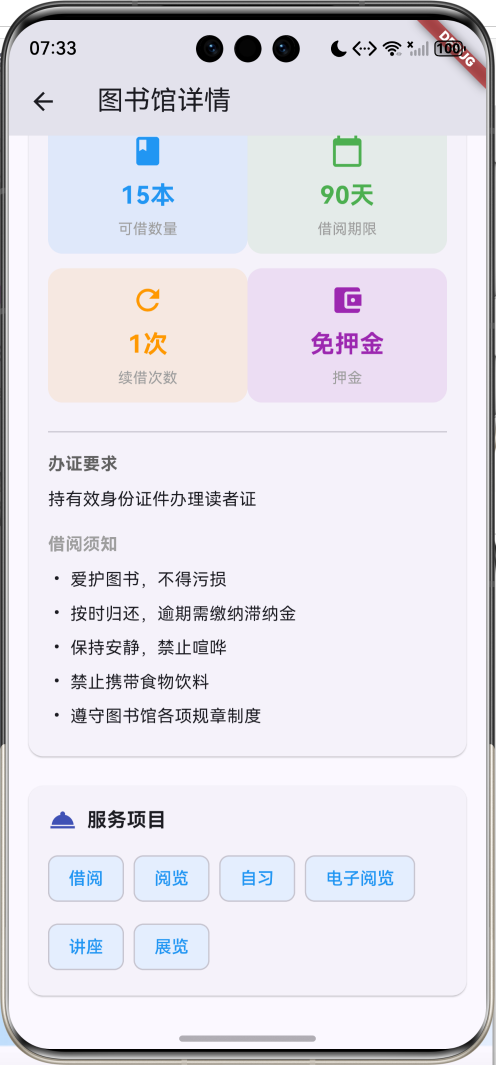
借阅规则展示结构:
-
规则指标(2x2网格):
- 可借数量:蓝色,书本图标
- 借阅期限:绿色,日历图标
- 续借次数:橙色,刷新图标
- 押金:紫色,钱包图标
-
办证要求:
- 标题:灰色粗体
- 内容:普通文本,行高1.6
-
借阅须知:
- 标题:灰色粗体
- 列表:项目符号 + 规则文本
规则项设计:
- 圆角容器:12px圆角,主题色透明背景
- 图标:28px彩色图标
- 数值:20px粗体彩色文字
- 标签:12px灰色小字
15. 服务项目展示
Widget _buildServices() {
  return Card(
    margin: const EdgeInsets.all(16),
    child: Padding(
      padding: const EdgeInsets.all(16),
      child: Column(
        crossAxisAlignment: CrossAxisAlignment.start,
        children: [
          const Row(
            children: [
              Icon(Icons.room_service, color: Colors.indigo),
              SizedBox(width: 8),
              Text(
                '服务项目',
                style: TextStyle(fontSize: 16, fontWeight: FontWeight.bold),
              ),
            ],
          ),
          const SizedBox(height: 12),
          Wrap(
            spacing: 8,
            runSpacing: 8,
            children: library.services.map((service) {
              return Chip(
                label: Text(service),
                backgroundColor: library.typeColor.withValues(alpha: 0.1),
                labelStyle: TextStyle(color: library.typeColor),
              );
            }).toList(),
          ),
        ],
      ),
    ),
  );
}
服务项目特点:
- Wrap布局:自动换行,适应不同屏幕宽度
- Chip组件:Material Design芯片组件
- 主题色背景:使用图书馆类型对应的主题色
- 间距控制:8px间距保持视觉平衡
服务项目列表:
- 借阅、阅览、自习、电子阅览、讲座、展览
技术要点详解
1. 计算属性的深度应用
计算属性(Getter)是Dart语言的重要特性,在本项目中广泛应用于数据格式化和状态计算。
基础语法:
class Library {
  final String province;
  final String city;

  // 计算属性:只读,每次访问时计算
  String get location => '$province $city';
}
高级应用场景:
- 条件判断:
String get depositText =>
    deposit > 0 ? '¥${deposit.toStringAsFixed(0)}' : '免押金';
- 数值格式化:
String get bookCountText {
  if (bookCount >= 10000000) {
    return '${(bookCount / 10000000).toStringAsFixed(1)}千万册';
  } else if (bookCount >= 10000) {
    return '${(bookCount / 10000).toStringAsFixed(1)}万册';
  }
  return '$bookCount册';
}
- 映射转换:
Color get typeColor {
  switch (type) {
    case '国家图书馆': return Colors.red;
    case '省级图书馆': return Colors.blue;
    // ...
    default: return Colors.grey;
  }
}
计算属性优势:
- 内存效率:不占用存储空间,按需计算
- 数据一致性:总是基于最新数据计算
- 代码简洁:使用时像访问属性一样简单
- 维护性:逻辑集中,易于修改和扩展
2. NavigationBar与页面状态管理
NavigationBar是Material Design 3的核心导航组件,配合IndexedStack实现高效的页面切换。
状态管理模式:
class _LibraryHomePageState extends State<LibraryHomePage> {
  int _selectedIndex = 0;  // 当前选中的页面索引

  // 页面切换处理
  void _onDestinationSelected(int index) {
    setState(() {
      _selectedIndex = index;
    });
  }
}
IndexedStack的工作原理:
- 预构建:所有子页面在初始化时构建
- 状态保持:切换时保持每个页面的状态
- 显示控制:只显示指定索引的页面
- 性能优化:避免重复构建和销毁
与其他导航方案对比:
| 方案 | 优势 | 劣势 | 适用场景 |
|---|---|---|---|
| IndexedStack | 状态保持,切换流畅 | 内存占用较高 | 底部导航,频繁切换 |
| PageView | 支持手势,动画丰富 | 状态不保持 | 引导页,图片浏览 |
| Navigator | 路由管理,层级清晰 | 切换成本高 | 页面跳转,深层导航 |
3. ChoiceChip的交互设计
ChoiceChip是Material Design中专门用于单选的芯片组件,提供了优秀的用户体验。
核心属性解析:
ChoiceChip(
  label: Text('国家图书馆'),           // 显示文本
  selected: isSelected,              // 选中状态
  onSelected: (selected) {           // 选择回调
    setState(() {
      _selectedType = '国家图书馆';
    });
  },
  selectedColor: Colors.blue,        // 选中颜色
  backgroundColor: Colors.grey[100], // 背景颜色
  labelStyle: TextStyle(            // 文本样式
    color: isSelected ? Colors.white : Colors.black,
  ),
)
状态管理最佳实践:
// 使用列表管理所有选项
final List<String> _types = ['全部', '国家图书馆', '省级图书馆', ...];
String _selectedType = '全部';

// 构建选项列表
Widget _buildTypeTabs() {
  return ListView.builder(
    scrollDirection: Axis.horizontal,
    itemCount: _types.length,
    itemBuilder: (context, index) {
      final type = _types[index];
      return ChoiceChip(
        label: Text(type),
        selected: type == _selectedType,
        onSelected: (selected) {
          setState(() {
            _selectedType = type;
            _applyFilters();  // 应用筛选
          });
        },
      );
    },
  );
}
交互体验优化:
- 即时反馈:选择后立即应用筛选
- 视觉反馈:选中状态有明显的颜色变化
- 滚动支持:选项过多时支持水平滚动
- 触摸友好:合适的点击区域和间距
4. DropdownButtonFormField的表单集成
DropdownButtonFormField是Flutter中功能强大的下拉选择组件,特别适合表单场景。
基础用法:
DropdownButtonFormField<String>(
  value: _selectedProvince,                    // 当前值
  decoration: const InputDecoration(          // 表单装饰
    labelText: '省份',
    border: OutlineInputBorder(),
  ),
  items: _provinces.map((province) {          // 选项列表
    return DropdownMenuItem(
      value: province,
      child: Text(province),
    );
  }).toList(),
  onChanged: (value) {                        // 变化回调
    setState(() {
      _selectedProvince = value!;
      _applyFilters();
    });
  },
  validator: (value) {                        // 验证函数
    if (value == null || value.isEmpty) {
      return '请选择省份';
    }
    return null;
  },
)
与DropdownButton的区别:
| 特性 | DropdownButton | DropdownButtonFormField |
|---|---|---|
| 表单集成 | 不支持 | 完全支持 |
| 装饰样式 | 基础样式 | 丰富的InputDecoration |
| 验证功能 | 不支持 | 内置validator |
| 标签支持 | 不支持 | 支持labelText |
| 错误提示 | 不支持 | 自动显示错误信息 |
在ModalBottomSheet中的应用:
void _showFilterDialog() {
  showModalBottomSheet(
    context: context,
    isScrollControlled: true,              // 支持滚动
    shape: const RoundedRectangleBorder(   // 圆角样式
      borderRadius: BorderRadius.vertical(
        top: Radius.circular(20),
      ),
    ),
    builder: (context) => Container(
      padding: const EdgeInsets.all(16),
      child: Column(
        mainAxisSize: MainAxisSize.min,
        children: [
          // 标题
          const Text('筛选条件', style: TextStyle(fontSize: 18, fontWeight: FontWeight.bold)),
          const SizedBox(height: 16),
          // 下拉选择
          DropdownButtonFormField<String>(...),
        ],
      ),
    ),
  );
}
5. LinearProgressIndicator的数据可视化
LinearProgressIndicator是Flutter中简单而有效的进度指示器,非常适合数据占比的可视化展示。
基础属性:
LinearProgressIndicator(
  value: 0.6,                          // 进度值(0.0-1.0)
  backgroundColor: Colors.grey[200],   // 背景颜色
  color: Colors.blue,                  // 进度颜色
  minHeight: 8,                        // 最小高度
)
在统计中的应用:
Widget _buildDistributionItem(String label, int count, int total, Color color) {
  final percentage = total > 0 ? (count / total * 100) : 0.0;

  return Column(
    crossAxisAlignment: CrossAxisAlignment.start,
    children: [
      // 标题和数量
      Row(
        mainAxisAlignment: MainAxisAlignment.spaceBetween,
        children: [
          Text(label, style: const TextStyle(fontSize: 14)),
          Text('$count 座', style: const TextStyle(fontSize: 14, fontWeight: FontWeight.bold)),
        ],
      ),
      const SizedBox(height: 4),
      // 进度条
      LinearProgressIndicator(
        value: percentage / 100,
        backgroundColor: Colors.grey[200],
        color: color,
        minHeight: 8,
      ),
      const SizedBox(height: 2),
      // 百分比文本
      Text(
        '占比 ${percentage.toStringAsFixed(1)}%',
        style: const TextStyle(fontSize: 12, color: Colors.grey),
      ),
    ],
  );
}
可视化设计原则:
- 颜色区分:不同类别使用不同颜色
- 数据标签:显示具体数量和百分比
- 视觉层次:进度条、文字、标签的层次分明
- 响应式:适应不同屏幕宽度
6. Card组件的层次设计
Card是Material Design中重要的容器组件,用于组织相关信息。
基础用法:
Card(
  margin: const EdgeInsets.all(16),        // 外边距
  elevation: 4,                            // 阴影高度
  shape: RoundedRectangleBorder(           // 形状
    borderRadius: BorderRadius.circular(12),
  ),
  child: Padding(
    padding: const EdgeInsets.all(16),     // 内边距
    child: Column(
      children: [...],
    ),
  ),
)
层次设计策略:
-
主要内容卡片:
- 较大的边距(16px)
- 适中的阴影(默认elevation)
- 丰富的内容结构
-
次要内容卡片:
- 较小的边距(8px)
- 较低的阴影(elevation: 2)
- 简洁的内容结构
-
列表项卡片:
- 底部边距(bottom: 12px)
- 默认阴影
- 统一的内容格式
与InkWell的结合:
Card(
  child: InkWell(
    onTap: () {
      // 点击处理
    },
    borderRadius: BorderRadius.circular(12),  // 与Card保持一致
    child: Padding(
      padding: const EdgeInsets.all(12),
      child: Column(...),
    ),
  ),
)
7. 渐变背景的视觉设计
渐变背景能够创造丰富的视觉层次,增强用户体验。
LinearGradient基础用法:
Container(
  decoration: BoxDecoration(
    gradient: LinearGradient(
      colors: [
        Colors.blue.withValues(alpha: 0.3),    // 起始颜色
        Colors.blue.withValues(alpha: 0.1),    // 结束颜色
      ],
      begin: Alignment.topCenter,              // 起始位置
      end: Alignment.bottomCenter,             // 结束位置
    ),
  ),
  child: ...,
)
在详情页头部的应用:
Widget _buildHeader() {
  return Container(
    width: double.infinity,
    padding: const EdgeInsets.all(24),
    decoration: BoxDecoration(
      gradient: LinearGradient(
        colors: [
          library.typeColor.withValues(alpha: 0.3),  // 动态主题色
          library.typeColor.withValues(alpha: 0.1),
        ],
      ),
    ),
    child: Column(
      children: [
        // 白色图标容器
        Container(
          padding: const EdgeInsets.all(24),
          decoration: BoxDecoration(
            color: Colors.white,
            borderRadius: BorderRadius.circular(16),
          ),
          child: Icon(
            library.typeIcon,
            size: 64,
            color: library.typeColor,
          ),
        ),
        // 标题和标签
        ...
      ],
    ),
  );
}
渐变设计原则:
- 透明度控制:使用alpha值控制透明度
- 颜色协调:基于主题色生成渐变
- 方向选择:垂直渐变更符合阅读习惯
- 对比度:确保文字在渐变背景上清晰可读
8. 响应式布局设计
响应式布局确保应用在不同屏幕尺寸上都有良好的显示效果。
Expanded的灵活布局:
Row(
  children: [
    // 固定宽度的图标
    Container(
      width: 60,
      height: 60,
      child: Icon(...),
    ),
    const SizedBox(width: 12),
    // 自适应宽度的内容
    Expanded(
      child: Column(
        crossAxisAlignment: CrossAxisAlignment.start,
        children: [
          Text(...),  // 文本会自动换行
          ...
        ],
      ),
    ),
    // 固定宽度的按钮
    IconButton(...),
  ],
)
Wrap的自适应换行:
Wrap(
  spacing: 8,      // 水平间距
  runSpacing: 8,   // 垂直间距
  children: library.services.map((service) {
    return Chip(
      label: Text(service),
      backgroundColor: library.typeColor.withValues(alpha: 0.1),
    );
  }).toList(),
)
MediaQuery的屏幕适配:
Widget build(BuildContext context) {
  final screenWidth = MediaQuery.of(context).size.width;
  final isTablet = screenWidth > 600;

  return Padding(
    padding: EdgeInsets.all(isTablet ? 24 : 16),  // 平板更大边距
    child: Column(
      children: [
        if (isTablet)
          // 平板专用布局
          Row(children: [...])
        else
          // 手机布局
          Column(children: [...]),
      ],
    ),
  );
}
9. 状态管理最佳实践
良好的状态管理是Flutter应用的核心,本项目采用了多种状态管理模式。
局部状态管理:
class _LibraryHomePageState extends State<LibraryHomePage> {
  // 页面状态
  int _selectedIndex = 0;
  String _selectedType = '全部';
  String _selectedProvince = '全部';
  String _searchQuery = '';

  // 数据状态
  List<Library> _allLibraries = [];
  List<Library> _filteredLibraries = [];

  // 状态更新方法
  void _applyFilters() {
    setState(() {
      _filteredLibraries = _allLibraries.where((library) {
        // 筛选逻辑
      }).toList();
    });
  }
}
计算属性状态:
// 收藏列表作为计算属性
List<Library> get _favoriteLibraries {
  return _allLibraries.where((library) => library.isFavorite).toList();
}
状态同步策略:
// 收藏状态变化时的处理
IconButton(
  onPressed: () {
    setState(() {
      library.isFavorite = !library.isFavorite;
      // 如果当前在收藏页,列表会自动更新
    });
  },
  icon: Icon(
    library.isFavorite ? Icons.favorite : Icons.favorite_border,
    color: library.isFavorite ? Colors.red : Colors.grey,
  ),
)
性能优化考虑:
- 局部更新:只在必要时调用setState
- 计算缓存:复杂计算结果适当缓存
- 列表优化:使用ListView.builder处理大量数据
- 图片优化:合理使用图片缓存和压缩
10. 数据模型设计模式
良好的数据模型设计是应用架构的基础。
不可变数据模型:
class Library {
  final String id;
  final String name;
  // ... 其他final字段
  bool isFavorite;  // 唯一可变字段

  Library({
    required this.id,
    required this.name,
    // ... 其他必需参数
    this.isFavorite = false,  // 可选参数
  });
}
嵌套模型设计:
class Library {
  final BorrowRule borrowRule;  // 嵌套对象
  // ...
}

class BorrowRule {
  final int maxBooks;
  final int borrowDays;
  // ...

  // 计算属性
  String get maxBooksText => '$maxBooks本';
}
工厂构造函数:
class Library {
  // 从JSON创建对象
  factory Library.fromJson(Map<String, dynamic> json) {
    return Library(
      id: json['id'],
      name: json['name'],
      // ...
    );
  }

  // 转换为JSON
  Map<String, dynamic> toJson() {
    return {
      'id': id,
      'name': name,
      // ...
    };
  }
}
扩展方法:
extension LibraryExtension on Library {
  // 是否为重点图书馆
  bool get isImportant => type == '国家图书馆' || type == '省级图书馆';

  // 获取简短描述
  String get shortDescription => '$name - $location';
}
功能扩展方向
1. 实时数据集成
API接口集成:
class LibraryService {
  static const String baseUrl = 'https://api.library.gov.cn';

  // 获取图书馆列表
  static Future<List<Library>> getLibraries({
    String? province,
    String? type,
    String? keyword,
  }) async {
    final response = await http.get(
      Uri.parse('$baseUrl/libraries').replace(queryParameters: {
        if (province != null) 'province': province,
        if (type != null) 'type': type,
        if (keyword != null) 'keyword': keyword,
      }),
    );

    if (response.statusCode == 200) {
      final List<dynamic> data = json.decode(response.body);
      return data.map((json) => Library.fromJson(json)).toList();
    } else {
      throw Exception('Failed to load libraries');
    }
  }

  // 获取图书馆详情
  static Future<Library> getLibraryDetail(String id) async {
    final response = await http.get(Uri.parse('$baseUrl/libraries/$id'));

    if (response.statusCode == 200) {
      return Library.fromJson(json.decode(response.body));
    } else {
      throw Exception('Failed to load library detail');
    }
  }
}
状态管理升级:
class LibraryProvider extends ChangeNotifier {
  List<Library> _libraries = [];
  bool _isLoading = false;
  String? _error;

  List<Library> get libraries => _libraries;
  bool get isLoading => _isLoading;
  String? get error => _error;

  Future<void> loadLibraries() async {
    _isLoading = true;
    _error = null;
    notifyListeners();

    try {
      _libraries = await LibraryService.getLibraries();
    } catch (e) {
      _error = e.toString();
    } finally {
      _isLoading = false;
      notifyListeners();
    }
  }
}
2. 在线预约功能
预约数据模型:
class Reservation {
  final String id;
  final String libraryId;
  final String userId;
  final DateTime reservationDate;
  final TimeOfDay startTime;
  final TimeOfDay endTime;
  final String purpose;  // 学习、阅览、研究等
  final ReservationStatus status;

  Reservation({
    required this.id,
    required this.libraryId,
    required this.userId,
    required this.reservationDate,
    required this.startTime,
    required this.endTime,
    required this.purpose,
    required this.status,
  });
}

enum ReservationStatus {
  pending,    // 待确认
  confirmed,  // 已确认
  cancelled,  // 已取消
  completed,  // 已完成
}
预约界面设计:
class ReservationPage extends StatefulWidget {
final Library library;
const ReservationPage({super.key, required this.library});
State<ReservationPage> createState() => _ReservationPageState();
}
class _ReservationPageState extends State<ReservationPage> {
DateTime _selectedDate = DateTime.now();
TimeOfDay _startTime = const TimeOfDay(hour: 9, minute: 0);
TimeOfDay _endTime = const TimeOfDay(hour: 17, minute: 0);
String _purpose = '学习';
Widget build(BuildContext context) {
return Scaffold(
appBar: AppBar(title: const Text('预约座位')),
body: Padding(
padding: const EdgeInsets.all(16),
child: Column(
children: [
// 日期选择
ListTile(
leading: const Icon(Icons.calendar_today),
title: const Text('预约日期'),
subtitle: Text(DateFormat('yyyy-MM-dd').format(_selectedDate)),
onTap: _selectDate,
),
// 时间选择
ListTile(
leading: const Icon(Icons.access_time),
title: const Text('时间段'),
subtitle: Text('${_startTime.format(context)} - ${_endTime.format(context)}'),
onTap: _selectTime,
),
// 用途选择
ListTile(
leading: const Icon(Icons.book),
title: const Text('用途'),
subtitle: Text(_purpose),
onTap: _selectPurpose,
),
const Spacer(),
// 预约按钮
SizedBox(
width: double.infinity,
child: ElevatedButton(
onPressed: _makeReservation,
child: const Text('确认预约'),
),
),
],
),
),
);
}
Future<void> _makeReservation() async {
// 预约逻辑
}
}
3. 图书搜索功能
图书数据模型:
class Book {
  final String id;
  final String title;
  final String author;
  final String isbn;
  final String publisher;
  final DateTime publishDate;
  final String category;
  final String description;
  final String coverUrl;
  final BookStatus status;
  final String location;  // 馆藏位置

  Book({
    required this.id,
    required this.title,
    required this.author,
    required this.isbn,
    required this.publisher,
    required this.publishDate,
    required this.category,
    required this.description,
    required this.coverUrl,
    required this.status,
    required this.location,
  });
}

enum BookStatus {
  available,    // 可借
  borrowed,     // 已借出
  reserved,     // 已预约
  maintenance,  // 维护中
}
搜索界面实现:
class BookSearchPage extends StatefulWidget {
final Library library;
const BookSearchPage({super.key, required this.library});
State<BookSearchPage> createState() => _BookSearchPageState();
}
class _BookSearchPageState extends State<BookSearchPage> {
final TextEditingController _searchController = TextEditingController();
List<Book> _searchResults = [];
bool _isSearching = false;
String _searchType = '书名'; // 书名、作者、ISBN
Widget build(BuildContext context) {
return Scaffold(
appBar: AppBar(
title: Text('${widget.library.name} - 图书搜索'),
),
body: Column(
children: [
// 搜索栏
Padding(
padding: const EdgeInsets.all(16),
child: Row(
children: [
// 搜索类型选择
DropdownButton<String>(
value: _searchType,
items: ['书名', '作者', 'ISBN'].map((type) {
return DropdownMenuItem(value: type, child: Text(type));
}).toList(),
onChanged: (value) {
setState(() => _searchType = value!);
},
),
const SizedBox(width: 8),
// 搜索输入框
Expanded(
child: TextField(
controller: _searchController,
decoration: InputDecoration(
hintText: '请输入$_searchType',
suffixIcon: IconButton(
icon: const Icon(Icons.search),
onPressed: _performSearch,
),
),
onSubmitted: (_) => _performSearch(),
),
),
],
),
),
// 搜索结果
Expanded(
child: _isSearching
? const Center(child: CircularProgressIndicator())
: ListView.builder(
itemCount: _searchResults.length,
itemBuilder: (context, index) {
return _buildBookCard(_searchResults[index]);
},
),
),
],
),
);
}
Widget _buildBookCard(Book book) {
return Card(
margin: const EdgeInsets.symmetric(horizontal: 16, vertical: 8),
child: ListTile(
leading: ClipRRect(
borderRadius: BorderRadius.circular(4),
child: Image.network(
book.coverUrl,
width: 50,
height: 70,
fit: BoxFit.cover,
errorBuilder: (context, error, stackTrace) {
return Container(
width: 50,
height: 70,
color: Colors.grey[300],
child: const Icon(Icons.book),
);
},
),
),
title: Text(
book.title,
style: const TextStyle(fontWeight: FontWeight.bold),
maxLines: 2,
overflow: TextOverflow.ellipsis,
),
subtitle: Column(
crossAxisAlignment: CrossAxisAlignment.start,
children: [
Text('作者:${book.author}'),
Text('出版社:${book.publisher}'),
Text('位置:${book.location}'),
Container(
padding: const EdgeInsets.symmetric(horizontal: 8, vertical: 2),
decoration: BoxDecoration(
color: _getStatusColor(book.status).withValues(alpha: 0.2),
borderRadius: BorderRadius.circular(4),
),
child: Text(
_getStatusText(book.status),
style: TextStyle(
fontSize: 12,
color: _getStatusColor(book.status),
fontWeight: FontWeight.bold,
),
),
),
],
),
onTap: () {
Navigator.push(
context,
MaterialPageRoute(
builder: (_) => BookDetailPage(book: book),
),
);
},
),
);
}
Color _getStatusColor(BookStatus status) {
switch (status) {
case BookStatus.available: return Colors.green;
case BookStatus.borrowed: return Colors.red;
case BookStatus.reserved: return Colors.orange;
case BookStatus.maintenance: return Colors.grey;
}
}
String _getStatusText(BookStatus status) {
switch (status) {
case BookStatus.available: return '可借';
case BookStatus.borrowed: return '已借出';
case BookStatus.reserved: return '已预约';
case BookStatus.maintenance: return '维护中';
}
}
Future<void> _performSearch() async {
if (_searchController.text.trim().isEmpty) return;
setState(() => _isSearching = true);
try {
// 模拟搜索API调用
await Future.delayed(const Duration(seconds: 1));
// 这里应该调用实际的搜索API
_searchResults = await BookService.searchBooks(
libraryId: widget.library.id,
query: _searchController.text.trim(),
searchType: _searchType,
);
} catch (e) {
ScaffoldMessenger.of(context).showSnackBar(
SnackBar(content: Text('搜索失败:$e')),
);
} finally {
setState(() => _isSearching = false);
}
}
}
4. 阅览室预约
阅览室数据模型:
class ReadingRoom {
  final String id;
  final String name;
  final String libraryId;
  final int capacity;
  final int availableSeats;
  final List<String> facilities;  // 设施:WiFi、插座、台灯等
  final String openTime;
  final String description;
  final List<String> rules;

  ReadingRoom({
    required this.id,
    required this.name,
    required this.libraryId,
    required this.capacity,
    required this.availableSeats,
    required this.facilities,
    required this.openTime,
    required this.description,
    required this.rules,
  });

  double get occupancyRate => (capacity - availableSeats) / capacity;

  String get occupancyText {
    final rate = (occupancyRate * 100).toInt();
    return '$rate%';
  }

  Color get occupancyColor {
    if (occupancyRate < 0.5) return Colors.green;
    if (occupancyRate < 0.8) return Colors.orange;
    return Colors.red;
  }
}
阅览室列表界面:
class ReadingRoomPage extends StatefulWidget {
final Library library;
const ReadingRoomPage({super.key, required this.library});
State<ReadingRoomPage> createState() => _ReadingRoomPageState();
}
class _ReadingRoomPageState extends State<ReadingRoomPage> {
List<ReadingRoom> _readingRooms = [];
bool _isLoading = true;
void initState() {
super.initState();
_loadReadingRooms();
}
Widget build(BuildContext context) {
return Scaffold(
appBar: AppBar(
title: Text('${widget.library.name} - 阅览室'),
actions: [
IconButton(
icon: const Icon(Icons.refresh),
onPressed: _loadReadingRooms,
),
],
),
body: _isLoading
? const Center(child: CircularProgressIndicator())
: ListView.builder(
padding: const EdgeInsets.all(16),
itemCount: _readingRooms.length,
itemBuilder: (context, index) {
return _buildReadingRoomCard(_readingRooms[index]);
},
),
);
}
Widget _buildReadingRoomC
case '高校图书馆': return Colors.purple;
case '专业图书馆': return Colors.orange;
default: return Colors.grey;
}
}
// 计算属性:类型对应图标
IconData get typeIcon {
switch (type) {
case '国家图书馆': return Icons.account_balance;
case '省级图书馆': return Icons.location_city;
case '市级图书馆': return Icons.business;
case '高校图书馆': return Icons.school;
case '专业图书馆': return Icons.library_books;
default: return Icons.local_library;
}
}
}
模型字段说明:
| 字段 | 类型 | 说明 |
|---|---|---|
| id | String | 唯一标识符 |
| name | String | 图书馆名称 |
| type | String | 图书馆类型 |
| province | String | 所在省份 |
| city | String | 所在城市 |
| address | String | 详细地址 |
| bookCount | int | 藏书数量 |
| openTime | String | 开放时间 |
| phone | String | 联系电话 |
| rating | double | 用户评分(1-5) |
| services | List | 服务项目列表 |
| borrowRule | BorrowRule | 借阅规则对象 |
| isFavorite | bool | 是否收藏 |
计算属性:
location:组合省份和城市,返回完整地址bookCountText:格式化藏书量显示(万册、千万册)typeColor:根据图书馆类型返回对应的主题颜色typeIcon:根据图书馆类型返回对应的图标
图书馆类型与颜色映射:
| 类型 | 颜色 | 图标 | 说明 |
|---|---|---|---|
| 国家图书馆 | 红色 | account_balance | 国家级图书馆 |
| 省级图书馆 | 蓝色 | location_city | 省级图书馆 |
| 市级图书馆 | 绿色 | business | 市级图书馆 |
| 高校图书馆 | 紫色 | school | 大学图书馆 |
| 专业图书馆 | 橙色 | library_books | 专业领域图书馆 |
2. 借阅规则数据模型
class BorrowRule {
  final int maxBooks;           // 最大借书数量
  final int borrowDays;         // 借阅天数
  final int renewTimes;         // 续借次数
  final double deposit;         // 押金金额
  final String requirement;     // 办证要求
  final List<String> rules;     // 借阅规则列表

  BorrowRule({
    required this.maxBooks,
    required this.borrowDays,
    required this.renewTimes,
    required this.deposit,
    required this.requirement,
    required this.rules,
  });

  // 计算属性:最大借书数量文本
  String get maxBooksText => '$maxBooks本';

  // 计算属性:借阅天数文本
  String get borrowDaysText => '$borrowDays天';

  // 计算属性:续借次数文本
  String get renewTimesText => '$renewTimes次';

  // 计算属性:押金文本
  String get depositText =>
      deposit > 0 ? '¥${deposit.toStringAsFixed(0)}' : '免押金';
}
借阅规则字段说明:
| 字段 | 类型 | 说明 |
|---|---|---|
| maxBooks | int | 最大可借图书数量 |
| borrowDays | int | 借阅期限(天) |
| renewTimes | int | 可续借次数 |
| deposit | double | 办证押金金额 |
| requirement | String | 办证要求说明 |
| rules | List | 借阅规则列表 |
计算属性:
maxBooksText:格式化借书数量显示borrowDaysText:格式化借阅天数显示renewTimesText:格式化续借次数显示depositText:格式化押金显示(0显示为"免押金")
3. 图书馆数据生成
void _generateLibraries() {
  final random = Random();

  // 30座知名图书馆名称
  final libraryNames = [
    '中国国家图书馆', '上海图书馆', '南京图书馆', '浙江图书馆',
    '广东省立中山图书馆', '湖南图书馆', '四川省图书馆', '陕西省图书馆',
    '北京大学图书馆', '清华大学图书馆', '复旦大学图书馆', '浙江大学图书馆',
    '武汉大学图书馆', '中山大学图书馆', '北京市图书馆', '深圳图书馆',
    '杭州图书馆', '成都图书馆', '西安图书馆', '南京市图书馆',
    '中国科学院图书馆', '中国医学科学院图书馆', '中国农业科学院图书馆',
    '首都图书馆', '天津图书馆', '重庆图书馆', '河北省图书馆',
    '山西省图书馆', '辽宁省图书馆', '吉林省图书馆',
  ];

  // 城市映射表
  final cities = {
    '北京市': ['北京市'],
    '上海市': ['上海市'],
    '江苏省': ['南京市', '苏州市', '无锡市'],
    '浙江省': ['杭州市', '宁波市', '温州市'],
    '广东省': ['广州市', '深圳市', '珠海市'],
    '陕西省': ['西安市', '咸阳市', '宝鸡市'],
    '四川省': ['成都市', '绵阳市', '德阳市'],
    '湖南省': ['长沙市', '株洲市', '湘潭市'],
    '湖北省': ['武汉市', '宜昌市', '襄阳市'],
    '河南省': ['郑州市', '洛阳市', '开封市'],
  };

  // 生成30个图书馆数据
  for (int i = 0; i < 30; i++) {
    final type = _types[random.nextInt(_types.length - 1) + 1];
    final province = _provinces[random.nextInt(10) + 1];
    final cityList = cities[province] ??
        ['${province.replaceAll('省', '').replaceAll('市', '')}市'];
    final city = cityList[random.nextInt(cityList.length)];

    // 根据类型设置藏书量范围
    int bookCount;
    if (type == '国家图书馆') {
      bookCount = 30000000 + random.nextInt(10000000);
    } else if (type == '省级图书馆') {
      bookCount = 5000000 + random.nextInt(5000000);
    } else if (type == '高校图书馆') {
      bookCount = 3000000 + random.nextInt(3000000);
    } else if (type == '市级图书馆') {
      bookCount = 1000000 + random.nextInt(2000000);
    } else {
      bookCount = 500000 + random.nextInt(1000000);
    }

    _allLibraries.add(Library(
      id: 'library_$i',
      name: libraryNames[i % libraryNames.length],
      type: type,
      province: province,
      city: city,
      address: '$city${['中山路', '人民路', '文化路', '图书馆路'][random.nextInt(4)]}${random.nextInt(500) + 1}号',
      bookCount: bookCount,
      openTime: '周一至周日 9:00-21:00',
      phone: '010-${random.nextInt(90000000) + 10000000}',
      rating: 4.0 + random.nextDouble(),
      services: ['借阅', '阅览', '自习', '电子阅览', '讲座', '展览'],
      borrowRule: BorrowRule(
        maxBooks: [5, 10, 15, 20][random.nextInt(4)],
        borrowDays: [30, 60, 90][random.nextInt(3)],
        renewTimes: [1, 2, 3][random.nextInt(3)],
        deposit: random.nextBool() ? 0 : [100, 200, 300][random.nextInt(3)].toDouble(),
        requirement: '持有效身份证件办理读者证',
        rules: [
          '爱护图书,不得污损',
          '按时归还,逾期需缴纳滞纳金',
          '保持安静,禁止喧哗',
          '禁止携带食物饮料',
          '遵守图书馆各项规章制度',
        ],
      ),
      isFavorite: false,
    ));
  }
  _applyFilters();
}
数据生成特点:
- 30座知名图书馆,涵盖全国主要省份
- 随机分配5种图书馆类型
- 地址生成:城市 + 街道 + 门牌号
- 开放时间:统一为周一至周日9:00-21:00
- 评分:4.0-5.0分随机
- 服务项目:6种基础服务
- 借阅规则:随机生成各项参数
藏书量分级:
| 图书馆类型 | 藏书量范围 | 说明 |
|---|---|---|
| 国家图书馆 | 3000-4000万册 | 国家级藏书规模 |
| 省级图书馆 | 500-1000万册 | 省级藏书规模 |
| 高校图书馆 | 300-600万册 | 大学藏书规模 |
| 市级图书馆 | 100-300万册 | 市级藏书规模 |
| 专业图书馆 | 50-150万册 | 专业领域藏书 |
省份覆盖(25个):
- 4个直辖市:北京、上海、天津、重庆
- 21个省:河北、山西、辽宁、吉林、黑龙江、江苏、浙江、安徽、福建、江西、山东、河南、湖北、湖南、广东、海南、四川、贵州、云南、陕西、甘肃
4. 搜索和筛选功能
void _applyFilters() {
  setState(() {
    _filteredLibraries = _allLibraries.where((library) {
      // 搜索关键词筛选
      if (_searchQuery.isNotEmpty) {
        if (!library.name.toLowerCase().contains(_searchQuery.toLowerCase()) &&
            !library.city.toLowerCase().contains(_searchQuery.toLowerCase())) {
          return false;
        }
      }

      // 类型筛选
      if (_selectedType != '全部' && library.type != _selectedType) {
        return false;
      }

      // 省份筛选
      if (_selectedProvince != '全部' && library.province != _selectedProvince) {
        return false;
      }

      return true;
    }).toList();
  });
}
筛选条件:
| 筛选项 | 说明 | 实现方式 |
|---|---|---|
| 搜索关键词 | 匹配图书馆名称或城市 | 不区分大小写的contains匹配 |
| 类型筛选 | 按5种类型筛选 | 精确匹配type字段 |
| 省份筛选 | 按25个省份筛选 | 精确匹配province字段 |
筛选流程:
- 检查搜索关键词是否匹配图书馆名称或城市
- 检查类型是否匹配("全部"跳过此检查)
- 检查省份是否匹配("全部"跳过此检查)
- 更新筛选结果列表
- 触发UI重新渲染
5. NavigationBar底部导航
bottomNavigationBar: NavigationBar(
  selectedIndex: _selectedIndex,
  onDestinationSelected: (index) {
    setState(() => _selectedIndex = index);
  },
  destinations: const [
    NavigationDestination(icon: Icon(Icons.list), label: '列表'),
    NavigationDestination(icon: Icon(Icons.bar_chart), label: '统计'),
    NavigationDestination(icon: Icon(Icons.favorite), label: '收藏'),
  ],
),
三个页面:
| 页面 | 图标 | 功能 |
|---|---|---|
| 列表 | list | 显示所有图书馆卡片 |
| 统计 | bar_chart | 显示类型和地域分布统计 |
| 收藏 | favorite | 显示收藏的图书馆 |
IndexedStack使用:
Expanded(
  child: IndexedStack(
    index: _selectedIndex,
    children: [
      _buildLibraryListPage(),
      _buildStatisticsPage(),
      _buildFavoritePage(),
    ],
  ),
),
IndexedStack的优势:
- 保持所有页面状态
- 切换时不重新构建
- 提升用户体验
- 减少资源消耗
6. 搜索栏设计
Widget _buildSearchBar() {
  return Container(
    padding: const EdgeInsets.all(16),
    child: TextField(
      decoration: InputDecoration(
        hintText: '搜索图书馆名称或城市',
        prefixIcon: const Icon(Icons.search),
        border: OutlineInputBorder(
          borderRadius: BorderRadius.circular(12),
        ),
        filled: true,
      ),
      onChanged: (value) {
        setState(() {
          _searchQuery = value;
          _applyFilters();
        });
      },
    ),
  );
}
搜索栏特点:
- 圆角边框设计(12px圆角)
- 搜索图标前缀
- 填充背景色
- 实时搜索(onChanged触发)
- 提示文本引导用户
7. ChoiceChip类型筛选
Widget _buildTypeTabs() {
  return Container(
    height: 50,
    padding: const EdgeInsets.symmetric(horizontal: 16),
    child: ListView.builder(
      scrollDirection: Axis.horizontal,
      itemCount: _types.length,
      itemBuilder: (context, index) {
        final type = _types[index];
        final isSelected = type == _selectedType;
        return Padding(
          padding: const EdgeInsets.only(right: 8),
          child: ChoiceChip(
            label: Text(type),
            selected: isSelected,
            onSelected: (selected) {
              setState(() {
                _selectedType = type;
                _applyFilters();
              });
            },
          ),
        );
      },
    ),
  );
}
ChoiceChip特点:
- Material Design 3组件
- 自动处理选中状态样式
- 支持单选模式
- 适合标签筛选场景
- 水平滚动布局
类型列表:
- 全部、国家图书馆、省级图书馆、市级图书馆、高校图书馆、专业图书馆
8. 图书馆卡片设计
Widget _buildLibraryCard(Library library) {
  return Card(
    margin: const EdgeInsets.only(bottom: 12),
    child: InkWell(
      onTap: () {
        Navigator.push(
          context,
          MaterialPageRoute(
            builder: (_) => LibraryDetailPage(library: library),
          ),
        );
      },
      child: Padding(
        padding: const EdgeInsets.all(12),
        child: Column(
          crossAxisAlignment: CrossAxisAlignment.start,
          children: [
            Row(
              children: [
                // 左侧:图标
                Container(
                  padding: const EdgeInsets.all(12),
                  decoration: BoxDecoration(
                    color: library.typeColor.withValues(alpha: 0.1),
                    borderRadius: BorderRadius.circular(12),
                  ),
                  child: Icon(
                    library.typeIcon,
                    color: library.typeColor,
                    size: 32,
                  ),
                ),
                const SizedBox(width: 12),
                // 中间:名称和类型
                Expanded(
                  child: Column(
                    crossAxisAlignment: CrossAxisAlignment.start,
                    children: [
                      Text(
                        library.name,
                        style: const TextStyle(
                          fontSize: 16,
                          fontWeight: FontWeight.bold,
                        ),
                        maxLines: 1,
                        overflow: TextOverflow.ellipsis,
                      ),
                      const SizedBox(height: 4),
                      Container(
                        padding: const EdgeInsets.symmetric(
                          horizontal: 6,
                          vertical: 2,
                        ),
                        decoration: BoxDecoration(
                          color: library.typeColor.withValues(alpha: 0.2),
                          borderRadius: BorderRadius.circular(4),
                        ),
                        child: Text(
                          library.type,
                          style: TextStyle(
                            fontSize: 10,
                            color: library.typeColor,
                          ),
                        ),
                      ),
                    ],
                  ),
                ),
                // 右侧:收藏按钮
                IconButton(
                  onPressed: () {
                    setState(() {
                      library.isFavorite = !library.isFavorite;
                    });
                  },
                  icon: Icon(
                    library.isFavorite ? Icons.favorite : Icons.favorite_border,
                    color: library.isFavorite ? Colors.red : Colors.grey,
                  ),
                ),
              ],
            ),
            const SizedBox(height: 12),
            // 地址和评分信息
            Row(
              children: [
                Icon(Icons.location_on, size: 14, color: Colors.grey[600]),
                const SizedBox(width: 4),
                Expanded(
                  child: Text(
                    library.location,
                    style: TextStyle(fontSize: 12, color: Colors.grey[600]),
                    maxLines: 1,
                    overflow: TextOverflow.ellipsis,
                  ),
                ),
                const SizedBox(width: 12),
                Icon(Icons.star, size: 14, color: Colors.amber),
                const SizedBox(width: 4),
                Text(
                  library.rating.toStringAsFixed(1),
                  style: TextStyle(fontSize: 12, color: Colors.grey[600]),
                ),
              ],
            ),
            const SizedBox(height: 8),
            // 藏书量和借阅信息
            Row(
              children: [
                Icon(Icons.menu_book, size: 14, color: Colors.grey[600]),
                const SizedBox(width: 4),
                Text(
                  '藏书:${library.bookCountText}',
                  style: TextStyle(fontSize: 12, color: Colors.grey[600]),
                ),
                const SizedBox(width: 16),
                Icon(Icons.book, size: 14, color: Colors.grey[600]),
                const SizedBox(width: 4),
                Text(
                  '可借:${library.borrowRule.maxBooksText}',
                  style: TextStyle(fontSize: 12, color: Colors.grey[600]),
                ),
                const SizedBox(width: 16),
                Icon(Icons.access_time, size: 14, color: Colors.grey[600]),
                const SizedBox(width: 4),
                Text(
                  library.borrowRule.borrowDaysText,
                  style: TextStyle(fontSize: 12, color: Colors.grey[600]),
                ),
              ],
            ),
          ],
        ),
      ),
    ),
  );
}
卡片布局结构:
- 顶部行:图标 + 名称类型 + 收藏按钮
- 中间行:地址 + 评分
- 底部行:藏书量 + 可借数量 + 借阅期限
信息展示:
- 图标:类型对应的图标和颜色
- 名称:粗体显示,超长省略
- 类型:彩色标签
- 地址:省份 + 城市
- 评分:1-5星评分
- 藏书量:万册、千万册单位
- 借阅信息:可借数量和期限
9. 统计分析页面
Widget _buildStatisticsPage() {
  final typeStats = <String, int>{};
  final provinceStats = <String, int>{};
  int totalBooks = 0;

  // 统计各类型和省份的图书馆数量
  for (var library in _allLibraries) {
    typeStats[library.type] = (typeStats[library.type] ?? 0) + 1;
    provinceStats[library.province] = (provinceStats[library.province] ?? 0) + 1;
    totalBooks += library.bookCount;
  }

  // 按数量降序排序
  final sortedTypes = typeStats.entries.toList()
    ..sort((a, b) => b.value.compareTo(a.value));
  final sortedProvinces = provinceStats.entries.toList()
    ..sort((a, b) => b.value.compareTo(a.value));

  return ListView(
    padding: const EdgeInsets.all(16),
    children: [
      // 总体统计卡片
      Card(
        child: Padding(
          padding: const EdgeInsets.all(16),
          child: Column(
            crossAxisAlignment: CrossAxisAlignment.start,
            children: [
              const Row(
                children: [
                  Icon(Icons.analytics, color: Colors.indigo),
                  SizedBox(width: 8),
                  Text(
                    '总体统计',
                    style: TextStyle(fontSize: 18, fontWeight: FontWeight.bold),
                  ),
                ],
              ),
              const SizedBox(height: 16),
              Row(
                children: [
                  Expanded(
                    child: _buildStatItem(
                      '图书馆数量',
                      '${_allLibraries.length}',
                      '座',
                      Icons.account_balance,
                      Colors.blue,
                    ),
                  ),
                  Expanded(
                    child: _buildStatItem(
                      '总藏书量',
                      '${(totalBooks / 10000000).toStringAsFixed(1)}',
                      '千万册',
                      Icons.menu_book,
                      Colors.green,
                    ),
                  ),
                ],
              ),
            ],
          ),
        ),
      ),
      const SizedBox(height: 16),
      // 类型分布卡片
      Card(
        child: Padding(
          padding: const EdgeInsets.all(16),
          child: Column(
            crossAxisAlignment: CrossAxisAlignment.start,
            children: [
              const Row(
                children: [
                  Icon(Icons.category, color: Colors.indigo),
                  SizedBox(width: 8),
                  Text(
                    '类型分布',
                    style: TextStyle(fontSize: 18, fontWeight: FontWeight.bold),
                  ),
                ],
              ),
              const SizedBox(height: 16),
              ...sortedTypes.map((entry) {
                final percentage = (entry.value / _allLibraries.length * 100);
                return Padding(
                  padding: const EdgeInsets.only(bottom: 12),
                  child: Column(
                    crossAxisAlignment: CrossAxisAlignment.start,
                    children: [
                      Row(
                        mainAxisAlignment: MainAxisAlignment.spaceBetween,
                        children: [
                          Text(entry.key, style: const TextStyle(fontSize: 14)),
                          Text('${entry.value} 座',
                              style: const TextStyle(
                                  fontSize: 14, fontWeight: FontWeight.bold)),
                        ],
                      ),
                      const SizedBox(height: 4),
                      LinearProgressIndicator(
                        value: percentage / 100,
                        backgroundColor: Colors.grey[200],
                        color: Colors.indigo,
                      ),
                      const SizedBox(height: 2),
                      Text(
                        '占比 ${percentage.toStringAsFixed(1)}%',
                        style: const TextStyle(fontSize: 12, color: Colors.grey),
                      ),
                    ],
                  ),
                );
              }),
            ],
          ),
        ),
      ),
      const SizedBox(height: 16),
      // 地域分布卡片
      Card(
        child: Padding(
          padding: const EdgeInsets.all(16),
          child: Column(
            crossAxisAlignment: CrossAxisAlignment.start,
            children: [
              const Row(
                children: [
                  Icon(Icons.map, color: Colors.indigo),
                  SizedBox(width: 8),
                  Text(
                    '地域分布',
                    style: TextStyle(fontSize: 18, fontWeight: FontWeight.bold),
                  ),
                ],
              ),
              const SizedBox(height: 16),
              ...sortedProvinces.take(10).map((entry) {
                final percentage = (entry.value / _allLibraries.length * 100);
                return Padding(
                  padding: const EdgeInsets.only(bottom: 12),
                  child: Column(
                    crossAxisAlignment: CrossAxisAlignment.start,
                    children: [
                      Row(
                        mainAxisAlignment: MainAxisAlignment.spaceBetween,
                        children: [
                          Text(entry.key, style: const TextStyle(fontSize: 14)),
                          Text('${entry.value} 座',
                              style: const TextStyle(
                                  fontSize: 14, fontWeight: FontWeight.bold)),
                        ],
                      ),
                      const SizedBox(height: 4),
                      LinearProgressIndicator(
                        value: percentage / 100,
                        backgroundColor: Colors.grey[200],
                        color: Colors.green,
                      ),
                      const SizedBox(height: 2),
                      Text(
                        '占比 ${percentage.toStringAsFixed(1)}%',
                        style: const TextStyle(fontSize: 12, color: Colors.grey),
                      ),
                    ],
                  ),
                );
              }),
            ],
          ),
        ),
      ),
    ],
  );
}
统计逻辑:
- 遍历所有图书馆,统计各类型和省份数量
- 计算总藏书量
- 按数量降序排序
- 计算每个类型和省份的占比百分比
- 使用LinearProgressIndicator可视化展示
统计项展示:
Widget _buildStatItem(String label, String value, String unit, IconData icon, Color color) {
  return Container(
    padding: const EdgeInsets.all(12),
    decoration: BoxDecoration(
      color: color.withValues(alpha: 0.1),
      borderRadius: BorderRadius.circular(12),
    ),
    child: Column(
      children: [
        Icon(icon, color: color, size: 32),
        const SizedBox(height: 8),
        Row(
          mainAxisAlignment: MainAxisAlignment.center,
          crossAxisAlignment: CrossAxisAlignment.end,
          children: [
            Text(
              value,
              style: TextStyle(
                fontSize: 28,
                fontWeight: FontWeight.bold,
                color: color,
              ),
            ),
            const SizedBox(width: 4),
            Padding(
              padding: const EdgeInsets.only(bottom: 4),
              child: Text(
                unit,
                style: TextStyle(fontSize: 14, color: color),
              ),
            ),
          ],
        ),
        const SizedBox(height: 4),
        Text(
          label,
          style: const TextStyle(fontSize: 12, color: Colors.grey),
        ),
      ],
    ),
  );
}
10. 收藏功能实现
List<Library> get _favoriteLibraries {
  return _allLibraries.where((library) => library.isFavorite).toList();
}

Widget _buildFavoritePage() {
  if (_favoriteLibraries.isEmpty) {
    return Center(
      child: Column(
        mainAxisAlignment: MainAxisAlignment.center,
        children: [
          Icon(Icons.favorite_border, size: 80, color: Colors.grey[300]),
          const SizedBox(height: 16),
          Text('还没有收藏的图书馆', style: TextStyle(color: Colors.grey[600])),
          const SizedBox(height: 8),
          Text('快去列表页收藏常去的图书馆吧',
              style: TextStyle(color: Colors.grey[400], fontSize: 12)),
        ],
      ),
    );
  }

  return ListView.builder(
    padding: const EdgeInsets.all(16),
    itemCount: _favoriteLibraries.length,
    itemBuilder: (context, index) {
      return _buildLibraryCard(_favoriteLibraries[index]);
    },
  );
}
收藏功能:
- 计算属性获取收藏列表
- 空状态提示引导用户
- 复用图书馆卡片组件
- 实时更新收藏状态
11. 省份筛选对话框
void _showFilterDialog() {
  showModalBottomSheet(
    context: context,
    builder: (context) => Container(
      padding: const EdgeInsets.all(16),
      child: Column(
        mainAxisSize: MainAxisSize.min,
        crossAxisAlignment: CrossAxisAlignment.start,
        children: [
          const Text(
            '筛选条件',
            style: TextStyle(fontSize: 18, fontWeight: FontWeight.bold),
          ),
          const SizedBox(height: 16),
          DropdownButtonFormField<String>(
            value: _selectedProvince,
            decoration: const InputDecoration(
              labelText: '省份',
              border: OutlineInputBorder(),
            ),
            items: _provinces.map((province) {
              return DropdownMenuItem(
                value: province,
                child: Text(province),
              );
            }).toList(),
            onChanged: (value) {
              setState(() {
                _selectedProvince = value!;
                _applyFilters();
              });
              Navigator.pop(context);
            },
          ),
        ],
      ),
    ),
  );
}
对话框特点:
- 使用ModalBottomSheet从底部弹出
- DropdownButtonFormField下拉选择
- 25个省份选项
- 选择后自动关闭并应用筛选
12. 图书馆详情页头部
Widget _buildHeader() {
  return Container(
    width: double.infinity,
    padding: const EdgeInsets.all(24),
    decoration: BoxDecoration(
      gradient: LinearGradient(
        colors: [
          library.typeColor.withValues(alpha: 0.3),
          library.typeColor.withValues(alpha: 0.1),
        ],
      ),
    ),
    child: Column(
      children: [
        Container(
          padding: const EdgeInsets.all(24),
          decoration: BoxDecoration(
            color: Colors.white,
            borderRadius: BorderRadius.circular(16),
          ),
          child: Icon(
            library.typeIcon,
            size: 64,
            color: library.typeColor,
          ),
        ),
        const SizedBox(height: 16),
        Text(
          library.name,
          style: const TextStyle(fontSize: 24, fontWeight: FontWeight.bold),
          textAlign: TextAlign.center,
        ),
        const SizedBox(height: 8),
        Container(
          padding: const EdgeInsets.symmetric(horizontal: 12, vertical: 4),
          decoration: BoxDecoration(
            color: library.typeColor.withValues(alpha: 0.2),
            borderRadius: BorderRadius.circular(12),
          ),
          child: Text(
            library.type,
            style: TextStyle(
              color: library.typeColor,
              fontWeight: FontWeight.bold,
            ),
          ),
        ),
      ],
    ),
  );
}
头部设计:
- 渐变色背景(类型主题色)
- 大号图标(64px)
- 白色圆角卡片包裹图标
- 图书馆名称居中显示
- 类型标签
13. 基本信息卡片
Widget _buildBasicInfo() {
  return Card(
    margin: const EdgeInsets.all(16),
    child: Padding(
      padding: const EdgeInsets.all(16),
      child: Column(
        children: [
          _buildInfoRow('地址', library.address, Icons.location_on),
          const Divider(),
          _buildInfoRow('电话', library.phone, Icons.phone),
          const Divider(),
          _buildInfoRow('开放时间', library.openTime, Icons.access_time),
          const Divider(),
          Row(
            children: [
              const Icon(Icons.star, size: 20, color: Colors.grey),
              const SizedBox(width: 12),
              const Text('评分', style: TextStyle(fontSize: 14, color: Colors.grey)),
              const Spacer(),
              Row(
                children: List.generate(5, (index) {
                  return Icon(
                    index < library.rating.floor() ? Icons.star : Icons.star_border,
                    size: 20,
                    color: Colors.amber,
                  );
                }),
              ),
              const SizedBox(width: 8),
              Text(
                library.rating.toStringAsFixed(1),
                style: const TextStyle(fontSize: 16, fontWeight: FontWeight.bold),
              ),
            ],
          ),
          const Divider(),
          _buildInfoRow('藏书量', library.bookCountText, Icons.menu_book),
        ],
      ),
    ),
  );
}

Widget _buildInfoRow(String label, String value, IconData icon) {
  return Row(
    crossAxisAlignment: CrossAxisAlignment.start,
    children: [
      Icon(icon, size: 20, color: Colors.grey),
      const SizedBox(width: 12),
      Text(label, style: const TextStyle(fontSize: 14, color: Colors.grey)),
      const SizedBox(width: 12),
      Expanded(
        child: Text(
          value,
          style: const TextStyle(fontSize: 14, fontWeight: FontWeight.w500),
          textAlign: TextAlign.right,
        ),
      ),
    ],
  );
}
信息卡片内容:
- 地址:详细地址
- 电话:联系电话
- 开放时间:营业时间
- 评分:星级评分(1-5星)
- 藏书量:格式化显示
星级评分实现:
- 使用List.generate生成5个星星
- 根据评分floor值判断实心或空心
- 显示数字评分
14. 借阅规则展示
Widget _buildBorrowRules() {
  return Card(
    margin: const EdgeInsets.symmetric(horizontal: 16, vertical: 8),
    child: Padding(
      padding: const EdgeInsets.all(16),
      child: Column(
        crossAxisAlignment: CrossAxisAlignment.start,
        children: [
          const Row(
            children: [
              Icon(Icons.rule, color: Colors.indigo),
              SizedBox(width: 8),
              Text(
                '借阅规则',
                style: TextStyle(fontSize: 16, fontWeight: FontWeight.bold),
              ),
            ],
          ),
          const SizedBox(height: 16),
          Row(
            children: [
              Expanded(
                child: _buildRuleItem(
                  '可借数量',
                  library.borrowRule.maxBooksText,
                  Icons.book,
                  Colors.blue,
                ),
              ),
              Expanded(
                child: _buildRuleItem(
                  '借阅期限',
                  library.borrowRule.borrowDaysText,
                  Icons.calendar_today,
                  Colors.green,
                ),
              ),
            ],
          ),
          const SizedBox(height: 12),
          Row(
            children: [
              Expanded(
                child: _buildRuleItem(
                  '续借次数',
                  library.borrowRule.renewTimesText,
                  Icons.refresh,
                  Colors.orange,
                ),
              ),
              Expanded(
                child: _buildRuleItem(
                  '押金',
                  library.borrowRule.depositText,
                  Icons.account_balance_wallet,
                  Colors.purple,
                ),
              ),
            ],
          ),
          const SizedBox(height: 16),
          const Divider(),
          const SizedBox(height: 8),
          Text(
            '办证要求',
            style: TextStyle(
              fontSize: 14,
              color: Colors.grey[700],
              fontWeight: FontWeight.bold,
            ),
          ),
          const SizedBox(height: 8),
          Text(
            library.borrowRule.requirement,
            style: const TextStyle(fontSize: 14, height: 1.6),
          ),
          const SizedBox(height: 16),
          const Text(
            '借阅须知',
            style: TextStyle(
              fontSize: 14,
              color: Colors.grey,
              fontWeight: FontWeight.bold,
            ),
          ),
          const SizedBox(height: 8),
          ...library.borrowRule.rules.map((rule) {
            return Padding(
              padding: const EdgeInsets.only(bottom: 6),
              child: Row(
                crossAxisAlignment: CrossAxisAlignment.start,
                children: [
                  const Text('• ', style: TextStyle(fontSize: 14)),
                  Expanded(
                    child: Text(
                      rule,
                      style: const TextStyle(fontSize: 14, height: 1.6),
                    ),
                  ),
                ],
              ),
            );
          }),
        ],
      ),
    ),
  );
}

Widget _buildRuleItem(String label, String value, IconData icon, Color color) {
  return Container(
    padding: const EdgeInsets.all(12),
    decoration: BoxDecoration(
      color: color.withValues(alpha: 0.1),
      borderRadius: BorderRadius.circular(12),
    ),
    child: Column(
      children: [
        Icon(icon, color: color, size: 28),
        const SizedBox(height: 8),
        Text(
          value,
          style: TextStyle(
            fontSize: 20,
            fontWeight: FontWeight.bold,
            color: color,
          ),
        ),
        const SizedBox(height: 4),
        Text(
          label,
          style: const TextStyle(fontSize: 12, color: Colors.grey),
        ),
      ],
    ),
  );
}
借阅规则展示:
- 2x2网格布局展示4个关键指标
- 每个指标用彩色卡片展示
- 办证要求文字说明
- 借阅须知列表展示
规则指标:
- 可借数量:蓝色,book图标
- 借阅期限:绿色,calendar_today图标
- 续借次数:橙色,refresh图标
- 押金:紫色,account_balance_wallet图标
15. 服务项目展示
Widget _buildServices() {
  return Card(
    margin: const EdgeInsets.all(16),
    child: Padding(
      padding: const EdgeInsets.all(16),
      child: Column(
        crossAxisAlignment: CrossAxisAlignment.start,
        children: [
          const Row(
            children: [
              Icon(Icons.room_service, color: Colors.indigo),
              SizedBox(width: 8),
              Text(
                '服务项目',
                style: TextStyle(fontSize: 16, fontWeight: FontWeight.bold),
              ),
            ],
          ),
          const SizedBox(height: 12),
          Wrap(
            spacing: 8,
            runSpacing: 8,
            children: library.services.map((service) {
              return Chip(
                label: Text(service),
                backgroundColor: library.typeColor.withValues(alpha: 0.1),
                labelStyle: TextStyle(color: library.typeColor),
              );
            }).toList(),
          ),
        ],
      ),
    ),
  );
}
服务项目展示:
- 使用Wrap自动换行布局
- Chip标签展示服务类型
- 类型主题色背景
- 间距8px
服务类型:
- 借阅、阅览、自习、电子阅览、讲座、展览
技术要点详解
1. 计算属性的应用
计算属性(Getter)可以根据对象状态动态返回值,避免数据冗余。
示例:
class Library {
  final String province;
  final String city;
  final String type;
  final int bookCount;

  // 计算属性:完整地址
  String get location => '$province $city';

  // 计算属性:藏书量文本
  String get bookCountText {
    if (bookCount >= 10000000) {
      return '${(bookCount / 10000000).toStringAsFixed(1)}千万册';
    } else if (bookCount >= 10000) {
      return '${(bookCount / 10000).toStringAsFixed(1)}万册';
    }
    return '$bookCount册';
  }

  // 计算属性:类型颜色
  Color get typeColor {
    switch (type) {
      case '国家图书馆': return Colors.red;
      case '省级图书馆': return Colors.blue;
      // ...
      default: return Colors.grey;
    }
  }

  // 计算属性:类型图标
  IconData get typeIcon {
    switch (type) {
      case '国家图书馆': return Icons.account_balance;
      case '省级图书馆': return Icons.location_city;
      // ...
      default: return Icons.local_library;
    }
  }
}
优势:
- 减少存储空间(不需要存储计算结果)
- 保持数据一致性(总是基于最新数据计算)
- 简化代码逻辑(使用时像访问属性一样)
- 便于维护和扩展
使用场景:
- 颜色和图标映射
- 格式化显示
- 状态判断
- 数据组合
2. NavigationBar与IndexedStack
NavigationBar是Material Design 3的底部导航组件,配合IndexedStack实现页面切换。
NavigationBar特点:
- Material Design 3风格
- 自动处理选中状态
- 支持图标和文字标签
- 流畅的切换动画
IndexedStack特点:
- 保持所有子组件状态
- 只显示指定索引的子组件
- 切换时不重新构建
- 提升用户体验
配合使用:
int _selectedIndex = 0;

// 底部导航
NavigationBar(
  selectedIndex: _selectedIndex,
  onDestinationSelected: (index) {
    setState(() => _selectedIndex = index);
  },
  destinations: [
    NavigationDestination(icon: Icon(Icons.list), label: '列表'),
    NavigationDestination(icon: Icon(Icons.bar_chart), label: '统计'),
    NavigationDestination(icon: Icon(Icons.favorite), label: '收藏'),
  ],
)

// 页面内容
IndexedStack(
  index: _selectedIndex,
  children: [
    ListPage(),
    StatisticsPage(),
    FavoritePage(),
  ],
)
3. ChoiceChip筛选组件
ChoiceChip是Material Design中用于单选的芯片组件。
基本用法:
ChoiceChip(
  label: Text('国家图书馆'),
  selected: isSelected,
  onSelected: (selected) {
    setState(() {
      _selectedType = '国家图书馆';
    });
  },
)
属性说明:
label:显示的文本或组件selected:是否选中onSelected:选中状态改变回调selectedColor:选中时的颜色backgroundColor:未选中时的背景色labelStyle:文本样式
使用场景:
- 分类筛选
- 标签选择
- 选项切换
- 过滤条件
4. DropdownButtonFormField下拉选择
DropdownButtonFormField是带表单装饰的下拉选择组件。
基本用法:
DropdownButtonFormField<String>(
  value: _selectedProvince,
  decoration: const InputDecoration(
    labelText: '省份',
    border: OutlineInputBorder(),
  ),
  items: _provinces.map((province) {
    return DropdownMenuItem(
      value: province,
      child: Text(province),
    );
  }).toList(),
  onChanged: (value) {
    setState(() {
      _selectedProvince = value!;
    });
  },
)
属性说明:
value:当前选中的值decoration:输入框装饰items:下拉选项列表onChanged:选择改变回调hint:提示文本isExpanded:是否展开填充宽度
使用场景:
- 省份城市选择
- 分类筛选
- 表单输入
- 选项选择
5. LinearProgressIndicator进度条
LinearProgressIndicator用于显示线性进度,适合统计数据可视化。
基本用法:
LinearProgressIndicator(
  value: percentage / 100,  // 0.0 到 1.0
  backgroundColor: Colors.grey[200],
  color: Colors.indigo,
  minHeight: 8,
)
属性说明:
value:进度值(0.0-1.0),null表示不确定进度backgroundColor:背景颜色color:进度条颜色minHeight:最小高度semanticsLabel:语义标签semanticsValue:语义值
使用场景:
- 统计数据可视化
- 百分比展示
- 进度显示
- 数据对比
6. Wrap自动换行布局
Wrap组件可以自动换行排列子组件,适合标签展示。
基本用法:
Wrap(
  spacing: 8,        // 主轴间距
  runSpacing: 8,     // 交叉轴间距
  children: services.map((service) {
    return Chip(
      label: Text(service),
      backgroundColor: Colors.blue.withValues(alpha: 0.1),
    );
  }).toList(),
)
属性说明:
spacing:主轴方向子组件间距runSpacing:交叉轴方向行间距direction:主轴方向(水平/垂直)alignment:主轴对齐方式runAlignment:交叉轴对齐方式crossAxisAlignment:交叉轴子组件对齐
使用场景:
- 标签展示
- 按钮组
- 图片网格
- 自适应布局
7. Card卡片组件
Card是Material Design的卡片组件,提供阴影和圆角效果。
基本用法:
Card(
  margin: const EdgeInsets.all(16),
  elevation: 4,
  shape: RoundedRectangleBorder(
    borderRadius: BorderRadius.circular(12),
  ),
  child: Padding(
    padding: const EdgeInsets.all(16),
    child: Column(
      children: [
        // 卡片内容
      ],
    ),
  ),
)
属性说明:
margin:外边距elevation:阴影高度shape:形状(圆角等)color:背景颜色shadowColor:阴影颜色clipBehavior:裁剪行为
使用场景:
- 信息展示
- 列表项
- 表单容器
- 内容分组
8. InkWell点击效果
InkWell提供Material Design的水波纹点击效果。
基本用法:
InkWell(
  onTap: () {
    // 点击处理
  },
  borderRadius: BorderRadius.circular(12),
  child: Container(
    padding: const EdgeInsets.all(16),
    child: Text('点击我'),
  ),
)
属性说明:
onTap:点击回调onLongPress:长按回调borderRadius:边框圆角splashColor:水波纹颜色highlightColor:高亮颜色hoverColor:悬停颜色
使用场景:
- 卡片点击
- 列表项点击
- 按钮效果
- 交互反馈
9. 渐变色背景
LinearGradient可以创建线性渐变效果。
基本用法:
Container(
  decoration: BoxDecoration(
    gradient: LinearGradient(
      colors: [
        Colors.blue.withValues(alpha: 0.3),
        Colors.blue.withValues(alpha: 0.1),
      ],
      begin: Alignment.topCenter,
      end: Alignment.bottomCenter,
    ),
  ),
  child: // 内容
)
属性说明:
colors:渐变颜色列表stops:颜色停止位置begin:渐变开始位置end:渐变结束位置tileMode:平铺模式
使用场景:
- 页面背景
- 卡片装饰
- 按钮背景
- 视觉效果
10. 模态底部表单
showModalBottomSheet显示从底部弹出的模态表单。
基本用法:
showModalBottomSheet(
  context: context,
  builder: (context) => Container(
    padding: const EdgeInsets.all(16),
    child: Column(
      mainAxisSize: MainAxisSize.min,
      children: [
        // 表单内容
      ],
    ),
  ),
)
属性说明:
context:构建上下文builder:构建器函数isScrollControlled:是否可滚动控制isDismissible:是否可关闭enableDrag:是否可拖拽shape:形状
使用场景:
- 筛选选项
- 表单输入
- 选择器
- 操作菜单
功能扩展方向
1. 实时数据集成
API接口集成:
class LibraryService {
  static const String baseUrl = 'https://api.library.gov.cn';

  // 获取图书馆列表
  static Future<List<Library>> getLibraries({
    String? province,
    String? type,
    String? keyword,
  }) async {
    final response = await http.get(
      Uri.parse('$baseUrl/libraries').replace(queryParameters: {
        if (province != null) 'province': province,
        if (type != null) 'type': type,
        if (keyword != null) 'keyword': keyword,
      }),
    );

    if (response.statusCode == 200) {
      final data = json.decode(response.body);
      return (data['libraries'] as List)
          .map((json) => Library.fromJson(json))
          .toList();
    }
    throw Exception('Failed to load libraries');
  }

  // 获取图书馆详情
  static Future<Library> getLibraryDetail(String id) async {
    final response = await http.get(Uri.parse('$baseUrl/libraries/$id'));

    if (response.statusCode == 200) {
      return Library.fromJson(json.decode(response.body));
    }
    throw Exception('Failed to load library detail');
  }
}
数据模型扩展:
class Library {
  // 现有字段...

  // 新增字段
  final String? website;          // 官方网站
  final String? email;            // 邮箱
  final List<String> images;      // 图片列表
  final Map<String, dynamic> location; // GPS坐标
  final List<Event> events;       // 活动列表
  final List<Book> featuredBooks; // 推荐图书

  // JSON序列化
  factory Library.fromJson(Map<String, dynamic> json) {
    return Library(
      id: json['id'],
      name: json['name'],
      type: json['type'],
      // ... 其他字段
      website: json['website'],
      email: json['email'],
      images: List<String>.from(json['images'] ?? []),
      location: json['location'] ?? {},
      events: (json['events'] as List?)
          ?.map((e) => Event.fromJson(e))
          .toList() ?? [],
      featuredBooks: (json['featured_books'] as List?)
          ?.map((b) => Book.fromJson(b))
          .toList() ?? [],
    );
  }
}
2. 在线预约功能
预约系统:
class ReservationService {
// 预约座位
static Future<bool> reserveSeat({
required String libraryId,
required String seatId,
required DateTime date,
required TimeSlot timeSlot,
}) async {
final response = await http.post(
Uri.parse('$baseUrl/reservations/seat'),
headers: {'Content-Type': 'application/json'},
body: json.encode({
'library_id': libraryId,
'seat_id': seatId,
'date': date.toIso8601String(),
'time_slot': timeSlot.toJson(),
}),
);
return response.statusCode == 200;
}
// 预约图书
static Future<bool> reserveBook({
required String libraryId,
required String bookId,
required String userId,
}) async {
final response = await http.post(
Uri.parse('$baseUrl/reservations/book'),
headers: {'Content-Type': 'application/json'},
body: json.encode({
'library_id': libraryId,
'book_id': bookId,
'user_id': userId,
}),
);
return response.statusCode == 200;
}
}
class ReservationPage extends StatefulWidget {
final Library library;
const ReservationPage({super.key, required this.library});
State<ReservationPage> createState() => _ReservationPageState();
}
class _ReservationPageState extends State<ReservationPage> {
DateTime _selectedDate = DateTime.now();
TimeSlot? _selectedTimeSlot;
String? _selectedSeat;
Widget build(BuildContext context) {
return Scaffold(
appBar: AppBar(title: const Text('座位预约')),
body: Column(
children: [
_buildDatePicker(),
_buildTimeSlotSelector(),
_buildSeatMap(),
_buildReserveButton(),
],
),
);
}
Widget _buildDatePicker() {
return CalendarDatePicker(
initialDate: _selectedDate,
firstDate: DateTime.now(),
lastDate: DateTime.now().add(const Duration(days: 7)),
onDateChanged: (date) {
setState(() => _selectedDate = date);
},
);
}
Widget _buildTimeSlotSelector() {
final timeSlots = [
TimeSlot('上午', '09:00', '12:00'),
TimeSlot('下午', '14:00', '17:00'),
TimeSlot('晚上', '19:00', '21:00'),
];
return Wrap(
spacing: 8,
children: timeSlots.map((slot) {
return ChoiceChip(
label: Text('${slot.name} ${slot.startTime}-${slot.endTime}'),
selected: _selectedTimeSlot == slot,
onSelected: (selected) {
setState(() => _selectedTimeSlot = selected ? slot : null);
},
);
}).toList(),
);
}
}
3. 图书搜索功能
图书搜索系统:
class BookSearchService {
static Future<List<Book>> searchBooks({
required String libraryId,
String? keyword,
String? author,
String? category,
int page = 1,
int limit = 20,
}) async {
final response = await http.get(
Uri.parse('$baseUrl/libraries/$libraryId/books/search').replace(
queryParameters: {
if (keyword != null) 'keyword': keyword,
if (author != null) 'author': author,
if (category != null) 'category': category,
'page': page.toString(),
'limit': limit.toString(),
},
),
);
if (response.statusCode == 200) {
final data = json.decode(response.body);
return (data['books'] as List)
.map((json) => Book.fromJson(json))
.toList();
}
throw Exception('Failed to search books');
}
}
class BookSearchPage extends StatefulWidget {
final Library library;
const BookSearchPage({super.key, required this.library});
State<BookSearchPage> createState() => _BookSearchPageState();
}
class _BookSearchPageState extends State<BookSearchPage> {
final _searchController = TextEditingController();
List<Book> _books = [];
bool _isLoading = false;
Widget build(BuildContext context) {
return Scaffold(
appBar: AppBar(title: const Text('图书搜索')),
body: Column(
children: [
_buildSearchBar(),
_buildFilterChips(),
Expanded(child: _buildBookList()),
],
),
);
}
Widget _buildSearchBar() {
return Padding(
padding: const EdgeInsets.all(16),
child: TextField(
controller: _searchController,
decoration: InputDecoration(
hintText: '搜索书名、作者、ISBN',
prefixIcon: const Icon(Icons.search),
suffixIcon: IconButton(
icon: const Icon(Icons.clear),
onPressed: () {
_searchController.clear();
_searchBooks();
},
),
border: OutlineInputBorder(
borderRadius: BorderRadius.circular(12),
),
),
onSubmitted: (_) => _searchBooks(),
),
);
}
void _searchBooks() async {
setState(() => _isLoading = true);
try {
final books = await BookSearchService.searchBooks(
libraryId: widget.library.id,
keyword: _searchController.text,
);
setState(() {
_books = books;
_isLoading = false;
});
} catch (e) {
setState(() => _isLoading = false);
ScaffoldMessenger.of(context).showSnackBar(
SnackBar(content: Text('搜索失败: $e')),
);
}
}
}
4. 阅览室预约
阅览室管理:
class ReadingRoom {
final String id;
final String name;
final String type; // 普通阅览室、电子阅览室、研讨室
final int capacity; // 容量
final int available; // 可用座位
final List<String> facilities; // 设施
final String location; // 位置
final bool needReservation; // 是否需要预约
ReadingRoom({
required this.id,
required this.name,
required this.type,
required this.capacity,
required this.available,
required this.facilities,
required this.location,
required this.needReservation,
});
}
class ReadingRoomPage extends StatefulWidget {
final Library library;
const ReadingRoomPage({super.key, required this.library});
State<ReadingRoomPage> createState() => _ReadingRoomPageState();
}
class _ReadingRoomPageState extends State<ReadingRoomPage> {
List<ReadingRoom> _rooms = [];
Widget build(BuildContext context) {
return Scaffold(
appBar: AppBar(title: const Text('阅览室')),
body: ListView.builder(
padding: const EdgeInsets.all(16),
itemCount: _rooms.length,
itemBuilder: (context, index) {
return _buildRoomCard(_rooms[index]);
},
),
);
}
Widget _buildRoomCard(ReadingRoom room) {
return Card(
margin: const EdgeInsets.only(bottom: 12),
child: InkWell(
onTap: () {
if (room.needReservation) {
Navigator.push(
context,
MaterialPageRoute(
builder: (_) => RoomReservationPage(room: room),
),
);
}
},
child: Padding(
padding: const EdgeInsets.all(16),
child: Column(
crossAxisAlignment: CrossAxisAlignment.start,
children: [
Row(
children: [
Icon(_getRoomIcon(room.type), color: Colors.indigo),
const SizedBox(width: 8),
Expanded(
child: Text(
room.name,
style: const TextStyle(
fontSize: 16,
fontWeight: FontWeight.bold,
),
),
),
Container(
padding: const EdgeInsets.symmetric(
horizontal: 8,
vertical: 4,
),
decoration: BoxDecoration(
color: _getAvailabilityColor(room).withValues(alpha: 0.2),
borderRadius: BorderRadius.circular(4),
),
child: Text(
'${room.available}/${room.capacity}',
style: TextStyle(
fontSize: 12,
color: _getAvailabilityColor(room),
fontWeight: FontWeight.bold,
),
),
),
],
),
const SizedBox(height: 8),
Text(
room.location,
style: TextStyle(fontSize: 12, color: Colors.grey[600]),
),
const SizedBox(height: 8),
Wrap(
spacing: 4,
runSpacing: 4,
children: room.facilities.map((facility) {
return Chip(
label: Text(facility),
backgroundColor: Colors.grey[100],
labelStyle: const TextStyle(fontSize: 10),
);
}).toList(),
),
],
),
),
),
);
}
IconData _getRoomIcon(String type) {
switch (type) {
case '普通阅览室': return Icons.menu_book;
case '电子阅览室': return Icons.computer;
case '研讨室': return Icons.groups;
default: return Icons.room;
}
}
Color _getAvailabilityColor(ReadingRoom room) {
final ratio = room.available / room.capacity;
if (ratio > 0.5) return Colors.green;
if (ratio > 0.2) return Colors.orange;
return Colors.red;
}
}
5. 活动报名功能
活动管理系统:
class Event {
final String id;
final String title;
final String description;
final DateTime startTime;
final DateTime endTime;
final String location;
final int maxParticipants;
final int currentParticipants;
final String category; // 讲座、展览、培训、读书会
final List<String> tags;
final String imageUrl;
final bool needRegistration;
final double? fee;
Event({
required this.id,
required this.title,
required this.description,
required this.startTime,
required this.endTime,
required this.location,
required this.maxParticipants,
required this.currentParticipants,
required this.category,
required this.tags,
required this.imageUrl,
required this.needRegistration,
this.fee,
});
bool get isFull => currentParticipants >= maxParticipants;
bool get isUpcoming => startTime.isAfter(DateTime.now());
String get statusText {
if (!isUpcoming) return '已结束';
if (isFull) return '已满员';
return '可报名';
}
}
class EventListPage extends StatefulWidget {
final Library library;
const EventListPage({super.key, required this.library});
State<EventListPage> createState() => _EventListPageState();
}
class _EventListPageState extends State<EventListPage> {
List<Event> _events = [];
String _selectedCategory = '全部';
final List<String> _categories = [
'全部', '讲座', '展览', '培训', '读书会', '文化活动'
];
Widget build(BuildContext context) {
return Scaffold(
appBar: AppBar(title: const Text('图书馆活动')),
body: Column(
children: [
_buildCategoryTabs(),
Expanded(child: _buildEventList()),
],
),
);
}
Widget _buildEventCard(Event event) {
return Card(
margin: const EdgeInsets.symmetric(horizontal: 16, vertical: 8),
child: InkWell(
onTap: () {
Navigator.push(
context,
MaterialPageRoute(
builder: (_) => EventDetailPage(event: event),
),
);
},
child: Column(
crossAxisAlignment: CrossAxisAlignment.start,
children: [
// 活动图片
ClipRRect(
borderRadius: const BorderRadius.vertical(top: Radius.circular(12)),
child: Image.network(
event.imageUrl,
height: 200,
width: double.infinity,
fit: BoxFit.cover,
errorBuilder: (context, error, stackTrace) {
return Container(
height: 200,
color: Colors.grey[200],
child: const Icon(Icons.image, size: 64, color: Colors.grey),
);
},
),
),
Padding(
padding: const EdgeInsets.all(16),
child: Column(
crossAxisAlignment: CrossAxisAlignment.start,
children: [
Row(
children: [
Container(
padding: const EdgeInsets.symmetric(
horizontal: 8,
vertical: 4,
),
decoration: BoxDecoration(
color: _getCategoryColor(event.category).withValues(alpha: 0.2),
borderRadius: BorderRadius.circular(4),
),
child: Text(
event.category,
style: TextStyle(
fontSize: 12,
color: _getCategoryColor(event.category),
fontWeight: FontWeight.bold,
),
),
),
const Spacer(),
Container(
padding: const EdgeInsets.symmetric(
horizontal: 8,
vertical: 4,
),
decoration: BoxDecoration(
color: _getStatusColor(event).withValues(alpha: 0.2),
borderRadius: BorderRadius.circular(4),
),
child: Text(
event.statusText,
style: TextStyle(
fontSize: 12,
color: _getStatusColor(event),
fontWeight: FontWeight.bold,
),
),
),
],
),
const SizedBox(height: 8),
Text(
event.title,
style: const TextStyle(
fontSize: 18,
fontWeight: FontWeight.bold,
),
maxLines: 2,
overflow: TextOverflow.ellipsis,
),
const SizedBox(height: 8),
Row(
children: [
Icon(Icons.access_time, size: 16, color: Colors.grey[600]),
const SizedBox(width: 4),
Text(
'${DateFormat('MM月dd日 HH:mm').format(event.startTime)}',
style: TextStyle(fontSize: 12, color: Colors.grey[600]),
),
const SizedBox(width: 16),
Icon(Icons.location_on, size: 16, color: Colors.grey[600]),
const SizedBox(width: 4),
Expanded(
child: Text(
event.location,
style: TextStyle(fontSize: 12, color: Colors.grey[600]),
maxLines: 1,
overflow: TextOverflow.ellipsis,
),
),
],
),
const SizedBox(height: 8),
Row(
children: [
Icon(Icons.people, size: 16, color: Colors.grey[600]),
const SizedBox(width: 4),
Text(
'${event.currentParticipants}/${event.maxParticipants}人',
style: TextStyle(fontSize: 12, color: Colors.grey[600]),
),
if (event.fee != null) ...[
const SizedBox(width: 16),
Icon(Icons.attach_money, size: 16, color: Colors.grey[600]),
const SizedBox(width: 4),
Text(
'¥${event.fee!.toStringAsFixed(0)}',
style: TextStyle(fontSize: 12, color: Colors.grey[600]),
),
],
],
),
],
),
),
],
),
),
);
}
Color _getCategoryColor(String category) {
switch (category) {
case '讲座': return Colors.blue;
case '展览': return Colors.purple;
case '培训': return Colors.green;
case '读书会': return Colors.orange;
case '文化活动': return Colors.red;
default: return Colors.grey;
}
}
Color _getStatusColor(Event event) {
if (!event.isUpcoming) return Colors.grey;
if (event.isFull) return Colors.red;
return Colors.green;
}
}
6. 用户评价系统
评价功能:
class Review {
final String id;
final String userId;
final String userName;
final String libraryId;
final double rating; // 1-5星评分
final String content; // 评价内容
final List<String> tags; // 标签
final DateTime createTime;
final int likeCount; // 点赞数
final bool isLiked; // 是否已点赞
Review({
required this.id,
required this.userId,
required this.userName,
required this.libraryId,
required this.rating,
required this.content,
required this.tags,
required this.createTime,
required this.likeCount,
required this.isLiked,
});
}
class ReviewPage extends StatefulWidget {
final Library library;
const ReviewPage({super.key, required this.library});
State<ReviewPage> createState() => _ReviewPageState();
}
class _ReviewPageState extends State<ReviewPage> {
List<Review> _reviews = [];
double _averageRating = 0.0;
Map<int, int> _ratingDistribution = {};
Widget build(BuildContext context) {
return Scaffold(
appBar: AppBar(
title: const Text('用户评价'),
actions: [
IconButton(
onPressed: _showWriteReviewDialog,
icon: const Icon(Icons.edit),
tooltip: '写评价',
),
],
),
body: Column(
children: [
_buildRatingSummary(),
Expanded(child: _buildReviewList()),
],
),
);
}
Widget _buildRatingSummary() {
return Card(
margin: const EdgeInsets.all(16),
child: Padding(
padding: const EdgeInsets.all(16),
child: Column(
children: [
Row(
children: [
Column(
children: [
Text(
_averageRating.toStringAsFixed(1),
style: const TextStyle(
fontSize: 48,
fontWeight: FontWeight.bold,
color: Colors.amber,
),
),
Row(
children: List.generate(5, (index) {
return Icon(
index < _averageRating.floor()
? Icons.star
: Icons.star_border,
color: Colors.amber,
size: 20,
);
}),
),
Text(
'${_reviews.length} 条评价',
style: TextStyle(fontSize: 12, color: Colors.grey[600]),
),
],
),
const SizedBox(width: 32),
Expanded(
child: Column(
children: List.generate(5, (index) {
final star = 5 - index;
final count = _ratingDistribution[star] ?? 0;
final percentage = _reviews.isNotEmpty
? count / _reviews.length
: 0.0;
return Padding(
padding: const EdgeInsets.symmetric(vertical: 2),
child: Row(
children: [
Text('$star星', style: const TextStyle(fontSize: 12)),
const SizedBox(width: 8),
Expanded(
child: LinearProgressIndicator(
value: percentage,
backgroundColor: Colors.grey[200],
color: Colors.amber,
),
),
const SizedBox(width: 8),
Text('$count', style: const TextStyle(fontSize: 12)),
],
),
);
}),
),
),
],
),
],
),
),
);
}
Widget _buildReviewCard(Review review) {
return Card(
margin: const EdgeInsets.symmetric(horizontal: 16, vertical: 8),
child: Padding(
padding: const EdgeInsets.all(16),
child: Column(
crossAxisAlignment: CrossAxisAlignment.start,
children: [
Row(
children: [
CircleAvatar(
child: Text(review.userName[0]),
),
const SizedBox(width: 12),
Expanded(
child: Column(
crossAxisAlignment: CrossAxisAlignment.start,
children: [
Text(
review.userName,
style: const TextStyle(fontWeight: FontWeight.bold),
),
Row(
children: [
...List.generate(5, (index) {
return Icon(
index < review.rating.floor()
? Icons.star
: Icons.star_border,
color: Colors.amber,
size: 16,
);
}),
const SizedBox(width: 8),
Text(
DateFormat('yyyy-MM-dd').format(review.createTime),
style: TextStyle(
fontSize: 12,
color: Colors.grey[600],
),
),
],
),
],
),
),
],
),
const SizedBox(height: 12),
Text(
review.content,
style: const TextStyle(fontSize: 14, height: 1.6),
),
if (review.tags.isNotEmpty) ...[
const SizedBox(height: 8),
Wrap(
spacing: 4,
runSpacing: 4,
children: review.tags.map((tag) {
return Chip(
label: Text(tag),
backgroundColor: Colors.blue.withValues(alpha: 0.1),
labelStyle: const TextStyle(fontSize: 10),
);
}).toList(),
),
],
const SizedBox(height: 8),
Row(
children: [
TextButton.icon(
onPressed: () => _toggleLike(review),
icon: Icon(
review.isLiked ? Icons.thumb_up : Icons.thumb_up_outlined,
size: 16,
color: review.isLiked ? Colors.blue : Colors.grey,
),
label: Text(
'${review.likeCount}',
style: TextStyle(
color: review.isLiked ? Colors.blue : Colors.grey,
),
),
),
],
),
],
),
),
);
}
void _showWriteReviewDialog() {
showDialog(
context: context,
builder: (context) => WriteReviewDialog(library: widget.library),
);
}
void _toggleLike(Review review) {
// 实现点赞功能
}
}
7. AR导航功能
增强现实导航:
class ARNavigationPage extends StatefulWidget {
final Library library;
const ARNavigationPage({super.key, required this.library});
State<ARNavigationPage> createState() => _ARNavigationPageState();
}
class _ARNavigationPageState extends State<ARNavigationPage> {
late ARController _arController;
List<ARNode> _arNodes = [];
String? _destination;
Widget build(BuildContext context) {
return Scaffold(
appBar: AppBar(
title: const Text('AR导航'),
backgroundColor: Colors.transparent,
elevation: 0,
),
extendBodyBehindAppBar: true,
body: Stack(
children: [
ARView(
onARViewCreated: _onARViewCreated,
planeDetectionConfig: PlaneDetectionConfig.horizontal,
),
_buildDestinationSelector(),
_buildNavigationInfo(),
],
),
);
}
void _onARViewCreated(ARController controller) {
_arController = controller;
_loadARNodes();
}
void _loadARNodes() {
// 加载图书馆内部AR节点
_arNodes = [
ARNode(
id: 'entrance',
name: '入口',
position: Vector3(0, 0, 0),
type: 'entrance',
),
ARNode(
id: 'reading_room_1',
name: '第一阅览室',
position: Vector3(10, 0, 5),
type: 'reading_room',
),
ARNode(
id: 'computer_room',
name: '电子阅览室',
position: Vector3(-5, 0, 10),
type: 'computer_room',
),
ARNode(
id: 'service_desk',
name: '服务台',
position: Vector3(0, 0, 15),
type: 'service',
),
];
// 在AR场景中添加节点
for (var node in _arNodes) {
_arController.addNode(node);
}
}
Widget _buildDestinationSelector() {
return Positioned(
top: 100,
left: 16,
right: 16,
child: Card(
child: Padding(
padding: const EdgeInsets.all(16),
child: Column(
crossAxisAlignment: CrossAxisAlignment.start,
children: [
const Text(
'选择目的地',
style: TextStyle(fontSize: 16, fontWeight: FontWeight.bold),
),
const SizedBox(height: 8),
Wrap(
spacing: 8,
runSpacing: 8,
children: _arNodes.map((node) {
return ChoiceChip(
label: Text(node.name),
selected: _destination == node.id,
onSelected: (selected) {
setState(() {
_destination = selected ? node.id : null;
});
if (selected) {
_startNavigation(node);
}
},
);
}).toList(),
),
],
),
),
),
);
}
Widget _buildNavigationInfo() {
if (_destination == null) return const SizedBox.shrink();
final destinationNode = _arNodes.firstWhere((node) => node.id == _destination);
return Positioned(
bottom: 100,
left: 16,
right: 16,
child: Card(
child: Padding(
padding: const EdgeInsets.all(16),
child: Column(
children: [
Row(
children: [
Icon(_getNodeIcon(destinationNode.type), color: Colors.blue),
const SizedBox(width: 8),
Expanded(
child: Text(
'导航至: ${destinationNode.name}',
style: const TextStyle(
fontSize: 16,
fontWeight: FontWeight.bold,
),
),
),
],
),
const SizedBox(height: 8),
Row(
children: [
const Icon(Icons.straighten, size: 16, color: Colors.grey),
const SizedBox(width: 4),
Text(
'距离: ${_calculateDistance(destinationNode).toStringAsFixed(1)}m',
style: TextStyle(fontSize: 12, color: Colors.grey[600]),
),
const SizedBox(width: 16),
const Icon(Icons.access_time, size: 16, color: Colors.grey),
const SizedBox(width: 4),
Text(
'预计: ${(_calculateDistance(destinationNode) / 1.2).round()}秒',
style: TextStyle(fontSize: 12, color: Colors.grey[600]),
),
],
),
],
),
),
),
);
}
void _startNavigation(ARNode destination) {
// 开始AR导航
_arController.startNavigation(destination);
}
IconData _getNodeIcon(String type) {
switch (type) {
case 'entrance': return Icons.door_front_door;
case 'reading_room': return Icons.menu_book;
case 'computer_room': return Icons.computer;
case 'service': return Icons.help_center;
default: return Icons.place;
}
}
double _calculateDistance(ARNode node) {
// 计算到目标节点的距离(简化计算)
return node.position.length;
}
}
class ARNode {
final String id;
final String name;
final Vector3 position;
final String type;
ARNode({
required this.id,
required this.name,
required this.position,
required this.type,
});
}
8. 离线模式支持
离线数据管理:
class OfflineManager {
static const String _dbName = 'library_offline.db';
static const int _dbVersion = 1;
static Database? _database;
static Future<Database> get database async {
_database ??= await _initDatabase();
return _database!;
}
static Future<Database> _initDatabase() async {
final dbPath = await getDatabasesPath();
final path = join(dbPath, _dbName);
return await openDatabase(
path,
version: _dbVersion,
onCreate: _createTables,
);
}
static Future<void> _createTables(Database db, int version) async {
// 创建图书馆表
await db.execute('''
CREATE TABLE libraries (
id TEXT PRIMARY KEY,
name TEXT NOT NULL,
type TEXT NOT NULL,
province TEXT NOT NULL,
city TEXT NOT NULL,
address TEXT NOT NULL,
book_count INTEGER NOT NULL,
open_time TEXT NOT NULL,
phone TEXT NOT NULL,
rating REAL NOT NULL,
services TEXT NOT NULL,
borrow_rule TEXT NOT NULL,
is_favorite INTEGER NOT NULL DEFAULT 0,
sync_time INTEGER NOT NULL
)
''');
// 创建搜索历史表
await db.execute('''
CREATE TABLE search_history (
id INTEGER PRIMARY KEY AUTOINCREMENT,
keyword TEXT NOT NULL,
search_time INTEGER NOT NULL
)
''');
// 创建收藏表
await db.execute('''
CREATE TABLE favorites (
library_id TEXT PRIMARY KEY,
favorite_time INTEGER NOT NULL
)
''');
}
// 保存图书馆数据到本地
static Future<void> saveLibraries(List<Library> libraries) async {
final db = await database;
final batch = db.batch();
for (var library in libraries) {
batch.insert(
'libraries',
{
'id': library.id,
'name': library.name,
'type': library.type,
'province': library.province,
'city': library.city,
'address': library.address,
'book_count': library.bookCount,
'open_time': library.openTime,
'phone': library.phone,
'rating': library.rating,
'services': json.encode(library.services),
'borrow_rule': json.encode(library.borrowRule.toJson()),
'is_favorite': library.isFavorite ? 1 : 0,
'sync_time': DateTime.now().millisecondsSinceEpoch,
},
conflictAlgorithm: ConflictAlgorithm.replace,
);
}
await batch.commit();
}
// 从本地加载图书馆数据
static Future<List<Library>> loadLibraries() async {
final db = await database;
final maps = await db.query('libraries');
return maps.map((map) {
return Library(
id: map['id'] as String,
name: map['name'] as String,
type: map['type'] as String,
province: map['province'] as String,
city: map['city'] as String,
address: map['address'] as String,
bookCount: map['book_count'] as int,
openTime: map['open_time'] as String,
phone: map['phone'] as String,
rating: map['rating'] as double,
services: List<String>.from(json.decode(map['services'] as String)),
borrowRule: BorrowRule.fromJson(json.decode(map['borrow_rule'] as String)),
isFavorite: (map['is_favorite'] as int) == 1,
);
}).toList();
}
// 保存搜索历史
static Future<void> saveSearchHistory(String keyword) async {
final db = await database;
await db.insert('search_history', {
'keyword': keyword,
'search_time': DateTime.now().millisecondsSinceEpoch,
});
}
// 获取搜索历史
static Future<List<String>> getSearchHistory() async {
final db = await database;
final maps = await db.query(
'search_history',
orderBy: 'search_time DESC',
limit: 10,
);
return maps.map((map) => map['keyword'] as String).toList();
}
// 检查网络连接
static Future<bool> isOnline() async {
try {
final result = await InternetAddress.lookup('google.com');
return result.isNotEmpty && result[0].rawAddress.isNotEmpty;
} on SocketException catch (_) {
return false;
}
}
// 同步数据
static Future<void> syncData() async {
if (await isOnline()) {
try {
// 从服务器获取最新数据
final libraries = await LibraryService.getLibraries();
await saveLibraries(libraries);
} catch (e) {
print('同步失败: $e');
}
}
}
}
// 在应用启动时初始化离线数据
class LibraryApp extends StatefulWidget {
State<LibraryApp> createState() => _LibraryAppState();
}
class _LibraryAppState extends State<LibraryApp> {
bool _isLoading = true;
List<Library> _libraries = [];
void initState() {
super.initState();
_initializeData();
}
Future<void> _initializeData() async {
// 先加载本地数据
_libraries = await OfflineManager.loadLibraries();
if (_libraries.isNotEmpty) {
setState(() => _isLoading = false);
}
// 后台同步数据
await OfflineManager.syncData();
// 重新加载数据
final updatedLibraries = await OfflineManager.loadLibraries();
if (updatedLibraries.length != _libraries.length) {
setState(() => _libraries = updatedLibraries);
}
setState(() => _isLoading = false);
}
}
常见问题解答
1. 如何获取真实的图书馆数据?
问题:应用中使用的是模拟数据,如何接入真实的图书馆数据源?
解答:
- 政府开放数据:查找各地政府的开放数据平台,如北京市政府数据开放平台
- 图书馆联盟API:联系各地图书馆联盟,申请API接口
- 第三方数据服务:使用如高德地图、百度地图的POI数据
- 网络爬虫:合法合规地爬取公开的图书馆信息
- 众包数据:建立用户贡献数据的机制
实现示例:
class RealDataService {
  // 接入政府开放数据API
  static Future<List<Library>> getGovernmentData(String city) async {
    final response = await http.get(
      Uri.parse('https://api.data.gov.cn/libraries?city=$city'),
      headers: {'Authorization': 'Bearer YOUR_API_KEY'},
    );

    if (response.statusCode == 200) {
      final data = json.decode(response.body);
      return (data['data'] as List)
          .map((json) => Library.fromGovernmentJson(json))
          .toList();
    }
    throw Exception('Failed to load government data');
  }
}
2. 如何实现离线模式?
问题:用户在没有网络的情况下如何使用应用?
解答:
- 本地数据库:使用SQLite存储图书馆基础信息
- 数据同步:有网络时自动同步最新数据
- 缓存策略:缓存用户常用的数据
- 离线提示:明确告知用户当前是离线模式
关键技术:
sqflite:本地数据库connectivity_plus:网络状态检测shared_preferences:简单数据存储- 数据版本控制和增量同步
3. 如何实现图书搜索功能?
问题:如何在图书馆中搜索具体的图书?
解答:
- OPAC系统集成:对接图书馆的在线公共访问目录
- ISBN查询:通过ISBN获取图书信息
- 全文搜索:实现书名、作者、关键词搜索
- 分类浏览:按学科分类浏览图书
实现要点:
class BookSearchService {
  // 通过OPAC系统搜索
  static Future<List<Book>> searchInOPAC({
    required String libraryId,
    String? title,
    String? author,
    String? isbn,
  }) async {
    final opacUrl = await _getOPACUrl(libraryId);
    final response = await http.get(
      Uri.parse('$opacUrl/search').replace(queryParameters: {
        if (title != null) 'title': title,
        if (author != null) 'author': author,
        if (isbn != null) 'isbn': isbn,
      }),
    );

    return _parseOPACResponse(response.body);
  }
}
4. 如何实现预约系统?
问题:如何实现座位预约和图书预约功能?
解答:
- 用户认证:集成图书馆的用户系统
- 实时状态:获取座位和图书的实时状态
- 预约规则:实现各种预约限制和规则
- 通知系统:预约成功、到期提醒等
系统架构:
class ReservationSystem {
  // 座位预约
  static Future<ReservationResult> reserveSeat({
    required String libraryId,
    required String seatId,
    required DateTime date,
    required TimeSlot timeSlot,
    required String userId,
  }) async {
    // 1. 验证用户权限
    final hasPermission = await _checkUserPermission(userId, libraryId);
    if (!hasPermission) {
      return ReservationResult.error('用户无权限');
    }

    // 2. 检查座位可用性
    final isAvailable = await _checkSeatAvailability(seatId, date, timeSlot);
    if (!isAvailable) {
      return ReservationResult.error('座位不可用');
    }

    // 3. 创建预约
    final reservation = await _createReservation(
      libraryId: libraryId,
      seatId: seatId,
      date: date,
      timeSlot: timeSlot,
      userId: userId,
    );

    // 4. 发送确认通知
    await _sendConfirmationNotification(reservation);

    return ReservationResult.success(reservation);
  }
}
5. 如何提升应用的无障碍性?
问题:如何让视障用户也能正常使用应用?
解答:
- 语义化标签:为所有UI元素添加语义标签
- 屏幕阅读器支持:确保与TalkBack/VoiceOver兼容
- 高对比度模式:支持高对比度显示
- 字体大小调节:支持动态字体大小
- 语音导航:提供语音操作功能
实现示例:
Widget _buildAccessibleCard(Library library) {
  return Semantics(
    label: '图书馆: ${library.name}',
    hint: '点击查看详情',
    child: Card(
      child: InkWell(
        onTap: () => _navigateToDetail(library),
        child: Padding(
          padding: const EdgeInsets.all(16),
          child: Column(
            children: [
              Semantics(
                label: '图书馆名称',
                child: Text(
                  library.name,
                  style: Theme.of(context).textTheme.titleLarge,
                ),
              ),
              Semantics(
                label: '地址: ${library.location}',
                child: Text(library.location),
              ),
              Semantics(
                label: '评分: ${library.rating}星',
                child: Row(
                  children: List.generate(5, (index) {
                    return Icon(
                      index < library.rating.floor()
                          ? Icons.star
                          : Icons.star_border,
                      color: Colors.amber,
                    );
                  }),
                ),
              ),
            ],
          ),
        ),
      ),
    ),
  );
}
项目总结
核心功能回顾
本项目成功实现了一个功能完整的全国图书馆查询应用,主要功能包括:
技术架构总览
数据流程图
项目特色
- Material Design 3设计:采用最新的Material Design 3设计规范,界面现代化
- 计算属性优化:使用Getter实现动态计算,减少数据冗余
- 响应式布局:适配不同屏幕尺寸,提供良好的用户体验
- 模块化架构:代码结构清晰,便于维护和扩展
- 无依赖实现:不依赖第三方包,降低项目复杂度
学习收获
通过本项目的开发,可以掌握以下技能:
Flutter基础技能:
- StatefulWidget状态管理
- ListView.builder列表构建
- Card和InkWell组件使用
- 导航和路由管理
Material Design组件:
- NavigationBar底部导航
- ChoiceChip选择芯片
- DropdownButtonFormField下拉选择
- LinearProgressIndicator进度条
数据处理技能:
- 数据模型设计
- 计算属性实现
- 搜索和筛选算法
- 统计数据计算
UI设计技能:
- 卡片式布局设计
- 渐变色背景应用
- 图标和颜色搭配
- 响应式界面适配
性能优化建议
- 列表优化:
// 使用ListView.builder而不是ListView
ListView.builder(
itemCount: _filteredLibraries.length,
itemBuilder: (context, index) {
return _buildLibraryCard(_filteredLibraries[index]);
},
)
// 添加缓存机制
class LibraryCard extends StatelessWidget {
final Library library;
const LibraryCard({super.key, required this.library});
Widget build(BuildContext context) {
// 卡片内容
}
}
- 图片优化:
// 使用CachedNetworkImage缓存网络图片
CachedNetworkImage(
  imageUrl: library.imageUrl,
  placeholder: (context, url) => const CircularProgressIndicator(),
  errorWidget: (context, url, error) => const Icon(Icons.error),
  memCacheWidth: 300,  // 限制内存中的图片尺寸
  memCacheHeight: 200,
)
- 状态管理优化:
// 使用Provider进行状态管理
class LibraryProvider extends ChangeNotifier {
  List<Library> _libraries = [];
  List<Library> _filteredLibraries = [];

  List<Library> get libraries => _libraries;
  List<Library> get filteredLibraries => _filteredLibraries;

  void updateFilter(String query, String type, String province) {
    _filteredLibraries = _libraries.where((library) {
      // 筛选逻辑
    }).toList();
    notifyListeners();
  }
}
未来优化方向
-
数据持久化:
- 使用SQLite存储图书馆数据
- 实现数据同步和缓存机制
- 支持离线模式使用
-
用户体验提升:
- 添加加载动画和骨架屏
- 实现下拉刷新和上拉加载
- 支持深色模式切换
-
功能扩展:
- 集成地图显示图书馆位置
- 添加路线规划功能
- 实现用户评价和评分系统
-
性能优化:
- 实现图片懒加载
- 优化列表滚动性能
- 减少不必要的重建
-
国际化支持:
- 支持多语言切换
- 适配不同地区的数据格式
- 提供本地化的用户体验
部署和发布
- Android发布:
# 生成签名密钥
keytool -genkey -v -keystore ~/upload-keystore.jks -keyalg RSA -keysize 2048 -validity 10000 -alias upload

# 配置签名
# android/app/build.gradle
signingConfigs {
    release {
        keyAlias keystoreProperties['keyAlias']
        keyPassword keystoreProperties['keyPassword']
        storeFile keystoreProperties['storeFile'] ? file(keystoreProperties['storeFile']) : null
        storePassword keystoreProperties['storePassword']
    }
}

# 构建发布版本
flutter build apk --release
flutter build appbundle --release
- iOS发布:
# 构建iOS版本
flutter build ios --release

# 使用Xcode进行签名和发布
open ios/Runner.xcworkspace
- Web发布:
# 构建Web版本
flutter build web --release

# 部署到服务器
# 将build/web目录内容上传到Web服务器
社区贡献
本项目展示了Flutter在信息查询类应用中的强大能力,通过合理的架构设计和组件使用,实现了功能丰富、性能优良的移动应用。项目代码结构清晰,注释详细,适合作为Flutter学习和实践的参考案例。
希望本教程能够帮助开发者更好地理解Flutter开发,掌握Material Design组件的使用,并在实际项目中应用这些技术。随着Flutter生态的不断发展,相信会有更多优秀的应用诞生。
欢迎加入开源鸿蒙跨平台社区:https://openharmonycrossplatform.csdn.net

开源鸿蒙跨平台开发社区汇聚开发者与厂商,共建“一次开发,多端部署”的开源生态,致力于降低跨端开发门槛,推动万物智联创新。
更多推荐

 16
16 0
0- 0


 已为社区贡献27条内容

所有评论(0)