Flutter for OpenHarmony软件开发助手app实战程序员计算器实现
本文介绍了在Flutter for OpenHarmony应用中实现程序员计算器的关键方法。该计算器支持二进制、八进制、十进制和十六进制运算,具备位运算功能。文章详细讲解了状态管理、数值解析与格式化、进制转换逻辑以及运算引擎的实现。通过Dart代码示例展示了输入处理、运算操作和进制切换的核心算法,同时提供了清晰的UI设计思路,特别是进制选择按钮组和结果显示区域的设计。这种计算器能够满足开发者在多种
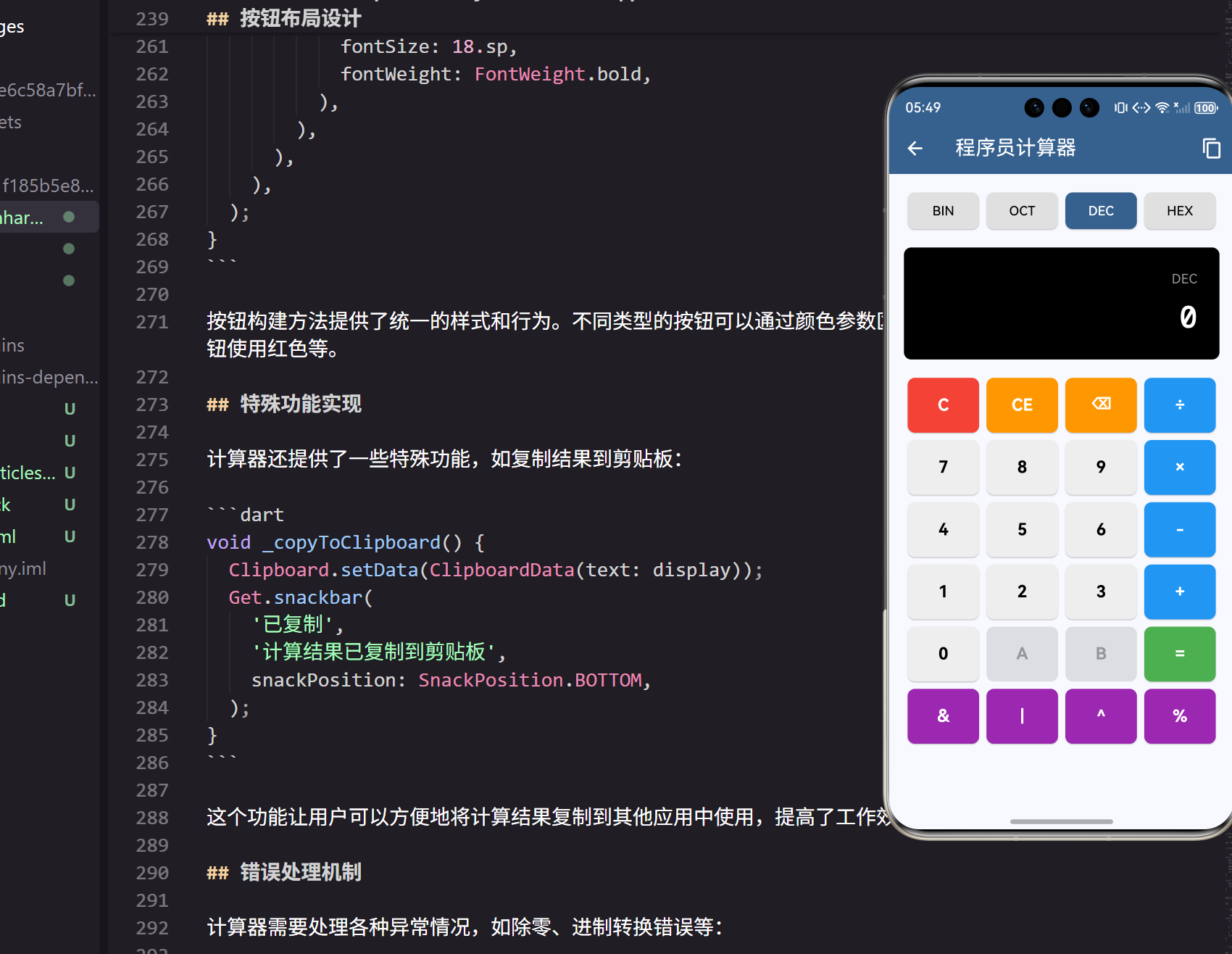
在软件开发过程中,程序员经常需要进行各种数值计算,特别是进制转换、位运算等操作。本文将详细介绍如何在Flutter for OpenHarmony应用中实现一个功能强大的程序员计算器。
功能特点
程序员计算器不同于普通计算器,它需要支持多种进制(二进制、八进制、十进制、十六进制)的数值显示和计算,同时还要支持位运算操作。
class CalculatorPage extends StatefulWidget {
_CalculatorPageState createState() => _CalculatorPageState();
}
class _CalculatorPageState extends State<CalculatorPage> {
String display = '0';
String operation = '';
double firstOperand = 0;
bool waitingForOperand = false;
int currentBase = 10; // 当前进制
这里定义了计算器的基本状态变量。display用于显示当前数值,operation记录当前操作符,firstOperand保存第一个操作数,waitingForOperand标识是否等待输入操作数,currentBase表示当前使用的进制。
进制支持配置
程序员计算器需要支持多种进制系统,我们通过映射表来管理不同进制的显示名称:
final List<int> bases = [2, 8, 10, 16];
final Map<int, String> baseNames = {
  2: 'BIN',
  8: 'OCT',
  10: 'DEC',
  16: 'HEX',
};
这种设计使得进制系统的扩展变得非常容易。bases列表定义了支持的进制类型,baseNames映射表提供了每种进制的显示名称,这样的设计既清晰又便于维护。
数值输入处理
数值输入需要考虑当前的计算状态,特别是是否正在等待新的操作数:
void _inputNumber(String number) {
  if (waitingForOperand) {
    display = number;
    waitingForOperand = false;
  } else {
    display = display == '0' ? number : display + number;
  }
  setState(() {});
}
这个方法处理数字输入逻辑。当等待操作数时,直接替换显示内容;否则,如果当前显示为’0’,则替换为输入的数字,否则追加到现有显示内容后面。这种处理方式确保了用户输入的自然性。
运算操作处理
运算操作的处理是计算器的核心逻辑,需要处理连续运算的情况:
void _inputOperation(String nextOperation) {
  double inputValue = _parseNumber(display);

  if (firstOperand == 0) {
    firstOperand = inputValue;
  } else if (operation.isNotEmpty) {
    double currentValue = firstOperand;
    double result = _calculate(currentValue, inputValue, operation);

    display = _formatNumber(result);
    firstOperand = result;
  }

  waitingForOperand = true;
  operation = nextOperation;
  setState(() {});
}
这个方法处理运算符输入。首先解析当前显示的数值,如果是第一次输入运算符,则保存当前值作为第一个操作数;如果已经有运算符,则执行之前的运算并显示结果。最后设置等待操作数状态并保存新的运算符。
计算引擎实现
计算引擎需要支持基本的算术运算和位运算:
double _calculate(double firstOperand, double secondOperand, String operation) {
  switch (operation) {
    case '+':
      return firstOperand + secondOperand;
    case '-':
      return firstOperand - secondOperand;
    case '×':
      return firstOperand * secondOperand;
    case '÷':
      return secondOperand != 0 ? firstOperand / secondOperand : 0;
    case '%':
      return firstOperand % secondOperand;
    case '&':
      return (firstOperand.toInt() & secondOperand.toInt()).toDouble();
    case '|':
      return (firstOperand.toInt() | secondOperand.toInt()).toDouble();
    case '^':
      return (firstOperand.toInt() ^ secondOperand.toInt()).toDouble();
    default:
      return secondOperand;
  }
}
计算引擎使用switch语句处理不同的运算符。对于位运算操作,需要先将浮点数转换为整数,执行位运算后再转回浮点数。除法运算特别处理了除零的情况,避免程序崩溃。
进制转换功能
进制转换是程序员计算器的重要功能,需要在不同进制间正确转换数值:
double _parseNumber(String number) {
  switch (currentBase) {
    case 2:
      return int.parse(number, radix: 2).toDouble();
    case 8:
      return int.parse(number, radix: 8).toDouble();
    case 16:
      return int.parse(number, radix: 16).toDouble();
    default:
      return double.parse(number);
  }
}

String _formatNumber(double number) {
  if (currentBase == 10) {
    return number % 1 == 0 ? number.toInt().toString() : number.toString();
  } else {
    return number.toInt().toRadixString(currentBase).toUpperCase();
  }
}
_parseNumber方法根据当前进制解析字符串为数值,_formatNumber方法将数值格式化为对应进制的字符串表示。对于十进制,还需要判断是否为整数来决定显示格式。
进制切换实现
用户可以随时切换计算器的进制模式:
void _changeBase(int base) {
  try {
    double currentValue = _parseNumber(display);
    setState(() {
      currentBase = base;
      display = _formatNumber(currentValue);
    });
  } catch (e) {
    _clear();
  }
}
进制切换时,首先解析当前显示的数值,然后更新进制设置并重新格式化显示。如果解析失败(比如在二进制模式下显示了无效字符),则清空计算器状态。
用户界面设计
计算器的界面需要清晰地显示当前进制和计算结果:
// 进制选择
Container(
  padding: EdgeInsets.all(16.w),
  child: Row(
    children: bases.map((base) {
      return Expanded(
        child: Container(
          margin: EdgeInsets.symmetric(horizontal: 4.w),
          child: ElevatedButton(
            onPressed: () => _changeBase(base),
            style: ElevatedButton.styleFrom(
              backgroundColor: currentBase == base
                ? Theme.of(context).primaryColor
                : Colors.grey[300],
              foregroundColor: currentBase == base
                ? Colors.white
                : Colors.black,
            ),
            child: Text(baseNames[base]!),
          ),
        ),
      );
    }).toList(),
  ),
),
进制选择区域使用按钮组的形式,当前选中的进制会高亮显示。这种设计让用户能够清楚地知道当前使用的进制,并且可以方便地切换。
显示屏设计
显示屏需要同时显示当前进制和计算结果:
Container(
  width: double.infinity,
  padding: EdgeInsets.all(24.w),
  margin: EdgeInsets.symmetric(horizontal: 16.w),
  decoration: BoxDecoration(
    color: Colors.black,
    borderRadius: BorderRadius.circular(8),
  ),
  child: Column(
    crossAxisAlignment: CrossAxisAlignment.end,
    children: [
      Text(
        baseNames[currentBase]!,
        style: TextStyle(
          color: Colors.grey,
          fontSize: 14.sp,
        ),
      ),
      SizedBox(height: 8.h),
      Text(
        display,
        style: TextStyle(
          color: Colors.white,
          fontSize: 32.sp,
          fontFamily: 'monospace',
          fontWeight: FontWeight.bold,
        ),
      ),
    ],
  ),
),
显示屏采用黑色背景,白色文字的经典计算器风格。顶部显示当前进制,下方显示计算结果。使用等宽字体确保数字对齐美观。
按钮布局设计
计算器按钮需要合理布局,包括数字、运算符和功能按钮:
Widget _buildButton(String text, {Color? color, VoidCallback? onPressed}) {
  return Expanded(
    child: Container(
      margin: EdgeInsets.all(4.w),
      height: 60.h,
      child: ElevatedButton(
        onPressed: onPressed,
        style: ElevatedButton.styleFrom(
          backgroundColor: color ?? Colors.grey[200],
          foregroundColor: color != null ? Colors.white : Colors.black,
          shape: RoundedRectangleBorder(
            borderRadius: BorderRadius.circular(8),
          ),
        ),
        child: Text(
          text,
          style: TextStyle(
            fontSize: 18.sp,
            fontWeight: FontWeight.bold,
          ),
        ),
      ),
    ),
  );
}
按钮构建方法提供了统一的样式和行为。不同类型的按钮可以通过颜色参数区分,比如运算符使用蓝色,清除按钮使用红色等。
特殊功能实现
计算器还提供了一些特殊功能,如复制结果到剪贴板:
void _copyToClipboard() {
  Clipboard.setData(ClipboardData(text: display));
  Get.snackbar(
    '已复制',
    '计算结果已复制到剪贴板',
    snackPosition: SnackPosition.BOTTOM,
  );
}
这个功能让用户可以方便地将计算结果复制到其他应用中使用,提高了工作效率。
错误处理机制
计算器需要处理各种异常情况,如除零、进制转换错误等:
void _performCalculation() {
  double inputValue = _parseNumber(display);

  if (firstOperand != 0 && operation.isNotEmpty) {
    double currentValue = firstOperand;
    double result = _calculate(currentValue, inputValue, operation);

    display = _formatNumber(result);
    firstOperand = 0;
    operation = '';
    waitingForOperand = true;
  }
  setState(() {});
}
计算执行时会检查操作数和运算符的有效性,确保只有在有效状态下才执行计算。计算完成后重置状态,准备下一次计算。
清除功能实现
计算器提供了两种清除功能:全部清除和清除当前输入:
void _clear() {
  display = '0';
  firstOperand = 0;
  operation = '';
  waitingForOperand = false;
  setState(() {});
}

void _clearEntry() {
  display = '0';
  setState(() {});
}
全部清除会重置所有状态,而清除当前输入只清除显示内容。这种设计符合用户的使用习惯。
退格功能
退格功能让用户可以修正输入错误:
void _backspace() {
  if (display.length > 1) {
    display = display.substring(0, display.length - 1);
  } else {
    display = '0';
  }
  setState(() {});
}
退格时如果显示内容长度大于1,则删除最后一个字符;否则重置为’0’。这确保了显示内容始终有效。
总结
通过以上实现,我们创建了一个功能完整的程序员计算器,支持多进制显示、基本算术运算、位运算等功能。这个计算器不仅满足了程序员的日常计算需求,还提供了良好的用户体验。在Flutter for OpenHarmony平台上,这样的工具应用能够很好地发挥跨平台的优势,为开发者提供便利。
欢迎加入开源鸿蒙跨平台社区:https://openharmonycrossplatform.csdn.net

开源鸿蒙跨平台开发社区汇聚开发者与厂商,共建“一次开发,多端部署”的开源生态,致力于降低跨端开发门槛,推动万物智联创新。
更多推荐
 18
18 0
0- 0


 已为社区贡献22条内容

所有评论(0)