Flutter 框架跨平台鸿蒙开发 - 校园二手书交易:简易实用的校园交易平台
简洁实用:界面简洁,功能实用,符合校园使用场景快速开发:代码结构清晰,易于理解和扩展用户友好:操作简单,学生容易上手使用功能完整:包含浏览、发布、管理等核心功能该应用为校园二手书交易提供了一个简单有效的解决方案,帮助学生节省购书成本,促进资源循环利用。欢迎加入开源鸿蒙跨平台社区:https://openharmonycrossplatform.csdn.net。
·
Flutter校园二手书交易:简易实用的校园交易平台
项目概述
校园二手书交易是一个专为大学生设计的简易交易平台,帮助学生买卖二手教材,既能节省购书成本,又能让闲置书籍发挥价值。本应用采用Flutter开发,界面简洁实用,功能完整。
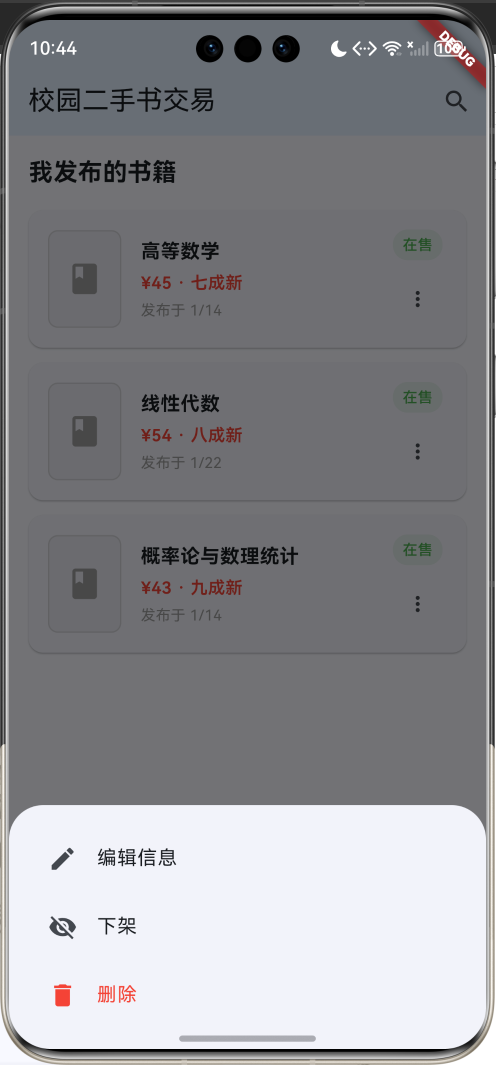
运行效果图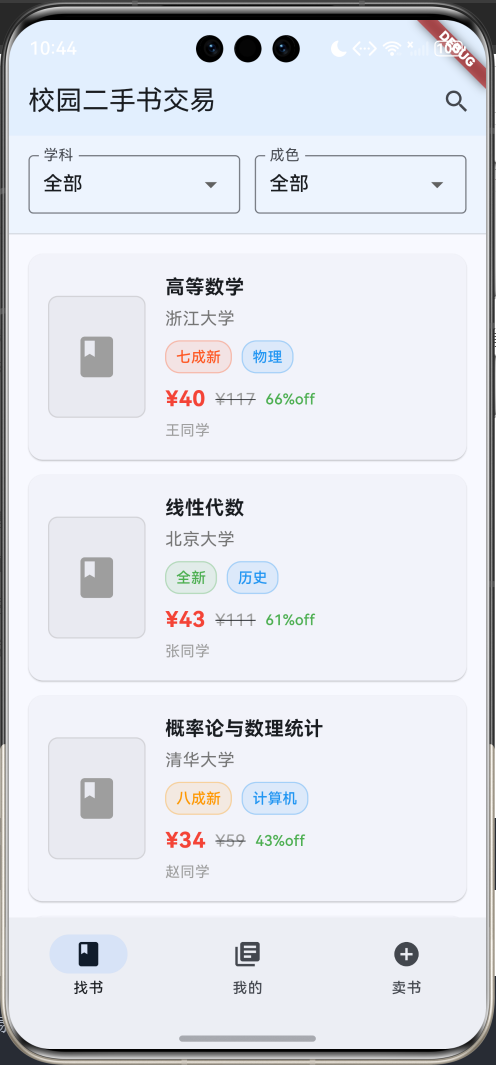
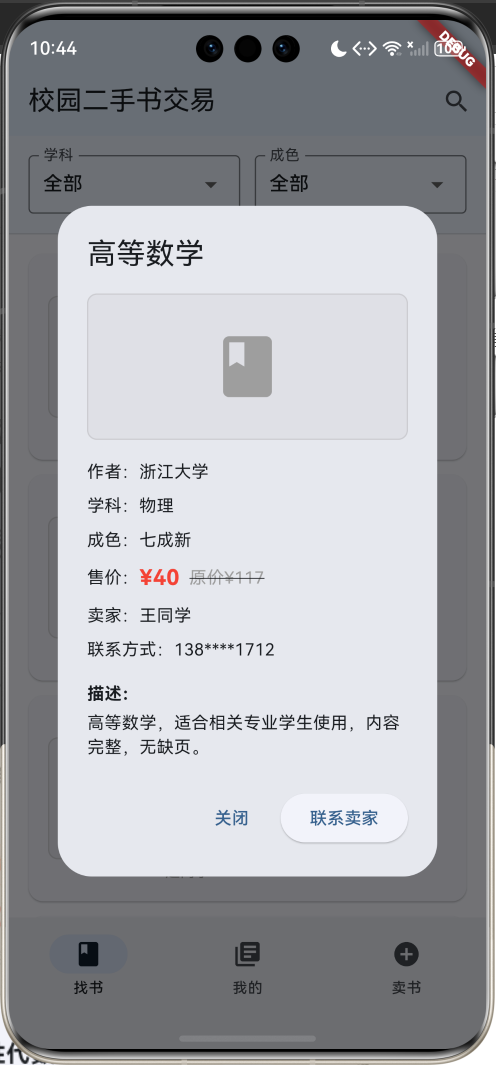
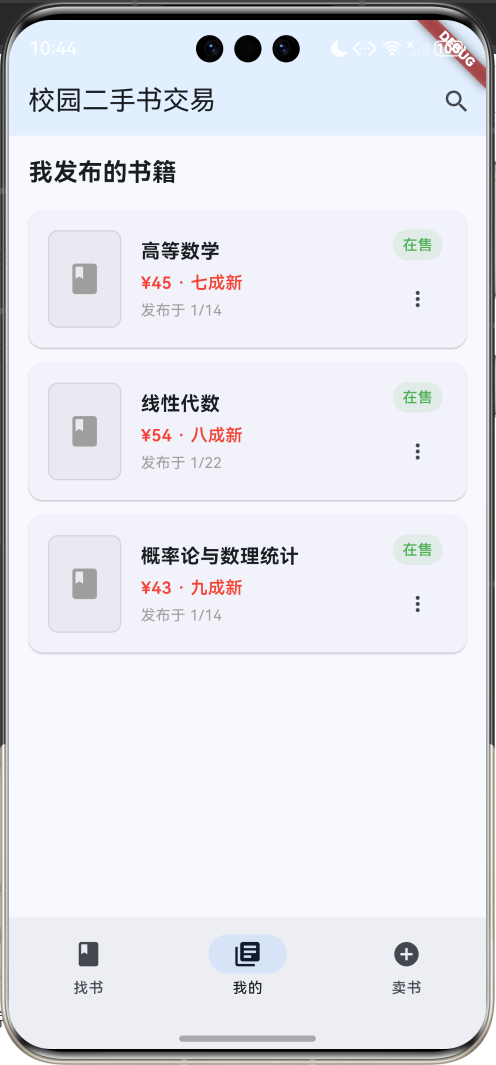
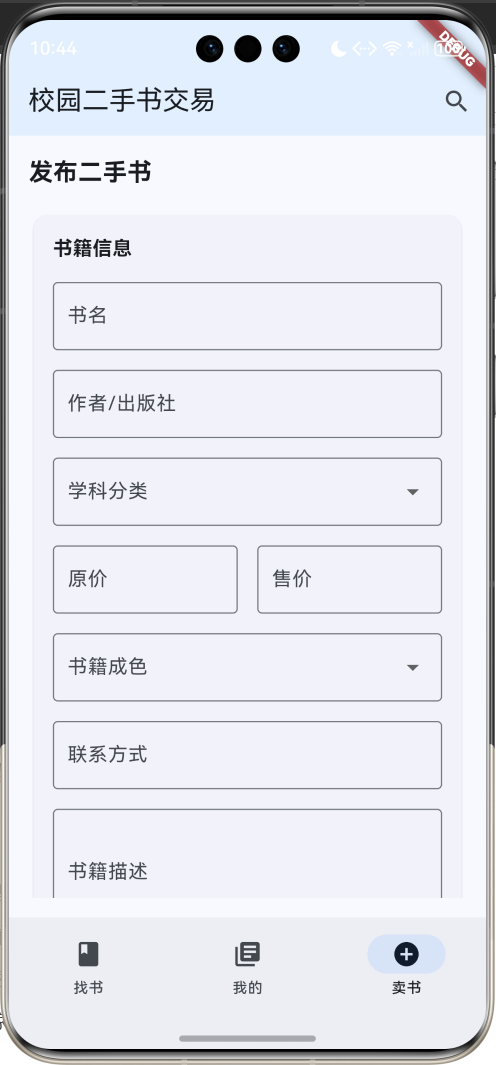
核心功能
- 书籍浏览:查看所有在售二手书,支持学科和成色筛选
- 我的书籍:管理个人发布的书籍,支持编辑和下架
- 发布书籍:简单表单快速发布二手书信息
- 联系交易:一键联系卖家进行交易
快速开始
1. 创建项目
flutter create campus_book_trading
cd campus_book_trading
2. 配置依赖
name: campus_book_trading
description: 校园二手书交易平台

dependencies:
  flutter:
    sdk: flutter
  cupertino_icons: ^1.0.2

flutter:
  uses-material-design: true
3. 运行应用
flutter pub get
flutter run
核心数据模型
Book 书籍模型
class Book {
  final String id;              // 书籍ID
  final String title;           // 书名
  final String author;          // 作者/出版社
  final String subject;         // 学科分类
  final double originalPrice;   // 原价
  final double currentPrice;    // 售价
  final String condition;       // 成色
  final String sellerName;      // 卖家姓名
  final String sellerContact;   // 联系方式
  final String description;     // 描述
  final DateTime postTime;      // 发布时间
  final bool isAvailable;       // 是否在售
  final String imageUrl;        // 图片路径

  // 计算折扣率
  double get discountRate {
    return ((originalPrice - currentPrice) / originalPrice * 100);
  }

  // 成色颜色映射
  Color get conditionColor {
    switch (condition) {
      case '全新': return Colors.green;
      case '九成新': return Colors.lightGreen;
      case '八成新': return Colors.orange;
      case '七成新': return Colors.deepOrange;
      default: return Colors.grey;
    }
  }
}
主要页面实现
1. 书籍浏览页面
Widget _buildBooksPage() {
  final filteredBooks = _books.where((book) {
    if (_selectedSubject != '全部' && book.subject != _selectedSubject) {
      return false;
    }
    if (_selectedCondition != '全部' && book.condition != _selectedCondition) {
      return false;
    }
    return book.isAvailable;
  }).toList();

  return Column(
    children: [
      _buildFilterBar(),  // 筛选栏
      Expanded(
        child: ListView.builder(
          padding: const EdgeInsets.all(16),
          itemCount: filteredBooks.length,
          itemBuilder: (context, index) {
            return _buildBookCard(filteredBooks[index]);
          },
        ),
      ),
    ],
  );
}
2. 书籍卡片设计
Widget _buildBookCard(Book book) {
  return Card(
    margin: const EdgeInsets.only(bottom: 12),
    child: InkWell(
      onTap: () => _showBookDetail(book),
      child: Padding(
        padding: const EdgeInsets.all(16),
        child: Row(
          children: [
            // 书籍图标
            Container(
              width: 80,
              height: 100,
              decoration: BoxDecoration(
                color: Colors.grey.withValues(alpha: 0.1),
                borderRadius: BorderRadius.circular(8),
              ),
              child: const Icon(Icons.book, size: 40, color: Colors.grey),
            ),
            const SizedBox(width: 16),
            // 书籍信息
            Expanded(
              child: Column(
                crossAxisAlignment: CrossAxisAlignment.start,
                children: [
                  Text(book.title, style: TextStyle(fontWeight: FontWeight.bold)),
                  Text(book.author),
                  // 标签行
                  Row(
                    children: [
                      _buildConditionTag(book),
                      _buildSubjectTag(book),
                    ],
                  ),
                  // 价格行
                  Row(
                    children: [
                      Text('¥${book.currentPrice.toStringAsFixed(0)}',
                           style: TextStyle(color: Colors.red, fontWeight: FontWeight.bold)),
                      Text('¥${book.originalPrice.toStringAsFixed(0)}',
                           style: TextStyle(decoration: TextDecoration.lineThrough)),
                      Text('${book.discountRate.toStringAsFixed(0)}%off'),
                    ],
                  ),
                  Text(book.sellerName),
                ],
              ),
            ),
          ],
        ),
      ),
    ),
  );
}
3. 发布书籍页面
Widget _buildSellForm() {
  return Card(
    child: Padding(
      padding: const EdgeInsets.all(16),
      child: Column(
        children: [
          TextFormField(
            decoration: InputDecoration(labelText: '书名', border: OutlineInputBorder()),
          ),
          TextFormField(
            decoration: InputDecoration(labelText: '作者/出版社', border: OutlineInputBorder()),
          ),
          DropdownButtonFormField<String>(
            decoration: InputDecoration(labelText: '学科分类', border: OutlineInputBorder()),
            items: _subjects.skip(1).map((subject) {
              return DropdownMenuItem(value: subject, child: Text(subject));
            }).toList(),
            onChanged: (value) {},
          ),
          Row(
            children: [
              Expanded(
                child: TextFormField(
                  decoration: InputDecoration(labelText: '原价', prefixText: '¥'),
                  keyboardType: TextInputType.number,
                ),
              ),
              Expanded(
                child: TextFormField(
                  decoration: InputDecoration(labelText: '售价', prefixText: '¥'),
                  keyboardType: TextInputType.number,
                ),
              ),
            ],
          ),
          DropdownButtonFormField<String>(
            decoration: InputDecoration(labelText: '书籍成色', border: OutlineInputBorder()),
            items: _conditions.skip(1).map((condition) {
              return DropdownMenuItem(value: condition, child: Text(condition));
            }).toList(),
            onChanged: (value) {},
          ),
          TextFormField(
            decoration: InputDecoration(labelText: '联系方式', border: OutlineInputBorder()),
          ),
          TextFormField(
            decoration: InputDecoration(labelText: '书籍描述', border: OutlineInputBorder()),
            maxLines: 3,
          ),
          SizedBox(
            width: double.infinity,
            child: ElevatedButton(
              onPressed: () {
                ScaffoldMessenger.of(context).showSnackBar(
                  SnackBar(content: Text('发布成功!')),
                );
              },
              child: Text('发布书籍'),
            ),
          ),
        ],
      ),
    ),
  );
}
核心功能实现
1. 数据生成
void _generateBooks() {
  final bookTitles = [
    '高等数学', '线性代数', '概率论与数理统计', '大学英语', '计算机网络',
    '数据结构与算法', '操作系统', '数据库原理', '软件工程', '微观经济学'
  ];

  final authors = ['同济大学', '清华大学', '北京大学', '复旦大学', '上海交通大学'];
  final subjects = ['计算机', '数学', '英语', '物理', '化学', '经济学', '管理学'];
  final conditions = ['全新', '九成新', '八成新', '七成新'];

  final random = Random();

  for (int i = 0; i < bookTitles.length; i++) {
    final originalPrice = 30.0 + random.nextDouble() * 100;
    final currentPrice = originalPrice * (0.3 + random.nextDouble() * 0.5);

    _books.add(Book(
      id: 'book_$i',
      title: bookTitles[i],
      author: authors[random.nextInt(authors.length)],
      subject: subjects[random.nextInt(subjects.length)],
      originalPrice: originalPrice,
      currentPrice: currentPrice,
      condition: conditions[random.nextInt(conditions.length)],
      sellerName: '${['张', '李', '王', '刘'][random.nextInt(4)]}同学',
      sellerContact: '138****${1000 + random.nextInt(9000)}',
      description: '${bookTitles[i]},适合相关专业学生使用,内容完整,无缺页。',
      postTime: DateTime.now().subtract(Duration(days: random.nextInt(30))),
      isAvailable: true,
      imageUrl: 'book_${i + 1}.jpg',
    ));
  }
}
2. 筛选功能
Widget _buildFilterBar() {
  return Container(
    padding: const EdgeInsets.all(16),
    child: Row(
      children: [
        Expanded(
          child: DropdownButtonFormField<String>(
            value: _selectedSubject,
            decoration: InputDecoration(labelText: '学科', border: OutlineInputBorder()),
            items: _subjects.map((subject) {
              return DropdownMenuItem(value: subject, child: Text(subject));
            }).toList(),
            onChanged: (value) => setState(() => _selectedSubject = value!),
          ),
        ),
        const SizedBox(width: 12),
        Expanded(
          child: DropdownButtonFormField<String>(
            value: _selectedCondition,
            decoration: InputDecoration(labelText: '成色', border: OutlineInputBorder()),
            items: _conditions.map((condition) {
              return DropdownMenuItem(value: condition, child: Text(condition));
            }).toList(),
            onChanged: (value) => setState(() => _selectedCondition = value!),
          ),
        ),
      ],
    ),
  );
}
3. 书籍详情对话框
void _showBookDetail(Book book) {
  showDialog(
    context: context,
    builder: (context) => AlertDialog(
      title: Text(book.title),
      content: SingleChildScrollView(
        child: Column(
          crossAxisAlignment: CrossAxisAlignment.start,
          mainAxisSize: MainAxisSize.min,
          children: [
            Container(
              width: double.infinity,
              height: 120,
              decoration: BoxDecoration(
                color: Colors.grey.withValues(alpha: 0.1),
                borderRadius: BorderRadius.circular(8),
              ),
              child: Icon(Icons.book, size: 60, color: Colors.grey),
            ),
            const SizedBox(height: 16),
            Text('作者:${book.author}'),
            Text('学科:${book.subject}'),
            Text('成色:${book.condition}'),
            Row(
              children: [
                Text('售价:'),
                Text('¥${book.currentPrice.toStringAsFixed(0)}',
                     style: TextStyle(fontSize: 18, fontWeight: FontWeight.bold, color: Colors.red)),
                Text(' 原价¥${book.originalPrice.toStringAsFixed(0)}',
                     style: TextStyle(decoration: TextDecoration.lineThrough)),
              ],
            ),
            Text('卖家:${book.sellerName}'),
            Text('联系方式:${book.sellerContact}'),
            const SizedBox(height: 16),
            Text('描述:', style: TextStyle(fontWeight: FontWeight.bold)),
            Text(book.description),
          ],
        ),
      ),
      actions: [
        TextButton(
          onPressed: () => Navigator.pop(context),
          child: Text('关闭'),
        ),
        ElevatedButton(
          onPressed: () {
            Navigator.pop(context);
            ScaffoldMessenger.of(context).showSnackBar(
              SnackBar(content: Text('已联系卖家:${book.sellerContact}')),
            );
          },
          child: Text('联系卖家'),
        ),
      ],
    ),
  );
}
应用特色
1. 简洁界面
- 采用Material Design 3设计规范
- 蓝色主题色,符合学术氛围
- 卡片式布局,信息层次清晰
2. 实用功能
- 学科分类筛选,快速找到需要的书籍
- 成色标识,了解书籍实际状况
- 价格对比,显示原价和售价的折扣
- 一键联系,方便买卖双方沟通
3. 用户体验
- 三个主要标签页:找书、我的、卖书
- 直观的书籍卡片展示
- 简单的发布流程
- 便捷的管理功能
扩展功能建议
1. 图片上传
// 添加图片选择功能
Future<void> _pickImage() async {
  // 使用image_picker插件选择图片
  final picker = ImagePicker();
  final image = await picker.pickImage(source: ImageSource.camera);
  // 处理图片上传逻辑
}
2. 消息系统
class Message {
  final String id;
  final String senderId;
  final String receiverId;
  final String content;
  final DateTime sendTime;
  final bool isRead;
}
3. 收藏功能
class FavoriteService {
  static final List<String> _favoriteIds = [];

  static void toggleFavorite(String bookId) {
    if (_favoriteIds.contains(bookId)) {
      _favoriteIds.remove(bookId);
    } else {
      _favoriteIds.add(bookId);
    }
  }
}
4. 搜索功能
List<Book> searchBooks(String keyword) {
  return _books.where((book) {
    return book.title.toLowerCase().contains(keyword.toLowerCase()) ||
           book.author.toLowerCase().contains(keyword.toLowerCase());
  }).toList();
}
部署说明
Android部署
flutter build apk --release
iOS部署
flutter build ios --release
总结
这个校园二手书交易应用具有以下优势:
- 简洁实用:界面简洁,功能实用,符合校园使用场景
- 快速开发:代码结构清晰,易于理解和扩展
- 用户友好:操作简单,学生容易上手使用
- 功能完整:包含浏览、发布、管理等核心功能
该应用为校园二手书交易提供了一个简单有效的解决方案,帮助学生节省购书成本,促进资源循环利用。
欢迎加入开源鸿蒙跨平台社区:https://openharmonycrossplatform.csdn.net

开源鸿蒙跨平台开发社区汇聚开发者与厂商,共建“一次开发,多端部署”的开源生态,致力于降低跨端开发门槛,推动万物智联创新。
更多推荐
 12
12 0
0- 0


 已为社区贡献30条内容

所有评论(0)