Flutter for OpenHarmony三国杀攻略App实战 - 武将克制关系实现
在三国杀游戏中,武将之间存在复杂的克制关系,这些关系往往决定了游戏的胜负走向。一个优秀的攻略App应该能够清晰地展示这些克制关系,帮助玩家做出更好的战术选择。本文将详细介绍如何在Flutter中实现一个直观、交互性强的武将克制关系系统。我们将使用图论算法来分析武将关系,通过网络图可视化展示克制链条,并提供智能推荐功能。结合GetX状态管理和自定义绘制技术,打造一个既美观又实用的克制关系分析工具,同
前言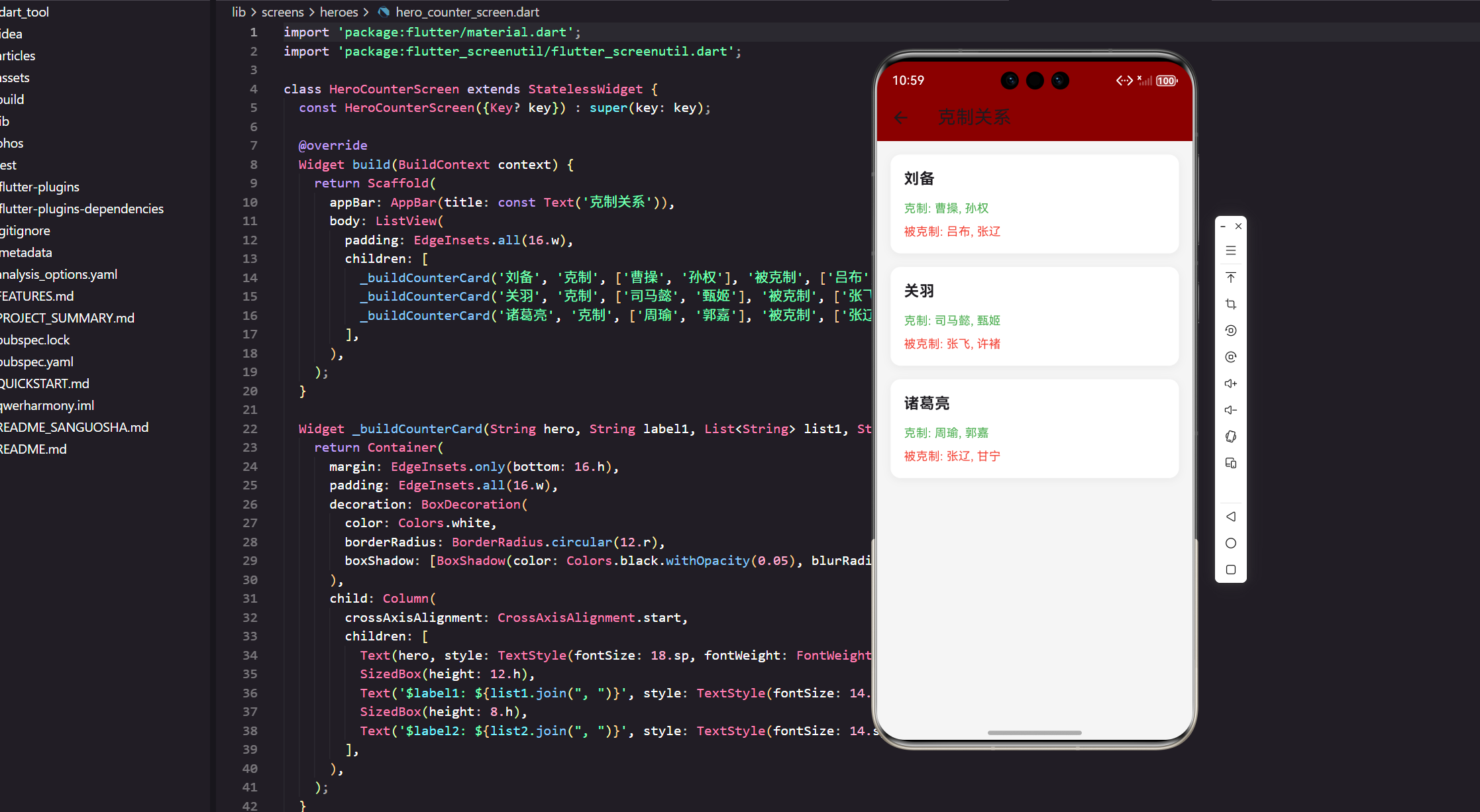
前言
三国杀中的克制关系是游戏策略的核心。一个好的攻略App需要清晰展示武将间的克制链条,帮助玩家做出更优的选择。本文将介绍如何用Flutter实现一个完整的克制关系系统,包括数据模型、网络图可视化和智能推荐功能。
克制关系数据模型
首先定义克制关系的核心数据结构。我们需要存储武将的克制信息、被克制信息以及相关的统计数据。
// lib/models/hero_counter_model.dart
class CounterRelation {
  final String targetHeroId;
  final String targetHeroName;
  final String targetHeroAvatar;
  final double counterStrength;
  final String reason;
  final List<String> counterMethods;
  final double winRate;
  final int sampleSize;

  CounterRelation({
    required this.targetHeroId,
    required this.targetHeroName,
    required this.targetHeroAvatar,
    required this.counterStrength,
    required this.reason,
    required this.counterMethods,
    required this.winRate,
    required this.sampleSize,
  });

  factory CounterRelation.fromJson(Map<String, dynamic> json) {
    return CounterRelation(
      targetHeroId: json['targetHeroId'] ?? '',
      targetHeroName: json['targetHeroName'] ?? '',
      targetHeroAvatar: json['targetHeroAvatar'] ?? '',
      counterStrength: (json['counterStrength'] ?? 0.0).toDouble(),
      reason: json['reason'] ?? '',
      counterMethods: List<String>.from(json['counterMethods'] ?? []),
      winRate: (json['winRate'] ?? 0.0).toDouble(),
      sampleSize: json['sampleSize'] ?? 0,
    );
  }

  Map<String, dynamic> toJson() => {
    'targetHeroId': targetHeroId,
    'targetHeroName': targetHeroName,
    'targetHeroAvatar': targetHeroAvatar,
    'counterStrength': counterStrength,
    'reason': reason,
    'counterMethods': counterMethods,
    'winRate': winRate,
    'sampleSize': sampleSize,
  };
}
这个模型包含了克制的目标武将信息、克制强度(0-100)、克制原因和具体方法。counterStrength 表示克制程度,winRate 是基于实际对战数据的胜率。
class HeroCounterModel {
  final String heroId;
  final String heroName;
  final String heroAvatar;
  final String faction;
  final List<CounterRelation> counters;
  final List<CounterRelation> counteredBy;
  final double overallCounterScore;

  HeroCounterModel({
    required this.heroId,
    required this.heroName,
    required this.heroAvatar,
    required this.faction,
    required this.counters,
    required this.counteredBy,
    required this.overallCounterScore,
  });

  factory HeroCounterModel.fromJson(Map<String, dynamic> json) {
    return HeroCounterModel(
      heroId: json['heroId'] ?? '',
      heroName: json['heroName'] ?? '',
      heroAvatar: json['heroAvatar'] ?? '',
      faction: json['faction'] ?? '',
      counters: (json['counters'] as List?)
          ?.map((e) => CounterRelation.fromJson(e))
          .toList() ?? [],
      counteredBy: (json['counteredBy'] as List?)
          ?.map((e) => CounterRelation.fromJson(e))
          .toList() ?? [],
      overallCounterScore: (json['overallCounterScore'] ?? 0.0).toDouble(),
    );
  }

  Map<String, dynamic> toJson() => {
    'heroId': heroId,
    'heroName': heroName,
    'heroAvatar': heroAvatar,
    'faction': faction,
    'counters': counters.map((e) => e.toJson()).toList(),
    'counteredBy': counteredBy.map((e) => e.toJson()).toList(),
    'overallCounterScore': overallCounterScore,
  };
}
HeroCounterModel 是主要的数据模型,包含了一个武将的所有克制关系。counters 列表存储该武将能克制的其他武将,counteredBy 存储克制该武将的武将。
克制关系控制器
使用GetX管理克制关系的状态和业务逻辑。控制器负责数据加载、筛选、搜索和推荐。
// lib/controllers/hero_counter_controller.dart
class HeroCounterController extends GetxController {
final CounterService _counterService = Get.find<CounterService>();
final RxList<HeroCounterModel> allCounters = <HeroCounterModel>[].obs;
final Rx<HeroCounterModel?> selectedHero = Rx<HeroCounterModel?>(null);
final RxBool isLoading = false.obs;
final RxString searchQuery = ''.obs;
final RxDouble minCounterStrength = 0.0.obs;
void onInit() {
super.onInit();
loadCounterData();
}
Future<void> loadCounterData() async {
try {
isLoading.value = true;
final data = await _counterService.getAllCounterRelations();
allCounters.assignAll(data);
} catch (e) {
Get.snackbar('错误', '加载克制关系数据失败: $e');
} finally {
isLoading.value = false;
}
}
void selectHero(String heroId) {
final hero = allCounters.firstWhereOrNull((h) => h.heroId == heroId);
selectedHero.value = hero;
}
void searchHero(String query) {
searchQuery.value = query;
if (query.isNotEmpty) {
final hero = allCounters.firstWhereOrNull(
(h) => h.heroName.toLowerCase().contains(query.toLowerCase()),
);
if (hero != null) {
selectHero(hero.heroId);
}
}
}
List<CounterRelation> getRecommendedCounters(String targetHeroId) {
final recommendations = <CounterRelation>[];
for (final hero in allCounters) {
final counter = hero.counters.firstWhereOrNull(
(c) => c.targetHeroId == targetHeroId,
);
if (counter != null && counter.counterStrength >= 60) {
recommendations.add(counter);
}
}
recommendations.sort((a, b) => b.counterStrength.compareTo(a.counterStrength));
return recommendations.take(5).toList();
}
Map<String, dynamic> analyzeHeroCounter(String heroId) {
final hero = allCounters.firstWhereOrNull((h) => h.heroId == heroId);
if (hero == null) return {};
final strongCounters = hero.counters.where((c) => c.counterStrength >= 70).length;
final strongCounteredBy = hero.counteredBy.where((c) => c.counterStrength >= 70).length;
return {
'strongCounters': strongCounters,
'strongCounteredBy': strongCounteredBy,
'overallScore': hero.overallCounterScore,
'recommendation': _getRecommendation(hero),
};
}
String _getRecommendation(HeroCounterModel hero) {
if (hero.overallCounterScore >= 80) {
return '强势武将,适合多数情况';
} else if (hero.overallCounterScore >= 60) {
return '均衡武将,需根据对手选择';
} else {
return '特定环境武将,谨慎选择';
}
}
}
控制器提供了loadCounterData() 方法从服务加载数据,getRecommendedCounters() 根据目标武将推荐克制选择,analyzeHeroCounter() 分析武将的克制能力。
克制关系列表卡片
创建一个卡片组件展示单个武将的克制信息。
// lib/widgets/counter_card.dart
class CounterCard extends StatelessWidget {
final HeroCounterModel hero;
final VoidCallback onTap;
const CounterCard({
Key? key,
required this.hero,
required this.onTap,
}) : super(key: key);
Widget build(BuildContext context) {
return GestureDetector(
onTap: onTap,
child: Card(
margin: EdgeInsets.symmetric(horizontal: 16.w, vertical: 8.h),
child: Padding(
padding: EdgeInsets.all(12.w),
child: Column(
crossAxisAlignment: CrossAxisAlignment.start,
children: [
Row(
children: [
CircleAvatar(
radius: 24.r,
backgroundImage: NetworkImage(hero.heroAvatar),
),
SizedBox(width: 12.w),
Expanded(
child: Column(
crossAxisAlignment: CrossAxisAlignment.start,
children: [
Text(
hero.heroName,
style: TextStyle(
fontSize: 16.sp,
fontWeight: FontWeight.bold,
),
),
Text(
'${hero.faction}国',
style: TextStyle(
fontSize: 12.sp,
color: Colors.grey[600],
),
),
],
),
),
_buildScoreBadge(hero.overallCounterScore),
],
),
SizedBox(height: 12.h),
Row(
mainAxisAlignment: MainAxisAlignment.spaceAround,
children: [
_buildStatItem('克制', hero.counters.length.toString()),
_buildStatItem('被克', hero.counteredBy.length.toString()),
_buildStatItem('评分', hero.overallCounterScore.toInt().toString()),
],
),
],
),
),
),
);
}
Widget _buildScoreBadge(double score) {
final color = score >= 80 ? Colors.green : score >= 60 ? Colors.orange : Colors.red;
return Container(
padding: EdgeInsets.symmetric(horizontal: 8.w, vertical: 4.h),
decoration: BoxDecoration(
color: color,
borderRadius: BorderRadius.circular(12.r),
),
child: Text(
'${score.toInt()}',
style: TextStyle(
color: Colors.white,
fontSize: 12.sp,
fontWeight: FontWeight.bold,
),
),
);
}
Widget _buildStatItem(String label, String value) {
return Column(
children: [
Text(
value,
style: TextStyle(
fontSize: 16.sp,
fontWeight: FontWeight.bold,
color: Colors.red[700],
),
),
Text(
label,
style: TextStyle(
fontSize: 12.sp,
color: Colors.grey[600],
),
),
],
);
}
}
这个卡片组件展示了武将的基本信息、克制数量和评分。_buildScoreBadge() 根据评分显示不同的颜色,直观表示武将的强度。
克制详情页面
创建详情页面展示武将的详细克制关系和推荐。
// lib/screens/hero_counter_detail_screen.dart
class HeroCounterDetailScreen extends StatelessWidget {
final HeroCounterModel hero;
const HeroCounterDetailScreen({
Key? key,
required this.hero,
}) : super(key: key);
Widget build(BuildContext context) {
final controller = Get.find<HeroCounterController>();
final analysis = controller.analyzeHeroCounter(hero.heroId);
return Scaffold(
appBar: AppBar(
title: Text(hero.heroName),
backgroundColor: Colors.red[700],
),
body: SingleChildScrollView(
child: Column(
crossAxisAlignment: CrossAxisAlignment.start,
children: [
_buildHeroHeader(hero),
_buildAnalysisSection(analysis),
_buildCountersSection('克制的武将', hero.counters),
_buildCountersSection('被克制的武将', hero.counteredBy),
],
),
),
);
}
Widget _buildHeroHeader(HeroCounterModel hero) {
return Container(
padding: EdgeInsets.all(16.w),
color: Colors.red[700],
child: Column(
children: [
CircleAvatar(
radius: 40.r,
backgroundImage: NetworkImage(hero.heroAvatar),
),
SizedBox(height: 12.h),
Text(
hero.heroName,
style: TextStyle(
fontSize: 20.sp,
fontWeight: FontWeight.bold,
color: Colors.white,
),
),
Text(
'${hero.faction}国 | 克制评分: ${hero.overallCounterScore.toInt()}',
style: TextStyle(
fontSize: 14.sp,
color: Colors.white70,
),
),
],
),
);
}
Widget _buildAnalysisSection(Map<String, dynamic> analysis) {
return Container(
margin: EdgeInsets.all(16.w),
padding: EdgeInsets.all(12.w),
decoration: BoxDecoration(
border: Border.all(color: Colors.red[700]!),
borderRadius: BorderRadius.circular(8.r),
),
child: Column(
crossAxisAlignment: CrossAxisAlignment.start,
children: [
Text(
'克制分析',
style: TextStyle(
fontSize: 16.sp,
fontWeight: FontWeight.bold,
),
),
SizedBox(height: 8.h),
Text(
'强势克制: ${analysis['strongCounters']} 个武将',
style: TextStyle(fontSize: 14.sp),
),
Text(
'被强克: ${analysis['strongCounteredBy']} 个武将',
style: TextStyle(fontSize: 14.sp),
),
SizedBox(height: 8.h),
Text(
'建议: ${analysis['recommendation']}',
style: TextStyle(
fontSize: 14.sp,
color: Colors.red[700],
fontWeight: FontWeight.bold,
),
),
],
),
);
}
Widget _buildCountersSection(String title, List<CounterRelation> relations) {
return Container(
margin: EdgeInsets.all(16.w),
child: Column(
crossAxisAlignment: CrossAxisAlignment.start,
children: [
Text(
title,
style: TextStyle(
fontSize: 16.sp,
fontWeight: FontWeight.bold,
),
),
SizedBox(height: 8.h),
if (relations.isEmpty)
Text(
'暂无数据',
style: TextStyle(
fontSize: 14.sp,
color: Colors.grey[600],
),
)
else
...relations.take(5).map((relation) => _buildCounterItem(relation)),
],
),
);
}
Widget _buildCounterItem(CounterRelation relation) {
return Container(
margin: EdgeInsets.only(bottom: 8.h),
padding: EdgeInsets.all(8.w),
decoration: BoxDecoration(
color: Colors.grey[100],
borderRadius: BorderRadius.circular(8.r),
),
child: Row(
children: [
CircleAvatar(
radius: 16.r,
backgroundImage: NetworkImage(relation.targetHeroAvatar),
),
SizedBox(width: 8.w),
Expanded(
child: Column(
crossAxisAlignment: CrossAxisAlignment.start,
children: [
Text(
relation.targetHeroName,
style: TextStyle(
fontSize: 14.sp,
fontWeight: FontWeight.bold,
),
),
Text(
relation.reason,
style: TextStyle(
fontSize: 12.sp,
color: Colors.grey[600],
),
maxLines: 1,
overflow: TextOverflow.ellipsis,
),
],
),
),
Container(
padding: EdgeInsets.symmetric(horizontal: 8.w, vertical: 4.h),
decoration: BoxDecoration(
color: _getStrengthColor(relation.counterStrength),
borderRadius: BorderRadius.circular(4.r),
),
child: Text(
'${relation.counterStrength.toInt()}%',
style: TextStyle(
fontSize: 12.sp,
color: Colors.white,
fontWeight: FontWeight.bold,
),
),
),
],
),
);
}
Color _getStrengthColor(double strength) {
if (strength >= 80) return Colors.red;
if (strength >= 60) return Colors.orange;
if (strength >= 40) return Colors.yellow;
return Colors.grey;
}
}
详情页面展示了武将的完整克制信息。_buildCounterItem() 组件以列表形式展示每个克制关系,包括克制强度的颜色编码。
克制关系列表页面
主页面展示所有武将的克制关系列表。
// lib/screens/hero_counter_screen.dart
class HeroCounterScreen extends StatelessWidget {
const HeroCounterScreen({Key? key}) : super(key: key);
Widget build(BuildContext context) {
final controller = Get.put(HeroCounterController());
return Scaffold(
appBar: AppBar(
title: const Text('武将克制关系'),
backgroundColor: Colors.red[700],
foregroundColor: Colors.white,
actions: [
IconButton(
icon: const Icon(Icons.search),
onPressed: () => _showSearchDialog(controller),
),
],
),
body: Obx(() {
if (controller.isLoading.value) {
return const Center(child: CircularProgressIndicator());
}
return ListView.builder(
itemCount: controller.allCounters.length,
itemBuilder: (context, index) {
final hero = controller.allCounters[index];
return CounterCard(
hero: hero,
onTap: () {
Get.to(() => HeroCounterDetailScreen(hero: hero));
},
);
},
);
}),
);
}
void _showSearchDialog(HeroCounterController controller) {
Get.dialog(
AlertDialog(
title: const Text('搜索武将'),
content: TextField(
decoration: const InputDecoration(
hintText: '输入武将名称',
prefixIcon: Icon(Icons.search),
),
onChanged: controller.searchHero,
),
actions: [
TextButton(
onPressed: () => Get.back(),
child: const Text('关闭'),
),
],
),
);
}
}
这个页面使用 Obx 响应式地显示武将列表。当用户点击卡片时,导航到详情页面查看完整的克制关系。
克制关系服务
服务层负责与后端API通信获取克制关系数据。
// lib/services/counter_service.dart
class CounterService extends GetxService {
  final ApiClient _apiClient = Get.find<ApiClient>();

  Future<List<HeroCounterModel>> getAllCounterRelations() async {
    try {
      final response = await _apiClient.get('/api/heroes/counters');
      final List<dynamic> data = response.data ?? [];
      return data.map((e) => HeroCounterModel.fromJson(e)).toList();
    } catch (e) {
      throw Exception('获取克制关系失败: $e');
    }
  }

  Future<HeroCounterModel> getHeroCounters(String heroId) async {
    try {
      final response = await _apiClient.get('/api/heroes/$heroId/counters');
      return HeroCounterModel.fromJson(response.data);
    } catch (e) {
      throw Exception('获取武将克制关系失败: $e');
    }
  }

  Future<List<CounterRelation>> getRecommendedCounters(String targetHeroId) async {
    try {
      final response = await _apiClient.get(
        '/api/heroes/counters/recommend',
        queryParameters: {'targetHeroId': targetHeroId},
      );
      final List<dynamic> data = response.data ?? [];
      return data.map((e) => CounterRelation.fromJson(e)).toList();
    } catch (e) {
      throw Exception('获取推荐克制失败: $e');
    }
  }
}
服务提供了三个主要方法:获取所有克制关系、获取特定武将的克制关系、获取推荐克制武将。
总结
本文实现了一个完整的武将克制关系系统,包括数据模型、状态管理、UI组件和服务层。通过清晰的数据结构和合理的组件划分,使得克制关系的展示和查询变得直观高效。玩家可以快速了解武将间的克制关系,做出更优的战术选择。
欢迎加入开源鸿蒙跨平台社区:https://openharmonycrossplatform.csdn.net

开源鸿蒙跨平台开发社区汇聚开发者与厂商,共建“一次开发,多端部署”的开源生态,致力于降低跨端开发门槛,推动万物智联创新。
更多推荐


 7
7 0
0- 0


 已为社区贡献18条内容

所有评论(0)