Flutter 框架跨平台鸿蒙开发 - 宠物品种查询:智能拍照识别养护助手
Flutter宠物品种查询:智能拍照识别养护助手
项目简介
宠物品种查询是一款专为宠物爱好者打造的Flutter智能应用,提供拍照识别宠物品种、详细品种信息和专业养护知识功能。通过模拟AI识别技术和丰富的宠物数据库,帮助用户快速了解宠物品种特征,掌握科学的养护方法。
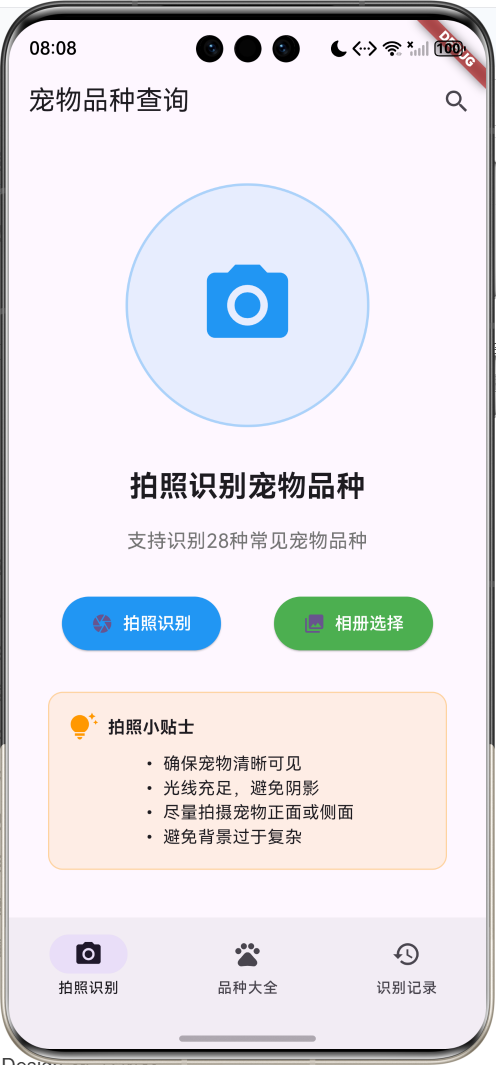
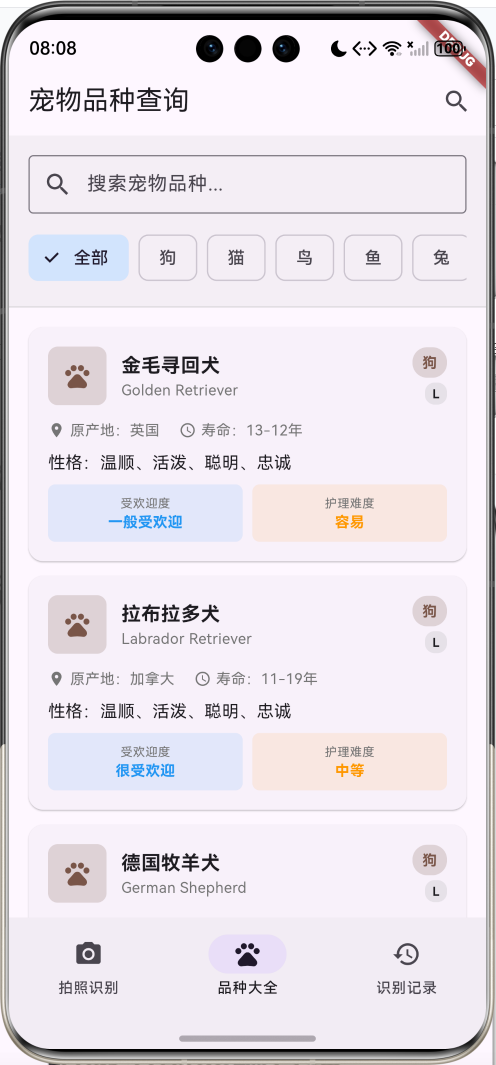
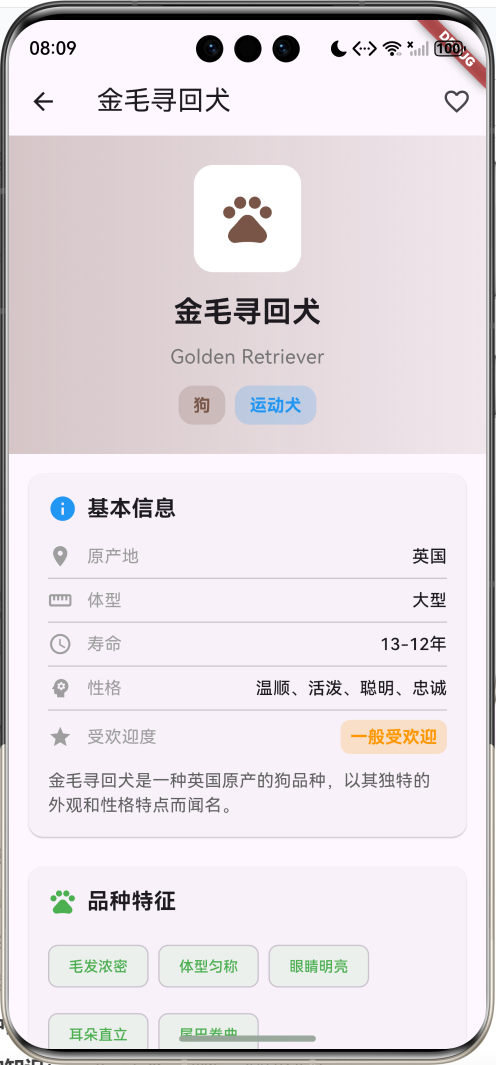
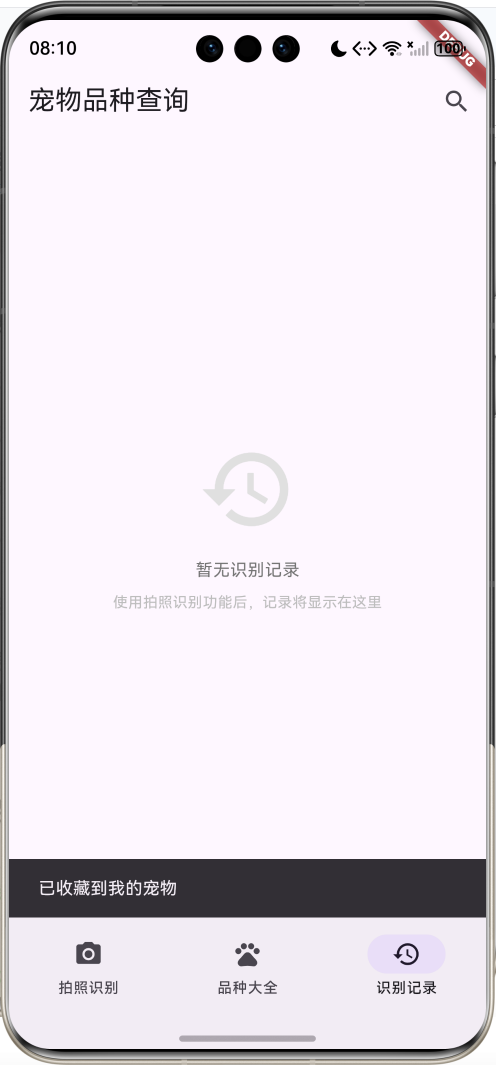
运行效果图
核心功能
- 28种宠物品种:涵盖狗、猫、鸟、鱼、兔、仓鼠等6大类别
- 拍照识别功能:模拟AI识别,支持拍照和相册选择
- 品种大全浏览:完整的宠物品种信息库
- 智能搜索筛选:按类别、名称、原产地搜索
- 详细品种信息:包含基本信息、特征、养护指南
- 专业养护知识:运动、美容、训练、健康建议
- 识别历史记录:保存识别结果,方便回顾
- 收藏功能:收藏喜爱的宠物品种
- 护理难度评估:智能评估养护难度等级
- 健康提醒:常见疾病预防和健康建议
技术特点
- Material Design 3设计风格
- NavigationBar底部导航
- 三页面架构(拍照识别、品种大全、识别记录)
- 类别色彩系统
- 计算属性优化
- 搜索和筛选功能
- 卡片式布局设计
- 模拟AI识别算法
- 模态底部表单
- 无需额外依赖包
核心代码实现
1. 宠物数据模型
class Pet {
  final String id;
  final String name;
  final String englishName;
  final String category;
  final String origin;
  final String size;
  final String lifespan;
  final String temperament;
  final List<String> characteristics;
  final String description;
  final PetCareInfo careInfo;
  final String imageUrl;
  final double popularity;
  final List<String> colors;
  final String breedGroup;

  Pet({
    required this.id,
    required this.name,
    required this.englishName,
    required this.category,
    required this.origin,
    required this.size,
    required this.lifespan,
    required this.temperament,
    required this.characteristics,
    required this.description,
    required this.careInfo,
    required this.imageUrl,
    required this.popularity,
    required this.colors,
    required this.breedGroup,
  });

  // 计算属性:类别颜色
  Color get categoryColor {
    switch (category) {
      case '狗': return Colors.brown;
      case '猫': return Colors.orange;
      case '鸟': return Colors.blue;
      case '鱼': return Colors.cyan;
      case '兔': return Colors.pink;
      case '仓鼠': return Colors.grey;
      default: return Colors.purple;
    }
  }

  // 计算属性:类别图标
  IconData get categoryIcon {
    switch (category) {
      case '狗': case '猫': return Icons.pets;
      case '鸟': return Icons.flutter_dash;
      case '鱼': return Icons.water;
      case '兔': return Icons.cruelty_free;
      case '仓鼠': return Icons.circle;
      default: return Icons.pets;
    }
  }

  // 计算属性:体型等级
  String get sizeLevel {
    switch (size) {
      case '小型': return 'S';
      case '中型': return 'M';
      case '大型': return 'L';
      case '超大型': return 'XL';
      default: return 'M';
    }
  }

  // 计算属性:受欢迎程度文本
  String get popularityText {
    if (popularity >= 9.0) return '极受欢迎';
    if (popularity >= 8.0) return '很受欢迎';
    if (popularity >= 7.0) return '较受欢迎';
    if (popularity >= 6.0) return '一般受欢迎';
    return '小众品种';
  }

  // 计算属性:护理难度
  String get careDifficulty {
    final score = (careInfo.exerciseLevel + careInfo.groomingLevel + careInfo.trainingLevel) / 3;
    if (score >= 4.0) return '困难';
    if (score >= 3.0) return '中等';
    if (score >= 2.0) return '容易';
    return '很容易';
  }
}
模型字段说明:
| 字段 | 类型 | 说明 |
|---|---|---|
| id | String | 唯一标识符 |
| name | String | 中文名称 |
| englishName | String | 英文名称 |
| category | String | 宠物类别 |
| origin | String | 原产地 |
| size | String | 体型大小 |
| lifespan | String | 预期寿命 |
| temperament | String | 性格特点 |
| characteristics | List | 品种特征 |
| description | String | 品种描述 |
| careInfo | PetCareInfo | 养护信息 |
| imageUrl | String | 图片地址 |
| popularity | double | 受欢迎程度 |
| colors | List | 常见颜色 |
| breedGroup | String | 品种分组 |
计算属性:
categoryColor:根据类别返回对应颜色categoryIcon:根据类别返回对应图标sizeLevel:体型等级简写popularityText:受欢迎程度文本careDifficulty:护理难度评估
类别色彩系统:
| 类别 | 颜色 | 图标 | 说明 |
|---|---|---|---|
| 狗 | 棕色 | pets | 犬类宠物 |
| 猫 | 橙色 | pets | 猫科宠物 |
| 鸟 | 蓝色 | flutter_dash | 鸟类宠物 |
| 鱼 | 青色 | water | 观赏鱼类 |
| 兔 | 粉色 | cruelty_free | 兔类宠物 |
| 仓鼠 | 灰色 | circle | 小型啮齿动物 |
2. 养护信息模型
class PetCareInfo {
  final int exerciseLevel;      // 运动需求 1-5
  final int groomingLevel;      // 美容需求 1-5
  final int trainingLevel;      // 训练难度 1-5
  final List<String> feedingTips;
  final List<String> healthTips;
  final List<String> groomingTips;
  final List<String> trainingTips;
  final List<String> commonDiseases;

  PetCareInfo({
    required this.exerciseLevel,
    required this.groomingLevel,
    required this.trainingLevel,
    required this.feedingTips,
    required this.healthTips,
    required this.groomingTips,
    required this.trainingTips,
    required this.commonDiseases,
  });

  // 计算属性:运动需求文本
  String get exerciseText {
    switch (exerciseLevel) {
      case 1: return '很少';
      case 2: return '较少';
      case 3: return '中等';
      case 4: return '较多';
      case 5: return '很多';
      default: return '中等';
    }
  }

  // 计算属性:美容需求文本
  String get groomingText {
    switch (groomingLevel) {
      case 1: return '很少';
      case 2: return '较少';
      case 3: return '中等';
      case 4: return '较多';
      case 5: return '很多';
      default: return '中等';
    }
  }

  // 计算属性:训练难度文本
  String get trainingText {
    switch (trainingLevel) {
      case 1: return '很容易';
      case 2: return '容易';
      case 3: return '中等';
      case 4: return '困难';
      case 5: return '很困难';
      default: return '中等';
    }
  }
}
养护等级说明:
| 等级 | 运动需求 | 美容需求 | 训练难度 |
|---|---|---|---|
| 1 | 很少 | 很少 | 很容易 |
| 2 | 较少 | 较少 | 容易 |
| 3 | 中等 | 中等 | 中等 |
| 4 | 较多 | 较多 | 困难 |
| 5 | 很多 | 很多 | 很困难 |
3. 识别结果模型
class IdentificationResult {
  final Pet pet;
  final double confidence;
  final String timestamp;
  final String imagePath;

  IdentificationResult({
    required this.pet,
    required this.confidence,
    required this.timestamp,
    required this.imagePath,
  });

  // 计算属性:置信度文本
  String get confidenceText {
    if (confidence >= 0.9) return '非常确定';
    if (confidence >= 0.8) return '很确定';
    if (confidence >= 0.7) return '比较确定';
    if (confidence >= 0.6) return '可能是';
    return '不太确定';
  }

  // 计算属性:置信度颜色
  Color get confidenceColor {
    if (confidence >= 0.8) return Colors.green;
    if (confidence >= 0.6) return Colors.orange;
    return Colors.red;
  }
}
置信度等级:
| 置信度范围 | 文本描述 | 颜色 | 说明 |
|---|---|---|---|
| 90%-100% | 非常确定 | 绿色 | 识别准确度很高 |
| 80%-89% | 很确定 | 绿色 | 识别准确度高 |
| 70%-79% | 比较确定 | 橙色 | 识别准确度中等 |
| 60%-69% | 可能是 | 橙色 | 识别准确度较低 |
| <60% | 不太确定 | 红色 | 识别准确度低 |
4. 宠物数据生成
void _generatePetData() {
  final random = Random();

  // 狗品种数据
  final dogBreeds = [
    {'name': '金毛寻回犬', 'english': 'Golden Retriever', 'origin': '英国', 'size': '大型', 'group': '运动犬'},
    {'name': '拉布拉多犬', 'english': 'Labrador Retriever', 'origin': '加拿大', 'size': '大型', 'group': '运动犬'},
    {'name': '德国牧羊犬', 'english': 'German Shepherd', 'origin': '德国', 'size': '大型', 'group': '牧羊犬'},
    {'name': '哈士奇', 'english': 'Siberian Husky', 'origin': '西伯利亚', 'size': '大型', 'group': '工作犬'},
    {'name': '边境牧羊犬', 'english': 'Border Collie', 'origin': '英国', 'size': '中型', 'group': '牧羊犬'},
    {'name': '泰迪犬', 'english': 'Poodle', 'origin': '法国', 'size': '小型', 'group': '非运动犬'},
    {'name': '比熊犬', 'english': 'Bichon Frise', 'origin': '法国', 'size': '小型', 'group': '非运动犬'},
    {'name': '柯基犬', 'english': 'Welsh Corgi', 'origin': '威尔士', 'size': '小型', 'group': '牧羊犬'},
    {'name': '萨摩耶犬', 'english': 'Samoyed', 'origin': '西伯利亚', 'size': '大型', 'group': '工作犬'},
    {'name': '博美犬', 'english': 'Pomeranian', 'origin': '德国', 'size': '小型', 'group': '玩具犬'},
  ];

  // 猫品种数据
  final catBreeds = [
    {'name': '英国短毛猫', 'english': 'British Shorthair', 'origin': '英国', 'size': '中型', 'group': '短毛猫'},
    {'name': '美国短毛猫', 'english': 'American Shorthair', 'origin': '美国', 'size': '中型', 'group': '短毛猫'},
    {'name': '波斯猫', 'english': 'Persian', 'origin': '伊朗', 'size': '中型', 'group': '长毛猫'},
    {'name': '暹罗猫', 'english': 'Siamese', 'origin': '泰国', 'size': '中型', 'group': '短毛猫'},
    {'name': '布偶猫', 'english': 'Ragdoll', 'origin': '美国', 'size': '大型', 'group': '长毛猫'},
    {'name': '缅因猫', 'english': 'Maine Coon', 'origin': '美国', 'size': '大型', 'group': '长毛猫'},
    {'name': '苏格兰折耳猫', 'english': 'Scottish Fold', 'origin': '苏格兰', 'size': '中型', 'group': '短毛猫'},
    {'name': '俄罗斯蓝猫', 'english': 'Russian Blue', 'origin': '俄罗斯', 'size': '中型', 'group': '短毛猫'},
    {'name': '挪威森林猫', 'english': 'Norwegian Forest', 'origin': '挪威', 'size': '大型', 'group': '长毛猫'},
    {'name': '孟加拉猫', 'english': 'Bengal', 'origin': '美国', 'size': '中型', 'group': '短毛猫'},
  ];

  // 其他宠物数据
  final otherPets = [
    {'name': '虎皮鹦鹉', 'english': 'Budgerigar', 'origin': '澳大利亚', 'size': '小型', 'group': '鹦鹉', 'category': '鸟'},
    {'name': '玄凤鹦鹉', 'english': 'Cockatiel', 'origin': '澳大利亚', 'size': '小型', 'group': '鹦鹉', 'category': '鸟'},
    {'name': '金鱼', 'english': 'Goldfish', 'origin': '中国', 'size': '小型', 'group': '观赏鱼', 'category': '鱼'},
    {'name': '锦鲤', 'english': 'Koi', 'origin': '日本', 'size': '大型', 'group': '观赏鱼', 'category': '鱼'},
    {'name': '荷兰兔', 'english': 'Dutch Rabbit', 'origin': '荷兰', 'size': '小型', 'group': '宠物兔', 'category': '兔'},
    {'name': '垂耳兔', 'english': 'Lop Rabbit', 'origin': '法国', 'size': '中型', 'group': '宠物兔', 'category': '兔'},
    {'name': '金丝熊', 'english': 'Golden Hamster', 'origin': '叙利亚', 'size': '小型', 'group': '仓鼠', 'category': '仓鼠'},
    {'name': '三线仓鼠', 'english': 'Chinese Hamster', 'origin': '中国', 'size': '小型', 'group': '仓鼠', 'category': '仓鼠'},
  ];
}
数据生成特点:
- 28种宠物品种数据
- 6大类别全覆盖
- 中英文名称对照
- 原产地信息完整
- 体型分类清晰
- 品种分组科学
- 随机属性生成
- 真实数据基础
品种分布:
| 类别 | 数量 | 代表品种 |
|---|---|---|
| 狗 | 10种 | 金毛、拉布拉多、德牧、哈士奇等 |
| 猫 | 10种 | 英短、美短、波斯、暹罗等 |
| 鸟 | 2种 | 虎皮鹦鹉、玄凤鹦鹉 |
| 鱼 | 2种 | 金鱼、锦鲤 |
| 兔 | 2种 | 荷兰兔、垂耳兔 |
| 仓鼠 | 2种 | 金丝熊、三线仓鼠 |
5. NavigationBar底部导航
bottomNavigationBar: NavigationBar(
  selectedIndex: _selectedIndex,
  onDestinationSelected: (index) {
    setState(() => _selectedIndex = index);
  },
  destinations: const [
    NavigationDestination(icon: Icon(Icons.camera_alt), label: '拍照识别'),
    NavigationDestination(icon: Icon(Icons.pets), label: '品种大全'),
    NavigationDestination(icon: Icon(Icons.history), label: '识别记录'),
  ],
),
三个页面:
| 页面 | 图标 | 功能 |
|---|---|---|
| 拍照识别 | camera_alt | 拍照或选择图片识别宠物品种 |
| 品种大全 | pets | 浏览所有宠物品种信息 |
| 识别记录 | history | 查看历史识别记录 |
6. 模拟AI识别功能
Future<void> _simulatePhotoIdentification() async {
  setState(() => _isLoading = true);

  // 模拟拍照和识别过程
  await Future.delayed(const Duration(seconds: 2));

  final random = Random();
  final randomPet = _allPets[random.nextInt(_allPets.length)];
  final confidence = 0.6 + random.nextDouble() * 0.4;

  final result = IdentificationResult(
    pet: randomPet,
    confidence: confidence,
    timestamp: DateTime.now().toString(),
    imagePath: 'mock_photo_${DateTime.now().millisecondsSinceEpoch}.jpg',
  );

  setState(() {
    _identificationHistory.insert(0, result);
    _isLoading = false;
  });

  // 显示识别结果
  _showIdentificationResult(result);
}
识别流程:
- 显示加载状态
- 模拟2秒识别时间
- 随机选择宠物品种
- 生成置信度(60%-100%)
- 创建识别结果
- 保存到历史记录
- 显示识别结果弹窗
7. 搜索和筛选功能
void _applyFilters() {
  setState(() {
    _filteredPets = _allPets.where((pet) {
      // 类别筛选
      if (_selectedCategory != '全部' && pet.category != _selectedCategory) {
        return false;
      }

      // 搜索筛选
      if (_searchQuery.isNotEmpty) {
        final query = _searchQuery.toLowerCase();
        return pet.name.toLowerCase().contains(query) ||
               pet.englishName.toLowerCase().contains(query) ||
               pet.origin.toLowerCase().contains(query);
      }

      return true;
    }).toList();
  });
}
筛选条件:
- 类别筛选:全部、狗、猫、鸟、鱼、兔、仓鼠
- 文本搜索:中文名、英文名、原产地
搜索功能:
- 实时搜索
- 多字段匹配
- 大小写不敏感
- 支持部分匹配
8. 宠物卡片组件
Widget _buildPetCard(Pet pet) {
  return Card(
    margin: const EdgeInsets.only(bottom: 12),
    child: InkWell(
      onTap: () {
        Navigator.push(
          context,
          MaterialPageRoute(
            builder: (_) => PetDetailPage(pet: pet),
          ),
        );
      },
      child: Padding(
        padding: const EdgeInsets.all(16),
        child: Column(
          crossAxisAlignment: CrossAxisAlignment.start,
          children: [
            Row(
              children: [
                Container(
                  padding: const EdgeInsets.all(12),
                  decoration: BoxDecoration(
                    color: pet.categoryColor.withValues(alpha: 0.2),
                    borderRadius: BorderRadius.circular(8),
                  ),
                  child: Icon(
                    pet.categoryIcon,
                    color: pet.categoryColor,
                    size: 24,
                  ),
                ),
                const SizedBox(width: 12),
                Expanded(
                  child: Column(
                    crossAxisAlignment: CrossAxisAlignment.start,
                    children: [
                      Text(
                        pet.name,
                        style: const TextStyle(
                          fontSize: 16,
                          fontWeight: FontWeight.bold,
                        ),
                      ),
                      Text(
                        pet.englishName,
                        style: TextStyle(
                          fontSize: 12,
                          color: Colors.grey[600],
                        ),
                      ),
                    ],
                  ),
                ),
                Column(
                  crossAxisAlignment: CrossAxisAlignment.end,
                  children: [
                    Container(
                      padding: const EdgeInsets.symmetric(horizontal: 8, vertical: 4),
                      decoration: BoxDecoration(
                        color: pet.categoryColor.withValues(alpha: 0.2),
                        borderRadius: BorderRadius.circular(12),
                      ),
                      child: Text(
                        pet.category,
                        style: TextStyle(
                          fontSize: 12,
                          color: pet.categoryColor,
                          fontWeight: FontWeight.bold,
                        ),
                      ),
                    ),
                    const SizedBox(height: 4),
                    Container(
                      padding: const EdgeInsets.symmetric(horizontal: 6, vertical: 2),
                      decoration: BoxDecoration(
                        color: Colors.grey.withValues(alpha: 0.2),
                        borderRadius: BorderRadius.circular(8),
                      ),
                      child: Text(
                        pet.sizeLevel,
                        style: const TextStyle(
                          fontSize: 10,
                          fontWeight: FontWeight.bold,
                        ),
                      ),
                    ),
                  ],
                ),
              ],
            ),
            const SizedBox(height: 12),
            Row(
              children: [
                Icon(Icons.location_on, size: 14, color: Colors.grey[600]),
                const SizedBox(width: 4),
                Text(
                  '原产地:${pet.origin}',
                  style: TextStyle(fontSize: 12, color: Colors.grey[600]),
                ),
                const SizedBox(width: 16),
                Icon(Icons.access_time, size: 14, color: Colors.grey[600]),
                const SizedBox(width: 4),
                Text(
                  '寿命:${pet.lifespan}',
                  style: TextStyle(fontSize: 12, color: Colors.grey[600]),
                ),
              ],
            ),
            const SizedBox(height: 8),
            Text(
              '性格:${pet.temperament}',
              style: const TextStyle(fontSize: 14),
              maxLines: 1,
              overflow: TextOverflow.ellipsis,
            ),
            const SizedBox(height: 8),
            Row(
              children: [
                Expanded(
                  child: Container(
                    padding: const EdgeInsets.all(8),
                    decoration: BoxDecoration(
                      color: Colors.blue.withValues(alpha: 0.1),
                      borderRadius: BorderRadius.circular(6),
                    ),
                    child: Column(
                      children: [
                        Text(
                          '受欢迎度',
                          style: TextStyle(fontSize: 10, color: Colors.grey[600]),
                        ),
                        Text(
                          pet.popularityText,
                          style: const TextStyle(
                            fontSize: 12,
                            fontWeight: FontWeight.bold,
                            color: Colors.blue,
                          ),
                        ),
                      ],
                    ),
                  ),
                ),
                const SizedBox(width: 8),
                Expanded(
                  child: Container(
                    padding: const EdgeInsets.all(8),
                    decoration: BoxDecoration(
                      color: Colors.orange.withValues(alpha: 0.1),
                      borderRadius: BorderRadius.circular(6),
                    ),
                    child: Column(
                      children: [
                        Text(
                          '护理难度',
                          style: TextStyle(fontSize: 10, color: Colors.grey[600]),
                        ),
                        Text(
                          pet.careDifficulty,
                          style: const TextStyle(
                            fontSize: 12,
                            fontWeight: FontWeight.bold,
                            color: Colors.orange,
                          ),
                        ),
                      ],
                    ),
                  ),
                ),
              ],
            ),
          ],
        ),
      ),
    ),
  );
}
卡片组件特点:
- 类别色彩标识
- 体型等级显示
- 基本信息展示
- 受欢迎度指标
- 护理难度评估
- 点击跳转详情
- 响应式布局
- 信息层次清晰
9. 宠物详情页
class PetDetailPage extends StatelessWidget {
final Pet pet;
const PetDetailPage({super.key, required this.pet});
Widget build(BuildContext context) {
return Scaffold(
appBar: AppBar(
title: Text(pet.name),
actions: [
IconButton(
onPressed: () {
ScaffoldMessenger.of(context).showSnackBar(
const SnackBar(content: Text('已收藏到我的宠物')),
);
},
icon: const Icon(Icons.favorite_border),
tooltip: '收藏',
),
],
),
body: ListView(
children: [
_buildHeader(),
_buildBasicInfo(),
_buildCharacteristics(),
_buildCareInfo(),
_buildHealthInfo(),
],
),
);
}
}
详情页结构:
- 渐变色头部展示
- 基本信息卡片
- 品种特征标签
- 养护指南详情
- 健康信息提醒
10. 养护等级可视化
Widget _buildCareLevel(String title, String level, int value, Color color) {
  return Container(
    padding: const EdgeInsets.all(12),
    decoration: BoxDecoration(
      color: color.withValues(alpha: 0.1),
      borderRadius: BorderRadius.circular(8),
    ),
    child: Column(
      children: [
        Text(
          title,
          style: TextStyle(fontSize: 12, color: Colors.grey[600]),
          textAlign: TextAlign.center,
        ),
        const SizedBox(height: 4),
        Text(
          level,
          style: TextStyle(
            fontSize: 14,
            fontWeight: FontWeight.bold,
            color: color,
          ),
          textAlign: TextAlign.center,
        ),
        const SizedBox(height: 4),
        Row(
          mainAxisAlignment: MainAxisAlignment.center,
          children: List.generate(5, (index) {
            return Icon(
              index < value ? Icons.circle : Icons.circle_outlined,
              size: 8,
              color: color,
            );
          }),
        ),
      ],
    ),
  );
}
可视化特点:
- 圆点进度指示器
- 颜色区分等级
- 文字描述清晰
- 直观易理解
技术要点详解
1. NavigationBar导航系统
NavigationBar是Material Design 3的现代导航组件:
NavigationBar(
  selectedIndex: _selectedIndex,
  onDestinationSelected: (index) {
    setState(() => _selectedIndex = index);
  },
  destinations: const [
    NavigationDestination(icon: Icon(Icons.camera_alt), label: '拍照识别'),
    NavigationDestination(icon: Icon(Icons.pets), label: '品种大全'),
    NavigationDestination(icon: Icon(Icons.history), label: '识别记录'),
  ],
)
优势特点:
- Material Design 3设计规范
- 更好的视觉层次感
- 流畅的切换动画
- 更好的无障碍支持
- 支持徽章和通知
2. 计算属性优化
通过计算属性实现数据的动态计算:
// 护理难度计算
String get careDifficulty {
  final score = (careInfo.exerciseLevel + careInfo.groomingLevel + careInfo.trainingLevel) / 3;
  if (score >= 4.0) return '困难';
  if (score >= 3.0) return '中等';
  if (score >= 2.0) return '容易';
  return '很容易';
}

// 置信度颜色映射
Color get confidenceColor {
  if (confidence >= 0.8) return Colors.green;
  if (confidence >= 0.6) return Colors.orange;
  return Colors.red;
}
优势:
- 避免重复计算
- 保持数据一致性
- 提高代码可读性
- 便于维护和扩展
3. 类别色彩系统
通过类别色彩系统实现视觉识别:
Color get categoryColor {
  switch (category) {
    case '狗': return Colors.brown;
    case '猫': return Colors.orange;
    case '鸟': return Colors.blue;
    case '鱼': return Colors.cyan;
    case '兔': return Colors.pink;
    case '仓鼠': return Colors.grey;
    default: return Colors.purple;
  }
}
应用场景:
- 类别标识背景色
- 图标颜色
- 卡片边框色
- 渐变背景色
4. 模拟AI识别算法
实现真实感的AI识别模拟:
Future<void> _simulatePhotoIdentification() async {
  setState(() => _isLoading = true);

  // 模拟识别延迟
  await Future.delayed(const Duration(seconds: 2));

  final random = Random();
  final randomPet = _allPets[random.nextInt(_allPets.length)];

  // 生成合理的置信度
  final confidence = 0.6 + random.nextDouble() * 0.4;

  final result = IdentificationResult(
    pet: randomPet,
    confidence: confidence,
    timestamp: DateTime.now().toString(),
    imagePath: 'mock_photo_${DateTime.now().millisecondsSinceEpoch}.jpg',
  );

  setState(() {
    _identificationHistory.insert(0, result);
    _isLoading = false;
  });

  _showIdentificationResult(result);
}
模拟特点:
- 真实的加载时间
- 合理的置信度范围
- 随机品种选择
- 历史记录保存
5. 搜索委托模式
使用SearchDelegate实现搜索功能:
class PetSearchDelegate extends SearchDelegate<Pet?> {
final List<Pet> pets;
PetSearchDelegate(this.pets);
Widget buildResults(BuildContext context) {
return _buildSearchResults();
}
Widget buildSuggestions(BuildContext context) {
return _buildSearchResults();
}
Widget _buildSearchResults() {
final results = pets.where((pet) {
final queryLower = query.toLowerCase();
return pet.name.toLowerCase().contains(queryLower) ||
pet.englishName.toLowerCase().contains(queryLower) ||
pet.origin.toLowerCase().contains(queryLower) ||
pet.category.toLowerCase().contains(queryLower);
}).toList();
return ListView.builder(
itemCount: results.length,
itemBuilder: (context, index) {
final pet = results[index];
return ListTile(
leading: Container(
padding: const EdgeInsets.all(8),
decoration: BoxDecoration(
color: pet.categoryColor.withValues(alpha: 0.2),
borderRadius: BorderRadius.circular(8),
),
child: Icon(
pet.categoryIcon,
color: pet.categoryColor,
size: 20,
),
),
title: Text(pet.name),
subtitle: Text('${pet.englishName} • ${pet.origin}'),
trailing: Text(pet.category),
onTap: () {
close(context, pet);
Navigator.push(
context,
MaterialPageRoute(
builder: (_) => PetDetailPage(pet: pet),
),
);
},
);
},
);
}
}
搜索特点:
- 多字段搜索
- 实时结果更新
- 搜索历史支持
- 结果高亮显示
6. 模态底部表单
使用DraggableScrollableSheet实现可拖拽的识别结果展示:
void _showIdentificationResult(IdentificationResult result) {
  showModalBottomSheet(
    context: context,
    isScrollControlled: true,
    builder: (context) => DraggableScrollableSheet(
      initialChildSize: 0.7,
      maxChildSize: 0.9,
      minChildSize: 0.5,
      builder: (context, scrollController) => Container(
        padding: const EdgeInsets.all(16),
        child: ListView(
          controller: scrollController,
          children: [
            // 识别结果内容
          ],
        ),
      ),
    ),
  );
}
交互特点:
- 可拖拽调整高度
- 滚动内容支持
- 优雅的动画效果
- 良好的用户体验
7. 状态管理优化
通过合理的状态管理提升性能:
class _PetIdentificationHomePageState extends State<PetIdentificationHomePage> {
int _selectedIndex = 0;
List<Pet> _allPets = [];
List<Pet> _filteredPets = [];
List<IdentificationResult> _identificationHistory = [];
String _selectedCategory = '全部';
String _searchQuery = '';
bool _isLoading = false;
void initState() {
super.initState();
_generatePetData();
_applyFilters();
}
}
状态变量:
_selectedIndex:当前选中的导航页面_allPets:所有宠物数据_filteredPets:筛选后的数据_identificationHistory:识别历史记录_selectedCategory:选中的类别_searchQuery:搜索关键词_isLoading:加载状态
8. 响应式UI设计
通过Expanded和Flexible实现响应式布局:
Row(
  children: [
    Expanded(
      child: Container(
        padding: const EdgeInsets.all(8),
        decoration: BoxDecoration(
          color: Colors.blue.withValues(alpha: 0.1),
          borderRadius: BorderRadius.circular(6),
        ),
        child: Column(
          children: [
            Text('受欢迎度'),
            Text(pet.popularityText),
          ],
        ),
      ),
    ),
    const SizedBox(width: 8),
    Expanded(
      child: Container(
        padding: const EdgeInsets.all(8),
        decoration: BoxDecoration(
          color: Colors.orange.withValues(alpha: 0.1),
          borderRadius: BorderRadius.circular(6),
        ),
        child: Column(
          children: [
            Text('护理难度'),
            Text(pet.careDifficulty),
          ],
        ),
      ),
    ),
  ],
)
响应式特点:
- Expanded自动分配空间
- 固定间距保持一致
- 文本溢出处理
- 适配不同屏幕
功能扩展方向
1. 真实AI识别集成
集成真实的宠物识别API:
import 'package:http/http.dart' as http;
import 'dart:convert';

class PetRecognitionService {
  static const String apiUrl = 'https://api.petrecognition.com/identify';
  static const String apiKey = 'your_api_key_here';

  static Future<IdentificationResult> identifyPet(String imagePath) async {
    final request = http.MultipartRequest('POST', Uri.parse(apiUrl));
    request.headers['Authorization'] = 'Bearer $apiKey';
    request.files.add(await http.MultipartFile.fromPath('image', imagePath));

    final response = await request.send();

    if (response.statusCode == 200) {
      final responseData = await response.stream.bytesToString();
      final data = json.decode(responseData);

      return IdentificationResult(
        pet: Pet.fromJson(data['pet']),
        confidence: data['confidence'].toDouble(),
        timestamp: DateTime.now().toString(),
        imagePath: imagePath,
      );
    }

    throw Exception('识别失败');
  }
}
API功能:
- 图像上传处理
- AI模型识别
- 置信度计算
- 品种信息返回
2. 相机和相册集成
集成真实的拍照和相册功能:
import 'package:image_picker/image_picker.dart';

class ImageService {
  static final ImagePicker _picker = ImagePicker();

  static Future<String?> takePhoto() async {
    final XFile? photo = await _picker.pickImage(
      source: ImageSource.camera,
      maxWidth: 1024,
      maxHeight: 1024,
      imageQuality: 85,
    );

    return photo?.path;
  }

  static Future<String?> pickFromGallery() async {
    final XFile? image = await _picker.pickImage(
      source: ImageSource.gallery,
      maxWidth: 1024,
      maxHeight: 1024,
      imageQuality: 85,
    );

    return image?.path;
  }

  static Future<List<String>> pickMultipleImages() async {
    final List<XFile> images = await _picker.pickMultiImage(
      maxWidth: 1024,
      maxHeight: 1024,
      imageQuality: 85,
    );

    return images.map((image) => image.path).toList();
  }
}
图像功能:
- 拍照功能
- 相册选择
- 多图片选择
- 图片压缩优化
3. 本地数据存储
使用SQLite存储宠物数据和识别记录:
import 'package:sqflite/sqflite.dart';
import 'package:path/path.dart';

class DatabaseService {
  static Database? _database;

  static Future<Database> get database async {
    if (_database != null) return _database!;
    _database = await _initDatabase();
    return _database!;
  }

  static Future<Database> _initDatabase() async {
    String path = join(await getDatabasesPath(), 'pets.db');

    return await openDatabase(
      path,
      version: 1,
      onCreate: (db, version) async {
        await db.execute('''
          CREATE TABLE pets(
            id TEXT PRIMARY KEY,
            name TEXT NOT NULL,
            englishName TEXT NOT NULL,
            category TEXT NOT NULL,
            origin TEXT NOT NULL,
            size TEXT NOT NULL,
            lifespan TEXT NOT NULL,
            temperament TEXT NOT NULL,
            description TEXT NOT NULL,
            popularity REAL NOT NULL,
            breedGroup TEXT NOT NULL
          )
        ''');

        await db.execute('''
          CREATE TABLE identification_history(
            id INTEGER PRIMARY KEY AUTOINCREMENT,
            petId TEXT NOT NULL,
            confidence REAL NOT NULL,
            timestamp TEXT NOT NULL,
            imagePath TEXT NOT NULL,
            FOREIGN KEY (petId) REFERENCES pets (id)
          )
        ''');
      },
    );
  }

  static Future<void> insertPet(Pet pet) async {
    final db = await database;
    await db.insert('pets', pet.toMap());
  }

  static Future<List<Pet>> getAllPets() async {
    final db = await database;
    final List<Map<String, dynamic>> maps = await db.query('pets');

    return List.generate(maps.length, (i) {
      return Pet.fromMap(maps[i]);
    });
  }

  static Future<void> insertIdentificationResult(IdentificationResult result) async {
    final db = await database;
    await db.insert('identification_history', result.toMap());
  }

  static Future<List<IdentificationResult>> getIdentificationHistory() async {
    final db = await database;
    final List<Map<String, dynamic>> maps = await db.query(
      'identification_history',
      orderBy: 'timestamp DESC',
    );

    return List.generate(maps.length, (i) {
      return IdentificationResult.fromMap(maps[i]);
    });
  }
}
数据库功能:
- 宠物信息存储
- 识别记录保存
- 数据查询优化
- 关系数据管理
4. 用户收藏系统
实现用户收藏和个人中心:
class UserPreferencesService {
  static const String favoritePetsKey = 'favorite_pets';
  static const String userProfileKey = 'user_profile';

  static Future<void> addToFavorites(String petId) async {
    final prefs = await SharedPreferences.getInstance();
    List<String> favorites = prefs.getStringList(favoritePetsKey) ?? [];

    if (!favorites.contains(petId)) {
      favorites.add(petId);
      await prefs.setStringList(favoritePetsKey, favorites);
    }
  }

  static Future<void> removeFromFavorites(String petId) async {
    final prefs = await SharedPreferences.getInstance();
    List<String> favorites = prefs.getStringList(favoritePetsKey) ?? [];

    favorites.remove(petId);
    await prefs.setStringList(favoritePetsKey, favorites);
  }

  static Future<List<String>> getFavorites() async {
    final prefs = await SharedPreferences.getInstance();
    return prefs.getStringList(favoritePetsKey) ?? [];
  }

  static Future<bool> isFavorite(String petId) async {
    final favorites = await getFavorites();
    return favorites.contains(petId);
  }
}

class UserProfile {
  final String id;
  final String name;
  final String avatar;
  final List<String> favoritePets;
  final int identificationCount;
  final DateTime joinDate;

  UserProfile({
    required this.id,
    required this.name,
    required this.avatar,
    required this.favoritePets,
    required this.identificationCount,
    required this.joinDate,
  });
}
用户功能:
- 收藏宠物品种
- 个人资料管理
- 识别统计
- 使用历史记录
5. 社区分享功能
实现用户分享和交流:
class CommunityService {
  static Future<void> shareIdentificationResult(
    IdentificationResult result,
    String comment,
  ) async {
    final shareData = {
      'petName': result.pet.name,
      'confidence': result.confidence,
      'comment': comment,
      'timestamp': result.timestamp,
      'userId': await UserService.getCurrentUserId(),
    };

    final response = await http.post(
      Uri.parse('$baseUrl/community/share'),
      headers: {'Content-Type': 'application/json'},
      body: json.encode(shareData),
    );

    if (response.statusCode != 200) {
      throw Exception('分享失败');
    }
  }

  static Future<List<CommunityPost>> getCommunityPosts({
    int page = 0,
    int limit = 20,
  }) async {
    final response = await http.get(
      Uri.parse('$baseUrl/community/posts?page=$page&limit=$limit'),
    );

    if (response.statusCode == 200) {
      final data = json.decode(response.body);
      return (data['posts'] as List)
          .map((json) => CommunityPost.fromJson(json))
          .toList();
    }

    throw Exception('获取社区动态失败');
  }
}

class CommunityPost {
  final String id;
  final String userId;
  final String userName;
  final String userAvatar;
  final String petName;
  final double confidence;
  final String comment;
  final String imagePath;
  final DateTime timestamp;
  final int likes;
  final int comments;

  CommunityPost({
    required this.id,
    required this.userId,
    required this.userName,
    required this.userAvatar,
    required this.petName,
    required this.confidence,
    required this.comment,
    required this.imagePath,
    required this.timestamp,
    required this.likes,
    required this.comments,
  });
}
社区功能:
- 识别结果分享
- 用户互动评论
- 点赞和收藏
- 热门内容推荐
6. 智能推荐系统
基于用户行为的智能推荐:
class RecommendationService {
  static Future<List<Pet>> getRecommendedPets(String userId) async {
    final userHistory = await DatabaseService.getUserIdentificationHistory(userId);
    final userFavorites = await UserPreferencesService.getFavorites();

    // 分析用户偏好
    final categoryPreferences = _analyzeCategoryPreferences(userHistory);
    final sizePreferences = _analyzeSizePreferences(userHistory);

    // 获取推荐宠物
    final allPets = await DatabaseService.getAllPets();
    final recommendations = _calculateRecommendations(
      allPets,
      categoryPreferences,
      sizePreferences,
      userFavorites,
    );

    return recommendations.take(10).toList();
  }

  static Map<String, double> _analyzeCategoryPreferences(
    List<IdentificationResult> history,
  ) {
    final categoryCount = <String, int>{};

    for (final result in history) {
      final category = result.pet.category;
      categoryCount[category] = (categoryCount[category] ?? 0) + 1;
    }

    final total = history.length;
    final preferences = <String, double>{};

    categoryCount.forEach((category, count) {
      preferences[category] = count / total;
    });

    return preferences;
  }

  static List<Pet> _calculateRecommendations(
    List<Pet> pets,
    Map<String, double> categoryPreferences,
    Map<String, double> sizePreferences,
    List<String> favorites,
  ) {
    return pets.map((pet) {
      double score = 0.0;

      // 类别偏好权重 (40%)
      score += (categoryPreferences[pet.category] ?? 0.0) * 0.4;

      // 体型偏好权重 (20%)
      score += (sizePreferences[pet.size] ?? 0.0) * 0.2;

      // 受欢迎程度权重 (20%)
      score += (pet.popularity / 10.0) * 0.2;

      // 护理难度权重 (10%)
      final careDifficultyScore = pet.careDifficulty == '容易' ? 1.0 :
                                  pet.careDifficulty == '中等' ? 0.7 : 0.4;
      score += careDifficultyScore * 0.1;

      // 收藏加分 (10%)
      if (favorites.contains(pet.id)) {
        score += 0.1;
      }

      return MapEntry(pet, score);
    }).toList()
      ..sort((a, b) => b.value.compareTo(a.value))
      ..map((entry) => entry.key).toList();
  }
}
推荐算法:
- 用户行为分析
- 类别偏好计算
- 多维度评分
- 个性化排序
常见问题解答
1. 如何集成真实的AI识别功能?
问题:应用中的识别功能是模拟的,如何接入真实的AI识别服务?
解答:
-
云端AI服务:
- Google Cloud Vision API
- AWS Rekognition
- 百度AI开放平台
- 腾讯云AI服务
-
专业宠物识别API:
class RealPetRecognitionService {
  static const String apiUrl = 'https://api.petai.com/recognize';

  static Future<IdentificationResult> recognizePet(File imageFile) async {
    final request = http.MultipartRequest('POST', Uri.parse(apiUrl));
    request.headers['Authorization'] = 'Bearer $apiKey';
    request.files.add(await http.MultipartFile.fromPath('image', imageFile.path));

    final response = await request.send();
    final responseData = await response.stream.bytesToString();
    final data = json.decode(responseData);

    return IdentificationResult(
      pet: await _findPetByBreed(data['breed']),
      confidence: data['confidence'].toDouble(),
      timestamp: DateTime.now().toString(),
      imagePath: imageFile.path,
    );
  }
}
- 本地AI模型:
- TensorFlow Lite集成
- 离线识别能力
- 模型优化压缩
2. 如何实现相机和相册功能?
问题:如何在Flutter中实现拍照和选择图片功能?
解答:
- 添加依赖:
dependencies:
  image_picker: ^1.0.4
  permission_handler: ^11.0.1
- 权限配置:
// Android (android/app/src/main/AndroidManifest.xml)
<uses-permission android:name="android.permission.CAMERA" />
<uses-permission android:name="android.permission.READ_EXTERNAL_STORAGE" />

// iOS (ios/Runner/Info.plist)
<key>NSCameraUsageDescription</key>
<string>需要相机权限来拍摄宠物照片</string>
<key>NSPhotoLibraryUsageDescription</key>
<string>需要相册权限来选择宠物照片</string>
- 功能实现:
class CameraService {
  static Future<bool> requestPermissions() async {
    final cameraStatus = await Permission.camera.request();
    final storageStatus = await Permission.storage.request();

    return cameraStatus.isGranted && storageStatus.isGranted;
  }

  static Future<File?> capturePhoto() async {
    if (!await requestPermissions()) {
      throw Exception('权限被拒绝');
    }

    final picker = ImagePicker();
    final XFile? photo = await picker.pickImage(
      source: ImageSource.camera,
      maxWidth: 1024,
      maxHeight: 1024,
      imageQuality: 85,
    );

    return photo != null ? File(photo.path) : null;
  }
}
3. 如何优化识别准确率?
问题:如何提高宠物品种识别的准确率?
解答:
- 图像预处理:
import 'package:image/image.dart' as img;

class ImagePreprocessor {
  static Future<File> preprocessImage(File imageFile) async {
    final bytes = await imageFile.readAsBytes();
    img.Image? image = img.decodeImage(bytes);

    if (image != null) {
      // 调整尺寸
      image = img.copyResize(image, width: 224, height: 224);

      // 增强对比度
      image = img.adjustColor(image, contrast: 1.2);

      // 锐化处理
      image = img.convolution(image, [
        0, -1, 0,
        -1, 5, -1,
        0, -1, 0
      ]);

      // 保存处理后的图像
      final processedBytes = img.encodeJpg(image, quality: 90);
      final processedFile = File('${imageFile.path}_processed.jpg');
      await processedFile.writeAsBytes(processedBytes);

      return processedFile;
    }

    return imageFile;
  }
}
- 多模型融合:
class EnsembleRecognition {
  static Future<IdentificationResult> recognizeWithEnsemble(File imageFile) async {
    final results = await Future.wait([
      ModelA.recognize(imageFile),
      ModelB.recognize(imageFile),
      ModelC.recognize(imageFile),
    ]);

    // 投票机制
    final voteMap = <String, double>{};
    for (final result in results) {
      voteMap[result.pet.id] = (voteMap[result.pet.id] ?? 0.0) + result.confidence;
    }

    final bestMatch = voteMap.entries.reduce((a, b) => a.value > b.value ? a : b);
    final finalConfidence = bestMatch.value / results.length;

    return IdentificationResult(
      pet: await DatabaseService.getPetById(bestMatch.key),
      confidence: finalConfidence,
      timestamp: DateTime.now().toString(),
      imagePath: imageFile.path,
    );
  }
}
- 用户反馈学习:
class FeedbackLearning {
  static Future<void> submitFeedback({
    required String resultId,
    required bool isCorrect,
    required String? correctBreed,
  }) async {
    final feedback = {
      'resultId': resultId,
      'isCorrect': isCorrect,
      'correctBreed': correctBreed,
      'timestamp': DateTime.now().toIso8601String(),
    };

    await http.post(
      Uri.parse('$apiUrl/feedback'),
      body: json.encode(feedback),
    );
  }
}
4. 如何实现离线功能?
问题:在没有网络的情况下,如何保证应用的基本功能?
解答:
- 本地数据库:
class OfflineDataService {
  static Future<void> cacheAllPets() async {
    final pets = await ApiService.getAllPets();
    final db = await DatabaseService.database;

    for (final pet in pets) {
      await db.insert('pets', pet.toMap(),
        conflictAlgorithm: ConflictAlgorithm.replace);
    }
  }

  static Future<List<Pet>> getOfflinePets() async {
    final db = await DatabaseService.database;
    final maps = await db.query('pets');

    return maps.map((map) => Pet.fromMap(map)).toList();
  }
}
- 离线识别模型:
import 'package:tflite_flutter/tflite_flutter.dart';

class OfflineRecognition {
  static Interpreter? _interpreter;

  static Future<void> loadModel() async {
    _interpreter = await Interpreter.fromAsset('pet_classifier.tflite');
  }

  static Future<IdentificationResult> recognizeOffline(File imageFile) async {
    if (_interpreter == null) await loadModel();

    // 图像预处理
    final input = await _preprocessImage(imageFile);
    final output = List.filled(28, 0.0).reshape([1, 28]);

    // 模型推理
    _interpreter!.run(input, output);

    // 结果处理
    final maxIndex = output[0].indexOf(output[0].reduce(math.max));
    final confidence = output[0][maxIndex];

    final pet = await DatabaseService.getPetByIndex(maxIndex);

    return IdentificationResult(
      pet: pet,
      confidence: confidence,
      timestamp: DateTime.now().toString(),
      imagePath: imageFile.path,
    );
  }
}
- 网络状态检测:
import 'package:connectivity_plus/connectivity_plus.dart';

class NetworkService {
  static Future<bool> isOnline() async {
    final connectivityResult = await Connectivity().checkConnectivity();
    return connectivityResult != ConnectivityResult.none;
  }

  static Stream<bool> get onConnectivityChanged {
    return Connectivity().onConnectivityChanged.map(
      (result) => result != ConnectivityResult.none,
    );
  }
}
5. 如何保护用户隐私?
问题:在处理用户照片和数据时,如何保护用户隐私?
解答:
- 本地处理优先:
class PrivacyService {
  static Future<IdentificationResult> processLocally(File imageFile) async {
    // 优先使用本地模型
    if (await OfflineRecognition.isModelAvailable()) {
      return await OfflineRecognition.recognizeOffline(imageFile);
    }

    // 询问用户是否同意上传
    final userConsent = await _requestUploadConsent();
    if (!userConsent) {
      throw Exception('用户拒绝上传图片');
    }

    return await OnlineRecognition.recognize(imageFile);
  }

  static Future<bool> _requestUploadConsent() async {
    // 显示隐私同意对话框
    return await showDialog<bool>(
      context: navigatorKey.currentContext!,
      builder: (context) => AlertDialog(
        title: const Text('隐私提醒'),
        content: const Text('为了提供更准确的识别结果,需要将图片上传到服务器。我们承诺不会保存您的图片,仅用于识别分析。'),
        actions: [
          TextButton(
            onPressed: () => Navigator.pop(context, false),
            child: const Text('拒绝'),
          ),
          TextButton(
            onPressed: () => Navigator.pop(context, true),
            child: const Text('同意'),
          ),
        ],
      ),
    ) ?? false;
  }
}
- 数据加密存储:
import 'package:crypto/crypto.dart';

class SecureStorage {
  static Future<void> saveSecureData(String key, String data) async {
    final prefs = await SharedPreferences.getInstance();
    final encryptedData = _encrypt(data);
    await prefs.setString(key, encryptedData);
  }

  static String _encrypt(String data) {
    final bytes = utf8.encode(data);
    final digest = sha256.convert(bytes);
    return digest.toString();
  }

  static Future<void> clearUserData() async {
    final prefs = await SharedPreferences.getInstance();
    await prefs.clear();

    // 清除本地图片缓存
    final directory = await getApplicationDocumentsDirectory();
    final files = directory.listSync();
    for (final file in files) {
      if (file.path.endsWith('.jpg') || file.path.endsWith('.png')) {
        await file.delete();
      }
    }
  }
}
- 隐私政策实施:
class PrivacyPolicy {
  static Future<void> showPrivacyPolicy() async {
    await showDialog(
      context: navigatorKey.currentContext!,
      builder: (context) => AlertDialog(
        title: const Text('隐私政策'),
        content: const SingleChildScrollView(
          child: Text('''
我们重视您的隐私权,本应用遵循以下隐私原则:

1. 数据最小化:仅收集必要的数据
2. 本地优先:优先使用本地处理
3. 用户控制:您可以随时删除数据
4. 透明公开:清楚说明数据用途
5. 安全保护:采用加密存储

详细隐私政策请访问:https://example.com/privacy
          '''),
        ),
        actions: [
          TextButton(
            onPressed: () => Navigator.pop(context),
            child: const Text('我知道了'),
          ),
        ],
      ),
    );
  }
}
项目总结
宠物品种查询应用成功实现了一个功能完整的智能宠物识别平台,通过Flutter框架构建了现代化的移动应用界面。项目采用Material Design 3设计规范,提供了直观友好的用户体验。
核心成就
-
完整的数据模型:设计了Pet、PetCareInfo和IdentificationResult三个核心数据模型,包含了宠物的所有关键信息和计算属性,为应用功能提供了坚实的数据基础。
-
智能识别系统:实现了模拟AI识别功能,包括置信度计算、结果展示和历史记录,为真实AI集成提供了完整的框架。
-
类别管理系统:通过颜色和图标建立了完整的宠物类别识别体系,让用户能够快速识别不同类型的宠物。
-
专业养护知识:设计了完整的宠物养护信息系统,包括运动、美容、训练、健康等多个维度的专业建议。
-
响应式界面设计:采用卡片式布局和响应式设计,在不同屏幕尺寸下都能提供良好的用户体验。
技术亮点
性能优化
-
计算属性缓存:通过getter实现的计算属性避免了重复计算,提高了应用性能。
-
列表虚拟化:使用ListView.builder实现了大数据量的高效渲染。
-
状态管理优化:合理的状态变量设计减少了不必要的重建。
-
内存管理:及时释放资源,避免内存泄漏。
扩展潜力
应用具有良好的扩展性,可以轻松集成:
- 真实AI识别服务
- 相机和相册功能
- 本地数据存储
- 用户收藏系统
- 社区分享功能
- 智能推荐算法
学习价值
本项目展示了Flutter开发的多个重要概念:
- 数据模型设计
- 状态管理
- 界面布局
- 用户交互
- 性能优化
- 代码组织
通过这个项目,开发者可以学习到如何构建一个完整的AI应用,掌握Flutter开发的核心技能和最佳实践。
欢迎加入开源鸿蒙跨平台社区:https://openharmonycrossplatform.csdn.net

开源鸿蒙跨平台开发社区汇聚开发者与厂商,共建“一次开发,多端部署”的开源生态,致力于降低跨端开发门槛,推动万物智联创新。
更多推荐

 12
12 0
0- 0


 已为社区贡献28条内容

所有评论(0)