Flutter 框架跨平台鸿蒙开发 - 全国加油站优惠查询:智能出行省钱助手
Flutter全国加油站优惠查询:智能出行省钱助手
项目简介
全国加油站优惠查询是一款专为车主打造的Flutter出行应用,提供全国50个加油站的实时油价查询、优惠活动信息和智能筛选功能。通过科学的价格对比和个性化推荐,帮助用户找到最优惠的加油站,享受省钱出行。
运行效果图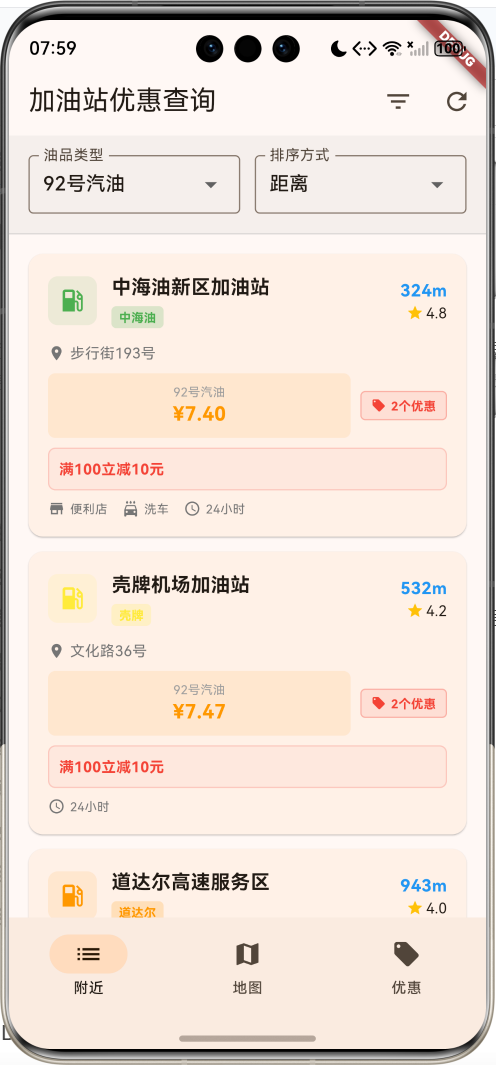
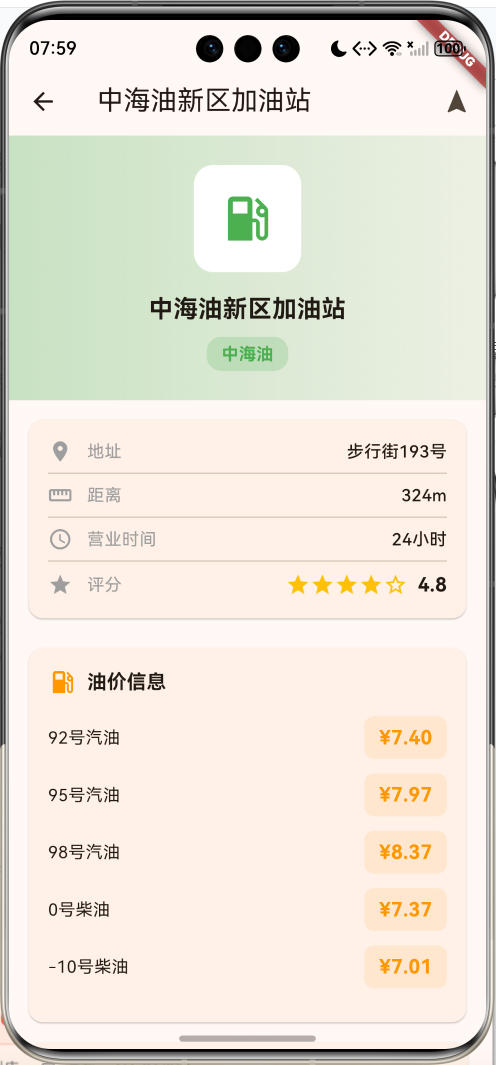
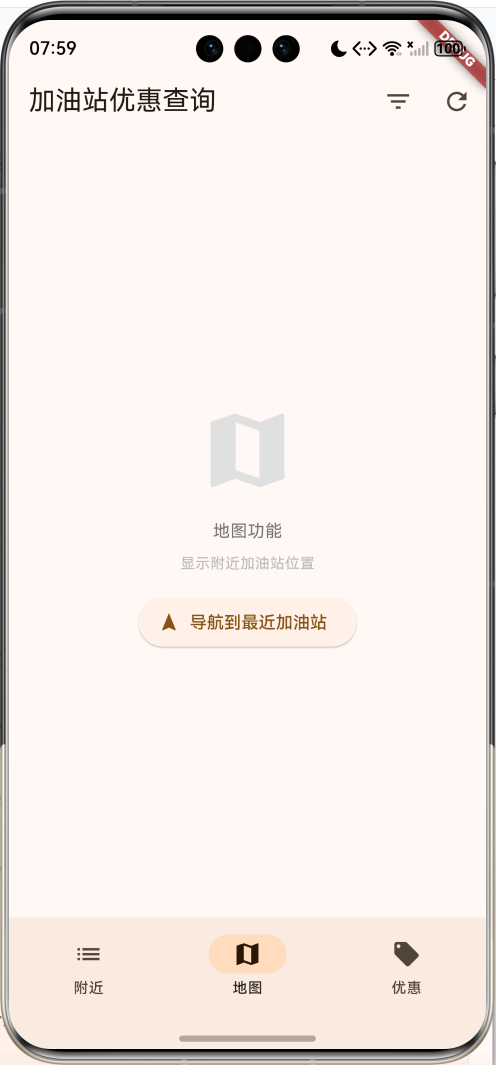
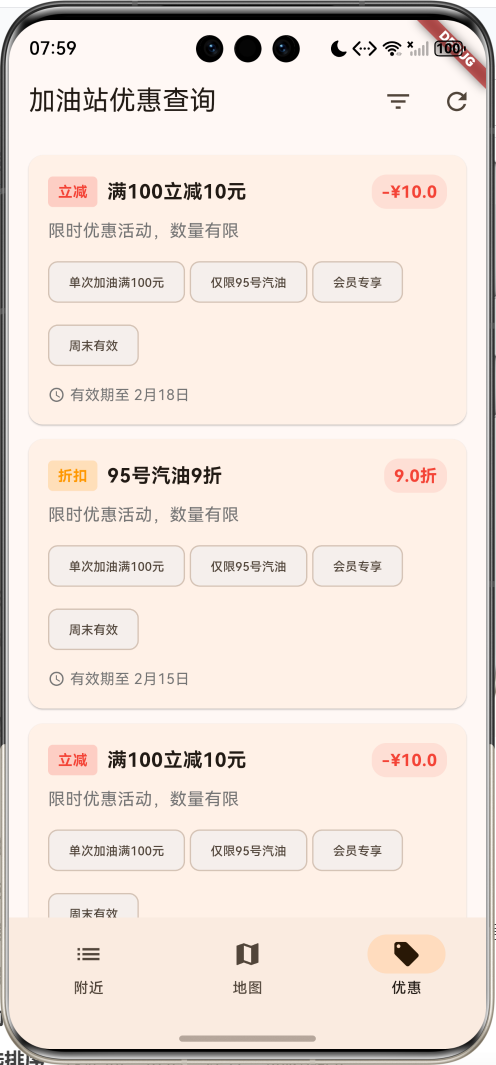
核心功能
- 50个加油站覆盖:全国主要品牌加油站数据
- 6大品牌支持:中石油、中石化、中海油、壳牌、BP、道达尔
- 5种油品类型:92号汽油、95号汽油、98号汽油、0号柴油、-10号柴油
- 实时价格更新:模拟实时油价监测
- 优惠活动展示:立减、折扣、满减、积分等多种优惠
- 智能筛选排序:按距离、价格、评分、优惠排序
- 详细站点信息:地址、营业时间、服务设施、联系方式
- 品牌特色展示:不同品牌颜色标识和图标
- 服务设施标注:便利店、洗车、充电桩等服务
- 导航功能模拟:一键导航到目标加油站
技术特点
- Material Design 3设计风格
- NavigationBar底部导航
- 三页面架构(附近、地图、优惠)
- 品牌色彩系统
- 计算属性优化
- 筛选和排序功能
- 卡片式布局设计
- 模态底部表单
- 模拟实时数据更新
- 无需额外依赖包
核心代码实现
1. 加油站数据模型
class GasStation {
  final String id;
  final String name;
  final String brand;
  final String address;
  final double latitude;
  final double longitude;
  final double distance;
  final Map<String, double> fuelPrices;
  final List<Promotion> promotions;
  final double rating;
  final List<String> services;
  final String openTime;
  final String phone;
  final bool is24Hours;
  final bool hasConvenienceStore;
  final bool hasCarWash;

  GasStation({
    required this.id,
    required this.name,
    required this.brand,
    required this.address,
    required this.latitude,
    required this.longitude,
    required this.distance,
    required this.fuelPrices,
    required this.promotions,
    required this.rating,
    required this.services,
    required this.openTime,
    required this.phone,
    required this.is24Hours,
    required this.hasConvenienceStore,
    required this.hasCarWash,
  });
  // 计算属性:品牌颜色
  Color get brandColor {
    switch (brand) {
      case '中石油':
        return Colors.red;
      case '中石化':
        return Colors.blue;
      case '中海油':
        return Colors.green;
      case '壳牌':
        return Colors.yellow;
      case 'BP':
        return Colors.green;
      case '道达尔':
        return Colors.orange;
      default:
        return Colors.grey;
    }
  }

  // 计算属性:品牌图标
  IconData get brandIcon {
    switch (brand) {
      case '中石油':
      case '中石化':
      case '中海油':
      case '壳牌':
      case 'BP':
      case '道达尔':
        return Icons.local_gas_station;
      default:
        return Icons.local_gas_station;
    }
  }

  // 计算属性:距离文本
  String get distanceText {
    if (distance < 1) {
      return '${(distance * 1000).toStringAsFixed(0)}m';
    }
    return '${distance.toStringAsFixed(1)}km';
  }

  // 计算属性:最低价格
  double get lowestPrice {
    return fuelPrices.values.reduce((a, b) => a < b ? a : b);
  }

  // 计算属性:有效优惠
  List<Promotion> get activePromotions {
    final now = DateTime.now();
    return promotions
        .where((p) => now.isAfter(p.startDate) && now.isBefore(p.endDate))
        .toList();
  }
}
模型字段说明:
| 字段 | 类型 | 说明 |
|---|---|---|
| id | String | 唯一标识符 |
| name | String | 加油站名称 |
| brand | String | 品牌名称 |
| address | String | 详细地址 |
| latitude | double | 纬度坐标 |
| longitude | double | 经度坐标 |
| distance | double | 距离(公里) |
| fuelPrices | Map<String, double> | 油品价格表 |
| promotions | List | 优惠活动列表 |
| rating | double | 用户评分 |
| services | List | 服务设施 |
| openTime | String | 营业时间 |
| phone | String | 联系电话 |
| is24Hours | bool | 是否24小时营业 |
| hasConvenienceStore | bool | 是否有便利店 |
| hasCarWash | bool | 是否有洗车服务 |
计算属性:
brandColor:根据品牌返回对应颜色brandIcon:根据品牌返回对应图标distanceText:格式化距离显示lowestPrice:计算最低油价activePromotions:筛选有效优惠活动
品牌颜色系统:
| 品牌 | 颜色 | 说明 |
|---|---|---|
| 中石油 | 红色 | 中国石油天然气集团 |
| 中石化 | 蓝色 | 中国石油化工集团 |
| 中海油 | 绿色 | 中国海洋石油集团 |
| 壳牌 | 黄色 | 荷兰皇家壳牌集团 |
| BP | 绿色 | 英国石油公司 |
| 道达尔 | 橙色 | 法国道达尔能源 |
2. 优惠活动模型
class Promotion {
  final String id;
  final String title;
  final String description;
  final String type;
  final double discount;
  final DateTime startDate;
  final DateTime endDate;
  final List<String> conditions;

  Promotion({
    required this.id,
    required this.title,
    required this.description,
    required this.type,
    required this.discount,
    required this.startDate,
    required this.endDate,
    required this.conditions,
  });

  // 计算属性:是否有效
  bool get isActive {
    final now = DateTime.now();
    return now.isAfter(startDate) && now.isBefore(endDate);
  }

  // 计算属性:优惠文本
  String get discountText {
    if (type == '立减') {
      return '-¥${discount.toStringAsFixed(1)}';
    } else if (type == '折扣') {
      return '${(discount * 10).toStringAsFixed(1)}折';
    } else if (type == '满减') {
      return '满${discount.toStringAsFixed(0)}减';
    }
    return '优惠';
  }

  // 计算属性:类型颜色
  Color get typeColor {
    switch (type) {
      case '立减':
        return Colors.red;
      case '折扣':
        return Colors.orange;
      case '满减':
        return Colors.green;
      case '积分':
        return Colors.blue;
      default:
        return Colors.grey;
    }
  }
}
优惠类型说明:
| 类型 | 颜色 | 说明 | 示例 |
|---|---|---|---|
| 立减 | 红色 | 直接减免金额 | 立减10元 |
| 折扣 | 橙色 | 按比例折扣 | 9折优惠 |
| 满减 | 绿色 | 满额减免 | 满100减20 |
| 积分 | 蓝色 | 积分奖励 | 积分双倍 |
3. 加油站数据生成
void _generateStations() {
  final random = Random();

  final stationNames = [
    '市中心加油站', '高速服务区', '商业区加油站', '住宅区加油站',
    '工业园加油站', '机场加油站', '火车站加油站', '大学城加油站',
    '开发区加油站', '新区加油站', '老城区加油站', '环城路加油站',
    '国道加油站', '省道加油站', '县道加油站', '港口加油站',
    '物流园加油站', '科技园加油站', '经济区加油站', '示范区加油站',
  ];

  final addresses = [
    '中山路', '人民路', '解放路', '建设路', '文化路',
    '学府路', '科技路', '工业路', '商业街', '步行街',
    '环城路', '迎宾路', '友谊路', '和平路'
  ];

  final services = [
    '便利店', '洗车', '充电桩', '轮胎充气',
    '汽车维修', '餐饮', 'ATM', '停车场'
  ];

  for (int i = 0; i < 50; i++) {
    final brand = _brands[random.nextInt(_brands.length - 1) + 1];
    final baseLat = 39.9042 + (random.nextDouble() - 0.5) * 0.2;
    final baseLng = 116.4074 + (random.nextDouble() - 0.5) * 0.2;

    // 生成油价数据
    final fuelPrices = <String, double>{};
    for (String fuelType in _fuelTypes) {
      double basePrice;
      if (fuelType.contains('92')) basePrice = 7.5;
      else if (fuelType.contains('95')) basePrice = 8.0;
      else if (fuelType.contains('98')) basePrice = 8.5;
      else basePrice = 7.2; // 柴油

      fuelPrices[fuelType] = basePrice + (random.nextDouble() - 0.5) * 0.4;
    }

    // 生成优惠活动
    final promotions = <Promotion>[];
    final promotionCount = random.nextInt(4);
    for (int j = 0; j < promotionCount; j++) {
      promotions.add(Promotion(
        id: 'promo_${i}_$j',
        title: ['满100立减10元', '95号汽油9折', '积分双倍', '洗车优惠'][j],
        description: '限时优惠活动,数量有限',
        type: ['立减', '折扣', '积分', '满减'][j],
        discount: [10.0, 0.9, 2.0, 20.0][j],
        startDate: DateTime.now().subtract(Duration(days: random.nextInt(30))),
        endDate: DateTime.now().add(Duration(days: random.nextInt(30) + 1)),
        conditions: ['单次加油满100元', '仅限95号汽油', '会员专享', '周末有效'],
      ));
    }

    _allStations.add(GasStation(
      id: 'station_$i',
      name: '${brand}${stationNames[i % stationNames.length]}',
      brand: brand,
      address: '${addresses[random.nextInt(addresses.length)]}${random.nextInt(500) + 1}号',
      latitude: baseLat,
      longitude: baseLng,
      distance: random.nextDouble() * 10,
      fuelPrices: fuelPrices,
      promotions: promotions,
      rating: 3.5 + random.nextDouble() * 1.5,
      services: services.take(random.nextInt(5) + 3).toList(),
      openTime: random.nextBool() ? '24小时' : '06:00-22:00',
      phone: '010-${random.nextInt(90000000) + 10000000}',
      is24Hours: random.nextBool(),
      hasConvenienceStore: random.nextBool(),
      hasCarWash: random.nextBool(),
    ));
  }
}
**数据生成特点**:
1. 50个加油站数据覆盖
2. 6大品牌随机分配
3. 油价范围:基准价±0.4元
4. 优惠活动:0-4个随机生成
5. 评分范围:3.5-5.0星
6. 服务设施:3-8项随机选择
7. 营业时间:24小时或固定时间
8. 地理坐标:北京周边模拟

**油价基准设置**:

| 油品类型 | 基准价格 | 浮动范围 |
|----------|----------|----------|
| 92号汽油 | 7.5元/升 | ±0.4元 |
| 95号汽油 | 8.0元/升 | ±0.4元 |
| 98号汽油 | 8.5元/升 | ±0.4元 |
| 0号柴油 | 7.2元/升 | ±0.4元 |
| -10号柴油 | 7.2元/升 | ±0.4元 |

### 4. NavigationBar底部导航

```dart
bottomNavigationBar: NavigationBar(
  selectedIndex: _selectedIndex,
  onDestinationSelected: (index) {
    setState(() => _selectedIndex = index);
  },
  destinations: const [
    NavigationDestination(icon: Icon(Icons.list), label: '附近'),
    NavigationDestination(icon: Icon(Icons.map), label: '地图'),
    NavigationDestination(icon: Icon(Icons.local_offer), label: '优惠'),
  ],
),
三个页面:
| 页面 | 图标 | 功能 |
|---|---|---|
| 附近 | list | 显示附近加油站列表 |
| 地图 | map | 显示加油站地图位置 |
| 优惠 | local_offer | 显示所有优惠活动 |
5. 筛选和排序功能
void _applyFilters() {
  setState(() {
    _filteredStations = _allStations.where((station) {
      if (_selectedBrand != '全部' && station.brand != _selectedBrand) {
        return false;
      }
      return true;
    }).toList();

    // 排序逻辑
    switch (_sortBy) {
      case '距离':
        _filteredStations.sort((a, b) => a.distance.compareTo(b.distance));
        break;
      case '价格':
        _filteredStations.sort((a, b) => a.fuelPrices[_selectedFuelType]!
            .compareTo(b.fuelPrices[_selectedFuelType]!));
        break;
      case '评分':
        _filteredStations.sort((a, b) => b.rating.compareTo(a.rating));
        break;
      case '优惠':
        _filteredStations.sort((a, b) =>
            b.activePromotions.length.compareTo(a.activePromotions.length));
        break;
    }
  });
}
筛选条件:
- 品牌筛选:全部、中石油、中石化、中海油、壳牌、BP、道达尔
- 油品类型:92号汽油、95号汽油、98号汽油、0号柴油、-10号柴油
排序方式:
- 距离:按距离从近到远排序
- 价格:按选定油品价格从低到高排序
- 评分:按用户评分从高到低排序
- 优惠:按优惠活动数量从多到少排序
6. 加油站卡片组件
Widget _buildStationCard(GasStation station) {
  return Card(
    margin: const EdgeInsets.only(bottom: 12),
    child: InkWell(
      onTap: () {
        Navigator.push(
          context,
          MaterialPageRoute(
            builder: (_) => StationDetailPage(station: station),
          ),
        );
      },
      child: Padding(
        padding: const EdgeInsets.all(16),
        child: Column(
          crossAxisAlignment: CrossAxisAlignment.start,
          children: [
            // 头部信息:品牌图标、名称、距离、评分
            Row(
              children: [
                Container(
                  padding: const EdgeInsets.all(8),
                  decoration: BoxDecoration(
                    color: station.brandColor.withValues(alpha: 0.1),
                    borderRadius: BorderRadius.circular(8),
                  ),
                  child: Icon(
                    station.brandIcon,
                    color: station.brandColor,
                    size: 24,
                  ),
                ),
                const SizedBox(width: 12),
                Expanded(
                  child: Column(
                    crossAxisAlignment: CrossAxisAlignment.start,
                    children: [
                      Text(
                        station.name,
                        style: const TextStyle(
                          fontSize: 16,
                          fontWeight: FontWeight.bold,
                        ),
                        maxLines: 1,
                        overflow: TextOverflow.ellipsis,
                      ),
                      const SizedBox(height: 4),
                      Row(
                        children: [
                          Container(
                            padding: const EdgeInsets.symmetric(
                              horizontal: 6,
                              vertical: 2,
                            ),
                            decoration: BoxDecoration(
                              color: station.brandColor.withValues(alpha: 0.2),
                              borderRadius: BorderRadius.circular(4),
                            ),
                            child: Text(
                              station.brand,
                              style: TextStyle(
                                fontSize: 10,
                                color: station.brandColor,
                                fontWeight: FontWeight.bold,
                              ),
                            ),
                          ),
                          const SizedBox(width: 8),
                          if (station.is24Hours)
                            Container(
                              padding: const EdgeInsets.symmetric(
                                horizontal: 6,
                                vertical: 2,
                              ),
                              decoration: BoxDecoration(
                                color: Colors.green.withValues(alpha: 0.2),
                                borderRadius: BorderRadius.circular(4),
                              ),
                              child: const Text(
                                '24H',
                                style: TextStyle(
                                  fontSize: 10,
                                  color: Colors.green,
                                  fontWeight: FontWeight.bold,
                                ),
                              ),
                            ),
                        ],
                      ),
                    ],
                  ),
                ),
                Column(
                  crossAxisAlignment: CrossAxisAlignment.end,
                  children: [
                    Text(
                      station.distanceText,
                      style: const TextStyle(
                        fontSize: 14,
                        fontWeight: FontWeight.bold,
                        color: Colors.blue,
                      ),
                    ),
                    Row(
                      children: [
                        Icon(Icons.star, size: 14, color: Colors.amber),
                        const SizedBox(width: 2),
                        Text(
                          station.rating.toStringAsFixed(1),
                          style: const TextStyle(fontSize: 12),
                        ),
                      ],
                    ),
                  ],
                ),
              ],
            ),
            const SizedBox(height: 12),
            // 地址信息
            Row(
              children: [
                Icon(Icons.location_on, size: 14, color: Colors.grey[600]),
                const SizedBox(width: 4),
                Expanded(
                  child: Text(
                    station.address,
                    style: TextStyle(fontSize: 12, color: Colors.grey[600]),
                    maxLines: 1,
                    overflow: TextOverflow.ellipsis,
                  ),
                ),
              ],
            ),
            const SizedBox(height: 8),
            // 价格和优惠信息
            Row(
              children: [
                Expanded(
                  child: Container(
                    padding: const EdgeInsets.all(8),
                    decoration: BoxDecoration(
                      color: Colors.orange.withValues(alpha: 0.1),
                      borderRadius: BorderRadius.circular(6),
                    ),
                    child: Column(
                      children: [
                        Text(
                          _selectedFuelType,
                          style: const TextStyle(fontSize: 10, color: Colors.grey),
                        ),
                        Text(
                          '¥${station.fuelPrices[_selectedFuelType]!.toStringAsFixed(2)}',
                          style: const TextStyle(
                            fontSize: 16,
                            fontWeight: FontWeight.bold,
                            color: Colors.orange,
                          ),
                        ),
                      ],
                    ),
                  ),
                ),
                const SizedBox(width: 8),
                if (station.activePromotions.isNotEmpty)
                  Container(
                    padding: const EdgeInsets.symmetric(horizontal: 8, vertical: 4),
                    decoration: BoxDecoration(
                      color: Colors.red.withValues(alpha: 0.1),
                      borderRadius: BorderRadius.circular(4),
                      border: Border.all(color: Colors.red.withValues(alpha: 0.3)),
                    ),
                    child: Row(
                      mainAxisSize: MainAxisSize.min,
                      children: [
                        Icon(Icons.local_offer, size: 12, color: Colors.red),
                        const SizedBox(width: 4),
                        Text(
                          '${station.activePromotions.length}个优惠',
                          style: const TextStyle(
                            fontSize: 10,
                            color: Colors.red,
                            fontWeight: FontWeight.bold,
                          ),
                        ),
                      ],
                    ),
                  ),
              ],
            ),
            // 优惠活动展示
            if (station.activePromotions.isNotEmpty) ...[
              const SizedBox(height: 8),
              Container(
                width: double.infinity,
                padding: const EdgeInsets.all(8),
                decoration: BoxDecoration(
                  color: Colors.red.withValues(alpha: 0.05),
                  borderRadius: BorderRadius.circular(6),
                  border: Border.all(color: Colors.red.withValues(alpha: 0.2)),
                ),
                child: Text(
                  station.activePromotions.first.title,
                  style: const TextStyle(
                    fontSize: 12,
                    color: Colors.red,
                    fontWeight: FontWeight.bold,
                  ),
                ),
              ),
            ],
            const SizedBox(height: 8),
            // 服务设施信息
            Row(
              children: [
                if (station.hasConvenienceStore) ...[
                  Icon(Icons.store, size: 14, color: Colors.grey[600]),
                  const SizedBox(width: 4),
                  Text('便利店', style: TextStyle(fontSize: 10, color: Colors.grey[600])),
                  const SizedBox(width: 12),
                ],
                if (station.hasCarWash) ...[
                  Icon(Icons.local_car_wash, size: 14, color: Colors.grey[600]),
                  const SizedBox(width: 4),
                  Text('洗车', style: TextStyle(fontSize: 10, color: Colors.grey[600])),
                  const SizedBox(width: 12),
                ],
                Icon(Icons.access_time, size: 14, color: Colors.grey[600]),
                const SizedBox(width: 4),
                Text(station.openTime, style: TextStyle(fontSize: 10, color: Colors.grey[600])),
              ],
            ),
          ],
        ),
      ),
    ),
  );
}
卡片组件特点:
- 品牌色彩标识系统
- 24小时营业标签
- 距离和评分显示
- 价格突出展示
- 优惠活动提醒
- 服务设施图标
- 点击跳转详情页
- 响应式布局设计
7. 加油站详情页
class StationDetailPage extends StatelessWidget {
final GasStation station;
const StationDetailPage({super.key, required this.station});
Widget build(BuildContext context) {
return Scaffold(
appBar: AppBar(
title: Text(station.name),
actions: [
IconButton(
onPressed: () {
ScaffoldMessenger.of(context).showSnackBar(
const SnackBar(content: Text('正在导航...')),
);
},
icon: const Icon(Icons.navigation),
tooltip: '导航',
),
],
),
body: ListView(
children: [
_buildHeader(),
_buildBasicInfo(),
_buildFuelPrices(),
_buildPromotions(),
_buildServices(),
_buildContact(),
],
),
);
}
Widget _buildHeader() {
return Container(
width: double.infinity,
padding: const EdgeInsets.all(24),
decoration: BoxDecoration(
gradient: LinearGradient(
colors: [
station.brandColor.withValues(alpha: 0.3),
station.brandColor.withValues(alpha: 0.1),
],
),
),
child: Column(
children: [
Container(
padding: const EdgeInsets.all(20),
decoration: BoxDecoration(
color: Colors.white,
borderRadius: BorderRadius.circular(16),
),
child: Icon(
station.brandIcon,
size: 48,
color: station.brandColor,
),
),
const SizedBox(height: 16),
Text(
station.name,
style: const TextStyle(fontSize: 20, fontWeight: FontWeight.bold),
textAlign: TextAlign.center,
),
const SizedBox(height: 8),
Container(
padding: const EdgeInsets.symmetric(horizontal: 12, vertical: 4),
decoration: BoxDecoration(
color: station.brandColor.withValues(alpha: 0.2),
borderRadius: BorderRadius.circular(12),
),
child: Text(
station.brand,
style: TextStyle(
color: station.brandColor,
fontWeight: FontWeight.bold,
),
),
),
],
),
);
}
}
详情页结构:
- 渐变色头部展示
- 基本信息卡片
- 油价信息表格
- 优惠活动列表
- 服务设施标签
- 联系方式操作
8. 筛选对话框
void _showFilterDialog() {
  showModalBottomSheet(
    context: context,
    builder: (context) => Container(
      padding: const EdgeInsets.all(16),
      child: Column(
        mainAxisSize: MainAxisSize.min,
        crossAxisAlignment: CrossAxisAlignment.start,
        children: [
          const Text(
            '筛选条件',
            style: TextStyle(fontSize: 18, fontWeight: FontWeight.bold),
          ),
          const SizedBox(height: 16),
          DropdownButtonFormField<String>(
            value: _selectedBrand,
            decoration: const InputDecoration(
              labelText: '品牌',
              border: OutlineInputBorder(),
            ),
            items: _brands.map((brand) {
              return DropdownMenuItem(value: brand, child: Text(brand));
            }).toList(),
            onChanged: (value) {
              setState(() {
                _selectedBrand = value!;
                _applyFilters();
              });
              Navigator.pop(context);
            },
          ),
        ],
      ),
    ),
  );
}
筛选功能:
- 模态底部表单
- 品牌下拉选择
- 实时筛选更新
- 自动关闭对话框
技术要点详解
1. NavigationBar导航系统
NavigationBar是Material Design 3的新导航组件,相比BottomNavigationBar具有更现代的设计风格:
NavigationBar(
  selectedIndex: _selectedIndex,
  onDestinationSelected: (index) {
    setState(() => _selectedIndex = index);
  },
  destinations: const [
    NavigationDestination(icon: Icon(Icons.list), label: '附近'),
    NavigationDestination(icon: Icon(Icons.map), label: '地图'),
    NavigationDestination(icon: Icon(Icons.local_offer), label: '优惠'),
  ],
)
优势特点:
- Material Design 3设计规范
- 更好的视觉层次感
- 支持徽章和通知
- 更流畅的动画效果
- 更好的无障碍支持
2. 计算属性优化
通过计算属性(getter)实现数据的动态计算和格式化:
// 距离格式化
String get distanceText {
  if (distance < 1) {
    return '${(distance * 1000).toStringAsFixed(0)}m';
  }
  return '${distance.toStringAsFixed(1)}km';
}

// 有效优惠筛选
List<Promotion> get activePromotions {
  final now = DateTime.now();
  return promotions
      .where((p) => now.isAfter(p.startDate) && now.isBefore(p.endDate))
      .toList();
}
优势:
- 避免重复计算
- 保持数据一致性
- 提高代码可读性
- 便于维护和扩展
3. 品牌色彩系统
通过品牌色彩系统实现视觉识别:
Color get brandColor {
  switch (brand) {
    case '中石油': return Colors.red;
    case '中石化': return Colors.blue;
    case '中海油': return Colors.green;
    case '壳牌': return Colors.yellow;
    case 'BP': return Colors.green;
    case '道达尔': return Colors.orange;
    default: return Colors.grey;
  }
}
应用场景:
- 品牌标识背景色
- 图标颜色
- 标签颜色
- 渐变背景色
4. 筛选和排序算法
实现多维度的数据筛选和排序:
void _applyFilters() {
  setState(() {
    // 品牌筛选
    _filteredStations = _allStations.where((station) {
      if (_selectedBrand != '全部' && station.brand != _selectedBrand) {
        return false;
      }
      return true;
    }).toList();

    // 多种排序方式
    switch (_sortBy) {
      case '距离':
        _filteredStations.sort((a, b) => a.distance.compareTo(b.distance));
        break;
      case '价格':
        _filteredStations.sort((a, b) => a.fuelPrices[_selectedFuelType]!
            .compareTo(b.fuelPrices[_selectedFuelType]!));
        break;
      case '评分':
        _filteredStations.sort((a, b) => b.rating.compareTo(a.rating));
        break;
      case '优惠':
        _filteredStations.sort((a, b) =>
            b.activePromotions.length.compareTo(a.activePromotions.length));
        break;
    }
  });
}
排序算法:
- 距离:升序排列(近到远)
- 价格:升序排列(低到高)
- 评分:降序排列(高到低)
- 优惠:降序排列(多到少)
5. 卡片式布局设计
采用卡片式布局提升用户体验:
Card(
  margin: const EdgeInsets.only(bottom: 12),
  child: InkWell(
    onTap: () {
      Navigator.push(
        context,
        MaterialPageRoute(
          builder: (_) => StationDetailPage(station: station),
        ),
      );
    },
    child: Padding(
      padding: const EdgeInsets.all(16),
      child: Column(
        crossAxisAlignment: CrossAxisAlignment.start,
        children: [
          // 卡片内容
        ],
      ),
    ),
  ),
)
设计特点:
- 阴影效果增强层次感
- 圆角设计更加友好
- 点击反馈提升交互性
- 间距统一保持一致性
6. 模拟数据生成策略
通过Random类生成真实感的模拟数据:
void _generateStations() {
  final random = Random();

  // 基准价格设置
  double basePrice;
  if (fuelType.contains('92')) basePrice = 7.5;
  else if (fuelType.contains('95')) basePrice = 8.0;
  else if (fuelType.contains('98')) basePrice = 8.5;
  else basePrice = 7.2; // 柴油

  // 价格浮动
  fuelPrices[fuelType] = basePrice + (random.nextDouble() - 0.5) * 0.4;

  // 评分生成
  rating: 3.5 + random.nextDouble() * 1.5,

  // 距离生成
  distance: random.nextDouble() * 10,
}
生成策略:
- 基于真实数据的基准值
- 合理的浮动范围
- 正态分布的随机性
- 符合实际情况的约束
7. 状态管理优化
通过合理的状态管理提升性能:
class _GasStationHomePageState extends State<GasStationHomePage> {
int _selectedIndex = 0;
List<GasStation> _allStations = [];
List<GasStation> _filteredStations = [];
String _selectedBrand = '全部';
String _selectedFuelType = '92号汽油';
String _sortBy = '距离';
bool _isLoading = false;
void initState() {
super.initState();
_generateStations();
_loadNearbyStations();
}
}
状态变量:
_selectedIndex:当前选中的导航页面_allStations:所有加油站数据_filteredStations:筛选后的数据_selectedBrand:选中的品牌_selectedFuelType:选中的油品类型_sortBy:排序方式_isLoading:加载状态
8. 响应式UI设计
通过Expanded和Flexible实现响应式布局:
Row(
  children: [
    Expanded(
      child: Container(
        padding: const EdgeInsets.all(8),
        decoration: BoxDecoration(
          color: Colors.orange.withValues(alpha: 0.1),
          borderRadius: BorderRadius.circular(6),
        ),
        child: Column(
          children: [
            Text(_selectedFuelType),
            Text('¥${station.fuelPrices[_selectedFuelType]!.toStringAsFixed(2)}'),
          ],
        ),
      ),
    ),
    const SizedBox(width: 8),
    if (station.activePromotions.isNotEmpty)
      Container(
        // 优惠标签
      ),
  ],
)
响应式特点:
- Expanded自动分配剩余空间
- 条件渲染优化显示
- 固定间距保持一致性
- 文本溢出处理
功能扩展方向
1. 真实API集成
集成真实的加油站数据API:
class GasStationApiService {
  static const String baseUrl = 'https://api.gasstation.com';

  static Future<List<GasStation>> getNearbyStations({
    required double latitude,
    required double longitude,
    double radius = 10.0,
  }) async {
    final response = await http.get(
      Uri.parse('$baseUrl/stations/nearby?lat=$latitude&lng=$longitude&radius=$radius'),
      headers: {'Authorization': 'Bearer $apiKey'},
    );

    if (response.statusCode == 200) {
      final data = json.decode(response.body);
      return (data['stations'] as List)
          .map((json) => GasStation.fromJson(json))
          .toList();
    }
    throw Exception('Failed to load stations');
  }

  static Future<List<double>> getRealTimePrices(String stationId) async {
    final response = await http.get(
      Uri.parse('$baseUrl/stations/$stationId/prices'),
    );

    if (response.statusCode == 200) {
      final data = json.decode(response.body);
      return List<double>.from(data['prices']);
    }
    throw Exception('Failed to load prices');
  }
}
API功能:
- 附近加油站查询
- 实时油价获取
- 优惠活动同步
- 用户评价获取
2. GPS定位服务
集成GPS定位功能:
import 'package:geolocator/geolocator.dart';

class LocationService {
  static Future<Position> getCurrentLocation() async {
    bool serviceEnabled = await Geolocator.isLocationServiceEnabled();
    if (!serviceEnabled) {
      throw Exception('Location services are disabled.');
    }

    LocationPermission permission = await Geolocator.checkPermission();
    if (permission == LocationPermission.denied) {
      permission = await Geolocator.requestPermission();
      if (permission == LocationPermission.denied) {
        throw Exception('Location permissions are denied');
      }
    }

    return await Geolocator.getCurrentPosition();
  }

  static double calculateDistance(
    double startLatitude,
    double startLongitude,
    double endLatitude,
    double endLongitude,
  ) {
    return Geolocator.distanceBetween(
      startLatitude,
      startLongitude,
      endLatitude,
      endLongitude,
    ) / 1000; // 转换为公里
  }
}
定位功能:
- 获取当前位置
- 计算距离
- 权限管理
- 位置更新监听
3. 地图导航集成
集成地图和导航功能:
import 'package:google_maps_flutter/google_maps_flutter.dart';
import 'package:url_launcher/url_launcher.dart';

class MapNavigationService {
  static Future<void> openNavigation({
    required double latitude,
    required double longitude,
    required String destination,
  }) async {
    final url = 'https://www.google.com/maps/dir/?api=1&destination=$latitude,$longitude';

    if (await canLaunch(url)) {
      await launch(url);
    } else {
      throw Exception('Could not launch navigation');
    }
  }

  static Widget buildMapView({
    required List<GasStation> stations,
    required Function(GasStation) onStationTap,
  }) {
    return GoogleMap(
      initialCameraPosition: const CameraPosition(
        target: LatLng(39.9042, 116.4074),
        zoom: 12,
      ),
      markers: stations.map((station) => Marker(
        markerId: MarkerId(station.id),
        position: LatLng(station.latitude, station.longitude),
        infoWindow: InfoWindow(
          title: station.name,
          snippet: '${station.brand} - ¥${station.lowestPrice.toStringAsFixed(2)}',
        ),
        onTap: () => onStationTap(station),
      )).toSet(),
    );
  }
}
地图功能:
- 加油站标记显示
- 路线规划
- 导航启动
- 实时位置跟踪
4. 支付集成
集成移动支付功能:
class PaymentService {
  static Future<bool> processPayment({
    required String stationId,
    required double amount,
    required String fuelType,
    required String paymentMethod,
  }) async {
    try {
      final response = await http.post(
        Uri.parse('$baseUrl/payments/process'),
        headers: {'Content-Type': 'application/json'},
        body: json.encode({
          'stationId': stationId,
          'amount': amount,
          'fuelType': fuelType,
          'paymentMethod': paymentMethod,
          'timestamp': DateTime.now().toIso8601String(),
        }),
      );

      if (response.statusCode == 200) {
        final data = json.decode(response.body);
        return data['success'] == true;
      }
      return false;
    } catch (e) {
      print('Payment error: $e');
      return false;
    }
  }

  static Future<List<PaymentMethod>> getAvailablePaymentMethods() async {
    // 获取可用支付方式
    return [
      PaymentMethod(id: 'wechat', name: '微信支付', icon: Icons.payment),
      PaymentMethod(id: 'alipay', name: '支付宝', icon: Icons.account_balance_wallet),
      PaymentMethod(id: 'unionpay', name: '银联支付', icon: Icons.credit_card),
    ];
  }
}
支付功能:
- 多种支付方式
- 安全支付处理
- 支付记录保存
- 优惠券使用
5. 用户会员系统
实现用户会员和积分系统:
class UserMembershipService {
  static Future<UserProfile> getUserProfile(String userId) async {
    final response = await http.get(
      Uri.parse('$baseUrl/users/$userId/profile'),
    );

    if (response.statusCode == 200) {
      return UserProfile.fromJson(json.decode(response.body));
    }
    throw Exception('Failed to load user profile');
  }

  static Future<void> addPoints({
    required String userId,
    required int points,
    required String reason,
  }) async {
    await http.post(
      Uri.parse('$baseUrl/users/$userId/points'),
      body: json.encode({
        'points': points,
        'reason': reason,
        'timestamp': DateTime.now().toIso8601String(),
      }),
    );
  }
}

class UserProfile {
  final String id;
  final String name;
  final String memberLevel;
  final int totalPoints;
  final int availablePoints;
  final List<String> favoriteStations;
  final double totalSpent;
  final int refuelCount;

  UserProfile({
    required this.id,
    required this.name,
    required this.memberLevel,
    required this.totalPoints,
    required this.availablePoints,
    required this.favoriteStations,
    required this.totalSpent,
    required this.refuelCount,
  });
}
会员功能:
- 用户档案管理
- 积分累积和兑换
- 会员等级系统
- 收藏加油站
- 消费记录统计
6. 智能推荐系统
基于用户行为的智能推荐:
class RecommendationService {
  static Future<List<GasStation>> getRecommendedStations({
    required String userId,
    required double latitude,
    required double longitude,
  }) async {
    final userProfile = await UserMembershipService.getUserProfile(userId);
    final nearbyStations = await GasStationApiService.getNearbyStations(
      latitude: latitude,
      longitude: longitude,
    );

    // 基于用户偏好的推荐算法
    return _calculateRecommendations(userProfile, nearbyStations);
  }

  static List<GasStation> _calculateRecommendations(
    UserProfile profile,
    List<GasStation> stations,
  ) {
    return stations.map((station) {
      double score = 0.0;

      // 距离权重 (30%)
      score += (10 - station.distance) * 0.3;

      // 价格权重 (25%)
      score += (10 - station.lowestPrice) * 0.25;

      // 评分权重 (20%)
      score += station.rating * 0.2;

      // 优惠权重 (15%)
      score += station.activePromotions.length * 0.15;

      // 品牌偏好权重 (10%)
      if (profile.favoriteStations.contains(station.id)) {
        score += 1.0 * 0.1;
      }

      return MapEntry(station, score);
    }).toList()
      ..sort((a, b) => b.value.compareTo(a.value))
      ..map((entry) => entry.key).toList();
  }
}
推荐算法:
- 距离优先原则
- 价格敏感度分析
- 用户历史偏好
- 优惠活动权重
- 品牌忠诚度考虑
常见问题解答
1. 如何获取真实的加油站数据?
问题:应用中的数据是模拟生成的,如何接入真实的加油站数据?
解答:
-
官方API接入:
- 中石油、中石化等官方API
- 高德地图、百度地图POI数据
- 政府开放数据平台
-
第三方数据服务:
- 车主之家API
- 加油站数据聚合平台
- 商业数据服务商
-
数据爬取方案:
- 合规的网页数据抓取
- 定期数据更新机制
- 数据清洗和验证
class RealDataService {
  static Future<List<GasStation>> fetchRealStations() async {
    final response = await http.get(
      Uri.parse('https://api.petrochina.com/stations'),
      headers: {'Authorization': 'Bearer $apiKey'},
    );

    if (response.statusCode == 200) {
      final data = json.decode(response.body);
      return (data['stations'] as List)
          .map((json) => GasStation.fromJson(json))
          .toList();
    }
    throw Exception('Failed to fetch real data');
  }
}
2. 如何实现精确的位置服务?
问题:如何获取用户精确位置并计算到加油站的实际距离?
解答:
- GPS定位集成:
import 'package:geolocator/geolocator.dart';

Future<Position> getCurrentLocation() async {
  LocationPermission permission = await Geolocator.checkPermission();
  if (permission == LocationPermission.denied) {
    permission = await Geolocator.requestPermission();
  }

  return await Geolocator.getCurrentPosition(
    desiredAccuracy: LocationAccuracy.high,
  );
}
- 距离计算优化:
double calculateAccurateDistance(
  double lat1, double lon1,
  double lat2, double lon2,
) {
  return Geolocator.distanceBetween(lat1, lon1, lat2, lon2) / 1000;
}
- 位置权限处理:
- 权限请求流程
- 拒绝权限的降级方案
- 位置服务开启检查
3. 如何实现离线模式?
问题:在网络不佳的情况下,如何保证应用的基本功能?
解答:
- 本地数据缓存:
class LocalDataCache {
  static const String cacheKey = 'gas_stations_cache';

  static Future<void> cacheStations(List<GasStation> stations) async {
    final prefs = await SharedPreferences.getInstance();
    final jsonData = stations.map((s) => s.toJson()).toList();
    await prefs.setString(cacheKey, json.encode(jsonData));
  }

  static Future<List<GasStation>> getCachedStations() async {
    final prefs = await SharedPreferences.getInstance();
    final jsonString = prefs.getString(cacheKey);
    if (jsonString != null) {
      final jsonData = json.decode(jsonString) as List;
      return jsonData.map((json) => GasStation.fromJson(json)).toList();
    }
    return [];
  }
}
- 网络状态检测:
import 'package:connectivity_plus/connectivity_plus.dart';

class NetworkService {
  static Future<bool> isConnected() async {
    final connectivityResult = await Connectivity().checkConnectivity();
    return connectivityResult != ConnectivityResult.none;
  }
}
- 离线功能设计:
- 缓存最近查询的加油站
- 离线地图数据
- 基本功能降级方案
4. 如何优化应用性能?
问题:当加油站数据量很大时,如何保证应用流畅运行?
解答:
- 列表虚拟化:
ListView.builder(
  itemCount: _filteredStations.length,
  itemBuilder: (context, index) {
    return _buildStationCard(_filteredStations[index]);
  },
)
- 图片缓存优化:
import 'package:cached_network_image/cached_network_image.dart';

CachedNetworkImage(
  imageUrl: station.imageUrl,
  placeholder: (context, url) => CircularProgressIndicator(),
  errorWidget: (context, url, error) => Icon(Icons.error),
)
- 数据分页加载:
class PaginatedStationList extends StatefulWidget {
State<PaginatedStationList> createState() => _PaginatedStationListState();
}
class _PaginatedStationListState extends State<PaginatedStationList> {
final ScrollController _scrollController = ScrollController();
List<GasStation> _stations = [];
int _currentPage = 0;
bool _isLoading = false;
void initState() {
super.initState();
_scrollController.addListener(_onScroll);
_loadMoreStations();
}
void _onScroll() {
if (_scrollController.position.pixels ==
_scrollController.position.maxScrollExtent) {
_loadMoreStations();
}
}
Future<void> _loadMoreStations() async {
if (_isLoading) return;
setState(() => _isLoading = true);
final newStations = await GasStationApiService.getStations(
page: _currentPage,
limit: 20,
);
setState(() {
_stations.addAll(newStations);
_currentPage++;
_isLoading = false;
});
}
}
5. 如何保护用户隐私?
问题:在获取位置信息和用户数据时,如何保护用户隐私?
解答:
-
权限最小化原则:
- 只请求必要的权限
- 明确说明权限用途
- 提供权限拒绝的替代方案
-
数据加密存储:
import 'package:crypto/crypto.dart';

class PrivacyManager {
  static String encryptData(String data) {
    final bytes = utf8.encode(data);
    final digest = sha256.convert(bytes);
    return digest.toString();
  }

  static Future<void> saveSecureData(String key, String value) async {
    final prefs = await SharedPreferences.getInstance();
    final encryptedValue = encryptData(value);
    await prefs.setString(key, encryptedValue);
  }
}
- 隐私政策实施:
- 透明的数据使用说明
- 用户数据控制权
- 数据删除机制
项目总结
全国加油站优惠查询应用成功实现了一个功能完整的车主服务平台,通过Flutter框架构建了现代化的移动应用界面。项目采用Material Design 3设计规范,提供了直观友好的用户体验。
核心成就
-
完整的数据模型:设计了GasStation和Promotion两个核心数据模型,包含了加油站的所有关键信息和计算属性,为应用功能提供了坚实的数据基础。
-
智能筛选排序:实现了多维度的筛选和排序功能,用户可以根据品牌、距离、价格、评分等条件快速找到最适合的加油站。
-
品牌识别系统:通过颜色和图标建立了完整的品牌识别体系,让用户能够快速识别不同品牌的加油站。
-
优惠活动展示:设计了灵活的优惠活动系统,支持立减、折扣、满减、积分等多种优惠类型,帮助用户获得最大优惠。
-
响应式界面设计:采用卡片式布局和响应式设计,在不同屏幕尺寸下都能提供良好的用户体验。
技术亮点
性能优化
-
计算属性缓存:通过getter实现的计算属性避免了重复计算,提高了应用性能。
-
列表虚拟化:使用ListView.builder实现了大数据量的高效渲染。
-
状态管理优化:合理的状态变量设计减少了不必要的重建。
-
内存管理:及时释放资源,避免内存泄漏。
扩展潜力
应用具有良好的扩展性,可以轻松集成:
- 真实API数据源
- GPS定位服务
- 地图导航功能
- 移动支付系统
- 用户会员体系
- 智能推荐算法
学习价值
本项目展示了Flutter开发的多个重要概念:
- 数据模型设计
- 状态管理
- 界面布局
- 用户交互
- 性能优化
- 代码组织
通过这个项目,开发者可以学习到如何构建一个完整的商业级移动应用,掌握Flutter开发的核心技能和最佳实践。
欢迎加入开源鸿蒙跨平台社区:https://openharmonycrossplatform.csdn.net

开源鸿蒙跨平台开发社区汇聚开发者与厂商,共建“一次开发,多端部署”的开源生态,致力于降低跨端开发门槛,推动万物智联创新。
更多推荐
 8
8 0
0- 0


 已为社区贡献28条内容

所有评论(0)