Flutter for OpenHarmony音乐播放器App实战:电台实现
本文介绍了音乐播放器中电台页面的实现方法,主要包括:1)使用TabBar实现多分类切换;2)私人FM功能实现,包含播放控制、歌曲列表和喜欢标记;3)推荐电台、热门主播和精选节目等内容的展示布局;4)状态管理处理播放状态和用户交互。页面采用模块化设计,包含FM播放器、分类导航和内容推荐三大核心功能模块,通过Dart语言和Flutter框架实现跨平台兼容性。
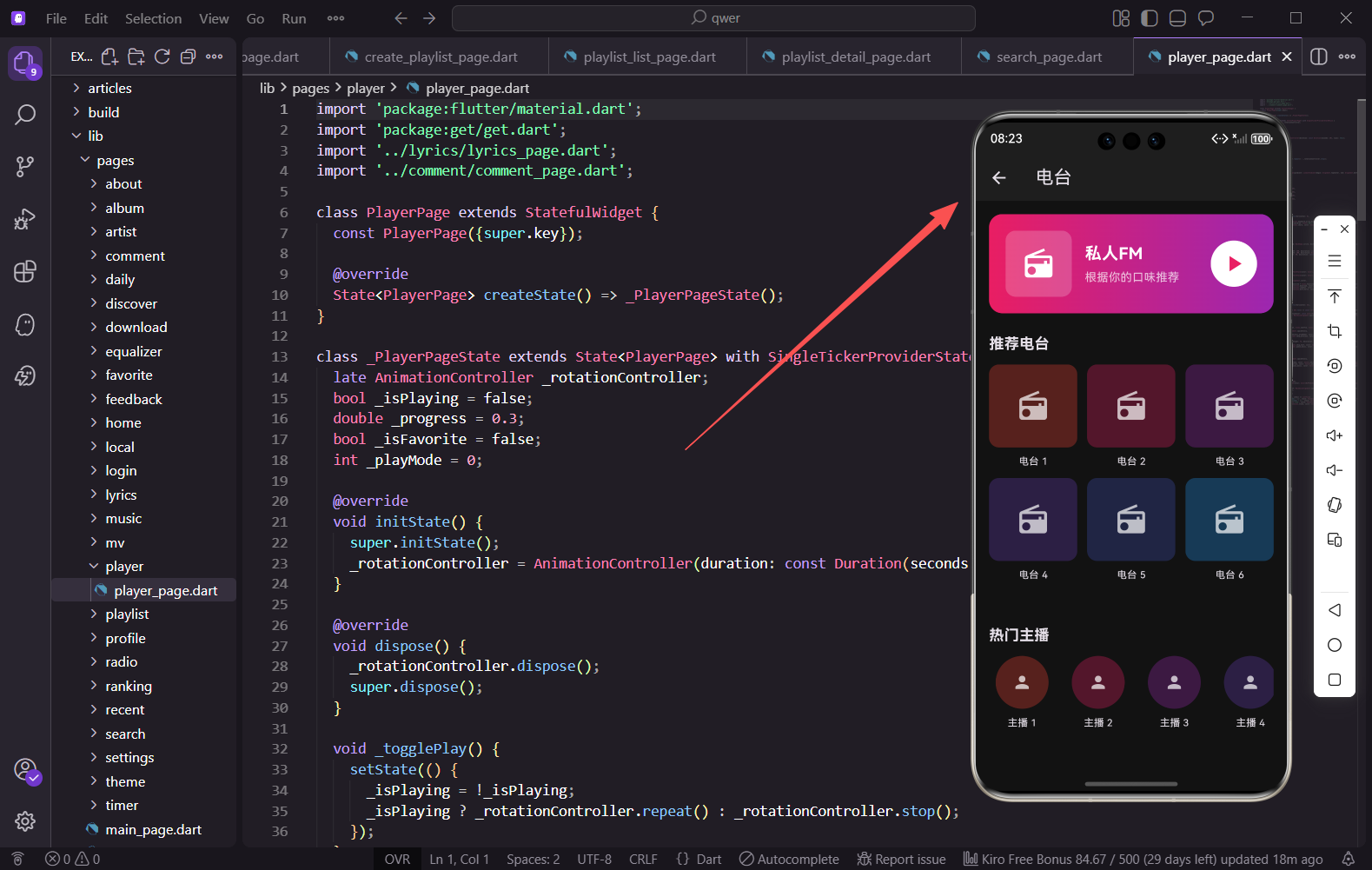
电台功能是音乐播放器中一个独特的模块,它不同于传统的歌曲播放,更像是一个音频内容平台。用户可以收听私人FM、订阅喜欢的电台、关注主播。本篇文章将详细介绍如何实现一个功能丰富的电台页面。
页面基础结构
电台页面使用TabBar实现多分类切换,包含推荐、音乐、情感等多个分类。
import 'package:flutter/material.dart';
import 'package:get/get.dart';
/// 电台页面
/// 提供私人FM、推荐电台、热门主播、电台分类等功能
class RadioPage extends StatefulWidget {
const RadioPage({super.key});
State<RadioPage> createState() => _RadioPageState();
}
电台页面继承自StatefulWidget,因为需要管理私人FM的播放状态、分类选择等多个状态变量。
状态变量定义
页面需要管理FM播放状态、当前歌曲索引、分类选择等状态。
class _RadioPageState extends State<RadioPage> with SingleTickerProviderStateMixin {
  // 私人FM播放状态
  bool _isFMPlaying = false;
  // 当前FM歌曲索引
  int _currentFMIndex = 0;
  // 选中的分类索引
  int _selectedCategory = 0;
  // TabController
  late TabController _tabController;

  // 电台分类
  final List<String> _categories = ['推荐', '音乐', '情感', '脱口秀', '有声书', '二次元', '相声', '知识'];
_isFMPlaying控制私人FM的播放暂停状态,_currentFMIndex记录当前播放的歌曲索引。分类列表涵盖了常见的电台类型,满足不同用户的收听需求。
私人FM数据
私人FM是电台的核心功能,根据用户喜好推荐歌曲。
  // 私人FM歌曲列表
  final List<Map<String, dynamic>> _fmSongs = [
    {'name': '夜空中最亮的星', 'artist': '逃跑计划', 'liked': false},
    {'name': '平凡之路', 'artist': '朴树', 'liked': true},
    {'name': '追梦赤子心', 'artist': 'GALA', 'liked': false},
  ];
每首歌曲包含名称、歌手和是否喜欢的标记。liked字段用于显示红心状态,用户可以标记喜欢的歌曲。
初始化数据
在initState中初始化TabController和各类数据。
void initState() {
super.initState();
_tabController = TabController(length: _categories.length, vsync: this);
_initData();
}
void _initData() {
_recommendRadios = List.generate(9, (index) => {
return {
'id': index,
'name': '电台 ${index + 1}',
'description': '这是一个很棒的电台节目',
'subscriberCount': 10000 + index * 5000,
'programCount': 50 + index * 10,
'category': _categories[(index % (_categories.length - 1)) + 1],
};
});
推荐电台数据包含ID、名称、描述、订阅数和节目数等信息。category字段用于分类筛选。
热门主播数据
热门主播列表展示平台上受欢迎的主播。
    _hotHosts = List.generate(15, (index) => {
      return {
        'id': index,
        'name': '主播 ${index + 1}',
        'followerCount': 50000 + index * 10000,
        'programCount': 100 + index * 20,
        'isFollowed': index % 3 == 0,
      };
    });
主播数据包含粉丝数、节目数和关注状态。isFollowed用于显示关注按钮的状态。
精选节目数据
精选节目是编辑推荐的优质内容。
    _featuredPrograms = List.generate(10, (index) => {
      return {
        'id': index,
        'name': '精选节目 ${index + 1}',
        'host': '主播 ${index % 5 + 1}',
        'duration': '${30 + index * 5}分钟',
        'playCount': 100000 + index * 20000,
        'description': '这是一期非常精彩的节目,内容丰富,值得一听!',
      };
    });
  }
节目数据包含主播、时长、播放量等信息,方便用户了解节目详情。
AppBar与TabBar
页面顶部包含标题、操作按钮和分类Tab。
Widget build(BuildContext context) {
return Scaffold(
appBar: AppBar(
title: const Text('电台'),
actions: [
IconButton(
icon: const Icon(Icons.history),
onPressed: () => _showHistory(),
),
IconButton(
icon: const Icon(Icons.search),
onPressed: () => Get.toNamed('/search'),
),
],
bottom: TabBar(
controller: _tabController,
isScrollable: true,
indicatorColor: const Color(0xFFE91E63),
labelColor: const Color(0xFFE91E63),
unselectedLabelColor: Colors.grey,
tabs: _categories.map((c) => Tab(text: c)).toList(),
),
),
历史按钮点击后显示收听历史,搜索按钮跳转到搜索页面。TabBar设置isScrollable为true,因为分类较多需要横向滚动。
TabBarView内容
根据选中的Tab显示不同的内容。
      body: TabBarView(
        controller: _tabController,
        children: [
          _buildRecommendTab(),
          ..._categories.skip(1).map((c) => _buildCategoryTab(c)),
        ],
      ),
    );
  }
第一个Tab是推荐页面,包含私人FM和各种推荐内容。其他Tab显示对应分类的电台列表。使用skip(1)跳过第一个"推荐"分类。
推荐Tab构建
推荐页面包含私人FM、推荐电台、热门主播等多个区块。
  Widget _buildRecommendTab() {
    return SingleChildScrollView(
      padding: const EdgeInsets.all(16),
      child: Column(
        children: [
          _buildPrivateFM(),
          const SizedBox(height: 24),
          _buildSection('推荐电台', _buildRadioGrid(), onMore: () => _showMoreRadios()),
          const SizedBox(height: 24),
          _buildSection('热门主播', _buildHostList(), onMore: () => _showMoreHosts()),
          const SizedBox(height: 24),
          _buildSection('精选节目', _buildFeaturedPrograms(), onMore: () => _showMorePrograms()),
          const SizedBox(height: 24),
          _buildSection('电台排行', _buildRadioRanking()),
        ],
      ),
    );
  }
使用SingleChildScrollView包裹整个内容,各个区块之间用SizedBox分隔。每个区块都有标题和"更多"按钮。
私人FM卡片
私人FM是电台页面最醒目的组件,使用渐变背景突出显示。
  Widget _buildPrivateFM() {
    final currentSong = _fmSongs[_currentFMIndex];
    return Container(
      padding: const EdgeInsets.all(20),
      decoration: BoxDecoration(
        gradient: const LinearGradient(
          colors: [Color(0xFFE91E63), Color(0xFF9C27B0)],
          begin: Alignment.topLeft,
          end: Alignment.bottomRight,
        ),
        borderRadius: BorderRadius.circular(16),
        boxShadow: [
          BoxShadow(
            color: const Color(0xFFE91E63).withOpacity(0.3),
            blurRadius: 20,
            offset: const Offset(0, 10),
          ),
        ],
      ),
渐变色从粉色过渡到紫色,配合阴影效果让卡片更有层次感。圆角设置为16,与整体设计风格一致。
FM封面与信息
卡片左侧显示封面,右侧显示歌曲信息。
      child: Column(
        children: [
          Row(
            children: [
              Container(
                width: 100,
                height: 100,
                decoration: BoxDecoration(
                  color: Colors.white.withOpacity(0.2),
                  borderRadius: BorderRadius.circular(12),
                ),
                child: const Icon(Icons.radio, size: 50, color: Colors.white),
              ),
              const SizedBox(width: 16),
              Expanded(
                child: Column(
                  crossAxisAlignment: CrossAxisAlignment.start,
                  children: [
                    const Text(
                      '私人FM',
                      style: TextStyle(color: Colors.white, fontSize: 22, fontWeight: FontWeight.bold),
                    ),
                    const SizedBox(height: 8),
                    Text(
                      currentSong['name'],
                      style: const TextStyle(color: Colors.white, fontSize: 16),
                      maxLines: 1,
                      overflow: TextOverflow.ellipsis,
                    ),
                    const SizedBox(height: 4),
                    Text(
                      currentSong['artist'],
                      style: TextStyle(color: Colors.white.withOpacity(0.7)),
                    ),
                  ],
                ),
              ),
            ],
          ),
封面使用半透明白色背景,与渐变背景形成对比。歌曲名和歌手名使用不同透明度的白色,形成视觉层次。
FM控制按钮
底部是播放控制按钮,包括不喜欢、上一首、播放/暂停、下一首、喜欢。
          const SizedBox(height: 16),
          Row(
            mainAxisAlignment: MainAxisAlignment.spaceEvenly,
            children: [
              IconButton(
                icon: const Icon(Icons.thumb_down_outlined, color: Colors.white70),
                onPressed: () => _skipFMSong(),
              ),
              IconButton(
                icon: const Icon(Icons.skip_previous, color: Colors.white, size: 32),
                onPressed: () => _previousFMSong(),
              ),
              GestureDetector(
                onTap: () => setState(() => _isFMPlaying = !_isFMPlaying),
                child: Container(
                  width: 64,
                  height: 64,
                  decoration: const BoxDecoration(shape: BoxShape.circle, color: Colors.white),
                  child: Icon(
                    _isFMPlaying ? Icons.pause : Icons.play_arrow,
                    color: const Color(0xFFE91E63),
                    size: 36,
                  ),
                ),
              ),
播放按钮使用白色圆形背景,与渐变背景形成强烈对比。图标根据播放状态切换播放和暂停图标。
喜欢按钮
喜欢按钮会根据当前歌曲的liked状态改变颜色。
              IconButton(
                icon: const Icon(Icons.skip_next, color: Colors.white, size: 32),
                onPressed: () => _nextFMSong(),
              ),
              IconButton(
                icon: Icon(
                  currentSong['liked'] ? Icons.favorite : Icons.favorite_border,
                  color: currentSong['liked'] ? Colors.red : Colors.white70,
                ),
                onPressed: () => _toggleFMLike(),
              ),
            ],
          ),
        ],
      ),
    );
  }
已喜欢的歌曲显示红色实心爱心,未喜欢的显示白色空心爱心。点击后切换状态并更新UI。
区块组件
通用的区块组件,包含标题和可选的"更多"按钮。
  Widget _buildSection(String title, Widget child, {VoidCallback? onMore}) {
    return Column(
      crossAxisAlignment: CrossAxisAlignment.start,
      children: [
        Row(
          mainAxisAlignment: MainAxisAlignment.spaceBetween,
          children: [
            Text(title, style: const TextStyle(fontSize: 18, fontWeight: FontWeight.bold)),
            if (onMore != null)
              GestureDetector(
                onTap: onMore,
                child: const Row(
                  children: [
                    Text('更多', style: TextStyle(color: Colors.grey)),
                    Icon(Icons.chevron_right, color: Colors.grey, size: 20),
                  ],
                ),
              ),
          ],
        ),
        const SizedBox(height: 12),
        child,
      ],
    );
  }
使用可选参数onMore控制是否显示"更多"按钮。这种封装方式让代码更加简洁,避免重复。
电台网格
推荐电台使用网格布局展示。
  Widget _buildRadioGrid() {
    return GridView.builder(
      shrinkWrap: true,
      physics: const NeverScrollableScrollPhysics(),
      gridDelegate: const SliverGridDelegateWithFixedCrossAxisCount(
        crossAxisCount: 3,
        childAspectRatio: 0.85,
        crossAxisSpacing: 12,
        mainAxisSpacing: 12,
      ),
      itemCount: 6,
      itemBuilder: (context, index) => _buildRadioItem(index),
    );
  }
每行显示3个电台,childAspectRatio设置为0.85让卡片略高于宽。shrinkWrap和NeverScrollableScrollPhysics让网格嵌入到滚动视图中。
电台卡片
单个电台卡片的构建。
  Widget _buildRadioItem(int index) {
    return GestureDetector(
      onTap: () => _openRadio(index),
      child: Column(
        children: [
          Expanded(
            child: Container(
              decoration: BoxDecoration(
                borderRadius: BorderRadius.circular(12),
                color: Colors.primaries[index % Colors.primaries.length].withOpacity(0.3),
              ),
              child: Stack(
                children: [
                  const Center(child: Icon(Icons.radio, size: 40, color: Colors.white70)),
                  Positioned(
                    bottom: 8,
                    right: 8,
                    child: Container(
                      padding: const EdgeInsets.symmetric(horizontal: 6, vertical: 2),
                      decoration: BoxDecoration(color: Colors.black54, borderRadius: BorderRadius.circular(10)),
                      child: Text(
                        '${_recommendRadios[index % _recommendRadios.length]['programCount']}期',
                        style: const TextStyle(color: Colors.white, fontSize: 10),
                      ),
                    ),
                  ),
                ],
              ),
            ),
          ),
          const SizedBox(height: 8),
          Text('电台 ${index + 1}', style: const TextStyle(fontSize: 12), maxLines: 1, overflow: TextOverflow.ellipsis),
        ],
      ),
    );
  }
封面右下角显示节目期数,使用半透明黑色背景让文字更清晰。颜色根据索引变化,让页面更加丰富多彩。
主播列表
热门主播使用横向滚动列表展示。
  Widget _buildHostList() {
    return SizedBox(
      height: 120,
      child: ListView.builder(
        scrollDirection: Axis.horizontal,
        itemCount: _hotHosts.length,
        itemBuilder: (context, index) {
          final host = _hotHosts[index];
          return GestureDetector(
            onTap: () => _openHostProfile(index),
            child: Container(
              width: 90,
              margin: const EdgeInsets.only(right: 12),
              child: Column(
                children: [
                  Stack(
                    children: [
                      CircleAvatar(
                        radius: 36,
                        backgroundColor: Colors.primaries[index % Colors.primaries.length].withOpacity(0.3),
                        child: const Icon(Icons.person, color: Colors.white70, size: 36),
                      ),
横向列表固定高度120,每个主播卡片宽度90。使用CircleAvatar显示圆形头像。
主播排名角标
前三名主播显示排名角标。
                      if (index < 3)
                        Positioned(
                          bottom: 0,
                          right: 0,
                          child: Container(
                            padding: const EdgeInsets.all(4),
                            decoration: BoxDecoration(
                              color: index == 0 ? Colors.amber : (index == 1 ? Colors.grey : Colors.brown),
                              shape: BoxShape.circle,
                            ),
                            child: Text(
                              '${index + 1}',
                              style: const TextStyle(color: Colors.white, fontSize: 10, fontWeight: FontWeight.bold),
                            ),
                          ),
                        ),
                    ],
                  ),
                  const SizedBox(height: 8),
                  Text(host['name'], style: const TextStyle(fontSize: 12), maxLines: 1, overflow: TextOverflow.ellipsis),
                  Text('${_formatCount(host['followerCount'])}粉丝', style: const TextStyle(color: Colors.grey, fontSize: 10)),
                ],
              ),
            ),
          );
        },
      ),
    );
  }
第一名金色、第二名银色、第三名铜色,符合用户的认知习惯。粉丝数使用格式化方法显示。
精选节目列表
精选节目使用列表形式展示,信息更加详细。
  Widget _buildFeaturedPrograms() {
    return ListView.builder(
      shrinkWrap: true,
      physics: const NeverScrollableScrollPhysics(),
      itemCount: 5,
      itemBuilder: (context, index) {
        final program = _featuredPrograms[index];
        return ListTile(
          contentPadding: EdgeInsets.zero,
          leading: Container(
            width: 60,
            height: 60,
            decoration: BoxDecoration(
              borderRadius: BorderRadius.circular(8),
              color: Colors.primaries[index % Colors.primaries.length].withOpacity(0.3),
            ),
            child: const Icon(Icons.mic, color: Colors.white70),
          ),
          title: Text(program['name'], maxLines: 1, overflow: TextOverflow.ellipsis),
          subtitle: Text(
            '${program['host']} · ${program['duration']} · ${_formatCount(program['playCount'])}播放',
            style: const TextStyle(color: Colors.grey, fontSize: 12),
          ),
          trailing: IconButton(
            icon: const Icon(Icons.play_circle_outline, color: Color(0xFFE91E63)),
            onPressed: () => _playProgram(index),
          ),
          onTap: () => _openProgram(index),
        );
      },
    );
  }
每个节目显示封面、名称、主播、时长和播放量。右侧的播放按钮可以直接播放节目。
数字格式化
将大数字格式化为更易读的形式。
  String _formatCount(int count) {
    if (count >= 10000) {
      return '${(count / 10000).toStringAsFixed(1)}万';
    }
    return count.toString();
  }
超过一万的数字显示为"xx.x万"的形式,这是国内App的通用做法。
FM切歌方法
控制私人FM的切歌逻辑。
  void _previousFMSong() {
    setState(() {
      _currentFMIndex = (_currentFMIndex - 1 + _fmSongs.length) % _fmSongs.length;
    });
  }

  void _nextFMSong() {
    setState(() {
      _currentFMIndex = (_currentFMIndex + 1) % _fmSongs.length;
    });
  }

  void _skipFMSong() {
    _nextFMSong();
    Get.snackbar('提示', '已跳过该歌曲', snackPosition: SnackPosition.BOTTOM);
  }

  void _toggleFMLike() {
    setState(() {
      _fmSongs[_currentFMIndex]['liked'] = !_fmSongs[_currentFMIndex]['liked'];
    });
  }
使用取模运算实现循环播放。跳过歌曲时会显示提示信息,让用户知道操作已生效。
总结
电台页面的实现涉及到多个Flutter组件的综合运用:TabBar实现分类切换、渐变Container实现私人FM卡片、GridView和ListView实现不同形式的列表展示。通过合理的数据结构和状态管理,为用户提供了丰富的电台收听体验。在实际项目中,还需要对接后端接口获取真实的电台数据和音频流。
欢迎加入开源鸿蒙跨平台社区:https://openharmonycrossplatform.csdn.net

开源鸿蒙跨平台开发社区汇聚开发者与厂商,共建“一次开发,多端部署”的开源生态,致力于降低跨端开发门槛,推动万物智联创新。
更多推荐

 19
19 0
0- 0


 已为社区贡献59条内容

所有评论(0)